ogpt.nvim
1.0.0

如果您不指定提供商, ollama将是默认提供商。 http://localhost:11434是您的终点。 mistral:7b如果未更新配置,则将是您的默认值。
 -- Simple, minimal Lazy.nvim configuration
{
  " huynle/ogpt.nvim " ,
    event = " VeryLazy " ,
    opts = {
      default_provider = " ollama " ,
      providers = {
        ollama = {
          api_host = os.getenv ( " OLLAMA_API_HOST " ) or " http://localhost:11434 " ,
          api_key = os.getenv ( " OLLAMA_API_KEY " ) or " " ,
        }
      }
    },
    dependencies = {
      " MunifTanjim/nui.nvim " ,
      " nvim-lua/plenary.nvim " ,
      " nvim-telescope/telescope.nvim "
    }
}OGPT.nvim带有以下默认值。您可以通过将配置作为设置参数覆盖任何字段。
https://github.com/huynle/ogpt.nvim/blob/main/lua/ogpt/config.lua
OGPT是一个Neovim插件,可让您毫不费力地利用Ollama OGPT API,使您能够直接在编辑器中从Ollama产生自然语言响应,以响应您的提示。
curl 。具有配置选项api_host_cmd或称为$OLLAMA_API_HOST的环境变量的自定义Ollama API主机。如果您远程运行Ollama,这将很有用。
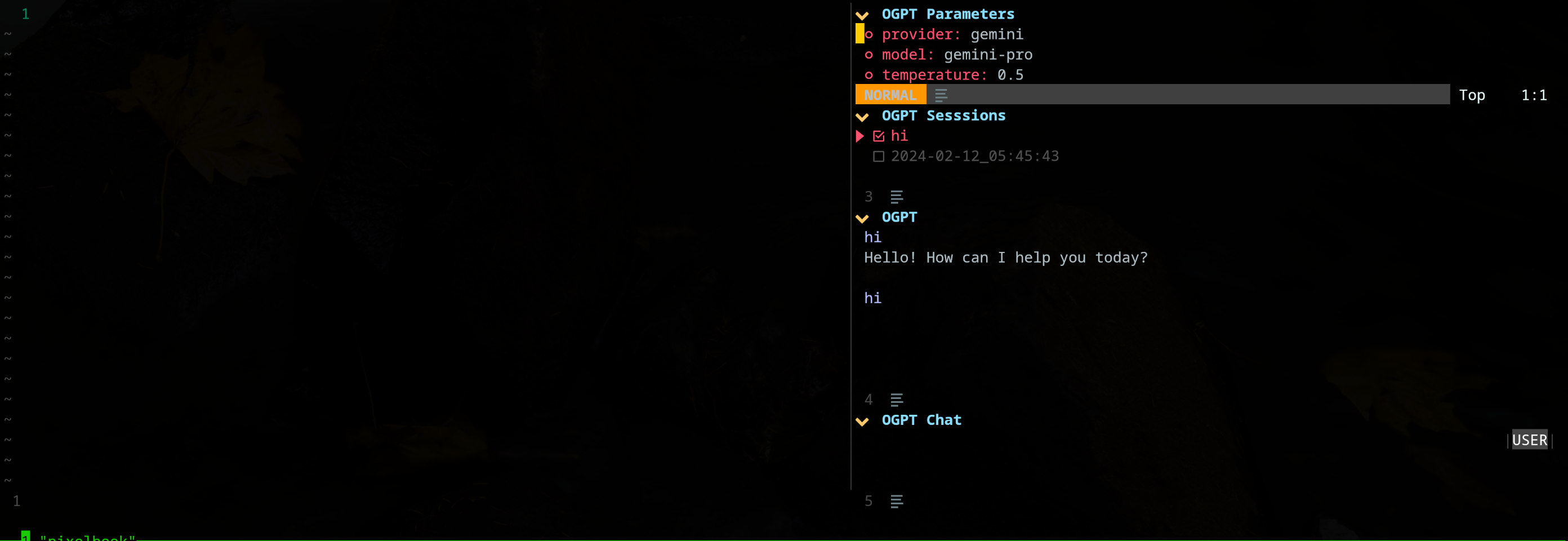
edgy.nvim插件提供了一个侧窗(默认位于右侧),该窗口提供了一个并行的工作空间,在与OGPT互动时,您可以在项目中工作。这是“前卫”配置的示例。
{
{
  " huynle/ogpt.nvim " ,
    event = " VeryLazy " ,
    opts = {
      default_provider = " ollama " ,
      edgy = true , -- enable this!
      single_window = false , -- set this to true if you want only one OGPT window to appear at a time
      providers = {
        ollama = {
          api_host = os.getenv ( " OLLAMA_API_HOST " ) or " http://localhost:11434 " ,
          api_key = os.getenv ( " OLLAMA_API_KEY " ) or " " ,
        }
      }
    },
    dependencies = {
      " MunifTanjim/nui.nvim " ,
      " nvim-lua/plenary.nvim " ,
      " nvim-telescope/telescope.nvim "
    }
},
{
    " folke/edgy.nvim " ,
    event = " VeryLazy " ,
    init = function ()
      vim . opt . laststatus = 3
      vim . opt . splitkeep = " screen " -- or "topline" or "screen"
    end ,
    opts = {
      exit_when_last = false ,
      animate = {
        enabled = false ,
      },
      wo = {
        winbar = true ,
        winfixwidth = true ,
        winfixheight = false ,
        winhighlight = " WinBar:EdgyWinBar,Normal:EdgyNormal " ,
        spell = false ,
        signcolumn = " no " ,
      },
      keys = {
        -- -- close window
        [ " q " ] = function ( win )
          win : close ()
        end ,
        -- close sidebar
        [ " Q " ] = function ( win )
          win . view . edgebar : close ()
        end ,
        -- increase width
        [ " <S-Right> " ] = function ( win )
          win : resize ( " width " , 3 )
        end ,
        -- decrease width
        [ " <S-Left> " ] = function ( win )
          win : resize ( " width " , - 3 )
        end ,
        -- increase height
        [ " <S-Up> " ] = function ( win )
          win : resize ( " height " , 3 )
        end ,
        -- decrease height
        [ " <S-Down> " ] = function ( win )
          win : resize ( " height " , - 3 )
        end ,
      },
      right = {
        {
          title = " OGPT Popup " ,
          ft = " ogpt-popup " ,
          size = { width = 0.2 },
          wo = {
            wrap = true ,
          },
        },
        {
          title = " OGPT Parameters " ,
          ft = " ogpt-parameters-window " ,
          size = { height = 6 },
          wo = {
            wrap = true ,
          },
        },
        {
          title = " OGPT Template " ,
          ft = " ogpt-template " ,
          size = { height = 6 },
        },
        {
          title = " OGPT Sessions " ,
          ft = " ogpt-sessions " ,
          size = { height = 6 },
          wo = {
            wrap = true ,
          },
        },
        {
          title = " OGPT System Input " ,
          ft = " ogpt-system-window " ,
          size = { height = 6 },
        },
        {
          title = " OGPT " ,
          ft = " ogpt-window " ,
          size = { height = 0.5 },
          wo = {
            wrap = true ,
          },
        },
        {
          title = " OGPT {{{selection}}} " ,
          ft = " ogpt-selection " ,
          size = { width = 80 , height = 4 },
          wo = {
            wrap = true ,
          },
        },
        {
          title = " OGPt {{{instruction}}} " ,
          ft = " ogpt-instruction " ,
          size = { width = 80 , height = 4 },
          wo = {
            wrap = true ,
          },
        },
        {
          title = " OGPT Chat " ,
          ft = " ogpt-input " ,
          size = { width = 80 , height = 4 },
          wo = {
            wrap = true ,
          },
        },
      },
    },
  }
}插件公开以下命令:
OGPT OGPT命令打开一个交互式窗口,与LLM后端通信。交互式窗口由四个窗格组成:
| 区域 | 默认快捷方式 | 描述 |
|---|---|---|
| 常见的 | ctrl-o | 切换参数面板(OGPT参数)和会话面板(OGPT会话)。 |
| Ctrl-n | 创建一个新会话。 | |
| ctrl-c | 关闭OGPT。 | |
| Ctrl-i | 在OGPT输出文本区域中LLM中的最新响应中复制代码。 | |
| Ctrl-X | 停止产生响应。 | |
| 选项卡 | 通过窗格循环。 | |
| 哦 | k | 以前的回应。 |
| j | 下一个回应。 | |
| ctrl-u | 向上滚动。 | |
| Ctrl-D | 向下滚动。 | |
| OGPT聊天 | 进入 (正常模式) | 将提示发送到LLM。 |
| alt-enter (输入模式) | 将提示发送到LLM。 | |
| Ctrl-y | 在OGPT输出文本区域中复制LLM的最新响应。 | |
| ctrl-r | 切换角色(助手或用户)。 | |
| ctrl-s | 切换系统消息。 | |
| OGPT参数 | 进入 | 更改参数。 |
| OGPT会议 | 进入 | 切换会话。 |
| d | 删除会话。 | |
| r | 重命名会话。请注意,活动会话无法删除。 |
可以通过opts.chat.keymaps修改OGPT交互式窗口的快捷方式。
OGPTActAs OGPTActAs命令从mistral:7b型号中使用Awesome OGPT提示的提示。
OGPTRun [action_name] OGPTRun [action_name]运行LLM,使用名为[action_name]的预定义动作。 OGPT提供了一些默认操作,以及用户定义的自定义操作。
操作需要参数来配置其行为。默认模型参数是在actions.<action_name>在config.lua中,自定义模型参数是在自定义OGPT配置文件中或单独的操作配置文件(例如actions.json )中定义的。
一些动作参数包括:
type :OGPT接口的类型。目前,OGPT接口有三种类型:popup :轻巧的弹出窗口edit :OGPT窗口completions :不打开窗口,直接在编辑窗口上完成strategy :确定OGPT接口的行为方式。您可以为每种type使用特定的strategy :type = "popup" :显示,替换,附加,预处,quick_fixtype = "completions" :显示,替换,附加,预处type = "edits" :edit,edit_codesystem :系统提示params :模型参数。默认模型参数在opts.providers.<provider_name>.api_params 。您可以在opts.actions.<action_name>.params和覆盖默认模型参数。model :用于动作的LLM模型stop :LLM停止生成响应的条件。例如, codellama的一个有用的停止条件是“````'。请参阅示例lazy.nvim配置中的“ optimize_code”操作。temperature :LLM响应的差异frequency_penalty :请有人解释max_tokens :最大令牌数量top_p :请有人解释template :提示模板。模板定义了LLM必须遵循的一般指令。模板可以将模板参数包含在{{{<argument_name>}}}的形式中,其中<argument_name>是args中定义的模板参数。除了在args中定义的参数外,您还可以包括以下参数:{{{input}}} :视觉模式下选定的文本。{{{filetype}}} :您正在与之交互的文件类型。args :模板参数。模板参数定义了用template中相同名称替换参数的参数。一些常见的模板参数包括:instruction :LLM的自定义说明遵循。它往往比进入template的一般指令更具体和结构化。lang :语言。通常用于与语言相关的动作,例如翻译或语法检查。 默认操作是在config.lua中的actions.<action_name> 。
OGPTRun edit_with_instructions OGPTRun edit_with_instructions使用config.<provider_name>.api_params中定义的模型打开交互式窗口,以编辑所选文本或整个窗口。
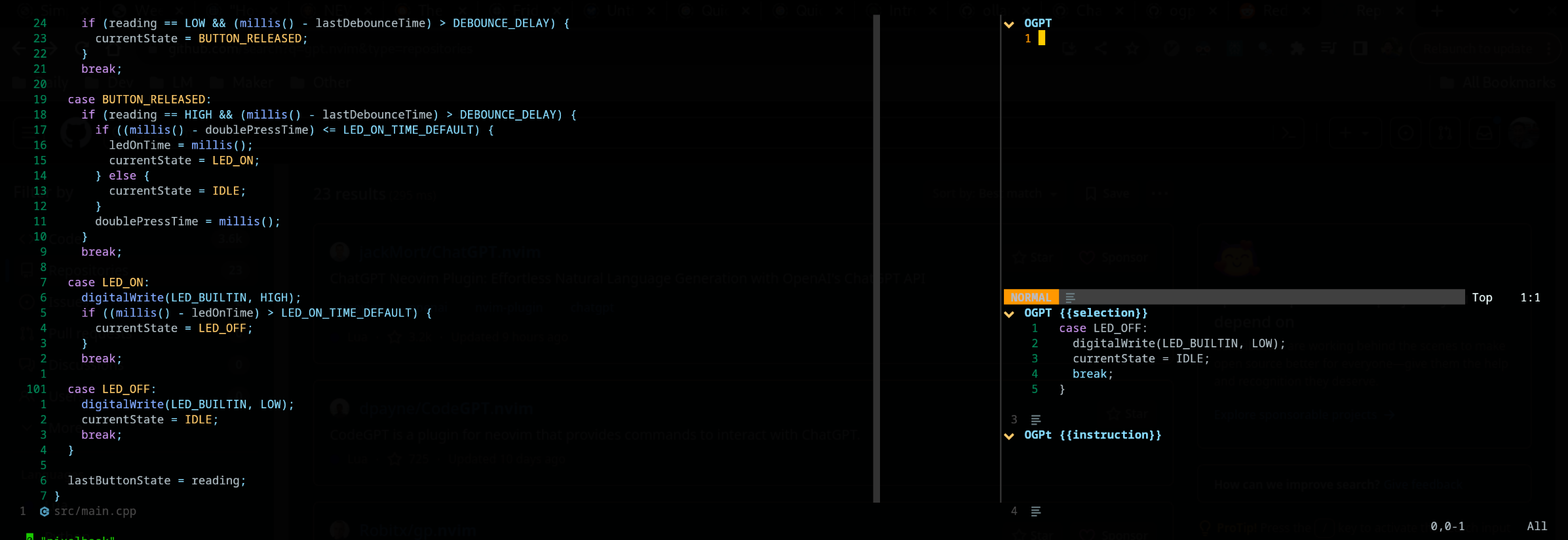
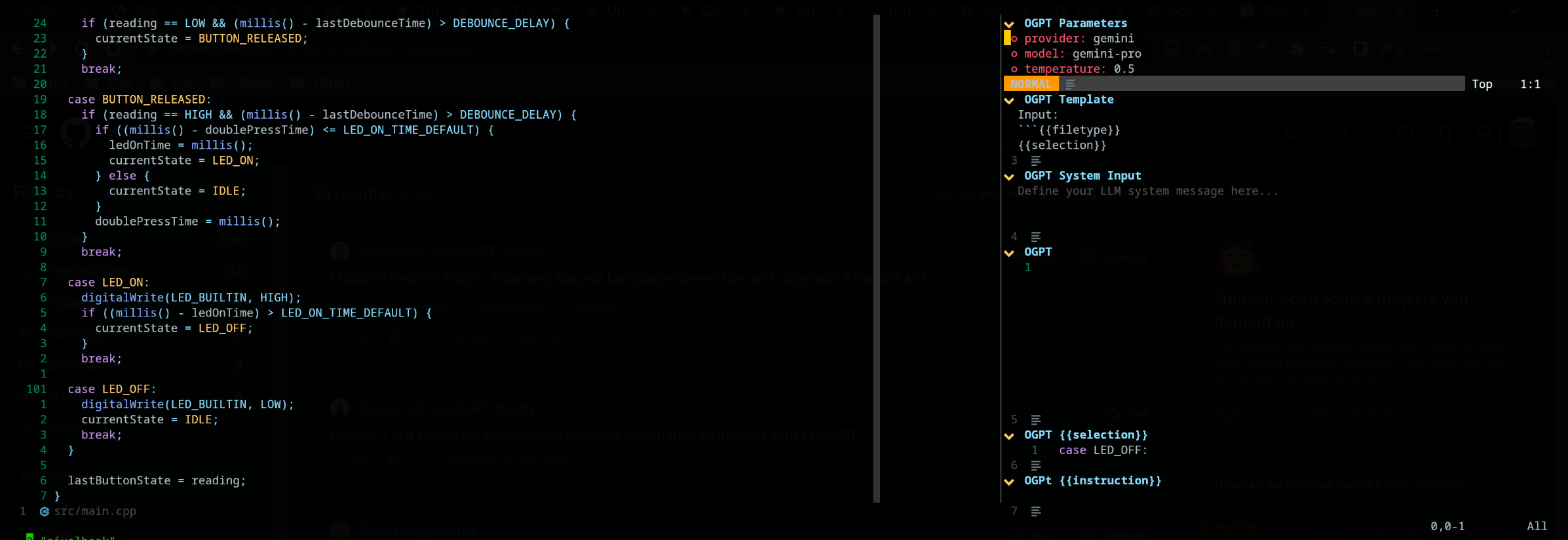
默认情况下, OGPTRun edit_with_instructions的接口类型是edit ,它打开了右侧的交互式窗口。在窗口中,您可以使用<co> (默认的keymap,可以自定义)打开和关闭参数面板。请注意此屏幕截图使用edgy.nvim
您可以通过在自定义的OGPT配置文件或单独的操作文件中定义它们来自定义OGPT操作。在制作自己的自定义操作时,config.lua中的默认模型配置可以是很好的引用。
您可以在自己的OGPT配置文件中配置操作(如果使用Neovim,通常在ogpt.lua文件中的LUA文件中)。在自定义的OGPT配置文件中,您必须在actions.<action_name>就像config.lua中默认操作的方式一样。
 --- config options lua
opts = {
  ...
  actions = {
    grammar_correction = {
      -- type = "popup", -- could be a string or table to override
      type = {
        popup = { -- overrides the default popup options - https://github.com/huynle/ogpt.nvim/blob/main/lua/ogpt/config.lua#L147-L180
          edgy = true
        }
      },
      strategy = " replace " ,
      provider = " ollama " , -- default to "default_provider" if not provided
      model = " mixtral:7b " , -- default to "provider.<default_provider>.model" if not provided
      template = " Correct the given text to standard {{{lang}}}: nn ```{{{input}}}``` " ,
      system = " You are a helpful note writing assistant, given a text input, correct the text only for grammar and spelling error. You are to keep all formatting the same, e.g. markdown bullets, should stay as a markdown bullet in the result, and indents should stay the same. Return ONLY the corrected text. " ,
      params = {
        temperature = 0.3 ,
      },
      args = {
        lang = {
          type = " string " ,
          optional = " true " ,
          default = " english " ,
        },
      },
    },
  ...
  }
} edit类型包括与输入并排显示输出,可用于进一步的编辑提示。
display策略显示了浮子窗口中的输出。用“ A”或“ R”直接在缓冲区中append并replace修改文本
可以使用JSON文件定义自定义操作。请参阅actions.json的示例以获取参考。
自定义操作的一个示例可能如下:( #标记注释)
{
  "action_name" : {
    "type" : " popup " , # "popup" or "edit"
    "template" : " A template using possible variable: {{{filetype}}} (neovim filetype), {{{input}}} (the selected text) an {{{argument}}} (provided on the command line) " ,
    "strategy" : " replace " , # or "display" or "append" or "edit"
    "params" : { # parameters according to the official Ollama API
      "model" : " mistral:7b " , # or any other model supported by `"type"` in the Ollama API, use the playground for reference
      "stop" : [
        " ``` " # a string used to stop the model
      ]
    }
    "args" : {
      "argument" : " some value " -- or function
    }
  }
}如果要使用其他操作文件,则必须将这些路径附加到defaults.actions_paths中的config.lua中。
在即时,您可以执行命令行以致电OGPT。下面提供了一个替换Grammar_Correction调用的示例。 :OGPTRun grammar_correction {provider="openai", model="gpt-4"}
为了使其更具动态性,您可以将其更改为在执行命令时,用户在现场将其输入提供商/模型或任何参数。 :OGPTRun grammar_correction {provider=vim.fn.input("Provider: "), type={popup={edgy=false}}}}
此外,在上面的示例中,可以关闭edgy.nvim 。这样,响应弹出弹出了光标将在哪里。有关弹出窗口的其他选项,请通过https://github.com/huynle/ogpt.nvim/blob/main/main/lua/ogpt/config.lua#l147-l180
例如,您并将其弹出并更改enter = false ,这将光标留在同一位置,而不是将其移至弹出窗口。
此外,对于高级用户,这允许您使用VIM自动码数。例如,当光标被暂停时,可以进行自动完成。查看此高级选项的各种模板助手,因为现在
当前,对API的给定输入进行了{{{<template_helper_name>}}}的扫描。当您想为您的API请求提供更多上下文时,或者只是在其他函数调用中挂接时,这将很有帮助。
查看此文件最新的模板助手。如果您有更多的模板助手,请提出先生,您会为您的贡献表示感谢!
https://github.com/huynle/ogpt.nvim/blob/main/lua/lua/ogpt/flows/actions/template_helpers.lua
这是一个自定义操作,我一直在使用可见窗口作为上下文,以使AI回答任何内联问题。
....
  -- Other OGPT configurations here
  ....
  actions = {
    infill_visible_code = {
      type = " popup " ,
      template = [[
      Given the following code snippets, please complete the code by infilling the rest of the code in between the two
      code snippets for BEFORE and AFTER, these snippets are given below.


      Code BEFORE infilling position:
      ```{{{filetype}}}
      {{{visible_window_content}}}
      {{{before_cursor}}}
      ```

      Code AFTER infilling position:
      ```{{{filetype}}}
      {{{after_cursor}}}
      ```


      Within the given snippets, complete the instructions that are given in between the
      triple percent sign '%%%-' and '-%%%'. Note that the instructions as
      could be multilines AND/OR it could be in a comment block of the code!!!

      Lastly, apply the following conditions to your response.
      * The response should replace the '%%%-' and '-%%%' if the code snippet was to be reused.
      * PLEASE respond ONLY with the answers to the given instructions.
      ]] ,
      strategy = " display " ,
      -- provider = "textgenui",
      -- model = "mixtral-8-7b",
      -- params = {
      --   max_new_tokens = 1000,
      -- },
    },
  -- more actions here
  }
....通过打开参数面板默认为(CTRL-O)或您的方式来更改模型,然后按模型字段上的Enter()更改它。它应列出LLM提供商的所有可用模型。 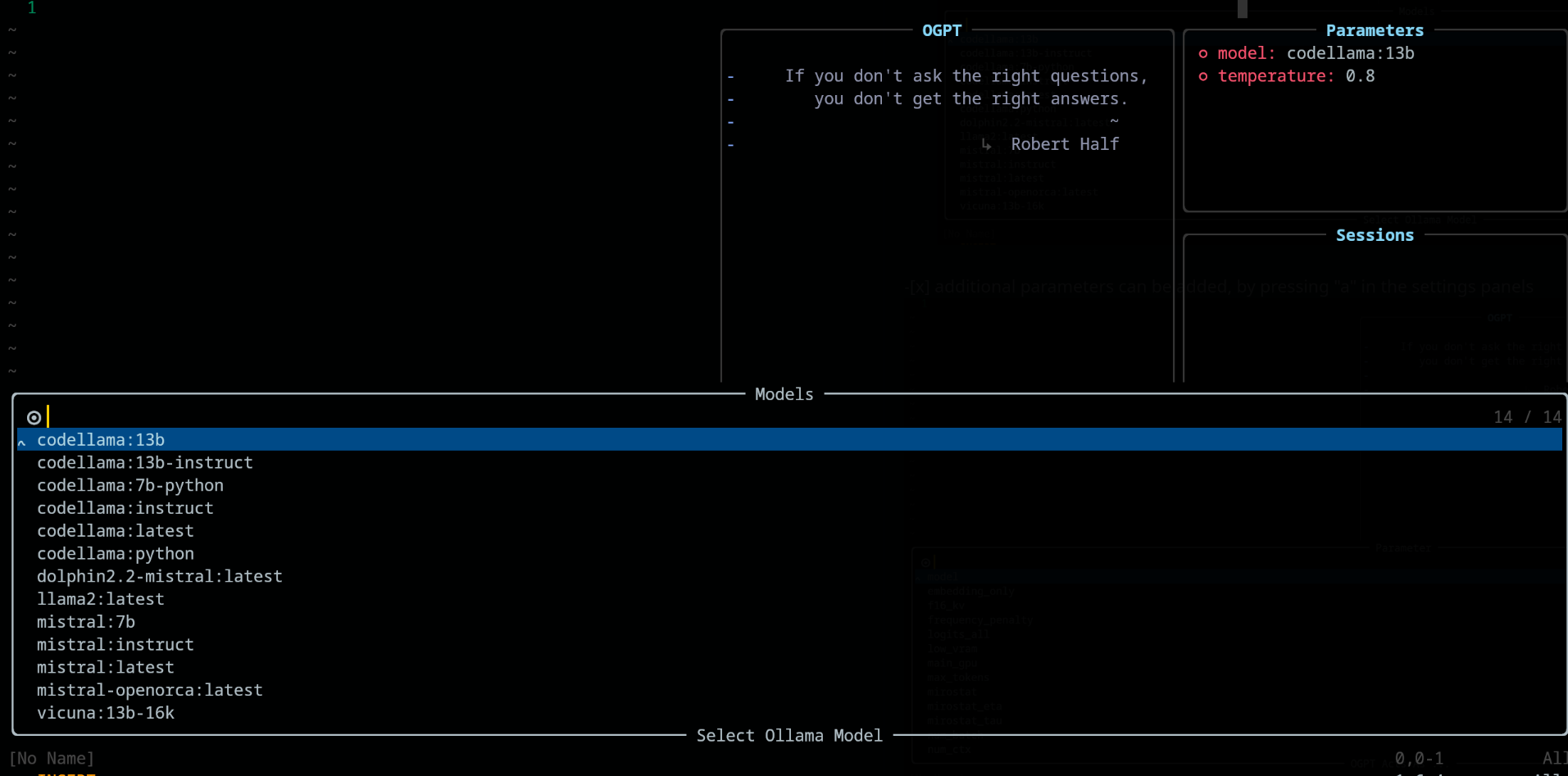
在参数面板中,分别使用键“ A”和“ D”来添加和删除参数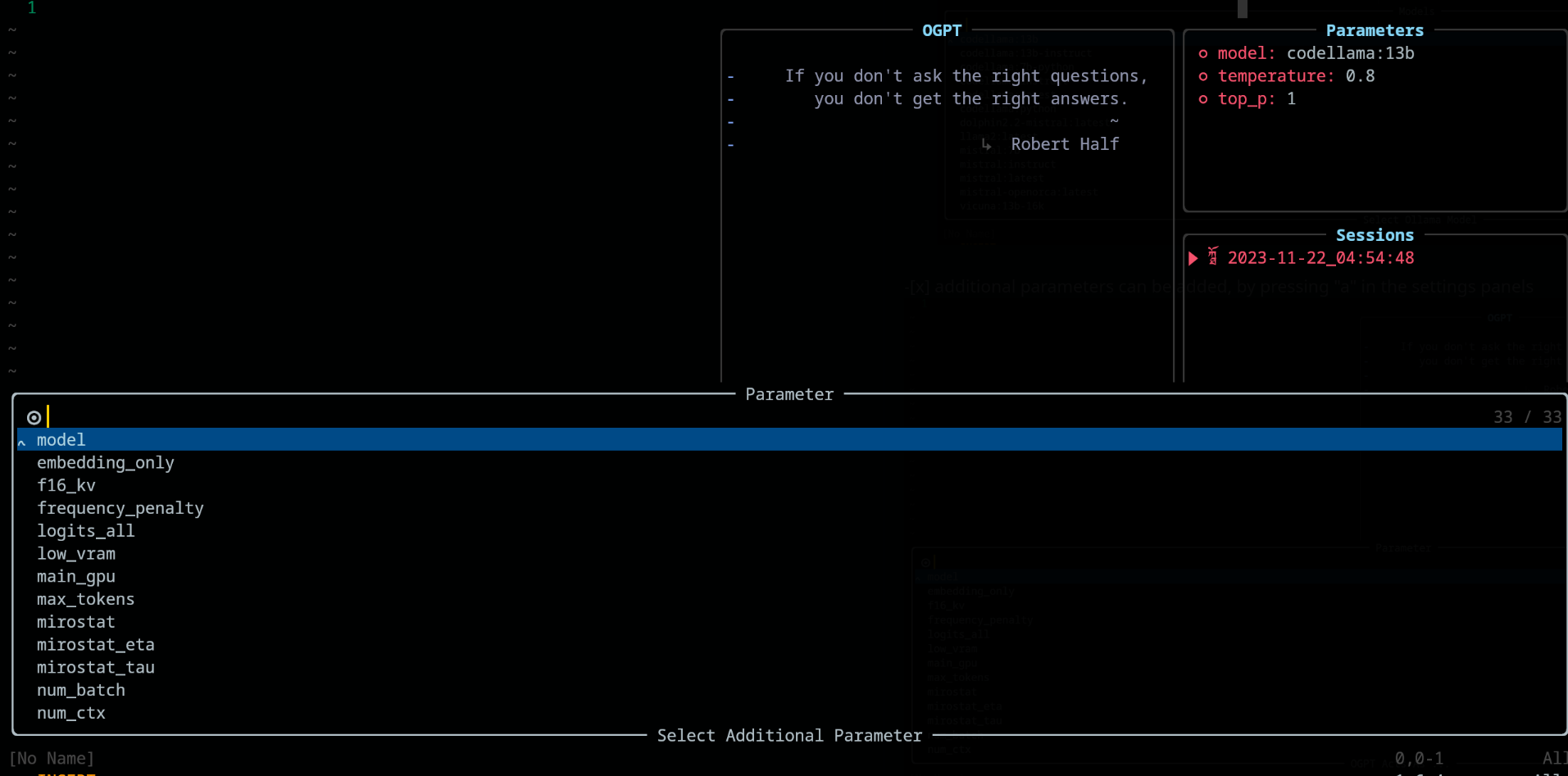
使用OGPT时,请在config.chat.keymaps下可用以下键键。
https://github.com/huynle/ogpt.nvim/blob/main/lua/ogpt/config.lua#l51-l71
edit和edit_code策略的交互式弹出式弹出窗口https://github.com/huynle/ogpt.nvim/blob/main/lua/ogpt/config.lua#l18-l28
https://github.com/huynle/ogpt.nvim/blob/main/lua/ogpt/config.lua#l174-l181
打开参数面板(使用<Co> )时,可以通过在相关配置上按Enter进行修改设置。设置在各个会议上保存。
lazy.nvim配置 return {
{
" huynle/ogpt.nvim " ,
dev = true ,
event = " VeryLazy " ,
keys = {
{
" <leader>]] " ,
" <cmd>OGPTFocus<CR> " ,
desc = " GPT " ,
},
{
" <leader>] " ,
" :'<,'>OGPTRun<CR> " ,
desc = " GPT " ,
mode = { " n " , " v " },
},
{
" <leader>]c " ,
" <cmd>OGPTRun edit_code_with_instructions<CR> " ,
" Edit code with instruction " ,
mode = { " n " , " v " },
},
{
" <leader>]e " ,
" <cmd>OGPTRun edit_with_instructions<CR> " ,
" Edit with instruction " ,
mode = { " n " , " v " },
},
{
" <leader>]g " ,
" <cmd>OGPTRun grammar_correction<CR> " ,
" Grammar Correction " ,
mode = { " n " , " v " },
},
{
" <leader>]r " ,
" <cmd>OGPTRun evaluate<CR> " ,
" Evaluate " ,
mode = { " n " , " v " },
},
{
" <leader>]i " ,
" <cmd>OGPTRun get_info<CR> " ,
" Get Info " ,
mode = { " n " , " v " },
},
{ " <leader>]t " , " <cmd>OGPTRun translate<CR> " , " Translate " , mode = { " n " , " v " } },
{ " <leader>]k " , " <cmd>OGPTRun keywords<CR> " , " Keywords " , mode = { " n " , " v " } },
{ " <leader>]d " , " <cmd>OGPTRun docstring<CR> " , " Docstring " , mode = { " n " , " v " } },
{ " <leader>]a " , " <cmd>OGPTRun add_tests<CR> " , " Add Tests " , mode = { " n " , " v " } },
{ " <leader>]<leader> " , " <cmd>OGPTRun custom_input<CR> " , " Custom Input " , mode = { " n " , " v " } },
{ " g? " , " <cmd>OGPTRun quick_question<CR> " , " Quick Question " , mode = { " n " } },
{ " <leader>]f " , " <cmd>OGPTRun fix_bugs<CR> " , " Fix Bugs " , mode = { " n " , " v " } },
{
" <leader>]x " ,
" <cmd>OGPTRun explain_code<CR> " ,
" Explain Code " ,
mode = { " n " , " v " },
},
},
opts = {
default_provider = " ollama " ,
-- default edgy flag
-- set this to true if you prefer to use edgy.nvim (https://github.com/folke/edgy.nvim) instead of floating windows
edgy = false ,
providers = {
ollama = {
api_host = os.getenv ( " OLLAMA_API_HOST " ),
-- default model
model = " mistral:7b " ,
-- model definitions
models = {
-- alias to actual model name, helpful to define same model name across multiple providers
coder = " deepseek-coder:6.7b " ,
-- nested alias
cool_coder = " coder " ,
general_model = " mistral:7b " ,
custom_coder = {
name = " deepseek-coder:6.7b " ,
modify_url = function ( url )
-- completely modify the URL of a model, if necessary. This function is called
-- right before making the REST request
return url
end ,
-- custom conform function. Each provider have a dedicated conform function where all
-- of OGPT chat info is passed into the conform function to be massaged to the
-- correct format that the provider is expecting. This function, if provided will
-- override the provider default conform function
-- conform_fn = function(ogpt_params)
-- return provider_specific_params
-- end,
},
},
-- default model params for all 'actions'
api_params = {
model = " mistral:7b " ,
temperature = 0.8 ,
top_p = 0.9 ,
},
api_chat_params = {
model = " mistral:7b " ,
frequency_penalty = 0 ,
presence_penalty = 0 ,
temperature = 0.5 ,
top_p = 0.9 ,
},
},
openai = {
api_host = os.getenv ( " OPENAI_API_HOST " ),
api_key = os.getenv ( " OPENAI_API_KEY " ),
api_params = {
model = " gpt-4 " ,
temperature = 0.8 ,
top_p = 0.9 ,
},
api_chat_params = {
model = " gpt-4 " ,
frequency_penalty = 0 ,
presence_penalty = 0 ,
temperature = 0.5 ,
top_p = 0.9 ,
},
},
textgenui = {
api_host = os.getenv ( " TEXTGEN_API_HOST " ),
api_key = os.getenv ( " TEXTGEN_API_KEY " ),
api_params = {
model = " mixtral-8-7b " ,
temperature = 0.8 ,
top_p = 0.9 ,
},
api_chat_params = {
model = " mixtral-8-7b " ,
frequency_penalty = 0 ,
presence_penalty = 0 ,
temperature = 0.5 ,
top_p = 0.9 ,
},
},
},
yank_register = " + " ,
edit = {
edgy = nil , -- use global default, override if defined
diff = false ,
keymaps = {
close = " <C-c> " ,
accept = " <M-CR> " ,
toggle_diff = " <C-d> " ,
toggle_parameters = " <C-o> " ,
cycle_windows = " <Tab> " ,
use_output_as_input = " <C-u> " ,
},
},
popup = {
edgy = nil , -- use global default, override if defined
position = 1 ,
size = {
width = " 40% " ,
height = 10 ,
},
padding = { 1 , 1 , 1 , 1 },
enter = true ,
focusable = true ,
zindex = 50 ,
border = {
style = " rounded " ,
},
buf_options = {
modifiable = false ,
readonly = false ,
filetype = " ogpt-popup " ,
syntax = " markdown " ,
},
win_options = {
wrap = true ,
linebreak = true ,
winhighlight = " Normal:Normal,FloatBorder:FloatBorder " ,
},
keymaps = {
close = { " <C-c> " , " q " },
accept = " <C-CR> " ,
append = " a " ,
prepend = " p " ,
yank_code = " c " ,
yank_to_register = " y " ,
},
},
chat = {
edgy = nil , -- use global default, override if defined
welcome_message = WELCOME_MESSAGE ,
loading_text = " Loading, please wait ... " ,
question_sign = " " , -- ?
answer_sign = " ﮧ " , -- ?
border_left_sign = " | " ,
border_right_sign = " | " ,
max_line_length = 120 ,
sessions_window = {
active_sign = " ? " ,
inactive_sign = " ? " ,
current_line_sign = " " ,
border = {
style = " rounded " ,
text = {
top = " Sessions " ,
},
},
win_options = {
winhighlight = " Normal:Normal,FloatBorder:FloatBorder " ,
},
},
keymaps = {
close = { " <C-c> " },
yank_last = " <C-y> " ,
yank_last_code = " <C-i> " ,
scroll_up = " <C-u> " ,
scroll_down = " <C-d> " ,
new_session = " <C-n> " ,
cycle_windows = " <Tab> " ,
cycle_modes = " <C-f> " ,
next_message = " J " ,
prev_message = " K " ,
select_session = " <CR> " ,
rename_session = " r " ,
delete_session = " d " ,
draft_message = " <C-d> " ,
edit_message = " e " ,
delete_message = " d " ,
toggle_parameters = " <C-o> " ,
toggle_message_role = " <C-r> " ,
toggle_system_role_open = " <C-s> " ,
stop_generating = " <C-x> " ,
},
},
-- {{{input}}} is always available as the selected/highlighted text
actions = {
grammar_correction = {
type = " popup " ,
template = " Correct the given text to standard {{{lang}}}: nn ```{{{input}}}``` " ,
system = " You are a helpful note writing assistant, given a text input, correct the text only for grammar and spelling error. You are to keep all formatting the same, e.g. markdown bullets, should stay as a markdown bullet in the result, and indents should stay the same. Return ONLY the corrected text. " ,
strategy = " replace " ,
params = {
temperature = 0.3 ,
},
args = {
lang = {
type = " string " ,
optional = " true " ,
default = " english " ,
},
},
},
translate = {
type = " popup " ,
template = " Translate this into {{{lang}}}: nn {{{input}}} " ,
strategy = " display " ,
params = {
temperature = 0.3 ,
},
args = {
lang = {
type = " string " ,
optional = " true " ,
default = " vietnamese " ,
},
},
},
keywords = {
type = " popup " ,
template = " Extract the main keywords from the following text to be used as document tags. nn ```{{{input}}}``` " ,
strategy = " display " ,
params = {
model = " general_model " , -- use of model alias, generally, this model alias should be available to all providers in use
temperature = 0.5 ,
frequency_penalty = 0.8 ,
},
},
do_complete_code = {
type = " popup " ,
template = " Code: n ```{{{filetype}}} n {{{input}}} n ``` nn Completed Code: n ```{{{filetype}}} " ,
strategy = " display " ,
params = {
model = " coder " ,
stop = {
" ``` " ,
},
},
},
quick_question = {
type = " popup " ,
args = {
-- template expansion
question = {
type = " string " ,
optional = " true " ,
default = function ()
return vim . fn . input ( " question: " )
end ,
},
},
system = " You are a helpful assistant " ,
template = " {{{question}}} " ,
strategy = " display " ,
},
custom_input = {
type = " popup " ,
args = {
instruction = {
type = " string " ,
optional = " true " ,
default = function ()
return vim . fn . input ( " instruction: " )
end ,
},
},
system = " You are a helpful assistant " ,
template = " Given the follow snippet, {{{instruction}}}. nn snippet: n ```{{{filetype}}} n {{{input}}} n ``` " ,
strategy = " display " ,
},
optimize_code = {
type = " popup " ,
system = " You are a helpful coding assistant. Complete the given prompt. " ,
template = " Optimize the code below, following these instructions: nn {{{instruction}}}. nn Code: n ```{{{filetype}}} n {{{input}}} n ``` nn Optimized version: n ```{{{filetype}}} " ,
strategy = " edit_code " ,
params = {
model = " coder " ,
stop = {
" ``` " ,
},
},
},
},
},
dependencies = {
" MunifTanjim/nui.nvim " ,
" nvim-lua/plenary.nvim " ,
" nvim-telescope/telescope.nvim " ,
},
},
}当您经常更新操作时,我建议在lazy.nvim ogpt配置中添加以下键。这只是在现场重新加载ogpt.nvim ,让您查看您的更新操作。
 ...
  -- other config options here
    keys = {
      {
        " <leader>ro " ,
        " <Cmd>Lazy reload ogpt.nvim<CR> " ,
        desc = " RELOAD ogpt " ,
      },
    ...
    }
  -- other config options here
... 这是如何设置可能位于其他服务器上的Ollama Mixtral模型服务器的示例。请注意,在下面的示例中,您可以:
secret_model是mixtral-8-7b的别名,因此在您的actions中,您可以使用secret_model 。当您拥有与MixTral相同功能的多个提供商时,这很有用,并且您希望根据开发环境或出于其他原因将不同的提供商交换以供不同的提供商使用。mixtral-8-7b时,此模型将显示在chat和edit操作中的模型选项中。conform_message_fn用于覆盖默认提供商conform_message函数。此功能允许按摩API请求参数符合特定模型。当您需要修改消息以适合经过模型训练的模板时,这确实很有用。conform_request_fn用于覆盖默认提供商conform_request函数。此功能(或提供商默认函数)在制作API调用之前,在末尾调用。最终按摩可以在这里进行。 -- advanced model, can take the following structure
providers = {
ollama = {
model = " secret_model " , -- default model for ollama
models = {
...
secret_model = " mixtral-8-7b " ,
[ " mixtral-8-7b " ] = {
params = {
-- the parameters here are FORCED into the final API REQUEST, OVERRIDDING
-- anything that was set before
max_new_token = 200 ,
},
modify_url = function ( url )
-- given a URL, this function modifies the URL specifically to the model
-- This is useful when you have different models hosted on different subdomains like
-- https://model1.yourdomain.com/
-- https://model2.yourdomain.com/
local new_model = " mixtral-8-7b "
-- local new_model = "mistral-7b-tgi-predictor-ai-factory"
local host = url : match ( " https?://([^/]+) " )
local subdomain , domain , tld = host : match ( " ([^.]+)%.([^.]+)%.([^.]+) " )
local _new_url = url : gsub ( host , new_model .. " . " .. domain .. " . " .. tld )
return _new_url
end ,
-- conform_messages_fn = function(params)
-- Different models might have different instruction format
-- for example, Mixtral operates on `<s> [INST] Instruction [/INST] Model answer</s> [INST] Follow-up instruction [/INST] `
-- look in the `providers` folder of the plugin for examples
-- end,
-- conform_request_fn = function(params)
-- API request might need custom format, this function allows that to happen
-- look in the `providers` folder of the plugin for examples
-- end,
}
}
}
}
TBD
如果您喜欢edgy.nvim设置,请为edgy.nvim的插件设置选项使用类似的内容。设置此之后,请确保您在ogpt.nvim的配置选项中启用edgy = true选项。
 opts = {
  right = {
    {
      title = " OGPT Popup " ,
      ft = " ogpt-popup " ,
      size = { width = 0.2 },
      wo = {
        wrap = true ,
      },
    },
    {
      title = " OGPT Parameters " ,
      ft = " ogpt-parameters-window " ,
      size = { height = 6 },
      wo = {
        wrap = true ,
      },
    },
    {
      title = " OGPT Template " ,
      ft = " ogpt-template " ,
      size = { height = 6 },
    },
    {
      title = " OGPT Sessions " ,
      ft = " ogpt-sessions " ,
      size = { height = 6 },
      wo = {
        wrap = true ,
      },
    },
    {
      title = " OGPT System Input " ,
      ft = " ogpt-system-window " ,
      size = { height = 6 },
    },
    {
      title = " OGPT " ,
      ft = " ogpt-window " ,
      size = { height = 0.5 },
      wo = {
        wrap = true ,
      },
    },
    {
      title = " OGPT {{{selection}}} " ,
      ft = " ogpt-selection " ,
      size = { width = 80 , height = 4 },
      wo = {
        wrap = true ,
      },
    },
    {
      title = " OGPt {{{instruction}}} " ,
      ft = " ogpt-instruction " ,
      size = { width = 80 , height = 4 },
      wo = {
        wrap = true ,
      },
    },
    {
      title = " OGPT Chat " ,
      ft = " ogpt-input " ,
      size = { width = 80 , height = 4 },
      wo = {
        wrap = true ,
      },
    },
  },
}providersconfig.lua中的“ default_provider”,默认为ollamaOGPTRun显示望远镜选择器type="popup"和strategy="display" -- or append, prepend, replace, quick_fix 感谢jackMort/ChatGPT.nvim的作者创建了一个与Neovim互动的无缝框架!
给我买咖啡





