ogpt.nvim
1.0.0

หากคุณไม่ได้ระบุผู้ให้บริการ ollama จะเป็นผู้ให้บริการเริ่มต้น http://localhost:11434 เป็นจุดสิ้นสุดของคุณ mistral:7b จะเป็นค่าเริ่มต้นของคุณหากการกำหนดค่าไม่ได้รับการอัปเดต
 -- Simple, minimal Lazy.nvim configuration
{
  " huynle/ogpt.nvim " ,
    event = " VeryLazy " ,
    opts = {
      default_provider = " ollama " ,
      providers = {
        ollama = {
          api_host = os.getenv ( " OLLAMA_API_HOST " ) or " http://localhost:11434 " ,
          api_key = os.getenv ( " OLLAMA_API_KEY " ) or " " ,
        }
      }
    },
    dependencies = {
      " MunifTanjim/nui.nvim " ,
      " nvim-lua/plenary.nvim " ,
      " nvim-telescope/telescope.nvim "
    }
} OGPT.nvim มาพร้อมกับค่าเริ่มต้นต่อไปนี้ คุณสามารถแทนที่ฟิลด์ใด ๆ โดยผ่านการกำหนดค่าเป็นพารามิเตอร์การตั้งค่า
https://github.com/huynle/ogpt.nvim/blob/main/lua/ogpt/config.lua
OGPT เป็นปลั๊กอิน NeoVim ที่ช่วยให้คุณใช้ Ollama OGPT API ได้อย่างง่ายดายช่วยให้คุณสร้างการตอบสนองภาษาธรรมชาติจาก Ollama โดยตรงภายในตัวแก้ไขเพื่อตอบสนองต่อพรอมต์ของคุณ
curl โฮสต์ Ollama API ที่กำหนดเองพร้อมตัวเลือกการกำหนดค่า api_host_cmd หรือตัวแปรสภาพแวดล้อมที่เรียกว่า $OLLAMA_API_HOST มันมีประโยชน์ถ้าคุณเรียกใช้ Ollama จากระยะไกล
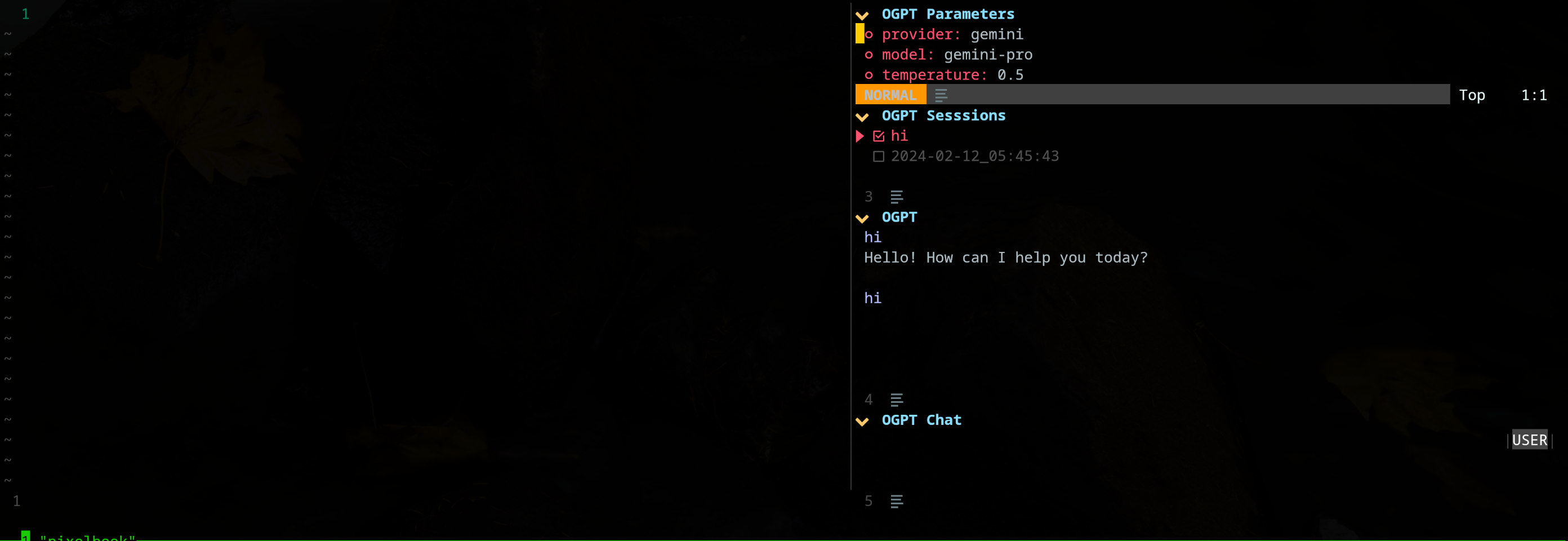
ปลั๊กอิน edgy.nvim เสนอหน้าต่างด้านข้าง (อยู่ทางด้านขวาโดยค่าเริ่มต้น) ที่ให้พื้นที่ทำงานแบบขนานซึ่งคุณสามารถทำงานในโครงการของคุณในขณะที่โต้ตอบกับ OGPT นี่คือตัวอย่างของการกำหนดค่า 'หงุดหงิด'
{
{
  " huynle/ogpt.nvim " ,
    event = " VeryLazy " ,
    opts = {
      default_provider = " ollama " ,
      edgy = true , -- enable this!
      single_window = false , -- set this to true if you want only one OGPT window to appear at a time
      providers = {
        ollama = {
          api_host = os.getenv ( " OLLAMA_API_HOST " ) or " http://localhost:11434 " ,
          api_key = os.getenv ( " OLLAMA_API_KEY " ) or " " ,
        }
      }
    },
    dependencies = {
      " MunifTanjim/nui.nvim " ,
      " nvim-lua/plenary.nvim " ,
      " nvim-telescope/telescope.nvim "
    }
},
{
    " folke/edgy.nvim " ,
    event = " VeryLazy " ,
    init = function ()
      vim . opt . laststatus = 3
      vim . opt . splitkeep = " screen " -- or "topline" or "screen"
    end ,
    opts = {
      exit_when_last = false ,
      animate = {
        enabled = false ,
      },
      wo = {
        winbar = true ,
        winfixwidth = true ,
        winfixheight = false ,
        winhighlight = " WinBar:EdgyWinBar,Normal:EdgyNormal " ,
        spell = false ,
        signcolumn = " no " ,
      },
      keys = {
        -- -- close window
        [ " q " ] = function ( win )
          win : close ()
        end ,
        -- close sidebar
        [ " Q " ] = function ( win )
          win . view . edgebar : close ()
        end ,
        -- increase width
        [ " <S-Right> " ] = function ( win )
          win : resize ( " width " , 3 )
        end ,
        -- decrease width
        [ " <S-Left> " ] = function ( win )
          win : resize ( " width " , - 3 )
        end ,
        -- increase height
        [ " <S-Up> " ] = function ( win )
          win : resize ( " height " , 3 )
        end ,
        -- decrease height
        [ " <S-Down> " ] = function ( win )
          win : resize ( " height " , - 3 )
        end ,
      },
      right = {
        {
          title = " OGPT Popup " ,
          ft = " ogpt-popup " ,
          size = { width = 0.2 },
          wo = {
            wrap = true ,
          },
        },
        {
          title = " OGPT Parameters " ,
          ft = " ogpt-parameters-window " ,
          size = { height = 6 },
          wo = {
            wrap = true ,
          },
        },
        {
          title = " OGPT Template " ,
          ft = " ogpt-template " ,
          size = { height = 6 },
        },
        {
          title = " OGPT Sessions " ,
          ft = " ogpt-sessions " ,
          size = { height = 6 },
          wo = {
            wrap = true ,
          },
        },
        {
          title = " OGPT System Input " ,
          ft = " ogpt-system-window " ,
          size = { height = 6 },
        },
        {
          title = " OGPT " ,
          ft = " ogpt-window " ,
          size = { height = 0.5 },
          wo = {
            wrap = true ,
          },
        },
        {
          title = " OGPT {{{selection}}} " ,
          ft = " ogpt-selection " ,
          size = { width = 80 , height = 4 },
          wo = {
            wrap = true ,
          },
        },
        {
          title = " OGPt {{{instruction}}} " ,
          ft = " ogpt-instruction " ,
          size = { width = 80 , height = 4 },
          wo = {
            wrap = true ,
          },
        },
        {
          title = " OGPT Chat " ,
          ft = " ogpt-input " ,
          size = { width = 80 , height = 4 },
          wo = {
            wrap = true ,
          },
        },
      },
    },
  }
}ปลั๊กอินเปิดเผยคำสั่งต่อไปนี้:
OGPT คำสั่ง OGPT เปิดหน้าต่างแบบโต้ตอบเพื่อสื่อสารกับแบ็กเอนด์ LLM หน้าต่างแบบโต้ตอบประกอบด้วยสี่บาน:
| พื้นที่ | ทางลัดเริ่มต้น | คำอธิบาย |
|---|---|---|
| ทั่วไป | Ctrl-O | แผงพารามิเตอร์สลับ (พารามิเตอร์ OGPT) และแผงเซสชัน (เซสชัน OGPT) |
| ctrl-n | สร้างเซสชันใหม่ | |
| CTRL-C | ปิด ogpt | |
| ctrl-i | คัดลอกรหัสในการตอบกลับล่าสุดของ LLM ในพื้นที่ข้อความเอาต์พุต OGPT | |
| ctrl-x | หยุดสร้างการตอบสนอง | |
| แท็บ | ปั่นจักรยานผ่านบานหน้าต่าง | |
| Ogpt | K | การตอบสนองก่อนหน้านี้ |
| J | คำตอบถัดไป | |
| ctrl-u | เลื่อนขึ้น | |
| CTRL-D | เลื่อนลง | |
| Ogpt Chat | เข้า (โหมดปกติ) | ส่งพรอมต์ไปยัง LLM |
| Alt-enter (โหมดอินพุต) | ส่งพรอมต์ไปยัง LLM | |
| ctrl-y | คัดลอกการตอบกลับล่าสุดจาก LLM ในพื้นที่ข้อความเอาต์พุต OGPT | |
| CTRL-R | สลับบทบาท (ผู้ช่วยหรือผู้ใช้) | |
| CTRL-S | สลับข้อความระบบ | |
| พารามิเตอร์ OGPT | เข้า | เปลี่ยนพารามิเตอร์ |
| Ogpt Sessions | เข้า | สวิตช์เซสชัน |
| d | ลบเซสชัน | |
| R | เปลี่ยนชื่อเซสชัน โปรดทราบว่าไม่สามารถลบเซสชันที่ใช้งานได้ |
ทางลัดสำหรับ Ogpt Interactive Window สามารถแก้ไขได้ที่ opts.chat.keymaps
OGPTActAs คำสั่ง OGPTActAs ซึ่งเปิดการเลือกพรอมต์จากพรอมต์ OGPT ที่ยอดเยี่ยมที่จะใช้กับโมเดล mistral:7b
OGPTRun [action_name] OGPTRun [action_name] ทำงาน LLM ด้วยการกระทำที่กำหนดไว้ล่วงหน้าชื่อ [action_name] มีการดำเนินการเริ่มต้นที่ OGPT จัดทำขึ้นและการกระทำที่กำหนดเองที่กำหนดโดยผู้ใช้
การดำเนินการต้องการพารามิเตอร์ในการกำหนดค่าพฤติกรรม พารามิเตอร์โมเดลเริ่มต้นถูกกำหนดไว้ใน actions.<action_name> ใน config.lua และพารามิเตอร์โมเดลที่กำหนดเองถูกกำหนดไว้ในไฟล์การกำหนดค่า OGPT ที่กำหนดเองหรือในไฟล์กำหนดค่าการกระทำแยกต่างหากเช่น actions.json
พารามิเตอร์การดำเนินการบางอย่างรวมถึง:
type : ประเภทของอินเตอร์เฟส OGPT ปัจจุบันมีอินเทอร์เฟซ OGPT สามประเภท:popup : หน้าต่างป๊อปอัพน้ำหนักเบาedit : หน้าต่าง Ogptcompletions : ไม่เปิดหน้าต่างเสร็จสมบูรณ์บนหน้าต่างแก้ไขโดยตรงstrategy : กำหนดวิธีการทำงานของอินเทอร์เฟซ OGPT มี strategy เฉพาะที่คุณสามารถใช้สำหรับแต่ละ type :type = "popup" : แสดง, แทนที่, ต่อท้าย, prepend, quick_fixtype = "completions" : แสดง, แทนที่, ผนวก, prependtype = "edits" : แก้ไข, edit_codesystem : ระบบพรอมต์params : พารามิเตอร์รุ่น พารามิเตอร์โมเดลเริ่มต้นถูกกำหนดไว้ใน opts.providers.<provider_name>.api_params คุณสามารถปรับแต่งพารามิเตอร์โมเดลใน opts.actions.<action_name>.params และแทนที่พารามิเตอร์รุ่นเริ่มต้นmodel : รุ่น LLM ที่จะใช้สำหรับการกระทำstop : เงื่อนไขสำหรับ LLM ที่จะหยุดสร้างการตอบสนอง ตัวอย่างเช่นเงื่อนไขการหยุดที่มีประโยชน์สำหรับ codellama คือ "` `` " ดูการดำเนินการ "Optimize_Code" ในตัวอย่าง lazy.nvim การกำหนดค่าtemperature : ความแปรปรวนของการตอบสนองของ LLMfrequency_penalty : มีคนอธิบายโปรดmax_tokens : จำนวนโทเค็นสูงสุดtop_p : มีคนอธิบายได้โปรดtemplate : เทมเพลตพรอมต์ เทมเพลตกำหนดคำสั่งทั่วไปที่ LLM ต้องปฏิบัติตาม เทมเพลตสามารถรวมอาร์กิวเมนต์เทมเพลตในรูปแบบของ {{{<argument_name>}}} โดยที่ <argument_name> เป็นอาร์กิวเมนต์เทมเพลตที่กำหนดไว้ใน args นอกเหนือจากข้อโต้แย้งที่กำหนดไว้ใน args คุณสามารถรวมอาร์กิวเมนต์ต่อไปนี้:{{{input}}} : ข้อความที่เลือกในโหมดภาพ{{{filetype}}} : ประเภทของไฟล์ที่คุณโต้ตอบด้วยargs : อาร์กิวเมนต์เทมเพลต อาร์กิวเมนต์เทมเพลตกำหนดอาร์กิวเมนต์ที่แทนที่อาร์กิวเมนต์ด้วยชื่อเดียวกันใน template อาร์กิวเมนต์เทมเพลตทั่วไปบางประการ ได้แก่ :instruction : คำสั่งที่กำหนดเองสำหรับ LLM ที่จะติดตาม มันมีแนวโน้มที่จะเฉพาะเจาะจงและมีโครงสร้างมากกว่าคำสั่งทั่วไปที่เข้าสู่ templatelang : ภาษา มักใช้สำหรับการกระทำที่เกี่ยวข้องกับภาษาเช่นการแปลหรือการตรวจสอบไวยากรณ์ การกระทำเริ่มต้นถูกกำหนดไว้ใน actions.<action_name> ใน config.lua
OGPTRun edit_with_instructions OGPTRun edit_with_instructions เปิดหน้าต่างแบบโต้ตอบเพื่อแก้ไขข้อความที่เลือกหรือหน้าต่างทั้งหมดโดยใช้โมเดลที่กำหนดไว้ใน config.<provider_name>.api_params
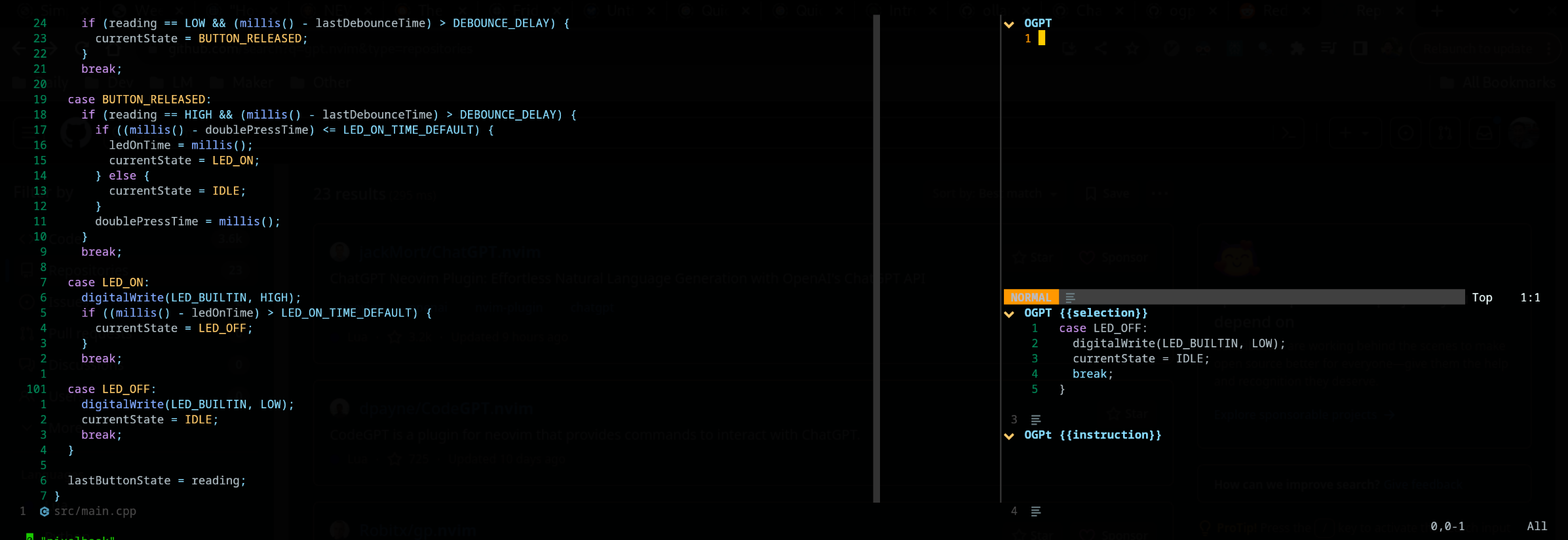
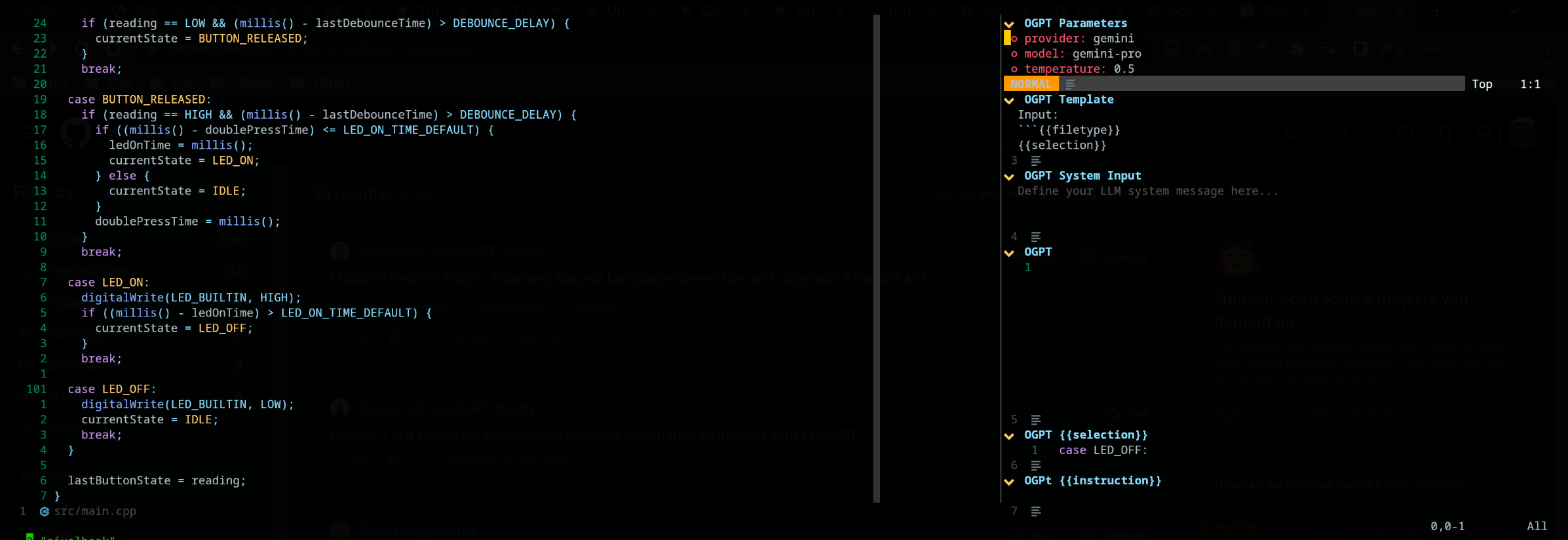
โดยค่าเริ่มต้นประเภทอินเตอร์เฟสของ OGPTRun edit_with_instructions คือ edit ซึ่งจะเปิดหน้าต่างแบบโต้ตอบไปทางขวา ในหน้าต่างคุณสามารถใช้ <co> (ปุ่มเริ่มต้นสามารถปรับแต่งได้) เพื่อเปิดและปิดแผงพารามิเตอร์ หมายเหตุภาพหน้าจอนี้ใช้ edgy.nvim
คุณสามารถปรับแต่งการกระทำของ OGPT โดยกำหนดไว้ในไฟล์การกำหนดค่า OGPT ที่กำหนดเองหรือในไฟล์แอ็คชั่นแยกต่างหาก การกำหนดค่าโมเดลเริ่มต้นใน config.lua อาจเป็นการอ้างอิงที่ดีเมื่อทำการดำเนินการที่กำหนดเองของคุณเอง
คุณสามารถกำหนดค่าการกระทำในไฟล์การกำหนดค่า OGPT ของคุณเอง (โดยทั่วไปในไฟล์ LUA เช่น ogpt.lua หากใช้ NeoVim) ในไฟล์การกำหนดค่า OGPT ที่กำหนดเองคุณต้องกำหนดการกระทำใน actions.<action_name> เช่นเดียวกับวิธีการที่กำหนดการเริ่มต้นใน config.lua
 --- config options lua
opts = {
  ...
  actions = {
    grammar_correction = {
      -- type = "popup", -- could be a string or table to override
      type = {
        popup = { -- overrides the default popup options - https://github.com/huynle/ogpt.nvim/blob/main/lua/ogpt/config.lua#L147-L180
          edgy = true
        }
      },
      strategy = " replace " ,
      provider = " ollama " , -- default to "default_provider" if not provided
      model = " mixtral:7b " , -- default to "provider.<default_provider>.model" if not provided
      template = " Correct the given text to standard {{{lang}}}: nn ```{{{input}}}``` " ,
      system = " You are a helpful note writing assistant, given a text input, correct the text only for grammar and spelling error. You are to keep all formatting the same, e.g. markdown bullets, should stay as a markdown bullet in the result, and indents should stay the same. Return ONLY the corrected text. " ,
      params = {
        temperature = 0.3 ,
      },
      args = {
        lang = {
          type = " string " ,
          optional = " true " ,
          default = " english " ,
        },
      },
    },
  ...
  }
}
ประเภท edit ประกอบด้วยการแสดงเอาต์พุตเคียงข้างกับอินพุตและพร้อมใช้งานสำหรับการแก้ไขเพิ่มเติม
กลยุทธ์ display แสดงผลลัพธ์ในหน้าต่างลอย append และ replace แก้ไขข้อความโดยตรงในบัฟเฟอร์ด้วย "A" หรือ "R"
เป็นไปได้ที่จะกำหนดการกระทำที่กำหนดเองโดยใช้ไฟล์ JSON โปรดดูตัวอย่างที่ actions.json สำหรับการอ้างอิง
ตัวอย่างของการกระทำที่กำหนดเองอาจมีลักษณะดังต่อไปนี้: ( # เครื่องหมายความคิดเห็น)
{
  "action_name" : {
    "type" : " popup " , # "popup" or "edit"
    "template" : " A template using possible variable: {{{filetype}}} (neovim filetype), {{{input}}} (the selected text) an {{{argument}}} (provided on the command line) " ,
    "strategy" : " replace " , # or "display" or "append" or "edit"
    "params" : { # parameters according to the official Ollama API
      "model" : " mistral:7b " , # or any other model supported by `"type"` in the Ollama API, use the playground for reference
      "stop" : [
        " ``` " # a string used to stop the model
      ]
    }
    "args" : {
      "argument" : " some value " -- or function
    }
  }
}
หากคุณต้องการใช้ไฟล์แอ็คชั่นอื่น ๆ คุณต้องผนวกพา ธ ไปยังไฟล์เหล่านั้นไปที่ defaults.actions_paths ใน config.lua
ได้ทันทีคุณสามารถเรียกใช้บรรทัดคำสั่งเพื่อเรียก OGPT ตัวอย่างเพื่อแทนที่การโทร Grammar_correction มีให้ด้านล่าง :OGPTRun grammar_correction {provider="openai", model="gpt-4"}
เพื่อให้มันเป็นแบบไดนามิกมากขึ้นคุณสามารถเปลี่ยนเพื่อให้ผู้ให้บริการ/รุ่นหรือพารามิเตอร์ใด ๆ ถูกป้อนโดยผู้ใช้ในจุดเมื่อคำสั่งถูกดำเนินการ :OGPTRun grammar_correction {provider=vim.fn.input("Provider: "), type={popup={edgy=false}}}}
นอกจากนี้ในตัวอย่างข้างต้น edgy.nvim สามารถปิดได้ เพื่อให้การตอบสนองป๊อปอัพแบบอินไลน์ที่เคอร์เซอร์จะอยู่ สำหรับตัวเลือกเพิ่มเติมสำหรับป๊อปอัปโปรดอ่านผ่าน https://github.com/huynle/ogpt.nvim/blob/main/lua/ogpt/config.lua#l147-l180
ตัวอย่างเช่นคุณและให้มันป๊อปอัปและเปลี่ยน enter = false ซึ่งออกจากเคอร์เซอร์ในตำแหน่งเดียวกันแทนที่จะย้ายไปยังป๊อปอัพ
นอกจากนี้สำหรับผู้ใช้ขั้นสูงสิ่งนี้จะช่วยให้คุณใช้ VIM Autocommands ตัวอย่างเช่นการเติมเงินอัตโนมัติสามารถเกิดขึ้นได้เมื่อเคอร์เซอร์หยุดชั่วคราว ดูผู้ช่วยแม่แบบต่างๆสำหรับตัวเลือกขั้นสูงนี้เพราะตอนนี้
ปัจจุบันอินพุตที่กำหนดไปยัง API จะได้รับการสแกนสำหรับ {{{<template_helper_name>}}} สำหรับการขยายตัว สิ่งนี้มีประโยชน์เมื่อคุณต้องการให้บริบทเพิ่มเติมเล็กน้อยกับคำขอ API ของคุณหรือเพียงแค่ขอในการเรียกใช้ฟังก์ชั่นเพิ่มเติม
ดูไฟล์นี้สำหรับผู้ช่วยเทมเพลตที่ทันสมัยที่สุด หากคุณมีผู้ช่วยแม่แบบเพิ่มเติมโปรดสร้าง MR การบริจาคของคุณจะได้รับการชื่นชม!
https://github.com/huynle/ogpt.nvim/blob/main/lua/ogpt/flows/actions/template_helpers.lua
นี่คือการกระทำที่กำหนดเองที่ฉันใช้ตลอดเวลาเพื่อใช้หน้าต่างที่มองเห็นได้เป็นบริบทเพื่อให้ AI ตอบคำถามแบบอินไลน์ใด ๆ
....
  -- Other OGPT configurations here
  ....
  actions = {
    infill_visible_code = {
      type = " popup " ,
      template = [[
      Given the following code snippets, please complete the code by infilling the rest of the code in between the two
      code snippets for BEFORE and AFTER, these snippets are given below.


      Code BEFORE infilling position:
      ```{{{filetype}}}
      {{{visible_window_content}}}
      {{{before_cursor}}}
      ```

      Code AFTER infilling position:
      ```{{{filetype}}}
      {{{after_cursor}}}
      ```


      Within the given snippets, complete the instructions that are given in between the
      triple percent sign '%%%-' and '-%%%'. Note that the instructions as
      could be multilines AND/OR it could be in a comment block of the code!!!

      Lastly, apply the following conditions to your response.
      * The response should replace the '%%%-' and '-%%%' if the code snippet was to be reused.
      * PLEASE respond ONLY with the answers to the given instructions.
      ]] ,
      strategy = " display " ,
      -- provider = "textgenui",
      -- model = "mixtral-8-7b",
      -- params = {
      --   max_new_tokens = 1000,
      -- },
    },
  -- more actions here
  }
.... เปลี่ยนโมเดลโดยการเปิดแผงพารามิเตอร์เริ่มต้นเป็น (CTRL-O) หรือวิธีการของคุณจากนั้นกด Enter () บนฟิลด์โมเดลเพื่อเปลี่ยน ควรแสดงรายการรุ่นที่มีอยู่ทั้งหมดจากผู้ให้บริการ LLM ของคุณ 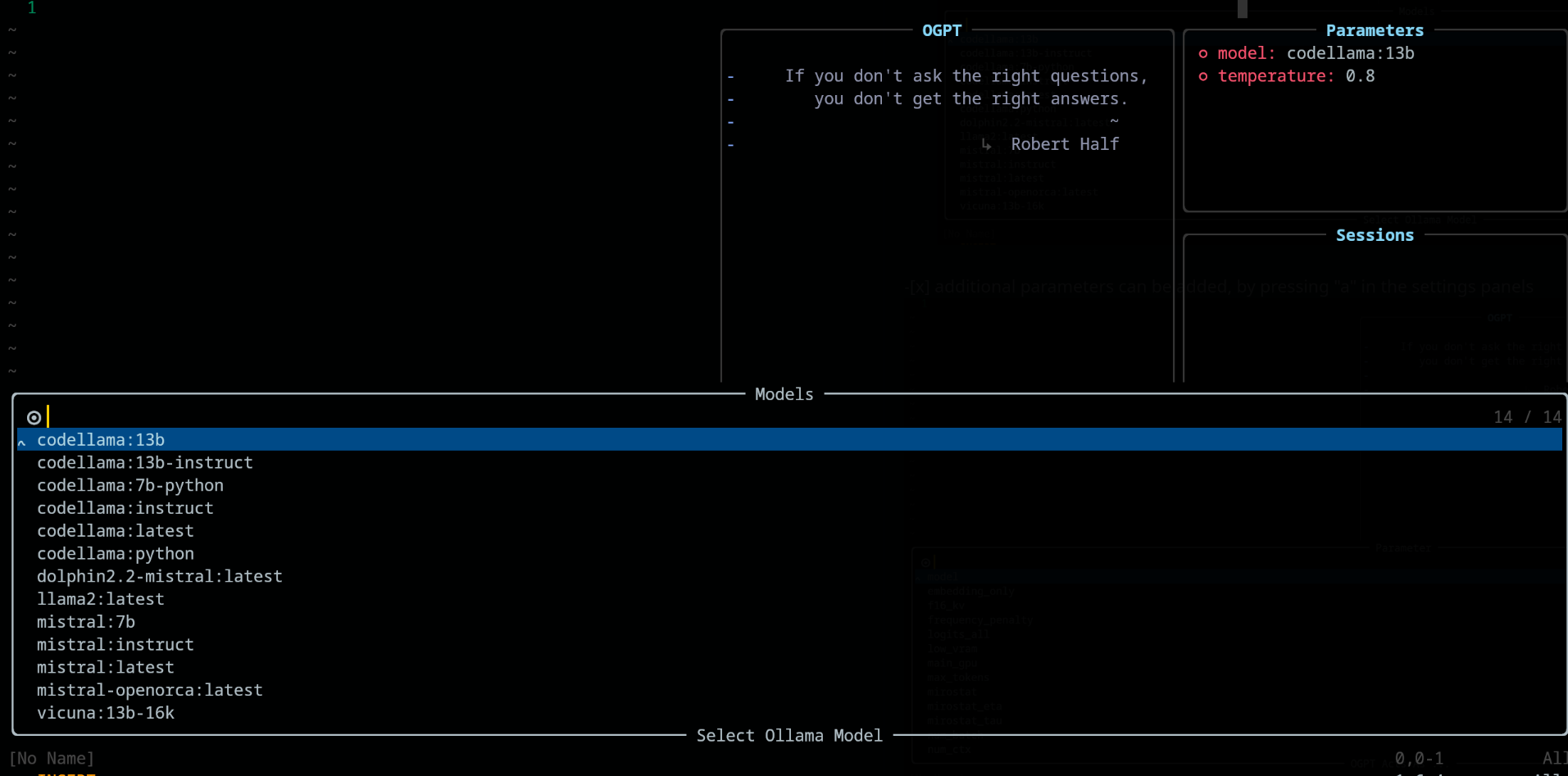
ในแผง พารามิเตอร์ เพิ่มและลบพารามิเตอร์โดยใช้ปุ่ม "A" และ "D" ตามลำดับ 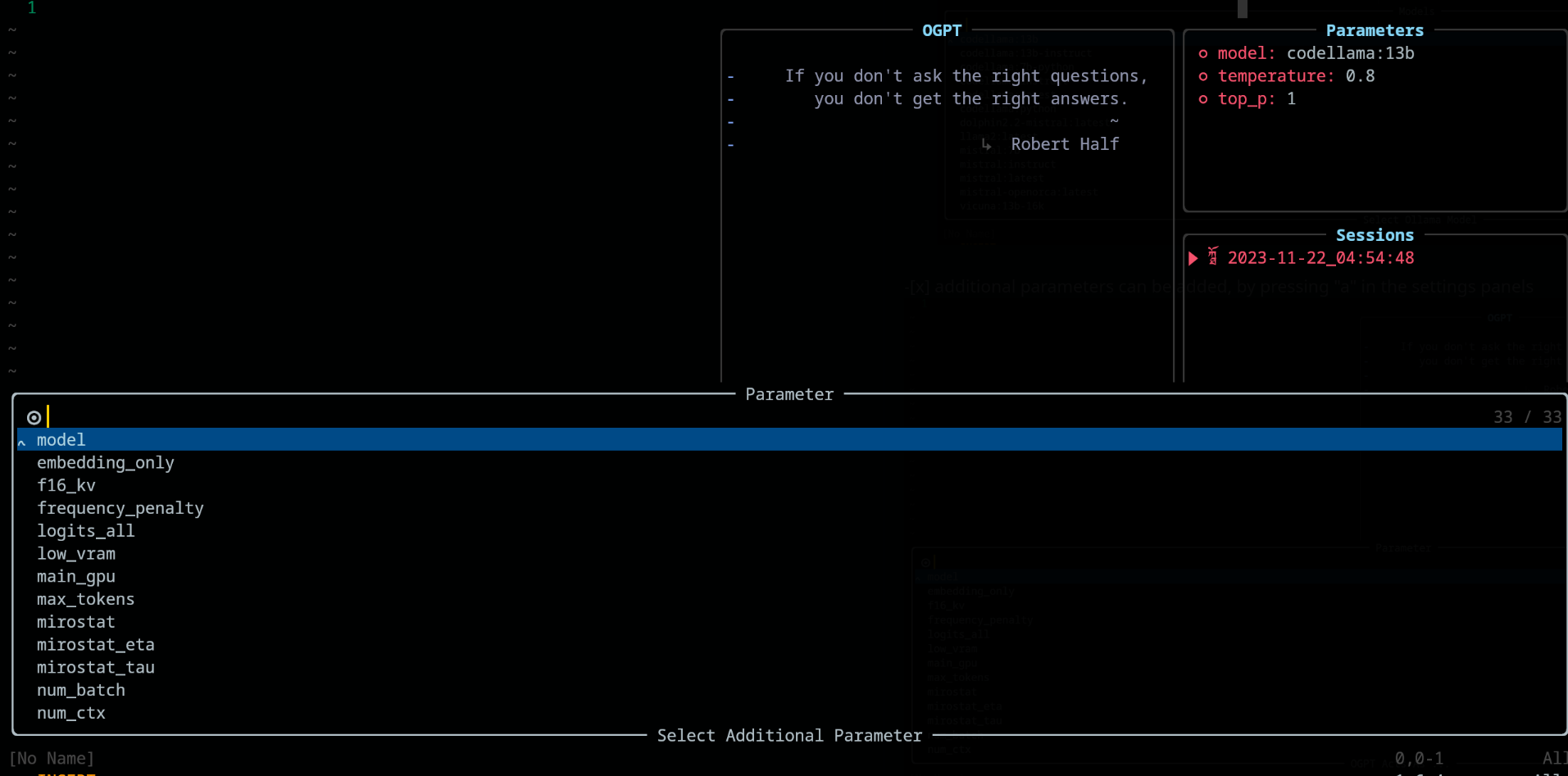
เมื่อใช้ OGPT คีย์ bindings ต่อไปนี้จะพร้อมใช้งานภายใต้ config.chat.keymaps
https://github.com/huynle/ogpt.nvim/blob/main/lua/ogpt/config.lua#l51-l71
edit และ edit_code กลยุทธ์https://github.com/huynle/ogpt.nvim/blob/main/lua/ogpt/config.lua#l18-l28
https://github.com/huynle/ogpt.nvim/blob/main/lua/ogpt/config.lua#l174-l181
เมื่อแผงพารามิเตอร์ถูกเปิด (ด้วย <Co> ) การตั้งค่าสามารถแก้ไขได้โดยการกด Enter ในการกำหนดค่าที่เกี่ยวข้อง การตั้งค่าจะถูกบันทึกไว้ในเซสชัน
lazy.nvim การกำหนดค่า return {
{
" huynle/ogpt.nvim " ,
dev = true ,
event = " VeryLazy " ,
keys = {
{
" <leader>]] " ,
" <cmd>OGPTFocus<CR> " ,
desc = " GPT " ,
},
{
" <leader>] " ,
" :'<,'>OGPTRun<CR> " ,
desc = " GPT " ,
mode = { " n " , " v " },
},
{
" <leader>]c " ,
" <cmd>OGPTRun edit_code_with_instructions<CR> " ,
" Edit code with instruction " ,
mode = { " n " , " v " },
},
{
" <leader>]e " ,
" <cmd>OGPTRun edit_with_instructions<CR> " ,
" Edit with instruction " ,
mode = { " n " , " v " },
},
{
" <leader>]g " ,
" <cmd>OGPTRun grammar_correction<CR> " ,
" Grammar Correction " ,
mode = { " n " , " v " },
},
{
" <leader>]r " ,
" <cmd>OGPTRun evaluate<CR> " ,
" Evaluate " ,
mode = { " n " , " v " },
},
{
" <leader>]i " ,
" <cmd>OGPTRun get_info<CR> " ,
" Get Info " ,
mode = { " n " , " v " },
},
{ " <leader>]t " , " <cmd>OGPTRun translate<CR> " , " Translate " , mode = { " n " , " v " } },
{ " <leader>]k " , " <cmd>OGPTRun keywords<CR> " , " Keywords " , mode = { " n " , " v " } },
{ " <leader>]d " , " <cmd>OGPTRun docstring<CR> " , " Docstring " , mode = { " n " , " v " } },
{ " <leader>]a " , " <cmd>OGPTRun add_tests<CR> " , " Add Tests " , mode = { " n " , " v " } },
{ " <leader>]<leader> " , " <cmd>OGPTRun custom_input<CR> " , " Custom Input " , mode = { " n " , " v " } },
{ " g? " , " <cmd>OGPTRun quick_question<CR> " , " Quick Question " , mode = { " n " } },
{ " <leader>]f " , " <cmd>OGPTRun fix_bugs<CR> " , " Fix Bugs " , mode = { " n " , " v " } },
{
" <leader>]x " ,
" <cmd>OGPTRun explain_code<CR> " ,
" Explain Code " ,
mode = { " n " , " v " },
},
},
opts = {
default_provider = " ollama " ,
-- default edgy flag
-- set this to true if you prefer to use edgy.nvim (https://github.com/folke/edgy.nvim) instead of floating windows
edgy = false ,
providers = {
ollama = {
api_host = os.getenv ( " OLLAMA_API_HOST " ),
-- default model
model = " mistral:7b " ,
-- model definitions
models = {
-- alias to actual model name, helpful to define same model name across multiple providers
coder = " deepseek-coder:6.7b " ,
-- nested alias
cool_coder = " coder " ,
general_model = " mistral:7b " ,
custom_coder = {
name = " deepseek-coder:6.7b " ,
modify_url = function ( url )
-- completely modify the URL of a model, if necessary. This function is called
-- right before making the REST request
return url
end ,
-- custom conform function. Each provider have a dedicated conform function where all
-- of OGPT chat info is passed into the conform function to be massaged to the
-- correct format that the provider is expecting. This function, if provided will
-- override the provider default conform function
-- conform_fn = function(ogpt_params)
-- return provider_specific_params
-- end,
},
},
-- default model params for all 'actions'
api_params = {
model = " mistral:7b " ,
temperature = 0.8 ,
top_p = 0.9 ,
},
api_chat_params = {
model = " mistral:7b " ,
frequency_penalty = 0 ,
presence_penalty = 0 ,
temperature = 0.5 ,
top_p = 0.9 ,
},
},
openai = {
api_host = os.getenv ( " OPENAI_API_HOST " ),
api_key = os.getenv ( " OPENAI_API_KEY " ),
api_params = {
model = " gpt-4 " ,
temperature = 0.8 ,
top_p = 0.9 ,
},
api_chat_params = {
model = " gpt-4 " ,
frequency_penalty = 0 ,
presence_penalty = 0 ,
temperature = 0.5 ,
top_p = 0.9 ,
},
},
textgenui = {
api_host = os.getenv ( " TEXTGEN_API_HOST " ),
api_key = os.getenv ( " TEXTGEN_API_KEY " ),
api_params = {
model = " mixtral-8-7b " ,
temperature = 0.8 ,
top_p = 0.9 ,
},
api_chat_params = {
model = " mixtral-8-7b " ,
frequency_penalty = 0 ,
presence_penalty = 0 ,
temperature = 0.5 ,
top_p = 0.9 ,
},
},
},
yank_register = " + " ,
edit = {
edgy = nil , -- use global default, override if defined
diff = false ,
keymaps = {
close = " <C-c> " ,
accept = " <M-CR> " ,
toggle_diff = " <C-d> " ,
toggle_parameters = " <C-o> " ,
cycle_windows = " <Tab> " ,
use_output_as_input = " <C-u> " ,
},
},
popup = {
edgy = nil , -- use global default, override if defined
position = 1 ,
size = {
width = " 40% " ,
height = 10 ,
},
padding = { 1 , 1 , 1 , 1 },
enter = true ,
focusable = true ,
zindex = 50 ,
border = {
style = " rounded " ,
},
buf_options = {
modifiable = false ,
readonly = false ,
filetype = " ogpt-popup " ,
syntax = " markdown " ,
},
win_options = {
wrap = true ,
linebreak = true ,
winhighlight = " Normal:Normal,FloatBorder:FloatBorder " ,
},
keymaps = {
close = { " <C-c> " , " q " },
accept = " <C-CR> " ,
append = " a " ,
prepend = " p " ,
yank_code = " c " ,
yank_to_register = " y " ,
},
},
chat = {
edgy = nil , -- use global default, override if defined
welcome_message = WELCOME_MESSAGE ,
loading_text = " Loading, please wait ... " ,
question_sign = " " , -- ?
answer_sign = " ﮧ " , -- ?
border_left_sign = " | " ,
border_right_sign = " | " ,
max_line_length = 120 ,
sessions_window = {
active_sign = " ? " ,
inactive_sign = " ? " ,
current_line_sign = " " ,
border = {
style = " rounded " ,
text = {
top = " Sessions " ,
},
},
win_options = {
winhighlight = " Normal:Normal,FloatBorder:FloatBorder " ,
},
},
keymaps = {
close = { " <C-c> " },
yank_last = " <C-y> " ,
yank_last_code = " <C-i> " ,
scroll_up = " <C-u> " ,
scroll_down = " <C-d> " ,
new_session = " <C-n> " ,
cycle_windows = " <Tab> " ,
cycle_modes = " <C-f> " ,
next_message = " J " ,
prev_message = " K " ,
select_session = " <CR> " ,
rename_session = " r " ,
delete_session = " d " ,
draft_message = " <C-d> " ,
edit_message = " e " ,
delete_message = " d " ,
toggle_parameters = " <C-o> " ,
toggle_message_role = " <C-r> " ,
toggle_system_role_open = " <C-s> " ,
stop_generating = " <C-x> " ,
},
},
-- {{{input}}} is always available as the selected/highlighted text
actions = {
grammar_correction = {
type = " popup " ,
template = " Correct the given text to standard {{{lang}}}: nn ```{{{input}}}``` " ,
system = " You are a helpful note writing assistant, given a text input, correct the text only for grammar and spelling error. You are to keep all formatting the same, e.g. markdown bullets, should stay as a markdown bullet in the result, and indents should stay the same. Return ONLY the corrected text. " ,
strategy = " replace " ,
params = {
temperature = 0.3 ,
},
args = {
lang = {
type = " string " ,
optional = " true " ,
default = " english " ,
},
},
},
translate = {
type = " popup " ,
template = " Translate this into {{{lang}}}: nn {{{input}}} " ,
strategy = " display " ,
params = {
temperature = 0.3 ,
},
args = {
lang = {
type = " string " ,
optional = " true " ,
default = " vietnamese " ,
},
},
},
keywords = {
type = " popup " ,
template = " Extract the main keywords from the following text to be used as document tags. nn ```{{{input}}}``` " ,
strategy = " display " ,
params = {
model = " general_model " , -- use of model alias, generally, this model alias should be available to all providers in use
temperature = 0.5 ,
frequency_penalty = 0.8 ,
},
},
do_complete_code = {
type = " popup " ,
template = " Code: n ```{{{filetype}}} n {{{input}}} n ``` nn Completed Code: n ```{{{filetype}}} " ,
strategy = " display " ,
params = {
model = " coder " ,
stop = {
" ``` " ,
},
},
},
quick_question = {
type = " popup " ,
args = {
-- template expansion
question = {
type = " string " ,
optional = " true " ,
default = function ()
return vim . fn . input ( " question: " )
end ,
},
},
system = " You are a helpful assistant " ,
template = " {{{question}}} " ,
strategy = " display " ,
},
custom_input = {
type = " popup " ,
args = {
instruction = {
type = " string " ,
optional = " true " ,
default = function ()
return vim . fn . input ( " instruction: " )
end ,
},
},
system = " You are a helpful assistant " ,
template = " Given the follow snippet, {{{instruction}}}. nn snippet: n ```{{{filetype}}} n {{{input}}} n ``` " ,
strategy = " display " ,
},
optimize_code = {
type = " popup " ,
system = " You are a helpful coding assistant. Complete the given prompt. " ,
template = " Optimize the code below, following these instructions: nn {{{instruction}}}. nn Code: n ```{{{filetype}}} n {{{input}}} n ``` nn Optimized version: n ```{{{filetype}}} " ,
strategy = " edit_code " ,
params = {
model = " coder " ,
stop = {
" ``` " ,
},
},
},
},
},
dependencies = {
" MunifTanjim/nui.nvim " ,
" nvim-lua/plenary.nvim " ,
" nvim-telescope/telescope.nvim " ,
},
},
} เมื่อคุณอัปเดตการกระทำของคุณบ่อยครั้งฉันขอแนะนำให้เพิ่มคีย์ต่อไปนี้ในการกำหนด ogpt ของคุณ lazy.nvim สิ่งนี้เพียงแค่โหลด ogpt.nvim ในจุดที่คุณจะเห็นการดำเนินการที่อัปเดตของคุณ
 ...
  -- other config options here
    keys = {
      {
        " <leader>ro " ,
        " <Cmd>Lazy reload ogpt.nvim<CR> " ,
        desc = " RELOAD ogpt " ,
      },
    ...
    }
  -- other config options here
... นี่คือตัวอย่างของวิธีการตั้งค่าเซิร์ฟเวอร์ Mixtral Ollama Mixtral ที่อาจนั่งอยู่บนเซิร์ฟเวอร์อื่น หมายเหตุในตัวอย่างด้านล่างคุณสามารถ:
secret_model เป็นนามแฝงของ mixtral-8-7b ดังนั้นใน actions ของคุณคุณสามารถใช้ secret_model สิ่งนี้มีประโยชน์เมื่อคุณมีผู้ให้บริการหลายรายที่มีอำนาจเช่นเดียวกับ Mixtral และคุณต้องการแลกเปลี่ยนผู้ให้บริการที่แตกต่างกันเพื่อใช้ตามสภาพแวดล้อมการพัฒนาหรือด้วยเหตุผลอื่น ๆmixtral-8-7b ในตัวอย่างนี้โมเดลนี้จะปรากฏในตัวเลือกของคุณในรูปแบบใน chat และ edit การกระทำของคุณconform_message_fn ใช้เพื่อแทนที่ฟังก์ชันผู้ให้บริการเริ่มต้น conform_message ฟังก์ชั่นนี้ช่วยให้การนวดพารามิเตอร์การร้องขอ API ให้พอดีกับโมเดลเฉพาะ สิ่งนี้มีประโยชน์จริง ๆ เมื่อคุณต้องการแก้ไขข้อความให้พอดีกับเทมเพลตที่ผ่านการฝึกอบรมของโมเดลconform_request_fn ใช้เพื่อแทนที่ฟังก์ชันผู้ให้บริการเริ่มต้น conform_request ฟังก์ชั่นนี้ (หรือฟังก์ชั่นเริ่มต้นของผู้ให้บริการ) ถูกเรียกในตอนท้ายก่อนที่จะทำการโทร API การนวดครั้งสุดท้ายสามารถทำได้ที่นี่ -- advanced model, can take the following structure
providers = {
ollama = {
model = " secret_model " , -- default model for ollama
models = {
...
secret_model = " mixtral-8-7b " ,
[ " mixtral-8-7b " ] = {
params = {
-- the parameters here are FORCED into the final API REQUEST, OVERRIDDING
-- anything that was set before
max_new_token = 200 ,
},
modify_url = function ( url )
-- given a URL, this function modifies the URL specifically to the model
-- This is useful when you have different models hosted on different subdomains like
-- https://model1.yourdomain.com/
-- https://model2.yourdomain.com/
local new_model = " mixtral-8-7b "
-- local new_model = "mistral-7b-tgi-predictor-ai-factory"
local host = url : match ( " https?://([^/]+) " )
local subdomain , domain , tld = host : match ( " ([^.]+)%.([^.]+)%.([^.]+) " )
local _new_url = url : gsub ( host , new_model .. " . " .. domain .. " . " .. tld )
return _new_url
end ,
-- conform_messages_fn = function(params)
-- Different models might have different instruction format
-- for example, Mixtral operates on `<s> [INST] Instruction [/INST] Model answer</s> [INST] Follow-up instruction [/INST] `
-- look in the `providers` folder of the plugin for examples
-- end,
-- conform_request_fn = function(params)
-- API request might need custom format, this function allows that to happen
-- look in the `providers` folder of the plugin for examples
-- end,
}
}
}
}
TBD
หากคุณชอบการตั้งค่า edgy.nvim ให้ใช้สิ่งนี้สำหรับตัวเลือกการตั้งค่าปลั๊กอินของคุณสำหรับ edgy.nvim หลังจากตั้งค่านี้ตรวจสอบให้แน่ใจว่าคุณเปิดใช้งานตัวเลือก edgy = true ในตัวเลือกการกำหนดค่าของคุณสำหรับ ogpt.nvim
 opts = {
  right = {
    {
      title = " OGPT Popup " ,
      ft = " ogpt-popup " ,
      size = { width = 0.2 },
      wo = {
        wrap = true ,
      },
    },
    {
      title = " OGPT Parameters " ,
      ft = " ogpt-parameters-window " ,
      size = { height = 6 },
      wo = {
        wrap = true ,
      },
    },
    {
      title = " OGPT Template " ,
      ft = " ogpt-template " ,
      size = { height = 6 },
    },
    {
      title = " OGPT Sessions " ,
      ft = " ogpt-sessions " ,
      size = { height = 6 },
      wo = {
        wrap = true ,
      },
    },
    {
      title = " OGPT System Input " ,
      ft = " ogpt-system-window " ,
      size = { height = 6 },
    },
    {
      title = " OGPT " ,
      ft = " ogpt-window " ,
      size = { height = 0.5 },
      wo = {
        wrap = true ,
      },
    },
    {
      title = " OGPT {{{selection}}} " ,
      ft = " ogpt-selection " ,
      size = { width = 80 , height = 4 },
      wo = {
        wrap = true ,
      },
    },
    {
      title = " OGPt {{{instruction}}} " ,
      ft = " ogpt-instruction " ,
      size = { width = 80 , height = 4 },
      wo = {
        wrap = true ,
      },
    },
    {
      title = " OGPT Chat " ,
      ft = " ogpt-input " ,
      size = { width = 80 , height = 4 },
      wo = {
        wrap = true ,
      },
    },
  },
}providersconfig.lua ค่าเริ่มต้นคือ ollamaOGPTRun แสดงตัวเลือกกล้องโทรทรรศน์ type="popup" และ strategy="display" -- or append, prepend, replace, quick_fix , "r" และ "A" สามารถใช้เพื่อ "แทนที่ไฟล์ ขอขอบคุณผู้แต่ง jackMort/ChatGPT.nvim สำหรับการสร้างกรอบการทำงานที่ไร้รอยต่อเพื่อโต้ตอบกับ OGPT ใน Neovim!
ซื้อกาแฟให้ฉัน





