ogpt.nvim
1.0.0

Si no especifica un proveedor, ollama será el proveedor predeterminado. http://localhost:11434 es su punto final. mistral:7b será su valor predeterminado si la configuración no se actualiza.
 -- Simple, minimal Lazy.nvim configuration
{
  " huynle/ogpt.nvim " ,
    event = " VeryLazy " ,
    opts = {
      default_provider = " ollama " ,
      providers = {
        ollama = {
          api_host = os.getenv ( " OLLAMA_API_HOST " ) or " http://localhost:11434 " ,
          api_key = os.getenv ( " OLLAMA_API_KEY " ) or " " ,
        }
      }
    },
    dependencies = {
      " MunifTanjim/nui.nvim " ,
      " nvim-lua/plenary.nvim " ,
      " nvim-telescope/telescope.nvim "
    }
} OGPT.nvim viene con los siguientes valores predeterminados. Puede anular cualquiera de los campos pasando una configuración como parámetros de configuración.
https://github.com/huynle/ogpt.nvim/blob/main/lua/ogpt/config.lua
OGPT es un complemento neovim que le permite utilizar sin esfuerzo la API OLLAMA OGPT, lo que le permite generar respuestas del lenguaje natural de Ollama directamente dentro del editor en respuesta a sus indicaciones.
curl . Host de API Ollama personalizado con la opción de configuración api_host_cmd o la variable de entorno llamada $OLLAMA_API_HOST . Es útil si ejecutas ollama de forma remota.
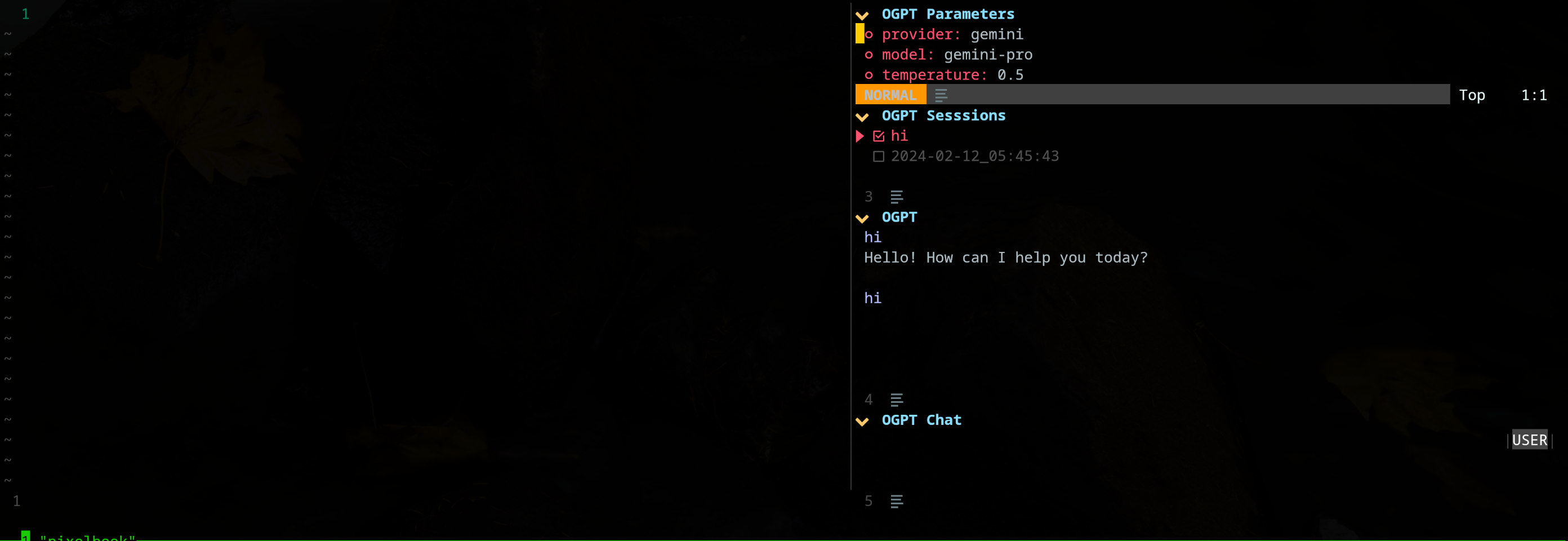
El complemento edgy.nvim ofrece una ventana lateral (ubicada a la derecha de forma predeterminada) que proporciona un espacio de trabajo paralelo donde puede trabajar en su proyecto mientras interactúa con OGPT. Aquí hay un ejemplo de una configuración 'vanguardista'.
{
{
  " huynle/ogpt.nvim " ,
    event = " VeryLazy " ,
    opts = {
      default_provider = " ollama " ,
      edgy = true , -- enable this!
      single_window = false , -- set this to true if you want only one OGPT window to appear at a time
      providers = {
        ollama = {
          api_host = os.getenv ( " OLLAMA_API_HOST " ) or " http://localhost:11434 " ,
          api_key = os.getenv ( " OLLAMA_API_KEY " ) or " " ,
        }
      }
    },
    dependencies = {
      " MunifTanjim/nui.nvim " ,
      " nvim-lua/plenary.nvim " ,
      " nvim-telescope/telescope.nvim "
    }
},
{
    " folke/edgy.nvim " ,
    event = " VeryLazy " ,
    init = function ()
      vim . opt . laststatus = 3
      vim . opt . splitkeep = " screen " -- or "topline" or "screen"
    end ,
    opts = {
      exit_when_last = false ,
      animate = {
        enabled = false ,
      },
      wo = {
        winbar = true ,
        winfixwidth = true ,
        winfixheight = false ,
        winhighlight = " WinBar:EdgyWinBar,Normal:EdgyNormal " ,
        spell = false ,
        signcolumn = " no " ,
      },
      keys = {
        -- -- close window
        [ " q " ] = function ( win )
          win : close ()
        end ,
        -- close sidebar
        [ " Q " ] = function ( win )
          win . view . edgebar : close ()
        end ,
        -- increase width
        [ " <S-Right> " ] = function ( win )
          win : resize ( " width " , 3 )
        end ,
        -- decrease width
        [ " <S-Left> " ] = function ( win )
          win : resize ( " width " , - 3 )
        end ,
        -- increase height
        [ " <S-Up> " ] = function ( win )
          win : resize ( " height " , 3 )
        end ,
        -- decrease height
        [ " <S-Down> " ] = function ( win )
          win : resize ( " height " , - 3 )
        end ,
      },
      right = {
        {
          title = " OGPT Popup " ,
          ft = " ogpt-popup " ,
          size = { width = 0.2 },
          wo = {
            wrap = true ,
          },
        },
        {
          title = " OGPT Parameters " ,
          ft = " ogpt-parameters-window " ,
          size = { height = 6 },
          wo = {
            wrap = true ,
          },
        },
        {
          title = " OGPT Template " ,
          ft = " ogpt-template " ,
          size = { height = 6 },
        },
        {
          title = " OGPT Sessions " ,
          ft = " ogpt-sessions " ,
          size = { height = 6 },
          wo = {
            wrap = true ,
          },
        },
        {
          title = " OGPT System Input " ,
          ft = " ogpt-system-window " ,
          size = { height = 6 },
        },
        {
          title = " OGPT " ,
          ft = " ogpt-window " ,
          size = { height = 0.5 },
          wo = {
            wrap = true ,
          },
        },
        {
          title = " OGPT {{{selection}}} " ,
          ft = " ogpt-selection " ,
          size = { width = 80 , height = 4 },
          wo = {
            wrap = true ,
          },
        },
        {
          title = " OGPt {{{instruction}}} " ,
          ft = " ogpt-instruction " ,
          size = { width = 80 , height = 4 },
          wo = {
            wrap = true ,
          },
        },
        {
          title = " OGPT Chat " ,
          ft = " ogpt-input " ,
          size = { width = 80 , height = 4 },
          wo = {
            wrap = true ,
          },
        },
      },
    },
  }
}El complemento expone los siguientes comandos:
OGPT El comando OGPT abre una ventana interactiva para comunicarse con Backends LLM. La ventana interactiva consta de cuatro paneles:
| Área | Atajos predeterminados | Descripción |
|---|---|---|
| Común | CTRL-O | Panel de parámetros (parámetros OGPT) y panel de sesiones (sesiones OGPT). |
| Ctrl-N | Crea una nueva sesión. | |
| Ctrl-C | Cerrar Ogpt. | |
| CTRL-I | Copiar código en la última respuesta de LLM en el área de texto de salida OGPT. | |
| CTRL-X | Deja de generar respuesta. | |
| Pestaña | Ciclo a través de paneles. | |
| OGPT | K | Respuesta previa. |
| J | Siguiente respuesta. | |
| CTRL-U | Desplácese hacia arriba. | |
| Ctrl-d | Desplácese hacia abajo. | |
| Chat ogpt | Ingresar (modo normal) | Envíe un indicador a LLM. |
| Alternativo (Modo de entrada) | Envíe un indicador a LLM. | |
| Ctrl-y | Copie la última respuesta de LLM en el área de texto de salida OGPT. | |
| CTRL-R | Alternar rol (asistente o usuario). | |
| CTRL-S | Mensaje del sistema alternativo. | |
| Parámetros OGPT | Ingresar | Cambiar el parámetro. |
| Sesiones OGPT | Ingresar | Sesión de interruptor. |
| d | Eliminar sesión. | |
| riñonal | Cambiar el nombre de la sesión. Tenga en cuenta que no se puede eliminar una sesión activa. |
Los atajos para la ventana interactiva OGPT se pueden modificar en opts.chat.keymaps .
OGPTActAs Comando OGPTActAs que abre una selección rápida de increíbles indicaciones OGPT que se utilizarán con el modelo mistral:7b .
OGPTRun [action_name] OGPTRun [action_name] se ejecuta LLM con una acción predefinida llamada [action_name] . Existen acciones predeterminadas proporcionadas por OGPT y acciones personalizadas definidas por los usuarios.
Una acción requiere parámetros para configurar su comportamiento. Los parámetros del modelo predeterminados se definen en actions.<action_name> en config.luA, y los parámetros del modelo personalizado se definen en un archivo de configuración OGPT personalizado o en un archivo de configuración de acciones separado como actions.json .
Algunos de los parámetros de acción incluyen:
type : el tipo de interfaz OGPT. Actualmente, hay tres tipos de interfaz OGPT:popup : ventana emergente ligeraedit : ventana OGPTcompletions : no abre una ventana, se completa directamente en la ventana de ediciónstrategy : determina la forma en que se comporta la interfaz OGPT. Hay strategy específicas que puede usar para cada type :type = "popup" : visualizar, reemplazar, agregar, prepend, Quick_fixtype = "completions" : mostrar, reemplazar, agregar, prependertype = "edits" : editar, edit_codesystem : aviso del sistemaparams : parámetros del modelo. Los parámetros del modelo predeterminado se definen en opts.providers.<provider_name>.api_params . Puede personalizar los parámetros del modelo en opts.actions.<action_name>.params y anular los parámetros del modelo predeterminado.model : LLM Modelo para usar para la acciónstop : condición para que LLM deje de generar respuesta. Por ejemplo, una condición de parada útil para codellama es "` `` ". Consulte la acción "Optimize_code" en la configuración de Ejemplo lazy.nvim .temperature : variabilidad de la respuesta de LLMfrequency_penalty : alguien explica por favormax_tokens : número máximo de tokenstop_p : alguien explica por favortemplate : plantilla de inmediato. La plantilla define una instrucción general que LLM debe seguir. La plantilla puede incluir el argumento de la plantilla en forma de {{{<argument_name>}}} , donde <argument_name> es un argumento de plantilla definido en args . Aparte de los argumentos definidos en args , puede incluir los siguientes argumentos:{{{input}}} : el texto seleccionado en modo visual.{{{filetype}}} : el tipo de archivo con el que está interactuando.args : argumento de plantilla. Los argumentos de la plantilla definen los argumentos que reemplazan los argumentos con el mismo nombre en template . Algunos argumentos de plantilla comunes incluyen:instruction : Instrucción personalizada para que la LLM lo siga. Tiende a ser más específico y estructurado que la instrucción general que entra en template .lang : Lenguaje. A menudo se usa para acciones relacionadas con el lenguaje, como traducción o verificación de gramática. Las acciones predeterminadas se definen en actions.<action_name> en config.lua.
OGPTRun edit_with_instructions OGPTRun edit_with_instructions abre una ventana interactiva para editar texto o ventana completa seleccionada utilizando el modelo definido en config.<provider_name>.api_params .
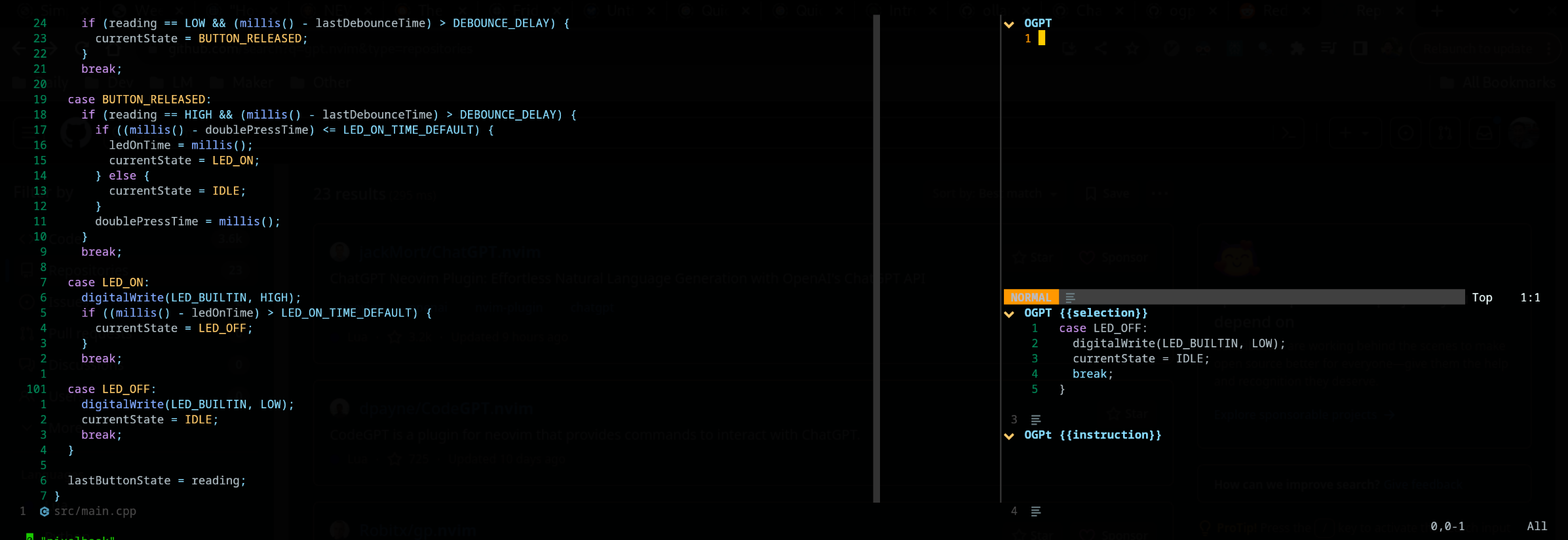
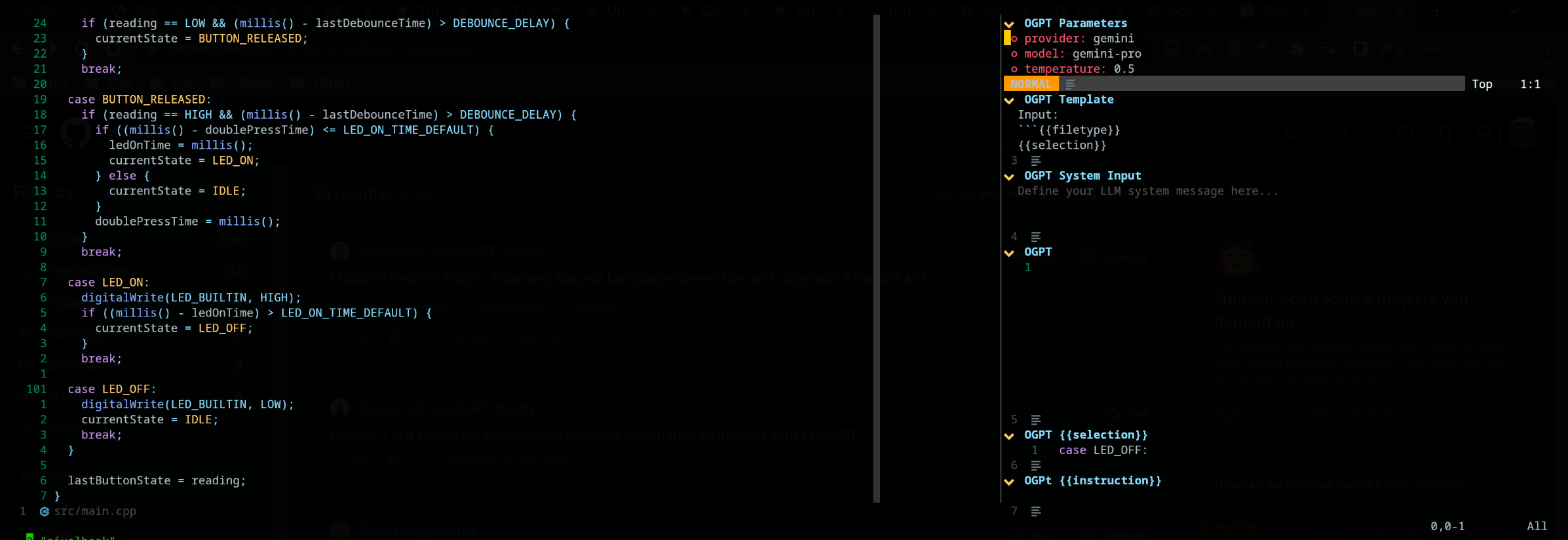
De forma predeterminada, el tipo de interfaz de OGPTRun edit_with_instructions es edit , que abre una ventana interactiva a la derecha. En la ventana, puede usar <co> (KEYMAP predeterminado, se puede personalizar) para abrir y cerrar los paneles de parámetros. Tenga en cuenta que esta captura de pantalla está usando edgy.nvim
Puede personalizar las acciones OGPT definiéndolas en un archivo de configuración OGPT personalizado o en un archivo de acción separado. Las configuraciones de modelo predeterminadas en config.lua pueden ser buenas referencias al hacer sus propias acciones personalizadas.
Puede configurar acciones en su propio archivo de configuración OGPT (generalmente en un archivo LUA como ogpt.lua si usa NEOVIM). En un archivo de configuración OGPT personalizado, debe definir acciones en actions.<action_name> Como la forma en que las acciones predeterminadas se definen en config.lua.
 --- config options lua
opts = {
  ...
  actions = {
    grammar_correction = {
      -- type = "popup", -- could be a string or table to override
      type = {
        popup = { -- overrides the default popup options - https://github.com/huynle/ogpt.nvim/blob/main/lua/ogpt/config.lua#L147-L180
          edgy = true
        }
      },
      strategy = " replace " ,
      provider = " ollama " , -- default to "default_provider" if not provided
      model = " mixtral:7b " , -- default to "provider.<default_provider>.model" if not provided
      template = " Correct the given text to standard {{{lang}}}: nn ```{{{input}}}``` " ,
      system = " You are a helpful note writing assistant, given a text input, correct the text only for grammar and spelling error. You are to keep all formatting the same, e.g. markdown bullets, should stay as a markdown bullet in the result, and indents should stay the same. Return ONLY the corrected text. " ,
      params = {
        temperature = 0.3 ,
      },
      args = {
        lang = {
          type = " string " ,
          optional = " true " ,
          default = " english " ,
        },
      },
    },
  ...
  }
}
El tipo edit consiste en mostrar la salida al lado de la entrada y disponible para obtener más información sobre edición.
La estrategia display muestra la salida en una ventana flotante. append y replace modificar el texto directamente en el búfer con "A" o "R"
Es posible definir acciones personalizadas utilizando un archivo JSON. Consulte el ejemplo en actions.json como referencia.
Un ejemplo de acción personalizada puede parecer lo siguiente: ( # marca comentarios)
{
  "action_name" : {
    "type" : " popup " , # "popup" or "edit"
    "template" : " A template using possible variable: {{{filetype}}} (neovim filetype), {{{input}}} (the selected text) an {{{argument}}} (provided on the command line) " ,
    "strategy" : " replace " , # or "display" or "append" or "edit"
    "params" : { # parameters according to the official Ollama API
      "model" : " mistral:7b " , # or any other model supported by `"type"` in the Ollama API, use the playground for reference
      "stop" : [
        " ``` " # a string used to stop the model
      ]
    }
    "args" : {
      "argument" : " some value " -- or function
    }
  }
}
Si desea usar otros archivos de acción, debe agregar las rutas a esos archivos a defaults.actions_paths en config.lua.
En la marcha, puede ejecutar una línea de comando para llamar a OGPT. A continuación se proporciona un ejemplo para reemplazar la llamada Grammar_Correction. :OGPTRun grammar_correction {provider="openai", model="gpt-4"}
Para que sea aún más dinámico, puede cambiarlo para que el usuario ingrese el proveedor/modelo o cualquier parámetro en el punto en el punto cuando se ejecuta el comando. :OGPTRun grammar_correction {provider=vim.fn.input("Provider: "), type={popup={edgy=false}}}}
Además, en el ejemplo anterior, edgy.nvim se puede apagar. Para que la respuesta emergente en línea donde estaría el cursor. Para obtener opciones adicionales para la ventana emergente, lea https://github.com/huynle/ogpt.nvim/blob/main/lua/ogpt/config.lua#l147-l180
Por ejemplo, usted y lo tienen ventana emergente y cambia enter = false , lo que deja el cursor en la misma ubicación, en lugar de moverlo a la ventana emergente.
Además, para usuarios avanzados, esto le permite usar VIM Autocommands. Por ejemplo, el autocompleto puede ocurrir cuando el cursor se detiene. Mire los diversos ayudantes de plantilla para estas opciones avanzadas, porque ahora
Actualmente, las entradas dadas a la API se escanea para {{{<template_helper_name>}}} para la expansión. Esto es útil cuando desea dar un poco más de contexto a sus solicitudes de API, o simplemente para enganchar llamadas de funciones adicionales.
Mire este archivo para obtener los ayudantes de plantilla más actualizados. Si tiene más ayudantes de plantilla, haga un MR, ¡su contribución es apreciada!
https://github.com/huynle/ogpt.nvim/blob/main/lua/ogpt/flows/actions/template_helpers.lua
Esta es una acción personalizada que uso todo el tiempo para usar las ventanas visibles como contexto para que AI responda cualquier pregunta en línea.
....
  -- Other OGPT configurations here
  ....
  actions = {
    infill_visible_code = {
      type = " popup " ,
      template = [[
      Given the following code snippets, please complete the code by infilling the rest of the code in between the two
      code snippets for BEFORE and AFTER, these snippets are given below.


      Code BEFORE infilling position:
      ```{{{filetype}}}
      {{{visible_window_content}}}
      {{{before_cursor}}}
      ```

      Code AFTER infilling position:
      ```{{{filetype}}}
      {{{after_cursor}}}
      ```


      Within the given snippets, complete the instructions that are given in between the
      triple percent sign '%%%-' and '-%%%'. Note that the instructions as
      could be multilines AND/OR it could be in a comment block of the code!!!

      Lastly, apply the following conditions to your response.
      * The response should replace the '%%%-' and '-%%%' if the code snippet was to be reused.
      * PLEASE respond ONLY with the answers to the given instructions.
      ]] ,
      strategy = " display " ,
      -- provider = "textgenui",
      -- model = "mixtral-8-7b",
      -- params = {
      --   max_new_tokens = 1000,
      -- },
    },
  -- more actions here
  }
.... Cambie el modelo abriendo los paneles de parámetros predeterminados a (CTRL-O) o su camino hacia él y luego presione Entrar () en el campo Modelo para cambiarlo. Debe enumerar todos los modelos disponibles en su proveedor de LLM. 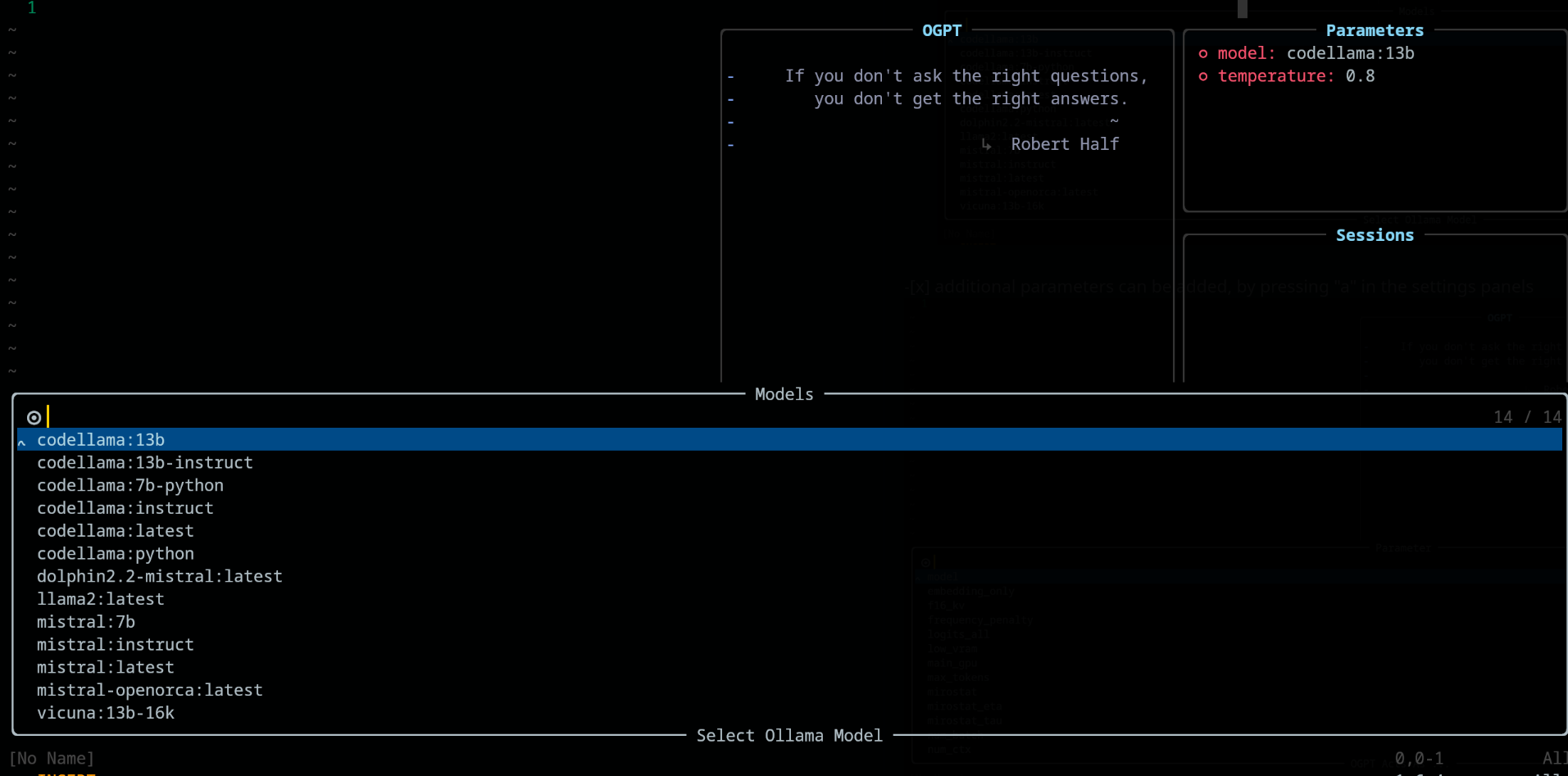
En el panel de parámetros , agregue y elimine los parámetros utilizando las teclas "A" y "D" respectivamente 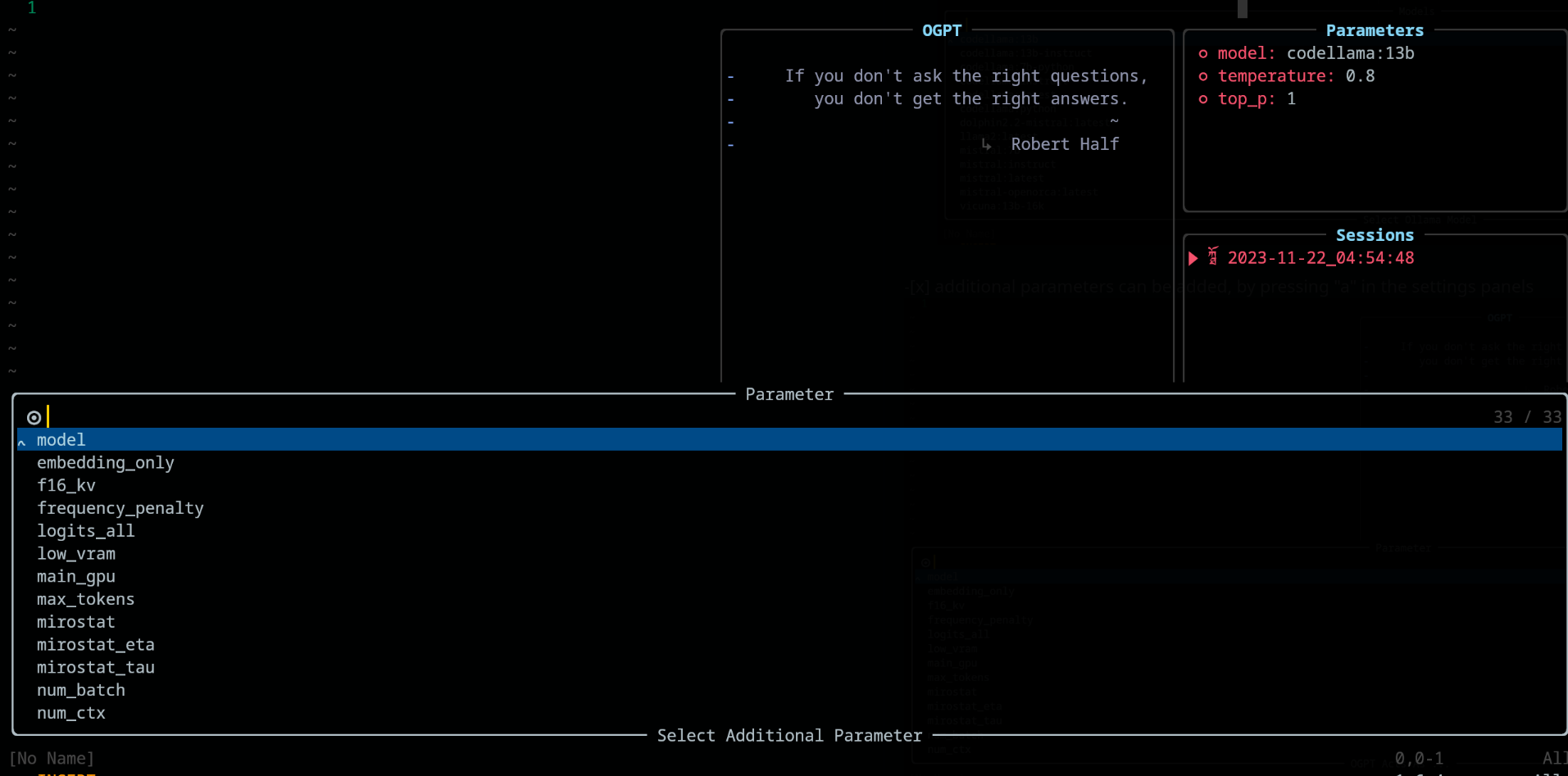
Al usar OGPT , las siguientes teclas están disponibles en config.chat.keymaps
https://github.com/huynle/ogpt.nvim/blob/main/lua/ogpt/config.lua#l51-l71
edit y edit_codehttps://github.com/huynle/ogpt.nvim/blob/main/lua/ogpt/config.lua#l18-l28
https://github.com/huynle/ogpt.nvim/blob/main/lua/ogpt/config.lua#l174-l181
Cuando se abre los paneles de parámetros (con <Co> ), la configuración se puede modificar presionando Enter en la configuración relacionada. Las configuraciones se guardan en todas las sesiones.
lazy.nvim return {
{
" huynle/ogpt.nvim " ,
dev = true ,
event = " VeryLazy " ,
keys = {
{
" <leader>]] " ,
" <cmd>OGPTFocus<CR> " ,
desc = " GPT " ,
},
{
" <leader>] " ,
" :'<,'>OGPTRun<CR> " ,
desc = " GPT " ,
mode = { " n " , " v " },
},
{
" <leader>]c " ,
" <cmd>OGPTRun edit_code_with_instructions<CR> " ,
" Edit code with instruction " ,
mode = { " n " , " v " },
},
{
" <leader>]e " ,
" <cmd>OGPTRun edit_with_instructions<CR> " ,
" Edit with instruction " ,
mode = { " n " , " v " },
},
{
" <leader>]g " ,
" <cmd>OGPTRun grammar_correction<CR> " ,
" Grammar Correction " ,
mode = { " n " , " v " },
},
{
" <leader>]r " ,
" <cmd>OGPTRun evaluate<CR> " ,
" Evaluate " ,
mode = { " n " , " v " },
},
{
" <leader>]i " ,
" <cmd>OGPTRun get_info<CR> " ,
" Get Info " ,
mode = { " n " , " v " },
},
{ " <leader>]t " , " <cmd>OGPTRun translate<CR> " , " Translate " , mode = { " n " , " v " } },
{ " <leader>]k " , " <cmd>OGPTRun keywords<CR> " , " Keywords " , mode = { " n " , " v " } },
{ " <leader>]d " , " <cmd>OGPTRun docstring<CR> " , " Docstring " , mode = { " n " , " v " } },
{ " <leader>]a " , " <cmd>OGPTRun add_tests<CR> " , " Add Tests " , mode = { " n " , " v " } },
{ " <leader>]<leader> " , " <cmd>OGPTRun custom_input<CR> " , " Custom Input " , mode = { " n " , " v " } },
{ " g? " , " <cmd>OGPTRun quick_question<CR> " , " Quick Question " , mode = { " n " } },
{ " <leader>]f " , " <cmd>OGPTRun fix_bugs<CR> " , " Fix Bugs " , mode = { " n " , " v " } },
{
" <leader>]x " ,
" <cmd>OGPTRun explain_code<CR> " ,
" Explain Code " ,
mode = { " n " , " v " },
},
},
opts = {
default_provider = " ollama " ,
-- default edgy flag
-- set this to true if you prefer to use edgy.nvim (https://github.com/folke/edgy.nvim) instead of floating windows
edgy = false ,
providers = {
ollama = {
api_host = os.getenv ( " OLLAMA_API_HOST " ),
-- default model
model = " mistral:7b " ,
-- model definitions
models = {
-- alias to actual model name, helpful to define same model name across multiple providers
coder = " deepseek-coder:6.7b " ,
-- nested alias
cool_coder = " coder " ,
general_model = " mistral:7b " ,
custom_coder = {
name = " deepseek-coder:6.7b " ,
modify_url = function ( url )
-- completely modify the URL of a model, if necessary. This function is called
-- right before making the REST request
return url
end ,
-- custom conform function. Each provider have a dedicated conform function where all
-- of OGPT chat info is passed into the conform function to be massaged to the
-- correct format that the provider is expecting. This function, if provided will
-- override the provider default conform function
-- conform_fn = function(ogpt_params)
-- return provider_specific_params
-- end,
},
},
-- default model params for all 'actions'
api_params = {
model = " mistral:7b " ,
temperature = 0.8 ,
top_p = 0.9 ,
},
api_chat_params = {
model = " mistral:7b " ,
frequency_penalty = 0 ,
presence_penalty = 0 ,
temperature = 0.5 ,
top_p = 0.9 ,
},
},
openai = {
api_host = os.getenv ( " OPENAI_API_HOST " ),
api_key = os.getenv ( " OPENAI_API_KEY " ),
api_params = {
model = " gpt-4 " ,
temperature = 0.8 ,
top_p = 0.9 ,
},
api_chat_params = {
model = " gpt-4 " ,
frequency_penalty = 0 ,
presence_penalty = 0 ,
temperature = 0.5 ,
top_p = 0.9 ,
},
},
textgenui = {
api_host = os.getenv ( " TEXTGEN_API_HOST " ),
api_key = os.getenv ( " TEXTGEN_API_KEY " ),
api_params = {
model = " mixtral-8-7b " ,
temperature = 0.8 ,
top_p = 0.9 ,
},
api_chat_params = {
model = " mixtral-8-7b " ,
frequency_penalty = 0 ,
presence_penalty = 0 ,
temperature = 0.5 ,
top_p = 0.9 ,
},
},
},
yank_register = " + " ,
edit = {
edgy = nil , -- use global default, override if defined
diff = false ,
keymaps = {
close = " <C-c> " ,
accept = " <M-CR> " ,
toggle_diff = " <C-d> " ,
toggle_parameters = " <C-o> " ,
cycle_windows = " <Tab> " ,
use_output_as_input = " <C-u> " ,
},
},
popup = {
edgy = nil , -- use global default, override if defined
position = 1 ,
size = {
width = " 40% " ,
height = 10 ,
},
padding = { 1 , 1 , 1 , 1 },
enter = true ,
focusable = true ,
zindex = 50 ,
border = {
style = " rounded " ,
},
buf_options = {
modifiable = false ,
readonly = false ,
filetype = " ogpt-popup " ,
syntax = " markdown " ,
},
win_options = {
wrap = true ,
linebreak = true ,
winhighlight = " Normal:Normal,FloatBorder:FloatBorder " ,
},
keymaps = {
close = { " <C-c> " , " q " },
accept = " <C-CR> " ,
append = " a " ,
prepend = " p " ,
yank_code = " c " ,
yank_to_register = " y " ,
},
},
chat = {
edgy = nil , -- use global default, override if defined
welcome_message = WELCOME_MESSAGE ,
loading_text = " Loading, please wait ... " ,
question_sign = " " , -- ?
answer_sign = " ﮧ " , -- ?
border_left_sign = " | " ,
border_right_sign = " | " ,
max_line_length = 120 ,
sessions_window = {
active_sign = " ? " ,
inactive_sign = " ? " ,
current_line_sign = " " ,
border = {
style = " rounded " ,
text = {
top = " Sessions " ,
},
},
win_options = {
winhighlight = " Normal:Normal,FloatBorder:FloatBorder " ,
},
},
keymaps = {
close = { " <C-c> " },
yank_last = " <C-y> " ,
yank_last_code = " <C-i> " ,
scroll_up = " <C-u> " ,
scroll_down = " <C-d> " ,
new_session = " <C-n> " ,
cycle_windows = " <Tab> " ,
cycle_modes = " <C-f> " ,
next_message = " J " ,
prev_message = " K " ,
select_session = " <CR> " ,
rename_session = " r " ,
delete_session = " d " ,
draft_message = " <C-d> " ,
edit_message = " e " ,
delete_message = " d " ,
toggle_parameters = " <C-o> " ,
toggle_message_role = " <C-r> " ,
toggle_system_role_open = " <C-s> " ,
stop_generating = " <C-x> " ,
},
},
-- {{{input}}} is always available as the selected/highlighted text
actions = {
grammar_correction = {
type = " popup " ,
template = " Correct the given text to standard {{{lang}}}: nn ```{{{input}}}``` " ,
system = " You are a helpful note writing assistant, given a text input, correct the text only for grammar and spelling error. You are to keep all formatting the same, e.g. markdown bullets, should stay as a markdown bullet in the result, and indents should stay the same. Return ONLY the corrected text. " ,
strategy = " replace " ,
params = {
temperature = 0.3 ,
},
args = {
lang = {
type = " string " ,
optional = " true " ,
default = " english " ,
},
},
},
translate = {
type = " popup " ,
template = " Translate this into {{{lang}}}: nn {{{input}}} " ,
strategy = " display " ,
params = {
temperature = 0.3 ,
},
args = {
lang = {
type = " string " ,
optional = " true " ,
default = " vietnamese " ,
},
},
},
keywords = {
type = " popup " ,
template = " Extract the main keywords from the following text to be used as document tags. nn ```{{{input}}}``` " ,
strategy = " display " ,
params = {
model = " general_model " , -- use of model alias, generally, this model alias should be available to all providers in use
temperature = 0.5 ,
frequency_penalty = 0.8 ,
},
},
do_complete_code = {
type = " popup " ,
template = " Code: n ```{{{filetype}}} n {{{input}}} n ``` nn Completed Code: n ```{{{filetype}}} " ,
strategy = " display " ,
params = {
model = " coder " ,
stop = {
" ``` " ,
},
},
},
quick_question = {
type = " popup " ,
args = {
-- template expansion
question = {
type = " string " ,
optional = " true " ,
default = function ()
return vim . fn . input ( " question: " )
end ,
},
},
system = " You are a helpful assistant " ,
template = " {{{question}}} " ,
strategy = " display " ,
},
custom_input = {
type = " popup " ,
args = {
instruction = {
type = " string " ,
optional = " true " ,
default = function ()
return vim . fn . input ( " instruction: " )
end ,
},
},
system = " You are a helpful assistant " ,
template = " Given the follow snippet, {{{instruction}}}. nn snippet: n ```{{{filetype}}} n {{{input}}} n ``` " ,
strategy = " display " ,
},
optimize_code = {
type = " popup " ,
system = " You are a helpful coding assistant. Complete the given prompt. " ,
template = " Optimize the code below, following these instructions: nn {{{instruction}}}. nn Code: n ```{{{filetype}}} n {{{input}}} n ``` nn Optimized version: n ```{{{filetype}}} " ,
strategy = " edit_code " ,
params = {
model = " coder " ,
stop = {
" ``` " ,
},
},
},
},
},
dependencies = {
" MunifTanjim/nui.nvim " ,
" nvim-lua/plenary.nvim " ,
" nvim-telescope/telescope.nvim " ,
},
},
} Cuando actualice sus acciones con frecuencia, le recomiendo agregar las siguientes claves a su configuración ogpt lazy.nvim Esto simplemente recarga ogpt.nvim en el lugar para ver sus acciones actualizadas.
 ...
  -- other config options here
    keys = {
      {
        " <leader>ro " ,
        " <Cmd>Lazy reload ogpt.nvim<CR> " ,
        desc = " RELOAD ogpt " ,
      },
    ...
    }
  -- other config options here
... Este es un ejemplo de cómo configurar un servidor de modelo Ollama Mixtral que podría estar en un servidor diferente. Nota En el ejemplo a continuación puede:
secret_model es un alias para mixtral-8-7b , por lo que en sus actions puede usar secret_model . Esto es útil cuando tiene múltiples proveedores que tienen el mismo poder que MixTral, y desea intercambiar diferentes proveedores para usar, según el entorno de desarrollo o por otras razones.mixtral-8-7b en este ejemplo, este modelo aparecerá en sus opciones de modelos en su chat y edit acciones.conform_message_fn se usa para anular la función de proveedor predeterminada conform_message . Esta función permite que el masaje de los parámetros de solicitud de API se ajuste al modelo específico. Esto es realmente útil cuando necesita modificar los mensajes para adaptarse a la plantilla capacitada del modelo.conform_request_fn se usa para anular la función de proveedor predeterminada conform_request . Esta función (o la función predeterminada del proveedor) se llama al final, justo antes de hacer la llamada API. El masaje final se puede hacer aquí. -- advanced model, can take the following structure
providers = {
ollama = {
model = " secret_model " , -- default model for ollama
models = {
...
secret_model = " mixtral-8-7b " ,
[ " mixtral-8-7b " ] = {
params = {
-- the parameters here are FORCED into the final API REQUEST, OVERRIDDING
-- anything that was set before
max_new_token = 200 ,
},
modify_url = function ( url )
-- given a URL, this function modifies the URL specifically to the model
-- This is useful when you have different models hosted on different subdomains like
-- https://model1.yourdomain.com/
-- https://model2.yourdomain.com/
local new_model = " mixtral-8-7b "
-- local new_model = "mistral-7b-tgi-predictor-ai-factory"
local host = url : match ( " https?://([^/]+) " )
local subdomain , domain , tld = host : match ( " ([^.]+)%.([^.]+)%.([^.]+) " )
local _new_url = url : gsub ( host , new_model .. " . " .. domain .. " . " .. tld )
return _new_url
end ,
-- conform_messages_fn = function(params)
-- Different models might have different instruction format
-- for example, Mixtral operates on `<s> [INST] Instruction [/INST] Model answer</s> [INST] Follow-up instruction [/INST] `
-- look in the `providers` folder of the plugin for examples
-- end,
-- conform_request_fn = function(params)
-- API request might need custom format, this function allows that to happen
-- look in the `providers` folder of the plugin for examples
-- end,
}
}
}
}
TBD
Si le gusta su configuración edgy.nvim , use algo como esto para las opciones de configuración de su complemento para edgy.nvim . Después de establecer esto, asegúrese de habilitar las opciones edgy = true en sus opciones de configuración para ogpt.nvim .
 opts = {
  right = {
    {
      title = " OGPT Popup " ,
      ft = " ogpt-popup " ,
      size = { width = 0.2 },
      wo = {
        wrap = true ,
      },
    },
    {
      title = " OGPT Parameters " ,
      ft = " ogpt-parameters-window " ,
      size = { height = 6 },
      wo = {
        wrap = true ,
      },
    },
    {
      title = " OGPT Template " ,
      ft = " ogpt-template " ,
      size = { height = 6 },
    },
    {
      title = " OGPT Sessions " ,
      ft = " ogpt-sessions " ,
      size = { height = 6 },
      wo = {
        wrap = true ,
      },
    },
    {
      title = " OGPT System Input " ,
      ft = " ogpt-system-window " ,
      size = { height = 6 },
    },
    {
      title = " OGPT " ,
      ft = " ogpt-window " ,
      size = { height = 0.5 },
      wo = {
        wrap = true ,
      },
    },
    {
      title = " OGPT {{{selection}}} " ,
      ft = " ogpt-selection " ,
      size = { width = 80 , height = 4 },
      wo = {
        wrap = true ,
      },
    },
    {
      title = " OGPt {{{instruction}}} " ,
      ft = " ogpt-instruction " ,
      size = { width = 80 , height = 4 },
      wo = {
        wrap = true ,
      },
    },
    {
      title = " OGPT Chat " ,
      ft = " ogpt-input " ,
      size = { width = 80 , height = 4 },
      wo = {
        wrap = true ,
      },
    },
  },
}providersconfig.lua , el valor predeterminado es ollamaOGPTRun muestra el selector de telescopio type="popup" y strategy="display" -- or append, prepend, replace, quick_fix ¡Gracias al autor de jackMort/ChatGPT.nvim por crear un marco sin problemas para interactuar con OGPT en Neovim!
Cómprame un café





