ogpt.nvim
1.0.0

プロバイダーを指定しない場合、 ollamaデフォルトのプロバイダーになります。 http://localhost:11434はエンドポイントです。 mistral:7bデフォルトになります。
 -- Simple, minimal Lazy.nvim configuration
{
  " huynle/ogpt.nvim " ,
    event = " VeryLazy " ,
    opts = {
      default_provider = " ollama " ,
      providers = {
        ollama = {
          api_host = os.getenv ( " OLLAMA_API_HOST " ) or " http://localhost:11434 " ,
          api_key = os.getenv ( " OLLAMA_API_KEY " ) or " " ,
        }
      }
    },
    dependencies = {
      " MunifTanjim/nui.nvim " ,
      " nvim-lua/plenary.nvim " ,
      " nvim-telescope/telescope.nvim "
    }
}OGPT.nvimには、次のデフォルトが付属しています。設定パラメーターとして構成を渡すことにより、どのフィールドをオーバーライドできます。
https://github.com/huynle/ogpt.nvim/blob/main/lua/ogpt/config.lua
OGPT 、Ollama OGPT APIを簡単に利用できるNeoVimプラグインであり、プロンプトに応じて編集者内でOllamaから直接自然言語応答を生成できるようになります。
curlがインストールされていることを確認してください。 Configurationオプションapi_host_cmdまたは環境変数を使用したカスタムOllama APIホスト$OLLAMA_API_HOSTと呼ばれる環境変数。オラマをリモートで走らせると便利です。
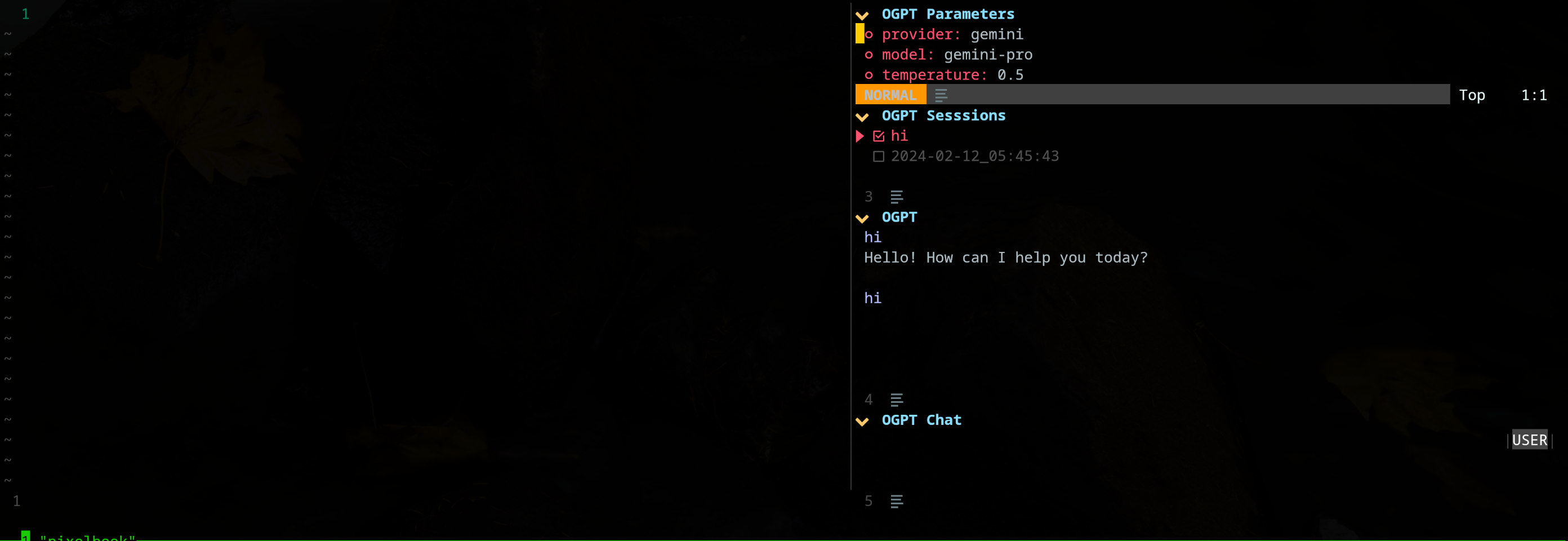
edgy.nvimプラグインは、OGPTと対話しながらプロジェクトに取り組むことができる並列作業スペースを提供するサイドウィンドウ(デフォルトで右に配置されています)を提供します。以下は、「エッジの効いた」構成の例です。
{
{
  " huynle/ogpt.nvim " ,
    event = " VeryLazy " ,
    opts = {
      default_provider = " ollama " ,
      edgy = true , -- enable this!
      single_window = false , -- set this to true if you want only one OGPT window to appear at a time
      providers = {
        ollama = {
          api_host = os.getenv ( " OLLAMA_API_HOST " ) or " http://localhost:11434 " ,
          api_key = os.getenv ( " OLLAMA_API_KEY " ) or " " ,
        }
      }
    },
    dependencies = {
      " MunifTanjim/nui.nvim " ,
      " nvim-lua/plenary.nvim " ,
      " nvim-telescope/telescope.nvim "
    }
},
{
    " folke/edgy.nvim " ,
    event = " VeryLazy " ,
    init = function ()
      vim . opt . laststatus = 3
      vim . opt . splitkeep = " screen " -- or "topline" or "screen"
    end ,
    opts = {
      exit_when_last = false ,
      animate = {
        enabled = false ,
      },
      wo = {
        winbar = true ,
        winfixwidth = true ,
        winfixheight = false ,
        winhighlight = " WinBar:EdgyWinBar,Normal:EdgyNormal " ,
        spell = false ,
        signcolumn = " no " ,
      },
      keys = {
        -- -- close window
        [ " q " ] = function ( win )
          win : close ()
        end ,
        -- close sidebar
        [ " Q " ] = function ( win )
          win . view . edgebar : close ()
        end ,
        -- increase width
        [ " <S-Right> " ] = function ( win )
          win : resize ( " width " , 3 )
        end ,
        -- decrease width
        [ " <S-Left> " ] = function ( win )
          win : resize ( " width " , - 3 )
        end ,
        -- increase height
        [ " <S-Up> " ] = function ( win )
          win : resize ( " height " , 3 )
        end ,
        -- decrease height
        [ " <S-Down> " ] = function ( win )
          win : resize ( " height " , - 3 )
        end ,
      },
      right = {
        {
          title = " OGPT Popup " ,
          ft = " ogpt-popup " ,
          size = { width = 0.2 },
          wo = {
            wrap = true ,
          },
        },
        {
          title = " OGPT Parameters " ,
          ft = " ogpt-parameters-window " ,
          size = { height = 6 },
          wo = {
            wrap = true ,
          },
        },
        {
          title = " OGPT Template " ,
          ft = " ogpt-template " ,
          size = { height = 6 },
        },
        {
          title = " OGPT Sessions " ,
          ft = " ogpt-sessions " ,
          size = { height = 6 },
          wo = {
            wrap = true ,
          },
        },
        {
          title = " OGPT System Input " ,
          ft = " ogpt-system-window " ,
          size = { height = 6 },
        },
        {
          title = " OGPT " ,
          ft = " ogpt-window " ,
          size = { height = 0.5 },
          wo = {
            wrap = true ,
          },
        },
        {
          title = " OGPT {{{selection}}} " ,
          ft = " ogpt-selection " ,
          size = { width = 80 , height = 4 },
          wo = {
            wrap = true ,
          },
        },
        {
          title = " OGPt {{{instruction}}} " ,
          ft = " ogpt-instruction " ,
          size = { width = 80 , height = 4 },
          wo = {
            wrap = true ,
          },
        },
        {
          title = " OGPT Chat " ,
          ft = " ogpt-input " ,
          size = { width = 80 , height = 4 },
          wo = {
            wrap = true ,
          },
        },
      },
    },
  }
}プラグインは次のコマンドを公開します。
OGPT OGPTコマンドは、LLMバックエンドと通信するインタラクティブウィンドウを開きます。インタラクティブウィンドウは、4つのペインで構成されています。
| エリア | デフォルトのショートカット | 説明 |
|---|---|---|
| 一般 | Ctrl-O | トグルパラメーターパネル(OGPTパラメーター)とセッションパネル(OGPTセッション)。 |
| ctrl-n | 新しいセッションを作成します。 | |
| Ctrl-C | ogptを閉じます。 | |
| ctrl-i | OGPT出力テキスト領域のLLMの最新の応答のコードをコピーします。 | |
| Ctrl-X | 応答の生成を停止します。 | |
| タブ | ペインを循環します。 | |
| ogpt | k | 以前の応答。 |
| j | 次の応答。 | |
| Ctrl-u | スクロールアップします。 | |
| ctrl-d | 下にスクロールします。 | |
| OGPTチャット | 入力 (通常モード) | LLMにプロンプトを送信します。 |
| alt-enter (入力モード) | LLMにプロンプトを送信します。 | |
| ctrl-y | OGPT出力テキスト領域のLLMからの最新の応答をコピーします。 | |
| Ctrl-r | トグルロール(アシスタントまたはユーザー)。 | |
| ctrl-s | システムメッセージを切り替えます。 | |
| OGPTパラメーター | 入力 | パラメーターを変更します。 |
| OGPTセッション | 入力 | スイッチセッション。 |
| d | セッションを削除します。 | |
| r | セッションを変更します。アクティブなセッションを削除できないことに注意してください。 |
OGPTインタラクティブウィンドウのショートカットは、 opts.chat.keymapsで変更できます。
OGPTActAs mistral:7bモデルで使用するAwesome OGPTプロンプトからのプロンプト選択を開くOGPTActAsコマンド。
OGPTRun [action_name] OGPTRun [action_name] [action_name]という名前の事前定義されたアクションでLLMを実行します。 OGPTが提供するデフォルトのアクションと、ユーザーが定義するカスタムアクションがあります。
アクションには、その動作を構成するためのパラメーターが必要です。デフォルトのモデルパラメーターは、config.luaのactions.<action_name> config.lua、およびカスタムモデルパラメーターは、カスタムOGPT構成ファイルまたはactions.jsonなどの別のアクション構成ファイルのいずれかで定義されます。
アクションパラメーターには次のものがあります。
type :OGPTインターフェイスのタイプ。現在、OGPTインターフェイスには3種類のタイプがあります。popup :軽量のポップアップウィンドウedit :OGPTウィンドウcompletions :ウィンドウを開けず、編集ウィンドウに直接完了しますstrategy :OGPTインターフェイスの動作方法を決定します。各typeに使用できる特定のstrategyがあります。type = "popup" :表示、交換、追加、prepend、Quick_fixtype = "completions" :表示、交換、追加、prependtype = "edits" :edit、edit_codesystem :システムプロンプトparams :モデルパラメーター。デフォルトのモデルパラメーターは、 opts.providers.<provider_name>.api_paramsで定義されています。 opts.actions.<action_name>.paramsおよびデフォルトモデルパラメーターをオーバーライドできます。model :アクションに使用するLLMモデルstop :LLMが応答の生成を停止する条件。たとえば、 codellamaの便利な停止状態は「 `` `` "です。例のlazy.nvim構成の「optimize_code」アクションを参照してください。temperature :LLMの応答のばらつきfrequency_penalty :誰かが説明してくださいmax_tokens :トークンの最大数top_p :誰かが説明してくださいtemplate :プロンプトテンプレート。テンプレートは、LLMが従わなければならない一般的な指示を定義します。テンプレートには、 {{{<argument_name>}}}の形式のテンプレート引数を含めることができます。ここで、 <argument_name>はargsで定義されたテンプレート引数です。 argsで定義されている引数以外に、次の引数を含めることができます。{{{input}}} :視覚モードで選択したテキスト。{{{filetype}}} :相互作用しているファイルのタイプ。args :テンプレート引数。テンプレート引数は、引数をtemplate内の同じ名前に置き換える引数を定義します。いくつかの一般的なテンプレート引数は次のとおりです。instruction :従うべきLLMのカスタム命令。 templateに入る一般的な命令よりも具体的で構造化される傾向があります。lang :言語。翻訳や文法チェックなどの言語関連のアクションによく使用されます。 デフォルトのアクションは、config.luaのactions.<action_name> 。
OGPTRun edit_with_instructions OGPTRun edit_with_instructionsインタラクティブウィンドウを開き、 config.<provider_name>.api_paramsで定義されたモデルを使用して、選択したテキストまたはウィンドウ全体を編集します。
デフォルトでは、 OGPTRun edit_with_instructionsのインターフェイスタイプがeditおり、右にインタラクティブなウィンドウが開きます。ウィンドウでは、 <co> (デフォルトのキーマップ、カスタマイズできます)を使用して、パラメーターパネルを開閉できます。このスクリーンショットはedgy.nvimを使用しています
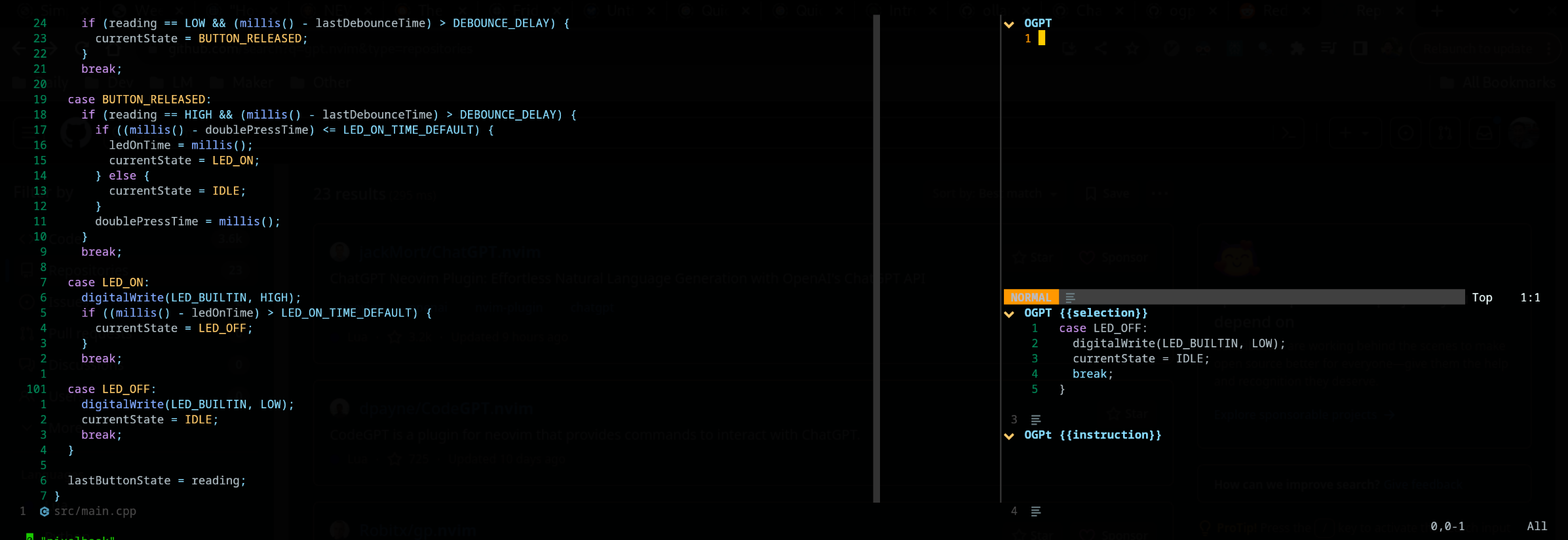
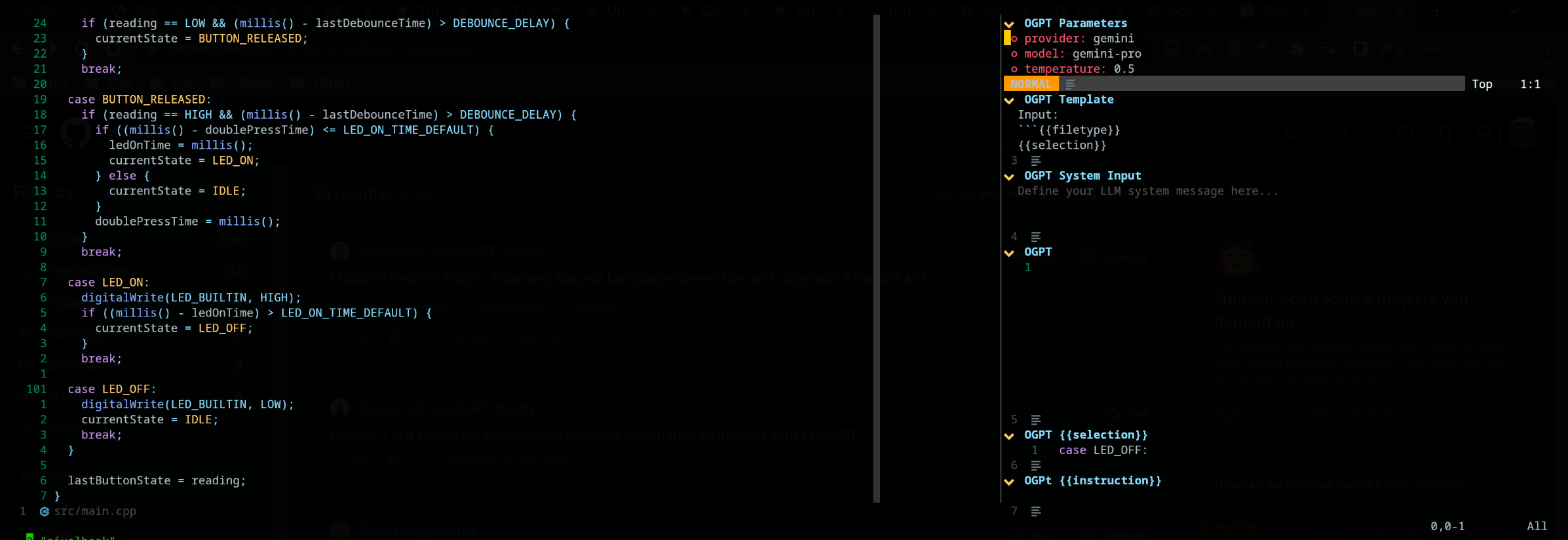
OGPTアクションをカスタムOGPT構成ファイル、または別のアクションファイルで定義することでカスタマイズできます。 config.luaのデフォルトモデル構成は、独自のカスタムアクションを作成するときに適切に参照できます。
独自のOGPT構成ファイルでアクションを構成できます(通常、NeoVIMを使用している場合はogpt.luaのようなLUAファイルで)。カスタムOGPT構成ファイルでは、 actions.<action_name> config.luaでデフォルトアクションが定義される方法のように。
 --- config options lua
opts = {
  ...
  actions = {
    grammar_correction = {
      -- type = "popup", -- could be a string or table to override
      type = {
        popup = { -- overrides the default popup options - https://github.com/huynle/ogpt.nvim/blob/main/lua/ogpt/config.lua#L147-L180
          edgy = true
        }
      },
      strategy = " replace " ,
      provider = " ollama " , -- default to "default_provider" if not provided
      model = " mixtral:7b " , -- default to "provider.<default_provider>.model" if not provided
      template = " Correct the given text to standard {{{lang}}}: nn ```{{{input}}}``` " ,
      system = " You are a helpful note writing assistant, given a text input, correct the text only for grammar and spelling error. You are to keep all formatting the same, e.g. markdown bullets, should stay as a markdown bullet in the result, and indents should stay the same. Return ONLY the corrected text. " ,
      params = {
        temperature = 0.3 ,
      },
      args = {
        lang = {
          type = " string " ,
          optional = " true " ,
          default = " english " ,
        },
      },
    },
  ...
  }
} editタイプは、出力を入力と並べて表示することで構成され、さらに編集プロンプトを使用できます。
display戦略には、フロートウィンドウの出力が表示されます。 「A」または「R」でバッファー内のテキストを直接appendてreplace
JSONファイルを使用してカスタムアクションを定義することができます。参照については、 actions.jsonの例をご覧ください。
カスタムアクションの例は、次のように見える場合があります:( #マークコメント)
{
  "action_name" : {
    "type" : " popup " , # "popup" or "edit"
    "template" : " A template using possible variable: {{{filetype}}} (neovim filetype), {{{input}}} (the selected text) an {{{argument}}} (provided on the command line) " ,
    "strategy" : " replace " , # or "display" or "append" or "edit"
    "params" : { # parameters according to the official Ollama API
      "model" : " mistral:7b " , # or any other model supported by `"type"` in the Ollama API, use the playground for reference
      "stop" : [
        " ``` " # a string used to stop the model
      ]
    }
    "args" : {
      "argument" : " some value " -- or function
    }
  }
}他のアクションファイルを使用する場合は、それらのファイルへのパスをdefaults.actions_paths in config.luaに追加する必要があります。
その場で、コマンドラインを実行してOGPTを呼び出すことができます。 Grammar_Correctionコールを置き換える例を以下に示します。 :OGPTRun grammar_correction {provider="openai", model="gpt-4"}
さらに動的にするために、コマンドが実行されたときにプロバイダー/モデルまたはパラメーターをその場でユーザーによって入力するように変更できます。 :OGPTRun grammar_correction {provider=vim.fn.input("Provider: "), type={popup={edgy=false}}}}
さらに、上記の例では、 edgy.nvimオフにすることができます。それにより、応答はカーソルがどこにあるかをインラインでポップアップします。ポップアップの追加オプションについては、https://github.com/huynle/ogpt.nvim/blob/main/lua/ogpt/config.lua#l147-l180をご覧ください
たとえば、あなたとそれをポップアップと変更してくださいenter = falseします。これにより、ポップアップに移動するのではなく、同じ場所にカーソルが残ります。
さらに、高度なユーザーの場合、これによりVIMオートコマンドを使用できます。たとえば、カーソルが一時停止されたときに自動完了が発生する可能性があります。この高度なオプションのさまざまなテンプレートヘルパーを見てください。
現在、特定されたAPIへの入力は{{{<template_helper_name>}}}の拡張に対してスキャンされます。これは、APIリクエストにもう少しコンテキストを提供する場合、または単に追加の関数呼び出しをフックする場合に役立ちます。
最新のテンプレートヘルパーについては、このファイルを見てください。より多くのテンプレートヘルパーがある場合は、MRを作ってください、あなたの貢献を感謝してください!
https://github.com/huynle/ogpt.nvim/blob/main/lua/ogpt/flows/actions/template_helpers.lua
これは、常に目に見えるウィンドウをコンテキストとして使用して、AIにインラインの質問に答えてもらうカスタムアクションです。
....
  -- Other OGPT configurations here
  ....
  actions = {
    infill_visible_code = {
      type = " popup " ,
      template = [[
      Given the following code snippets, please complete the code by infilling the rest of the code in between the two
      code snippets for BEFORE and AFTER, these snippets are given below.


      Code BEFORE infilling position:
      ```{{{filetype}}}
      {{{visible_window_content}}}
      {{{before_cursor}}}
      ```

      Code AFTER infilling position:
      ```{{{filetype}}}
      {{{after_cursor}}}
      ```


      Within the given snippets, complete the instructions that are given in between the
      triple percent sign '%%%-' and '-%%%'. Note that the instructions as
      could be multilines AND/OR it could be in a comment block of the code!!!

      Lastly, apply the following conditions to your response.
      * The response should replace the '%%%-' and '-%%%' if the code snippet was to be reused.
      * PLEASE respond ONLY with the answers to the given instructions.
      ]] ,
      strategy = " display " ,
      -- provider = "textgenui",
      -- model = "mixtral-8-7b",
      -- params = {
      --   max_new_tokens = 1000,
      -- },
    },
  -- more actions here
  }
....パラメーターパネルをデフォルト(Ctrl-O)に開くか、モデルフィールドのEnter()を押して変更して変更してモデルを変更します。 LLMプロバイダーから利用可能なすべてのモデルをリストする必要があります。 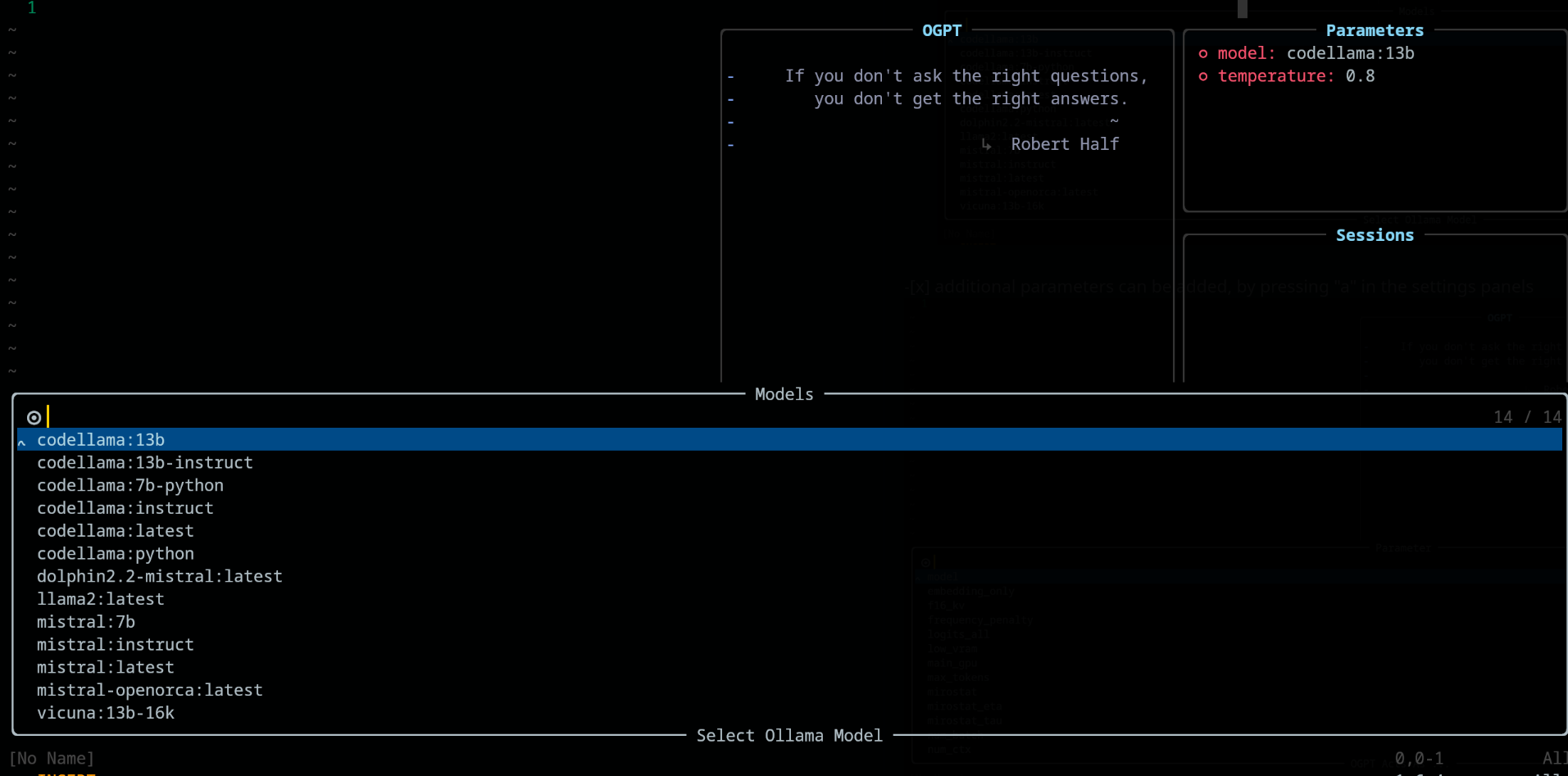
パラメーターパネルでは、それぞれキー「A」と「D」を使用してパラメーターを追加および削除します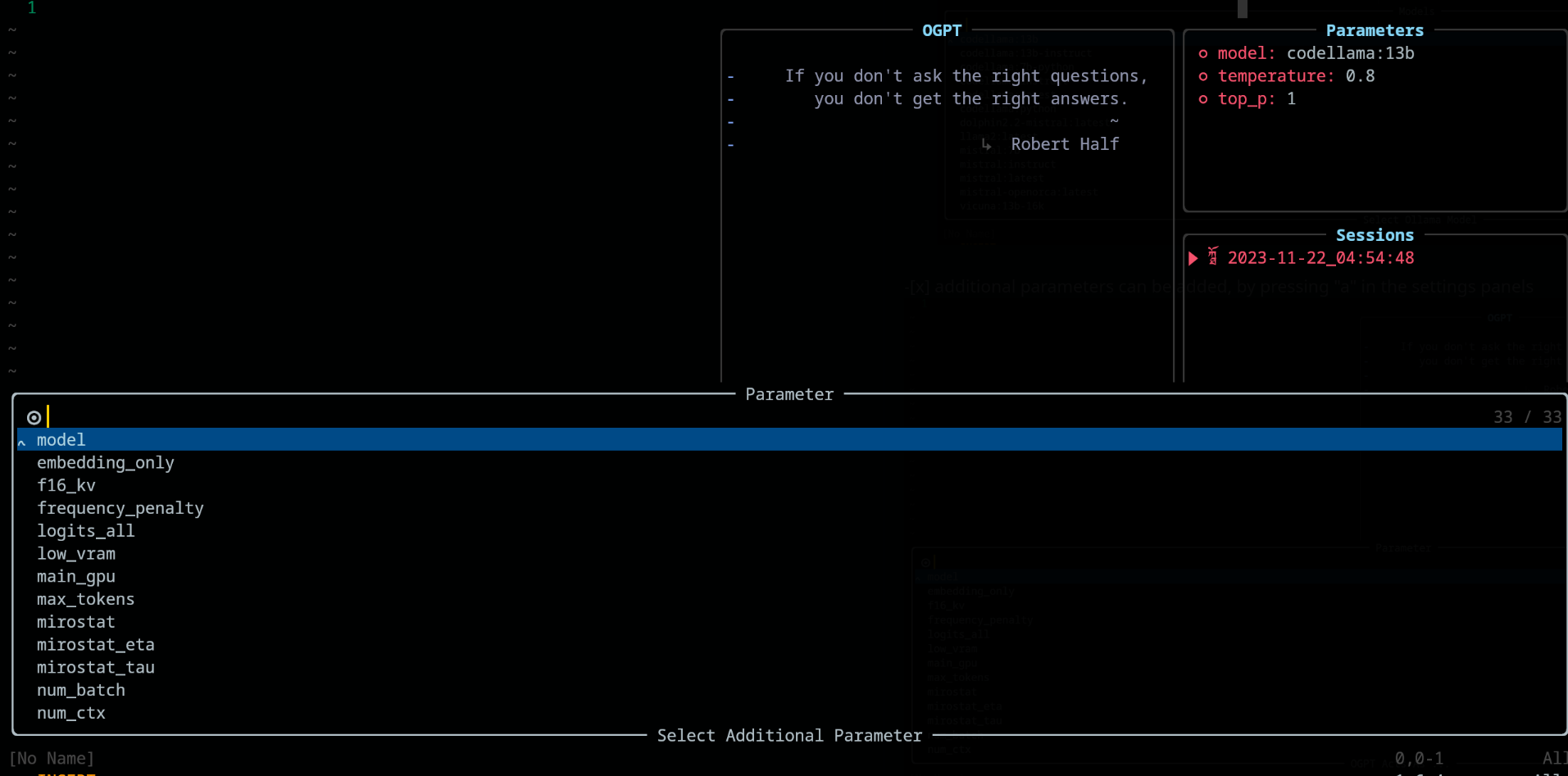
OGPTを使用する場合、次のキーバインディングがconfig.chat.keymapsで利用可能です
https://github.com/huynle/ogpt.nvim/blob/main/lua/ogpt/config.lua#l51-l71
editおよびedit_code戦略用のインタラクティブポップアップhttps://github.com/huynle/ogpt.nvim/blob/main/lua/ogpt/config.lua#l18-l28
https://github.com/huynle/ogpt.nvim/blob/main/lua/ogpt/config.lua#l174-l181
パラメーターパネルが開かれた場合( <Co>付き)、関連する構成でEnter押すことで設定を変更できます。設定はセッション全体で保存されます。
lazy.nvim構成の例 return {
{
" huynle/ogpt.nvim " ,
dev = true ,
event = " VeryLazy " ,
keys = {
{
" <leader>]] " ,
" <cmd>OGPTFocus<CR> " ,
desc = " GPT " ,
},
{
" <leader>] " ,
" :'<,'>OGPTRun<CR> " ,
desc = " GPT " ,
mode = { " n " , " v " },
},
{
" <leader>]c " ,
" <cmd>OGPTRun edit_code_with_instructions<CR> " ,
" Edit code with instruction " ,
mode = { " n " , " v " },
},
{
" <leader>]e " ,
" <cmd>OGPTRun edit_with_instructions<CR> " ,
" Edit with instruction " ,
mode = { " n " , " v " },
},
{
" <leader>]g " ,
" <cmd>OGPTRun grammar_correction<CR> " ,
" Grammar Correction " ,
mode = { " n " , " v " },
},
{
" <leader>]r " ,
" <cmd>OGPTRun evaluate<CR> " ,
" Evaluate " ,
mode = { " n " , " v " },
},
{
" <leader>]i " ,
" <cmd>OGPTRun get_info<CR> " ,
" Get Info " ,
mode = { " n " , " v " },
},
{ " <leader>]t " , " <cmd>OGPTRun translate<CR> " , " Translate " , mode = { " n " , " v " } },
{ " <leader>]k " , " <cmd>OGPTRun keywords<CR> " , " Keywords " , mode = { " n " , " v " } },
{ " <leader>]d " , " <cmd>OGPTRun docstring<CR> " , " Docstring " , mode = { " n " , " v " } },
{ " <leader>]a " , " <cmd>OGPTRun add_tests<CR> " , " Add Tests " , mode = { " n " , " v " } },
{ " <leader>]<leader> " , " <cmd>OGPTRun custom_input<CR> " , " Custom Input " , mode = { " n " , " v " } },
{ " g? " , " <cmd>OGPTRun quick_question<CR> " , " Quick Question " , mode = { " n " } },
{ " <leader>]f " , " <cmd>OGPTRun fix_bugs<CR> " , " Fix Bugs " , mode = { " n " , " v " } },
{
" <leader>]x " ,
" <cmd>OGPTRun explain_code<CR> " ,
" Explain Code " ,
mode = { " n " , " v " },
},
},
opts = {
default_provider = " ollama " ,
-- default edgy flag
-- set this to true if you prefer to use edgy.nvim (https://github.com/folke/edgy.nvim) instead of floating windows
edgy = false ,
providers = {
ollama = {
api_host = os.getenv ( " OLLAMA_API_HOST " ),
-- default model
model = " mistral:7b " ,
-- model definitions
models = {
-- alias to actual model name, helpful to define same model name across multiple providers
coder = " deepseek-coder:6.7b " ,
-- nested alias
cool_coder = " coder " ,
general_model = " mistral:7b " ,
custom_coder = {
name = " deepseek-coder:6.7b " ,
modify_url = function ( url )
-- completely modify the URL of a model, if necessary. This function is called
-- right before making the REST request
return url
end ,
-- custom conform function. Each provider have a dedicated conform function where all
-- of OGPT chat info is passed into the conform function to be massaged to the
-- correct format that the provider is expecting. This function, if provided will
-- override the provider default conform function
-- conform_fn = function(ogpt_params)
-- return provider_specific_params
-- end,
},
},
-- default model params for all 'actions'
api_params = {
model = " mistral:7b " ,
temperature = 0.8 ,
top_p = 0.9 ,
},
api_chat_params = {
model = " mistral:7b " ,
frequency_penalty = 0 ,
presence_penalty = 0 ,
temperature = 0.5 ,
top_p = 0.9 ,
},
},
openai = {
api_host = os.getenv ( " OPENAI_API_HOST " ),
api_key = os.getenv ( " OPENAI_API_KEY " ),
api_params = {
model = " gpt-4 " ,
temperature = 0.8 ,
top_p = 0.9 ,
},
api_chat_params = {
model = " gpt-4 " ,
frequency_penalty = 0 ,
presence_penalty = 0 ,
temperature = 0.5 ,
top_p = 0.9 ,
},
},
textgenui = {
api_host = os.getenv ( " TEXTGEN_API_HOST " ),
api_key = os.getenv ( " TEXTGEN_API_KEY " ),
api_params = {
model = " mixtral-8-7b " ,
temperature = 0.8 ,
top_p = 0.9 ,
},
api_chat_params = {
model = " mixtral-8-7b " ,
frequency_penalty = 0 ,
presence_penalty = 0 ,
temperature = 0.5 ,
top_p = 0.9 ,
},
},
},
yank_register = " + " ,
edit = {
edgy = nil , -- use global default, override if defined
diff = false ,
keymaps = {
close = " <C-c> " ,
accept = " <M-CR> " ,
toggle_diff = " <C-d> " ,
toggle_parameters = " <C-o> " ,
cycle_windows = " <Tab> " ,
use_output_as_input = " <C-u> " ,
},
},
popup = {
edgy = nil , -- use global default, override if defined
position = 1 ,
size = {
width = " 40% " ,
height = 10 ,
},
padding = { 1 , 1 , 1 , 1 },
enter = true ,
focusable = true ,
zindex = 50 ,
border = {
style = " rounded " ,
},
buf_options = {
modifiable = false ,
readonly = false ,
filetype = " ogpt-popup " ,
syntax = " markdown " ,
},
win_options = {
wrap = true ,
linebreak = true ,
winhighlight = " Normal:Normal,FloatBorder:FloatBorder " ,
},
keymaps = {
close = { " <C-c> " , " q " },
accept = " <C-CR> " ,
append = " a " ,
prepend = " p " ,
yank_code = " c " ,
yank_to_register = " y " ,
},
},
chat = {
edgy = nil , -- use global default, override if defined
welcome_message = WELCOME_MESSAGE ,
loading_text = " Loading, please wait ... " ,
question_sign = " " , -- ?
answer_sign = " ﮧ " , -- ?
border_left_sign = " | " ,
border_right_sign = " | " ,
max_line_length = 120 ,
sessions_window = {
active_sign = " ? " ,
inactive_sign = " ? " ,
current_line_sign = " " ,
border = {
style = " rounded " ,
text = {
top = " Sessions " ,
},
},
win_options = {
winhighlight = " Normal:Normal,FloatBorder:FloatBorder " ,
},
},
keymaps = {
close = { " <C-c> " },
yank_last = " <C-y> " ,
yank_last_code = " <C-i> " ,
scroll_up = " <C-u> " ,
scroll_down = " <C-d> " ,
new_session = " <C-n> " ,
cycle_windows = " <Tab> " ,
cycle_modes = " <C-f> " ,
next_message = " J " ,
prev_message = " K " ,
select_session = " <CR> " ,
rename_session = " r " ,
delete_session = " d " ,
draft_message = " <C-d> " ,
edit_message = " e " ,
delete_message = " d " ,
toggle_parameters = " <C-o> " ,
toggle_message_role = " <C-r> " ,
toggle_system_role_open = " <C-s> " ,
stop_generating = " <C-x> " ,
},
},
-- {{{input}}} is always available as the selected/highlighted text
actions = {
grammar_correction = {
type = " popup " ,
template = " Correct the given text to standard {{{lang}}}: nn ```{{{input}}}``` " ,
system = " You are a helpful note writing assistant, given a text input, correct the text only for grammar and spelling error. You are to keep all formatting the same, e.g. markdown bullets, should stay as a markdown bullet in the result, and indents should stay the same. Return ONLY the corrected text. " ,
strategy = " replace " ,
params = {
temperature = 0.3 ,
},
args = {
lang = {
type = " string " ,
optional = " true " ,
default = " english " ,
},
},
},
translate = {
type = " popup " ,
template = " Translate this into {{{lang}}}: nn {{{input}}} " ,
strategy = " display " ,
params = {
temperature = 0.3 ,
},
args = {
lang = {
type = " string " ,
optional = " true " ,
default = " vietnamese " ,
},
},
},
keywords = {
type = " popup " ,
template = " Extract the main keywords from the following text to be used as document tags. nn ```{{{input}}}``` " ,
strategy = " display " ,
params = {
model = " general_model " , -- use of model alias, generally, this model alias should be available to all providers in use
temperature = 0.5 ,
frequency_penalty = 0.8 ,
},
},
do_complete_code = {
type = " popup " ,
template = " Code: n ```{{{filetype}}} n {{{input}}} n ``` nn Completed Code: n ```{{{filetype}}} " ,
strategy = " display " ,
params = {
model = " coder " ,
stop = {
" ``` " ,
},
},
},
quick_question = {
type = " popup " ,
args = {
-- template expansion
question = {
type = " string " ,
optional = " true " ,
default = function ()
return vim . fn . input ( " question: " )
end ,
},
},
system = " You are a helpful assistant " ,
template = " {{{question}}} " ,
strategy = " display " ,
},
custom_input = {
type = " popup " ,
args = {
instruction = {
type = " string " ,
optional = " true " ,
default = function ()
return vim . fn . input ( " instruction: " )
end ,
},
},
system = " You are a helpful assistant " ,
template = " Given the follow snippet, {{{instruction}}}. nn snippet: n ```{{{filetype}}} n {{{input}}} n ``` " ,
strategy = " display " ,
},
optimize_code = {
type = " popup " ,
system = " You are a helpful coding assistant. Complete the given prompt. " ,
template = " Optimize the code below, following these instructions: nn {{{instruction}}}. nn Code: n ```{{{filetype}}} n {{{input}}} n ``` nn Optimized version: n ```{{{filetype}}} " ,
strategy = " edit_code " ,
params = {
model = " coder " ,
stop = {
" ``` " ,
},
},
},
},
},
dependencies = {
" MunifTanjim/nui.nvim " ,
" nvim-lua/plenary.nvim " ,
" nvim-telescope/telescope.nvim " ,
},
},
}アクションを頻繁に更新する場合は、次のキーをlazy.nvim ogpt構成に追加することをお勧めします。これは、最新のアクションを確認するために、その場でogpt.nvimをリロードするだけです。
 ...
  -- other config options here
    keys = {
      {
        " <leader>ro " ,
        " <Cmd>Lazy reload ogpt.nvim<CR> " ,
        desc = " RELOAD ogpt " ,
      },
    ...
    }
  -- other config options here
... これは、別のサーバーに座っている可能性のあるOllama Mixtralモデルサーバーをセットアップする方法の例です。以下の例では、次のことができます。
secret_modelはmixtral-8-7bのエイリアスであるため、 actionsではsecret_model使用できます。これは、MixTralと同じパワーを持つ複数のプロバイダーがあり、開発環境に基づいて、または他の理由でさまざまなプロバイダーを使用する場合に役立ちます。mixtral-8-7bのような新しいモデルを定義するとき、このモデルは、 chatおよびeditアクションのモデルのオプションに表示されます。conform_message_fnは、デフォルトのプロバイダーconform_message関数をオーバーライドするために使用されます。この関数により、特定のモデルに適合するAPI要求パラメーターのマッサージが可能になります。これは、モデル訓練されたテンプレートに適合するためにメッセージを変更する必要がある場合に非常に便利です。conform_request_fnは、デフォルトのプロバイダーconform_request関数をオーバーライドするために使用されます。この関数(またはプロバイダーのデフォルト関数)は、API呼び出しを行う直前に、最後に呼び出されます。ここで最終的なマッサージを行うことができます。 -- advanced model, can take the following structure
providers = {
ollama = {
model = " secret_model " , -- default model for ollama
models = {
...
secret_model = " mixtral-8-7b " ,
[ " mixtral-8-7b " ] = {
params = {
-- the parameters here are FORCED into the final API REQUEST, OVERRIDDING
-- anything that was set before
max_new_token = 200 ,
},
modify_url = function ( url )
-- given a URL, this function modifies the URL specifically to the model
-- This is useful when you have different models hosted on different subdomains like
-- https://model1.yourdomain.com/
-- https://model2.yourdomain.com/
local new_model = " mixtral-8-7b "
-- local new_model = "mistral-7b-tgi-predictor-ai-factory"
local host = url : match ( " https?://([^/]+) " )
local subdomain , domain , tld = host : match ( " ([^.]+)%.([^.]+)%.([^.]+) " )
local _new_url = url : gsub ( host , new_model .. " . " .. domain .. " . " .. tld )
return _new_url
end ,
-- conform_messages_fn = function(params)
-- Different models might have different instruction format
-- for example, Mixtral operates on `<s> [INST] Instruction [/INST] Model answer</s> [INST] Follow-up instruction [/INST] `
-- look in the `providers` folder of the plugin for examples
-- end,
-- conform_request_fn = function(params)
-- API request might need custom format, this function allows that to happen
-- look in the `providers` folder of the plugin for examples
-- end,
}
}
}
}
TBD
edgy.nvimセットアップが好きなら、 edgy.nvimのプラグインセットアップオプションにこのようなものを使用してください。これが設定されたら、 ogpt.nvimの構成オプションでedgy = trueオプションを有効にしてください。
 opts = {
  right = {
    {
      title = " OGPT Popup " ,
      ft = " ogpt-popup " ,
      size = { width = 0.2 },
      wo = {
        wrap = true ,
      },
    },
    {
      title = " OGPT Parameters " ,
      ft = " ogpt-parameters-window " ,
      size = { height = 6 },
      wo = {
        wrap = true ,
      },
    },
    {
      title = " OGPT Template " ,
      ft = " ogpt-template " ,
      size = { height = 6 },
    },
    {
      title = " OGPT Sessions " ,
      ft = " ogpt-sessions " ,
      size = { height = 6 },
      wo = {
        wrap = true ,
      },
    },
    {
      title = " OGPT System Input " ,
      ft = " ogpt-system-window " ,
      size = { height = 6 },
    },
    {
      title = " OGPT " ,
      ft = " ogpt-window " ,
      size = { height = 0.5 },
      wo = {
        wrap = true ,
      },
    },
    {
      title = " OGPT {{{selection}}} " ,
      ft = " ogpt-selection " ,
      size = { width = 80 , height = 4 },
      wo = {
        wrap = true ,
      },
    },
    {
      title = " OGPt {{{instruction}}} " ,
      ft = " ogpt-instruction " ,
      size = { width = 80 , height = 4 },
      wo = {
        wrap = true ,
      },
    },
    {
      title = " OGPT Chat " ,
      ft = " ogpt-input " ,
      size = { width = 80 , height = 4 },
      wo = {
        wrap = true ,
      },
    },
  },
}providers経由で協力しますconfig.luaの「default_provider」を見てください。デフォルトはollamaですOGPTRunを実行すると、望遠鏡ピッカーが表示されますtype="popup"およびstrategy="display" -- or append, prepend, replace, quick_fix 、 "r"および "a"を使用するには、「r」を使用できます。 NeovimでOGPTと対話するためのシームレスなフレームワークを作成してくれたjackMort/ChatGPT.nvimの著者に感謝します!
コーヒーを買ってください





