simple openai
3.10.0

Java库以最简单的方式使用OpenAI API。
Simple-Openai是Java HTTP客户库库,用于向OpenAI API发送请求并接收响应。它揭示了所有服务中一致的接口,但是像Python或nodejs一样简单,就像您可以找到的那样。这是一个非正式的图书馆。
Simple-Openai使用cleverclient库进行HTTP通信,杰克逊进行JSON解析和Lombok,以最大程度地减少样板代码等库。
Simple-Openai试图与Openai的最新变化保持最新状态。目前,它支持大多数现有功能,并将继续随后更改。
对大多数OpenAI服务的全部支持:
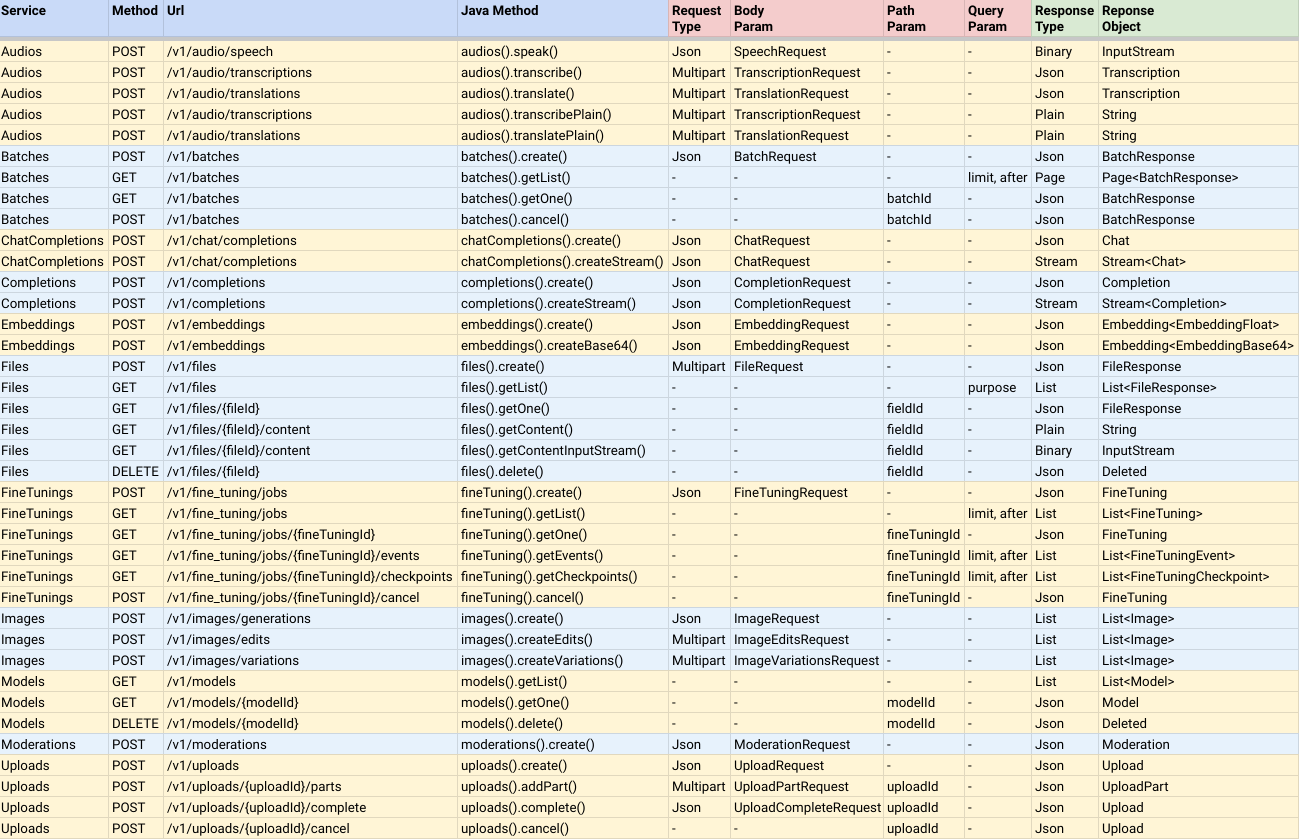
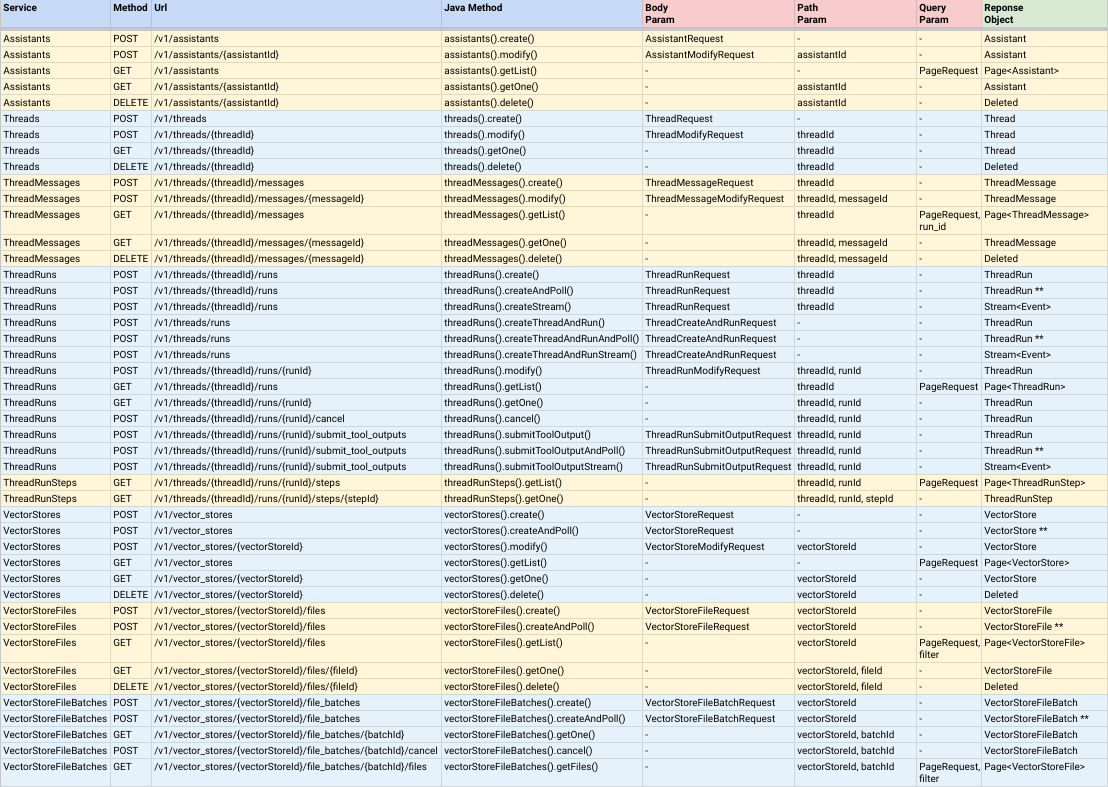
笔记:
CompletableFuture<ResponseObject> ,这意味着它们是异步的,但是您可以调用join()方法以返回结果值后返回结果值。AndPoll()结尾的方法。这些方法是同步的,并且阻止了您提供返回false的谓词函数。 您可以通过在Maven项目中添加以下依赖性来安装简单的Openai:
< dependency >
    < groupId >io.github.sashirestela</ groupId >
    < artifactId >simple-openai</ artifactId >
    < version >[latest version]</ version >
</ dependency >
或者使用gradle:
dependencies {
    implementation ' io.github.sashirestela:simple-openai:[latest version] '
}这是您在使用服务之前需要做的第一步。您必须至少提供OpenAI API密钥(有关更多详细信息,请参见此处)。在下面的示例中,我们将从一个称为OPENAI_API_KEY的环境变量中获取API键,我们创建了以保留它:
 var openAI = SimpleOpenAI . builder ()
    . apiKey ( System . getenv ( "OPENAI_API_KEY" ))
. build ();如果您有多个组织,并且要通过组织识别使用情况,则可以通过您的OpenAI组织ID来传递您的OpenAI组织ID,并且/或者可以通过OpenAI Project ID通过,以防您要提供对单个项目的访问权限。在下面的示例中,我们正在为这些ID使用环境变量:
 var openAI = SimpleOpenAI . builder ()
    . apiKey ( System . getenv ( "OPENAI_API_KEY" ))
    . organizationId ( System . getenv ( "OPENAI_ORGANIZATION_ID" ))
    . projectId ( System . getenv ( "OPENAI_PROJECT_ID" ))
    . build ();
另外,如果您想为HTTP连接提供更多选项,例如执行者,代理,超时,cookie等,则可以提供自定义的Java HTTPClient对象(有关更多详细信息)。在下面的示例中,我们提供了自定义的httpclient:
 var httpClient = HttpClient . newBuilder ()
    . version ( Version . HTTP_1_1 )
    . followRedirects ( Redirect . NORMAL )
    . connectTimeout ( Duration . ofSeconds ( 20 ))
    . executor ( Executors . newFixedThreadPool ( 3 ))
    . proxy ( ProxySelector . of ( new InetSocketAddress ( "proxy.example.com" , 80 )))
    . build ();

var openAI = SimpleOpenAI . builder ()
    . apiKey ( System . getenv ( "OPENAI_API_KEY" ))
    . httpClient ( httpClient )
    . build ();
创建了一个简单的对象后,您准备致电其服务,以便与OpenAI API通信。让我们看看一些例子。
示例调用音频服务以将文本转换为音频。我们要求以二进制格式(InputStream)接收音频:
 var speechRequest = SpeechRequest . builder ()
        . model ( "tts-1" )
        . input ( "Hello world, welcome to the AI universe!" )
        . voice ( Voice . ALLOY )
        . responseFormat ( SpeechResponseFormat . MP3 )
        . speed ( 1.0 )
        . build ();
var futureSpeech = openAI . audios (). speak ( speechRequest );
var speechResponse = futureSpeech . join ();
try {
    var audioFile = new FileOutputStream ( speechFileName );
    audioFile . write ( speechResponse . readAllBytes ());
    System . out . println ( audioFile . getChannel (). size () + " bytes" );
    audioFile . close ();
} catch ( Exception e ) {
    e . printStackTrace ();
}
示例致电音频服务以将音频转录为文本。我们要求以纯文本格式接收转录(请参阅方法的名称):
 var audioRequest = TranscriptionRequest . builder ()
        . file ( Paths . get ( "hello_audio.mp3" ))
        . model ( "whisper-1" )
        . responseFormat ( AudioResponseFormat . VERBOSE_JSON )
        . temperature ( 0.2 )
        . timestampGranularity ( TimestampGranularity . WORD )
        . timestampGranularity ( TimestampGranularity . SEGMENT )
        . build ();
var futureAudio = openAI . audios (). transcribe ( audioRequest );
var audioResponse = futureAudio . join ();
System . out . println ( audioResponse );示例调用图像服务以生成两个图像,以响应我们的提示。我们要求接收图像的URL,并在控制台中打印出图像:
 var imageRequest = ImageRequest . builder ()
        . prompt ( "A cartoon of a hummingbird that is flying around a flower." )
        . n ( 2 )
        . size ( Size . X256 )
        . responseFormat ( ImageResponseFormat . URL )
        . model ( "dall-e-2" )
        . build ();
var futureImage = openAI . images (). create ( imageRequest );
var imageResponse = futureImage . join ();
imageResponse . stream (). forEach ( img -> System . out . println ( " n " + img . getUrl ()));示例致电聊天完成服务以提出问题并等待完整的答案。我们正在控制台上打印出来:
 var chatRequest = ChatRequest . builder ()
        . model ( "gpt-4o-mini" )
        . message ( SystemMessage . of ( "You are an expert in AI." ))
        . message ( UserMessage . of ( "Write a technical article about ChatGPT, no more than 100 words." ))
        . temperature ( 0.0 )
        . maxCompletionTokens ( 300 )
        . build ();
var futureChat = openAI . chatCompletions (). create ( chatRequest );
var chatResponse = futureChat . join ();
System . out . println ( chatResponse . firstContent ());示例致电聊天完成服务以提出问题,并在部分消息中等待答案。我们将在每个三角洲到达后立即将其打印出来:
 var chatRequest = ChatRequest . builder ()
        . model ( "gpt-4o-mini" )
        . message ( SystemMessage . of ( "You are an expert in AI." ))
        . message ( UserMessage . of ( "Write a technical article about ChatGPT, no more than 100 words." ))
        . temperature ( 0.0 )
        . maxCompletionTokens ( 300 )
        . build ();
var futureChat = openAI . chatCompletions (). createStream ( chatRequest );
var chatResponse = futureChat . join ();
chatResponse . filter ( chatResp -> chatResp . getChoices (). size () > 0 && chatResp . firstContent () != null )
        . map ( Chat :: firstContent )
        . forEach ( System . out :: print );
System . out . println ();此功能授权聊天完成服务以解决我们上下文的特定问题。在此示例中,我们设置了三个功能,并且正在输入一个提示,该提示将需要调用其中一个(功能product )。对于设置功能,我们使用的其他类实现了接口Functional 。这些类通过每个函数参数定义一个字段,注释它们来描述它们,每个类都必须使用函数的逻辑覆盖execute方法。请注意,我们正在使用FunctionExecutor实用程序类来注册函数并执行openai.chatCompletions()调用:
 public void demoCallChatWithFunctions () {
    var functionExecutor = new FunctionExecutor ();
    functionExecutor . enrollFunction (
            FunctionDef . builder ()
                    . name ( "get_weather" )
                    . description ( "Get the current weather of a location" )
                    . functionalClass ( Weather . class )
                    . strict ( Boolean . TRUE )
                    . build ());
    functionExecutor . enrollFunction (
            FunctionDef . builder ()
                    . name ( "product" )
                    . description ( "Get the product of two numbers" )
                    . functionalClass ( Product . class )
                    . strict ( Boolean . TRUE )
                    . build ());
    functionExecutor . enrollFunction (
            FunctionDef . builder ()
                    . name ( "run_alarm" )
                    . description ( "Run an alarm" )
                    . functionalClass ( RunAlarm . class )
                    . strict ( Boolean . TRUE )
                    . build ());
    var messages = new ArrayList < ChatMessage >();
    messages . add ( UserMessage . of ( "What is the product of 123 and 456?" ));
    chatRequest = ChatRequest . builder ()
            . model ( "gpt-4o-mini" )
            . messages ( messages )
            . tools ( functionExecutor . getToolFunctions ())
            . build ();
    var futureChat = openAI . chatCompletions (). create ( chatRequest );
    var chatResponse = futureChat . join ();
    var chatMessage = chatResponse . firstMessage ();
    var chatToolCall = chatMessage . getToolCalls (). get ( 0 );
    var result = functionExecutor . execute ( chatToolCall . getFunction ());
    messages . add ( chatMessage );
    messages . add ( ToolMessage . of ( result . toString (), chatToolCall . getId ()));
    chatRequest = ChatRequest . builder ()
            . model ( "gpt-4o-mini" )
            . messages ( messages )
            . tools ( functionExecutor . getToolFunctions ())
            . build ();
    futureChat = openAI . chatCompletions (). create ( chatRequest );
    chatResponse = futureChat . join ();
    System . out . println ( chatResponse . firstContent ());
}

public static class Weather implements Functional {

    @ JsonPropertyDescription ( "City and state, for example: León, Guanajuato" )
    @ JsonProperty ( required = true )
    public String location ;

    @ JsonPropertyDescription ( "The temperature unit, can be 'celsius' or 'fahrenheit'" )
    @ JsonProperty ( required = true )
    public String unit ;

    @ Override
    public Object execute () {
        return Math . random () * 45 ;
    }

}

public static class Product implements Functional {

    @ JsonPropertyDescription ( "The multiplicand part of a product" )
    @ JsonProperty ( required = true )
    public double multiplicand ;

    @ JsonPropertyDescription ( "The multiplier part of a product" )
    @ JsonProperty ( required = true )
    public double multiplier ;

    @ Override
    public Object execute () {
        return multiplicand * multiplier ;
    }

}

public static class RunAlarm implements Functional {

    @ Override
    public Object execute () {
        return "DONE" ;
    }

}示例调用聊天完成服务以允许模型摄入外部图像并回答有关它们的问题:
 var chatRequest = ChatRequest . builder ()
        . model ( "gpt-4o-mini" )
        . messages ( List . of (
                UserMessage . of ( List . of (
                        ContentPartText . of (
                                "What do you see in the image? Give in details in no more than 100 words." ),
                        ContentPartImageUrl . of ( ImageUrl . of (
                                "https://upload.wikimedia.org/wikipedia/commons/e/eb/Machu_Picchu%2C_Peru.jpg" ))))))
        . temperature ( 0.0 )
        . maxCompletionTokens ( 500 )
        . build ();
var chatResponse = openAI . chatCompletions (). createStream ( chatRequest ). join ();
chatResponse . filter ( chatResp -> chatResp . getChoices (). size () > 0 && chatResp . firstContent () != null )
        . map ( Chat :: firstContent )
        . forEach ( System . out :: print );
System . out . println ();示例调用聊天完成服务以允许该模型录制本地图像并回答有关它们的问题(在此存储库中检查Base64util的代码):
 var chatRequest = ChatRequest . builder ()
        . model ( "gpt-4o-mini" )
        . messages ( List . of (
                UserMessage . of ( List . of (
                        ContentPartText . of (
                                "What do you see in the image? Give in details in no more than 100 words." ),
                        ContentPartImageUrl . of ( ImageUrl . of (
                                Base64Util . encode ( "src/demo/resources/machupicchu.jpg" , MediaType . IMAGE )))))))
        . temperature ( 0.0 )
        . maxCompletionTokens ( 500 )
        . build ();
var chatResponse = openAI . chatCompletions (). createStream ( chatRequest ). join ();
chatResponse . filter ( chatResp -> chatResp . getChoices (). size () > 0 && chatResp . firstContent () != null )
        . map ( Chat :: firstContent )
        . forEach ( System . out :: print );
System . out . println ();示例调用聊天完成服务以生成对提示的口语响应,并使用音频输入来提示该模型(在此存储库中检查Base64util的代码):
 var messages = new ArrayList < ChatMessage >();
messages . add ( SystemMessage . of ( "Respond in a short and concise way." ));
messages . add ( UserMessage . of ( List . of ( ContentPartInputAudio . of ( InputAudio . of (
        Base64Util . encode ( "src/demo/resources/question1.mp3" , null ), InputAudioFormat . MP3 )))));
chatRequest = ChatRequest . builder ()
        . model ( "gpt-4o-audio-preview" )
        . modality ( Modality . TEXT )
        . modality ( Modality . AUDIO )
        . audio ( Audio . of ( Voice . ALLOY , AudioFormat . MP3 ))
        . messages ( messages )
        . build ();
var chatResponse = openAI . chatCompletions (). create ( chatRequest ). join ();
var audio = chatResponse . firstMessage (). getAudio ();
Base64Util . decode ( audio . getData (), "src/demo/resources/answer1.mp3" );
System . out . println ( "Answer 1: " + audio . getTranscript ());

messages . add ( AssistantMessage . builder (). audioId ( audio . getId ()). build ());
messages . add ( UserMessage . of ( List . of ( ContentPartInputAudio . of ( InputAudio . of (
        Base64Util . encode ( "src/demo/resources/question2.mp3" , null ), InputAudioFormat . MP3 )))));
chatRequest = ChatRequest . builder ()
        . model ( "gpt-4o-audio-preview" )
        . modality ( Modality . TEXT )
        . modality ( Modality . AUDIO )
        . audio ( Audio . of ( Voice . ALLOY , AudioFormat . MP3 ))
        . messages ( messages )
        . build ();
chatResponse = openAI . chatCompletions (). create ( chatRequest ). join ();
audio = chatResponse . firstMessage (). getAudio ();
Base64Util . decode ( audio . getData (), "src/demo/resources/answer2.mp3" );
System . out . println ( "Answer 2: " + audio . getTranscript ());示例调用聊天完成服务以确保模型始终生成遵守通过Java类定义的JSON模式的响应:
 public void demoCallChatWithStructuredOutputs () {
    var chatRequest = ChatRequest . builder ()
            . model ( "gpt-4o-mini" )
            . message ( SystemMessage
                    . of ( "You are a helpful math tutor. Guide the user through the solution step by step." ))
            . message ( UserMessage . of ( "How can I solve 8x + 7 = -23" ))
            . responseFormat ( ResponseFormat . jsonSchema ( JsonSchema . builder ()
                    . name ( "MathReasoning" )
                    . schemaClass ( MathReasoning . class )
                    . build ()))
            . build ();
    var chatResponse = openAI . chatCompletions (). createStream ( chatRequest ). join ();
    chatResponse . filter ( chatResp -> chatResp . getChoices (). size () > 0 && chatResp . firstContent () != null )
            . map ( Chat :: firstContent )
            . forEach ( System . out :: print );
    System . out . println ();
}

public static class MathReasoning {

    public List < Step > steps ;
    public String finalAnswer ;

    public static class Step {

        public String explanation ;
        public String output ;

    }

}此示例模拟了命令控制台的对话聊天,并通过流函数和呼叫功能演示了聊天量的用法。
您可以看到完整的演示代码以及运行演示代码的结果:
 package io . github . sashirestela . openai . demo ;

import com . fasterxml . jackson . annotation . JsonProperty ;
import com . fasterxml . jackson . annotation . JsonPropertyDescription ;
import io . github . sashirestela . openai . SimpleOpenAI ;
import io . github . sashirestela . openai . common . function . FunctionDef ;
import io . github . sashirestela . openai . common . function . FunctionExecutor ;
import io . github . sashirestela . openai . common . function . Functional ;
import io . github . sashirestela . openai . common . tool . ToolCall ;
import io . github . sashirestela . openai . domain . chat . Chat ;
import io . github . sashirestela . openai . domain . chat . Chat . Choice ;
import io . github . sashirestela . openai . domain . chat . ChatMessage ;
import io . github . sashirestela . openai . domain . chat . ChatMessage . AssistantMessage ;
import io . github . sashirestela . openai . domain . chat . ChatMessage . ResponseMessage ;
import io . github . sashirestela . openai . domain . chat . ChatMessage . ToolMessage ;
import io . github . sashirestela . openai . domain . chat . ChatMessage . UserMessage ;
import io . github . sashirestela . openai . domain . chat . ChatRequest ;

import java . util . ArrayList ;
import java . util . List ;
import java . util . stream . Stream ;

public class ConversationDemo {

    private SimpleOpenAI openAI ;
    private FunctionExecutor functionExecutor ;

    private int indexTool ;
    private StringBuilder content ;
    private StringBuilder functionArgs ;

    public ConversationDemo () {
        openAI = SimpleOpenAI . builder (). apiKey ( System . getenv ( "OPENAI_API_KEY" )). build ();
    }

    public void prepareConversation () {
        List < FunctionDef > functionList = new ArrayList <>();
        functionList . add ( FunctionDef . builder ()
                . name ( "getCurrentTemperature" )
                . description ( "Get the current temperature for a specific location" )
                . functionalClass ( CurrentTemperature . class )
                . strict ( Boolean . TRUE )
                . build ());
        functionList . add ( FunctionDef . builder ()
                . name ( "getRainProbability" )
                . description ( "Get the probability of rain for a specific location" )
                . functionalClass ( RainProbability . class )
                . strict ( Boolean . TRUE )
                . build ());
        functionExecutor = new FunctionExecutor ( functionList );
    }

    public void runConversation () {
        List < ChatMessage > messages = new ArrayList <>();
        var myMessage = System . console (). readLine ( " n Welcome! Write any message: " );
        messages . add ( UserMessage . of ( myMessage ));
        while (! myMessage . toLowerCase (). equals ( "exit" )) {
            var chatStream = openAI . chatCompletions ()
                    . createStream ( ChatRequest . builder ()
                            . model ( "gpt-4o-mini" )
                            . messages ( messages )
                            . tools ( functionExecutor . getToolFunctions ())
                            . temperature ( 0.2 )
                            . stream ( true )
                            . build ())
                    . join ();

            indexTool = - 1 ;
            content = new StringBuilder ();
            functionArgs = new StringBuilder ();

            var response = getResponse ( chatStream );

            if ( response . getMessage (). getContent () != null ) {
                messages . add ( AssistantMessage . of ( response . getMessage (). getContent ()));
            }
            if ( response . getFinishReason (). equals ( "tool_calls" )) {
                messages . add ( response . getMessage ());
                var toolCalls = response . getMessage (). getToolCalls ();
                var toolMessages = functionExecutor . executeAll ( toolCalls ,
                        ( toolCallId , result ) -> ToolMessage . of ( result , toolCallId ));
                messages . addAll ( toolMessages );
            } else {
                myMessage = System . console (). readLine ( " n n Write any message (or write 'exit' to finish): " );
                messages . add ( UserMessage . of ( myMessage ));
            }
        }
    }

    private Choice getResponse ( Stream < Chat > chatStream ) {
        var choice = new Choice ();
        choice . setIndex ( 0 );
        var chatMsgResponse = new ResponseMessage ();
        List < ToolCall > toolCalls = new ArrayList <>();

        chatStream . forEach ( responseChunk -> {
            var choices = responseChunk . getChoices ();
            if ( choices . size () > 0 ) {
                var innerChoice = choices . get ( 0 );
                var delta = innerChoice . getMessage ();
                if ( delta . getRole () != null ) {
                    chatMsgResponse . setRole ( delta . getRole ());
                }
                if ( delta . getContent () != null && ! delta . getContent (). isEmpty ()) {
                    content . append ( delta . getContent ());
                    System . out . print ( delta . getContent ());
                }
                if ( delta . getToolCalls () != null ) {
                    var toolCall = delta . getToolCalls (). get ( 0 );
                    if ( toolCall . getIndex () != indexTool ) {
                        if ( toolCalls . size () > 0 ) {
                            toolCalls . get ( toolCalls . size () - 1 ). getFunction (). setArguments ( functionArgs . toString ());
                            functionArgs = new StringBuilder ();
                        }
                        toolCalls . add ( toolCall );
                        indexTool ++;
                    } else {
                        functionArgs . append ( toolCall . getFunction (). getArguments ());
                    }
                }
                if ( innerChoice . getFinishReason () != null ) {
                    if ( content . length () > 0 ) {
                        chatMsgResponse . setContent ( content . toString ());
                    }
                    if ( toolCalls . size () > 0 ) {
                        toolCalls . get ( toolCalls . size () - 1 ). getFunction (). setArguments ( functionArgs . toString ());
                        chatMsgResponse . setToolCalls ( toolCalls );
                    }
                    choice . setMessage ( chatMsgResponse );
                    choice . setFinishReason ( innerChoice . getFinishReason ());
                }
            }
        });
        return choice ;
    }

    public static void main ( String [] args ) {
        var demo = new ConversationDemo ();
        demo . prepareConversation ();
        demo . runConversation ();
    }

    public static class CurrentTemperature implements Functional {

        @ JsonPropertyDescription ( "The city and state, e.g., San Francisco, CA" )
        @ JsonProperty ( required = true )
        public String location ;

        @ JsonPropertyDescription ( "The temperature unit to use. Infer this from the user's location." )
        @ JsonProperty ( required = true )
        public String unit ;

        @ Override
        public Object execute () {
            double centigrades = Math . random () * ( 40.0 - 10.0 ) + 10.0 ;
            double fahrenheit = centigrades * 9.0 / 5.0 + 32.0 ;
            String shortUnit = unit . substring ( 0 , 1 ). toUpperCase ();
            return shortUnit . equals ( "C" ) ? centigrades : ( shortUnit . equals ( "F" ) ? fahrenheit : 0.0 );
        }

    }

    public static class RainProbability implements Functional {

        @ JsonPropertyDescription ( "The city and state, e.g., San Francisco, CA" )
        @ JsonProperty ( required = true )
        public String location ;

        @ Override
        public Object execute () {
            return Math . random () * 100 ;
        }

    }

}Welcome! Write any message: Hi, can you help me with some quetions about Lima, Peru?
Of course! What would you like to know about Lima, Peru?
Write any message (or write 'exit' to finish): Tell me something brief about Lima Peru, then tell me how's the weather there right now. Finally give me three tips to travel there.
## # Brief About Lima, Peru
Lima, the capital city of Peru, is a bustling metropolis that blends modernity with rich historical heritage. Founded by Spanish conquistador Francisco Pizarro in 1535, Lima is known for its colonial architecture, vibrant culture, and delicious cuisine, particularly its world-renowned ceviche. The city is also a gateway to exploring Peru's diverse landscapes, from the coastal deserts to the Andean highlands and the Amazon rainforest.
## # Current Weather in Lima, Peru
I'll check the current temperature and the probability of rain in Lima for you. ## # Current Weather in Lima, Peru
- ** Temperature: ** Approximately 11.8°C
- ** Probability of Rain: ** Approximately 97.8%
## # Three Tips for Traveling to Lima, Peru
1. ** Explore the Historic Center: **
- Visit the Plaza Mayor, the Government Palace, and the Cathedral of Lima. These landmarks offer a glimpse into Lima's colonial past and are UNESCO World Heritage Sites.
2. ** Savor the Local Cuisine: **
- Don't miss out on trying ceviche, a traditional Peruvian dish made from fresh raw fish marinated in citrus juices. Also, explore the local markets and try other Peruvian delicacies.
3. ** Visit the Coastal Districts: **
- Head to Miraflores and Barranco for stunning ocean views, vibrant nightlife, and cultural experiences. These districts are known for their beautiful parks, cliffs, and bohemian atmosphere.
Enjoy your trip to Lima! If you have any more questions, feel free to ask.
Write any message (or write 'exit' to finish): exit此示例模拟了命令控制台的对话聊天,并演示了最新助手API V2功能的使用:
您可以看到完整的演示代码以及运行演示代码的结果:
 package io . github . sashirestela . openai . demo ;

import com . fasterxml . jackson . annotation . JsonProperty ;
import com . fasterxml . jackson . annotation . JsonPropertyDescription ;
import io . github . sashirestela . cleverclient . Event ;
import io . github . sashirestela . openai . SimpleOpenAI ;
import io . github . sashirestela . openai . common . content . ContentPart . ContentPartTextAnnotation ;
import io . github . sashirestela . openai . common . function . FunctionDef ;
import io . github . sashirestela . openai . common . function . FunctionExecutor ;
import io . github . sashirestela . openai . common . function . Functional ;
import io . github . sashirestela . openai . domain . assistant . AssistantRequest ;
import io . github . sashirestela . openai . domain . assistant . AssistantTool ;
import io . github . sashirestela . openai . domain . assistant . ThreadMessageDelta ;
import io . github . sashirestela . openai . domain . assistant . ThreadMessageRequest ;
import io . github . sashirestela . openai . domain . assistant . ThreadMessageRole ;
import io . github . sashirestela . openai . domain . assistant . ThreadRequest ;
import io . github . sashirestela . openai . domain . assistant . ThreadRun ;
import io . github . sashirestela . openai . domain . assistant . ThreadRun . RunStatus ;
import io . github . sashirestela . openai . domain . assistant . ThreadRunRequest ;
import io . github . sashirestela . openai . domain . assistant . ThreadRunSubmitOutputRequest ;
import io . github . sashirestela . openai . domain . assistant . ThreadRunSubmitOutputRequest . ToolOutput ;
import io . github . sashirestela . openai . domain . assistant . ToolResourceFull ;
import io . github . sashirestela . openai . domain . assistant . ToolResourceFull . FileSearch ;
import io . github . sashirestela . openai . domain . assistant . VectorStoreRequest ;
import io . github . sashirestela . openai . domain . assistant . events . EventName ;
import io . github . sashirestela . openai . domain . file . FileRequest ;
import io . github . sashirestela . openai . domain . file . FileRequest . PurposeType ;

import java . nio . file . Paths ;
import java . util . ArrayList ;
import java . util . List ;
import java . util . stream . Stream ;

public class ConversationV2Demo {

    private SimpleOpenAI openAI ;
    private String fileId ;
    private String vectorStoreId ;
    private FunctionExecutor functionExecutor ;
    private String assistantId ;
    private String threadId ;

    public ConversationV2Demo () {
        openAI = SimpleOpenAI . builder (). apiKey ( System . getenv ( "OPENAI_API_KEY" )). build ();
    }

    public void prepareConversation () {
        List < FunctionDef > functionList = new ArrayList <>();
        functionList . add ( FunctionDef . builder ()
                . name ( "getCurrentTemperature" )
                . description ( "Get the current temperature for a specific location" )
                . functionalClass ( CurrentTemperature . class )
                . strict ( Boolean . TRUE )
                . build ());
        functionList . add ( FunctionDef . builder ()
                . name ( "getRainProbability" )
                . description ( "Get the probability of rain for a specific location" )
                . functionalClass ( RainProbability . class )
                . strict ( Boolean . TRUE )
                . build ());
        functionExecutor = new FunctionExecutor ( functionList );

        var file = openAI . files ()
                . create ( FileRequest . builder ()
                        . file ( Paths . get ( "src/demo/resources/mistral-ai.txt" ))
                        . purpose ( PurposeType . ASSISTANTS )
                        . build ())
                . join ();
        fileId = file . getId ();
        System . out . println ( "File was created with id: " + fileId );

        var vectorStore = openAI . vectorStores ()
                . createAndPoll ( VectorStoreRequest . builder ()
                        . fileId ( fileId )
                        . build ());
        vectorStoreId = vectorStore . getId ();
        System . out . println ( "Vector Store was created with id: " + vectorStoreId );

        var assistant = openAI . assistants ()
                . create ( AssistantRequest . builder ()
                        . name ( "World Assistant" )
                        . model ( "gpt-4o" )
                        . instructions ( "You are a skilled tutor on geo-politic topics." )
                        . tools ( functionExecutor . getToolFunctions ())
                        . tool ( AssistantTool . fileSearch ())
                        . toolResources ( ToolResourceFull . builder ()
                                . fileSearch ( FileSearch . builder ()
                                        . vectorStoreId ( vectorStoreId )
                                        . build ())
                                . build ())
                        . temperature ( 0.2 )
                        . build ())
                . join ();
        assistantId = assistant . getId ();
        System . out . println ( "Assistant was created with id: " + assistantId );

        var thread = openAI . threads (). create ( ThreadRequest . builder (). build ()). join ();
        threadId = thread . getId ();
        System . out . println ( "Thread was created with id: " + threadId );
        System . out . println ();
    }

    public void runConversation () {
        var myMessage = System . console (). readLine ( " n Welcome! Write any message: " );
        while (! myMessage . toLowerCase (). equals ( "exit" )) {
            openAI . threadMessages ()
                    . create ( threadId , ThreadMessageRequest . builder ()
                            . role ( ThreadMessageRole . USER )
                            . content ( myMessage )
                            . build ())
                    . join ();
            var runStream = openAI . threadRuns ()
                    . createStream ( threadId , ThreadRunRequest . builder ()
                            . assistantId ( assistantId )
                            . parallelToolCalls ( Boolean . FALSE )
                            . build ())
                    . join ();
            handleRunEvents ( runStream );
            myMessage = System . console (). readLine ( " n Write any message (or write 'exit' to finish): " );
        }
    }

    private void handleRunEvents ( Stream < Event > runStream ) {
        runStream . forEach ( event -> {
            switch ( event . getName ()) {
                case EventName . THREAD_RUN_CREATED :
                case EventName . THREAD_RUN_COMPLETED :
                case EventName . THREAD_RUN_REQUIRES_ACTION :
                    var run = ( ThreadRun ) event . getData ();
                    System . out . println ( "=====>> Thread Run: id=" + run . getId () + ", status=" + run . getStatus ());
                    if ( run . getStatus (). equals ( RunStatus . REQUIRES_ACTION )) {
                        var toolCalls = run . getRequiredAction (). getSubmitToolOutputs (). getToolCalls ();
                        var toolOutputs = functionExecutor . executeAll ( toolCalls ,
                                ( toolCallId , result ) -> ToolOutput . builder ()
                                        . toolCallId ( toolCallId )
                                        . output ( result )
                                        . build ());
                        var runSubmitToolStream = openAI . threadRuns ()
                                . submitToolOutputStream ( threadId , run . getId (), ThreadRunSubmitOutputRequest . builder ()
                                        . toolOutputs ( toolOutputs )
                                        . stream ( true )
                                        . build ())
                                . join ();
                        handleRunEvents ( runSubmitToolStream );
                    }
                    break ;
                case EventName . THREAD_MESSAGE_DELTA :
                    var msgDelta = ( ThreadMessageDelta ) event . getData ();
                    var content = msgDelta . getDelta (). getContent (). get ( 0 );
                    if ( content instanceof ContentPartTextAnnotation ) {
                        var textContent = ( ContentPartTextAnnotation ) content ;
                        System . out . print ( textContent . getText (). getValue ());
                    }
                    break ;
                case EventName . THREAD_MESSAGE_COMPLETED :
                    System . out . println ();
                    break ;
                default :
                    break ;
            }
        });
    }

    public void cleanConversation () {
        var deletedFile = openAI . files (). delete ( fileId ). join ();
        var deletedVectorStore = openAI . vectorStores (). delete ( vectorStoreId ). join ();
        var deletedAssistant = openAI . assistants (). delete ( assistantId ). join ();
        var deletedThread = openAI . threads (). delete ( threadId ). join ();

        System . out . println ( "File was deleted: " + deletedFile . getDeleted ());
        System . out . println ( "Vector Store was deleted: " + deletedVectorStore . getDeleted ());
        System . out . println ( "Assistant was deleted: " + deletedAssistant . getDeleted ());
        System . out . println ( "Thread was deleted: " + deletedThread . getDeleted ());
    }

    public static void main ( String [] args ) {
        var demo = new ConversationV2Demo ();
        demo . prepareConversation ();
        demo . runConversation ();
        demo . cleanConversation ();
    }

    public static class CurrentTemperature implements Functional {

        @ JsonPropertyDescription ( "The city and state, e.g., San Francisco, CA" )
        @ JsonProperty ( required = true )
        public String location ;

        @ JsonPropertyDescription ( "The temperature unit to use. Infer this from the user's location." )
        @ JsonProperty ( required = true )
        public String unit ;

        @ Override
        public Object execute () {
            double centigrades = Math . random () * ( 40.0 - 10.0 ) + 10.0 ;
            double fahrenheit = centigrades * 9.0 / 5.0 + 32.0 ;
            String shortUnit = unit . substring ( 0 , 1 ). toUpperCase ();
            return shortUnit . equals ( "C" ) ? centigrades : ( shortUnit . equals ( "F" ) ? fahrenheit : 0.0 );
        }

    }

    public static class RainProbability implements Functional {

        @ JsonPropertyDescription ( "The city and state, e.g., San Francisco, CA" )
        @ JsonProperty ( required = true )
        public String location ;

        @ Override
        public Object execute () {
            return Math . random () * 100 ;
        }

    }

}File was created with id: file-oDFIF7o4SwuhpwBNnFIILhMK
Vector Store was created with id: vs_lG1oJmF2s5wLhqHUSeJpELMr
Assistant was created with id: asst_TYS5cZ05697tyn3yuhDrCCIv
Thread was created with id: thread_33n258gFVhZVIp88sQKuqMvg
Welcome! Write any message: Hello
=====>> Thread Run: id=run_nihN6dY0uyudsORg4xyUvQ5l, status=QUEUED
Hello! How can I assist you today?
=====>> Thread Run: id=run_nihN6dY0uyudsORg4xyUvQ5l, status=COMPLETED
Write any message (or write 'exit' to finish): Tell me something brief about Lima Peru, then tell me how's the weather there right now. Finally give me three tips to travel there.
=====>> Thread Run: id=run_QheimPyP5UK6FtmH5obon0fB, status=QUEUED
Lima, the capital city of Peru, is located on the country's arid Pacific coast. It's known for its vibrant culinary scene, rich history, and as a cultural hub with numerous museums, colonial architecture, and remnants of pre-Columbian civilizations. This bustling metropolis serves as a key gateway to visiting Peru’s more famous attractions, such as Machu Picchu and the Amazon rainforest.
Let me find the current weather conditions in Lima for you, and then I'll provide three travel tips.
=====>> Thread Run: id=run_QheimPyP5UK6FtmH5obon0fB, status=REQUIRES_ACTION
## # Current Weather in Lima, Peru:
- ** Temperature: ** 12.8°C
- ** Rain Probability: ** 82.7%
## # Three Travel Tips for Lima, Peru:
1. ** Best Time to Visit: ** Plan your trip during the dry season, from May to September, which offers clearer skies and milder temperatures. This period is particularly suitable for outdoor activities and exploring the city comfortably.
2. ** Local Cuisine: ** Don't miss out on tasting the local Peruvian dishes, particularly the ceviche, which is renowned worldwide. Lima is also known as the gastronomic capital of South America, so indulge in the wide variety of dishes available.
3. ** Cultural Attractions: ** Allocate enough time to visit Lima's rich array of museums, such as the Larco Museum, which showcases pre-Columbian art, and the historical center which is a UNESCO World Heritage Site. Moreover, exploring districts like Miraflores and Barranco can provide insights into the modern and bohemian sides of the city.
Enjoy planning your trip to Lima! If you need more information or help, feel free to ask.
=====>> Thread Run: id=run_QheimPyP5UK6FtmH5obon0fB, status=COMPLETED
Write any message (or write 'exit' to finish): Tell me something about the Mistral company
=====>> Thread Run: id=run_5u0t8kDQy87p5ouaTRXsCG8m, status=QUEUED
Mistral AI is a French company that specializes in selling artificial intelligence products. It was established in April 2023 by former employees of Meta Platforms and Google DeepMind. Notably, the company secured a significant amount of funding, raising €385 million in October 2023, and achieved a valuation exceeding $ 2 billion by December of the same year.
The prime focus of Mistral AI is on developing and producing open-source large language models. This approach underscores the foundational role of open-source software as a counter to proprietary models. As of March 2024, Mistral AI has published two models, which are available in terms of weights, while three more models—categorized as Small, Medium, and Large—are accessible only through an API[1].
=====>> Thread Run: id=run_5u0t8kDQy87p5ouaTRXsCG8m, status=COMPLETED
Write any message (or write 'exit' to finish): exit
File was deleted: true
Vector Store was deleted: true
Assistant was deleted: true
Thread was deleted: true在此示例中,您可以看到代码,以使用麦克风和扬声器在模型之间建立语音对话。请参阅完整的代码:
Realtimedemo.java
Simple-Openai可以与与OpenAI API兼容的其他提供商一起使用。目前,对以下其他提供商有支持:
Azure Openia由简单的Openai支持。我们可以使用扩展BaseSimpleOpenAI的SimpleOpenAIAzure开始使用此提供商。
 var openai = SimpleOpenAIAzure . builder ()
    . apiKey ( System . getenv ( "AZURE_OPENAI_API_KEY" ))
    . baseUrl ( System . getenv ( "AZURE_OPENAI_BASE_URL" ))   // Including resourceName and deploymentId
    . apiVersion ( System . getenv ( "AZURE_OPENAI_API_VERSION" ))
    //.httpClient(customHttpClient)   Optionally you could pass a custom HttpClient
    . build ();
Azure Openai由具有不同功能的多种模型提供动力,并且每个模型都需要单独的部署。模型可用性随区域和云而异。查看有关Azure Openai型号的更多详细信息。
目前,我们仅支持以下服务:
chatCompletionService (文本生成,流式,功能调用,视觉,结构化输出)fileService (上传文件)Anyscale由简单的Openai un。我们可以使用扩展BaseSimpleOpenAI SimpleOpenAIAnyscale类,以开始使用此提供商。
 var openai = SimpleOpenAIAnyscale . builder ()
    . apiKey ( System . getenv ( "ANYSCALE_API_KEY" ))
    //.baseUrl(customUrl)             Optionally you could pass a custom baseUrl
    //.httpClient(customHttpClient)   Optionally you could pass a custom HttpClient
. build ();目前,我们仅支持chatCompletionService服务。它通过Mistral模型进行了测试。
每个OpenAI服务的示例都是在文件夹演示中创建的,您可以按照下一步执行它们:
克隆这个存储库:
 git clone https://github.com/sashirestela/simple-openai.git
cd simple-openai
建立项目:
mvn clean install
为您的OpenAI API密钥创建环境变量:
export OPENAI_API_KEY=<here goes your api key>
授予脚本文件的执行权限:
chmod +x rundemo.sh
运行示例:
./rundemo.sh <demo> [debug]
在哪里:
<demo>是强制性的,必须是值之一:
[debug]是可选的,可以创建demo.log文件,您可以在其中看到每个执行的日志详细信息。
例如,使用日志文件运行聊天演示: ./rundemo.sh Chat debug
Azure Openai演示的指示
运行此演示的推荐模型是:
有关更多详细信息,请参见Azure Openai文档:Azure Openai文档。具有部署URL和API密钥后,设置以下环境变量:
 export AZURE_OPENAI_BASE_URL=<https://YOUR_RESOURCE_NAME.openai.azure.com/openai/deployments/YOUR_DEPLOYMENT_NAME>
export AZURE_OPENAI_API_KEY=<here goes your regional API key>
export AZURE_OPENAI_API_VERSION=<for example: 2024-08-01-preview>
请注意,某些模型在所有区域都可能不可用。如果您难以找到模型,请尝试其他区域。 API密钥是区域性的(根据认知帐户)。如果您在同一区域中提供多个模型,它们将共享相同的API密钥(实际上每个区域有两个键可以支持备用键旋转)。
请阅读我们学习和理解如何为该项目贡献的贡献指南。
Simple-Openai已获得MIT许可证的许可。有关更多信息,请参见许可证文件。
我们库的主要用户列表:
感谢您使用Simple-Openai 。如果您发现这个项目很有价值,则有几种方法可以向我们展示您的爱,最好是所有人?::::





