simple openai
3.10.0

Una biblioteca Java para usar la API de OpenAI de la manera más simple posible.
Simple-Openai es una biblioteca de clientes Java HTTP para enviar solicitudes y recibir respuestas de la API de OpenAI. Expone una interfaz consistente en todos los servicios, pero tan simple como puede encontrar en otros idiomas como Python o NodeJS. Es una biblioteca no oficial.
Simple-Openai utiliza la Biblioteca CleverClient para HTTP Communication, Jackson para JSON PARSING y Lombok para minimizar el código básico, entre otras bibliotecas.
Simple-Openai busca mantenerse al día con los cambios más recientes en OpenAI. Actualmente, admite la mayoría de las características existentes y continuará actualizando con cambios futuros.
Soporte completo para la mayoría de los servicios de Operai:
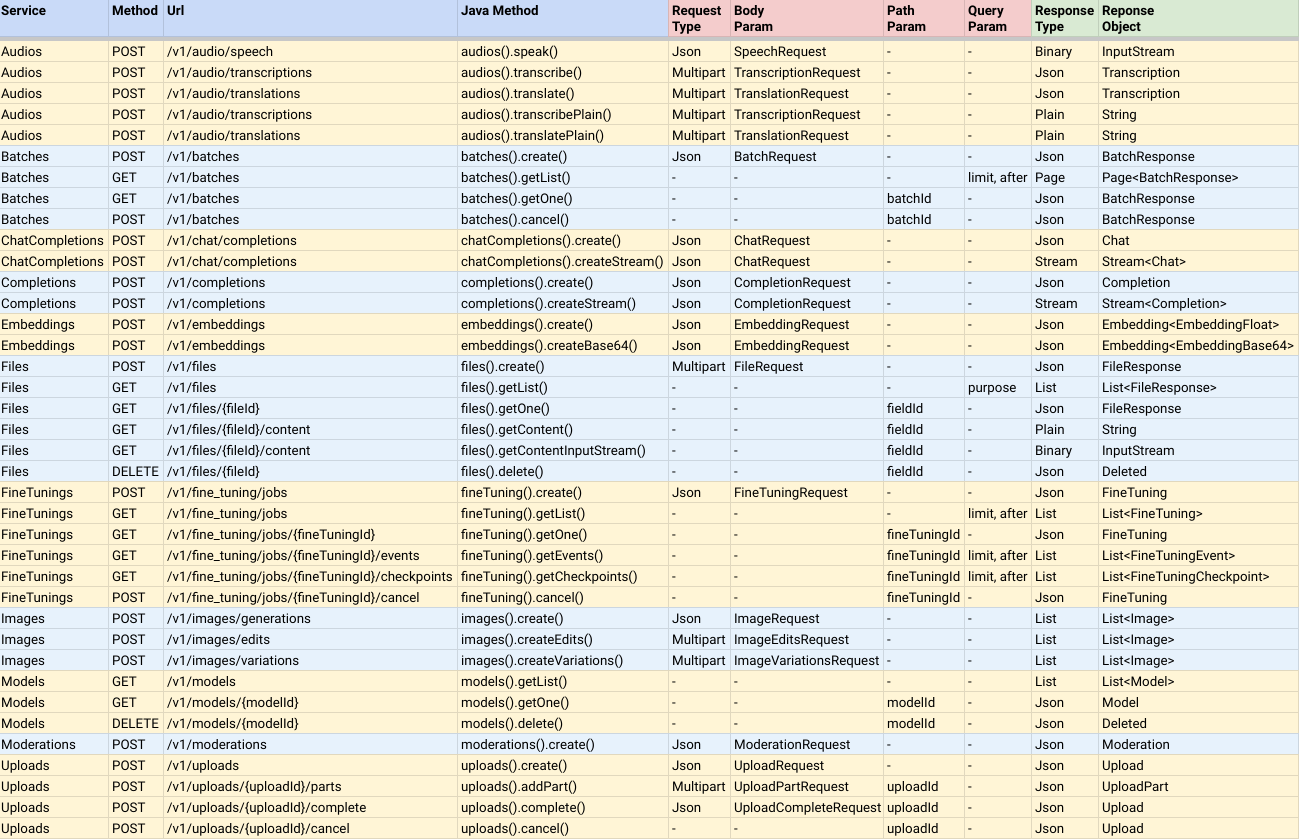
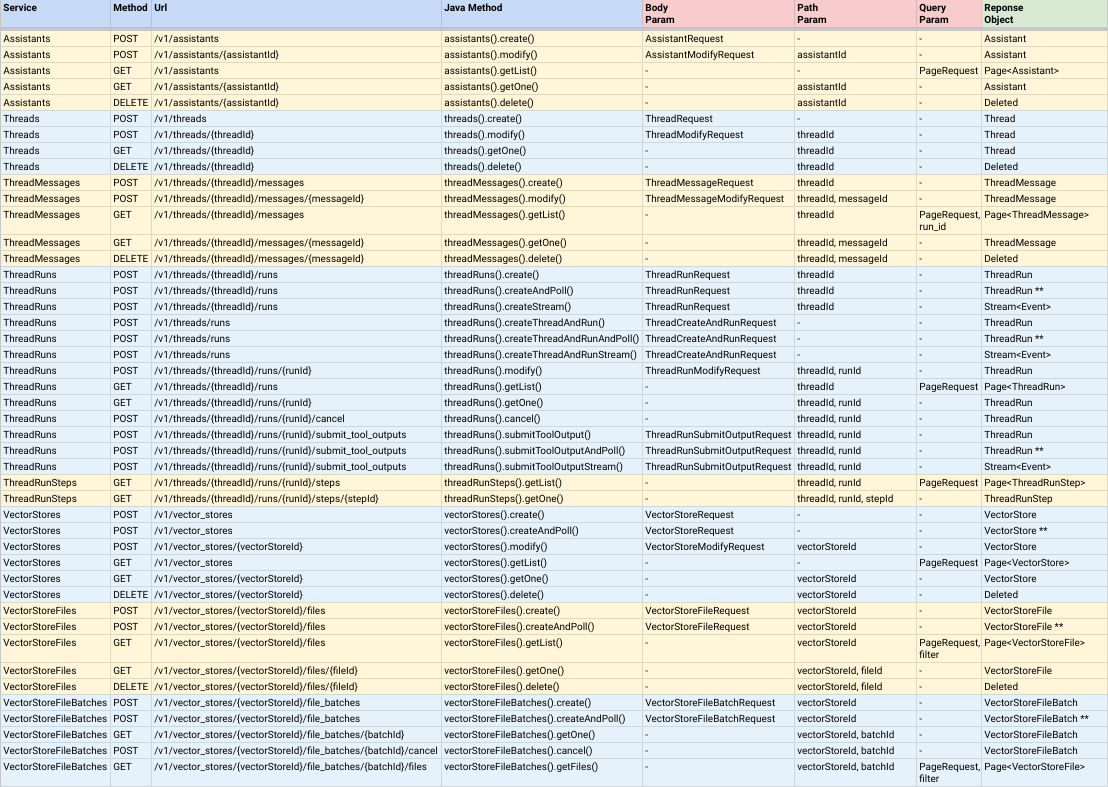
Notas:
CompletableFuture<ResponseObject> , lo que significa que son asíncronas, pero puede llamar al método Join () para devolver el valor del resultado cuando se complete.AndPoll() . Estos métodos son sincrónicos y bloquean hasta que una función de predicado que proporciona devuelve falso. Puede instalar Simple-Openai agregando la siguiente dependencia a su proyecto Maven:
< dependency >
    < groupId >io.github.sashirestela</ groupId >
    < artifactId >simple-openai</ artifactId >
    < version >[latest version]</ version >
</ dependency >
O alternativamente usando Gradle:
dependencies {
    implementation ' io.github.sashirestela:simple-openai:[latest version] '
} Este es el primer paso que debe hacer antes para usar los servicios. Debe proporcionar al menos su tecla API OpenAI (consulte aquí para obtener más detalles). En el siguiente ejemplo, obtenemos la clave API de una variable de entorno llamada OPENAI_API_KEY que hemos creado para mantenerla:
 var openAI = SimpleOpenAI . builder ()
    . apiKey ( System . getenv ( "OPENAI_API_KEY" ))
    . build ();
Opcionalmente, puede aprobar su ID de organización Operai en caso de que tenga múltiples organizaciones y desee identificar el uso por organización y/o puede aprobar su ID de proyecto Operai en caso de que desee proporcionar acceso a un solo proyecto. En el siguiente ejemplo, estamos utilizando la variable de entorno para esas ID:
 var openAI = SimpleOpenAI . builder ()
    . apiKey ( System . getenv ( "OPENAI_API_KEY" ))
    . organizationId ( System . getenv ( "OPENAI_ORGANIZATION_ID" ))
    . projectId ( System . getenv ( "OPENAI_PROJECT_ID" ))
    . build ();
Opcionalmente, también, puede proporcionar un objeto Java HttpClient personalizado si desea tener más opciones para la conexión HTTP, como ejecutores, proxy, tiempo de espera, cookies, etc. (ver aquí para obtener más detalles). En el siguiente ejemplo, proporcionamos un httpclient personalizado:
 var httpClient = HttpClient . newBuilder ()
    . version ( Version . HTTP_1_1 )
    . followRedirects ( Redirect . NORMAL )
    . connectTimeout ( Duration . ofSeconds ( 20 ))
    . executor ( Executors . newFixedThreadPool ( 3 ))
    . proxy ( ProxySelector . of ( new InetSocketAddress ( "proxy.example.com" , 80 )))
    . build ();

var openAI = SimpleOpenAI . builder ()
    . apiKey ( System . getenv ( "OPENAI_API_KEY" ))
    . httpClient ( httpClient )
    . build ();
Después de haber creado un objeto SimplePenai, está listo para llamar a sus servicios para comunicarse con OpenAI API. Veamos algunos ejemplos.
Ejemplo para llamar al servicio de audio para transformar el texto en audio. Estamos solicitando recibir el audio en formato binario (inputStream):
 var speechRequest = SpeechRequest . builder ()
        . model ( "tts-1" )
        . input ( "Hello world, welcome to the AI universe!" )
        . voice ( Voice . ALLOY )
        . responseFormat ( SpeechResponseFormat . MP3 )
        . speed ( 1.0 )
        . build ();
var futureSpeech = openAI . audios (). speak ( speechRequest );
var speechResponse = futureSpeech . join ();
try {
    var audioFile = new FileOutputStream ( speechFileName );
    audioFile . write ( speechResponse . readAllBytes ());
    System . out . println ( audioFile . getChannel (). size () + " bytes" );
    audioFile . close ();
} catch ( Exception e ) {
    e . printStackTrace ();
}
Ejemplo para llamar al servicio de audio para transcribir un audio al mensaje de texto. Estamos solicitando recibir la transcripción en formato de texto plano (consulte el nombre del método):
 var audioRequest = TranscriptionRequest . builder ()
        . file ( Paths . get ( "hello_audio.mp3" ))
        . model ( "whisper-1" )
        . responseFormat ( AudioResponseFormat . VERBOSE_JSON )
        . temperature ( 0.2 )
        . timestampGranularity ( TimestampGranularity . WORD )
        . timestampGranularity ( TimestampGranularity . SEGMENT )
        . build ();
var futureAudio = openAI . audios (). transcribe ( audioRequest );
var audioResponse = futureAudio . join ();
System . out . println ( audioResponse );
Ejemplo para llamar al servicio de imagen para generar dos imágenes en respuesta a nuestro aviso. Estamos solicitando recibir las URL de las imágenes y las imprimimos en la consola:
 var imageRequest = ImageRequest . builder ()
        . prompt ( "A cartoon of a hummingbird that is flying around a flower." )
        . n ( 2 )
        . size ( Size . X256 )
        . responseFormat ( ImageResponseFormat . URL )
        . model ( "dall-e-2" )
        . build ();
var futureImage = openAI . images (). create ( imageRequest );
var imageResponse = futureImage . join ();
imageResponse . stream (). forEach ( img -> System . out . println ( " n " + img . getUrl ()));
Ejemplo para llamar al servicio de finalización de chat para hacer una pregunta y esperar una respuesta completa. Lo estamos imprimiendo en la consola:
 var chatRequest = ChatRequest . builder ()
        . model ( "gpt-4o-mini" )
        . message ( SystemMessage . of ( "You are an expert in AI." ))
        . message ( UserMessage . of ( "Write a technical article about ChatGPT, no more than 100 words." ))
        . temperature ( 0.0 )
        . maxCompletionTokens ( 300 )
        . build ();
var futureChat = openAI . chatCompletions (). create ( chatRequest );
var chatResponse = futureChat . join ();
System . out . println ( chatResponse . firstContent ());Ejemplo para llamar al servicio de finalización de chat para hacer una pregunta y esperar una respuesta en los deltas de mensaje parcial. Lo imprimimos en la consola tan pronto como llegue cada delta:
 var chatRequest = ChatRequest . builder ()
        . model ( "gpt-4o-mini" )
        . message ( SystemMessage . of ( "You are an expert in AI." ))
        . message ( UserMessage . of ( "Write a technical article about ChatGPT, no more than 100 words." ))
        . temperature ( 0.0 )
        . maxCompletionTokens ( 300 )
        . build ();
var futureChat = openAI . chatCompletions (). createStream ( chatRequest );
var chatResponse = futureChat . join ();
chatResponse . filter ( chatResp -> chatResp . getChoices (). size () > 0 && chatResp . firstContent () != null )
        . map ( Chat :: firstContent )
        . forEach ( System . out :: print );
System . out . println (); Esta funcionalidad faculta el servicio de finalización de chat para resolver problemas específicos a nuestro contexto. En este ejemplo, estamos estableciendo tres funciones y estamos ingresando un mensaje que requerirá llamar a uno de ellos (el product de la función). Para configurar funciones estamos utilizando clases adicionales que implementan la interfaz Functional . Esas clases definen un campo por cada argumento de la función, anotándolos para describirlas y cada clase debe anular el método execute con la lógica de la función. Tenga en cuenta que estamos utilizando la clase de utilidad FunctionExecutor para inscribir las funciones y ejecutar la función seleccionada por openai.chatCompletions() llamando:
 public void demoCallChatWithFunctions () {
    var functionExecutor = new FunctionExecutor ();
    functionExecutor . enrollFunction (
            FunctionDef . builder ()
                    . name ( "get_weather" )
                    . description ( "Get the current weather of a location" )
                    . functionalClass ( Weather . class )
                    . strict ( Boolean . TRUE )
                    . build ());
    functionExecutor . enrollFunction (
            FunctionDef . builder ()
                    . name ( "product" )
                    . description ( "Get the product of two numbers" )
                    . functionalClass ( Product . class )
                    . strict ( Boolean . TRUE )
                    . build ());
    functionExecutor . enrollFunction (
            FunctionDef . builder ()
                    . name ( "run_alarm" )
                    . description ( "Run an alarm" )
                    . functionalClass ( RunAlarm . class )
                    . strict ( Boolean . TRUE )
                    . build ());
    var messages = new ArrayList < ChatMessage >();
    messages . add ( UserMessage . of ( "What is the product of 123 and 456?" ));
    chatRequest = ChatRequest . builder ()
            . model ( "gpt-4o-mini" )
            . messages ( messages )
            . tools ( functionExecutor . getToolFunctions ())
            . build ();
    var futureChat = openAI . chatCompletions (). create ( chatRequest );
    var chatResponse = futureChat . join ();
    var chatMessage = chatResponse . firstMessage ();
    var chatToolCall = chatMessage . getToolCalls (). get ( 0 );
    var result = functionExecutor . execute ( chatToolCall . getFunction ());
    messages . add ( chatMessage );
    messages . add ( ToolMessage . of ( result . toString (), chatToolCall . getId ()));
    chatRequest = ChatRequest . builder ()
            . model ( "gpt-4o-mini" )
            . messages ( messages )
            . tools ( functionExecutor . getToolFunctions ())
            . build ();
    futureChat = openAI . chatCompletions (). create ( chatRequest );
    chatResponse = futureChat . join ();
    System . out . println ( chatResponse . firstContent ());
}

public static class Weather implements Functional {

    @ JsonPropertyDescription ( "City and state, for example: León, Guanajuato" )
    @ JsonProperty ( required = true )
    public String location ;

    @ JsonPropertyDescription ( "The temperature unit, can be 'celsius' or 'fahrenheit'" )
    @ JsonProperty ( required = true )
    public String unit ;

    @ Override
    public Object execute () {
        return Math . random () * 45 ;
    }

}

public static class Product implements Functional {

    @ JsonPropertyDescription ( "The multiplicand part of a product" )
    @ JsonProperty ( required = true )
    public double multiplicand ;

    @ JsonPropertyDescription ( "The multiplier part of a product" )
    @ JsonProperty ( required = true )
    public double multiplier ;

    @ Override
    public Object execute () {
        return multiplicand * multiplier ;
    }

}

public static class RunAlarm implements Functional {

    @ Override
    public Object execute () {
        return "DONE" ;
    }

}Ejemplo para llamar al servicio de finalización de chat para permitir que el modelo tome imágenes externas y responda preguntas sobre ellas:
 var chatRequest = ChatRequest . builder ()
        . model ( "gpt-4o-mini" )
        . messages ( List . of (
                UserMessage . of ( List . of (
                        ContentPartText . of (
                                "What do you see in the image? Give in details in no more than 100 words." ),
                        ContentPartImageUrl . of ( ImageUrl . of (
                                "https://upload.wikimedia.org/wikipedia/commons/e/eb/Machu_Picchu%2C_Peru.jpg" ))))))
        . temperature ( 0.0 )
        . maxCompletionTokens ( 500 )
        . build ();
var chatResponse = openAI . chatCompletions (). createStream ( chatRequest ). join ();
chatResponse . filter ( chatResp -> chatResp . getChoices (). size () > 0 && chatResp . firstContent () != null )
        . map ( Chat :: firstContent )
        . forEach ( System . out :: print );
System . out . println ();
Ejemplo para llamar al servicio de finalización de chat para permitir que el modelo tome imágenes locales y responda preguntas sobre ellas ( verifique el código de Base64util en este repositorio ):
 var chatRequest = ChatRequest . builder ()
        . model ( "gpt-4o-mini" )
        . messages ( List . of (
                UserMessage . of ( List . of (
                        ContentPartText . of (
                                "What do you see in the image? Give in details in no more than 100 words." ),
                        ContentPartImageUrl . of ( ImageUrl . of (
                                Base64Util . encode ( "src/demo/resources/machupicchu.jpg" , MediaType . IMAGE )))))))
        . temperature ( 0.0 )
        . maxCompletionTokens ( 500 )
        . build ();
var chatResponse = openAI . chatCompletions (). createStream ( chatRequest ). join ();
chatResponse . filter ( chatResp -> chatResp . getChoices (). size () > 0 && chatResp . firstContent () != null )
        . map ( Chat :: firstContent )
        . forEach ( System . out :: print );
System . out . println ();Ejemplo para llamar al servicio de finalización de chat para generar una respuesta de audio hablada a un mensaje y para usar entradas de audio para solicitar el modelo ( verifique el código de base64UTIL en este repositorio ):
 var messages = new ArrayList < ChatMessage >();
messages . add ( SystemMessage . of ( "Respond in a short and concise way." ));
messages . add ( UserMessage . of ( List . of ( ContentPartInputAudio . of ( InputAudio . of (
        Base64Util . encode ( "src/demo/resources/question1.mp3" , null ), InputAudioFormat . MP3 )))));
chatRequest = ChatRequest . builder ()
        . model ( "gpt-4o-audio-preview" )
        . modality ( Modality . TEXT )
        . modality ( Modality . AUDIO )
        . audio ( Audio . of ( Voice . ALLOY , AudioFormat . MP3 ))
        . messages ( messages )
        . build ();
var chatResponse = openAI . chatCompletions (). create ( chatRequest ). join ();
var audio = chatResponse . firstMessage (). getAudio ();
Base64Util . decode ( audio . getData (), "src/demo/resources/answer1.mp3" );
System . out . println ( "Answer 1: " + audio . getTranscript ());

messages . add ( AssistantMessage . builder (). audioId ( audio . getId ()). build ());
messages . add ( UserMessage . of ( List . of ( ContentPartInputAudio . of ( InputAudio . of (
        Base64Util . encode ( "src/demo/resources/question2.mp3" , null ), InputAudioFormat . MP3 )))));
chatRequest = ChatRequest . builder ()
        . model ( "gpt-4o-audio-preview" )
        . modality ( Modality . TEXT )
        . modality ( Modality . AUDIO )
        . audio ( Audio . of ( Voice . ALLOY , AudioFormat . MP3 ))
        . messages ( messages )
        . build ();
chatResponse = openAI . chatCompletions (). create ( chatRequest ). join ();
audio = chatResponse . firstMessage (). getAudio ();
Base64Util . decode ( audio . getData (), "src/demo/resources/answer2.mp3" );
System . out . println ( "Answer 2: " + audio . getTranscript ());Ejemplo para llamar al servicio de finalización de chat para garantizar que el modelo siempre genere respuestas que se adhieran a un esquema JSON definido a través de las clases de Java:
 public void demoCallChatWithStructuredOutputs () {
    var chatRequest = ChatRequest . builder ()
            . model ( "gpt-4o-mini" )
            . message ( SystemMessage
                    . of ( "You are a helpful math tutor. Guide the user through the solution step by step." ))
            . message ( UserMessage . of ( "How can I solve 8x + 7 = -23" ))
            . responseFormat ( ResponseFormat . jsonSchema ( JsonSchema . builder ()
                    . name ( "MathReasoning" )
                    . schemaClass ( MathReasoning . class )
                    . build ()))
            . build ();
    var chatResponse = openAI . chatCompletions (). createStream ( chatRequest ). join ();
    chatResponse . filter ( chatResp -> chatResp . getChoices (). size () > 0 && chatResp . firstContent () != null )
            . map ( Chat :: firstContent )
            . forEach ( System . out :: print );
    System . out . println ();
}

public static class MathReasoning {

    public List < Step > steps ;
    public String finalAnswer ;

    public static class Step {

        public String explanation ;
        public String output ;

    }

}Este ejemplo simula un chat de conversación de la consola de comando y demuestra el uso de chatcompletion con funciones de transmisión y llamadas.
Puede ver el código de demostración completo, así como los resultados de ejecutar el código de demostración:
 package io . github . sashirestela . openai . demo ;

import com . fasterxml . jackson . annotation . JsonProperty ;
import com . fasterxml . jackson . annotation . JsonPropertyDescription ;
import io . github . sashirestela . openai . SimpleOpenAI ;
import io . github . sashirestela . openai . common . function . FunctionDef ;
import io . github . sashirestela . openai . common . function . FunctionExecutor ;
import io . github . sashirestela . openai . common . function . Functional ;
import io . github . sashirestela . openai . common . tool . ToolCall ;
import io . github . sashirestela . openai . domain . chat . Chat ;
import io . github . sashirestela . openai . domain . chat . Chat . Choice ;
import io . github . sashirestela . openai . domain . chat . ChatMessage ;
import io . github . sashirestela . openai . domain . chat . ChatMessage . AssistantMessage ;
import io . github . sashirestela . openai . domain . chat . ChatMessage . ResponseMessage ;
import io . github . sashirestela . openai . domain . chat . ChatMessage . ToolMessage ;
import io . github . sashirestela . openai . domain . chat . ChatMessage . UserMessage ;
import io . github . sashirestela . openai . domain . chat . ChatRequest ;

import java . util . ArrayList ;
import java . util . List ;
import java . util . stream . Stream ;

public class ConversationDemo {

    private SimpleOpenAI openAI ;
    private FunctionExecutor functionExecutor ;

    private int indexTool ;
    private StringBuilder content ;
    private StringBuilder functionArgs ;

    public ConversationDemo () {
        openAI = SimpleOpenAI . builder (). apiKey ( System . getenv ( "OPENAI_API_KEY" )). build ();
    }

    public void prepareConversation () {
        List < FunctionDef > functionList = new ArrayList <>();
        functionList . add ( FunctionDef . builder ()
                . name ( "getCurrentTemperature" )
                . description ( "Get the current temperature for a specific location" )
                . functionalClass ( CurrentTemperature . class )
                . strict ( Boolean . TRUE )
                . build ());
        functionList . add ( FunctionDef . builder ()
                . name ( "getRainProbability" )
                . description ( "Get the probability of rain for a specific location" )
                . functionalClass ( RainProbability . class )
                . strict ( Boolean . TRUE )
                . build ());
        functionExecutor = new FunctionExecutor ( functionList );
    }

    public void runConversation () {
        List < ChatMessage > messages = new ArrayList <>();
        var myMessage = System . console (). readLine ( " n Welcome! Write any message: " );
        messages . add ( UserMessage . of ( myMessage ));
        while (! myMessage . toLowerCase (). equals ( "exit" )) {
            var chatStream = openAI . chatCompletions ()
                    . createStream ( ChatRequest . builder ()
                            . model ( "gpt-4o-mini" )
                            . messages ( messages )
                            . tools ( functionExecutor . getToolFunctions ())
                            . temperature ( 0.2 )
                            . stream ( true )
                            . build ())
                    . join ();

            indexTool = - 1 ;
            content = new StringBuilder ();
            functionArgs = new StringBuilder ();

            var response = getResponse ( chatStream );

            if ( response . getMessage (). getContent () != null ) {
                messages . add ( AssistantMessage . of ( response . getMessage (). getContent ()));
            }
            if ( response . getFinishReason (). equals ( "tool_calls" )) {
                messages . add ( response . getMessage ());
                var toolCalls = response . getMessage (). getToolCalls ();
                var toolMessages = functionExecutor . executeAll ( toolCalls ,
                        ( toolCallId , result ) -> ToolMessage . of ( result , toolCallId ));
                messages . addAll ( toolMessages );
            } else {
                myMessage = System . console (). readLine ( " n n Write any message (or write 'exit' to finish): " );
                messages . add ( UserMessage . of ( myMessage ));
            }
        }
    }

    private Choice getResponse ( Stream < Chat > chatStream ) {
        var choice = new Choice ();
        choice . setIndex ( 0 );
        var chatMsgResponse = new ResponseMessage ();
        List < ToolCall > toolCalls = new ArrayList <>();

        chatStream . forEach ( responseChunk -> {
            var choices = responseChunk . getChoices ();
            if ( choices . size () > 0 ) {
                var innerChoice = choices . get ( 0 );
                var delta = innerChoice . getMessage ();
                if ( delta . getRole () != null ) {
                    chatMsgResponse . setRole ( delta . getRole ());
                }
                if ( delta . getContent () != null && ! delta . getContent (). isEmpty ()) {
                    content . append ( delta . getContent ());
                    System . out . print ( delta . getContent ());
                }
                if ( delta . getToolCalls () != null ) {
                    var toolCall = delta . getToolCalls (). get ( 0 );
                    if ( toolCall . getIndex () != indexTool ) {
                        if ( toolCalls . size () > 0 ) {
                            toolCalls . get ( toolCalls . size () - 1 ). getFunction (). setArguments ( functionArgs . toString ());
                            functionArgs = new StringBuilder ();
                        }
                        toolCalls . add ( toolCall );
                        indexTool ++;
                    } else {
                        functionArgs . append ( toolCall . getFunction (). getArguments ());
                    }
                }
                if ( innerChoice . getFinishReason () != null ) {
                    if ( content . length () > 0 ) {
                        chatMsgResponse . setContent ( content . toString ());
                    }
                    if ( toolCalls . size () > 0 ) {
                        toolCalls . get ( toolCalls . size () - 1 ). getFunction (). setArguments ( functionArgs . toString ());
                        chatMsgResponse . setToolCalls ( toolCalls );
                    }
                    choice . setMessage ( chatMsgResponse );
                    choice . setFinishReason ( innerChoice . getFinishReason ());
                }
            }
        });
        return choice ;
    }

    public static void main ( String [] args ) {
        var demo = new ConversationDemo ();
        demo . prepareConversation ();
        demo . runConversation ();
    }

    public static class CurrentTemperature implements Functional {

        @ JsonPropertyDescription ( "The city and state, e.g., San Francisco, CA" )
        @ JsonProperty ( required = true )
        public String location ;

        @ JsonPropertyDescription ( "The temperature unit to use. Infer this from the user's location." )
        @ JsonProperty ( required = true )
        public String unit ;

        @ Override
        public Object execute () {
            double centigrades = Math . random () * ( 40.0 - 10.0 ) + 10.0 ;
            double fahrenheit = centigrades * 9.0 / 5.0 + 32.0 ;
            String shortUnit = unit . substring ( 0 , 1 ). toUpperCase ();
            return shortUnit . equals ( "C" ) ? centigrades : ( shortUnit . equals ( "F" ) ? fahrenheit : 0.0 );
        }

    }

    public static class RainProbability implements Functional {

        @ JsonPropertyDescription ( "The city and state, e.g., San Francisco, CA" )
        @ JsonProperty ( required = true )
        public String location ;

        @ Override
        public Object execute () {
            return Math . random () * 100 ;
        }

    }

}Welcome! Write any message: Hi, can you help me with some quetions about Lima, Peru?
Of course! What would you like to know about Lima, Peru?
Write any message (or write 'exit' to finish): Tell me something brief about Lima Peru, then tell me how's the weather there right now. Finally give me three tips to travel there.
## # Brief About Lima, Peru
Lima, the capital city of Peru, is a bustling metropolis that blends modernity with rich historical heritage. Founded by Spanish conquistador Francisco Pizarro in 1535, Lima is known for its colonial architecture, vibrant culture, and delicious cuisine, particularly its world-renowned ceviche. The city is also a gateway to exploring Peru's diverse landscapes, from the coastal deserts to the Andean highlands and the Amazon rainforest.
## # Current Weather in Lima, Peru
I'll check the current temperature and the probability of rain in Lima for you. ## # Current Weather in Lima, Peru
- ** Temperature: ** Approximately 11.8°C
- ** Probability of Rain: ** Approximately 97.8%
## # Three Tips for Traveling to Lima, Peru
1. ** Explore the Historic Center: **
- Visit the Plaza Mayor, the Government Palace, and the Cathedral of Lima. These landmarks offer a glimpse into Lima's colonial past and are UNESCO World Heritage Sites.
2. ** Savor the Local Cuisine: **
- Don't miss out on trying ceviche, a traditional Peruvian dish made from fresh raw fish marinated in citrus juices. Also, explore the local markets and try other Peruvian delicacies.
3. ** Visit the Coastal Districts: **
- Head to Miraflores and Barranco for stunning ocean views, vibrant nightlife, and cultural experiences. These districts are known for their beautiful parks, cliffs, and bohemian atmosphere.
Enjoy your trip to Lima! If you have any more questions, feel free to ask.
Write any message (or write 'exit' to finish): exitEste ejemplo simula un chat de conversación de la consola de comando y demuestra el uso de las últimas funciones de API V2 de los asistentes:
Puede ver el código de demostración completo, así como los resultados de ejecutar el código de demostración:
 package io . github . sashirestela . openai . demo ;

import com . fasterxml . jackson . annotation . JsonProperty ;
import com . fasterxml . jackson . annotation . JsonPropertyDescription ;
import io . github . sashirestela . cleverclient . Event ;
import io . github . sashirestela . openai . SimpleOpenAI ;
import io . github . sashirestela . openai . common . content . ContentPart . ContentPartTextAnnotation ;
import io . github . sashirestela . openai . common . function . FunctionDef ;
import io . github . sashirestela . openai . common . function . FunctionExecutor ;
import io . github . sashirestela . openai . common . function . Functional ;
import io . github . sashirestela . openai . domain . assistant . AssistantRequest ;
import io . github . sashirestela . openai . domain . assistant . AssistantTool ;
import io . github . sashirestela . openai . domain . assistant . ThreadMessageDelta ;
import io . github . sashirestela . openai . domain . assistant . ThreadMessageRequest ;
import io . github . sashirestela . openai . domain . assistant . ThreadMessageRole ;
import io . github . sashirestela . openai . domain . assistant . ThreadRequest ;
import io . github . sashirestela . openai . domain . assistant . ThreadRun ;
import io . github . sashirestela . openai . domain . assistant . ThreadRun . RunStatus ;
import io . github . sashirestela . openai . domain . assistant . ThreadRunRequest ;
import io . github . sashirestela . openai . domain . assistant . ThreadRunSubmitOutputRequest ;
import io . github . sashirestela . openai . domain . assistant . ThreadRunSubmitOutputRequest . ToolOutput ;
import io . github . sashirestela . openai . domain . assistant . ToolResourceFull ;
import io . github . sashirestela . openai . domain . assistant . ToolResourceFull . FileSearch ;
import io . github . sashirestela . openai . domain . assistant . VectorStoreRequest ;
import io . github . sashirestela . openai . domain . assistant . events . EventName ;
import io . github . sashirestela . openai . domain . file . FileRequest ;
import io . github . sashirestela . openai . domain . file . FileRequest . PurposeType ;

import java . nio . file . Paths ;
import java . util . ArrayList ;
import java . util . List ;
import java . util . stream . Stream ;

public class ConversationV2Demo {

    private SimpleOpenAI openAI ;
    private String fileId ;
    private String vectorStoreId ;
    private FunctionExecutor functionExecutor ;
    private String assistantId ;
    private String threadId ;

    public ConversationV2Demo () {
        openAI = SimpleOpenAI . builder (). apiKey ( System . getenv ( "OPENAI_API_KEY" )). build ();
    }

    public void prepareConversation () {
        List < FunctionDef > functionList = new ArrayList <>();
        functionList . add ( FunctionDef . builder ()
                . name ( "getCurrentTemperature" )
                . description ( "Get the current temperature for a specific location" )
                . functionalClass ( CurrentTemperature . class )
                . strict ( Boolean . TRUE )
                . build ());
        functionList . add ( FunctionDef . builder ()
                . name ( "getRainProbability" )
                . description ( "Get the probability of rain for a specific location" )
                . functionalClass ( RainProbability . class )
                . strict ( Boolean . TRUE )
                . build ());
        functionExecutor = new FunctionExecutor ( functionList );

        var file = openAI . files ()
                . create ( FileRequest . builder ()
                        . file ( Paths . get ( "src/demo/resources/mistral-ai.txt" ))
                        . purpose ( PurposeType . ASSISTANTS )
                        . build ())
                . join ();
        fileId = file . getId ();
        System . out . println ( "File was created with id: " + fileId );

        var vectorStore = openAI . vectorStores ()
                . createAndPoll ( VectorStoreRequest . builder ()
                        . fileId ( fileId )
                        . build ());
        vectorStoreId = vectorStore . getId ();
        System . out . println ( "Vector Store was created with id: " + vectorStoreId );

        var assistant = openAI . assistants ()
                . create ( AssistantRequest . builder ()
                        . name ( "World Assistant" )
                        . model ( "gpt-4o" )
                        . instructions ( "You are a skilled tutor on geo-politic topics." )
                        . tools ( functionExecutor . getToolFunctions ())
                        . tool ( AssistantTool . fileSearch ())
                        . toolResources ( ToolResourceFull . builder ()
                                . fileSearch ( FileSearch . builder ()
                                        . vectorStoreId ( vectorStoreId )
                                        . build ())
                                . build ())
                        . temperature ( 0.2 )
                        . build ())
                . join ();
        assistantId = assistant . getId ();
        System . out . println ( "Assistant was created with id: " + assistantId );

        var thread = openAI . threads (). create ( ThreadRequest . builder (). build ()). join ();
        threadId = thread . getId ();
        System . out . println ( "Thread was created with id: " + threadId );
        System . out . println ();
    }

    public void runConversation () {
        var myMessage = System . console (). readLine ( " n Welcome! Write any message: " );
        while (! myMessage . toLowerCase (). equals ( "exit" )) {
            openAI . threadMessages ()
                    . create ( threadId , ThreadMessageRequest . builder ()
                            . role ( ThreadMessageRole . USER )
                            . content ( myMessage )
                            . build ())
                    . join ();
            var runStream = openAI . threadRuns ()
                    . createStream ( threadId , ThreadRunRequest . builder ()
                            . assistantId ( assistantId )
                            . parallelToolCalls ( Boolean . FALSE )
                            . build ())
                    . join ();
            handleRunEvents ( runStream );
            myMessage = System . console (). readLine ( " n Write any message (or write 'exit' to finish): " );
        }
    }

    private void handleRunEvents ( Stream < Event > runStream ) {
        runStream . forEach ( event -> {
            switch ( event . getName ()) {
                case EventName . THREAD_RUN_CREATED :
                case EventName . THREAD_RUN_COMPLETED :
                case EventName . THREAD_RUN_REQUIRES_ACTION :
                    var run = ( ThreadRun ) event . getData ();
                    System . out . println ( "=====>> Thread Run: id=" + run . getId () + ", status=" + run . getStatus ());
                    if ( run . getStatus (). equals ( RunStatus . REQUIRES_ACTION )) {
                        var toolCalls = run . getRequiredAction (). getSubmitToolOutputs (). getToolCalls ();
                        var toolOutputs = functionExecutor . executeAll ( toolCalls ,
                                ( toolCallId , result ) -> ToolOutput . builder ()
                                        . toolCallId ( toolCallId )
                                        . output ( result )
                                        . build ());
                        var runSubmitToolStream = openAI . threadRuns ()
                                . submitToolOutputStream ( threadId , run . getId (), ThreadRunSubmitOutputRequest . builder ()
                                        . toolOutputs ( toolOutputs )
                                        . stream ( true )
                                        . build ())
                                . join ();
                        handleRunEvents ( runSubmitToolStream );
                    }
                    break ;
                case EventName . THREAD_MESSAGE_DELTA :
                    var msgDelta = ( ThreadMessageDelta ) event . getData ();
                    var content = msgDelta . getDelta (). getContent (). get ( 0 );
                    if ( content instanceof ContentPartTextAnnotation ) {
                        var textContent = ( ContentPartTextAnnotation ) content ;
                        System . out . print ( textContent . getText (). getValue ());
                    }
                    break ;
                case EventName . THREAD_MESSAGE_COMPLETED :
                    System . out . println ();
                    break ;
                default :
                    break ;
            }
        });
    }

    public void cleanConversation () {
        var deletedFile = openAI . files (). delete ( fileId ). join ();
        var deletedVectorStore = openAI . vectorStores (). delete ( vectorStoreId ). join ();
        var deletedAssistant = openAI . assistants (). delete ( assistantId ). join ();
        var deletedThread = openAI . threads (). delete ( threadId ). join ();

        System . out . println ( "File was deleted: " + deletedFile . getDeleted ());
        System . out . println ( "Vector Store was deleted: " + deletedVectorStore . getDeleted ());
        System . out . println ( "Assistant was deleted: " + deletedAssistant . getDeleted ());
        System . out . println ( "Thread was deleted: " + deletedThread . getDeleted ());
    }

    public static void main ( String [] args ) {
        var demo = new ConversationV2Demo ();
        demo . prepareConversation ();
        demo . runConversation ();
        demo . cleanConversation ();
    }

    public static class CurrentTemperature implements Functional {

        @ JsonPropertyDescription ( "The city and state, e.g., San Francisco, CA" )
        @ JsonProperty ( required = true )
        public String location ;

        @ JsonPropertyDescription ( "The temperature unit to use. Infer this from the user's location." )
        @ JsonProperty ( required = true )
        public String unit ;

        @ Override
        public Object execute () {
            double centigrades = Math . random () * ( 40.0 - 10.0 ) + 10.0 ;
            double fahrenheit = centigrades * 9.0 / 5.0 + 32.0 ;
            String shortUnit = unit . substring ( 0 , 1 ). toUpperCase ();
            return shortUnit . equals ( "C" ) ? centigrades : ( shortUnit . equals ( "F" ) ? fahrenheit : 0.0 );
        }

    }

    public static class RainProbability implements Functional {

        @ JsonPropertyDescription ( "The city and state, e.g., San Francisco, CA" )
        @ JsonProperty ( required = true )
        public String location ;

        @ Override
        public Object execute () {
            return Math . random () * 100 ;
        }

    }

}File was created with id: file-oDFIF7o4SwuhpwBNnFIILhMK
Vector Store was created with id: vs_lG1oJmF2s5wLhqHUSeJpELMr
Assistant was created with id: asst_TYS5cZ05697tyn3yuhDrCCIv
Thread was created with id: thread_33n258gFVhZVIp88sQKuqMvg
Welcome! Write any message: Hello
=====>> Thread Run: id=run_nihN6dY0uyudsORg4xyUvQ5l, status=QUEUED
Hello! How can I assist you today?
=====>> Thread Run: id=run_nihN6dY0uyudsORg4xyUvQ5l, status=COMPLETED
Write any message (or write 'exit' to finish): Tell me something brief about Lima Peru, then tell me how's the weather there right now. Finally give me three tips to travel there.
=====>> Thread Run: id=run_QheimPyP5UK6FtmH5obon0fB, status=QUEUED
Lima, the capital city of Peru, is located on the country's arid Pacific coast. It's known for its vibrant culinary scene, rich history, and as a cultural hub with numerous museums, colonial architecture, and remnants of pre-Columbian civilizations. This bustling metropolis serves as a key gateway to visiting Peru’s more famous attractions, such as Machu Picchu and the Amazon rainforest.
Let me find the current weather conditions in Lima for you, and then I'll provide three travel tips.
=====>> Thread Run: id=run_QheimPyP5UK6FtmH5obon0fB, status=REQUIRES_ACTION
## # Current Weather in Lima, Peru:
- ** Temperature: ** 12.8°C
- ** Rain Probability: ** 82.7%
## # Three Travel Tips for Lima, Peru:
1. ** Best Time to Visit: ** Plan your trip during the dry season, from May to September, which offers clearer skies and milder temperatures. This period is particularly suitable for outdoor activities and exploring the city comfortably.
2. ** Local Cuisine: ** Don't miss out on tasting the local Peruvian dishes, particularly the ceviche, which is renowned worldwide. Lima is also known as the gastronomic capital of South America, so indulge in the wide variety of dishes available.
3. ** Cultural Attractions: ** Allocate enough time to visit Lima's rich array of museums, such as the Larco Museum, which showcases pre-Columbian art, and the historical center which is a UNESCO World Heritage Site. Moreover, exploring districts like Miraflores and Barranco can provide insights into the modern and bohemian sides of the city.
Enjoy planning your trip to Lima! If you need more information or help, feel free to ask.
=====>> Thread Run: id=run_QheimPyP5UK6FtmH5obon0fB, status=COMPLETED
Write any message (or write 'exit' to finish): Tell me something about the Mistral company
=====>> Thread Run: id=run_5u0t8kDQy87p5ouaTRXsCG8m, status=QUEUED
Mistral AI is a French company that specializes in selling artificial intelligence products. It was established in April 2023 by former employees of Meta Platforms and Google DeepMind. Notably, the company secured a significant amount of funding, raising €385 million in October 2023, and achieved a valuation exceeding $ 2 billion by December of the same year.
The prime focus of Mistral AI is on developing and producing open-source large language models. This approach underscores the foundational role of open-source software as a counter to proprietary models. As of March 2024, Mistral AI has published two models, which are available in terms of weights, while three more models—categorized as Small, Medium, and Large—are accessible only through an API[1].
=====>> Thread Run: id=run_5u0t8kDQy87p5ouaTRXsCG8m, status=COMPLETED
Write any message (or write 'exit' to finish): exit
File was deleted: true
Vector Store was deleted: true
Assistant was deleted: true
Thread was deleted: trueEn este ejemplo, puede ver el código para establecer una conversación de voz a voz entre usted y el modelo utilizando su micrófono y su altavoz. Vea el código completo en:
RealTimedemo.java
Openai simple se puede usar con proveedores adicionales que sean compatibles con la API de OpenAI. En este momento, hay apoyo para los siguientes proveedores adicionales:
Azure Openia es compatible con Openai simple. Podemos usar la clase SimpleOpenAIAzure , que extiende la clase BaseSimpleOpenAI , para comenzar a usar este proveedor.
 var openai = SimpleOpenAIAzure . builder ()
    . apiKey ( System . getenv ( "AZURE_OPENAI_API_KEY" ))
    . baseUrl ( System . getenv ( "AZURE_OPENAI_BASE_URL" ))   // Including resourceName and deploymentId
    . apiVersion ( System . getenv ( "AZURE_OPENAI_API_VERSION" ))
    //.httpClient(customHttpClient)   Optionally you could pass a custom HttpClient
    . build ();
Azure Openai funciona con un conjunto diverso de modelos con diferentes capacidades y requiere una implementación separada para cada modelo. La disponibilidad del modelo varía según la región y la nube. Vea más detalles sobre los modelos Azure OpenAI.
Actualmente estamos apoyando solo los siguientes servicios:
chatCompletionService (generación de texto, transmisión, llamadas de funciones, visión, salidas estructuradas)fileService (cargar archivos) AnyScale es supuesta por Simple-Openai. Podemos usar la clase SimpleOpenAIAnyscale , que extiende la clase BaseSimpleOpenAI , para comenzar a usar este proveedor.
 var openai = SimpleOpenAIAnyscale . builder ()
    . apiKey ( System . getenv ( "ANYSCALE_API_KEY" ))
    //.baseUrl(customUrl)             Optionally you could pass a custom baseUrl
    //.httpClient(customHttpClient)   Optionally you could pass a custom HttpClient
    . build ();
Actualmente estamos apoyando el servicio chatCompletionService solamente. Fue probado con el modelo Mistral .
Se han creado ejemplos para cada servicio OpenAI en la demostración de la carpeta y puede seguir los próximos pasos para ejecutarlos:
Clon este repositorio:
 git clone https://github.com/sashirestela/simple-openai.git
cd simple-openai
Construye el proyecto:
mvn clean install
Cree una variable de entorno para su tecla API de OpenAI:
export OPENAI_API_KEY=<here goes your api key>
Permiso de ejecución de subvención al archivo de script:
chmod +x rundemo.sh
Ejemplos de ejecución:
./rundemo.sh <demo> [debug]
Dónde:
<demo> es obligatorio y debe ser uno de los valores:
[debug] es opcional y crea el archivo demo.log donde puede ver los detalles del registro para cada ejecución.
Por ejemplo, para ejecutar la demostración de chat con un archivo de registro: ./rundemo.sh Chat debug
Indicaciones para la demostración de Azure OpenAi
Los modelos recomendados para ejecutar esta demostración son:
Vea los documentos de Azure Openai para obtener más detalles: documentación de Azure Openai. Una vez que tenga la URL de implementación y la clave API, establezca las siguientes variables de entorno:
 export AZURE_OPENAI_BASE_URL=<https://YOUR_RESOURCE_NAME.openai.azure.com/openai/deployments/YOUR_DEPLOYMENT_NAME>
export AZURE_OPENAI_API_KEY=<here goes your regional API key>
export AZURE_OPENAI_API_VERSION=<for example: 2024-08-01-preview>
Tenga en cuenta que algunos modelos pueden no estar disponibles en todas las regiones. Si tiene problemas para encontrar un modelo, intente una región diferente. Las claves API son regionales (por cuenta cognitiva). Si provoca múltiples modelos en la misma región, compartirán la misma clave API (en realidad, hay dos claves por región para admitir la rotación de la tecla alternativa).
Lea amablemente nuestra guía contribuyente para aprender y comprender cómo contribuir a este proyecto.
Simple-Openai tiene licencia bajo la licencia MIT. Consulte el archivo de licencia para obtener más información.
Lista de los principales usuarios de nuestra biblioteca:
Gracias por usar Openai simple . Si encuentra este proyecto valioso, hay algunas formas en que puede mostrarnos su amor, preferiblemente todos ellos.





