simple openai
3.10.0

ห้องสมุด Java เพื่อใช้ OpenAI API ในวิธีที่ง่ายที่สุดเท่าที่จะเป็นไปได้
Simple-Openai เป็นไลบรารีไคลเอนต์ Java HTTP สำหรับการส่งคำขอและรับคำตอบจาก OpenAI API มันเปิดเผยอินเทอร์เฟซที่สอดคล้องกันในบริการทั้งหมด แต่ง่ายเท่าที่คุณสามารถหาได้ในภาษาอื่น ๆ เช่น Python หรือ NodeJS มันเป็นห้องสมุดที่ไม่เป็นทางการ
Simple-Openai ใช้ไลบรารี CleverClient สำหรับการสื่อสาร HTTP, Jackson for JSON Parsing และ Lombok เพื่อลดรหัสหม้อไอน้ำและห้องสมุดอื่น ๆ
Simple-Openai พยายามที่จะติดตามการเปลี่ยนแปลงล่าสุดใน OpenAI ปัจจุบันรองรับคุณสมบัติส่วนใหญ่ที่มีอยู่และจะอัปเดตต่อไปด้วยการเปลี่ยนแปลงในอนาคต
การสนับสนุนอย่างเต็มที่สำหรับบริการ OpenAI ส่วนใหญ่:
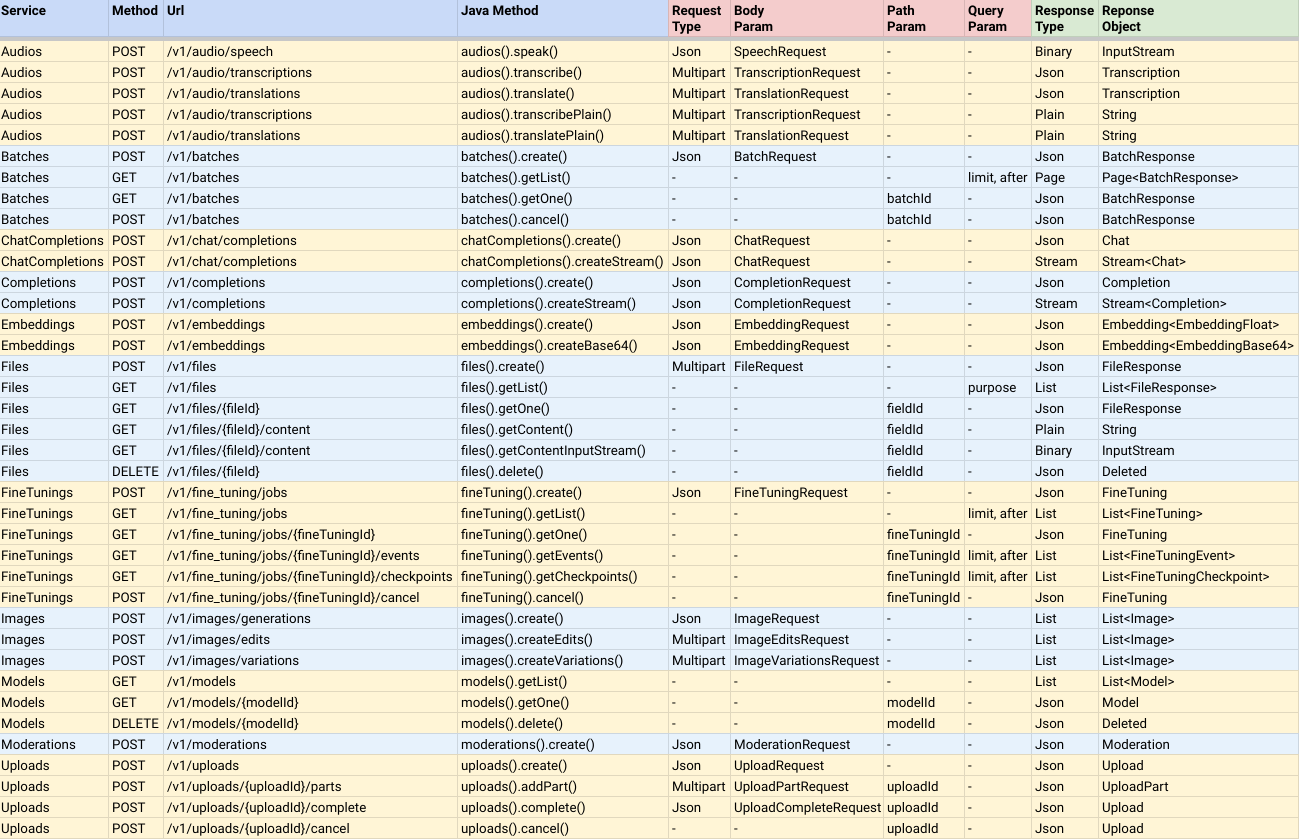
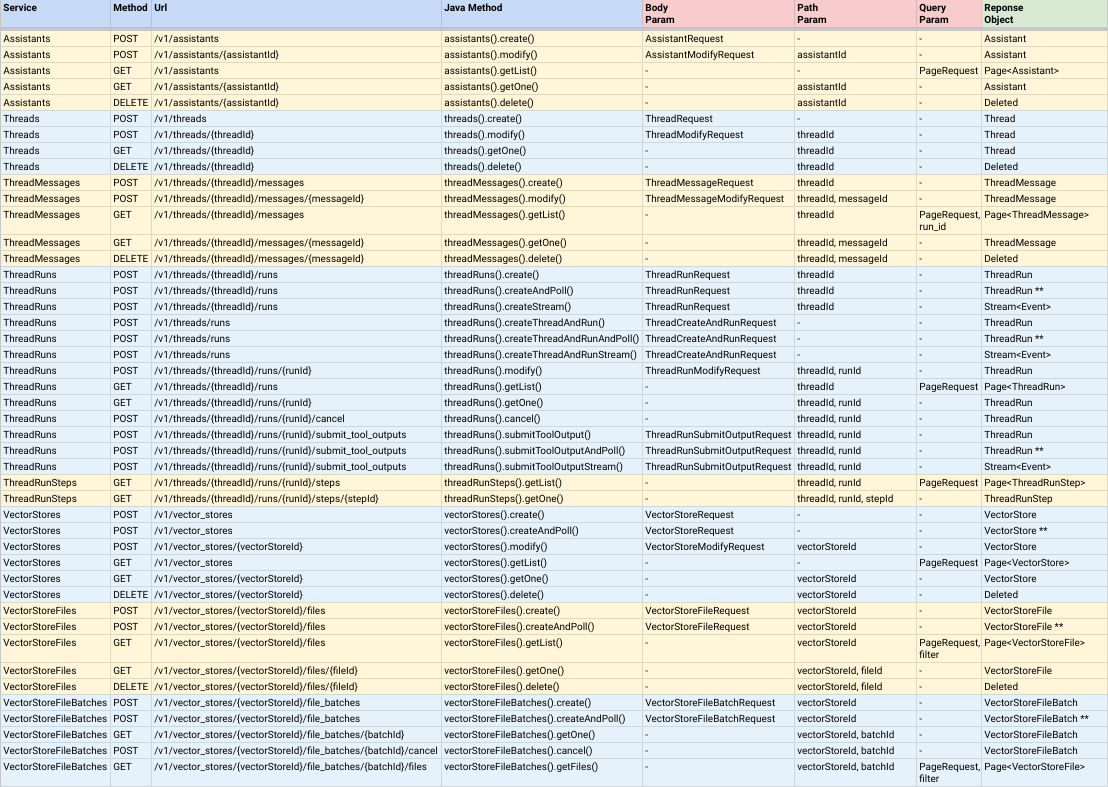
หมายเหตุ:
CompletableFuture<ResponseObject> ซึ่งหมายความว่าพวกเขาเป็นแบบอะซิงโครนัส แต่คุณสามารถโทรหาวิธีการเข้าร่วม () เพื่อส่งคืนค่าผลลัพธ์เมื่อเสร็จสมบูรณ์AndPoll() วิธีการเหล่านี้เป็นแบบซิงโครนัสและบล็อกจนกระทั่งฟังก์ชั่นเพรดิเคตที่คุณให้ผลตอบแทนเท็จ คุณสามารถติดตั้ง Simple-Openai ได้โดยเพิ่มการพึ่งพาโครงการ Maven ของคุณต่อไปนี้:
< dependency >
    < groupId >io.github.sashirestela</ groupId >
    < artifactId >simple-openai</ artifactId >
    < version >[latest version]</ version >
</ dependency >
หรือโดยใช้ Gradle:
dependencies {
    implementation ' io.github.sashirestela:simple-openai:[latest version] '
} นี่เป็นขั้นตอนแรกที่คุณต้องทำก่อนที่จะใช้บริการ คุณต้องระบุ คีย์ OpenAI API ของคุณอย่างน้อย (ดูที่นี่สำหรับรายละเอียดเพิ่มเติม) ในตัวอย่างต่อไปนี้เราได้รับคีย์ API จากตัวแปรสภาพแวดล้อมที่เรียกว่า OPENAI_API_KEY ซึ่งเราได้สร้างขึ้นเพื่อเก็บไว้:
 var openAI = SimpleOpenAI . builder ()
    . apiKey ( System . getenv ( "OPENAI_API_KEY" ))
    . build ();
ทางเลือกคุณสามารถผ่าน รหัสองค์กร OpenAI ของคุณในกรณีที่คุณมีหลายองค์กรและคุณต้องการระบุการใช้งานโดยองค์กรและ/หรือคุณสามารถผ่าน รหัสโครงการ OpenAI ของคุณในกรณีที่คุณต้องการให้เข้าถึงโครงการเดียว ในตัวอย่างต่อไปนี้เราใช้ตัวแปรสภาพแวดล้อมสำหรับ ID เหล่านั้น:
 var openAI = SimpleOpenAI . builder ()
    . apiKey ( System . getenv ( "OPENAI_API_KEY" ))
    . organizationId ( System . getenv ( "OPENAI_ORGANIZATION_ID" ))
    . projectId ( System . getenv ( "OPENAI_PROJECT_ID" ))
    . build ();
ทางเลือกเช่นกันคุณสามารถจัดหาวัตถุ Java httpClient ที่กำหนดเองได้หากคุณต้องการมีตัวเลือกเพิ่มเติมสำหรับการเชื่อมต่อ HTTP เช่นผู้บริหารพร็อกซีหมดเวลาคุกกี้ ฯลฯ (ดูรายละเอียดเพิ่มเติมที่นี่) ในตัวอย่างต่อไปนี้เรากำลังจัดทำ httpclient ที่กำหนดเอง:
 var httpClient = HttpClient . newBuilder ()
    . version ( Version . HTTP_1_1 )
    . followRedirects ( Redirect . NORMAL )
    . connectTimeout ( Duration . ofSeconds ( 20 ))
    . executor ( Executors . newFixedThreadPool ( 3 ))
    . proxy ( ProxySelector . of ( new InetSocketAddress ( "proxy.example.com" , 80 )))
    . build ();

var openAI = SimpleOpenAI . builder ()
    . apiKey ( System . getenv ( "OPENAI_API_KEY" ))
    . httpClient ( httpClient )
    . build ();
หลังจากที่คุณสร้างวัตถุ SimpleOpenai คุณพร้อมที่จะโทรหาบริการเพื่อสื่อสารกับ OpenAI API มาดูตัวอย่าง
ตัวอย่างการโทรบริการเสียงเพื่อแปลงข้อความเป็นเสียง เรากำลังขอให้รับเสียงในรูปแบบไบนารี (อินพุตสตรีม):
 var speechRequest = SpeechRequest . builder ()
        . model ( "tts-1" )
        . input ( "Hello world, welcome to the AI universe!" )
        . voice ( Voice . ALLOY )
        . responseFormat ( SpeechResponseFormat . MP3 )
        . speed ( 1.0 )
        . build ();
var futureSpeech = openAI . audios (). speak ( speechRequest );
var speechResponse = futureSpeech . join ();
try {
    var audioFile = new FileOutputStream ( speechFileName );
    audioFile . write ( speechResponse . readAllBytes ());
    System . out . println ( audioFile . getChannel (). size () + " bytes" );
    audioFile . close ();
} catch ( Exception e ) {
    e . printStackTrace ();
}
ตัวอย่างที่จะเรียกบริการเสียงเพื่อถอดเสียงเป็นข้อความ เรากำลังขอให้รับการถอดความในรูปแบบข้อความธรรมดา (ดูชื่อของวิธีการ):
 var audioRequest = TranscriptionRequest . builder ()
        . file ( Paths . get ( "hello_audio.mp3" ))
        . model ( "whisper-1" )
        . responseFormat ( AudioResponseFormat . VERBOSE_JSON )
        . temperature ( 0.2 )
        . timestampGranularity ( TimestampGranularity . WORD )
        . timestampGranularity ( TimestampGranularity . SEGMENT )
        . build ();
var futureAudio = openAI . audios (). transcribe ( audioRequest );
var audioResponse = futureAudio . join ();
System . out . println ( audioResponse );ตัวอย่างการเรียกใช้บริการรูปภาพเพื่อสร้างภาพสองภาพเพื่อตอบสนองต่อพรอมต์ของเรา เรากำลังขอให้รับ URL ของรูปภาพและเรากำลังพิมพ์ออกมาในคอนโซล:
 var imageRequest = ImageRequest . builder ()
        . prompt ( "A cartoon of a hummingbird that is flying around a flower." )
        . n ( 2 )
        . size ( Size . X256 )
        . responseFormat ( ImageResponseFormat . URL )
        . model ( "dall-e-2" )
        . build ();
var futureImage = openAI . images (). create ( imageRequest );
var imageResponse = futureImage . join ();
imageResponse . stream (). forEach ( img -> System . out . println ( " n " + img . getUrl ()));ตัวอย่างที่จะโทรหาบริการ CHAT เสร็จสิ้นเพื่อถามคำถามและรอคำตอบเต็ม เรากำลังพิมพ์ออกมาในคอนโซล:
 var chatRequest = ChatRequest . builder ()
        . model ( "gpt-4o-mini" )
        . message ( SystemMessage . of ( "You are an expert in AI." ))
        . message ( UserMessage . of ( "Write a technical article about ChatGPT, no more than 100 words." ))
        . temperature ( 0.0 )
        . maxCompletionTokens ( 300 )
        . build ();
var futureChat = openAI . chatCompletions (). create ( chatRequest );
var chatResponse = futureChat . join ();
System . out . println ( chatResponse . firstContent ());ตัวอย่างการโทรบริการการแชทเสร็จสิ้นเพื่อถามคำถามและรอคำตอบใน Deltas ข้อความบางส่วน เรากำลังพิมพ์ออกมาในคอนโซลทันทีที่เดลต้าแต่ละแห่งมาถึง:
 var chatRequest = ChatRequest . builder ()
        . model ( "gpt-4o-mini" )
        . message ( SystemMessage . of ( "You are an expert in AI." ))
        . message ( UserMessage . of ( "Write a technical article about ChatGPT, no more than 100 words." ))
        . temperature ( 0.0 )
        . maxCompletionTokens ( 300 )
        . build ();
var futureChat = openAI . chatCompletions (). createStream ( chatRequest );
var chatResponse = futureChat . join ();
chatResponse . filter ( chatResp -> chatResp . getChoices (). size () > 0 && chatResp . firstContent () != null )
        . map ( Chat :: firstContent )
        . forEach ( System . out :: print );
System . out . println (); ฟังก์ชั่นนี้ช่วยให้บริการการแชทเสร็จสมบูรณ์เพื่อแก้ปัญหาเฉพาะในบริบทของเรา ในตัวอย่างนี้เรากำลังตั้งค่าฟังก์ชั่นสามฟังก์ชั่นและเรากำลังป้อนพรอมต์ที่จะต้องเรียกหนึ่งในนั้น ( product ฟังก์ชั่น) สำหรับการตั้งค่าฟังก์ชั่นเราใช้คลาสเพิ่มเติมซึ่งใช้ Functional อินเตอร์เฟส คลาสเหล่านั้นกำหนดฟิลด์โดยอาร์กิวเมนต์ฟังก์ชั่นแต่ละรายการหมายเหตุประกอบพวกเขาเพื่ออธิบายพวกเขาและแต่ละคลาสจะต้องแทนที่วิธี execute ด้วยตรรกะของฟังก์ชั่น โปรดทราบว่าเรากำลังใช้คลาสยูทิลิตี้ FunctionExecutor เพื่อลงทะเบียนฟังก์ชั่นและเพื่อเรียกใช้ฟังก์ชันที่เลือกโดย openai.chatCompletions() การโทร:
 public void demoCallChatWithFunctions () {
    var functionExecutor = new FunctionExecutor ();
    functionExecutor . enrollFunction (
            FunctionDef . builder ()
                    . name ( "get_weather" )
                    . description ( "Get the current weather of a location" )
                    . functionalClass ( Weather . class )
                    . strict ( Boolean . TRUE )
                    . build ());
    functionExecutor . enrollFunction (
            FunctionDef . builder ()
                    . name ( "product" )
                    . description ( "Get the product of two numbers" )
                    . functionalClass ( Product . class )
                    . strict ( Boolean . TRUE )
                    . build ());
    functionExecutor . enrollFunction (
            FunctionDef . builder ()
                    . name ( "run_alarm" )
                    . description ( "Run an alarm" )
                    . functionalClass ( RunAlarm . class )
                    . strict ( Boolean . TRUE )
                    . build ());
    var messages = new ArrayList < ChatMessage >();
    messages . add ( UserMessage . of ( "What is the product of 123 and 456?" ));
    chatRequest = ChatRequest . builder ()
            . model ( "gpt-4o-mini" )
            . messages ( messages )
            . tools ( functionExecutor . getToolFunctions ())
            . build ();
    var futureChat = openAI . chatCompletions (). create ( chatRequest );
    var chatResponse = futureChat . join ();
    var chatMessage = chatResponse . firstMessage ();
    var chatToolCall = chatMessage . getToolCalls (). get ( 0 );
    var result = functionExecutor . execute ( chatToolCall . getFunction ());
    messages . add ( chatMessage );
    messages . add ( ToolMessage . of ( result . toString (), chatToolCall . getId ()));
    chatRequest = ChatRequest . builder ()
            . model ( "gpt-4o-mini" )
            . messages ( messages )
            . tools ( functionExecutor . getToolFunctions ())
            . build ();
    futureChat = openAI . chatCompletions (). create ( chatRequest );
    chatResponse = futureChat . join ();
    System . out . println ( chatResponse . firstContent ());
}

public static class Weather implements Functional {

    @ JsonPropertyDescription ( "City and state, for example: León, Guanajuato" )
    @ JsonProperty ( required = true )
    public String location ;

    @ JsonPropertyDescription ( "The temperature unit, can be 'celsius' or 'fahrenheit'" )
    @ JsonProperty ( required = true )
    public String unit ;

    @ Override
    public Object execute () {
        return Math . random () * 45 ;
    }

}

public static class Product implements Functional {

    @ JsonPropertyDescription ( "The multiplicand part of a product" )
    @ JsonProperty ( required = true )
    public double multiplicand ;

    @ JsonPropertyDescription ( "The multiplier part of a product" )
    @ JsonProperty ( required = true )
    public double multiplier ;

    @ Override
    public Object execute () {
        return multiplicand * multiplier ;
    }

}

public static class RunAlarm implements Functional {

    @ Override
    public Object execute () {
        return "DONE" ;
    }

}ตัวอย่างที่จะเรียกบริการการแชทเสร็จสิ้นเพื่อให้โมเดลถ่ายภาพภายนอกและตอบคำถามเกี่ยวกับพวกเขา:
 var chatRequest = ChatRequest . builder ()
        . model ( "gpt-4o-mini" )
        . messages ( List . of (
                UserMessage . of ( List . of (
                        ContentPartText . of (
                                "What do you see in the image? Give in details in no more than 100 words." ),
                        ContentPartImageUrl . of ( ImageUrl . of (
                                "https://upload.wikimedia.org/wikipedia/commons/e/eb/Machu_Picchu%2C_Peru.jpg" ))))))
        . temperature ( 0.0 )
        . maxCompletionTokens ( 500 )
        . build ();
var chatResponse = openAI . chatCompletions (). createStream ( chatRequest ). join ();
chatResponse . filter ( chatResp -> chatResp . getChoices (). size () > 0 && chatResp . firstContent () != null )
        . map ( Chat :: firstContent )
        . forEach ( System . out :: print );
System . out . println ();
ตัวอย่างที่จะเรียกบริการการแชทเสร็จสิ้นเพื่อให้โมเดลถ่ายภาพในท้องถิ่นและตอบคำถามเกี่ยวกับพวกเขา ( ตรวจสอบรหัสของ Base64util ในที่เก็บนี้ ):
 var chatRequest = ChatRequest . builder ()
        . model ( "gpt-4o-mini" )
        . messages ( List . of (
                UserMessage . of ( List . of (
                        ContentPartText . of (
                                "What do you see in the image? Give in details in no more than 100 words." ),
                        ContentPartImageUrl . of ( ImageUrl . of (
                                Base64Util . encode ( "src/demo/resources/machupicchu.jpg" , MediaType . IMAGE )))))))
        . temperature ( 0.0 )
        . maxCompletionTokens ( 500 )
        . build ();
var chatResponse = openAI . chatCompletions (). createStream ( chatRequest ). join ();
chatResponse . filter ( chatResp -> chatResp . getChoices (). size () > 0 && chatResp . firstContent () != null )
        . map ( Chat :: firstContent )
        . forEach ( System . out :: print );
System . out . println ();ตัวอย่างที่จะเรียกใช้บริการการแชทเสร็จสิ้นเพื่อสร้างการตอบสนองเสียงพูดไปยังพรอมต์และใช้อินพุตเสียงเพื่อแจ้งรุ่น ( ตรวจสอบรหัสของ Base64util ในที่เก็บนี้ ):
 var messages = new ArrayList < ChatMessage >();
messages . add ( SystemMessage . of ( "Respond in a short and concise way." ));
messages . add ( UserMessage . of ( List . of ( ContentPartInputAudio . of ( InputAudio . of (
        Base64Util . encode ( "src/demo/resources/question1.mp3" , null ), InputAudioFormat . MP3 )))));
chatRequest = ChatRequest . builder ()
        . model ( "gpt-4o-audio-preview" )
        . modality ( Modality . TEXT )
        . modality ( Modality . AUDIO )
        . audio ( Audio . of ( Voice . ALLOY , AudioFormat . MP3 ))
        . messages ( messages )
        . build ();
var chatResponse = openAI . chatCompletions (). create ( chatRequest ). join ();
var audio = chatResponse . firstMessage (). getAudio ();
Base64Util . decode ( audio . getData (), "src/demo/resources/answer1.mp3" );
System . out . println ( "Answer 1: " + audio . getTranscript ());

messages . add ( AssistantMessage . builder (). audioId ( audio . getId ()). build ());
messages . add ( UserMessage . of ( List . of ( ContentPartInputAudio . of ( InputAudio . of (
        Base64Util . encode ( "src/demo/resources/question2.mp3" , null ), InputAudioFormat . MP3 )))));
chatRequest = ChatRequest . builder ()
        . model ( "gpt-4o-audio-preview" )
        . modality ( Modality . TEXT )
        . modality ( Modality . AUDIO )
        . audio ( Audio . of ( Voice . ALLOY , AudioFormat . MP3 ))
        . messages ( messages )
        . build ();
chatResponse = openAI . chatCompletions (). create ( chatRequest ). join ();
audio = chatResponse . firstMessage (). getAudio ();
Base64Util . decode ( audio . getData (), "src/demo/resources/answer2.mp3" );
System . out . println ( "Answer 2: " + audio . getTranscript ());ตัวอย่างเพื่อเรียกใช้บริการการแชทเสร็จสิ้นเพื่อให้แน่ใจว่าโมเดลจะสร้างคำตอบที่ปฏิบัติตามสคีมา JSON ที่กำหนดผ่านคลาส Java:
 public void demoCallChatWithStructuredOutputs () {
    var chatRequest = ChatRequest . builder ()
            . model ( "gpt-4o-mini" )
            . message ( SystemMessage
                    . of ( "You are a helpful math tutor. Guide the user through the solution step by step." ))
            . message ( UserMessage . of ( "How can I solve 8x + 7 = -23" ))
            . responseFormat ( ResponseFormat . jsonSchema ( JsonSchema . builder ()
                    . name ( "MathReasoning" )
                    . schemaClass ( MathReasoning . class )
                    . build ()))
            . build ();
    var chatResponse = openAI . chatCompletions (). createStream ( chatRequest ). join ();
    chatResponse . filter ( chatResp -> chatResp . getChoices (). size () > 0 && chatResp . firstContent () != null )
            . map ( Chat :: firstContent )
            . forEach ( System . out :: print );
    System . out . println ();
}

public static class MathReasoning {

    public List < Step > steps ;
    public String finalAnswer ;

    public static class Step {

        public String explanation ;
        public String output ;

    }

}ตัวอย่างนี้จำลองการแชทการสนทนาโดยคอนโซลคำสั่งและแสดงให้เห็นถึงการใช้งานของ chatcompletion ด้วยฟังก์ชั่นการสตรีมและการโทร
คุณสามารถดูรหัสตัวอย่างเต็มรูปแบบรวมถึงผลลัพธ์จากการเรียกใช้รหัสสาธิต:
 package io . github . sashirestela . openai . demo ;

import com . fasterxml . jackson . annotation . JsonProperty ;
import com . fasterxml . jackson . annotation . JsonPropertyDescription ;
import io . github . sashirestela . openai . SimpleOpenAI ;
import io . github . sashirestela . openai . common . function . FunctionDef ;
import io . github . sashirestela . openai . common . function . FunctionExecutor ;
import io . github . sashirestela . openai . common . function . Functional ;
import io . github . sashirestela . openai . common . tool . ToolCall ;
import io . github . sashirestela . openai . domain . chat . Chat ;
import io . github . sashirestela . openai . domain . chat . Chat . Choice ;
import io . github . sashirestela . openai . domain . chat . ChatMessage ;
import io . github . sashirestela . openai . domain . chat . ChatMessage . AssistantMessage ;
import io . github . sashirestela . openai . domain . chat . ChatMessage . ResponseMessage ;
import io . github . sashirestela . openai . domain . chat . ChatMessage . ToolMessage ;
import io . github . sashirestela . openai . domain . chat . ChatMessage . UserMessage ;
import io . github . sashirestela . openai . domain . chat . ChatRequest ;

import java . util . ArrayList ;
import java . util . List ;
import java . util . stream . Stream ;

public class ConversationDemo {

    private SimpleOpenAI openAI ;
    private FunctionExecutor functionExecutor ;

    private int indexTool ;
    private StringBuilder content ;
    private StringBuilder functionArgs ;

    public ConversationDemo () {
        openAI = SimpleOpenAI . builder (). apiKey ( System . getenv ( "OPENAI_API_KEY" )). build ();
    }

    public void prepareConversation () {
        List < FunctionDef > functionList = new ArrayList <>();
        functionList . add ( FunctionDef . builder ()
                . name ( "getCurrentTemperature" )
                . description ( "Get the current temperature for a specific location" )
                . functionalClass ( CurrentTemperature . class )
                . strict ( Boolean . TRUE )
                . build ());
        functionList . add ( FunctionDef . builder ()
                . name ( "getRainProbability" )
                . description ( "Get the probability of rain for a specific location" )
                . functionalClass ( RainProbability . class )
                . strict ( Boolean . TRUE )
                . build ());
        functionExecutor = new FunctionExecutor ( functionList );
    }

    public void runConversation () {
        List < ChatMessage > messages = new ArrayList <>();
        var myMessage = System . console (). readLine ( " n Welcome! Write any message: " );
        messages . add ( UserMessage . of ( myMessage ));
        while (! myMessage . toLowerCase (). equals ( "exit" )) {
            var chatStream = openAI . chatCompletions ()
                    . createStream ( ChatRequest . builder ()
                            . model ( "gpt-4o-mini" )
                            . messages ( messages )
                            . tools ( functionExecutor . getToolFunctions ())
                            . temperature ( 0.2 )
                            . stream ( true )
                            . build ())
                    . join ();

            indexTool = - 1 ;
            content = new StringBuilder ();
            functionArgs = new StringBuilder ();

            var response = getResponse ( chatStream );

            if ( response . getMessage (). getContent () != null ) {
                messages . add ( AssistantMessage . of ( response . getMessage (). getContent ()));
            }
            if ( response . getFinishReason (). equals ( "tool_calls" )) {
                messages . add ( response . getMessage ());
                var toolCalls = response . getMessage (). getToolCalls ();
                var toolMessages = functionExecutor . executeAll ( toolCalls ,
                        ( toolCallId , result ) -> ToolMessage . of ( result , toolCallId ));
                messages . addAll ( toolMessages );
            } else {
                myMessage = System . console (). readLine ( " n n Write any message (or write 'exit' to finish): " );
                messages . add ( UserMessage . of ( myMessage ));
            }
        }
    }

    private Choice getResponse ( Stream < Chat > chatStream ) {
        var choice = new Choice ();
        choice . setIndex ( 0 );
        var chatMsgResponse = new ResponseMessage ();
        List < ToolCall > toolCalls = new ArrayList <>();

        chatStream . forEach ( responseChunk -> {
            var choices = responseChunk . getChoices ();
            if ( choices . size () > 0 ) {
                var innerChoice = choices . get ( 0 );
                var delta = innerChoice . getMessage ();
                if ( delta . getRole () != null ) {
                    chatMsgResponse . setRole ( delta . getRole ());
                }
                if ( delta . getContent () != null && ! delta . getContent (). isEmpty ()) {
                    content . append ( delta . getContent ());
                    System . out . print ( delta . getContent ());
                }
                if ( delta . getToolCalls () != null ) {
                    var toolCall = delta . getToolCalls (). get ( 0 );
                    if ( toolCall . getIndex () != indexTool ) {
                        if ( toolCalls . size () > 0 ) {
                            toolCalls . get ( toolCalls . size () - 1 ). getFunction (). setArguments ( functionArgs . toString ());
                            functionArgs = new StringBuilder ();
                        }
                        toolCalls . add ( toolCall );
                        indexTool ++;
                    } else {
                        functionArgs . append ( toolCall . getFunction (). getArguments ());
                    }
                }
                if ( innerChoice . getFinishReason () != null ) {
                    if ( content . length () > 0 ) {
                        chatMsgResponse . setContent ( content . toString ());
                    }
                    if ( toolCalls . size () > 0 ) {
                        toolCalls . get ( toolCalls . size () - 1 ). getFunction (). setArguments ( functionArgs . toString ());
                        chatMsgResponse . setToolCalls ( toolCalls );
                    }
                    choice . setMessage ( chatMsgResponse );
                    choice . setFinishReason ( innerChoice . getFinishReason ());
                }
            }
        });
        return choice ;
    }

    public static void main ( String [] args ) {
        var demo = new ConversationDemo ();
        demo . prepareConversation ();
        demo . runConversation ();
    }

    public static class CurrentTemperature implements Functional {

        @ JsonPropertyDescription ( "The city and state, e.g., San Francisco, CA" )
        @ JsonProperty ( required = true )
        public String location ;

        @ JsonPropertyDescription ( "The temperature unit to use. Infer this from the user's location." )
        @ JsonProperty ( required = true )
        public String unit ;

        @ Override
        public Object execute () {
            double centigrades = Math . random () * ( 40.0 - 10.0 ) + 10.0 ;
            double fahrenheit = centigrades * 9.0 / 5.0 + 32.0 ;
            String shortUnit = unit . substring ( 0 , 1 ). toUpperCase ();
            return shortUnit . equals ( "C" ) ? centigrades : ( shortUnit . equals ( "F" ) ? fahrenheit : 0.0 );
        }

    }

    public static class RainProbability implements Functional {

        @ JsonPropertyDescription ( "The city and state, e.g., San Francisco, CA" )
        @ JsonProperty ( required = true )
        public String location ;

        @ Override
        public Object execute () {
            return Math . random () * 100 ;
        }

    }

}Welcome! Write any message: Hi, can you help me with some quetions about Lima, Peru?
Of course! What would you like to know about Lima, Peru?
Write any message (or write 'exit' to finish): Tell me something brief about Lima Peru, then tell me how's the weather there right now. Finally give me three tips to travel there.
## # Brief About Lima, Peru
Lima, the capital city of Peru, is a bustling metropolis that blends modernity with rich historical heritage. Founded by Spanish conquistador Francisco Pizarro in 1535, Lima is known for its colonial architecture, vibrant culture, and delicious cuisine, particularly its world-renowned ceviche. The city is also a gateway to exploring Peru's diverse landscapes, from the coastal deserts to the Andean highlands and the Amazon rainforest.
## # Current Weather in Lima, Peru
I'll check the current temperature and the probability of rain in Lima for you. ## # Current Weather in Lima, Peru
- ** Temperature: ** Approximately 11.8°C
- ** Probability of Rain: ** Approximately 97.8%
## # Three Tips for Traveling to Lima, Peru
1. ** Explore the Historic Center: **
- Visit the Plaza Mayor, the Government Palace, and the Cathedral of Lima. These landmarks offer a glimpse into Lima's colonial past and are UNESCO World Heritage Sites.
2. ** Savor the Local Cuisine: **
- Don't miss out on trying ceviche, a traditional Peruvian dish made from fresh raw fish marinated in citrus juices. Also, explore the local markets and try other Peruvian delicacies.
3. ** Visit the Coastal Districts: **
- Head to Miraflores and Barranco for stunning ocean views, vibrant nightlife, and cultural experiences. These districts are known for their beautiful parks, cliffs, and bohemian atmosphere.
Enjoy your trip to Lima! If you have any more questions, feel free to ask.
Write any message (or write 'exit' to finish): exitตัวอย่างนี้จำลองการสนทนาการสนทนาโดยคอนโซลคำสั่งและแสดงให้เห็นถึงการใช้งานคุณสมบัติผู้ช่วยล่าสุด API V2:
คุณสามารถดูรหัสตัวอย่างเต็มรูปแบบรวมถึงผลลัพธ์จากการเรียกใช้รหัสสาธิต:
 package io . github . sashirestela . openai . demo ;

import com . fasterxml . jackson . annotation . JsonProperty ;
import com . fasterxml . jackson . annotation . JsonPropertyDescription ;
import io . github . sashirestela . cleverclient . Event ;
import io . github . sashirestela . openai . SimpleOpenAI ;
import io . github . sashirestela . openai . common . content . ContentPart . ContentPartTextAnnotation ;
import io . github . sashirestela . openai . common . function . FunctionDef ;
import io . github . sashirestela . openai . common . function . FunctionExecutor ;
import io . github . sashirestela . openai . common . function . Functional ;
import io . github . sashirestela . openai . domain . assistant . AssistantRequest ;
import io . github . sashirestela . openai . domain . assistant . AssistantTool ;
import io . github . sashirestela . openai . domain . assistant . ThreadMessageDelta ;
import io . github . sashirestela . openai . domain . assistant . ThreadMessageRequest ;
import io . github . sashirestela . openai . domain . assistant . ThreadMessageRole ;
import io . github . sashirestela . openai . domain . assistant . ThreadRequest ;
import io . github . sashirestela . openai . domain . assistant . ThreadRun ;
import io . github . sashirestela . openai . domain . assistant . ThreadRun . RunStatus ;
import io . github . sashirestela . openai . domain . assistant . ThreadRunRequest ;
import io . github . sashirestela . openai . domain . assistant . ThreadRunSubmitOutputRequest ;
import io . github . sashirestela . openai . domain . assistant . ThreadRunSubmitOutputRequest . ToolOutput ;
import io . github . sashirestela . openai . domain . assistant . ToolResourceFull ;
import io . github . sashirestela . openai . domain . assistant . ToolResourceFull . FileSearch ;
import io . github . sashirestela . openai . domain . assistant . VectorStoreRequest ;
import io . github . sashirestela . openai . domain . assistant . events . EventName ;
import io . github . sashirestela . openai . domain . file . FileRequest ;
import io . github . sashirestela . openai . domain . file . FileRequest . PurposeType ;

import java . nio . file . Paths ;
import java . util . ArrayList ;
import java . util . List ;
import java . util . stream . Stream ;

public class ConversationV2Demo {

    private SimpleOpenAI openAI ;
    private String fileId ;
    private String vectorStoreId ;
    private FunctionExecutor functionExecutor ;
    private String assistantId ;
    private String threadId ;

    public ConversationV2Demo () {
        openAI = SimpleOpenAI . builder (). apiKey ( System . getenv ( "OPENAI_API_KEY" )). build ();
    }

    public void prepareConversation () {
        List < FunctionDef > functionList = new ArrayList <>();
        functionList . add ( FunctionDef . builder ()
                . name ( "getCurrentTemperature" )
                . description ( "Get the current temperature for a specific location" )
                . functionalClass ( CurrentTemperature . class )
                . strict ( Boolean . TRUE )
                . build ());
        functionList . add ( FunctionDef . builder ()
                . name ( "getRainProbability" )
                . description ( "Get the probability of rain for a specific location" )
                . functionalClass ( RainProbability . class )
                . strict ( Boolean . TRUE )
                . build ());
        functionExecutor = new FunctionExecutor ( functionList );

        var file = openAI . files ()
                . create ( FileRequest . builder ()
                        . file ( Paths . get ( "src/demo/resources/mistral-ai.txt" ))
                        . purpose ( PurposeType . ASSISTANTS )
                        . build ())
                . join ();
        fileId = file . getId ();
        System . out . println ( "File was created with id: " + fileId );

        var vectorStore = openAI . vectorStores ()
                . createAndPoll ( VectorStoreRequest . builder ()
                        . fileId ( fileId )
                        . build ());
        vectorStoreId = vectorStore . getId ();
        System . out . println ( "Vector Store was created with id: " + vectorStoreId );

        var assistant = openAI . assistants ()
                . create ( AssistantRequest . builder ()
                        . name ( "World Assistant" )
                        . model ( "gpt-4o" )
                        . instructions ( "You are a skilled tutor on geo-politic topics." )
                        . tools ( functionExecutor . getToolFunctions ())
                        . tool ( AssistantTool . fileSearch ())
                        . toolResources ( ToolResourceFull . builder ()
                                . fileSearch ( FileSearch . builder ()
                                        . vectorStoreId ( vectorStoreId )
                                        . build ())
                                . build ())
                        . temperature ( 0.2 )
                        . build ())
                . join ();
        assistantId = assistant . getId ();
        System . out . println ( "Assistant was created with id: " + assistantId );

        var thread = openAI . threads (). create ( ThreadRequest . builder (). build ()). join ();
        threadId = thread . getId ();
        System . out . println ( "Thread was created with id: " + threadId );
        System . out . println ();
    }

    public void runConversation () {
        var myMessage = System . console (). readLine ( " n Welcome! Write any message: " );
        while (! myMessage . toLowerCase (). equals ( "exit" )) {
            openAI . threadMessages ()
                    . create ( threadId , ThreadMessageRequest . builder ()
                            . role ( ThreadMessageRole . USER )
                            . content ( myMessage )
                            . build ())
                    . join ();
            var runStream = openAI . threadRuns ()
                    . createStream ( threadId , ThreadRunRequest . builder ()
                            . assistantId ( assistantId )
                            . parallelToolCalls ( Boolean . FALSE )
                            . build ())
                    . join ();
            handleRunEvents ( runStream );
            myMessage = System . console (). readLine ( " n Write any message (or write 'exit' to finish): " );
        }
    }

    private void handleRunEvents ( Stream < Event > runStream ) {
        runStream . forEach ( event -> {
            switch ( event . getName ()) {
                case EventName . THREAD_RUN_CREATED :
                case EventName . THREAD_RUN_COMPLETED :
                case EventName . THREAD_RUN_REQUIRES_ACTION :
                    var run = ( ThreadRun ) event . getData ();
                    System . out . println ( "=====>> Thread Run: id=" + run . getId () + ", status=" + run . getStatus ());
                    if ( run . getStatus (). equals ( RunStatus . REQUIRES_ACTION )) {
                        var toolCalls = run . getRequiredAction (). getSubmitToolOutputs (). getToolCalls ();
                        var toolOutputs = functionExecutor . executeAll ( toolCalls ,
                                ( toolCallId , result ) -> ToolOutput . builder ()
                                        . toolCallId ( toolCallId )
                                        . output ( result )
                                        . build ());
                        var runSubmitToolStream = openAI . threadRuns ()
                                . submitToolOutputStream ( threadId , run . getId (), ThreadRunSubmitOutputRequest . builder ()
                                        . toolOutputs ( toolOutputs )
                                        . stream ( true )
                                        . build ())
                                . join ();
                        handleRunEvents ( runSubmitToolStream );
                    }
                    break ;
                case EventName . THREAD_MESSAGE_DELTA :
                    var msgDelta = ( ThreadMessageDelta ) event . getData ();
                    var content = msgDelta . getDelta (). getContent (). get ( 0 );
                    if ( content instanceof ContentPartTextAnnotation ) {
                        var textContent = ( ContentPartTextAnnotation ) content ;
                        System . out . print ( textContent . getText (). getValue ());
                    }
                    break ;
                case EventName . THREAD_MESSAGE_COMPLETED :
                    System . out . println ();
                    break ;
                default :
                    break ;
            }
        });
    }

    public void cleanConversation () {
        var deletedFile = openAI . files (). delete ( fileId ). join ();
        var deletedVectorStore = openAI . vectorStores (). delete ( vectorStoreId ). join ();
        var deletedAssistant = openAI . assistants (). delete ( assistantId ). join ();
        var deletedThread = openAI . threads (). delete ( threadId ). join ();

        System . out . println ( "File was deleted: " + deletedFile . getDeleted ());
        System . out . println ( "Vector Store was deleted: " + deletedVectorStore . getDeleted ());
        System . out . println ( "Assistant was deleted: " + deletedAssistant . getDeleted ());
        System . out . println ( "Thread was deleted: " + deletedThread . getDeleted ());
    }

    public static void main ( String [] args ) {
        var demo = new ConversationV2Demo ();
        demo . prepareConversation ();
        demo . runConversation ();
        demo . cleanConversation ();
    }

    public static class CurrentTemperature implements Functional {

        @ JsonPropertyDescription ( "The city and state, e.g., San Francisco, CA" )
        @ JsonProperty ( required = true )
        public String location ;

        @ JsonPropertyDescription ( "The temperature unit to use. Infer this from the user's location." )
        @ JsonProperty ( required = true )
        public String unit ;

        @ Override
        public Object execute () {
            double centigrades = Math . random () * ( 40.0 - 10.0 ) + 10.0 ;
            double fahrenheit = centigrades * 9.0 / 5.0 + 32.0 ;
            String shortUnit = unit . substring ( 0 , 1 ). toUpperCase ();
            return shortUnit . equals ( "C" ) ? centigrades : ( shortUnit . equals ( "F" ) ? fahrenheit : 0.0 );
        }

    }

    public static class RainProbability implements Functional {

        @ JsonPropertyDescription ( "The city and state, e.g., San Francisco, CA" )
        @ JsonProperty ( required = true )
        public String location ;

        @ Override
        public Object execute () {
            return Math . random () * 100 ;
        }

    }

}File was created with id: file-oDFIF7o4SwuhpwBNnFIILhMK
Vector Store was created with id: vs_lG1oJmF2s5wLhqHUSeJpELMr
Assistant was created with id: asst_TYS5cZ05697tyn3yuhDrCCIv
Thread was created with id: thread_33n258gFVhZVIp88sQKuqMvg
Welcome! Write any message: Hello
=====>> Thread Run: id=run_nihN6dY0uyudsORg4xyUvQ5l, status=QUEUED
Hello! How can I assist you today?
=====>> Thread Run: id=run_nihN6dY0uyudsORg4xyUvQ5l, status=COMPLETED
Write any message (or write 'exit' to finish): Tell me something brief about Lima Peru, then tell me how's the weather there right now. Finally give me three tips to travel there.
=====>> Thread Run: id=run_QheimPyP5UK6FtmH5obon0fB, status=QUEUED
Lima, the capital city of Peru, is located on the country's arid Pacific coast. It's known for its vibrant culinary scene, rich history, and as a cultural hub with numerous museums, colonial architecture, and remnants of pre-Columbian civilizations. This bustling metropolis serves as a key gateway to visiting Peru’s more famous attractions, such as Machu Picchu and the Amazon rainforest.
Let me find the current weather conditions in Lima for you, and then I'll provide three travel tips.
=====>> Thread Run: id=run_QheimPyP5UK6FtmH5obon0fB, status=REQUIRES_ACTION
## # Current Weather in Lima, Peru:
- ** Temperature: ** 12.8°C
- ** Rain Probability: ** 82.7%
## # Three Travel Tips for Lima, Peru:
1. ** Best Time to Visit: ** Plan your trip during the dry season, from May to September, which offers clearer skies and milder temperatures. This period is particularly suitable for outdoor activities and exploring the city comfortably.
2. ** Local Cuisine: ** Don't miss out on tasting the local Peruvian dishes, particularly the ceviche, which is renowned worldwide. Lima is also known as the gastronomic capital of South America, so indulge in the wide variety of dishes available.
3. ** Cultural Attractions: ** Allocate enough time to visit Lima's rich array of museums, such as the Larco Museum, which showcases pre-Columbian art, and the historical center which is a UNESCO World Heritage Site. Moreover, exploring districts like Miraflores and Barranco can provide insights into the modern and bohemian sides of the city.
Enjoy planning your trip to Lima! If you need more information or help, feel free to ask.
=====>> Thread Run: id=run_QheimPyP5UK6FtmH5obon0fB, status=COMPLETED
Write any message (or write 'exit' to finish): Tell me something about the Mistral company
=====>> Thread Run: id=run_5u0t8kDQy87p5ouaTRXsCG8m, status=QUEUED
Mistral AI is a French company that specializes in selling artificial intelligence products. It was established in April 2023 by former employees of Meta Platforms and Google DeepMind. Notably, the company secured a significant amount of funding, raising €385 million in October 2023, and achieved a valuation exceeding $ 2 billion by December of the same year.
The prime focus of Mistral AI is on developing and producing open-source large language models. This approach underscores the foundational role of open-source software as a counter to proprietary models. As of March 2024, Mistral AI has published two models, which are available in terms of weights, while three more models—categorized as Small, Medium, and Large—are accessible only through an API[1].
=====>> Thread Run: id=run_5u0t8kDQy87p5ouaTRXsCG8m, status=COMPLETED
Write any message (or write 'exit' to finish): exit
File was deleted: true
Vector Store was deleted: true
Assistant was deleted: true
Thread was deleted: trueในตัวอย่างนี้คุณสามารถดูรหัสเพื่อสร้างการสนทนาแบบพูดระหว่างคุณกับโมเดลโดยใช้ไมโครโฟนและลำโพงของคุณ ดูรหัสเต็มบน:
realtimedemo.java
Simple-Openai สามารถใช้กับผู้ให้บริการเพิ่มเติมที่เข้ากันได้กับ OpenAI API ในขณะนี้มีการสนับสนุนสำหรับผู้ให้บริการเพิ่มเติมต่อไปนี้:
Azure Openia ได้รับการสนับสนุนโดย Simple-Openai เราสามารถใช้คลาส SimpleOpenAIAzure ซึ่งขยาย BaseSimpleOpenAI คลาสเพื่อเริ่มใช้ผู้ให้บริการนี้
 var openai = SimpleOpenAIAzure . builder ()
    . apiKey ( System . getenv ( "AZURE_OPENAI_API_KEY" ))
    . baseUrl ( System . getenv ( "AZURE_OPENAI_BASE_URL" ))   // Including resourceName and deploymentId
    . apiVersion ( System . getenv ( "AZURE_OPENAI_API_VERSION" ))
    //.httpClient(customHttpClient)   Optionally you could pass a custom HttpClient
    . build ();
Azure Openai ขับเคลื่อนโดยชุดรุ่นที่หลากหลายที่มีความสามารถที่แตกต่างกันและต้องใช้การปรับใช้แยกต่างหากสำหรับแต่ละรุ่น ความพร้อมใช้งานของโมเดลแตกต่างกันไปตามภูมิภาคและคลาวด์ ดูรายละเอียดเพิ่มเติมเกี่ยวกับรุ่น Azure Openai
ขณะนี้เรากำลังสนับสนุนบริการต่อไปนี้เท่านั้น:
chatCompletionService (การสร้างข้อความ, สตรีมมิ่ง, การเรียกใช้ฟังก์ชัน, การมองเห็น, ผลลัพธ์ที่มีโครงสร้าง)fileService (อัปโหลดไฟล์) Anyscale ได้รับการสนับสนุนจาก Simple-Openai เราสามารถใช้คลาส SimpleOpenAIAnyscale ซึ่งขยาย BaseSimpleOpenAI คลาสเพื่อเริ่มใช้ผู้ให้บริการนี้
 var openai = SimpleOpenAIAnyscale . builder ()
    . apiKey ( System . getenv ( "ANYSCALE_API_KEY" ))
    //.baseUrl(customUrl)             Optionally you could pass a custom baseUrl
    //.httpClient(customHttpClient)   Optionally you could pass a custom HttpClient
    . build ();
ขณะนี้เราสนับสนุนบริการ chatCompletionService เท่านั้น มันถูกทดสอบกับแบบจำลอง mistral
ตัวอย่างสำหรับบริการ OpenAI แต่ละรายการถูกสร้างขึ้นในการสาธิตโฟลเดอร์และคุณสามารถทำตามขั้นตอนต่อไปเพื่อดำเนินการ:
โคลนที่เก็บนี้:
 git clone https://github.com/sashirestela/simple-openai.git
cd simple-openai
สร้างโครงการ:
mvn clean install
สร้างตัวแปรสภาพแวดล้อมสำหรับคีย์ OpenAI API ของคุณ:
export OPENAI_API_KEY=<here goes your api key>
ให้สิทธิ์การดำเนินการในไฟล์สคริปต์:
chmod +x rundemo.sh
รันตัวอย่าง:
./rundemo.sh <demo> [debug]
ที่ไหน:
<demo> เป็นข้อบังคับและต้องเป็นหนึ่งในค่า:
[debug] เป็นทางเลือกและสร้างไฟล์ demo.log ที่คุณสามารถดูรายละเอียดบันทึกสำหรับการดำเนินการแต่ละครั้ง
ตัวอย่างเช่นในการเรียกใช้การสาธิตการแชทด้วยไฟล์บันทึก: ./rundemo.sh Chat debug
ข้อบ่งชี้สำหรับการสาธิต Azure Openai
รุ่นที่แนะนำในการเรียกใช้การสาธิตนี้คือ:
ดูเอกสาร Azure Openai สำหรับรายละเอียดเพิ่มเติม: เอกสาร Azure Openai เมื่อคุณมี URL การปรับใช้และคีย์ API ให้ตั้งค่าตัวแปรสภาพแวดล้อมต่อไปนี้:
 export AZURE_OPENAI_BASE_URL=<https://YOUR_RESOURCE_NAME.openai.azure.com/openai/deployments/YOUR_DEPLOYMENT_NAME>
export AZURE_OPENAI_API_KEY=<here goes your regional API key>
export AZURE_OPENAI_API_VERSION=<for example: 2024-08-01-preview>
โปรดทราบว่าบางรุ่นอาจไม่สามารถใช้ได้ในทุกภูมิภาค หากคุณมีปัญหาในการค้นหาแบบจำลองให้ลองใช้ภูมิภาคอื่น ปุ่ม API เป็นภูมิภาค (ต่อบัญชีความรู้ความเข้าใจ) หากคุณจัดเตรียมหลายรุ่นในภูมิภาคเดียวกันพวกเขาจะแบ่งปันคีย์ API เดียวกัน (จริง ๆ แล้วมีสองปุ่มต่อภูมิภาคเพื่อรองรับการหมุนคีย์สำรอง)
กรุณาอ่านคู่มือการสนับสนุนของเราเพื่อเรียนรู้และทำความเข้าใจวิธีการมีส่วนร่วมในโครงการนี้
Simple-Openai ได้รับใบอนุญาตภายใต้ใบอนุญาต MIT ดูไฟล์ใบอนุญาตสำหรับข้อมูลเพิ่มเติม
รายชื่อผู้ใช้หลักของห้องสมุดของเรา:
ขอบคุณที่ใช้ Simple-Openai หากคุณพบว่าโครงการนี้มีค่ามีสองสามวิธีที่คุณสามารถแสดงความรักของคุณได้โดยเฉพาะอย่างยิ่งพวกเขาทั้งหมด?:





