nodejs gpt
v1.37.4

已经添加了对官方CHATGPT模型的支持!现在,您可以使用ChatGPTClient使用官方的OpenAI API使用gpt-3.5-turbo模型。这是Chatgpt使用的模型,它是目前可用的最强大的模型。该模型的使用不是免费的,但是比text-davinci-003便宜10倍(价格为每1k代币0.002美元)。
有关更多信息,请参见Openai的帖子,介绍Chatgpt和Whisper Apis。
要使用它,请将 modelOptions.model设置为gpt-3.5-turbo ,而ChatGPTClient将处理其余的。ChatGPTClient中使用的默认模型现在为gpt-3.5-turbo 。您仍然可以像往常一样设置userLabel , chatGptLabel和promptPrefix (系统说明)。
如果您继续自动chat.openai.com,则可能会有更高的可能性被禁止使用。继续这样做的风险。
我添加了一个实验性ChatGPTBrowserClient ,该chatgptbrowserclient取决于使用CloudFlare旁路的反向代理服务器,使您可以与Chatgpt(Chat.openai.com)交谈而无需浏览器自动化。您所需要的只是您的访问令牌从https://chat.openai.com/api/auth/session。
与往常一样,请注意,如果您选择走这条路线,则将访问令牌公开为封闭的第三方服务器。如果您担心这一点,则可以选择使用免费的ChatGpt帐户来最大程度地降低风险,或者继续使用ChatGPTClient代替text-davinci-003型号。
不幸的是,我们使用的方法用于访问Chatgpt基础模型。您现在的选项是将官方的OpenAI API与text-davinci-003型号(费用为钱),或者使用基于浏览器的解决方案与ChatGpt的后端进行交互(该解决方案较不强大,更限制,并且此时不受此库的支持)。
在@pawanosman的帮助下,我们已经找到了一种继续使用Chatgpt基础模型的方法。为了防止再次失去访问权限,我们决定提供与OpenAI API兼容的反向代理服务器。我已经更新了ChatGPTClient ,以使用反向代理服务器而不是OpenAI API服务器进行支持。有关可用代理服务器及其工作方式的更多信息,请参见使用反向代理。
请注意,如果您选择走这条路线,则将访问令牌公开为封闭的第三方服务器。如果您担心这一点,则可以选择使用免费的ChatGpt帐户来最大程度地降低风险,或者继续使用官方的OpenAI API而不是text-davinci-003型号。
我找到了一种新的用于text-chat-davinci-002 , text-chat-davinci-002-sh-alpha-aoruigiofdj83的工作模型。这是Chatgpt Plus“ Turbo”版本使用的基础模型。响应迅速。我已经更新了库以使用此模型。
不良时机;不久之后删除了text-chat-davinci-002-sh-alpha-aoruigiofdj83 ,这可能是由于某个地方的新型号造成的吗?
通过BingAIClient (实验)体验Bing的GPT-4版本Chatgpt的力量。 API服务器和CLI仍需要更新以支持此功能,但是您可以立即直接使用客户端。请注意,如果您的帐户仍在等待上市,则您将无法使用此客户端。
即使text-chat-davinci-002-20221122再次备份,似乎它不断被超载并返回429个错误。 Openai可能仅将少量资源用于该模型,以防止公众广泛使用它。此外,我听说现在较新的版本已访问OpenAI员工和合作伙伴,因此,在型号正式发布之前,我们不太可能能找到任何解决方法。
您可以将text-davinci-003型号代替作为置换式替换。请记住, text-davinci-003不如text-chat-davinci-002 (通过RHLF训练并进行微调为对话ai),尽管结果在大多数情况下仍然相当不错。请注意,使用text-davinci-003将花费您的信用($)。
我将重新添加对API服务器和CLI的基于浏览器的CHATGPT的支持。请出演并观看此存储库以获取更新。
过山车已经到达下一站。 text-chat-davinci-002-20221122再次备份。
尝试使用OpenAI API使用text-chat-davinci-002-20221122现在返回404错误。您可以将text-davinci-003型号代替作为置换式替换。请记住, text-davinci-003不如text-chat-davinci-002 (通过RHLF训练并微调为对话ai),尽管结果仍然非常好。请注意,使用text-davinci-003将花费您的信用($)。
当我们研究进一步的解决方法时,请保留进一步的更新。
尝试使用OpenAI API使用text-chat-davinci-002-20230126现在返回404错误。有人已经找到了新的型号名称,但是他们目前不愿意分享。找到新模型后,我将更新此存储库。如果您有任何线索,请打开问题或拉动请求。
同时,我增加了对诸如text-davinci-003之类的模型的支持,您可以将其用作置换式替换。请记住, text-davinci-003不如text-chat-davinci-002 (通过RHLF训练并微调为对话ai),尽管结果仍然非常好。请注意,使用text-davinci-003将花费您的信用($)。
Discord用户 @Pig#8932找到了一种工作的text-chat-davinci-002型号, text-chat-davinci-002-20221122 。我已经更新了库以使用此模型。
CHATGPT和BING AI的客户实现。可作为Node.js模块,REST API服务器和CLI应用程序可用。
ChatGPTClient :通过OpenAI的API支持官方Chatgpt基础模型gpt-3.5-turbo 。keyv-file适配器,如果您使用的是API服务器或CLI(请参阅settings.example.js ),可用于将对话存储在JSON文件中。text-davinci-003之类的模型的支持BingAIClient :支持Bing版本的Chatgpt,由GPT-4提供支持。ChatGPTBrowserClient :支持官方ChatGpt网站,使用反向代理服务器进行CloudFlare旁路。npm i @waylaidwanderer/chatgpt-api请参阅demos/use-bing-client.js 。
请参阅demos/use-client.js 。
请参阅demos/use-browser-client.js 。
您可以使用
npm i -g @waylaidwanderer/chatgpt-api然后使用chatgpt-api运行它。这需要一个可选的--settings=<path_to_settings.js>参数,或在当前目录中查找settings.js 。
 module . exports = {
    // Options for the Keyv cache, see https://www.npmjs.com/package/keyv.
    // This is used for storing conversations, and supports additional drivers (conversations are stored in memory by default).
    // Only necessary when using `ChatGPTClient`, or `BingAIClient` in jailbreak mode.
    cacheOptions : { } ,
    // If set, `ChatGPTClient` and `BingAIClient` will use `keyv-file` to store conversations to this JSON file instead of in memory.
    // However, `cacheOptions.store` will override this if set
    storageFilePath : process . env . STORAGE_FILE_PATH || './cache.json' ,
    chatGptClient : {
        // Your OpenAI API key (for `ChatGPTClient`)
        openaiApiKey : process . env . OPENAI_API_KEY || '' ,
        // (Optional) Support for a reverse proxy for the completions endpoint (private API server).
        // Warning: This will expose your `openaiApiKey` to a third party. Consider the risks before using this.
        // reverseProxyUrl: 'https://chatgpt.hato.ai/completions',
        // (Optional) Parameters as described in https://platform.openai.com/docs/api-reference/completions
        modelOptions : {
            // You can override the model name and any other parameters here.
            // The default model is `gpt-3.5-turbo`.
            model : 'gpt-3.5-turbo' ,
            // Set max_tokens here to override the default max_tokens of 1000 for the completion.
            // max_tokens: 1000,
        } ,
        // (Optional) Davinci models have a max context length of 4097 tokens, but you may need to change this for other models.
        // maxContextTokens: 4097,
        // (Optional) You might want to lower this to save money if using a paid model like `text-davinci-003`.
        // Earlier messages will be dropped until the prompt is within the limit.
        // maxPromptTokens: 3097,
        // (Optional) Set custom instructions instead of "You are ChatGPT...".
        // (Optional) Set a custom name for the user
        // userLabel: 'User',
        // (Optional) Set a custom name for ChatGPT ("ChatGPT" by default)
        // chatGptLabel: 'Bob',
        // promptPrefix: 'You are Bob, a cowboy in Western times...',
        // A proxy string like "http://<ip>:<port>"
        proxy : '' ,
        // (Optional) Set to true to enable `console.debug()` logging
        debug : false ,
    } ,
    // Options for the Bing client
    bingAiClient : {
        // Necessary for some people in different countries, e.g. China (https://cn.bing.com)
        host : '' ,
        // The "_U" cookie value from bing.com
        userToken : '' ,
        // If the above doesn't work, provide all your cookies as a string instead
        cookies : '' ,
        // A proxy string like "http://<ip>:<port>"
        proxy : '' ,
        // (Optional) Set to true to enable `console.debug()` logging
        debug : false ,
    } ,
    chatGptBrowserClient : {
        // (Optional) Support for a reverse proxy for the conversation endpoint (private API server).
        // Warning: This will expose your access token to a third party. Consider the risks before using this.
        reverseProxyUrl : 'https://bypass.churchless.tech/api/conversation' ,
        // Access token from https://chat.openai.com/api/auth/session
        accessToken : '' ,
        // Cookies from chat.openai.com (likely not required if using reverse proxy server).
        cookies : '' ,
        // A proxy string like "http://<ip>:<port>"
        proxy : '' ,
        // (Optional) Set to true to enable `console.debug()` logging
        debug : false ,
    } ,
    // Options for the API server
    apiOptions : {
        port : process . env . API_PORT || 3000 ,
        host : process . env . API_HOST || 'localhost' ,
        // (Optional) Set to true to enable `console.debug()` logging
        debug : false ,
        // (Optional) Possible options: "chatgpt", "chatgpt-browser", "bing". (Default: "chatgpt")
        clientToUse : 'chatgpt' ,
        // (Optional) Generate titles for each conversation for clients that support it (only ChatGPTClient for now).
        // This will be returned as a `title` property in the first response of the conversation.
        generateTitles : false ,
        // (Optional) Set this to allow changing the client or client options in POST /conversation.
        // To disable, set to `null`.
        perMessageClientOptionsWhitelist : {
            // The ability to switch clients using `clientOptions.clientToUse` will be disabled if `validClientsToUse` is not set.
            // To allow switching clients per message, you must set `validClientsToUse` to a non-empty array.
            validClientsToUse : [ 'bing' , 'chatgpt' , 'chatgpt-browser' ] , // values from possible `clientToUse` options above
            // The Object key, e.g. "chatgpt", is a value from `validClientsToUse`.
            // If not set, ALL options will be ALLOWED to be changed. For example, `bing` is not defined in `perMessageClientOptionsWhitelist` above,
            // so all options for `bingAiClient` will be allowed to be changed.
            // If set, ONLY the options listed here will be allowed to be changed.
            // In this example, each array element is a string representing a property in `chatGptClient` above.
            chatgpt : [
                'promptPrefix' ,
                'userLabel' ,
                'chatGptLabel' ,
                // Setting `modelOptions.temperature` here will allow changing ONLY the temperature.
                // Other options like `modelOptions.model` will not be allowed to be changed.
                // If you want to allow changing all `modelOptions`, define `modelOptions` here instead of `modelOptions.temperature`.
                'modelOptions.temperature' ,
            ] ,
        } ,
    } ,
    // Options for the CLI app
    cliOptions : {
        // (Optional) Possible options: "chatgpt", "bing".
        // clientToUse: 'bing',
    } ,
} ;
另外,您可以直接安装和运行包。
git clone https://github.com/waylaidwanderer/node-chatgpt-apinpm install安装依赖项(如果不使用Docker)settings.example.js到root目录中的settings.js ,并在需要时更改设置。npm start或npm run server (如果不使用Docker)docker-compose up (需要Docker) 开始或继续对话。可选参数仅对于跨越多个请求的对话必需。
| 场地 | 描述 |
|---|---|
| 信息 | 向用户显示的消息。 |
| 对话 | (可选)您想继续进行对话的ID。 |
| 越狱折音 | (可选,仅适用于BingAIClient )设置为true以在越狱模式开始对话。之后,这应该是越狱对话的ID(在回应中以参数为参数也称为jailbreakConversationId )。 |
| parentmessageid | (可选,适用于ChatGPTClient ,以及在越狱模式下的BingAIClient )在继续对话时,父邮件的ID(即response.messageId )。 |
| 对话签名 | (可选,仅适用于BingAIClient )对话的签名(响应中作为参数给出的conversationSignature )。除非处于越狱模式,否则继续对话时需要。 |
| 客户端 | (可选,仅适用于BingAIClient )客户端的ID。除非处于越狱模式,否则继续对话时需要。 |
| invocationId | (可选,仅适用于BingAIClient )调用的ID。除非处于越狱模式,否则继续对话时需要。 |
| 客户端 | (可选)一个包含客户端选项的对象。 |
| clientoptions.clienttouse | (可选)用于此消息的客户端。可能的值: chatgpt , chatgpt-browser , bing 。 |
| 客户端。* | (可选)对客户端的任何有效选项。例如,对于ChatGPTClient ,您可以设置clientOptions.openaiApiKey仅设置此消息的API键,或clientOptions.promptPrefix ,以提供此消息的AI自定义说明,仅此信息。 |
要配置每个消息可以更改哪些选项(默认值:ALL),请参阅settings.example.js中的perMessageClientOptionsWhitelist的注释。为了允许更改的客户端,必须如示例设置文件中所述将perMessageClientOptionsWhitelist.validClientsToUse设置为非空数阵列。
要启动与ChatGpt的对话,请将POST请求发送到服务器的/conversation端点,该端点具有每个端点参数>上面的参数>上面的参数。
{
    "message" : " Hello, how are you today? " ,
    "conversationId" : " your-conversation-id (optional) " ,
    "parentMessageId" : " your-parent-message-id (optional, for `ChatGPTClient` only) " ,
    "conversationSignature" : " your-conversation-signature (optional, for `BingAIClient` only) " ,
    "clientId" : " your-client-id (optional, for `BingAIClient` only) " ,
    "invocationId" : " your-invocation-id (optional, for `BingAIClient` only) " ,
}
该服务器将返回包含ChatGpt响应的JSON对象:
 // HTTP/1.1 200 OK
{
    "response" : "I'm doing well, thank you! How are you?" ,
    "conversationId" : "your-conversation-id" ,
    "messageId" : "response-message-id (for `ChatGPTClient` only)" ,
    "conversationSignature" : "your-conversation-signature (for `BingAIClient` only)" ,
    "clientId" : "your-client-id (for `BingAIClient` only)" ,
    "invocationId" : "your-invocation-id (for `BingAIClient` only - pass this new value back into subsequent requests as-is)" ,
    "details" : "an object containing the raw response from the client"
}
如果请求不成功,服务器将返回带有错误消息的JSON对象。
如果请求对象缺少必需的属性(例如message ):
 // HTTP/1.1 400 Bad Request
{
    "error" : "The message parameter is required."
}
如果有错误将消息发送到chatgpt:
 // HTTP/1.1 503 Service Unavailable
{
    "error" : "There was an error communicating with ChatGPT."
}您可以在请求主体中设置"stream": true ,以在生成时接收这些令牌。
 import { fetchEventSource } from '@waylaidwanderer/fetch-event-source' ; // use `@microsoft/fetch-event-source` instead if in a browser environment

const opts = {
    method : 'POST' ,
    headers : {
        'Content-Type' : 'application/json' ,
    } ,
    body : JSON . stringify ( {
        "message" : "Write a poem about cats." ,
        "conversationId" : "your-conversation-id (optional)" ,
        "parentMessageId" : "your-parent-message-id (optional)" ,
        "stream" : true ,
        // Any other parameters per `Endpoints > POST /conversation` above
    } ) ,
} ;
有关如何在生成时接收响应的示例,请参见Demos/use-api-server-streaming.js。您将一次收到一个令牌,因此您需要自己加入它们。
成功的输出:
 { data : '' , event : '' , id : '' , retry : 3000 }
{ data : 'Hello' , event : '' , id : '' , retry : undefined }
{ data : '!' , event : '' , id : '' , retry : undefined }
{ data : ' How' , event : '' , id : '' , retry : undefined }
{ data : ' can' , event : '' , id : '' , retry : undefined }
{ data : ' I' , event : '' , id : '' , retry : undefined }
{ data : ' help' , event : '' , id : '' , retry : undefined }
{ data : ' you' , event : '' , id : '' , retry : undefined }
{ data : ' today' , event : '' , id : '' , retry : undefined }
{ data : '?' , event : '' , id : '' , retry : undefined }
{ data : '<result JSON here, see Method 1>' , event : 'result' , id : '' , retry : undefined }
{ data : '[DONE]' , event : '' , id : '' , retry : undefined }
// Hello! How can I help you today?
错误输出:
 const message = {
  data : '{"code":503,"error":"There was an error communicating with ChatGPT."}' ,
  event : 'error' ,
  id : '' ,
  retry : undefined
} ;

if ( message . event === 'error' ) {
  console . error ( JSON . parse ( message . data ) . error ) ; // There was an error communicating with ChatGPT.
} fetch-event-source并使用POST方法。按照API服务器的相同设置说明,创建settings.js 。
如果在全球安装:
chatgpt-cli如果在本地安装:
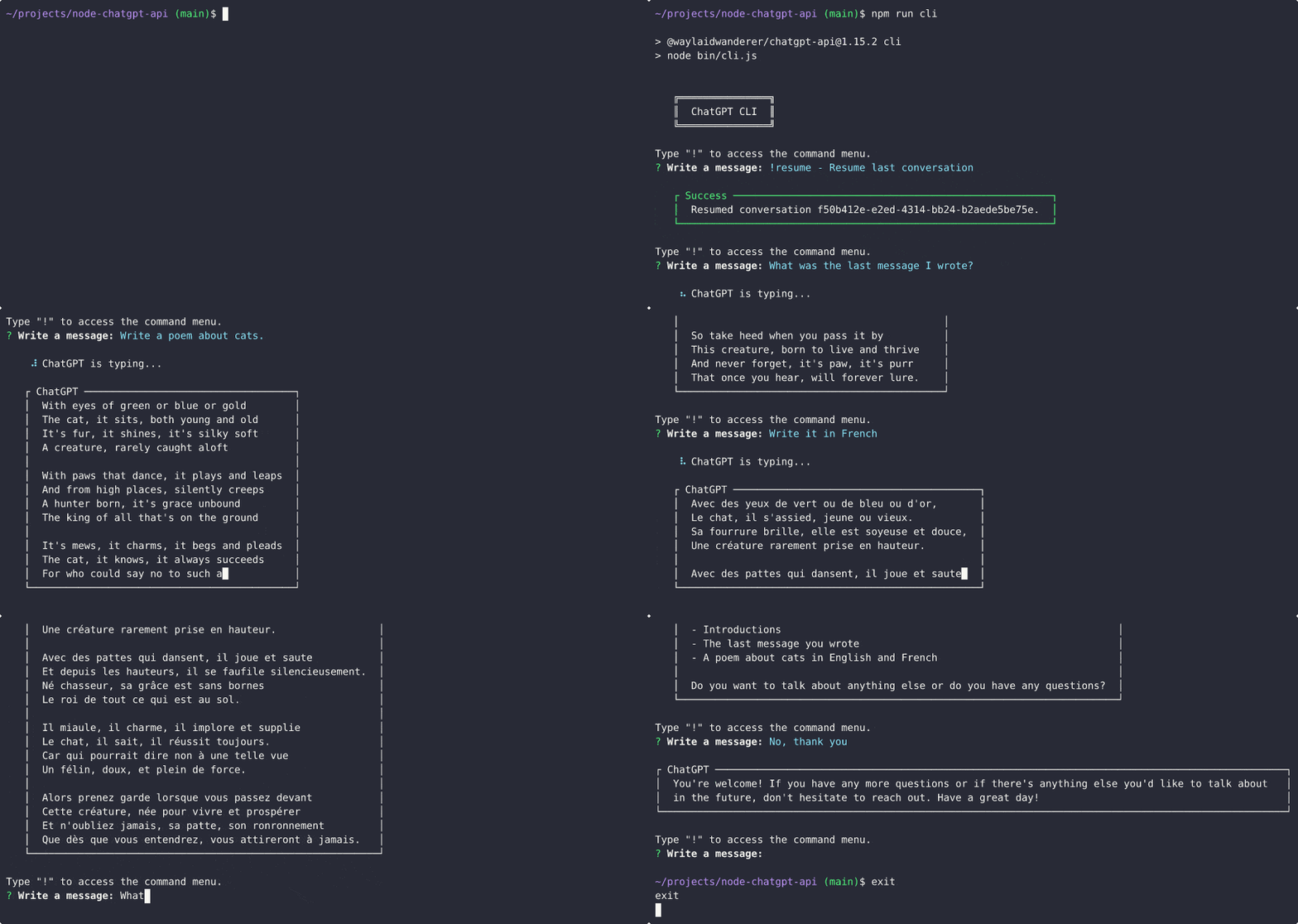
npm run cliChatgpt的响应会自动复制到剪贴板上,因此您可以将其粘贴到其他应用程序中。
如上所述,您可以在ChatGPTClient的选项中设置reverseProxyUrl ,以使用反向代理服务器而不是官方的chatgpt API。就目前而言,这是使用Chatgpt基础模型的唯一方法。此方法已修补,以下说明不再相关,但是由于其他原因,您可能仍希望使用反向代理。当前,反向代理服务器仍用于为ChatGPTBrowserClient执行Cloudflare旁路。
它如何工作?简单答案: ChatGPTClient >反向代理> OpenAI服务器。反向代理服务器在引擎盖下做一些魔术,以直接通过OpenAI的服务器访问基础模型,然后将响应返回到ChatGPTClient 。
下面提供说明。
accessToken属性)。reverseProxyUrl设置为https://chatgpt.hato.ai/completions settings.js > chatGptClient或ChatGPTClient的选项。settings.chatGptClient.openaiApiKey )设置为您在步骤1中获得的访问令牌。model设置为text-davinci-002-render , text-davinci-002-render-paid或text-davinci-002-render-sha具体取决于您的帐户可以访问的ChatGPT模型。模型必须是ChatGpt模型名称,而不是基础模型名称,并且您无法使用您的帐户无法访问的型号。stream: true (API)或onProgress (客户端)作为解决方法。accessToken属性)。reverseProxyUrl设置为https://chatgpt.pawan.krd/api/completions in settings.js > chatGptClient或ChatGPTClient的选项。settings.chatGptClient.openaiApiKey )设置为您在步骤1中获得的访问访问令牌。model设置为text-davinci-002-render , text-davinci-002-render-paid或text-davinci-002-render-sha具体取决于您的帐户可以访问的ChatGPT模型。模型必须是ChatGpt模型名称,而不是基础模型名称,并且您无法使用您的帐户无法访问的型号。stream: true (API)或onProgress (客户端)作为解决方法。使用@waylaidwanderer/chatgpt-api令人敬畏项目的列表:
通过编辑此读数并创建拉动请求,将您的列表添加到列表中!
该项目的Web客户端也可以在Waylaidwanderer/Pandoraai上获得。
ChatGPTClient由于gpt-3.5-turbo是Chatgpt的基础模型,因此我必须尽力复制官方Chatgpt网站使用它的方式。这意味着我的实施或基础模型在某些方面可能并不完全相同:
如果您想为此项目做出贡献,请创建一个拉动请求,并详细说明您的更改。
该项目已根据MIT许可获得许可。





