nodejs gpt
v1.37.4

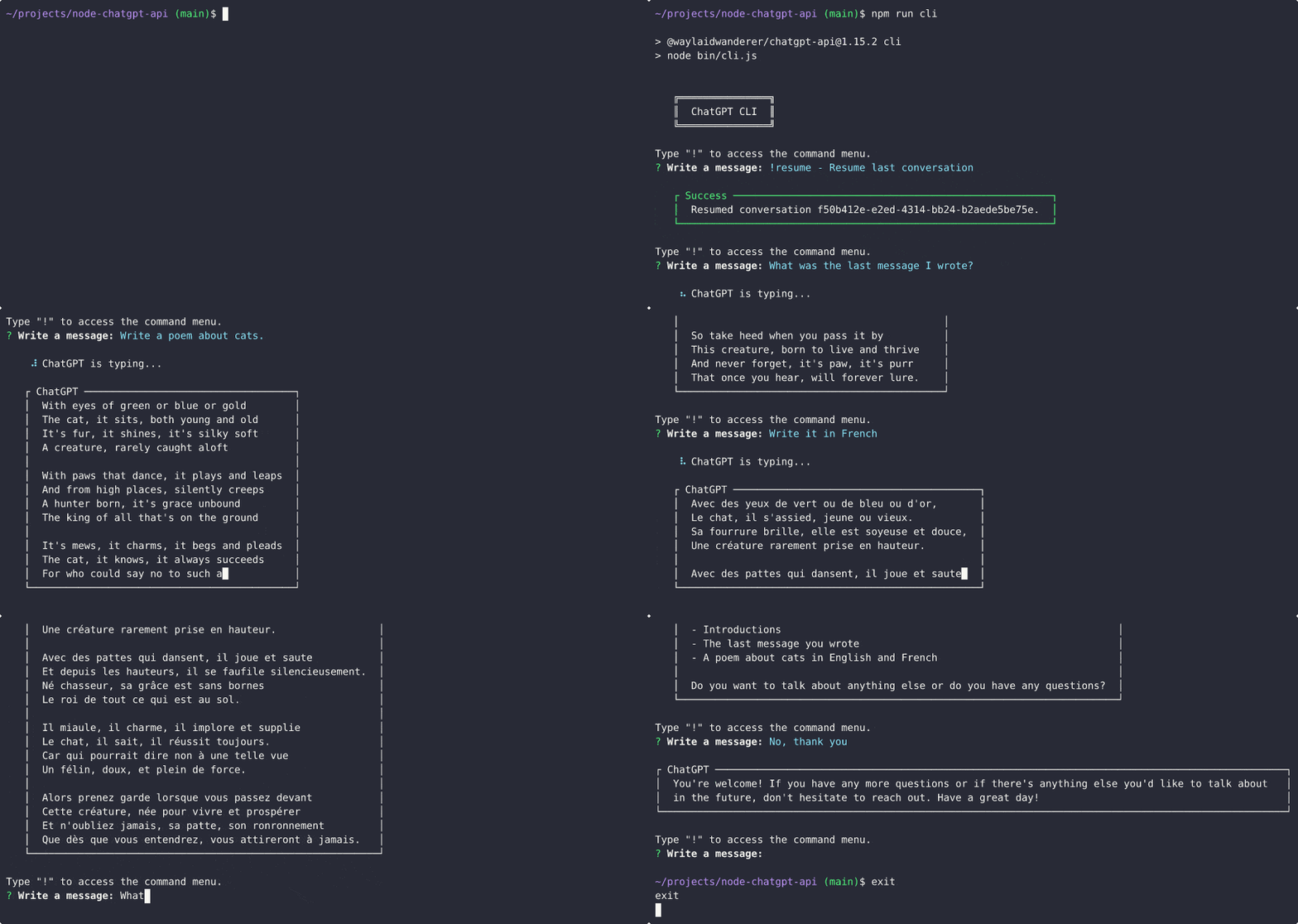
공식 Chatgpt 모델에 대한 지원이 추가되었습니다! 이제 ChatGPTClient 사용하여 공식 OpenAI API와 함께 gpt-3.5-turbo 모델을 사용할 수 있습니다. 이것은 Chatgpt가 사용하는 것과 동일한 모델이며 현재 가장 강력한 모델입니다. 이 모델의 사용은 무료는 아니지만 text-davinci-003 보다 10 배 저렴합니다 (1K 토큰 당 $ 0.002).
자세한 내용은 OpenAi의 게시물, ChatGpt 및 Whisper API 소개를 참조하십시오.
이를 사용하려면 modelOptions.model gpt-3.5-turbo 로 설정하면 ChatGPTClient 나머지를 처리합니다.ChatGPTClient 에 사용되는 기본 모델은 이제 gpt-3.5-turbo 입니다. 평소와 같이 userLabel , chatGptLabel 및 promptPrefix (시스템 지침)를 여전히 설정할 수 있습니다.
Chat.openai.com을 계속 자동화하면 계정이 금지 될 가능성이 높아질 수 있습니다. 자신의 위험으로 계속 그렇게하십시오.
CloudFlare 바이 패스를 사용하는 리버스 프록시 서버에 의존하는 실험적인 ChatGPTBrowserClient 추가하여 브라우저 자동화가 필요하지 않고 chatgpt (chat.openai.com)와 대화 할 수 있습니다. https://chat.openai.com/api/auth/session의 액세스 토큰 만 있으면됩니다.
언제나 그렇듯이이 경로를 선택하면 Access Token을 폐쇄 소스 타사 서버에 노출시키는 것입니다. 이에 대해 우려하는 경우 무료 ChatGpt 계정을 사용하여 위험을 최소화하거나 text-davinci-003 모델과 함께 ChatGPTClient 계속 사용하도록 선택할 수 있습니다.
불행히도 Chatgpt 기본 모델에 액세스하기 위해 사용했던 방법은 패치되었습니다. 현재 옵션은 text-davinci-003 모델 (비용이 드는)과 함께 공식 OpenAI API를 사용하거나 브라우저 기반 솔루션을 사용하여 ChatGpt의 백엔드와 인터페이스를 사용하는 것입니다 (이 시간 에이 라이브러리에서는 덜 강력하고 비율 제한 적이고이 라이브러리에서 지원되지 않습니다).
@pawanosman의 도움으로 Chatgpt 기본 모델을 계속 사용할 수있는 방법을 찾았습니다 . 희망적으로 액세스 손실을 방지하기 위해 OpenAI API와 호환되는 역 프록시 서버를 제공하기로 결정했습니다. OpenAI API 서버 대신 리버스 프록시 서버 사용을 지원하도록 ChatGPTClient 업데이트했습니다. 사용 가능한 프록시 서버 및 작동 방식에 대한 자세한 내용은 리버스 프록시 사용을 참조하십시오.
이 경로를 선택하면 액세스 토큰을 폐쇄 소스 타사 서버에 노출시키는 것입니다. 이에 대해 우려하는 경우 무료 ChatGpt 계정을 사용하여 위험을 최소화하거나 text-davinci-003 모델과 함께 공식 OpenAI API를 계속 사용하도록 선택할 수 있습니다.
text-chat-davinci-002 , text-chat-davinci-002-sh-alpha-aoruigiofdj83 에 대한 새로운 작업 모델을 찾았습니다. 이것은 Chatgpt Plus "Turbo"버전이 사용하는 기본 모델입니다. 응답은 빠르게 타 오르고 있습니다. 이 모델을 사용하도록 라이브러리를 업데이트했습니다.
나쁜 타이밍; text-chat-davinci-002-sh-alpha-aoruigiofdj83 어딘가에 새로운 모델로 인해 곧 제거 되었습니까?
BingAIClient (실험적)와 함께 Bing의 GPT-4 버전의 Chatgpt의 힘을 경험하십시오. API 서버와 CLI는 여전히이를 지원하기 위해 업데이트되어야 하지만 현재 클라이언트를 직접 사용할 수 있습니다. 귀하의 계정에 여전히 대기자가 상장 된 경우이 클라이언트를 사용할 수 없습니다.
text-chat-davinci-002-20221122 다시 백업 되더라도 지속적으로 과부하가 걸리고 429 오류를 반환하는 것처럼 보입니다. OpenAI는 대중이 널리 사용하는 것을 방지하기 위해이 모델에 소량의 리소스 만 전용 할 수 있습니다. 또한 최신 버전이 OpenAI 직원 및 파트너에게 액세스 권한이 부여된다고 들었으므로 모델이 공식적으로 릴리스 될 때까지 모든 해결 방법을 찾을 수있을 것 같지 않습니다.
대신 text-davinci-003 모델을 드롭 인 교체로 사용할 수 있습니다. text-davinci-003 은 text-chat-davinci-002 (RHLF를 통해 교육을 받고 대화 형 AI로 미세 조정)만큼 좋지 않지만 대부분의 경우 결과는 여전히 꽤 좋습니다. text-davinci-003 사용하면 크레딧이 필요합니다 ($).
API 서버 및 CLI의 브라우저 기반 ChatGpt에 대한 지원을 다시 설명 할 것입니다. 이 저장소에서 업데이트를 보려면 별을보십시오.
롤러 코스터가 다음 정거장에 도달했습니다. text-chat-davinci-002-20221122 다시 백업됩니다.
OpenAI API와 함께 text-chat-davinci-002-20221122 사용하려고하면 이제 404 오류가 반환됩니다. 대신 text-davinci-003 모델을 드롭 인 교체로 사용할 수 있습니다. text-davinci-003 text-chat-davinci-002 만큼 좋지 않다는 점을 명심하십시오 (RHLF를 통해 교육을 받고 대화 형 AI가되도록 미세 조정). 결과는 여전히 좋습니다. text-davinci-003 사용하면 크레딧이 필요합니다 ($).
추가 해결 방법을 조사 할 때 추가 업데이트를 보관하십시오.
OpenAI API와 함께 text-chat-davinci-002-20230126 사용하려고하면 이제 404 오류가 발생합니다. 누군가 이미 새로운 모델 이름을 찾았지만 현재 공유하지 않으려 고합니다. 새 모델을 찾으면이 저장소를 업데이트하겠습니다. 리드가 있으면 문제 또는 풀 요청을 열어주십시오.
그 동안 text-davinci-003 과 같은 모델에 대한 지원을 추가했습니다.이 모델은 드롭 인 교체로 사용할 수 있습니다. text-davinci-003 text-chat-davinci-002 만큼 좋지 않다는 점을 명심하십시오 (RHLF를 통해 교육을 받고 대화 형 AI가되도록 미세 조정). 결과는 여전히 좋습니다. text-davinci-003 사용하면 크레딧이 필요합니다 ($).
Discord user @pig#8932 text-chat-davinci-002 모델, text-chat-davinci-002-20221122 발견했습니다. 이 모델을 사용하도록 라이브러리를 업데이트했습니다.
ChatGpt 및 Bing AI의 클라이언트 구현. Node.js 모듈, REST API 서버 및 CLI 앱으로 제공됩니다.
ChatGPTClient : OpenAI의 API를 통해 공식 ChatGpt 기본 모델 gpt-3.5-turbo 지원.keyv-file 어댑터는이 패키지에도 포함되어 있으며 API 서버 또는 CLI를 사용하는 경우 대화를 JSON 파일에 저장하는 데 사용할 수 있습니다 ( settings.example.js 참조).text-davinci-003 과 같은 모델에 대한 지원을 유지합니다BingAIClient : GPT-4에 의해 구동되는 Bing의 Chatgpt 버전 지원.ChatGPTBrowserClient : CloudFlare 바이 패스 용 리버스 프록시 서버를 사용하는 공식 ChatGpt 웹 사이트 지원.npm i @waylaidwanderer/chatgpt-api demos/use-bing-client.js 참조하십시오.
demos/use-client.js 참조하십시오.
demos/use-browser-client.js 참조하십시오.
패키지를 사용하여 설치할 수 있습니다
npm i -g @waylaidwanderer/chatgpt-api 그런 다음 chatgpt-api 사용하여 실행하십시오. 선택 사항 --settings=<path_to_settings.js> 매개 변수를 선택하거나 다음과 같은 내용이 설정되지 않은 경우 현재 디렉토리에서 settings.js 찾습니다.
 module . exports = {
    // Options for the Keyv cache, see https://www.npmjs.com/package/keyv.
    // This is used for storing conversations, and supports additional drivers (conversations are stored in memory by default).
    // Only necessary when using `ChatGPTClient`, or `BingAIClient` in jailbreak mode.
    cacheOptions : { } ,
    // If set, `ChatGPTClient` and `BingAIClient` will use `keyv-file` to store conversations to this JSON file instead of in memory.
    // However, `cacheOptions.store` will override this if set
    storageFilePath : process . env . STORAGE_FILE_PATH || './cache.json' ,
    chatGptClient : {
        // Your OpenAI API key (for `ChatGPTClient`)
        openaiApiKey : process . env . OPENAI_API_KEY || '' ,
        // (Optional) Support for a reverse proxy for the completions endpoint (private API server).
        // Warning: This will expose your `openaiApiKey` to a third party. Consider the risks before using this.
        // reverseProxyUrl: 'https://chatgpt.hato.ai/completions',
        // (Optional) Parameters as described in https://platform.openai.com/docs/api-reference/completions
        modelOptions : {
            // You can override the model name and any other parameters here.
            // The default model is `gpt-3.5-turbo`.
            model : 'gpt-3.5-turbo' ,
            // Set max_tokens here to override the default max_tokens of 1000 for the completion.
            // max_tokens: 1000,
        } ,
        // (Optional) Davinci models have a max context length of 4097 tokens, but you may need to change this for other models.
        // maxContextTokens: 4097,
        // (Optional) You might want to lower this to save money if using a paid model like `text-davinci-003`.
        // Earlier messages will be dropped until the prompt is within the limit.
        // maxPromptTokens: 3097,
        // (Optional) Set custom instructions instead of "You are ChatGPT...".
        // (Optional) Set a custom name for the user
        // userLabel: 'User',
        // (Optional) Set a custom name for ChatGPT ("ChatGPT" by default)
        // chatGptLabel: 'Bob',
        // promptPrefix: 'You are Bob, a cowboy in Western times...',
        // A proxy string like "http://<ip>:<port>"
        proxy : '' ,
        // (Optional) Set to true to enable `console.debug()` logging
        debug : false ,
    } ,
    // Options for the Bing client
    bingAiClient : {
        // Necessary for some people in different countries, e.g. China (https://cn.bing.com)
        host : '' ,
        // The "_U" cookie value from bing.com
        userToken : '' ,
        // If the above doesn't work, provide all your cookies as a string instead
        cookies : '' ,
        // A proxy string like "http://<ip>:<port>"
        proxy : '' ,
        // (Optional) Set to true to enable `console.debug()` logging
        debug : false ,
    } ,
    chatGptBrowserClient : {
        // (Optional) Support for a reverse proxy for the conversation endpoint (private API server).
        // Warning: This will expose your access token to a third party. Consider the risks before using this.
        reverseProxyUrl : 'https://bypass.churchless.tech/api/conversation' ,
        // Access token from https://chat.openai.com/api/auth/session
        accessToken : '' ,
        // Cookies from chat.openai.com (likely not required if using reverse proxy server).
        cookies : '' ,
        // A proxy string like "http://<ip>:<port>"
        proxy : '' ,
        // (Optional) Set to true to enable `console.debug()` logging
        debug : false ,
    } ,
    // Options for the API server
    apiOptions : {
        port : process . env . API_PORT || 3000 ,
        host : process . env . API_HOST || 'localhost' ,
        // (Optional) Set to true to enable `console.debug()` logging
        debug : false ,
        // (Optional) Possible options: "chatgpt", "chatgpt-browser", "bing". (Default: "chatgpt")
        clientToUse : 'chatgpt' ,
        // (Optional) Generate titles for each conversation for clients that support it (only ChatGPTClient for now).
        // This will be returned as a `title` property in the first response of the conversation.
        generateTitles : false ,
        // (Optional) Set this to allow changing the client or client options in POST /conversation.
        // To disable, set to `null`.
        perMessageClientOptionsWhitelist : {
            // The ability to switch clients using `clientOptions.clientToUse` will be disabled if `validClientsToUse` is not set.
            // To allow switching clients per message, you must set `validClientsToUse` to a non-empty array.
            validClientsToUse : [ 'bing' , 'chatgpt' , 'chatgpt-browser' ] , // values from possible `clientToUse` options above
            // The Object key, e.g. "chatgpt", is a value from `validClientsToUse`.
            // If not set, ALL options will be ALLOWED to be changed. For example, `bing` is not defined in `perMessageClientOptionsWhitelist` above,
            // so all options for `bingAiClient` will be allowed to be changed.
            // If set, ONLY the options listed here will be allowed to be changed.
            // In this example, each array element is a string representing a property in `chatGptClient` above.
            chatgpt : [
                'promptPrefix' ,
                'userLabel' ,
                'chatGptLabel' ,
                // Setting `modelOptions.temperature` here will allow changing ONLY the temperature.
                // Other options like `modelOptions.model` will not be allowed to be changed.
                // If you want to allow changing all `modelOptions`, define `modelOptions` here instead of `modelOptions.temperature`.
                'modelOptions.temperature' ,
            ] ,
        } ,
    } ,
    // Options for the CLI app
    cliOptions : {
        // (Optional) Possible options: "chatgpt", "bing".
        // clientToUse: 'bing',
    } ,
} ;
또는 패키지를 직접 설치하고 실행할 수 있습니다.
git clone https://github.com/waylaidwanderer/node-chatgpt-apinpm install 로 종속성 설치 (Docker를 사용하지 않는 경우)settings.js 로 settings.example.js 를 바꾸고 필요한 경우 설정을 변경합니다.npm start 사용 또는 npm run server 사용 (Docker를 사용하지 않는 경우)docker-compose up 사용 (Docker 필요) 대화를 시작하거나 계속하십시오. 선택적 매개 변수는 여러 요청에 걸쳐있는 대화에만 필요합니다.
| 필드 | 설명 |
|---|---|
| 메시지 | 사용자에게 표시되는 메시지. |
| 대화가 있습니다 | (선택 사항) 계속하려는 대화의 ID. |
| JailbreakConversationId | ( BingAIClient 의 경우 선택 사항) 탈옥 모드에서 대화를 시작하기 위해 true 로 설정되었습니다. 그 후, 이것은 탈옥 대화의 ID가되어야합니다 (응답에서 jailbreakConversationId 라는 매개 변수로서). |
| ParentMessageId | (선택 사항, ChatGPTClient 및 탈옥 모드의 BingAIClient 의 경우) 대화를 계속할 때 부모 메시지 (예 : response.messageId )의 ID. |
| 대화 서명 | (선택 사항, BingAIClient 에만 해당) 대화의 서명 (응답에서 conversationSignature 라는 매개 변수로 표시). 탈옥 모드에 있지 않는 한 대화를 계속할 때 필요합니다. |
| ClientId | (선택 사항, BingAIClient 에만 해당) 클라이언트의 ID. 탈옥 모드에 있지 않는 한 대화를 계속할 때 필요합니다. |
| 호출 | (선택 사항, BingAIClient 에만 해당) 호출의 ID. 탈옥 모드에 있지 않는 한 대화를 계속할 때 필요합니다. |
| 클라이언트 | (선택 사항) 클라이언트를위한 옵션이 포함 된 개체. |
| ClientOptions.ClientTouse | (선택 사항)이 메시지에 사용할 클라이언트. 가능한 값 : chatgpt , chatgpt-browser , bing . |
| 클라이언트.* | (선택 사항) 클라이언트를위한 유효한 옵션. 예를 들어, ChatGPTClient 의 경우 clientOptions.openaiApiKey 설정 하여이 메시지에 대한 API 키를 설정하거나 clientOptions.promptPrefix 설정 하여이 메시지에 대한 AI 사용자 정의 지침을 제공 할 수 있습니다. |
메시지 당 변경할 수있는 옵션 (기본값 : 모두)을 구성하려면 settings.example.js 의 perMessageClientOptionsWhitelist 에 대한 주석을 참조하십시오. 변경 클라이언트를 허용하려면 perMessageClientOptionsWhitelist.validClientsToUse 예제 설정 파일에 설명 된대로 비어 있지 않은 배열로 설정해야합니다.
chatgpt와 대화를 시작하려면 위 의 끝 부분 당 매개 변수가있는 JSON 본문을 사용하여 서버 /conversation 엔드 포인트에 게시물 요청을 보내십시오.
{
    "message" : " Hello, how are you today? " ,
    "conversationId" : " your-conversation-id (optional) " ,
    "parentMessageId" : " your-parent-message-id (optional, for `ChatGPTClient` only) " ,
    "conversationSignature" : " your-conversation-signature (optional, for `BingAIClient` only) " ,
    "clientId" : " your-client-id (optional, for `BingAIClient` only) " ,
    "invocationId" : " your-invocation-id (optional, for `BingAIClient` only) " ,
}
서버는 Chatgpt의 응답이 포함 된 JSON 객체를 반환합니다.
 // HTTP/1.1 200 OK
{
    "response" : "I'm doing well, thank you! How are you?" ,
    "conversationId" : "your-conversation-id" ,
    "messageId" : "response-message-id (for `ChatGPTClient` only)" ,
    "conversationSignature" : "your-conversation-signature (for `BingAIClient` only)" ,
    "clientId" : "your-client-id (for `BingAIClient` only)" ,
    "invocationId" : "your-invocation-id (for `BingAIClient` only - pass this new value back into subsequent requests as-is)" ,
    "details" : "an object containing the raw response from the client"
}
요청이 실패하면 서버는 오류 메시지가있는 JSON 객체를 반환합니다.
요청 객체에 필요한 속성이 없으면 (예 : message ) :
 // HTTP/1.1 400 Bad Request
{
    "error" : "The message parameter is required."
}
chatgpt에 메시지를 보내는 오류가 있으면 :
 // HTTP/1.1 503 Service Unavailable
{
    "error" : "There was an error communicating with ChatGPT."
} 요청 본문에서 "stream": true 설정하여 토큰 스트림이 생성 될 때 수신 할 수 있습니다.
 import { fetchEventSource } from '@waylaidwanderer/fetch-event-source' ; // use `@microsoft/fetch-event-source` instead if in a browser environment

const opts = {
    method : 'POST' ,
    headers : {
        'Content-Type' : 'application/json' ,
    } ,
    body : JSON . stringify ( {
        "message" : "Write a poem about cats." ,
        "conversationId" : "your-conversation-id (optional)" ,
        "parentMessageId" : "your-parent-message-id (optional)" ,
        "stream" : true ,
        // Any other parameters per `Endpoints > POST /conversation` above
    } ) ,
} ;
응답이 생성 될 때 응답을받는 방법의 예는 Demos/Use-Api-Server-Streaming.js를 참조하십시오. 한 번에 하나의 토큰을 받게되므로 직접 연결해야합니다.
성공적인 출력 :
 { data : '' , event : '' , id : '' , retry : 3000 }
{ data : 'Hello' , event : '' , id : '' , retry : undefined }
{ data : '!' , event : '' , id : '' , retry : undefined }
{ data : ' How' , event : '' , id : '' , retry : undefined }
{ data : ' can' , event : '' , id : '' , retry : undefined }
{ data : ' I' , event : '' , id : '' , retry : undefined }
{ data : ' help' , event : '' , id : '' , retry : undefined }
{ data : ' you' , event : '' , id : '' , retry : undefined }
{ data : ' today' , event : '' , id : '' , retry : undefined }
{ data : '?' , event : '' , id : '' , retry : undefined }
{ data : '<result JSON here, see Method 1>' , event : 'result' , id : '' , retry : undefined }
{ data : '[DONE]' , event : '' , id : '' , retry : undefined }
// Hello! How can I help you today?
오류 출력 :
 const message = {
  data : '{"code":503,"error":"There was an error communicating with ChatGPT."}' ,
  event : 'error' ,
  id : '' ,
  retry : undefined
} ;

if ( message . event === 'error' ) {
  console . error ( JSON . parse ( message . data ) . error ) ; // There was an error communicating with ChatGPT.
} fetch-event-source 먼저 가져 와서 POST 메소드를 사용해야합니다. API 서버의 동일한 설정 지침을 따르고 settings.js 작성하십시오.
전 세계적으로 설치된 경우 :
chatgpt-cli로컬로 설치된 경우 :
npm run cliChatgpt의 응답은 클립 보드에 자동으로 복사되므로 다른 응용 프로그램에 붙여 넣을 수 있습니다.
위의 예에서 볼 수 있듯이 ChatGPTClient 의 옵션에서 reverseProxyUrl 설정하여 공식 ChatGpt API 대신 Reverse 프록시 서버를 사용할 수 있습니다. 지금은 이것이 Chatgpt 기본 모델을 사용하는 유일한 방법입니다 . 이 방법은 패치되었으며 아래 지침은 더 이상 관련이 없지만 다른 이유로 리버스 프록시를 사용하고 싶을 수도 있습니다. 현재 리버스 프록시 서버는 여전히 ChatGPTBrowserClient 의 CloudFlare 바이 패스를 수행하는 데 사용됩니다.
어떻게 작동합니까? 간단한 답변 : ChatGPTClient > 리버스 프록시> OpenAi 서버. 리버스 프록시 서버는 OpenAI의 서버를 통해 직접 기본 모델에 액세스하기 위해 후드 아래에서 약간의 마법을 수행 한 다음 ChatGPTClient 에 대한 응답을 반환합니다.
지침은 아래에 제공됩니다.
accessToken 속성을 찾으십시오).reverseProxyUrl https://chatgpt.hato.ai/completions settings.js > chatGptClient 또는 ChatGPTClient 의 옵션으로 설정하십시오.settings.chatGptClient.openaiApiKey )를 1 단계에서 얻은 chatgpt 액세스 토큰으로 설정하십시오.model text-davinci-002-render , text-davinci-002-render-paid 또는 text-davinci-002-render-sha 으로 설정하십시오. 모델은 기본 모델 이름이 아닌 Chatgpt 모델 이름이어야 하며 계정에 액세스 할 수없는 모델을 사용할 수 없습니다.stream: true (API) 또는 onProgress (클라이언트)를 해결 방법으로 사용하십시오.accessToken 속성을 찾으십시오).reverseProxyUrl https://chatgpt.pawan.krd/api/completions settings.js > chatGptClient 또는 ChatGPTClient 의 옵션으로 설정하십시오.settings.chatGptClient.openaiApiKey )를 1 단계에서 얻은 chatgpt 액세스 토큰으로 설정하십시오.model text-davinci-002-render , text-davinci-002-render-paid 또는 text-davinci-002-render-sha 으로 설정하십시오. 모델은 기본 모델 이름이 아닌 Chatgpt 모델 이름이어야 하며 계정에 액세스 할 수없는 모델을 사용할 수 없습니다.stream: true (API) 또는 onProgress (클라이언트)를 해결 방법으로 사용하십시오. @waylaidwanderer/chatgpt-api 사용하는 멋진 프로젝트 목록 :
이 readme를 편집하고 풀 요청을 만들어 목록에 추가하십시오!
이 프로젝트의 웹 클라이언트는 Waylaidwanderer/Pandoraai에서도 제공됩니다.
ChatGPTClient 와 관련하여 gpt-3.5-turbo 는 Chatgpt의 기본 모델이므로 공식 Chatgpt 웹 사이트가 사용하는 방식을 복제하기 위해 최선을 다해야했습니다. 이것은 내 구현 또는 기본 모델이 어떤면에서 정확히 동일하게 행동하지 않을 수 있음을 의미합니다.
이 프로젝트에 기여하려면 변경 사항에 대한 자세한 설명이 포함 된 풀 요청을 작성하십시오.
이 프로젝트는 MIT 라이센스에 따라 라이센스가 부여됩니다.





