nodejs gpt
v1.37.4

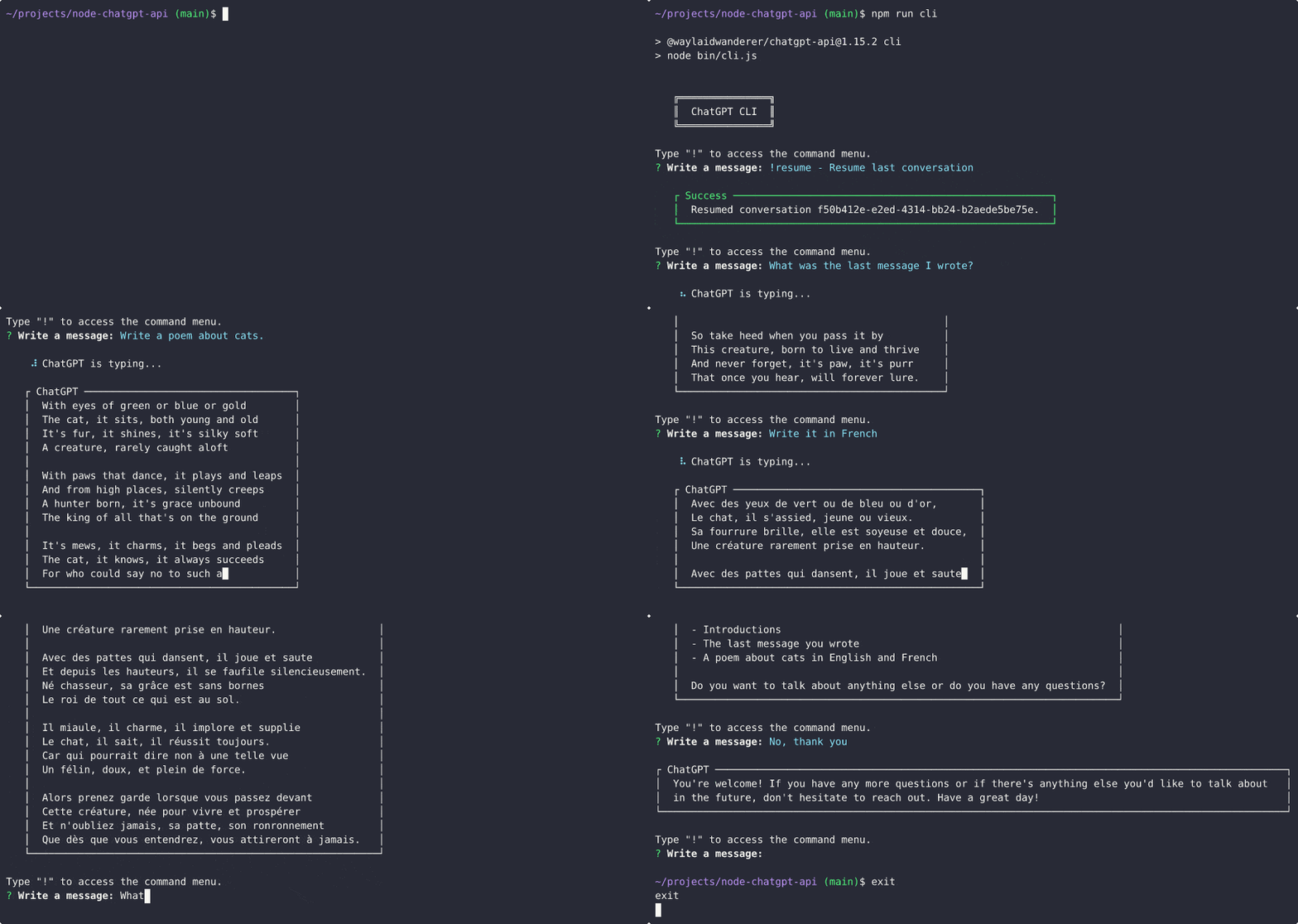
มีการเพิ่มการสนับสนุนสำหรับรุ่น ChatGPT อย่างเป็นทางการแล้ว! ตอนนี้คุณสามารถใช้รุ่น gpt-3.5-turbo กับ OpenAI API อย่างเป็นทางการโดยใช้ ChatGPTClient นี่เป็นรุ่นเดียวกับที่ ChatGPT ใช้และเป็นรุ่นที่ทรงพลังที่สุดในขณะนี้ การใช้งานของรุ่นนี้ ไม่ได้ฟรี แต่ ราคาถูกกว่า 10 เท่า (ราคาอยู่ที่ $ 0.002 ต่อโทเค็น 1K) มากกว่า text-davinci-003
ดูโพสต์ของ Openai แนะนำ chatgpt และ Whisper API สำหรับข้อมูลเพิ่มเติม
หากต้องการใช้ให้ตั้งค่า รุ่นเริ่มต้นที่ใช้ใน modelOptions.model เป็น gpt-3.5-turbo และ ChatGPTClient จะจัดการส่วนที่เหลือChatGPTClient ตอนนี้ gpt-3.5-turbo คุณยังสามารถตั้งค่า userLabel , chatGptLabel และ promptPrefix (คำแนะนำระบบ) ตามปกติ
อาจมีโอกาสสูงกว่าที่บัญชีของคุณจะถูกแบนหากคุณยังคงแชทต่อไปโดยอัตโนมัติ ทำต่อไปด้วยความเสี่ยงของคุณเอง
ฉันได้เพิ่มการทดลอง ChatGPTBrowserClient ซึ่งขึ้นอยู่กับเซิร์ฟเวอร์พร็อกซีย้อนกลับที่ใช้ประโยชน์จากการบายพาส CloudFlare ช่วยให้คุณสามารถพูดคุยกับ ChatGPT (chat.openai.com) โดยไม่ต้องใช้เบราว์เซอร์อัตโนมัติ สิ่งที่คุณต้องการคือโทเค็นการเข้าถึงของคุณจาก https://chat.openai.com/api/auth/session
เช่นเคยโปรดทราบว่าหากคุณเลือกที่จะไปเส้นทางนี้คุณจะเปิดเผยโทเค็นการเข้าถึงของคุณไปยังเซิร์ฟเวอร์บุคคลที่สามที่เป็นแหล่งปิด หากคุณมีความกังวลเกี่ยวกับเรื่องนี้คุณอาจเลือกที่จะใช้บัญชี ChatGPT ฟรีเพื่อลดความเสี่ยงหรือใช้ ChatGPTClient ต่อไปด้วยโมเดล text-davinci-003 ต่อไป
วิธีที่เราใช้ในการเข้าถึงโมเดลพื้นฐานของ ChatGPT ได้รับการแก้ไข แต่น่าเสียดาย ตัวเลือกของคุณในขณะนี้คือการใช้ OpenAI API อย่างเป็นทางการกับโมเดล text-davinci-003 (ซึ่งมีค่าใช้จ่ายเงิน) หรือใช้โซลูชันที่ใช้เบราว์เซอร์เพื่อเชื่อมต่อกับแบ็กเอนด์ของ Chatgpt (ซึ่งมีประสิทธิภาพน้อยกว่าอัตรา จำกัด มากขึ้นและไม่ได้รับการสนับสนุนจากห้องสมุดนี้ในเวลานี้)
ด้วยความช่วยเหลือของ @pawanosman เราได้คิดหาวิธีที่จะใช้โมเดลพื้นฐานของ CHATGPT ต่อไป เพื่อหวังว่าจะป้องกันการสูญเสียการเข้าถึงอีกครั้งเราได้ตัดสินใจที่จะให้เซิร์ฟเวอร์พร็อกซีย้อนกลับเข้ากันได้กับ OpenAI API ฉันได้อัปเดต ChatGPTClient เพื่อรองรับการใช้เซิร์ฟเวอร์พร็อกซีย้อนกลับแทนเซิร์ฟเวอร์ OpenAI API ดูการใช้พร็อกซีย้อนกลับสำหรับข้อมูลเพิ่มเติมเกี่ยวกับเซิร์ฟเวอร์พร็อกซีที่มีอยู่และวิธีการทำงาน
โปรดทราบว่าหากคุณเลือกที่จะไปเส้นทางนี้คุณจะเปิดเผยโทเค็นการเข้าถึงของคุณไปยังเซิร์ฟเวอร์บุคคลที่สามที่เป็นแหล่งปิด หากคุณมีความกังวลเกี่ยวกับเรื่องนี้คุณอาจเลือกที่จะใช้บัญชี ChatGPT ฟรีเพื่อลดความเสี่ยงหรือใช้ OpenAI API อย่างเป็นทางการแทนด้วยโมเดล text-davinci-003
ฉันได้พบรูปแบบการทำงานใหม่สำหรับ text-chat-davinci-002 , text-chat-davinci-002-sh-alpha-aoruigiofdj83 นี่คือรุ่นพื้นฐานที่ใช้เวอร์ชัน "Turbo" ของ CHATGPT Plus คำตอบนั้นรวดเร็ว ฉันได้อัปเดตไลบรารีเพื่อใช้โมเดลนี้แล้ว
ช่วงเวลาที่ไม่ดี; text-chat-davinci-002-sh-alpha-aoruigiofdj83 ถูกลบออกหลังจากนั้นไม่นานอาจเป็นเพราะรุ่นใหม่ที่นั่น?
สัมผัสกับพลังของ CHATGPT เวอร์ชัน GPT-4 ของ Bing กับ BingAIClient (ทดลอง) เซิร์ฟเวอร์ API และ CLI ยังคงต้องได้รับการอัปเดตเพื่อรองรับสิ่งนี้ แต่คุณสามารถใช้ไคลเอนต์ได้โดยตรงในขณะนี้ โปรดทราบว่าหากบัญชีของคุณยังคงอยู่ในรายการรออยู่คุณจะไม่สามารถใช้ไคลเอนต์นี้ได้
แม้ว่า text-chat-davinci-002-20221122 กลับมาอีกครั้งดูเหมือนว่ามันจะโอเวอร์โหลดมากเกินไปและส่งคืนข้อผิดพลาด 429 เป็นไปได้ว่า OpenAI จะทุ่มเททรัพยากรจำนวนเล็กน้อยให้กับรุ่นนี้เพื่อป้องกันไม่ให้ประชาชนใช้กันอย่างแพร่หลาย นอกจากนี้ฉันได้ยินมาว่าตอนนี้เวอร์ชันใหม่กว่านั้นล็อคเข้ากับพนักงานและพันธมิตรของ OpenAI ดังนั้นจึงไม่น่าเป็นไปได้ที่เราจะสามารถหาวิธีแก้ปัญหาใด ๆ ได้จนกว่าโมเดลจะถูกปล่อยออกมาอย่างเป็นทางการ
คุณสามารถใช้โมเดล text-davinci-003 แทนแทนการแทนที่ โปรดทราบว่า text-davinci-003 นั้นไม่ดีเท่า text-chat-davinci-002 (ซึ่งได้รับการฝึกฝนผ่าน RHLF และปรับแต่งให้เป็น AI การสนทนา) แม้ว่าผลลัพธ์จะค่อนข้างดีในกรณีส่วนใหญ่ โปรดทราบว่าการใช้ text-davinci-003 จะทำให้คุณต้องเสียเครดิต ($)
ฉันจะเพิ่มการสนับสนุนอีกครั้งสำหรับ CHATGPT ที่ใช้เบราว์เซอร์สำหรับเซิร์ฟเวอร์ API และ CLI โปรดแสดงและดูที่เก็บข้อมูลนี้สำหรับการอัปเดต
รถไฟเหาะถึงจุดหยุดถัดไป text-chat-davinci-002-20221122 กลับมาอีกครั้ง
พยายามใช้ text-chat-davinci-002-20221122 กับ OpenAI API ตอนนี้ส่งคืนข้อผิดพลาด 404 คุณสามารถใช้โมเดล text-davinci-003 แทนแทนการแทนที่ โปรดทราบว่า text-davinci-003 ไม่ดีเท่า text-chat-davinci-002 (ซึ่งได้รับการฝึกฝนผ่าน RHLF และปรับแต่งให้เป็น AI การสนทนา) แม้ว่าผลลัพธ์จะดีมาก โปรดทราบว่าการใช้ text-davinci-003 จะทำให้คุณต้องเสียเครดิต ($)
โปรดเก็บการอัปเดตเพิ่มเติมในขณะที่เราตรวจสอบวิธีแก้ปัญหาเพิ่มเติม
พยายามใช้ text-chat-davinci-002-20230126 กับ OpenAI API ตอนนี้ส่งคืนข้อผิดพลาด 404 มีคนพบชื่อรุ่นใหม่แล้ว แต่พวกเขาไม่เต็มใจที่จะแบ่งปันในเวลานี้ ฉันจะอัปเดตที่เก็บนี้เมื่อฉันพบรุ่นใหม่ หากคุณมีโอกาสในการขายโปรดเปิดปัญหาหรือคำขอดึง
ในระหว่างนี้ฉันได้เพิ่มการสนับสนุนสำหรับรุ่นเช่น text-davinci-003 ซึ่งคุณสามารถใช้เป็นการทดแทนแบบดรอปอิน โปรดทราบว่า text-davinci-003 ไม่ดีเท่า text-chat-davinci-002 (ซึ่งได้รับการฝึกฝนผ่าน RHLF และปรับแต่งให้เป็น AI การสนทนา) แม้ว่าผลลัพธ์จะดีมาก โปรดทราบว่าการใช้ text-davinci-003 จะทำให้คุณต้องเสียเครดิต ($)
Discord user @pig#8932 ได้พบรุ่น text-chat-davinci-002 text-chat-davinci-002-20221122 ใช้งานได้ ฉันได้อัปเดตไลบรารีเพื่อใช้โมเดลนี้แล้ว
การใช้งานไคลเอนต์สำหรับ CHATGPT และ BING AI มีให้เป็นโมดูล Node.js, REST API Server และ CLI
ChatGPTClient : สนับสนุนโมเดลพื้นฐานของ CHATGPT อย่างเป็นทางการ gpt-3.5-turbo ผ่าน API ของ OpenAIkeyv-file นั้นรวมอยู่ในแพ็คเกจนี้และสามารถใช้ในการจัดเก็บการสนทนาในไฟล์ JSON หากคุณใช้เซิร์ฟเวอร์ API หรือ CLI (ดู settings.example.js )text-davinci-003BingAIClient : สนับสนุน Chatgpt เวอร์ชันของ Bing ซึ่งขับเคลื่อนโดย GPT-4ChatGPTBrowserClient : สนับสนุนเว็บไซต์ ChatGPT อย่างเป็นทางการโดยใช้ Reverse Proxy Server สำหรับบายพาส CloudFlarenpm i @waylaidwanderer/chatgpt-api ดู demos/use-bing-client.js
ดู demos/use-client.js
ดู demos/use-browser-client.js
คุณสามารถติดตั้งแพ็คเกจโดยใช้
npm i -g @waylaidwanderer/chatgpt-api จากนั้นเรียกใช้โดยใช้ chatgpt-api สิ่งนี้ต้องใช้ตัวเลือก --settings=<path_to_settings.js> พารามิเตอร์หรือค้นหา settings.js ในไดเรกทอรีปัจจุบันหากไม่ได้ตั้งค่าด้วยเนื้อหาต่อไปนี้:
 module . exports = {
    // Options for the Keyv cache, see https://www.npmjs.com/package/keyv.
    // This is used for storing conversations, and supports additional drivers (conversations are stored in memory by default).
    // Only necessary when using `ChatGPTClient`, or `BingAIClient` in jailbreak mode.
    cacheOptions : { } ,
    // If set, `ChatGPTClient` and `BingAIClient` will use `keyv-file` to store conversations to this JSON file instead of in memory.
    // However, `cacheOptions.store` will override this if set
    storageFilePath : process . env . STORAGE_FILE_PATH || './cache.json' ,
    chatGptClient : {
        // Your OpenAI API key (for `ChatGPTClient`)
        openaiApiKey : process . env . OPENAI_API_KEY || '' ,
        // (Optional) Support for a reverse proxy for the completions endpoint (private API server).
        // Warning: This will expose your `openaiApiKey` to a third party. Consider the risks before using this.
        // reverseProxyUrl: 'https://chatgpt.hato.ai/completions',
        // (Optional) Parameters as described in https://platform.openai.com/docs/api-reference/completions
        modelOptions : {
            // You can override the model name and any other parameters here.
            // The default model is `gpt-3.5-turbo`.
            model : 'gpt-3.5-turbo' ,
            // Set max_tokens here to override the default max_tokens of 1000 for the completion.
            // max_tokens: 1000,
        } ,
        // (Optional) Davinci models have a max context length of 4097 tokens, but you may need to change this for other models.
        // maxContextTokens: 4097,
        // (Optional) You might want to lower this to save money if using a paid model like `text-davinci-003`.
        // Earlier messages will be dropped until the prompt is within the limit.
        // maxPromptTokens: 3097,
        // (Optional) Set custom instructions instead of "You are ChatGPT...".
        // (Optional) Set a custom name for the user
        // userLabel: 'User',
        // (Optional) Set a custom name for ChatGPT ("ChatGPT" by default)
        // chatGptLabel: 'Bob',
        // promptPrefix: 'You are Bob, a cowboy in Western times...',
        // A proxy string like "http://<ip>:<port>"
        proxy : '' ,
        // (Optional) Set to true to enable `console.debug()` logging
        debug : false ,
    } ,
    // Options for the Bing client
    bingAiClient : {
        // Necessary for some people in different countries, e.g. China (https://cn.bing.com)
        host : '' ,
        // The "_U" cookie value from bing.com
        userToken : '' ,
        // If the above doesn't work, provide all your cookies as a string instead
        cookies : '' ,
        // A proxy string like "http://<ip>:<port>"
        proxy : '' ,
        // (Optional) Set to true to enable `console.debug()` logging
        debug : false ,
    } ,
    chatGptBrowserClient : {
        // (Optional) Support for a reverse proxy for the conversation endpoint (private API server).
        // Warning: This will expose your access token to a third party. Consider the risks before using this.
        reverseProxyUrl : 'https://bypass.churchless.tech/api/conversation' ,
        // Access token from https://chat.openai.com/api/auth/session
        accessToken : '' ,
        // Cookies from chat.openai.com (likely not required if using reverse proxy server).
        cookies : '' ,
        // A proxy string like "http://<ip>:<port>"
        proxy : '' ,
        // (Optional) Set to true to enable `console.debug()` logging
        debug : false ,
    } ,
    // Options for the API server
    apiOptions : {
        port : process . env . API_PORT || 3000 ,
        host : process . env . API_HOST || 'localhost' ,
        // (Optional) Set to true to enable `console.debug()` logging
        debug : false ,
        // (Optional) Possible options: "chatgpt", "chatgpt-browser", "bing". (Default: "chatgpt")
        clientToUse : 'chatgpt' ,
        // (Optional) Generate titles for each conversation for clients that support it (only ChatGPTClient for now).
        // This will be returned as a `title` property in the first response of the conversation.
        generateTitles : false ,
        // (Optional) Set this to allow changing the client or client options in POST /conversation.
        // To disable, set to `null`.
        perMessageClientOptionsWhitelist : {
            // The ability to switch clients using `clientOptions.clientToUse` will be disabled if `validClientsToUse` is not set.
            // To allow switching clients per message, you must set `validClientsToUse` to a non-empty array.
            validClientsToUse : [ 'bing' , 'chatgpt' , 'chatgpt-browser' ] , // values from possible `clientToUse` options above
            // The Object key, e.g. "chatgpt", is a value from `validClientsToUse`.
            // If not set, ALL options will be ALLOWED to be changed. For example, `bing` is not defined in `perMessageClientOptionsWhitelist` above,
            // so all options for `bingAiClient` will be allowed to be changed.
            // If set, ONLY the options listed here will be allowed to be changed.
            // In this example, each array element is a string representing a property in `chatGptClient` above.
            chatgpt : [
                'promptPrefix' ,
                'userLabel' ,
                'chatGptLabel' ,
                // Setting `modelOptions.temperature` here will allow changing ONLY the temperature.
                // Other options like `modelOptions.model` will not be allowed to be changed.
                // If you want to allow changing all `modelOptions`, define `modelOptions` here instead of `modelOptions.temperature`.
                'modelOptions.temperature' ,
            ] ,
        } ,
    } ,
    // Options for the CLI app
    cliOptions : {
        // (Optional) Possible options: "chatgpt", "bing".
        // clientToUse: 'bing',
    } ,
} ;
หรือคุณสามารถติดตั้งและเรียกใช้แพ็คเกจโดยตรง
git clone https://github.com/waylaidwanderer/node-chatgpt-apinpm install (หากไม่ได้ใช้ Docker)settings.example.js เป็น settings.js ในไดเรกทอรีรูทและเปลี่ยนการตั้งค่าตามที่จำเป็นnpm start หรือ npm run server (หากไม่ได้ใช้ Docker)docker-compose up (ต้องใช้ Docker) เริ่มต้นหรือสนทนาต่อ พารามิเตอร์ทางเลือกเป็นสิ่งจำเป็นสำหรับการสนทนาที่ครอบคลุมหลายคำขอ
| สนาม | คำอธิบาย |
|---|---|
| ข้อความ | ข้อความที่จะแสดงต่อผู้ใช้ |
| บทสนทนา | (ไม่บังคับ) ID สำหรับการสนทนาที่คุณต้องการดำเนินการต่อ |
| JailbreakConversationID | (เป็นทางเลือกสำหรับ BingAIClient เท่านั้น) ตั้งค่าเป็น true เพื่อเริ่มการสนทนาในโหมด Jailbreak หลังจากนั้นนี่ควรเป็น ID สำหรับการสนทนาการแหกคุก (ที่ให้ไว้ในการตอบสนองเป็นพารามิเตอร์ที่ชื่อว่า jailbreakConversationId ) |
| ParentMessageID | (เป็นทางเลือกสำหรับ ChatGPTClient และ BingAIClient ในโหมด Jailbreak) id ของข้อความหลัก (เช่น response.messageId ) เมื่อทำการสนทนาต่อไป |
| การสนทนา | (เป็นทางเลือกสำหรับ BingAIClient เท่านั้น) ลายเซ็นสำหรับการสนทนา (ที่ให้ไว้ในการตอบสนองเป็นพารามิเตอร์ที่มีชื่อว่า conversationSignature ) จำเป็นเมื่อดำเนินการสนทนาต่อไปเว้นแต่ในโหมดการแหกคุก |
| มีลูกค้า | (ไม่บังคับสำหรับ BingAIClient เท่านั้น) ID ของลูกค้า จำเป็นเมื่อดำเนินการสนทนาต่อไปเว้นแต่ในโหมดการแหกคุก |
| riplicationId | (ไม่บังคับสำหรับ BingAIClient เท่านั้น) ID ของการเรียกร้อง จำเป็นเมื่อดำเนินการสนทนาต่อไปเว้นแต่ในโหมดการแหกคุก |
| ลูกค้า | (ไม่บังคับ) วัตถุที่มีตัวเลือกสำหรับไคลเอนต์ |
| clientOptions.ClientTouse | (ไม่บังคับ) ไคลเอนต์ที่จะใช้สำหรับข้อความนี้ ค่าที่เป็นไปได้: chatgpt , chatgpt-browser , bing |
| clientOptions.* | (ไม่บังคับ) ตัวเลือกที่ถูกต้องสำหรับลูกค้า ตัวอย่างเช่นสำหรับ ChatGPTClient คุณสามารถตั้งค่า clientOptions.openaiApiKey เพื่อตั้งค่าคีย์ API สำหรับข้อความนี้เท่านั้นหรือ clientOptions.promptPrefix เพื่อให้คำแนะนำที่กำหนดเอง AI สำหรับข้อความนี้เท่านั้น ฯลฯ |
ในการกำหนดค่าตัวเลือกที่สามารถเปลี่ยนแปลงได้ต่อข้อความ (ค่าเริ่มต้น: ทั้งหมด) ดูความคิดเห็นสำหรับ perMessageClientOptionsWhitelist ใน settings.example.js example.js ในการอนุญาตให้เปลี่ยนลูกค้า perMessageClientOptionsWhitelist.validClientsToUse จะต้องตั้งค่าเป็นอาร์เรย์ที่ไม่ว่างเปล่าตามที่อธิบายไว้ในไฟล์การตั้งค่าตัวอย่าง
ในการเริ่มต้นการสนทนากับ ChatGPT ให้ส่งคำขอโพสต์ไปยังจุดสิ้นสุดของเซิร์ฟเวอร์ /conversation ด้วยตัว JSON ที่มีพารามิเตอร์ต่อ จุดสิ้นสุด > โพสต์ /การสนทนา ด้านบน
{
    "message" : " Hello, how are you today? " ,
    "conversationId" : " your-conversation-id (optional) " ,
    "parentMessageId" : " your-parent-message-id (optional, for `ChatGPTClient` only) " ,
    "conversationSignature" : " your-conversation-signature (optional, for `BingAIClient` only) " ,
    "clientId" : " your-client-id (optional, for `BingAIClient` only) " ,
    "invocationId" : " your-invocation-id (optional, for `BingAIClient` only) " ,
}
เซิร์ฟเวอร์จะส่งคืนวัตถุ JSON ที่มีการตอบกลับของ CHATGPT:
 // HTTP/1.1 200 OK
{
    "response" : "I'm doing well, thank you! How are you?" ,
    "conversationId" : "your-conversation-id" ,
    "messageId" : "response-message-id (for `ChatGPTClient` only)" ,
    "conversationSignature" : "your-conversation-signature (for `BingAIClient` only)" ,
    "clientId" : "your-client-id (for `BingAIClient` only)" ,
    "invocationId" : "your-invocation-id (for `BingAIClient` only - pass this new value back into subsequent requests as-is)" ,
    "details" : "an object containing the raw response from the client"
}
หากคำขอไม่สำเร็จเซิร์ฟเวอร์จะส่งคืนวัตถุ JSON ด้วยข้อความแสดงข้อผิดพลาด
หากวัตถุคำขอหายไปคุณสมบัติที่จำเป็น (เช่น message ):
 // HTTP/1.1 400 Bad Request
{
    "error" : "The message parameter is required."
}
หากมีข้อผิดพลาดในการส่งข้อความถึง CHATGPT:
 // HTTP/1.1 503 Service Unavailable
{
    "error" : "There was an error communicating with ChatGPT."
} คุณสามารถตั้งค่า "stream": true ในร่างกายคำขอรับกระแสโทเค็นตามที่สร้างขึ้น
 import { fetchEventSource } from '@waylaidwanderer/fetch-event-source' ; // use `@microsoft/fetch-event-source` instead if in a browser environment

const opts = {
    method : 'POST' ,
    headers : {
        'Content-Type' : 'application/json' ,
    } ,
    body : JSON . stringify ( {
        "message" : "Write a poem about cats." ,
        "conversationId" : "your-conversation-id (optional)" ,
        "parentMessageId" : "your-parent-message-id (optional)" ,
        "stream" : true ,
        // Any other parameters per `Endpoints > POST /conversation` above
    } ) ,
} ;
ดูการสาธิต/use-api-server-streaming.js สำหรับตัวอย่างของวิธีการรับการตอบกลับตามที่สร้างขึ้น คุณจะได้รับโทเค็นทีละโทดังนั้นคุณจะต้องต่อกันด้วยตัวเอง
เอาท์พุทที่ประสบความสำเร็จ:
 { data : '' , event : '' , id : '' , retry : 3000 }
{ data : 'Hello' , event : '' , id : '' , retry : undefined }
{ data : '!' , event : '' , id : '' , retry : undefined }
{ data : ' How' , event : '' , id : '' , retry : undefined }
{ data : ' can' , event : '' , id : '' , retry : undefined }
{ data : ' I' , event : '' , id : '' , retry : undefined }
{ data : ' help' , event : '' , id : '' , retry : undefined }
{ data : ' you' , event : '' , id : '' , retry : undefined }
{ data : ' today' , event : '' , id : '' , retry : undefined }
{ data : '?' , event : '' , id : '' , retry : undefined }
{ data : '<result JSON here, see Method 1>' , event : 'result' , id : '' , retry : undefined }
{ data : '[DONE]' , event : '' , id : '' , retry : undefined }
// Hello! How can I help you today?
เอาต์พุตข้อผิดพลาด:
 const message = {
  data : '{"code":503,"error":"There was an error communicating with ChatGPT."}' ,
  event : 'error' ,
  id : '' ,
  retry : undefined
} ;

if ( message . event === 'error' ) {
  console . error ( JSON . parse ( message . data ) . error ) ; // There was an error communicating with ChatGPT.
} fetch-event-source มาก่อนและใช้วิธี POST ทำตามคำแนะนำการตั้งค่าเดียวกันสำหรับเซิร์ฟเวอร์ API โดยสร้าง settings.js js
หากติดตั้งทั่วโลก:
chatgpt-cliหากติดตั้งในเครื่อง:
npm run cliคำตอบของ CHATGPT จะถูกคัดลอกไปยังคลิปบอร์ดของคุณโดยอัตโนมัติดังนั้นคุณสามารถวางลงในแอปพลิเคชันอื่น ๆ
ดังที่แสดงในตัวอย่างด้านบนคุณสามารถตั้ง reverseProxyUrl ในตัวเลือกของ ChatGPTClient เพื่อใช้พร็อกซีเซิร์ฟเวอร์ย้อนกลับแทน API อย่างเป็นทางการ API สำหรับตอนนี้ นี่เป็นวิธีเดียวที่จะใช้โมเดลพื้นฐานของ CHATGPT วิธีนี้ได้รับการแก้ไขและคำแนะนำด้านล่างไม่เกี่ยวข้องอีกต่อไป แต่คุณอาจต้องการใช้พร็อกซีย้อนกลับด้วยเหตุผลอื่น ปัจจุบันเซิร์ฟเวอร์พร็อกซีย้อนกลับยังคงใช้สำหรับการบายพาส CloudFlare สำหรับ ChatGPTBrowserClient
มันทำงานอย่างไร? คำตอบง่ายๆ: ChatGPTClient > Reverse Proxy> OpenAI Server พร็อกซีเซิร์ฟเวอร์ย้อนกลับทำเวทย์มนตร์บางอย่างภายใต้ฮูดเพื่อเข้าถึงโมเดลพื้นฐานโดยตรงผ่านเซิร์ฟเวอร์ของ OpenAI จากนั้นส่งคืนการตอบกลับไปยัง ChatGPTClient
คำแนะนำมีให้ด้านล่าง
accessToken )reverseProxyUrl เป็น https://chatgpt.hato.ai/completions ใน settings.js > chatGptClient หรือ ChatGPTClientsettings.chatGptClient.openaiApiKey ) เป็นโทเค็นการเข้าถึง CHATGPT ที่คุณได้รับในขั้นตอนที่ 1model เป็น text-davinci-002-render , text-davinci-002-render-paid หรือ text-davinci-002-render-sha ขึ้นอยู่กับโมเดล chatgpt ที่บัญชีของคุณเข้าถึงได้ โมเดล ต้อง เป็นชื่อโมเดล chatgpt ไม่ใช่ชื่อรุ่นพื้นฐานและคุณไม่สามารถใช้โมเดลที่บัญชีของคุณไม่สามารถเข้าถึงได้stream: true (API) หรือ onProgress (ไคลเอนต์) เป็นวิธีแก้ปัญหาaccessToken )reverseProxyUrl เป็น https://chatgpt.pawan.krd/api/completions ใน settings.js > chatGptClient หรือ ChatGPTClientsettings.chatGptClient.openaiApiKey ) เป็นโทเค็นการเข้าถึง CHATGPT ที่คุณได้รับในขั้นตอนที่ 1model เป็น text-davinci-002-render , text-davinci-002-render-paid หรือ text-davinci-002-render-sha ขึ้นอยู่กับโมเดล chatgpt ที่บัญชีของคุณเข้าถึงได้ โมเดล ต้อง เป็นชื่อโมเดล chatgpt ไม่ใช่ชื่อรุ่นพื้นฐานและคุณไม่สามารถใช้โมเดลที่บัญชีของคุณไม่สามารถเข้าถึงได้stream: true (API) หรือ onProgress (ไคลเอนต์) เป็นวิธีแก้ปัญหา รายการโครงการที่ยอดเยี่ยมโดยใช้ @waylaidwanderer/chatgpt-api :
เพิ่มของคุณในรายการโดยแก้ไข readme นี้และสร้างคำขอดึง!
เว็บไคลเอนต์สำหรับโครงการนี้มีให้ที่ Waylaidwanderer/Pandoraai
ChatGPTClient เนื่องจาก gpt-3.5-turbo เป็นรุ่นพื้นฐานของ Chatgpt ฉันจึงต้องพยายามอย่างเต็มที่เพื่อทำซ้ำวิธีที่เว็บไซต์ ChatGPT อย่างเป็นทางการใช้มัน ซึ่งหมายความว่าการใช้งานของฉันหรือโมเดลพื้นฐานอาจไม่ทำงานเหมือนกันในบางวิธี:
หากคุณต้องการมีส่วนร่วมในโครงการนี้โปรดสร้างคำขอดึงพร้อมคำอธิบายโดยละเอียดเกี่ยวกับการเปลี่ยนแปลงของคุณ
โครงการนี้ได้รับใบอนุญาตภายใต้ใบอนุญาต MIT





