nodejs gpt
v1.37.4

公式のChatGPTモデルのサポートが追加されました! ChatGPTClientを使用して、公式OpenAI APIでgpt-3.5-turboモデルを使用できるようになりました。これは、ChATGPTが使用するのと同じモデルであり、現在利用可能な最も強力なモデルです。このモデルの使用は無料ではありませんが、 text-davinci-003よりも10倍安い(1kトークンあたり0.002ドル)。
詳細については、Openaiの投稿、ChatGptの紹介とWhisper APIを参照してください。
それを使用するには、 modelOptions.modelをgpt-3.5-turboに設定し、 ChatGPTClient残りを処理します。ChatGPTClientで使用されるデフォルトモデルはgpt-3.5-turboになりました。通常どおり、 userLabel 、 chatGptLabel 、 promptPrefix (システム命令)を設定できます。
chat.openai.comを自動化し続けると、アカウントが禁止される可能性が高くなる可能性があります。あなた自身の責任でそれを続けてください。
CloudFlareバイパスを使用するリバースプロキシサーバーに依存する実験的なChatGPTBrowserClient追加しました。ブラウザの自動化を必要とせずにChatGpt(chat.openai.com)と話すことができます。必要なのは、https://chat.openai.com/api/auth/sessionからのアクセストークンだけです。
いつものように、このルートに行くことを選択した場合、アクセストークンをクローズドソースのサードパーティサーバーに公開していることに注意してください。これに関心がある場合は、無料のChatGPTアカウントを使用してリスクを最小限に抑えるか、 text-davinci-003モデルではChatGPTClientを使用し続けることを選択できます。
残念ながら、ChatGptの基礎となるモデルにアクセスするために使用していた方法はパッチが適用されています。現在のオプションは、 text-davinci-003モデル(費用がかかる)で公式のOpenai APIを使用するか、ブラウザベースのソリューションを使用してChatGPTのバックエンドとのインターフェース(これは強力で、レート制限されており、現時点ではこのライブラリによってサポートされていません)です。
@Pawanosmanの助けを借りて、 ChatGPT基礎モデルを使用し続ける方法を見つけました。アクセスを再び失うことを防ぐために、OpenAI APIと互換性のあるリバースプロキシサーバーを提供することにしました。 ChatGPTClientを更新して、OpenAI APIサーバーの代わりにリバースプロキシサーバーを使用してサポートしました。利用可能なプロキシサーバーの詳細とそれらがどのように機能するかについては、逆プロキシの使用を参照してください。
このルートに行くことを選択した場合、アクセストークンをクローズドソースのサードパーティサーバーに公開していることに注意してください。これについて心配している場合は、リスクを最小限に抑えるために無料のChatGPTアカウントを使用するか、 text-davinci-003モデルでは代わりに公式OpenAI APIを使用し続けることを選択できます。
text-chat-davinci-002 、 text-chat-davinci-002-sh-alpha-aoruigiofdj83の新しい作業モデルを見つけました。これは、ChatGpt Plusの「Turbo」バージョンが使用する基礎モデルです。応答は速く燃えています。このモデルを使用するようにライブラリを更新しました。
悪いタイミング; text-chat-davinci-002-sh-alpha-aoruigiofdj83 、おそらくどこかに新しいモデルがあるため、すぐに削除されましたか?
BingのGPT-4バージョンのchatgptのパワーをBingAIClient (実験)と体験してください。 APIサーバーとCLIは、これをサポートするために更新する必要がありますが、今すぐクライアントを直接使用できます。アカウントがまだ待機リストにある場合、このクライアントを使用できないことに注意してください。
text-chat-davinci-002-20221122が再びバックアップされていますが、絶えず過負荷になっており、429エラーが返されているようです。 Openaiは、このモデルが一般に広く使用されているのを防ぐために、このモデルに少量のリソースのみを捧げた可能性があります。さらに、新しいバージョンがOpenaiの従業員やパートナーにアクセスロックされていることがあると聞いたことがあるので、モデルが正式にリリースされるまで回避策を見つけることができるとは考えにくい。
代わりにtext-davinci-003モデルをドロップイン交換として使用できます。 text-davinci-003はtext-chat-davinci-002 (RHLFを介して訓練され、会話型AIとして微調整されている)ほど良くないことに注意してください。ほとんどの場合、結果はまだかなり良いです。 text-davinci-003を使用すると、クレジット($)がかかることに注意してください。
APIサーバーとCLI用のブラウザベースのChatGPTのサポートを再追加します。更新のためにこのリポジトリを主演してご覧ください。
ジェットコースターが次の停留所に到達しました。 text-chat-davinci-002-20221122が再びバックアップされました。
OpenAI APIでtext-chat-davinci-002-20221122を使用しようとすると、404エラーが返されます。代わりにtext-davinci-003モデルをドロップイン交換として使用できます。 text-davinci-003 text-chat-davinci-002 (RHLFを介して訓練され、会話型AIとして微調整されている)ほど良くないことに注意してください。 text-davinci-003を使用すると、クレジット($)がかかることに注意してください。
さらなる回避策を調査する際には、さらに更新を保持してください。
OpenAI APIでtext-chat-davinci-002-20230126を使用しようとすると、404エラーが返されます。誰かがすでに新しいモデル名を見つけていますが、現時点では共有したくありません。新しいモデルを見つけたら、このリポジトリを更新します。リードがある場合は、問題またはプルリクエストを開いてください。
それまでの間、 text-davinci-003などのモデルのサポートを追加しました。これは、ドロップインの代替品として使用できます。 text-davinci-003 text-chat-davinci-002 (RHLFを介して訓練され、会話型AIとして微調整されている)ほど良くないことに注意してください。 text-davinci-003を使用すると、クレジット($)がかかることに注意してください。
Discord user @pig#8932はtext-chat-davinci-002モデル、 text-chat-davinci-002-20221122を見つけました。このモデルを使用するようにライブラリを更新しました。
ChatGptとBing AIのクライアント実装。 Node.jsモジュール、REST APIサーバー、CLIアプリとして利用できます。
ChatGPTClient :OpenAIのAPIを介して、公式ChatGPT基礎モデル、 gpt-3.5-turboのサポート。keyv-fileアダプターはこのパッケージにも含まれており、APIサーバーまたはCLIを使用している場合はJSONファイルに会話を保存するために使用できます( settings.example.jsを参照)。text-davinci-003などのモデルのサポートを保持していますBingAIClient :GPT-4を搭載したBingのchatgptのバージョンのサポート。ChatGPTBrowserClient :CHATGPTの公式Webサイトのサポート。CloudFlareバイパスにリバースプロキシサーバーを使用します。npm i @waylaidwanderer/chatgpt-api demos/use-bing-client.jsを参照してください。
demos/use-client.jsを参照してください。
demos/use-browser-client.jsを参照してください。
使用してパッケージをインストールできます
npm i -g @waylaidwanderer/chatgpt-api次に、 chatgpt-apiを使用して実行します。これには、オプションの--settings=<path_to_settings.js>パラメーターが必要です。または、設定されていない場合は現在のディレクトリでsettings.jsを探します。
 module . exports = {
    // Options for the Keyv cache, see https://www.npmjs.com/package/keyv.
    // This is used for storing conversations, and supports additional drivers (conversations are stored in memory by default).
    // Only necessary when using `ChatGPTClient`, or `BingAIClient` in jailbreak mode.
    cacheOptions : { } ,
    // If set, `ChatGPTClient` and `BingAIClient` will use `keyv-file` to store conversations to this JSON file instead of in memory.
    // However, `cacheOptions.store` will override this if set
    storageFilePath : process . env . STORAGE_FILE_PATH || './cache.json' ,
    chatGptClient : {
        // Your OpenAI API key (for `ChatGPTClient`)
        openaiApiKey : process . env . OPENAI_API_KEY || '' ,
        // (Optional) Support for a reverse proxy for the completions endpoint (private API server).
        // Warning: This will expose your `openaiApiKey` to a third party. Consider the risks before using this.
        // reverseProxyUrl: 'https://chatgpt.hato.ai/completions',
        // (Optional) Parameters as described in https://platform.openai.com/docs/api-reference/completions
        modelOptions : {
            // You can override the model name and any other parameters here.
            // The default model is `gpt-3.5-turbo`.
            model : 'gpt-3.5-turbo' ,
            // Set max_tokens here to override the default max_tokens of 1000 for the completion.
            // max_tokens: 1000,
        } ,
        // (Optional) Davinci models have a max context length of 4097 tokens, but you may need to change this for other models.
        // maxContextTokens: 4097,
        // (Optional) You might want to lower this to save money if using a paid model like `text-davinci-003`.
        // Earlier messages will be dropped until the prompt is within the limit.
        // maxPromptTokens: 3097,
        // (Optional) Set custom instructions instead of "You are ChatGPT...".
        // (Optional) Set a custom name for the user
        // userLabel: 'User',
        // (Optional) Set a custom name for ChatGPT ("ChatGPT" by default)
        // chatGptLabel: 'Bob',
        // promptPrefix: 'You are Bob, a cowboy in Western times...',
        // A proxy string like "http://<ip>:<port>"
        proxy : '' ,
        // (Optional) Set to true to enable `console.debug()` logging
        debug : false ,
    } ,
    // Options for the Bing client
    bingAiClient : {
        // Necessary for some people in different countries, e.g. China (https://cn.bing.com)
        host : '' ,
        // The "_U" cookie value from bing.com
        userToken : '' ,
        // If the above doesn't work, provide all your cookies as a string instead
        cookies : '' ,
        // A proxy string like "http://<ip>:<port>"
        proxy : '' ,
        // (Optional) Set to true to enable `console.debug()` logging
        debug : false ,
    } ,
    chatGptBrowserClient : {
        // (Optional) Support for a reverse proxy for the conversation endpoint (private API server).
        // Warning: This will expose your access token to a third party. Consider the risks before using this.
        reverseProxyUrl : 'https://bypass.churchless.tech/api/conversation' ,
        // Access token from https://chat.openai.com/api/auth/session
        accessToken : '' ,
        // Cookies from chat.openai.com (likely not required if using reverse proxy server).
        cookies : '' ,
        // A proxy string like "http://<ip>:<port>"
        proxy : '' ,
        // (Optional) Set to true to enable `console.debug()` logging
        debug : false ,
    } ,
    // Options for the API server
    apiOptions : {
        port : process . env . API_PORT || 3000 ,
        host : process . env . API_HOST || 'localhost' ,
        // (Optional) Set to true to enable `console.debug()` logging
        debug : false ,
        // (Optional) Possible options: "chatgpt", "chatgpt-browser", "bing". (Default: "chatgpt")
        clientToUse : 'chatgpt' ,
        // (Optional) Generate titles for each conversation for clients that support it (only ChatGPTClient for now).
        // This will be returned as a `title` property in the first response of the conversation.
        generateTitles : false ,
        // (Optional) Set this to allow changing the client or client options in POST /conversation.
        // To disable, set to `null`.
        perMessageClientOptionsWhitelist : {
            // The ability to switch clients using `clientOptions.clientToUse` will be disabled if `validClientsToUse` is not set.
            // To allow switching clients per message, you must set `validClientsToUse` to a non-empty array.
            validClientsToUse : [ 'bing' , 'chatgpt' , 'chatgpt-browser' ] , // values from possible `clientToUse` options above
            // The Object key, e.g. "chatgpt", is a value from `validClientsToUse`.
            // If not set, ALL options will be ALLOWED to be changed. For example, `bing` is not defined in `perMessageClientOptionsWhitelist` above,
            // so all options for `bingAiClient` will be allowed to be changed.
            // If set, ONLY the options listed here will be allowed to be changed.
            // In this example, each array element is a string representing a property in `chatGptClient` above.
            chatgpt : [
                'promptPrefix' ,
                'userLabel' ,
                'chatGptLabel' ,
                // Setting `modelOptions.temperature` here will allow changing ONLY the temperature.
                // Other options like `modelOptions.model` will not be allowed to be changed.
                // If you want to allow changing all `modelOptions`, define `modelOptions` here instead of `modelOptions.temperature`.
                'modelOptions.temperature' ,
            ] ,
        } ,
    } ,
    // Options for the CLI app
    cliOptions : {
        // (Optional) Possible options: "chatgpt", "bing".
        // clientToUse: 'bing',
    } ,
} ;
または、パッケージを直接インストールして実行することもできます。
git clone https://github.com/waylaidwanderer/node-chatgpt-apinpm installで依存関係をインストールする(dockerを使用していない場合)settings.example.jsをルートディレクトリのsettings.jsに変更し、必要に応じて設定を変更します。npm startまたはnpm run serverを使用する(dockerを使用していない場合)docker-compose upを使用します(Dockerが必要です) 会話を開始または続行します。オプションのパラメーターは、複数のリクエストにまたがる会話にのみ必要です。
| 分野 | 説明 |
|---|---|
| メッセージ | ユーザーに表示されるメッセージ。 |
| ConversatidId | (オプション)続行したい会話のID。 |
| JailbreakConversationId | (オプション、 BingAIClientのみ)脱獄モードで会話を開始するように設定trueれています。その後、これは脱獄会話のIDである必要があります( jailbreakConversationIdという名前のパラメーターとして応答で与えられます)。 |
| ParentMessageId | (オプション、 ChatGPTClientの場合、およびジェイルブレイクモードのBingAIClientの場合)会話を続けるときの親メッセージのID(IE response.messageId )。 |
| Conversationignature | (オプション、 BingAIClientのみ)会話の署名(応答では、 conversationSignatureという名前のパラメーターとして与えられます)。脱獄モードでない限り、会話を続けるときは必要です。 |
| clientid | (オプション、 BingAIClientのみ)クライアントのID。脱獄モードでない限り、会話を続けるときは必要です。 |
| 呼び出し | (オプション、 BingAIClientのみ)呼び出しのID。脱獄モードでない限り、会話を続けるときは必要です。 |
| ClientOptions | (オプション)クライアントのオプションを含むオブジェクト。 |
| clientoptions.clienttouse | (オプション)このメッセージに使用するクライアント。考えられる値: chatgpt 、 chatgpt-browser 、 bing 。 |
| クライアントオプション。* | (オプション)クライアントの有効なオプション。たとえば、 ChatGPTClientの場合、 clientOptions.openaiApiKeyを設定してこのメッセージのみのAPIキーを設定するか、 clientOptions.promptPrefixを設定して、このメッセージのみのAIカスタム命令のみを提供します。 |
メッセージごとに変更できるオプション(デフォルト:すべて)を構成するには、 settings.example.jsのperMessageClientOptionsWhitelistのコメントを参照してください。クライアントの変更を許可するには、 perMessageClientOptionsWhitelist.validClientsToUse 、例の設定ファイルに記載されているように、空でない配列に設定する必要があります。
ChatGPTとの会話を開始するには、エンドポイントごとにパラメーターを備えたJSONボディを使用して、サーバー/conversationエンドポイントにPOSTリクエストを送信してください。
{
    "message" : " Hello, how are you today? " ,
    "conversationId" : " your-conversation-id (optional) " ,
    "parentMessageId" : " your-parent-message-id (optional, for `ChatGPTClient` only) " ,
    "conversationSignature" : " your-conversation-signature (optional, for `BingAIClient` only) " ,
    "clientId" : " your-client-id (optional, for `BingAIClient` only) " ,
    "invocationId" : " your-invocation-id (optional, for `BingAIClient` only) " ,
}
サーバーは、ChatGPTの応答を含むJSONオブジェクトを返します。
 // HTTP/1.1 200 OK
{
    "response" : "I'm doing well, thank you! How are you?" ,
    "conversationId" : "your-conversation-id" ,
    "messageId" : "response-message-id (for `ChatGPTClient` only)" ,
    "conversationSignature" : "your-conversation-signature (for `BingAIClient` only)" ,
    "clientId" : "your-client-id (for `BingAIClient` only)" ,
    "invocationId" : "your-invocation-id (for `BingAIClient` only - pass this new value back into subsequent requests as-is)" ,
    "details" : "an object containing the raw response from the client"
}
リクエストが失敗した場合、サーバーはエラーメッセージでJSONオブジェクトを返します。
要求オブジェクトに必要なプロパティがない場合(例: message ):
 // HTTP/1.1 400 Bad Request
{
    "error" : "The message parameter is required."
}
メッセージをChatGPTに送信するエラーが発生した場合:
 // HTTP/1.1 503 Service Unavailable
{
    "error" : "There was an error communicating with ChatGPT."
} "stream": trueリクエスト本体では、生成されたトークンのストリームを受信することができます。
 import { fetchEventSource } from '@waylaidwanderer/fetch-event-source' ; // use `@microsoft/fetch-event-source` instead if in a browser environment

const opts = {
    method : 'POST' ,
    headers : {
        'Content-Type' : 'application/json' ,
    } ,
    body : JSON . stringify ( {
        "message" : "Write a poem about cats." ,
        "conversationId" : "your-conversation-id (optional)" ,
        "parentMessageId" : "your-parent-message-id (optional)" ,
        "stream" : true ,
        // Any other parameters per `Endpoints > POST /conversation` above
    } ) ,
} ;
生成された応答を受信する方法の例については、Demos/use-api-server-streaming.jsを参照してください。一度に1つのトークンを受け取るので、自分でそれらを連結する必要があります。
成功した出力:
 { data : '' , event : '' , id : '' , retry : 3000 }
{ data : 'Hello' , event : '' , id : '' , retry : undefined }
{ data : '!' , event : '' , id : '' , retry : undefined }
{ data : ' How' , event : '' , id : '' , retry : undefined }
{ data : ' can' , event : '' , id : '' , retry : undefined }
{ data : ' I' , event : '' , id : '' , retry : undefined }
{ data : ' help' , event : '' , id : '' , retry : undefined }
{ data : ' you' , event : '' , id : '' , retry : undefined }
{ data : ' today' , event : '' , id : '' , retry : undefined }
{ data : '?' , event : '' , id : '' , retry : undefined }
{ data : '<result JSON here, see Method 1>' , event : 'result' , id : '' , retry : undefined }
{ data : '[DONE]' , event : '' , id : '' , retry : undefined }
// Hello! How can I help you today?
エラー出力:
 const message = {
  data : '{"code":503,"error":"There was an error communicating with ChatGPT."}' ,
  event : 'error' ,
  id : '' ,
  retry : undefined
} ;

if ( message . event === 'error' ) {
  console . error ( JSON . parse ( message . data ) . error ) ; // There was an error communicating with ChatGPT.
} fetch-event-sourceをインポートし、 POSTメソッドを使用する必要があります。APIサーバーの同じセットアップ命令に従って、 settings.jsを作成します。
グローバルにインストールされている場合:
chatgpt-cliローカルにインストールされている場合:
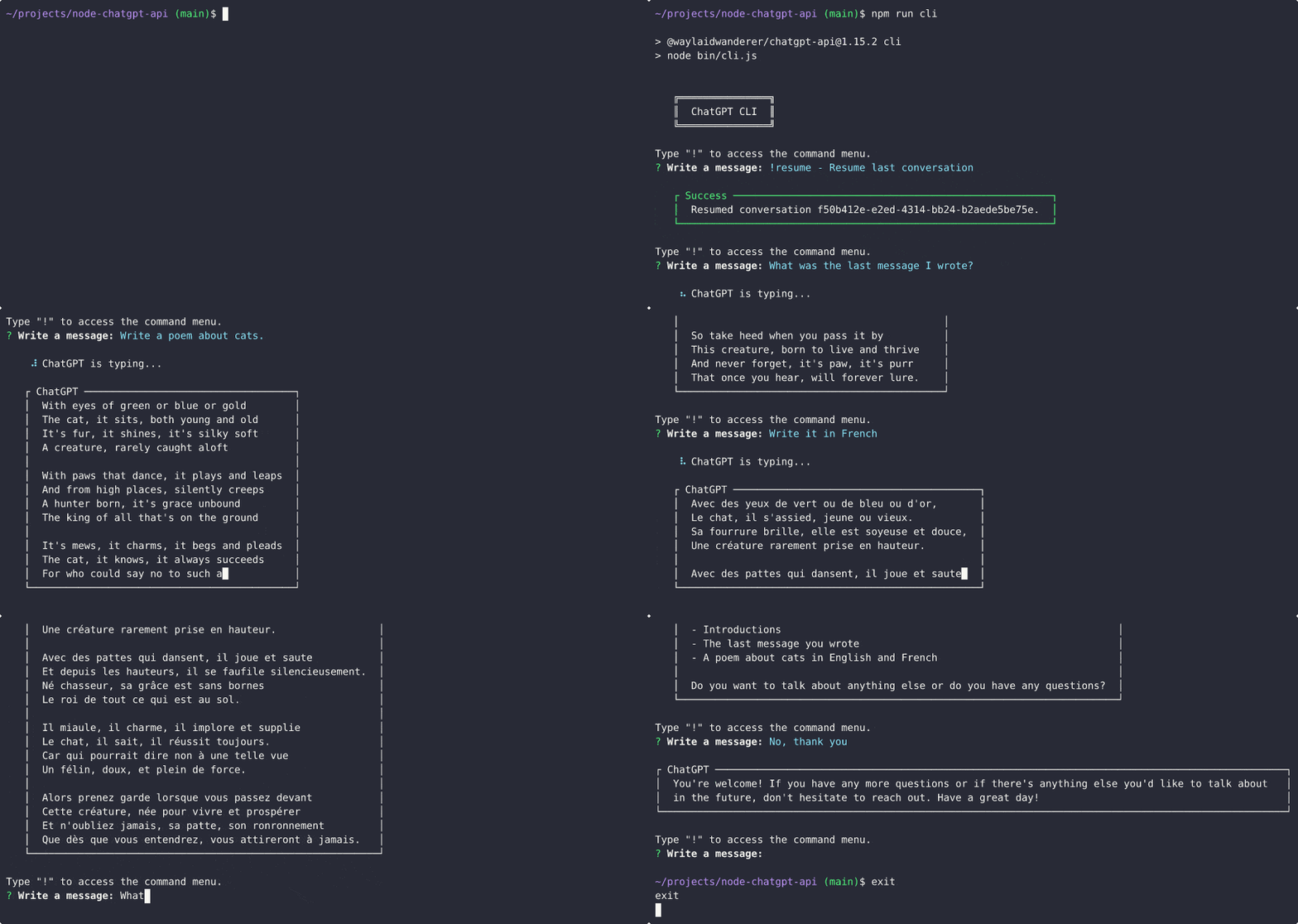
npm run cliChatGptの応答はクリップボードに自動的にコピーされるため、他のアプリケーションに貼り付けることができます。
上記の例に示すように、公式のChatGPTAPIの代わりに逆プロキシサーバーを使用するように、 ChatGPTClientのオプションにreverseProxyUrl設定できます。今のところ、これがChatGPT基礎モデルを使用する唯一の方法です。この方法はパッチが適用されており、以下の命令はもはや関連性がありませんが、他の理由で逆プロキシを使用することをお勧めします。現在、 ChatGPTBrowserClientのCloudFlareバイパスの実行には、逆プロキシサーバーが引き続き使用されています。
どのように機能しますか?簡単な回答: ChatGPTClient >逆プロキシ> openaiサーバー。 Reverse Proxy Serverは、Openaiのサーバーを介して基礎となるモデルに直接アクセスするためにフードの下で魔法を行い、その後、 ChatGPTClientへの応答を返します。
手順を以下に示します。
accessTokenプロパティを探してください)。reverseProxyUrlをhttps://chatgpt.hato.ai/completions in settings.js > chatGptClientまたはChatGPTClientのオプションに設定します。settings.chatGptClient.openaiApiKeyなど)をchatgptアクセストークンにステップ1に設定します。modelをtext-davinci-002-render 、 text-davinci-002-render-paid 、またはtext-davinci-002-render-shaに設定します。アカウントにアクセスできるChatGPTモデルに応じて。モデルは、基礎となるモデル名ではなく、ChatGPTモデル名である必要があり、アカウントにアクセスできないモデルを使用することはできません。stream: true (API)またはonProgress (クライアント)を回避策として使用します。accessTokenプロパティを探してください)。reverseProxyUrlをhttps://chatgpt.pawan.krd/api/completions in settings.js > chatGptClientまたはChatGPTClientのオプションに設定します。settings.chatGptClient.openaiApiKeyなど)をchatgptアクセストークンにステップ1に設定します。modelをtext-davinci-002-render 、 text-davinci-002-render-paid 、またはtext-davinci-002-render-shaに設定します。アカウントにアクセスできるChatGPTモデルに応じて。モデルは、基礎となるモデル名ではなく、ChatGPTモデル名である必要があり、アカウントにアクセスできないモデルを使用することはできません。stream: true (API)またはonProgress (クライアント)を回避策として使用します。@waylaidwanderer/chatgpt-apiを使用した素晴らしいプロジェクトのリスト:
このreadmeを編集し、プルリクエストを作成して、リストに追加してください!
このプロジェクトのWebクライアントは、WayLaidWanderer/Pandoraaiでも入手できます。
ChatGPTClientに関してgpt-3.5-turbo ChatGptの基礎モデルであるため、公式のChatGPT Webサイトの使用方法を再現するために最善を尽くさなければなりませんでした。これは、私の実装または基礎となるモデルがいくつかの点でまったく同じ動作をしないことを意味します。
このプロジェクトに貢献したい場合は、変更の詳細な説明を記載したプルリクエストを作成してください。
このプロジェクトは、MITライセンスの下でライセンスされています。





