WisBlock API V2
AT command parsing and default fPort changes

 |  |  |  |  |
|---|
การกำหนดเป้าหมายการใช้พลังงานต่ำห้องสมุด Arduino นี้สำหรับโมดูลหลักของ Rakwireless Wisblock จะดูแล Lora P2P ทั้งหมด, Lorawan, BLE, ที่ฟังก์ชั่นการบังคับบัญชา คุณสามารถมีสมาธิกับแอปพลิเคชันของคุณและทิ้งส่วนที่เหลือไว้ใน API มันถูกสร้างขึ้นเพื่อเป็นเพื่อนกับห้องสมุด SX126X-ARDUINO LORAWAN
มันต้องมีการคิดใหม่เกี่ยวกับแอปพลิเคชัน Arduino เนื่องจากคุณไม่มีฟังก์ชั่น setup() หรือ loop() ทุกอย่างเป็นแรงผลักดันเหตุการณ์ MCU กำลังนอนหลับจนกว่าจะต้องดำเนินการ นี่อาจเป็นเหตุการณ์ Lorawan ซึ่งเป็นคำสั่งที่ได้รับผ่านพอร์ต USB หรือเหตุการณ์แอปพลิเคชันเช่นการขัดจังหวะจากเซ็นเซอร์
วิธีการนี้ทำให้ง่ายต่อการสร้างแอปพลิเคชันที่ออกแบบมาสำหรับการใช้พลังงานต่ำ ในระหว่างการนอนหลับฐาน Wisblock + Wisblock Core Rak4631 กินเพียง 40ua
นอกจากนี้ API ยังมีสองตัวเลือกในการตั้งค่าการตั้งค่า LORA P2P / LORAWAN โดยไม่จำเป็นต้องใช้รหัสฮาร์ดลงในซอร์สโค้ด
V2 ของไลบรารีเปลี่ยนรูปแบบคำสั่ง AT ให้เข้ากันได้กับ RUI3 ที่คำสั่ง โปรดตรวจสอบคู่มือ AT Command สำหรับ RUI3 สำหรับความแตกต่าง
V2 Release รองรับเฉพาะโมดูลหลักของ Rakwireless Wisblock Rak4631
อาจเพิ่มการสนับสนุน RAK11310 และ RAK1200 ในอนาคต
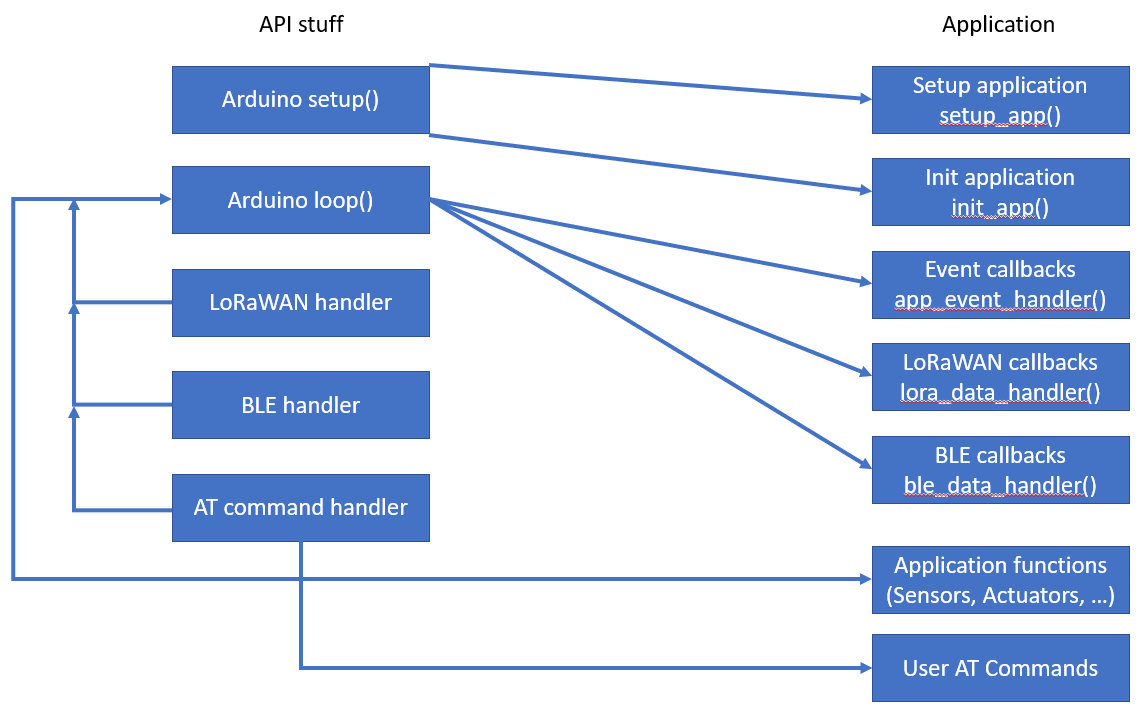
API กำลังจัดการทุกอย่างตั้งแต่ setup() , loop() , การเริ่มต้น Lorawan, การจัดการเหตุการณ์ Lorawan, การเริ่มต้น BLE, เหตุการณ์ BLE ที่จัดการกับอินเตอร์เฟสคำสั่ง AT
คำพูด
แอปพลิเคชันผู้ใช้ จะต้องไม่มี setup() และ loop() !
แอปพลิเคชันผู้ใช้มีฟังก์ชั่นการเริ่มต้นสองฟังก์ชั่นหนึ่งเรียกว่าที่จุดเริ่มต้นของ setup() อีกหนึ่งฟังก์ชั่นในตอนท้าย ฟังก์ชั่นอื่น ๆ คือการโทรกลับเหตุการณ์ที่เรียกจาก loop() เป็นไปได้ที่จะกำหนดเหตุการณ์ที่กำหนดเอง (เช่นการขัดจังหวะจากเซ็นเซอร์) เช่นกัน
การอ่านเซ็นเซอร์การควบคุมแอคทูเอเตอร์หรืองานแอปพลิเคชันอื่น ๆ ได้รับการจัดการใน app_event_handler() app_event_handler() เรียกบ่อยครั้งเวลาระหว่างการโทรถูกกำหนดโดยแอปพลิเคชัน นอกจากนี้ app_event_handler() เรียกว่าเหตุการณ์ที่กำหนดเอง
ble_data_handler() เรียกว่าเหตุการณ์ BLE (เหตุการณ์ BLE UART RX ตอนนี้) จาก loop() สามารถใช้เพื่อใช้การสื่อสารที่กำหนดเองผ่าน ble uart
คำพูด
ฟังก์ชั่นนี้ไม่จำเป็นใน RAK11310!
lora_data_handler() เรียกว่าเหตุการณ์ LORAWAN ที่แตกต่างกัน
 กราฟ TD
A [boot] -> | startup | B (การตั้งค่า)
    B -> | 1 | D (setup_app)
        D -> B (การตั้งค่า)
    B -> | 2 | E [เริ่มต้น Lora และ BLE]
        E -> B (การตั้งค่า)
    B -> | 3 | g (init_app)
        g -> k (การตั้งค่าเสร็จสิ้น)
    K -> | เริ่ม Loop | ฉัน (ลูป)
        Q [เหตุการณ์ LORA] -> | ตื่นขึ้นมา | j
        o [เหตุการณ์เซ็นเซอร์] -> | ตื่นขึ้นมา | JP [เหตุการณ์ BLE] -> | ตื่นขึ้นมา | JR [AT Command] -> | Wake Up | JT [ตัวจับเวลา] -> | ตื่นขึ้นมา | ji -> j (นอน)
        K -> | เริ่มจับเวลา | T
        j -> l (app_event_handler)
        j -> m (lora_data_handler)
        j -> n (ble_data_handler)
        j -> s (AT Command Handler)
        l -> u (อ่านเซ็นเซอร์)
        M -> V (เข้าร่วม, กิจกรรม TX และ RX)
        n -> w (จัดการกับคำสั่ง)
        S -> AA (ผู้ใช้ที่คำสั่ง)
        คุณ -> l
        v -> m
        w -> n
        aa -> s
        l -> j
        M -> J
        n -> j
        s -> j
คำสั่งทั้งหมดสามารถพบได้ในคู่มือ AT-Command ไม่รองรับ RUI3 ทั้งหมดที่คำสั่งได้รับการสนับสนุน รายการคำสั่งที่มีอยู่สามารถเรียกดูได้ที่? จากอุปกรณ์
มีการเพิ่มคำสั่งที่กำหนดเองสองคำลงในชุดคำสั่ง RUI3 ที่เริ่มต้นที่ชุดคำสั่ง:
คำอธิบาย: ตั้งค่าช่วงการส่งอัตโนมัติ
คำสั่งนี้อนุญาตให้ตั้งค่าช่วงเวลาในวินาทีระหว่างการส่งแพ็คเก็ตอัตโนมัติ หากตั้งค่าเป็น 0 การส่งแพ็คเก็ตอัตโนมัติจะถูกปิดใช้งาน
| สั่งการ | พารามิเตอร์อินพุต | ค่าส่งคืน | รหัสส่งคืน |
|---|---|---|---|
| ATC+SENDINT? | - | ATC+SENDINT: "Get or Set the automatic send interval | OK |
| atc+sendint =? | - | <interval in seconds> | OK |
ATC+sendint = <Input Parameter> | <interval in seconds> | - | OK หรือ AT_PARAM_ERROR |
ตัวอย่าง :
 ATC+SENDINT?

ATC+SENDINT: Get or Set the automatic send interval
OK

ATC+SENDINT=?

ATC+SENDINT:60
OK

ATC+SENDINT=60

OK
คำอธิบาย: แสดงสถานะอุปกรณ์
คำสั่งนี้ช่วยให้ผู้ใช้ได้รับสถานะอุปกรณ์ปัจจุบัน
| สั่งการ | พารามิเตอร์อินพุต | ค่าส่งคืน | รหัสส่งคืน |
|---|---|---|---|
| สถานะ ATC+? | - | ATC+STATUS: Show LoRaWAN status | OK |
| ATC+status =? | - | <status> | OK |
ตัวอย่าง :
 ATC+STATUS?

ATC+STATUS: Show LoRaWAN status
OK

// When in LoRaWAN mode:

ATC+STATUS=?
Device status:
   RAK4631
   Mode LPWAN
   Auto join enabled
   Network joined
LPWAN status:
   Dev EUI AC1F09FFFE09016C
   App EUI 70B3D57ED00201E1
   App Key 2B84E0B09B68E5CB42176FE753DCEE79
   Dev Addr 26021FB4
   NWS Key 323D155A000DF335307A16DA0C9DF53F
   Apps Key 3F6A66459D5EDCA63CBC4619CD61A11E
   OTAA enabled
   ADR disabled
   Public Network
   Dutycycle disabled
   Join trials 5
   TX Power 0
   DR 3
   Class 0
   Subband 1
   Fport 2
   Unconfirmed Message
   Region AS923-3
   Send Frequency 300

// When in LoRa P2P mode:

ATC+STATUS=?
Device status:
   RAK4631
   Mode P2P
   P2P frequency 916000000
   P2P TX Power 22
   P2P BW 125
   P2P SF 7
   P2P CR 0
   P2P Preamble length 8
   P2P Symbol Timeout 0
   Send Frequency 300
คำอธิบาย: การตั้งค่าพอร์ต
คำสั่งนี้อนุญาตให้ผู้ใช้เข้าถึงและกำหนดค่าการตั้งค่าพอร์ต
| สั่งการ | พารามิเตอร์อินพุต | ค่าส่งคืน | รหัสส่งคืน |
|---|---|---|---|
| ATC+พอร์ต? | - | AT+PORT=<Port><CR>. Get or Set the Port | OK |
| ATC+พอร์ต =? | - | 1-223 | ตกลง |
ATC+พอร์ต = <Input Parameter> | 1-223 | - | ตกลง หรือ at_param_error |
ตัวอย่าง :
 ATC+PORT?

ATC+PORT: Get or Set the Port=[1..223]
OK

ATC+PORT=?

ATC+PORT:2
OK

ATC+PORT=2

OK
กลับ
เริ่มต้นด้วย Wisblock API v1.1.2 คำสั่ง AT สามารถขยายได้โดยผู้ใช้ที่กำหนดไว้ที่คำสั่ง การใช้งานใหม่นี้ใช้ฟังก์ชั่น Parser ของ Wisblock API ที่ฟังก์ชั่นคำสั่ง นอกจากนี้คำสั่งที่กำหนดเองจะถูกระบุไว้หาก AT? ใช้
คำพูด ใน Rui3 Custom At Commands ถูกเรียกด้วย ATC แทนที่ !
ในการขยายคำสั่ง AT จำเป็นต้องมีสามขั้นตอน:
คำสั่งที่กำหนดเองจะแสดงอยู่ในอาร์เรย์ที่มีรูปแบบ struct atcmd_t แต่ละรายการประกอบด้วยคำสั่ง AT ข้อความคำอธิบายที่แสดงเมื่อคำสั่งถูกเรียกด้วย A? และพอยน์เตอร์ไปยังฟังก์ชั่นสำหรับการสืบค้นดำเนินการด้วยพารามิเตอร์และดำเนินการโดยไม่ต้องพารามิเตอร์ นี่คือตัวอย่างสำหรับสองคำสั่งที่กำหนดเอง:
 atcmd_t g_user_at_cmd_list_example[] = {
	/* |    CMD    |     AT+CMD?      |    AT+CMD=?    |  AT+CMD=value |  AT+CMD  |  Permissions  | */
	// GNSS commands
	{ " +SETVAL " , " Get/Set custom variable " , at_query_value, at_exec_value, NULL , " RW " },
	{ " +LIST " , " Show last packet content " , at_query_packet, NULL , NULL , " R " },
};

atcmd_t *g_user_at_cmd_list = g_user_at_cmd_list_example;
ข้อสังเกต 1
โครงสร้างสำหรับคำสั่งที่กำหนดเองจะขยายออกไปสำหรับความเข้ากันได้ของ RUI3 รหัสเก่าที่เขียนขึ้นสำหรับ Wisblock-Api v1.x จำเป็นต้องปรับให้เข้ากับโครงสร้างใหม่นี้
ข้อสังเกต 2
สำหรับฟังก์ชั่นที่ไม่ได้รับการสนับสนุนโดย AT Command จะต้องใส่ NULL ลงในอาร์เรย์
ข้อสังเกต 3
ชื่อ g_user_at_cmd_list ได้รับการแก้ไขและไม่สามารถเปลี่ยนแปลงได้หรือไม่พบคำสั่งที่กำหนดเอง
ข้อสังเกต 4
การอนุญาตจะได้รับเป็นสตริง รายการที่ถูกต้องคือ "R" (อ่านเท่านั้น), "W" (เขียนเท่านั้น), "RW" (อ่านและเขียน)
ต้องมีตัวแปรที่มีจำนวนคำสั่งที่กำหนดเอง:
 /* * Number of user defined AT commands */
uint8_t g_user_at_cmd_num = sizeof (g_user_at_cmd_list_example) / sizeof ( atcmd_t );
คำพูด
ชื่อ g_user_at_cmd_num ได้รับการแก้ไขและไม่สามารถเปลี่ยนแปลงได้หรือไม่พบคำสั่งที่กำหนดเอง
สำหรับแต่ละคำสั่งที่กำหนดเองต้องเขียนคำสั่งแบบสอบถามและดำเนินการ ชื่อของฟังก์ชั่นเหล่านี้จะต้องตรงกับชื่อฟังก์ชั่นที่ใช้ในอาร์เรย์ของคำสั่งที่กำหนดเอง คำสั่งดำเนินการรับเป็นพารามิเตอร์ค่าของคำสั่ง At หลังจาก = ของค่า
ฟังก์ชั่นการสืบค้น ( =? ) ไม่ได้รับและพารามิเตอร์และจะต้องกลับมาพร้อมกับ 0. ฟังก์ชั่นการสืบค้นบันทึกผลลัพธ์ของการสืบค้นในอาร์เรย์ถ่านถ่าน Global g_at_query_buffer อาร์เรย์มีขนาดสูงสุดของ ATQUERY_SIZE ซึ่งเป็นอักขระ 128 ตัว
ดำเนินการฟังก์ชั่นที่มีพารามิเตอร์ ( =<value> ) รับค่าหรือการตั้งค่าเป็นตัวชี้ไปยังอาร์เรย์ถ่าน อาร์เรย์นี้มีเฉพาะค่าหรือพารามิเตอร์ที่ไม่มีคำสั่ง AT เอง ตัวอย่างเช่นการจัดการฟังก์ชั่นการดำเนินการ ATC+SETDEV=12000 จะได้รับเพียง 120000 ค่าที่ได้รับหรือพารามิเตอร์จะต้องตรวจสอบความถูกต้องและหากค่าของรูปแบบไม่ตรงกันจะต้องส่งคืนค่า AT_ERRNO_PARA_VAL หากค่าหรือพารามิเตอร์ถูกต้องฟังก์ชั่นควรส่งคืน 0
ฟังก์ชั่นดำเนินการที่ไม่มีพารามิเตอร์จะใช้ในการดำเนินการและส่งคืนความสำเร็จของการกระทำเป็น 0 หากประสบความสำเร็จหรือ AT_ERRNO_EXEC_FAIL หากการดำเนินการล้มเหลว
ตัวอย่างนี้ใช้เพื่อตั้งค่าตัวแปรในแอปพลิเคชัน
 /* ******************************************************************* */
// Example AT command to change the value of the variable new_val:
// Query the value AT+SETVAL=?
// Set the value AT+SETVAL=120000
// Second AT command to show last packet content
// Query with AT+LIST=?
/* ******************************************************************* */
int32_t new_val = 3000 ;

/* *
 * @brief Returns the current value of the custom variable
 *
 * @return int always 0
 */
static int at_query_value ()
{
	snprintf (g_at_query_buf, ATQUERY_SIZE, " Custom Value: %d " , new_val);
	return 0 ;
}

/* *
 * @brief Command to set the custom variable
 *
 * @param str the new value for the variable without the AT part
 * @return int 0 if the command was succesfull, 5 if the parameter was wrong
 */
static int at_exec_value ( char *str)
{
	new_val = strtol (str, NULL , 0 );
	MYLOG ( " APP " , " Value number >>%ld<< " , new_val);
	return 0 ;
}

/* *
 * @brief Example how to show the last LoRa packet content
 *
 * @return int always 0
 */
static int at_query_packet ()
{
	snprintf (g_at_query_buf, ATQUERY_SIZE, " Packet: %02X%02X%02X%02X " ,
			 g_lpwan_data. data_flag1 ,
			 g_lpwan_data. data_flag2 ,
			 g_lpwan_data. batt_1 ,
			 g_lpwan_data. batt_2 );
	return 0 ;
}

/* *
 * @brief List of all available commands with short help and pointer to functions
 *
 */
atcmd_t g_user_at_cmd_list_example[] = {
	/* |    CMD    |     AT+CMD?      |    AT+CMD=?    |  AT+CMD=value |  AT+CMD  |  Permission  | */
	// GNSS commands
	{ " +SETVAL " , " Get/Set custom variable " , at_query_value, at_exec_value, NULL , " RW " },
	{ " +LIST " , " Show last packet content " , at_query_packet, NULL , NULL , " R " },
};

atcmd_t *g_user_at_cmd_list = g_user_at_cmd_list_example;

/* * Number of user defined AT commands */
uint8_t g_user_at_cmd_num = sizeof (g_user_at_cmd_list_example) / sizeof ( atcmd_t );ตัวอย่างห้าตัวอย่างนี้อธิบายการใช้ API ในตัวอย่างทั้งหมดการโทรกลับ API และฟังก์ชั่นเพิ่มเติม (การอ่านเซ็นเซอร์การจัดการ IRQ, บริการตำแหน่ง GNSS) จะถูกแยกออกเป็นภาพร่างของตนเอง
Wisblock-Api-V2 ถูกนำมาใช้เช่นกันในโครงการแพลตฟอร์มต่อไปนี้:
เมื่อใช้กับ RAK4631 การอัปเดตเฟิร์มแวร์ผ่าน BLE จะรวมอยู่ในห้องสมุดแล้ว การอัปเดตเฟิร์มแวร์สำหรับ RAK4631 สามารถทำได้โดยใช้กล่องเครื่องมือ NORDIC NRF (พร้อมใช้งานสำหรับ Android และ iOS) หรือกับกล่องเครื่องมือ Wisblock (แอปพลิเคชัน Android ของฉัน)
สำหรับการอัปเดตให้คัดลอกไฟล์อัปเดตที่สร้างขึ้น (โดยปกติเรียกว่า firmware.zip) จากโฟลเดอร์. pio/build/{device} คัดลอกไปยังโทรศัพท์ของคุณและใช้แอปพลิเคชันใดแอปพลิเคชันใดเพื่ออัปเดตเฟิร์มแวร์
หากการอัปเดตเฟิร์มแวร์ผ่าน BLE ล้มเหลวให้อัปเดตอุปกรณ์เป็น bootloader ล่าสุดสำหรับ RAK4631 ด้วยเวอร์ชัน v0.4.3 คุณสามารถค้นหา bootloader ล่าสุดใน repo wisblock
API ให้การเรียกร้องให้มีการจัดการเพื่อส่งแพ็กเก็ต Lorawan เพื่อส่งข้อมูล BLE UART และเรียกเหตุการณ์
void api_set_version(uint16_t sw_1 = 1, uint16_t sw_2 = 0, uint16_t sw_3 = 0);
ฟังก์ชั่นนี้สามารถเรียกใช้เพื่อตั้งค่าเวอร์ชันแอปพลิเคชัน เวอร์ชันแอปพลิเคชันสามารถขอได้โดยคำสั่ง AT หมายเลขเวอร์ชันถูกสร้างจากสามหลัก:
sw_1 ==> รุ่นใหญ่เพิ่มขึ้นในการเปลี่ยนแปลง API / ไม่สามารถย้อนกลับเข้ากันได้
sw_2 ==> รุ่นรองเพิ่มขึ้นในการเปลี่ยนแปลง API / ย้อนหลังเข้ากันได้
sw_3 ==> เพิ่มเวอร์ชันแพตช์บน BugFix ไม่มีผลกระทบต่อ API
หากไม่ได้เรียก api_set_version เวอร์ชันแอปพลิเคชันจะเริ่มต้นเป็น 1.0.0
void api_reset(void);
ทำการรีเซ็ตโมดูลหลัก Wisblock
void api_wake_loop(uint16_t reason);
สิ่งนี้ใช้ในการปลุกลูปด้วยเหตุการณ์ reason จะต้องกำหนดใน app.h หลังจากแอป Loop Week จะเรียก app_event_handler() ด้วยค่าของ reason ใน g_task_event_type
ตัวอย่างเช่นสิ่งนี้สามารถใช้ในการปลุกอุปกรณ์จากการขัดจังหวะของเซ็นเซอร์ accelerometer ที่นี่เป็นตัวอย่างสารสกัดจากรหัสตัวอย่าง accelerometer
ใน accelerometer.ino เหตุการณ์จะถูกกำหนด การกำหนดครั้งแรกคือการตั้งค่าสัญญาณที่สองคือการล้างเหตุการณ์หลังจากจัดการ
 /* * Define additional events */
# define ACC_TRIGGER 0b1000000000000000
# define N_ACC_TRIGGER 0b0111111111111111
จากนั้นใน lis3dh_acc.ino ในฟังก์ชั่นการโทรกลับ void acc_int_handler(void) ACC_TRIGGER
 void acc_int_handler ( void )
{
	// Wake up the task to handle it
	api_wake_loop (ACC_TRIGGER);
}
และในที่สุดก็อยู่ใน accelerometer.ino เหตุการณ์ได้รับการจัดการใน app_event_handler()
	// ACC triggered event
	if ((g_task_event_type & ACC_TRIGGER) == ACC_TRIGGER)
	{
		g_task_event_type &= N_ACC_TRIGGER;
		MYLOG ( " APP " , " ACC IRQ wakeup " );
		// Reset ACC IRQ register
		get_acc_int ();

		// Set Status flag, it will trigger sending a packet
		g_task_event_type = STATUS;
} void api_log_settings(void);
ฟังก์ชั่นนี้สามารถเรียกใช้เพื่อแสดงรายการการตั้งค่าที่สมบูรณ์ของอุปกรณ์ Wisblock ผ่าน USB ผลลัพธ์ดูเหมือนว่า:
Device status:
   RAK11310
   Auto join enabled
   Mode LPWAN
   Network joined
   Send Frequency 120
LPWAN status:
   Dev EUI AC1F09FFFE0142C8
   App EUI 70B3D57ED00201E1
   App Key 2B84E0B09B68E5CB42176FE753DCEE79
   Dev Addr 26021FB4
   NWS Key 323D155A000DF335307A16DA0C9DF53F
   Apps Key 3F6A66459D5EDCA63CBC4619CD61A11E
   OTAA enabled
   ADR disabled
   Public Network
   Dutycycle disabled
   Join trials 30
   TX Power 0
   DR 3
   Class 0
   Subband 1
   Fport 2
   Unconfirmed Message
   Region AS923-3
LoRa P2P status:
   P2P frequency 916000000
   P2P TX Power 22
   P2P BW 125
   P2P SF 7
   P2P CR 1
   P2P Preamble length 8
P2P Symbol Timeout 0 void api_timer_stop(void)
หยุดตัวจับเวลาที่ปลุก MCU บ่อยครั้ง
void api_timer_restart(uint32_t new_time)
รีสตาร์ทตัวจับเวลาด้วยค่าใหม่ ค่าเป็นมิลลิวินาที
void api_read_credentials(void);
void api_set_credentials(void); หากการตั้งค่า LORA P2P จำเป็นต้องเป็น hardcoded (เช่นความถี่, แบนด์วิดท์, ... ) สิ่งนี้สามารถทำได้ใน setup_app() ก่อนอื่นการตั้งค่าที่บันทึกไว้จะต้องอ่านจาก Flash ด้วย api_read_credentials(); จากนั้นการตั้งค่าสามารถเปลี่ยนแปลงได้ หลังจากเปลี่ยนการตั้งค่าจะต้องบันทึกด้วย api_set_credentials() ในขณะที่ Wisblock API ตรวจสอบว่าจำเป็นต้องมีการเปลี่ยนแปลงใด ๆ ค่าที่เปลี่ยนแปลงจะถูกบันทึกไว้ในการบูตครั้งแรกหลังจากกระพริบแอปพลิเคชัน
ตัวอย่าง:
 // Read credentials from Flash
api_read_credentials ();

// Make changes to the credentials
g_lorawan_settings.p2p_frequency = 916000000 ;			// Use 916 MHz to send and receive
g_lorawan_settings.p2p_bandwidth = 0 ;					// Bandwidth 125 kHz
g_lorawan_settings.p2p_sf = 7 ;							// Spreading Factor 7
g_lorawan_settings.p2p_cr = 1 ;							// Coding Rate 4/5
g_lorawan_settings.p2p_preamble_len = 8 ;				// Preample Length 8
g_lorawan_settings.p2p_tx_power = 22 ;					// TX power 22 dBi

// Save hard coded LoRaWAN settings
api_set_credentials ();
ข้อสังเกต 1
การตั้งค่ารหัสยากจะต้องตั้งค่าใน void setup_app(void) !
ข้อสังเกต 2
โปรดทราบว่าพารามิเตอร์ที่เปลี่ยนจากวิธีนี้สามารถเปลี่ยนแปลงได้ตามคำสั่งหรือ BLE แต่จะรีเซ็ตหลังจากรีบูต !
api_ble_printf() สามารถใช้ส่งข้อมูลผ่าน BLE UART รองรับ print println และ printf
คำพูด
คำสั่งนี้ไม่สามารถใช้ได้ใน RAK11310!
โดยค่าเริ่มต้นการโฆษณา BLE จะใช้งานได้เพียง 30 วินาทีหลังจากเปิดเครื่อง/รีเซ็ตเพื่อลดการใช้พลังงาน โดยการเรียก void restart_advertising(uint16_t timeout); การโฆษณาสามารถรีสตาร์ทได้สำหรับวินาที timeout
คำพูด
คำสั่งนี้ไม่สามารถใช้ได้ใน RAK11310!
lmh_error_status send_lora_packet(uint8_t *data, uint8_t size, uint8_t fport = 0); ใช้เพื่อส่งแพ็กเก็ตข้อมูลไปยังเซิร์ฟเวอร์ Lorawan *data เป็นตัวชี้ไปยังบัฟเฟอร์ที่มีข้อมูล size คือขนาดของแพ็กเก็ต หาก Fport เป็น 0, fportdefined ในโครงสร้าง G_lorawan_settings ถูกใช้
bool send_p2p_packet(uint8_t *data, uint8_t size); ใช้เพื่อส่งแพ็คเก็ตข้อมูลผ่าน Lora P2P *data เป็นตัวชี้ไปยังบัฟเฟอร์ที่มีข้อมูล size คือขนาดของแพ็กเก็ต
หลังจาก Cycle TX (รวมถึง Windows RX1 และ RX2) เสร็จสิ้นผลลัพธ์จะถูกเก็บไว้ใน Global Flag g_rx_fin_result เหตุการณ์ LORA_TX_FIN จะถูกเรียกและเรียกกลับ lora_data_handler() ในการโทรกลับนี้สามารถตรวจสอบผลลัพธ์ได้และหากมีมาตรการที่จำเป็น
Cayennelpp เป็นรูปแบบที่ออกแบบโดย MyDevices เพื่อรวมโหนด Lorawan เข้ากับแพลตฟอร์ม IoT ของพวกเขา
ห้องสมุด CayenNelpp ขยายประเภทข้อมูลที่มีอยู่ด้วยประเภทข้อมูล IPSO หลายชนิดที่ไม่รวมอยู่ในงานต้นฉบับโดย Johan Stokking หรือส้อมและงานด้านส่วนใหญ่โดยคนอื่น ๆ ประเภทข้อมูลเพิ่มเติมเหล่านี้ไม่ได้รับการสนับสนุนโดย MyDevices Cayenne
Wisblock API ใช้ประเภทข้อมูลอีกสองสามชนิดที่ขยายทั้งประเภทข้อมูลดั้งเดิมและอิเล็กทรอนิกส์เพื่อรองรับโมดูลเซ็นเซอร์ Wisblock ที่หลากหลาย
ในการใช้ประเภทข้อมูลเพิ่มเติม Wisblock API นั้นมีไฟล์ส่วนหัวที่จำเป็นอยู่แล้ว
เพื่อให้สามารถใช้ฟังก์ชั่น Cayenne LPP ได้จำเป็นต้องใช้อินสแตนซ์ของคลาส
 /* * LoRaWAN packet */
WisCayenne g_solution_data ( 255 );ก่อนที่จะเพิ่มข้อมูลจะต้องรีเซ็ตแพ็คเก็ตบัฟเฟอร์
 // Reset the packet
g_solution_data.reset();ห้องสมุด CayenNelpp มีการเรียก API สำหรับประเภทข้อมูลที่รองรับ ดูรายละเอียด Cayennelpp API นอกเหนือจากการเรียก API เหล่านี้ Wisblock API ยังเพิ่มการโทรอีก 5 ครั้ง การโทร API เหล่านี้มีไว้สำหรับรูปแบบ GNSS ที่แตกต่างกันและสำหรับข้อมูลเซ็นเซอร์ VOC:
 uint8_t addGNSS_4 ( uint8_t channel, int32_t latitude, int32_t longitude, int32_t altitude);
uint8_t addGNSS_6 ( uint8_t channel, int32_t latitude, int32_t longitude, int32_t altitude);
uint8_t addGNSS_H ( int32_t latitude, int32_t longitude, int16_t altitude, int16_t accuracy, int16_t battery);
uint8_t addGNSS_T ( int32_t latitude, int32_t longitude, int16_t altitude, float accuracy, int8_t sats);
uint8_t addVoc_index ( uint8_t channel, uint32_t voc_index); /* *
* @brief Add GNSS data in Cayenne LPP standard format
*
* @param channel LPP channel
* @param latitude Latitude as read from the GNSS receiver
* @param longitude Longitude as read from the GNSS receiver
* @param altitude Altitude as read from the GNSS receiver
* @return uint8_t bytes added to the data packet
*/
uint8_t WisCayenne::addGNSS_4 ( uint8_t channel, int32_t latitude, int32_t longitude, int32_t altitude) /* *
* @brief Add GNSS data in custom Cayenne LPP format
* Requires changed decoder in LNS and visualization
* Does not work with Cayenne LPP MyDevices
*
* @param channel LPP channel
* @param latitude Latitude as read from the GNSS receiver
* @param longitude Longitude as read from the GNSS receiver
* @param altitude Altitude as read from the GNSS receiver
* @return uint8_t bytes added to the data packet
*/
uint8_t WisCayenne::addGNSS_6 ( uint8_t channel, int32_t latitude, int32_t longitude, int32_t altitude) /* *
* @brief Add GNSS data in Helium Mapper format
*
* @param channel LPP channel
* @param latitude Latitude as read from the GNSS receiver
* @param longitude Longitude as read from the GNSS receiver
* @param altitude Altitude as read from the GNSS receiver
* @param accuracy Accuracy of reading from the GNSS receiver
* @param battery Device battery voltage in V
* @return uint8_t bytes added to the data packet
*/
uint8_t WisCayenne::addGNSS_H ( int32_t latitude, int32_t longitude, int16_t altitude, int16_t accuracy, int16_t battery) /* *
* @brief Add GNSS data in Field Tester format
*
* @param latitude Latitude as read from the GNSS receiver
* @param longitude Longitude as read from the GNSS receiver
* @param altitude Altitude as read from the GNSS receiver
* @param accuracy Accuracy of reading from the GNSS receiver
* @param sats Number of satellites of reading from the GNSS receiver
* @return uint8_t bytes added to the data packet
*/
uint8_t WisCayenne::addGNSS_T ( int32_t latitude, int32_t longitude, int16_t altitude, float accuracy, int8_t sats) /* *
* @brief Add the VOC index
*
* @param channel VOC channel
* @param voc_index VOC index
* @return uint8_t bytes added to the data packet
*/
uint8_t WisCayenne::addVoc_index ( uint8_t channel, uint32_t voc_index) แพ็กเก็ตข้อมูล CayenNelpp มักจะอยู่ในรูปแบบ <Channel #><Channel ID><data bytes>
เพื่อให้ง่ายขึ้นในการเข้ารหัสข้อมูลที่ใช้ในเซิร์ฟเวอร์ Lorawan และข้อมูลการรวมที่รวบรวมโดยเซ็นเซอร์ Wisblock จะมีหมายเลขช่องสัญญาณเดียวกันเสมอ (หากใช้ API เหล่านี้) นี่คือรายการของหมายเลขช่องสัญญาณที่กำหนดในปัจจุบัน ID ช่องและโมดูลใดที่ใช้ชุดค่าผสม
| ข้อมูล | ช่อง # | รหัสช่องสัญญาณ | ความยาว | การแสดงความคิดเห็น | โมดูลที่จำเป็น | ชื่อฟิลด์ถอดรหัส |
|---|---|---|---|---|---|---|
| มูลค่าแบตเตอรี่ | 1 | 116 | 2 ไบต์ | 0.01 V MSB ที่ไม่ได้ลงนาม | Rak4631 | Voltage_1 |
| ความชื้น | 2 | 104 | 1 ไบต์ | ใน %rh | Rak1901 | ความชื้น _2 |
| อุณหภูมิ | 3 | 103 | 2 ไบต์ | ใน° C | Rak1901 | อุณหภูมิ _3 |
| แรงดันบารอมิเตอร์ | 4 | 115 | 2 ไบต์ | ใน HPA (MBAR) | Rak1902 | Barometer_4 |
| การส่องสว่าง | 5 | 101 | 2 ไบต์ | 1 ลักซ์ไม่ได้ลงนาม | Rak1903 | Illuminance_5 |
| ความชื้น 2 | 6 | 104 | 1 ไบต์ | ใน %rh | Rak1906 | ความชื้น _6 |
| อุณหภูมิ 2 | 7 | 103 | 2 ไบต์ | ใน° C | Rak1906 | อุณหภูมิ _7 |
| ความดันบารอมิเตอร์ 2 | 8 | 115 | 2 ไบต์ | ใน HPA (MBAR) | Rak1906 | Barometer_8 |
| ความต้านทานก๊าซ 2 | 9 | 2 | 2 ไบต์ | 0.01 ลงนาม (KOHM) | Rak1906 | อะนาล็อก _9 |
| GNSS ยืน ปณิธาน | 10 | 136 | 9 ไบต์ | 3 byte lon/lat 0.0001 °, 3 bytes alt 0.01 เมตร | RAK1910, RAK12500 | GPS_10 |
| GNSS เพิ่มความละเอียด | 10 | 137 | 11 ไบต์ | 4 ไบต์ lon/lat 0.000001 °, 3 ไบต์ alt 0.01 เมตร | RAK1910, RAK12500 | GPS_10 |
| อุณหภูมิดิน | 11 | 103 | 2 ไบต์ | ใน° C | RAK12023/RAK12035 | อุณหภูมิ _11 |
| ความชื้นในดิน | 12 | 104 | 1 ไบต์ | ใน %rh | RAK12023/RAK12035 | ความชื้น _12 |
| ความชื้นในดินดิบ | 13 | 2 | 2 ไบต์ | 0.01 ลงนาม | RAK12023/RAK12035 | analog_in_13 |
| ข้อมูลดินใช้ได้ | 14 | 102 | 1 ไบต์ | บูล | RAK12023/RAK12035 | Prestence_14 |
| ความสว่าง 2 | 15 | 101 | 2 ไบต์ | 1 ลักซ์ไม่ได้ลงนาม | Rak12010 | Illuminance_15 |
| VOC | 16 | 138 | 2 ไบต์ | ดัชนี VOC | Rak12047 | VOC_16 |
| ก๊าซ MQ2 | 17 | 2 | 2 ไบต์ | 0.01 ลงนาม | Rak12004 | analog_in_17 |
| เปอร์เซ็นต์ก๊าซ MQ2 | 18 | 120 | 1 ไบต์ | 1-100% ไม่ได้ลงชื่อ | Rak12004 | เปอร์เซ็นต์ _18 |
| MG812 แก๊ส | 19 | 2 | 2 ไบต์ | 0.01 ลงนาม | Rak12008 | analog_in_19 |
| เปอร์เซ็นต์ก๊าซ MG812 | 20 | 120 | 1 ไบต์ | 1-100% ไม่ได้ลงชื่อ | Rak12008 | เปอร์เซ็นต์ _20 |
| ก๊าซแอลกอฮอล์ MQ3 | 21 | 2 | 2 ไบต์ | 0.01 ลงนาม | Rak12009 | analog_in_21 |
| MQ3 แอลกอฮอล์ Perc | 22 | 120 | 1 ไบต์ | 1-100% ไม่ได้ลงชื่อ | Rak12009 | เปอร์เซ็นต์ _22 |
| ระยะทาง TOF | 23 | 2 | 2 ไบต์ | 0.01 ลงนาม | Rak12014 | analog_in_23 |
| ข้อมูล TOF ใช้ได้ | 24 | 102 | 1 ไบต์ | บูล | Rak12014 | Prestence_24 |
| ไจโรเรียก | 25 | 134 | 6 ไบต์ | 2 ไบต์ต่อแกน 0.01 °/s | Rak12025 | Gyrometer_25 |
| ตรวจพบท่าทาง | 26 | 0 | 1 ไบต์ | 1 ไบต์ด้วย id ของท่าทาง | RAK14008 | digital_in_26 |
| ค่า LTR390 UVI | 27 | 2 | 2 ไบต์ | 0.01 ลงนาม | Rak12019 | analog_in_27 |
| ค่า LTR390 UVS | 28 | 101 | 2 ไบต์ | 1 ลักซ์ไม่ได้ลงนาม | Rak12019 | Illuminance_28 |
| INA219 ปัจจุบัน | 29 | 2 | 2 ไบต์ | 0.01 ลงนาม | Rak16000 | อะนาล็อก _29 |
| แรงดันไฟฟ้า INA219 | 30 | 2 | 2 ไบต์ | 0.01 ลงนาม | Rak16000 | analog_30 |
| พลังงาน INA219 | 31 | 2 | 2 ไบต์ | 0.01 ลงนาม | Rak16000 | อะนาล็อก _31 |
| ทัชแพดซ้าย | 32 | 102 | 1 ไบต์ | บูล | RAK14002 | Prestence_32 |
| ทัชแพดกลาง | 33 | 102 | 1 ไบต์ | บูล | RAK14002 | Prestence_33 |
| ทัชแพดขวา | 34 | 102 | 1 ไบต์ | บูล | RAK14002 | Prestence_34 |
| ความเข้มข้นของ SCD30 CO2 | 35 | 125 | 2 ไบต์ | 1 ppm ไม่ได้ลงนาม | Rak12037 | ความเข้มข้น _35 |
| อุณหภูมิ SCD30 | 36 | 103 | 2 ไบต์ | ใน° C | Rak12037 | อุณหภูมิ _36 |
| ความชื้น SCD30 | 37 | 104 | 1 ไบต์ | ใน %rh | Rak12037 | ความชื้น _37 |
| อุณหภูมิเซ็นเซอร์ MLX90632 | 38 | 103 | 2 ไบต์ | ใน° C | Rak12003 | อุณหภูมิ _38 |
| MLX90632 อุณหภูมิวัตถุ | 39 | 103 | 2 ไบต์ | ใน° C | Rak12003 | อุณหภูมิ _39 |
| ค่า PM 1.0 | 40 | 103 | 2 ไบต์ | ใน UG/M3 | Rak12003 | VOC_40 |
| PM 2.5 ค่า | 41 | 103 | 2 ไบต์ | ใน UG/M3 | Rak12003 | VOC_41 |
| PM 10 ค่า | 42 | 103 | 2 ไบต์ | ใน UG/M3 | Rak12003 | VOC_42 |
| เหตุการณ์แผ่นดินไหว | 43 | 102 | 1 ไบต์ | บูล | Rak12027 | Prestence_43 |
| ค่าแผ่นดินไหว | 44 | 2 | 2 ไบต์ | อะนาล็อก 10 * m/s | Rak12027 | อะนาล็อก _44 |
| ค่า PGA แผ่นดินไหว | 45 | 2 | 2 ไบต์ | อะนาล็อก 10 * m/s2 | Rak12027 | อะนาล็อก _45 |
| การแจ้งเตือนการปิดแผ่นดินไหว | 46 | 102 | 1 ไบต์ | บูล | Rak12027 | Prestence_46 |
| LPP_CHANNEL_EQ_COLLAPSE | 47 | 102 | 1 ไบต์ | บูล | Rak12027 | Prestence_47 |
| เปลี่ยนสถานะ | 48 | 102 | 1 ไบต์ | บูล | RAK13011 | Prestence_48 |
ID ของช่องสัญญาณในรูปแบบขยายและไม่รองรับโดยตัวถอดรหัสข้อมูล Cayenne LPP มาตรฐาน
รายการรูปแบบข้อมูลที่ใช้แล้วเต็มรูปแบบสามารถพบได้ใน rakwireless_standardized_payload ของเรา
repo repo rakwireless_standardized_payload รวมถึงตัวถอดรหัสที่ตรงกัน
รหัสที่ใช้ที่นี่คือตัวอย่าง API-test.ino
สิ่งเหล่านี้เป็นสิ่งที่จำเป็นรวมถึงและคำจำกัดความสำหรับแอปพลิเคชันผู้ใช้และอินเตอร์เฟส API
ในตัวอย่างนี้เราได้รับการเข้ารหัสข้อมูลรับรอง Lorawan ขอแนะนำอย่างยิ่ง ให้ไม่ทำเช่นนั้น เพื่อหลีกเลี่ยงข้อมูลรับรองโหนดที่ซ้ำกัน
ตัวเลือกทางเลือกในการตั้งค่าข้อมูลรับรองคือ
# include < Arduino.h >
/* * Add you required includes after Arduino.h */
# include < Wire.h >

// Debug output set to 0 to disable app debug output
# ifndef MY_DEBUG
# define MY_DEBUG 1
# endif

# ifdef NRF52_SERIES
# if MY_DEBUG > 0
# define MYLOG (tag, ...)
	do
	{
		if (tag)
			PRINTF ( " [%s] " , tag);
		PRINTF (__VA_ARGS__);
		PRINTF ( " n " );
		if (g_ble_uart_is_connected)
		{
			g_ble_uart. printf (__VA_ARGS__);
			g_ble_uart. printf ( " n " );
		}
	} while ( 0 )
# else
# define MYLOG (...)
# endif
# endif
# ifdef ARDUINO_ARCH_RP2040
# if MY_DEBUG > 0
# define MYLOG (tag, ...)
	do
	{
		if (tag)
			Serial. printf ( " [%s] " , tag);
		Serial. printf (__VA_ARGS__);
		Serial. printf ( " n " );
	} while ( 0 )
# else
# define MYLOG (...)
# endif
# endif

/* * Include the WisBlock-API-V2 */
# include < WisBlock-API-V2.h > // Click to install library: http://librarymanager/All#WisBlock-API-V2

/* * Define the version of your SW */
# define SW_VERSION_1 1 // major version increase on API change / not backwards compatible
# define SW_VERSION_2 0 // minor version increase on API change / backward compatible
# define SW_VERSION_3 0 // patch version increase on bugfix, no affect on API

/* *
   Optional hard-coded LoRaWAN credentials for OTAA and ABP.
   It is strongly recommended to avoid duplicated node credentials
   Options to setup credentials are
   - over USB with AT commands
   - over BLE with My nRF52 Toolbox
*/
uint8_t node_device_eui[ 8 ] = { 0x00 , 0x0D , 0x75 , 0xE6 , 0x56 , 0x4D , 0xC1 , 0xF3 };
uint8_t node_app_eui[ 8 ] = { 0x70 , 0xB3 , 0xD5 , 0x7E , 0xD0 , 0x02 , 0x01 , 0xE1 };
uint8_t node_app_key[ 16 ] = { 0x2B , 0x84 , 0xE0 , 0xB0 , 0x9B , 0x68 , 0xE5 , 0xCB , 0x42 , 0x17 , 0x6F , 0xE7 , 0x53 , 0xDC , 0xEE , 0x79 };
uint8_t node_nws_key[ 16 ] = { 0x32 , 0x3D , 0x15 , 0x5A , 0x00 , 0x0D , 0xF3 , 0x35 , 0x30 , 0x7A , 0x16 , 0xDA , 0x0C , 0x9D , 0xF5 , 0x3F };
uint8_t node_apps_key[ 16 ] = { 0x3F , 0x6A , 0x66 , 0x45 , 0x9D , 0x5E , 0xDC , 0xA6 , 0x3C , 0xBC , 0x46 , 0x19 , 0xCD , 0x61 , 0xA1 , 0x1E };
การประกาศไปข้างหน้าของฟังก์ชั่นบางอย่าง (จำเป็นเมื่อใช้ platformio)
 /* * Application function definitions */
void setup_app ( void );
bool init_app ( void );
void app_event_handler ( void );
void ble_data_handler ( void ) __attribute__((weak));
void lora_data_handler ( void );
ที่นี่ชื่อแอปพลิเคชันถูกตั้งค่าเป็น RAK-TEST ชื่อจะขยายออกไปด้วยรหัสชิป NRF52 ที่ไม่ซ้ำกัน ชื่อนี้ใช้ในการโฆษณา BLE
 /* * Application stuff */

/* * Set the device name, max length is 10 characters */
char g_ble_dev_name[ 10 ] = " RAK-TEST " ;
จำเป็นต้องมีธงและสัญญาณบางอย่าง
 /* * Flag showing if TX cycle is ongoing */
bool lora_busy = false ;

/* * Send Fail counter * */
uint8_t send_fail = 0 ; ฟังก์ชั่นนี้เรียกว่าจุดเริ่มต้นของแอปพลิเคชันเริ่มต้น ในฟังก์ชั่นนี้ควรตั้งค่าทุกอย่างที่จำเป็นก่อนที่ Arduino setup() จะถูกดำเนินการ นี่อาจเป็นตัวอย่างของข้อมูลประจำตัว Lorawan ในตัวอย่างนี้เราได้รับการเข้ารหัสข้อมูลรับรอง Lorawan ขอแนะนำอย่างยิ่ง ให้ไม่ทำเช่นนั้น เพื่อหลีกเลี่ยงข้อมูลรับรองโหนดที่ซ้ำกัน
ตัวเลือกทางเลือกในการตั้งค่าข้อมูลรับรองคือ
g_enable_ble ถ้าเป็นจริงอินเทอร์เฟซ BLE จะเริ่มต้น หากเท็จส่วนต่อประสาน BLE จะไม่เปิดใช้งานซึ่งสามารถลดการใช้พลังงานได้ void setup_app ( void )
{
Serial. begin ( 115200 );
time_t serial_timeout = millis ();
// On nRF52840 the USB serial is not available immediately
while (!Serial)
{
if (( millis () - serial_timeout) < 5000 )
{
delay ( 100 );
digitalWrite (LED_GREEN, ! digitalRead (LED_GREEN));
}
else
{
break ;
}
}
digitalWrite (LED_GREEN, LOW);
MYLOG ( " APP " , " Setup WisBlock API Example " );
# ifdef NRF52_SERIES
// Enable BLE
g_enable_ble = true ;
# endif
// Set firmware version
api_set_version (SW_VERSION_1, SW_VERSION_2, SW_VERSION_3);
// Optional
// Setup LoRaWAN credentials hard coded
// It is strongly recommended to avoid duplicated node credentials
// Options to setup credentials are
// -over USB with AT commands
// -over BLE with My nRF52 Toolbox
// Read LoRaWAN settings from flash
api_read_credentials ();
// Change LoRaWAN settings
g_lorawan_settings. auto_join = true ; // Flag if node joins automatically after reboot
g_lorawan_settings. otaa_enabled = true ; // Flag for OTAA or ABP
memcpy (g_lorawan_settings. node_device_eui , node_device_eui, 8 ); // OTAA Device EUI MSB
memcpy (g_lorawan_settings. node_app_eui , node_app_eui, 8 ); // OTAA Application EUI MSB
memcpy (g_lorawan_settings. node_app_key , node_app_key, 16 ); // OTAA Application Key MSB
memcpy (g_lorawan_settings. node_nws_key , node_nws_key, 16 ); // ABP Network Session Key MSB
memcpy (g_lorawan_settings. node_apps_key , node_apps_key, 16 ); // ABP Application Session key MSB
g_lorawan_settings. node_dev_addr = 0x26021FB4 ; // ABP Device Address MSB
g_lorawan_settings. send_repeat_time = 120000 ; // Send repeat time in milliseconds: 2 * 60 * 1000 => 2 minutes
g_lorawan_settings. adr_enabled = false ; // Flag for ADR on or off
g_lorawan_settings. public_network = true ; // Flag for public or private network
g_lorawan_settings. duty_cycle_enabled = false ; // Flag to enable duty cycle (validity depends on Region)
g_lorawan_settings. join_trials = 5 ; // Number of join retries
g_lorawan_settings. tx_power = 0 ; // TX power 0 .. 15 (validity depends on Region)
g_lorawan_settings. data_rate = 3 ; // Data rate 0 .. 15 (validity depends on Region)
g_lorawan_settings. lora_class = 0 ; // LoRaWAN class 0: A, 2: C, 1: B is not supported
g_lorawan_settings. subband_channels = 1 ; // Subband channel selection 1 .. 9
g_lorawan_settings. app_port = 2 ; // Data port to send data
g_lorawan_settings. confirmed_msg_enabled = LMH_UNCONFIRMED_MSG; // Flag to enable confirmed messages
g_lorawan_settings. resetRequest = true ; // Command from BLE to reset device
g_lorawan_settings. lora_region = LORAMAC_REGION_AS923_3; // LoRa region
// Save LoRaWAN settings
api_set_credentials ();ฟังก์ชั่นนี้เรียกว่าหลังจาก BLE และ LORA เริ่มต้นแล้ว เป็นการดีที่นี่เป็นสถานที่ในการเริ่มต้นสิ่งที่เฉพาะเจาะจงของแอปพลิเคชันเช่นเซ็นเซอร์หรือแอคทูเอเตอร์ ในตัวอย่างนี้ไม่ได้ใช้
 /* *
 * @brief Application specific initializations
 *
 * @return true Initialization success
 * @return false Initialization failure
 */
bool init_app ( void )
{
	MYLOG ( " APP " , " init_app " );
	return true ;
} การโทรกลับนี้เรียกว่าเหตุการณ์ สถานะ เหตุการณ์ สถานะ จะถูกทริกเกอร์บ่อยครั้งเวลาถูกตั้งค่าโดย send_repeat_time มันถูกทริกเกอร์เช่นกันโดยเหตุการณ์ที่ผู้ใช้กำหนด ดูตัวอย่าง RAK1904_EXAMPLE _ วิธีการกำหนดเหตุการณ์ที่ผู้ใช้กำหนด _ เป็นสิ่งสำคัญที่การตั้งค่าสถานะเหตุการณ์จะถูกรีเซ็ต ตัวอย่างเช่นเหตุการณ์สถานะถูกรีเซ็ตตามลำดับรหัสนี้:
 if ((g_task_event_type & STATUS) == STATUS)
{
	g_task_event_type &= N_STATUS;
	...
}
เหตุการณ์ สถานะ ใช้เพื่อส่งแพ็กเก็ตอัปลิงค์บ่อยครั้งไปยังเซิร์ฟเวอร์ Lorawan
ในรหัสตัวอย่างนี้เรารีสตาร์ทเช่นกันการโฆษณา BLE เป็นเวลา 15 วินาที มิฉะนั้น Adverstising BLE จะใช้งานได้เพียง 30 วินาทีหลังจากเปิดเครื่อง/รีเซ็ต
 void app_event_handler ( void )
{
  // Timer triggered event
  if ((g_task_event_type & STATUS) == STATUS)
  {
    g_task_event_type &= N_STATUS;
    MYLOG ( " APP " , " Timer wakeup " );

# ifdef NRF52_SERIES
    // If BLE is enabled, restart Advertising
    if (g_enable_ble)
    {
      restart_advertising ( 15 );
    }
# endif

    if (lora_busy)
    {
      MYLOG ( " APP " , " LoRaWAN TX cycle not finished, skip this event " );
    }
    else
    {

      // Dummy packet

      uint8_t dummy_packet[] = { 0x10 , 0x00 , 0x00 };

      lmh_error_status result = send_lora_packet (dummy_packet, 3 );
      switch (result)
      {
        case LMH_SUCCESS:
          MYLOG ( " APP " , " Packet enqueued " );
          // Set a flag that TX cycle is running
          lora_busy = true ;
          break ;
        case LMH_BUSY:
          MYLOG ( " APP " , " LoRa transceiver is busy " );
          break ;
        case LMH_ERROR:
          MYLOG ( " APP " , " Packet error, too big to send with current DR " );
          break ;
      }
    }
  }
} การโทรกลับนี้ใช้เพื่อจัดการข้อมูลที่ได้รับผ่าน BLE UART หากคุณไม่ต้องการฟังก์ชั่น BLE UART คุณสามารถลบฟังก์ชั่นนี้ได้อย่างสมบูรณ์ ในตัวอย่างนี้เราส่งต่อข้อมูล BLE UART ที่ได้รับไปยังล่ามคำสั่ง AT ด้วยวิธีนี้เราสามารถส่งคำสั่งได้ทั้งผ่านพอร์ต USB หรือผ่านพอร์ต UART BLE
การสื่อสาร BLE ได้รับการสนับสนุนเฉพาะใน RAK4631 RAK11310 ไม่มี BLE
# ifdef NRF52_SERIES
void ble_data_handler ( void )
{
  if (g_enable_ble)
  {
    /* ************************************************************ */
    /* ************************************************************ */
    // / todo BLE UART data arrived
    // / todo or forward them to the AT command interpreter
    // / todo parse them here
    /* ************************************************************ */
    /* ************************************************************ */
    if ((g_task_event_type & BLE_DATA) == BLE_DATA)
    {
      MYLOG ( " AT " , " RECEIVED BLE " );
      // BLE UART data arrived
      // in this example we forward it to the AT command interpreter
      g_task_event_type &= N_BLE_DATA;

      while (g_ble_uart. available () > 0 )
      {
        at_serial_input ( uint8_t (g_ble_uart. read ()));
        delay ( 5 );
      }
      at_serial_input ( uint8_t ( ' n ' ));
    }
  }
}
# endif การโทรกลับนี้เรียกว่าสามเหตุการณ์ที่แตกต่างกัน:
เหตุการณ์ LORA_DATA จะถูกเรียกใช้หากแพ็คเก็ตดาวน์ลิงก์จากเซิร์ฟเวอร์ Lorawan หรือแพ็คเก็ต Lora P2P มาถึงแล้ว ในตัวอย่างนี้เราไม่ได้แยกวิเคราะห์ข้อมูลพวกเขาจะถูกพิมพ์ออกไปที่บันทึกและมากกว่า UART (หากเชื่อมต่ออุปกรณ์)
เหตุการณ์ LORA_TX_FIN จะถูกเรียกใช้หลังจากส่งแพ็คเก็ตอัปลิงค์เสร็จสิ้นรวมถึงหน้าต่าง RX1 และ RX2 หากมีการส่งแพ็กเก็ต ที่ได้รับการยืนยันแล้ว Global Flag g_rx_fin_result จะมีผลลัพธ์ของการส่งสัญญาณที่ยืนยันแล้ว หาก g_rx_fin_result เป็นจริงเซิร์ฟเวอร์ Lorawan ยอมรับแพ็กเก็ตอัปลิงค์โดยส่ง ACK มิฉะนั้น g_rx_fin_result ถูกตั้งค่าเป็นเท็จแสดงให้เห็นว่าแพ็คเก็ตไม่ได้รับจากเซิร์ฟเวอร์ Lorawan (ไม่มีเกตเวย์ในช่วงแพ็คเก็ตได้รับความเสียหายในอากาศหากมีการส่งแพ็กเก็ต ที่ไม่ได้รับการยืนยัน หรือหากใช้ โหมด Lora g_rx_fin_result
เหตุการณ์ LORA_JOIN_FIN ถูกเรียกหลังจากวัฏจักรการขอเข้าร่วม/เข้าร่วมการยอมรับ/ปฏิเสธเสร็จสิ้นแล้ว Global Flag g_task_event_type มีผลลัพธ์ของคำขอเข้าร่วม ถ้าเป็นจริงโหนดได้เข้าร่วมเครือข่าย หากเท็จการเข้าร่วมไม่ประสบความสำเร็จ ในกรณีนี้รอบการเข้าร่วมสามารถรีสตาร์ทหรือโหนดสามารถรายงานข้อผิดพลาดได้
 void lora_data_handler ( void )
{
  // LoRa data handling
  if ((g_task_event_type & LORA_DATA) == LORA_DATA)
  {
    /* ************************************************************ */
    /* ************************************************************ */
    // / todo LoRa data arrived
    // / todo parse them here
    /* ************************************************************ */
    /* ************************************************************ */
    g_task_event_type &= N_LORA_DATA;
    MYLOG ( " APP " , " Received package over LoRa " );
    char log_buff[g_rx_data_len * 3 ] = { 0 };
    uint8_t log_idx = 0 ;
    for ( int idx = 0 ; idx < g_rx_data_len; idx++)
    {
      sprintf (&log_buff[log_idx], " %02X " , g_rx_lora_data[idx]);
      log_idx += 3 ;
    }
    lora_busy = false ;
    MYLOG ( " APP " , " %s " , log_buff);
  }

  // LoRa TX finished handling
  if ((g_task_event_type & LORA_TX_FIN) == LORA_TX_FIN)
  {
    g_task_event_type &= N_LORA_TX_FIN;

    MYLOG ( " APP " , " LPWAN TX cycle %s " , g_rx_fin_result ? " finished ACK " : " failed NAK " );

    if (!g_rx_fin_result)
    {
      // Increase fail send counter
      send_fail++;

      if (send_fail == 10 )
      {
        // Too many failed sendings, reset node and try to rejoin
        delay ( 100 );
        sd_nvic_SystemReset ();
      }
    }

    // Clear the LoRa TX flag
    lora_busy = false ;
  }

  // LoRa Join finished handling
  if ((g_task_event_type & LORA_JOIN_FIN) == LORA_JOIN_FIN)
  {
    g_task_event_type &= N_LORA_JOIN_FIN;
    if (g_join_result)
    {
      MYLOG ( " APP " , " Successfully joined network " );
    }
    else
    {
      MYLOG ( " APP " , " Join network failed " );
      // / todo here join could be restarted.
      // lmh_join();
    }
  }
} ใน Arduino เป็นไปไม่ได้ที่จะกำหนดการตั้งค่าในไฟล์. ino ที่สามารถควบคุมพฤติกรรมของไลบรารีที่รวมอยู่ได้ ในการเปลี่ยนบันทึกการดีบักและการใช้งานของ Blue BLE LED คุณต้องเปิดไฟล์ WisBlock-API-V2.h ในโฟลเดอร์แหล่งที่มาของไลบรารี
ในการเปิดใช้งาน/ปิดใช้งาน API Debug ( API_LOG() ) เปิดไฟล์ WisBlock-API-V2.h ในโฟลเดอร์แหล่งที่มาของไลบรารี
มองหา
# define API_DEBUG 1ในไฟล์
 0 -> No debug output
1 -> API debug output
ในการเปิดใช้งาน/ปิดการใช้งานการดีบักแอปพลิเคชัน ( MY_LOG() ) คุณสามารถค้นหาได้ในตัวอย่าง (ในไฟล์. ono หรือ app.h)
# define MY_DEBUG 1ในไฟล์
 0 -> No debug output
1 -> Application debug output
มองหา
# define NO_BLE_LED 1 ในไฟล์ WisBlock-API-V2
 0 -> the blue LED will be used to indicate BLE status
1 -> the blue LED will not used
คำพูด
RAK11310 ไม่มี BLE และ LED สีน้ำเงินสามารถใช้เพื่อวัตถุประสงค์อื่น
เอาต์พุตดีบั๊กสามารถควบคุมได้โดยกำหนดใน platformio.ini API_DEBUG ควบคุมเอาต์พุตดีพุทของ Wisblock API
 0 -> No debug outpuy
1 -> WisBlock API debug output
MY_DEBUG ควบคุมเอาต์พุตดีพุทของแอปพลิเคชันเอง
 0 -> No debug outpuy
1 -> Application debug output
NO_BLE_LED ควบคุมการใช้ LED สีน้ำเงิน BLE
 0 -> the blue LED will be used to indicate BLE status
1 -> the blue LED will not used
ตัวอย่างสำหรับไม่มีเอาต์พุตดีบั๊กและไม่มี LED สีน้ำเงิน
 build_flags =
	- DAPI_DEBUG =0    ; 0 Disable WisBlock API debug output
	- DMY_DEBUG =0     ; 0 Disable application debug output
- DNO_BLE_LED =1 ; 1 Disable blue LED as BLE notificatorห้องสมุดที่เผยแพร่ภายใต้ใบอนุญาต MIT
เครดิต:
ที่คำสั่งฟังก์ชั่น: Taylor Lee ([email protected])
การเผยแพร่รหัส
api_read_credentials()api_set_credentials() บันทึกเป็นแฟลชWisBlock API LoRaWAN แทน GNSS






