WisBlock API V2
AT command parsing and default fPort changes

 |  |  |  |  |
|---|
針對低功耗的目標,這個用於Rakwireless Wisblock Core模塊的Arduino庫會在命令功能上照顧所有Lora P2P,Lorawan,Ble,Ble。您可以專注於應用程序,然後將其餘的留給API。它是作為SX126X-Arduino Lorawan圖書館的伴侶
它需要對Arduino應用程序進行一些重新思考,因為您沒有setup()或loop()函數。相反,一切都是事件驅動的。 MCU正在睡覺,直到需要採取行動。這可以是洛杉磯事件,在USB端口或應用程序事件上接收到的AT命令,例如傳感器中斷。
這種方法使創建專為低功率使用設計的應用程序變得容易。在睡眠期間,Wisblock Base + Wisblock Core Rak4631僅消耗40UA。
此外,API提供了兩個設置Lora P2P / Lorawan設置的選項,而無需將它們硬編碼為源代碼。
庫的V2更改了AT命令格式,以與rui3 commands兼容。請檢查AT命令手冊中的RUI3是否有差異。
V2發布僅支持Rakwireless Wisblock Rak4631核心模塊
將來可能會添加對RAK11310和RAK1200的支持
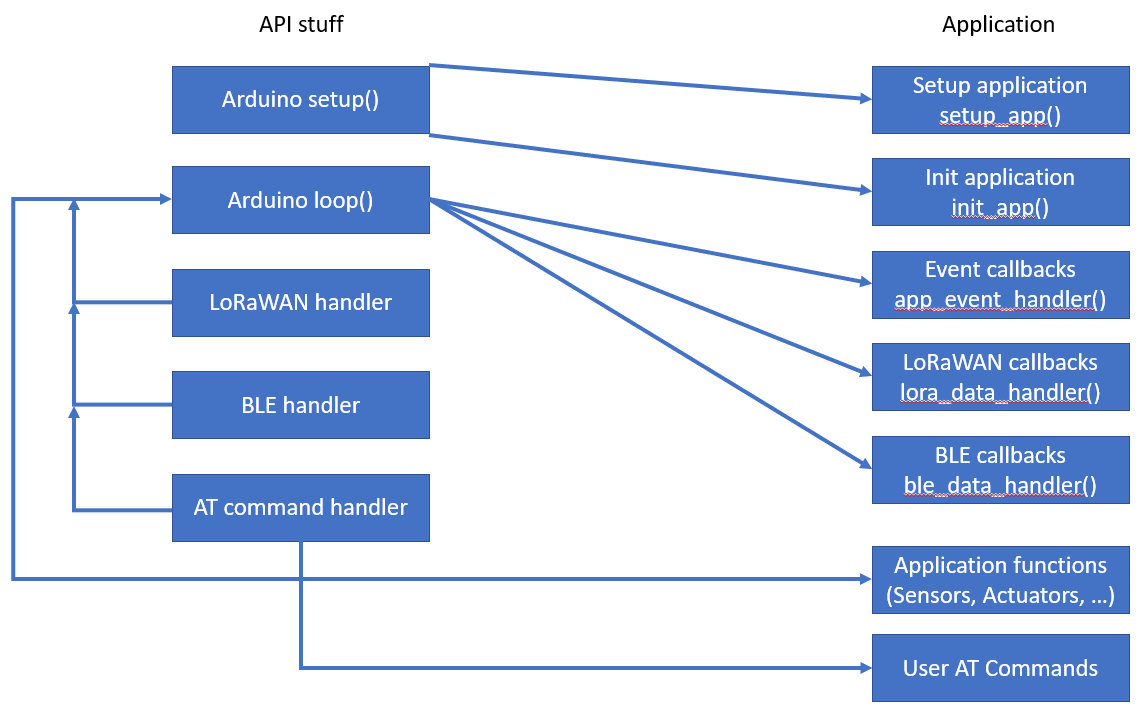
API正在處理從setup() , loop() ,Lorawan初始化,Lorawan事件處理,BLE初始化,BLE事件處理到AT命令界面的所有內容。
評論!
用戶應用程序不得具有函數setup()和loop() !
用戶應用程序具有兩個初始化函數,一個在setup()的開頭稱為一個函數,另一個在最後一個。其他功能是從loop()調用的事件回調。也可以定義自定義事件(例如傳感器中斷)。
傳感器讀取,執行器控製或其他應用程序任務在app_event_handler()中處理。 app_event_handler()經常調用,呼叫之間的時間由應用程序定義。另外, app_event_handler()在自定義事件上調用。
ble_data_handler()在loop()的ble uart rx事件中都調用。它可用於通過BLE UART實現自定義通信。
評論!
RAK11310上不需要此功能!
lora_data_handler()在不同的Lorawan事件上調用
圖TD
一個[引導]  - > |啟動| B(設置)
    B-> | 1 | D(setup_app)
        D-> B(設置)
    B-> | 2 | E [初始化Lora和Ble]
        E-> B(設置)
    B-> | 3 | g(init_app)
        g-> k(設置完成)
    K-> |開始循環|我(循環)
        Q [Lora事件]  - > |喚醒| j
        o [傳感器事件]  - > |喚醒| JP [BLE事件]  - > |喚醒| JR [在命令]  - > |喚醒| JT [計時器]  - > |喚醒| ji-> J(睡覺)
        K-> |啟動計時器| t
        j  - > l(app_event_handler)
        J-> m(lora_data_handler)
        j  - > n(ble_data_handler)
        J-> s(在命令處理程序)
        l-> u(讀取傳感器)
        M-> V(JOIN,TX和RX事件)
        n-> w(命令時處理ble)
        s-> aa(命令的用戶)
        u  - > l
        V-> m
        W-> n
        aa-> s
        l-> j
        M->J。
        n-> j
        S->J。
可以在“命令手冊”中找到所有命令,並非支持所有命令的RUI3。可以檢索AT的可用命令列表?從設備
在命令集的默認RUI3中添加了兩個自定義命令的自定義:
說明:設置自動傳輸間隔
此命令允許在自動數據包傳輸之間以秒為單位設置間隔。如果設置為0,則禁用自動數據包傳輸。
| 命令 | 輸入參數 | 返回值 | 返回代碼 |
|---|---|---|---|
| ATC+sendint? | - | ATC+SENDINT: "Get or Set the automatic send interval | OK |
| atc+sendint =? | - | <interval in seconds> | OK |
atc+sendint = <Input Parameter> | <interval in seconds> | - | OK或AT_PARAM_ERROR |
示例:
 ATC+SENDINT?

ATC+SENDINT: Get or Set the automatic send interval
OK

ATC+SENDINT=?

ATC+SENDINT:60
OK

ATC+SENDINT=60

OK
描述:顯示設備狀態
此命令允許用戶獲得當前的設備狀態。
| 命令 | 輸入參數 | 返回值 | 返回代碼 |
|---|---|---|---|
| ATC+狀態? | - | ATC+STATUS: Show LoRaWAN status | OK |
| ATC+狀態=? | - | <status> | OK |
示例:
 ATC+STATUS?

ATC+STATUS: Show LoRaWAN status
OK

// When in LoRaWAN mode:

ATC+STATUS=?
Device status:
   RAK4631
   Mode LPWAN
   Auto join enabled
   Network joined
LPWAN status:
   Dev EUI AC1F09FFFE09016C
   App EUI 70B3D57ED00201E1
   App Key 2B84E0B09B68E5CB42176FE753DCEE79
   Dev Addr 26021FB4
   NWS Key 323D155A000DF335307A16DA0C9DF53F
   Apps Key 3F6A66459D5EDCA63CBC4619CD61A11E
   OTAA enabled
   ADR disabled
   Public Network
   Dutycycle disabled
   Join trials 5
   TX Power 0
   DR 3
   Class 0
   Subband 1
   Fport 2
   Unconfirmed Message
   Region AS923-3
   Send Frequency 300

// When in LoRa P2P mode:

ATC+STATUS=?
Device status:
   RAK4631
   Mode P2P
   P2P frequency 916000000
   P2P TX Power 22
   P2P BW 125
   P2P SF 7
   P2P CR 0
   P2P Preamble length 8
   P2P Symbol Timeout 0
   Send Frequency 300
描述:端口設置
此命令允許用戶訪問和配置端口設置。
| 命令 | 輸入參數 | 返回值 | 返回代碼 |
|---|---|---|---|
| ATC+端口? | - | AT+PORT=<Port><CR>. Get or Set the Port | OK |
| ATC+端口=? | - | 1-223 | 好的 |
ATC+端口= <Input Parameter> | 1-223 | - | 好的或at_param_error |
示例:
 ATC+PORT?

ATC+PORT: Get or Set the Port=[1..223]
OK

ATC+PORT=?

ATC+PORT:2
OK

ATC+PORT=2

OK
後退
從Wisblock API v1.1.2開始,可以通過在命令上定義的用戶擴展AT命令。該新實現使用命令函數的Wisblock API的解析器函數。此外,如果AT?使用。
評論!在RUI3中,命令的自定義與ATC一起調用,而不是AT !
要擴展AT命令,需要三個步驟:
命令的自定義列表以struct atcmd_t格式列出。每個條目由AT命令組成,當命令調用a時顯示的說明文本。並指示查詢功能,使用參數執行並執行無參數。這是兩個自定義命令的示例:
 atcmd_t g_user_at_cmd_list_example[] = {
	/* |    CMD    |     AT+CMD?      |    AT+CMD=?    |  AT+CMD=value |  AT+CMD  |  Permissions  | */
	// GNSS commands
	{ " +SETVAL " , " Get/Set custom variable " , at_query_value, at_exec_value, NULL , " RW " },
	{ " +LIST " , " Show last packet content " , at_query_packet, NULL , NULL , " R " },
};

atcmd_t *g_user_at_cmd_list = g_user_at_cmd_list_example;
備註1
命令定制的結構擴展了RUI3兼容性。為Wisblock-API V1.X編寫的較舊代碼需要調整為此新結構。
備註2
對於不受AT命令支持的功能,必須將NULL放入數組中。
備註3
名稱g_user_at_cmd_list已固定,無法更改或未檢測到自定義命令。
備註4
權限作為字符串給出。有效條目是“ R”(僅讀),“ W”(僅寫),“ RW”(讀寫)
必須提供帶有自定義命令數量的變量:
 /* * Number of user defined AT commands */
uint8_t g_user_at_cmd_num = sizeof (g_user_at_cmd_list_example) / sizeof ( atcmd_t );
評論
名稱g_user_at_cmd_num已修復,無法更改或未檢測到自定義命令。
對於每個自定義命令,必須編寫查詢和執行命令。這些功能的名稱必須匹配命令自定義數組中使用的函數名稱。 execute命令作為參數接收到=之後的at命令的值。
查詢函數( =? )未接收和參數,必須始終以0。查詢函數保存在全局char數組g_at_query_buffer中查詢的結果,該數組的最大大小的ATQUERY_SIZE大小為128個字符。
用參數( =<value> )執行函數接收值或設置作為指向char數組的指針。此數組僅包含沒有AT命令本身的值或參數。例如,執行功能處理ATC+SETDEV=12000只會接收120000 。必須檢查接收值或參數的有效性,如果格式的值不匹配,則必須返回AT_ERRNO_PARA_VAL 。如果值或參數正確,則該函數應返回0 。
執行功能無參數執行操作,並將操作的成功返回為0如果執行失敗,則執行操作,如果成功或AT_ERRNO_EXEC_FAIL失敗。
此示例用於在應用程序中設置變量。
 /* ******************************************************************* */
// Example AT command to change the value of the variable new_val:
// Query the value AT+SETVAL=?
// Set the value AT+SETVAL=120000
// Second AT command to show last packet content
// Query with AT+LIST=?
/* ******************************************************************* */
int32_t new_val = 3000 ;

/* *
 * @brief Returns the current value of the custom variable
 *
 * @return int always 0
 */
static int at_query_value ()
{
	snprintf (g_at_query_buf, ATQUERY_SIZE, " Custom Value: %d " , new_val);
	return 0 ;
}

/* *
 * @brief Command to set the custom variable
 *
 * @param str the new value for the variable without the AT part
 * @return int 0 if the command was succesfull, 5 if the parameter was wrong
 */
static int at_exec_value ( char *str)
{
	new_val = strtol (str, NULL , 0 );
	MYLOG ( " APP " , " Value number >>%ld<< " , new_val);
	return 0 ;
}

/* *
 * @brief Example how to show the last LoRa packet content
 *
 * @return int always 0
 */
static int at_query_packet ()
{
	snprintf (g_at_query_buf, ATQUERY_SIZE, " Packet: %02X%02X%02X%02X " ,
			 g_lpwan_data. data_flag1 ,
			 g_lpwan_data. data_flag2 ,
			 g_lpwan_data. batt_1 ,
			 g_lpwan_data. batt_2 );
	return 0 ;
}

/* *
 * @brief List of all available commands with short help and pointer to functions
 *
 */
atcmd_t g_user_at_cmd_list_example[] = {
	/* |    CMD    |     AT+CMD?      |    AT+CMD=?    |  AT+CMD=value |  AT+CMD  |  Permission  | */
	// GNSS commands
	{ " +SETVAL " , " Get/Set custom variable " , at_query_value, at_exec_value, NULL , " RW " },
	{ " +LIST " , " Show last packet content " , at_query_packet, NULL , NULL , " R " },
};

atcmd_t *g_user_at_cmd_list = g_user_at_cmd_list_example;

/* * Number of user defined AT commands */
uint8_t g_user_at_cmd_num = sizeof (g_user_at_cmd_list_example) / sizeof ( atcmd_t );這五個示例說明了API的用法。在所有示例中,API回調和其他功能(傳感器讀數,IRQ處理,GNSS位置服務)都分為自己的草圖。
Wisblock-api-V2也已在以下平台項目中使用:
當與RAK4631一起使用時,庫中的固件更新已包含在庫中。可以使用Nordic NRF工具箱(可用於Android和iOS)或Wisblock Toolbox(我的Android應用程序)來完成RAK4631的固件更新。
有關更新,請從.pio/build/{設備}文件夾中復制創建的更新文件(通常稱為controwware.zip),將其複製到您的電話中,並使用其中一個應用程序來更新固件。
如果通過BLE的固件更新失敗,請使用版本v0.4.3將設備更新為RAK4631的最新引導加載程序。您可以在Wisblock Repo中找到最新的引導加載程序
API提供了一些呼籲管理,以發送Lorawan數據包,發送ble uart數據並觸發事件。
void api_set_version(uint16_t sw_1 = 1, uint16_t sw_2 = 0, uint16_t sw_3 = 0);
可以調用此功能設置應用程序版本。應用程序可以由AT命令請求。版本編號是由三位數字構建的:
sw_1 ==>主要版本增加了API更改 /不向後兼容sw_2 ==>次要版本增加了API更改 /向後兼容sw_3 ==>修補版本在BugFix上增加,對API沒有影響
如果未調用api_set_version ,則應用程序版本默認為1.0.0 。
void api_reset(void);
執行重置Wisblock核心模塊
void api_wake_loop(uint16_t reason);
這用於用事件喚醒循環。 reason必須在app.h中定義。循環喚醒應用程序後,它將在g_task_event_type中調用具有reason值的app_event_handler() 。
例如,這可以用來從加速度計傳感器中斷喚醒設備。在這裡,作為accelerometer的示例示例示例代碼的示例。
在accelerometer.ino中,該事件已定義。第一個定義是設置信號,第二個是在處理事件後清除事件。
 /* * Define additional events */
# define ACC_TRIGGER 0b1000000000000000
# define N_ACC_TRIGGER 0b0111111111111111然後在lis3dh_acc.ino中,在中斷回調函數中void acc_int_handler(void)用信號ACC_TRIGGER喚醒環路
 void acc_int_handler ( void )
{
	// Wake up the task to handle it
	api_wake_loop (ACC_TRIGGER);
}最後在accelerometer.ino中app_event_handler()
	// ACC triggered event
	if ((g_task_event_type & ACC_TRIGGER) == ACC_TRIGGER)
	{
		g_task_event_type &= N_ACC_TRIGGER;
		MYLOG ( " APP " , " ACC IRQ wakeup " );
		// Reset ACC IRQ register
		get_acc_int ();

		// Set Status flag, it will trigger sending a packet
		g_task_event_type = STATUS;
}void api_log_settings(void);
可以調用此功能以列出USB上Wisblock設備的完整設置。輸出看起來像:
Device status:
   RAK11310
   Auto join enabled
   Mode LPWAN
   Network joined
   Send Frequency 120
LPWAN status:
   Dev EUI AC1F09FFFE0142C8
   App EUI 70B3D57ED00201E1
   App Key 2B84E0B09B68E5CB42176FE753DCEE79
   Dev Addr 26021FB4
   NWS Key 323D155A000DF335307A16DA0C9DF53F
   Apps Key 3F6A66459D5EDCA63CBC4619CD61A11E
   OTAA enabled
   ADR disabled
   Public Network
   Dutycycle disabled
   Join trials 30
   TX Power 0
   DR 3
   Class 0
   Subband 1
   Fport 2
   Unconfirmed Message
   Region AS923-3
LoRa P2P status:
   P2P frequency 916000000
   P2P TX Power 22
   P2P BW 125
   P2P SF 7
   P2P CR 1
   P2P Preamble length 8
P2P Symbol Timeout 0void api_timer_stop(void)
停止經常喚醒MCU的計時器。
void api_timer_restart(uint32_t new_time)
以新值重新啟動計時器。價值以毫秒為單位
void api_read_credentials(void);
void api_set_credentials(void);如果需要對Lora P2P設置進行硬編碼(例如頻率,帶寬等),則可以在setup_app()中完成。首先,保存的設置必須使用api_read_credentials(); ,然後可以更改設置。更改設置後,必須使用api_set_credentials()保存。由於Wisblock API檢查是否需要保存任何更改,因此更改值僅在刷新應用程序後才保存在第一個引導中。
例子:
 // Read credentials from Flash
api_read_credentials ();

// Make changes to the credentials
g_lorawan_settings.p2p_frequency = 916000000 ;			// Use 916 MHz to send and receive
g_lorawan_settings.p2p_bandwidth = 0 ;					// Bandwidth 125 kHz
g_lorawan_settings.p2p_sf = 7 ;							// Spreading Factor 7
g_lorawan_settings.p2p_cr = 1 ;							// Coding Rate 4/5
g_lorawan_settings.p2p_preamble_len = 8 ;				// Preample Length 8
g_lorawan_settings.p2p_tx_power = 22 ;					// TX power 22 dBi

// Save hard coded LoRaWAN settings
api_set_credentials ();
備註1
硬編碼設置必須在void setup_app(void)中設置!
備註2
請記住,可以通過此方法更改的參數可以在命令或BLE上更改,但重新啟動後將重置!
api_ble_printf()可用於通過BLE UART發送數據。支持print , println和printf 。
評論
此命令在RAK11310上不可用!
默認情況下,BLE廣告僅在加電/重置後的30秒鐘才能降低功耗。通過調用void restart_advertising(uint16_t timeout);廣告可以重新啟動timeout幾秒鐘。
評論
此命令在RAK11310上不可用!
lmh_error_status send_lora_packet(uint8_t *data, uint8_t size, uint8_t fport = 0);用於將數據包發送到Lorawan服務器。 *data是指向包含數據的緩衝區的指針, size是數據包的大小。如果FPORT為0,則使用G_LORAWAN_SETTINGS結構中的FPORTDEFED。
bool send_p2p_packet(uint8_t *data, uint8_t size);用於通過Lora P2P發送數據包。 *data是指向包含數據的緩衝區的指針, size是數據包的大小。
在完成TX週期(包括RX1和RX2 Windows)之後,結果保存在全局標誌g_rx_fin_result中,事件LORA_TX_FIN被觸發,lora_data_handler()調用lora_data_handler()呼叫。在此回調中,可以檢查結果,並在必要時採取措施。
Cayennelpp是由MyDevices設計的一種格式,旨在將Lorawan節點集成到其物聯網平台中。
Cayennelpp庫擴展了可用的數據類型,其中幾種IPSO數據類型在Johan Stokking或其他人的大多數叉子和側面作品的原始作品中未包含,這些其他數據類型不受MyDevices Cayenne的支持。
Wisblock API使用了更多數據類型,這些數據類型可以擴展原始和電子貓的數據類型,以更好地支持廣泛的Wisblock傳感器模塊。
要使用擴展數據類型Wisblock API已經包含所需的標頭文件。
為了能夠使用Cayenne LPP功能,需要該類的實例。
 /* * LoRaWAN packet */
WisCayenne g_solution_data ( 255 );在添加數據之前,需要重置數據包緩衝區
 // Reset the packet
g_solution_data.reset();Cayennelpp庫的API呼籲支持所支持的不同數據類型。有關詳細信息,請參見Cayennelpp API。除了這些API調用外,Wisblock API還向其增加了5個調用。這些API調用適用於不同的GNSS格式和VOC傳感器數據:
 uint8_t addGNSS_4 ( uint8_t channel, int32_t latitude, int32_t longitude, int32_t altitude);
uint8_t addGNSS_6 ( uint8_t channel, int32_t latitude, int32_t longitude, int32_t altitude);
uint8_t addGNSS_H ( int32_t latitude, int32_t longitude, int16_t altitude, int16_t accuracy, int16_t battery);
uint8_t addGNSS_T ( int32_t latitude, int32_t longitude, int16_t altitude, float accuracy, int8_t sats);
uint8_t addVoc_index ( uint8_t channel, uint32_t voc_index); /* *
* @brief Add GNSS data in Cayenne LPP standard format
*
* @param channel LPP channel
* @param latitude Latitude as read from the GNSS receiver
* @param longitude Longitude as read from the GNSS receiver
* @param altitude Altitude as read from the GNSS receiver
* @return uint8_t bytes added to the data packet
*/
uint8_t WisCayenne::addGNSS_4 ( uint8_t channel, int32_t latitude, int32_t longitude, int32_t altitude) /* *
* @brief Add GNSS data in custom Cayenne LPP format
* Requires changed decoder in LNS and visualization
* Does not work with Cayenne LPP MyDevices
*
* @param channel LPP channel
* @param latitude Latitude as read from the GNSS receiver
* @param longitude Longitude as read from the GNSS receiver
* @param altitude Altitude as read from the GNSS receiver
* @return uint8_t bytes added to the data packet
*/
uint8_t WisCayenne::addGNSS_6 ( uint8_t channel, int32_t latitude, int32_t longitude, int32_t altitude) /* *
* @brief Add GNSS data in Helium Mapper format
*
* @param channel LPP channel
* @param latitude Latitude as read from the GNSS receiver
* @param longitude Longitude as read from the GNSS receiver
* @param altitude Altitude as read from the GNSS receiver
* @param accuracy Accuracy of reading from the GNSS receiver
* @param battery Device battery voltage in V
* @return uint8_t bytes added to the data packet
*/
uint8_t WisCayenne::addGNSS_H ( int32_t latitude, int32_t longitude, int16_t altitude, int16_t accuracy, int16_t battery) /* *
* @brief Add GNSS data in Field Tester format
*
* @param latitude Latitude as read from the GNSS receiver
* @param longitude Longitude as read from the GNSS receiver
* @param altitude Altitude as read from the GNSS receiver
* @param accuracy Accuracy of reading from the GNSS receiver
* @param sats Number of satellites of reading from the GNSS receiver
* @return uint8_t bytes added to the data packet
*/
uint8_t WisCayenne::addGNSS_T ( int32_t latitude, int32_t longitude, int16_t altitude, float accuracy, int8_t sats) /* *
* @brief Add the VOC index
*
* @param channel VOC channel
* @param voc_index VOC index
* @return uint8_t bytes added to the data packet
*/
uint8_t WisCayenne::addVoc_index ( uint8_t channel, uint32_t voc_index)cayennelpp數據包始終為格式<Channel #><Channel ID><data bytes> 。
為了使在Lorawan服務器中使用的數據編碼器和Wisblock傳感器收集的集成數據中更容易(如果使用這些API)始終具有相同的通道編號。這是當前分配的通道號,通道ID和哪些模塊使用該組合的列表。
| 數據 | 渠道 # | 通道ID | 長度 | 評論 | 所需的模塊 | 解碼字段名稱 |
|---|---|---|---|---|---|---|
| 電池價值 | 1 | 116 | 2個字節 | 0.01 V未簽名的MSB | RAK4631 | 電壓_1 |
| 濕度 | 2 | 104 | 1字節 | 在%rh中 | RAK1901 | 濕度_2 |
| 溫度 | 3 | 103 | 2個字節 | 在°C | RAK1901 | 溫度_3 |
| 氣壓 | 4 | 115 | 2個字節 | 在HPA(MBAR)中 | RAK1902 | 氣壓表_4 |
| 照明 | 5 | 101 | 2個字節 | 1個未簽名 | RAK1903 | Illuminance_5 |
| 濕度2 | 6 | 104 | 1字節 | 在%rh中 | RAK1906 | 濕度_6 |
| 溫度2 | 7 | 103 | 2個字節 | 在°C | RAK1906 | 溫度_7 |
| 氣壓2 | 8 | 115 | 2個字節 | 在HPA(MBAR)中 | RAK1906 | 氣壓表_8 |
| 氣電2 | 9 | 2 | 2個字節 | 0.01簽名(KOHM) | RAK1906 | 模擬_9 |
| GNSS站立。解決 | 10 | 136 | 9個字節 | 3個字節LON/LAT 0.0001°,3個字節ALT 0.01米 | RAK1910,RAK12500 | GPS_10 |
| GNSS增強了分辨率 | 10 | 137 | 11個字節 | 4個字節LON/LAT 0.000001°,3個字節ALT 0.01米 | RAK1910,RAK12500 | GPS_10 |
| 土壤溫度 | 11 | 103 | 2個字節 | 在°C | RAK12023/RAK12035 | 溫度_11 |
| 土壤濕度 | 12 | 104 | 1字節 | 在%rh中 | RAK12023/RAK12035 | 濕度_12 |
| 土壤濕度生 | 13 | 2 | 2個字節 | 0.01簽名 | RAK12023/RAK12035 | 模擬_in_13 |
| 土壤數據有效 | 14 | 102 | 1字節 | 布爾 | RAK12023/RAK12035 | 存在_14 |
| 照明2 | 15 | 101 | 2個字節 | 1個未簽名 | RAK12010 | Illuminance_15 |
| VOC | 16 | 138 | 2個字節 | VOC索引 | RAK12047 | VOC_16 |
| MQ2氣體 | 17 | 2 | 2個字節 | 0.01簽名 | RAK12004 | 模擬_in_17 |
| MQ2氣體百分比 | 18 | 120 | 1字節 | 1-100%未簽名 | RAK12004 | 百分比_18 |
| MG812氣體 | 19 | 2 | 2個字節 | 0.01簽名 | RAK12008 | 模擬_in_19 |
| MG812氣體百分比 | 20 | 120 | 1字節 | 1-100%未簽名 | RAK12008 | 百分比_20 |
| MQ3酒精氣 | 21 | 2 | 2個字節 | 0.01簽名 | RAK12009 | 模擬_in_21 |
| MQ3酒精氣perc。 | 22 | 120 | 1字節 | 1-100%未簽名 | RAK12009 | 百分比_22 |
| TOF距離 | 23 | 2 | 2個字節 | 0.01簽名 | RAK12014 | 模擬_in_23 |
| TOF數據有效 | 24 | 102 | 1字節 | 布爾 | RAK12014 | 存在_24 |
| 陀螺儀觸發 | 25 | 134 | 6個字節 | 每個軸2個字節,0.01°/s | RAK12025 | Gyrometer_25 |
| 檢測到手勢 | 26 | 0 | 1字節 | 1個字節帶有手勢的身份證 | RAK14008 | Digital_in_26 |
| LTR390 UVI值 | 27 | 2 | 2個字節 | 0.01簽名 | RAK12019 | 模擬_in_27 |
| ltr390紫外線值 | 28 | 101 | 2個字節 | 1個未簽名 | RAK12019 | Illuminance_28 |
| ina219電流 | 29 | 2 | 2個字節 | 0.01簽名 | RAK16000 | 模擬_29 |
| ina219電壓 | 30 | 2 | 2個字節 | 0.01簽名 | RAK16000 | 模擬_30 |
| ina219電源 | 31 | 2 | 2個字節 | 0.01簽名 | RAK16000 | 模擬_31 |
| 觸摸板左 | 32 | 102 | 1字節 | 布爾 | RAK14002 | 存在_32 |
| 觸摸板中間 | 33 | 102 | 1字節 | 布爾 | RAK14002 | 存在_33 |
| 觸摸板右 | 34 | 102 | 1字節 | 布爾 | RAK14002 | 存在_34 |
| SCD30 CO2濃度 | 35 | 125 | 2個字節 | 1 ppm未簽名 | RAK12037 | 濃度_35 |
| SCD30溫度 | 36 | 103 | 2個字節 | 在°C | RAK12037 | 溫度_36 |
| SCD30濕度 | 37 | 104 | 1字節 | 在%rh中 | RAK12037 | 濕度_37 |
| MLX90632傳感器溫度 | 38 | 103 | 2個字節 | 在°C | RAK12003 | 溫度_38 |
| MLX90632對象溫度 | 39 | 103 | 2個字節 | 在°C | RAK12003 | 溫度_39 |
| PM 1.0值 | 40 | 103 | 2個字節 | 在UG/M3中 | RAK12003 | VOC_40 |
| PM 2.5值 | 41 | 103 | 2個字節 | 在UG/M3中 | RAK12003 | VOC_41 |
| PM 10值 | 42 | 103 | 2個字節 | 在UG/M3中 | RAK12003 | VOC_42 |
| 地震事件 | 43 | 102 | 1字節 | 布爾 | RAK12027 | 存在_43 |
| 地震Si值 | 44 | 2 | 2個字節 | 模擬10 * m/s | RAK12027 | 模擬_44 |
| 地震PGA值 | 45 | 2 | 2個字節 | 模擬10 * m/s2 | RAK12027 | 模擬_45 |
| 地震關閉警報 | 46 | 102 | 1字節 | 布爾 | RAK12027 | 存在_46 |
| lpp_channel_eq_collapse | 47 | 102 | 1字節 | 布爾 | RAK12027 | 存在_47 |
| 切換狀態 | 48 | 102 | 1字節 | 布爾 | RAK13011 | 存在_48 |
草書中的通道ID是擴展格式,並且不受標準Cayenne LPP數據解碼器的支持。
可以在我們的rakwireless_standardized_payload中找到完整的已使用數據格式列表
rakwireless_standardized_payload存儲庫還包括匹配的解碼器。
這裡使用的代碼是API-TEST.ino示例。
這些是用戶應用程序和API接口的必需品和定義
在此示例中,我們對Lorawan證書進行了核對。強烈建議不要這樣做以避免重複的節點憑據
設置憑據的替代選項是
# include < Arduino.h >
/* * Add you required includes after Arduino.h */
# include < Wire.h >

// Debug output set to 0 to disable app debug output
# ifndef MY_DEBUG
# define MY_DEBUG 1
# endif

# ifdef NRF52_SERIES
# if MY_DEBUG > 0
# define MYLOG (tag, ...)
	do
	{
		if (tag)
			PRINTF ( " [%s] " , tag);
		PRINTF (__VA_ARGS__);
		PRINTF ( " n " );
		if (g_ble_uart_is_connected)
		{
			g_ble_uart. printf (__VA_ARGS__);
			g_ble_uart. printf ( " n " );
		}
	} while ( 0 )
# else
# define MYLOG (...)
# endif
# endif
# ifdef ARDUINO_ARCH_RP2040
# if MY_DEBUG > 0
# define MYLOG (tag, ...)
	do
	{
		if (tag)
			Serial. printf ( " [%s] " , tag);
		Serial. printf (__VA_ARGS__);
		Serial. printf ( " n " );
	} while ( 0 )
# else
# define MYLOG (...)
# endif
# endif

/* * Include the WisBlock-API-V2 */
# include < WisBlock-API-V2.h > // Click to install library: http://librarymanager/All#WisBlock-API-V2

/* * Define the version of your SW */
# define SW_VERSION_1 1 // major version increase on API change / not backwards compatible
# define SW_VERSION_2 0 // minor version increase on API change / backward compatible
# define SW_VERSION_3 0 // patch version increase on bugfix, no affect on API

/* *
   Optional hard-coded LoRaWAN credentials for OTAA and ABP.
   It is strongly recommended to avoid duplicated node credentials
   Options to setup credentials are
   - over USB with AT commands
   - over BLE with My nRF52 Toolbox
*/
uint8_t node_device_eui[ 8 ] = { 0x00 , 0x0D , 0x75 , 0xE6 , 0x56 , 0x4D , 0xC1 , 0xF3 };
uint8_t node_app_eui[ 8 ] = { 0x70 , 0xB3 , 0xD5 , 0x7E , 0xD0 , 0x02 , 0x01 , 0xE1 };
uint8_t node_app_key[ 16 ] = { 0x2B , 0x84 , 0xE0 , 0xB0 , 0x9B , 0x68 , 0xE5 , 0xCB , 0x42 , 0x17 , 0x6F , 0xE7 , 0x53 , 0xDC , 0xEE , 0x79 };
uint8_t node_nws_key[ 16 ] = { 0x32 , 0x3D , 0x15 , 0x5A , 0x00 , 0x0D , 0xF3 , 0x35 , 0x30 , 0x7A , 0x16 , 0xDA , 0x0C , 0x9D , 0xF5 , 0x3F };
uint8_t node_apps_key[ 16 ] = { 0x3F , 0x6A , 0x66 , 0x45 , 0x9D , 0x5E , 0xDC , 0xA6 , 0x3C , 0xBC , 0x46 , 0x19 , 0xCD , 0x61 , 0xA1 , 0x1E };
某些功能的正向聲明(使用Platformio時需要)
 /* * Application function definitions */
void setup_app ( void );
bool init_app ( void );
void app_event_handler ( void );
void ble_data_handler ( void ) __attribute__((weak));
void lora_data_handler ( void );在這裡,應用程序名稱設置為RAK檢驗。該名稱將使用NRF52唯一的芯片ID擴展。此名稱用於BLE廣告中。
 /* * Application stuff */

/* * Set the device name, max length is 10 characters */
char g_ble_dev_name[ 10 ] = " RAK-TEST " ;
需要一些標誌和信號
 /* * Flag showing if TX cycle is ongoing */
bool lora_busy = false ;

/* * Send Fail counter * */
uint8_t send_fail = 0 ;該功能在應用程序啟動的一開始。在此函數中,應設置所有在執行Arduino setup()之前所需的一切。例如,這可能是Lorawan的憑證。在此示例中,我們對Lorawan證書進行了核對。強烈建議不要這樣做以避免重複的節點憑據
設置憑據的替代選項是
g_enable_ble 。如果為true,則將BLE接口初始化。如果是錯誤的,則不會激活BLE界面,從而降低功耗。 void setup_app ( void )
{
Serial. begin ( 115200 );
time_t serial_timeout = millis ();
// On nRF52840 the USB serial is not available immediately
while (!Serial)
{
if (( millis () - serial_timeout) < 5000 )
{
delay ( 100 );
digitalWrite (LED_GREEN, ! digitalRead (LED_GREEN));
}
else
{
break ;
}
}
digitalWrite (LED_GREEN, LOW);
MYLOG ( " APP " , " Setup WisBlock API Example " );
# ifdef NRF52_SERIES
// Enable BLE
g_enable_ble = true ;
# endif
// Set firmware version
api_set_version (SW_VERSION_1, SW_VERSION_2, SW_VERSION_3);
// Optional
// Setup LoRaWAN credentials hard coded
// It is strongly recommended to avoid duplicated node credentials
// Options to setup credentials are
// -over USB with AT commands
// -over BLE with My nRF52 Toolbox
// Read LoRaWAN settings from flash
api_read_credentials ();
// Change LoRaWAN settings
g_lorawan_settings. auto_join = true ; // Flag if node joins automatically after reboot
g_lorawan_settings. otaa_enabled = true ; // Flag for OTAA or ABP
memcpy (g_lorawan_settings. node_device_eui , node_device_eui, 8 ); // OTAA Device EUI MSB
memcpy (g_lorawan_settings. node_app_eui , node_app_eui, 8 ); // OTAA Application EUI MSB
memcpy (g_lorawan_settings. node_app_key , node_app_key, 16 ); // OTAA Application Key MSB
memcpy (g_lorawan_settings. node_nws_key , node_nws_key, 16 ); // ABP Network Session Key MSB
memcpy (g_lorawan_settings. node_apps_key , node_apps_key, 16 ); // ABP Application Session key MSB
g_lorawan_settings. node_dev_addr = 0x26021FB4 ; // ABP Device Address MSB
g_lorawan_settings. send_repeat_time = 120000 ; // Send repeat time in milliseconds: 2 * 60 * 1000 => 2 minutes
g_lorawan_settings. adr_enabled = false ; // Flag for ADR on or off
g_lorawan_settings. public_network = true ; // Flag for public or private network
g_lorawan_settings. duty_cycle_enabled = false ; // Flag to enable duty cycle (validity depends on Region)
g_lorawan_settings. join_trials = 5 ; // Number of join retries
g_lorawan_settings. tx_power = 0 ; // TX power 0 .. 15 (validity depends on Region)
g_lorawan_settings. data_rate = 3 ; // Data rate 0 .. 15 (validity depends on Region)
g_lorawan_settings. lora_class = 0 ; // LoRaWAN class 0: A, 2: C, 1: B is not supported
g_lorawan_settings. subband_channels = 1 ; // Subband channel selection 1 .. 9
g_lorawan_settings. app_port = 2 ; // Data port to send data
g_lorawan_settings. confirmed_msg_enabled = LMH_UNCONFIRMED_MSG; // Flag to enable confirmed messages
g_lorawan_settings. resetRequest = true ; // Command from BLE to reset device
g_lorawan_settings. lora_region = LORAMAC_REGION_AS923_3; // LoRa region
// Save LoRaWAN settings
api_set_credentials ();BLE和LORA已經初始化後調用此功能。理想情況下,這是初始化應用程序特定內容(例如傳感器或執行器)的地方。在此示例中,它沒有使用
 /* *
 * @brief Application specific initializations
 *
 * @return true Initialization success
 * @return false Initialization failure
 */
bool init_app ( void )
{
	MYLOG ( " APP " , " init_app " );
	return true ;
}該回調是在狀態事件上調用的。狀態事件經常觸發,時間是由send_repeat_time設置的。用戶定義的事件也觸發了它。請參閱示例RAK1904_example _如何定義用戶定義的事件。 _重要的是要重置事件標誌。例如,通過此代碼序列重置狀態事件:
 if ((g_task_event_type & STATUS) == STATUS)
{
	g_task_event_type &= N_STATUS;
	...
}狀態事件用於經常將上行鏈路數據包發送到Lorawan服務器。
在此示例代碼中,我們還重新啟動了BLE廣告15秒鐘。否則,BLE副詞僅在加電/重置後活躍30秒。
 void app_event_handler ( void )
{
  // Timer triggered event
  if ((g_task_event_type & STATUS) == STATUS)
  {
    g_task_event_type &= N_STATUS;
    MYLOG ( " APP " , " Timer wakeup " );

# ifdef NRF52_SERIES
    // If BLE is enabled, restart Advertising
    if (g_enable_ble)
    {
      restart_advertising ( 15 );
    }
# endif

    if (lora_busy)
    {
      MYLOG ( " APP " , " LoRaWAN TX cycle not finished, skip this event " );
    }
    else
    {

      // Dummy packet

      uint8_t dummy_packet[] = { 0x10 , 0x00 , 0x00 };

      lmh_error_status result = send_lora_packet (dummy_packet, 3 );
      switch (result)
      {
        case LMH_SUCCESS:
          MYLOG ( " APP " , " Packet enqueued " );
          // Set a flag that TX cycle is running
          lora_busy = true ;
          break ;
        case LMH_BUSY:
          MYLOG ( " APP " , " LoRa transceiver is busy " );
          break ;
        case LMH_ERROR:
          MYLOG ( " APP " , " Packet error, too big to send with current DR " );
          break ;
      }
    }
  }
}此回調用於處理通過BLE UART收到的數據。如果您不需要BLE UART功能,則可以完全刪除此功能。在此示例中,我們將收到的uart數據轉發到AT命令解釋器。這樣,我們可以在USB端口或BLE UART端口上方提交命令。
BLE通信僅在RAK4631上支持。 RAK11310沒有BLE。
# ifdef NRF52_SERIES
void ble_data_handler ( void )
{
  if (g_enable_ble)
  {
    /* ************************************************************ */
    /* ************************************************************ */
    // / todo BLE UART data arrived
    // / todo or forward them to the AT command interpreter
    // / todo parse them here
    /* ************************************************************ */
    /* ************************************************************ */
    if ((g_task_event_type & BLE_DATA) == BLE_DATA)
    {
      MYLOG ( " AT " , " RECEIVED BLE " );
      // BLE UART data arrived
      // in this example we forward it to the AT command interpreter
      g_task_event_type &= N_BLE_DATA;

      while (g_ble_uart. available () > 0 )
      {
        at_serial_input ( uint8_t (g_ble_uart. read ()));
        delay ( 5 );
      }
      at_serial_input ( uint8_t ( ' n ' ));
    }
  }
}
# endif 該回調在三個不同的事件中被調用:
如果已到達Lorawan服務器或Lora P2P數據包的下行鏈路數據包,則會觸發事件Lora_data 。在此示例中,我們不是在解析數據,而僅將它們打印到日誌上,並通過BLE UART(如果連接設備已連接)
在發送上行鏈路數據包完成後,包括RX1和RX2 Windows,將觸發事件lora_tx_fin 。如果發送確認的數據包,則全局標誌g_rx_fin_result包含已確認傳輸的結果。如果g_rx_fin_result為TRUE,則Lorawan服務器通過發送ACK來確認上行鏈路數據包。否則, g_rx_fin_result設置為false,表明該數據包未由Lorawan服務器接收到該數據包(範圍內沒有網關,數據包在空中損壞。如果發送未確認的數據包,或者使用Lora P2P模式,則使用flag g_rx_fin_result是正確的。
在加入請求/加入Accept/拒絕週期完成後,將調用事件Lora_join_fin 。全局標誌g_task_event_type包含加入請求的結果。如果是真的,節點已加入網絡。如果false連接沒有成功。在這種情況下,連接週期可以重新啟動,或者節點可能會報告錯誤。
 void lora_data_handler ( void )
{
  // LoRa data handling
  if ((g_task_event_type & LORA_DATA) == LORA_DATA)
  {
    /* ************************************************************ */
    /* ************************************************************ */
    // / todo LoRa data arrived
    // / todo parse them here
    /* ************************************************************ */
    /* ************************************************************ */
    g_task_event_type &= N_LORA_DATA;
    MYLOG ( " APP " , " Received package over LoRa " );
    char log_buff[g_rx_data_len * 3 ] = { 0 };
    uint8_t log_idx = 0 ;
    for ( int idx = 0 ; idx < g_rx_data_len; idx++)
    {
      sprintf (&log_buff[log_idx], " %02X " , g_rx_lora_data[idx]);
      log_idx += 3 ;
    }
    lora_busy = false ;
    MYLOG ( " APP " , " %s " , log_buff);
  }

  // LoRa TX finished handling
  if ((g_task_event_type & LORA_TX_FIN) == LORA_TX_FIN)
  {
    g_task_event_type &= N_LORA_TX_FIN;

    MYLOG ( " APP " , " LPWAN TX cycle %s " , g_rx_fin_result ? " finished ACK " : " failed NAK " );

    if (!g_rx_fin_result)
    {
      // Increase fail send counter
      send_fail++;

      if (send_fail == 10 )
      {
        // Too many failed sendings, reset node and try to rejoin
        delay ( 100 );
        sd_nvic_SystemReset ();
      }
    }

    // Clear the LoRa TX flag
    lora_busy = false ;
  }

  // LoRa Join finished handling
  if ((g_task_event_type & LORA_JOIN_FIN) == LORA_JOIN_FIN)
  {
    g_task_event_type &= N_LORA_JOIN_FIN;
    if (g_join_result)
    {
      MYLOG ( " APP " , " Successfully joined network " );
    }
    else
    {
      MYLOG ( " APP " , " Join network failed " );
      // / todo here join could be restarted.
      // lmh_join();
    }
  }
}在Arduino中,不可能在.ino文件中定義可以控制隨附庫的行為的設置。要更改藍色BLE LED的調試日誌和使用情況,您必須在庫源文件夾中打開文件WisBlock-API-V2.h 。
要啟用/禁用API調試( API_LOG() )在庫源文件夾中打開文件WisBlock-API-V2.h 。
尋找
# define API_DEBUG 1在文件中。
 0 -> No debug output
1 -> API debug output
要在示例中啟用/禁用應用程序調試( MY_LOG() )(在.ino文件或app.h中)
# define MY_DEBUG 1在文件中。
 0 -> No debug output
1 -> Application debug output
尋找
# define NO_BLE_LED 1在文件中WisBlock-API-V2中
 0 -> the blue LED will be used to indicate BLE status
1 -> the blue LED will not used
評論
RAK11310沒有BLE,可以將藍色LED用於其他目的。
調試輸出可以通過platform.ini API_DEBUG控制Wisblock API的調試輸出來控制。
 0 -> No debug outpuy
1 -> WisBlock API debug output
MY_DEBUG控制應用程序本身的調試輸出
 0 -> No debug outpuy
1 -> Application debug output
NO_BLE_LED控制藍色BLE LED的使用。
 0 -> the blue LED will be used to indicate BLE status
1 -> the blue LED will not used
沒有調試輸出的示例,沒有藍色LED
 build_flags =
	- DAPI_DEBUG =0    ; 0 Disable WisBlock API debug output
	- DMY_DEBUG =0     ; 0 Disable application debug output
- DNO_BLE_LED =1 ; 1 Disable blue LED as BLE notificator根據MIT許可發布的圖書館
學分:
在命令功能:泰勒·李([email protected])
代碼發布
api_read_credentials()api_set_credentials()保存到flashWisBlock API LoRaWAN而不是GNSS






