SmoothNLP
1.0.0

| ผู้เขียน | อีเมล |
|---|---|
| ผู้ชนะ | [email protected] |
| หยินจัน | [email protected] |
| แมงกะพรุน | [email protected] |
ติดตั้งผ่าน pip
pip install smoothnlp > =0.4.0ติดตั้งเวอร์ชันล่าสุดผ่านซอร์สโค้ด
git clone https://github.com/smoothnlp/SmoothNLP.git
cd SmoothNLP
python setup.py installSmoothNLP
V0.3.0รุ่นรองรับเท่านั้น ต่อไปนี้เป็นตัวอย่างหลังจากเวอร์ชันV0.4:
 from smoothnlp . algorithm import kg
from kgexplore import visual
ngrams = kg . extract_ngram ([ "SmoothNLP在V0.3版本中正式推出知识抽取功能" ,
                            "SmoothNLP专注于可解释的NLP技术" ,
                            "SmoothNLP支持Python与Java" ,
                            "SmoothNLP将帮助工业界与学术界更加高效的构建知识图谱" ,
                            "SmoothNLP是上海文磨网络科技公司的开源项目" ,
                            "SmoothNLP在V0.4版本中推出对图谱节点的分类功能" ,
                            "KGExplore是SmoothNLP的一个子项目" ])
visual . visualize ( ngrams , width = 12 , height = 10 )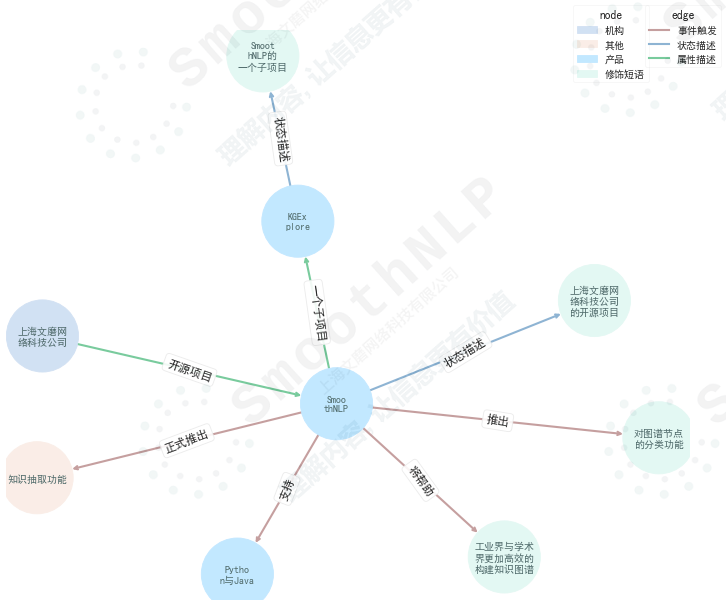
คำอธิบายฟังก์ชั่น
事件触发,状态描述,属性描述และ数值描述产品地区公司与品牌货品机构人物修饰短语และ其他 >> import smoothnlp
>> smoothnlp . segment ( '欢迎在Python中使用SmoothNLP' )
[ '欢迎' , '在' , 'Python' , '中' , '使用' , 'SmoothNLP' ]คำอธิบายฉลากส่วนหนึ่งของคำอธิบายวิกิ
 >> smoothnlp . postag ( '欢迎使用smoothnlp的Python接口' )
[{ 'token' : '欢迎' , 'postag' : 'VV' },
 { 'token' : '在' , 'postag' : 'P' },
 { 'token' : 'Python' , 'postag' : 'NN' },
 { 'token' : '中' , 'postag' : 'LC' },
 { 'token' : '使用' , 'postag' : 'VV' },
{ 'token' : 'SmoothNLP' , 'postag' : 'NN' }] >> smoothnlp . ner ( "中国平安2019年度长期服务计划于2019年5月7日至5月14日通过二级市场完成购股" )
[{ 'charStart' : 0 , 'charEnd' : 4 , 'text' : '中国平安' , 'nerTag' : 'COMPANY_NAME' , 'sTokenList' : { '1' : { 'token' : '中国平安' , 'postag' : None }}, 'normalizedEntityValue' : '中国平安' },
{ 'charStart' : 4 , 'charEnd' : 9 , 'text' : '2019年' , 'nerTag' : 'NUMBER' , 'sTokenList' : { '2' : { 'token' : '2019年' , 'postag' : 'CD' }}, 'normalizedEntityValue' : '2019年' },
{ 'charStart' : 17 , 'charEnd' : 26 , 'text' : '2019年5月7日' , 'nerTag' : 'DATETIME' , 'sTokenList' : { '8' : { 'token' : '2019年5月' , 'postag' : None }, '9' : { 'token' : '7日' , 'postag' : None }}, 'normalizedEntityValue' : '2019年5月7日' },
{ 'charStart' : 27 , 'charEnd' : 32 , 'text' : '5月14日' , 'nerTag' : 'DATETIME' , 'sTokenList' : { '11' : { 'token' : '5月' , 'postag' : None }, '12' : { 'token' : '14日' , 'postag' : None }}, 'normalizedEntityValue' : '5月14日' }] >> smoothnlp . company_recognize ( "旷视科技预计将在今年9月在港IPO" )
[{ 'charStart' : 0 ,
'charEnd' : 4 ,
'text' : '旷视科技' ,
'nerTag' : 'COMPANY_NAME' ,
'sTokenList' : { '1' : { 'token' : '旷视科技' , 'postag' : None }},
'normalizedEntityValue' : '旷视科技' }]โปรดทราบว่า
Index=0ส่งคืนโดยsmoothnlp.dep_parsingเป็นโทเค็นrootของ Dummy
Tag การวิเคราะห์ไวยากรณ์การพึ่งพาอาศัยคำอธิบายวิกิ
 smoothnlp . dep_parsing ( "特斯拉是全球最大的电动汽车制造商。" )
> [{ 'relationship' : 'top' , 'dependentIndex' : 2 , 'targetIndex' : 1 },
  { 'relationship' : 'root' , 'dependentIndex' : 0 , 'targetIndex' : 2 },
  { 'relationship' : 'dep' , 'dependentIndex' : 5 , 'targetIndex' : 3 },
  { 'relationship' : 'advmod' , 'dependentIndex' : 5 , 'targetIndex' : 4 },
  { 'relationship' : 'ccomp' , 'dependentIndex' : 2 , 'targetIndex' : 5 },
  { 'relationship' : 'cpm' , 'dependentIndex' : 5 , 'targetIndex' : 6 },
  { 'relationship' : 'amod' , 'dependentIndex' : 8 , 'targetIndex' : 7 },
  { 'relationship' : 'attr' , 'dependentIndex' : 2 , 'targetIndex' : 8 },
  { 'relationship' : 'attr' , 'dependentIndex' : 2 , 'targetIndex' : 9 },
{ 'relationship' : 'punct' , 'dependentIndex' : 2 , 'targetIndex' : 10 }] smoothnlp . split2sentences ( "句子1!句子2!" )
> [ '句子1!' , '句子2!' ]SmoothNLP ใช้ 2 เธรดโดยค่าเริ่มต้นสำหรับการโทรบริการ
 from smoothnlp import config
config . setNumThreads ( 2 ) from smoothnlp import config
config . setLogLevel ( "DEBUG" ) ## 设定日志级别อัลกอริทึมบทนำ | คำแนะนำสำหรับการใช้งาน
ขณะนี้เราสนับสนุนโซลูชั่นเชิงพาณิชย์สำหรับคุณลักษณะนี้เท่านั้นพร้อมบริการออนไลน์ สำหรับข้อมูลเพิ่มเติมกรุณาติดต่อ [email protected]
การสาธิตผล
[
  {
    "url" : " https://36kr.com/p/5167309 " ,
    "title" : " Facebook第三次数据泄露,可能导致680万用户私人照片泄露" ,
    "pub_ts" : 1544832000
  },
  {
    "url" : " https://www.pencilnews.cn/p/24038.html " ,
    "title" : "热点 | Facebook将因为泄露700万用户个人照片 面临16亿美元罚款" ,
    "pub_ts" : 1544832000
  },
  {
    "url" : " https://finance.sina.com.cn/stock/usstock/c/2018-12-15/doc-ihmutuec9334184.shtml " ,
    "title" : " Facebook再曝新数据泄露 6800万用户或受影响" ,
    "pub_ts" : 1544844120
  }
]
ความคิดเห็น: ข้อมูลของบรรณาธิการ Sina ผิด ... ข้อเท็จจริงที่พูดเกินจริงสถานการณ์จริง Facebook ไม่ได้รั่ว 68 ล้านภาพ
ขณะนี้เราสนับสนุนโซลูชั่นเชิงพาณิชย์สำหรับฟังก์ชั่นนี้เท่านั้นพร้อมบริการออนไลน์ สำหรับรายละเอียดกรุณาติดต่อ [email protected]; บริการออนไลน์รองรับเอาต์พุต API
ผล
| ชื่อเหตุการณ์ | AUC | ความแม่นยำ |
|---|---|---|
| การลงทุนและการซื้อกิจการ | 0.996 | 0.982 |
| ความร่วมมือขององค์กร | 0.977 | 0.885 |
| กรรมการหัวหน้างานและผู้บริหาร | 0.982 | 0.940 |
| รายงานรายได้ | 0.994 | 0.960 |
| การลงนามในธุรกิจ | 0.993 | 0.904 |
| การพัฒนาธุรกิจ | 0.968 | 0.869 |
| รายงานผลิตภัณฑ์ | 0.977 | 0.911 |
| นโยบายอุตสาหกรรม | 0.990 | 0.879 |
| ผู้บริหารที่ไม่ดี | 0.981 | 0.765 |
| การอภิปรายเกี่ยวกับการละเมิด | 0.951 | 0.890 |
การอ้างอิง
smoothnlp_maven มันสามารถรวบรวมและบรรจุผ่าน mavenSmoothNLP Pro รองรับผู้ใช้ระดับองค์กรที่มีเสถียรภาพและเชื่อถือได้เอกสาร หากคุณต้องการลองหรือซื้อโปรดติดต่อ @smoothnlp.com
smoothnlp.split2sentences สำหรับการประมวลผลการตัดประโยคล่วงหน้าSimHei ตามค่าเริ่มต้น Matplotlib ในสภาพแวดล้อมส่วนใหญ่ไม่สนับสนุนแบบอักษรจีน เรามีลิงค์ดาวน์โหลดสำหรับแพ็คเกจฟอนต์ คุณสามารถโหลดแบบอักษร Simhei ลงในไลบรารี Matplotlib Font ได้โดยเรียกใช้รหัสต่อไปนี้ import matplotlib . pyplot as plt
import matplotlib . font_manager as font_manager
## 设置字体
font_dirs = [ 'simhei/' ]
font_files = font_manager . findSystemFonts ( fontpaths = font_dirs )
font_list = font_manager . createFontList ( font_files )
font_manager . fontManager . ttflist . extend ( font_list )
plt . rcParams [ 'font.family' ] = "SimHei" NLP หรือ知识图谱หรือแม้กระทั่งโอกาสในการฝึกงาน ยินดีต้อนรับสู่ [email protected]




