SmoothNLP
1.0.0

| 작가 | 이메일 |
|---|---|
| 승리자 | [email protected] |
| 음운 | [email protected] |
| 해파리 | [email protected] |
pip 를 통해 설치하십시오
pip install smoothnlp > =0.4.0소스 코드를 통해 최신 버전을 설치하십시오
git clone https://github.com/smoothnlp/SmoothNLP.git
cd SmoothNLP
python setup.py installSmoothNLP
V0.3.0이상의 지원되는 버전 만; 다음은 버전V0.4의 예입니다.
 from smoothnlp . algorithm import kg
from kgexplore import visual
ngrams = kg . extract_ngram ([ "SmoothNLP在V0.3版本中正式推出知识抽取功能" ,
                            "SmoothNLP专注于可解释的NLP技术" ,
                            "SmoothNLP支持Python与Java" ,
                            "SmoothNLP将帮助工业界与学术界更加高效的构建知识图谱" ,
                            "SmoothNLP是上海文磨网络科技公司的开源项目" ,
                            "SmoothNLP在V0.4版本中推出对图谱节点的分类功能" ,
                            "KGExplore是SmoothNLP的一个子项目" ])
visual . visualize ( ngrams , width = 12 , height = 10 )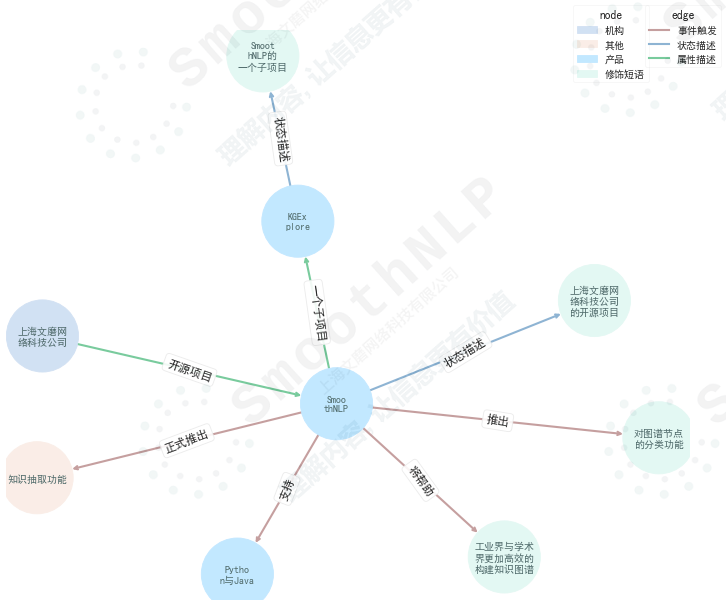
기능 설명
事件触发,状态描述,属性描述및数值描述포함됩니다.产品,地区,公司与品牌,货品,机构,人物,修饰短语및其他포함됩니다. >> import smoothnlp
>> smoothnlp . segment ( '欢迎在Python中使用SmoothNLP' )
[ '欢迎' , '在' , 'Python' , '中' , '使用' , 'SmoothNLP' ]부품 레이블 설명 Wiki
 >> smoothnlp . postag ( '欢迎使用smoothnlp的Python接口' )
[{ 'token' : '欢迎' , 'postag' : 'VV' },
 { 'token' : '在' , 'postag' : 'P' },
 { 'token' : 'Python' , 'postag' : 'NN' },
 { 'token' : '中' , 'postag' : 'LC' },
 { 'token' : '使用' , 'postag' : 'VV' },
{ 'token' : 'SmoothNLP' , 'postag' : 'NN' }] >> smoothnlp . ner ( "中国平安2019年度长期服务计划于2019年5月7日至5月14日通过二级市场完成购股" )
[{ 'charStart' : 0 , 'charEnd' : 4 , 'text' : '中国平安' , 'nerTag' : 'COMPANY_NAME' , 'sTokenList' : { '1' : { 'token' : '中国平安' , 'postag' : None }}, 'normalizedEntityValue' : '中国平安' },
{ 'charStart' : 4 , 'charEnd' : 9 , 'text' : '2019年' , 'nerTag' : 'NUMBER' , 'sTokenList' : { '2' : { 'token' : '2019年' , 'postag' : 'CD' }}, 'normalizedEntityValue' : '2019年' },
{ 'charStart' : 17 , 'charEnd' : 26 , 'text' : '2019年5月7日' , 'nerTag' : 'DATETIME' , 'sTokenList' : { '8' : { 'token' : '2019年5月' , 'postag' : None }, '9' : { 'token' : '7日' , 'postag' : None }}, 'normalizedEntityValue' : '2019年5月7日' },
{ 'charStart' : 27 , 'charEnd' : 32 , 'text' : '5月14日' , 'nerTag' : 'DATETIME' , 'sTokenList' : { '11' : { 'token' : '5月' , 'postag' : None }, '12' : { 'token' : '14日' , 'postag' : None }}, 'normalizedEntityValue' : '5月14日' }] >> smoothnlp . company_recognize ( "旷视科技预计将在今年9月在港IPO" )
[{ 'charStart' : 0 ,
'charEnd' : 4 ,
'text' : '旷视科技' ,
'nerTag' : 'COMPANY_NAME' ,
'sTokenList' : { '1' : { 'token' : '旷视科技' , 'postag' : None }},
'normalizedEntityValue' : '旷视科技' }]
smoothnlp.dep_parsing에 의해 반환 된Index=0은 더미의root토큰입니다.
의존성 구문 분석 태그 설명 위키
 smoothnlp . dep_parsing ( "特斯拉是全球最大的电动汽车制造商。" )
> [{ 'relationship' : 'top' , 'dependentIndex' : 2 , 'targetIndex' : 1 },
  { 'relationship' : 'root' , 'dependentIndex' : 0 , 'targetIndex' : 2 },
  { 'relationship' : 'dep' , 'dependentIndex' : 5 , 'targetIndex' : 3 },
  { 'relationship' : 'advmod' , 'dependentIndex' : 5 , 'targetIndex' : 4 },
  { 'relationship' : 'ccomp' , 'dependentIndex' : 2 , 'targetIndex' : 5 },
  { 'relationship' : 'cpm' , 'dependentIndex' : 5 , 'targetIndex' : 6 },
  { 'relationship' : 'amod' , 'dependentIndex' : 8 , 'targetIndex' : 7 },
  { 'relationship' : 'attr' , 'dependentIndex' : 2 , 'targetIndex' : 8 },
  { 'relationship' : 'attr' , 'dependentIndex' : 2 , 'targetIndex' : 9 },
{ 'relationship' : 'punct' , 'dependentIndex' : 2 , 'targetIndex' : 10 }] smoothnlp . split2sentences ( "句子1!句子2!" )
> [ '句子1!' , '句子2!' ]SmoothNLP는 기본적으로 서비스 통화에 2 개의 스레드를 사용합니다.
 from smoothnlp import config
config . setNumThreads ( 2 ) from smoothnlp import config
config . setLogLevel ( "DEBUG" ) ## 设定日志级别알고리즘 소개 | 사용 지침
우리는 현재 온라인 서비스와 함께이 기능에 대한 상용 솔루션 만 지원합니다. 자세한 내용은 [email protected]으로 문의하십시오
효과 데모
[
  {
    "url" : " https://36kr.com/p/5167309 " ,
    "title" : " Facebook第三次数据泄露,可能导致680万用户私人照片泄露" ,
    "pub_ts" : 1544832000
  },
  {
    "url" : " https://www.pencilnews.cn/p/24038.html " ,
    "title" : "热点 | Facebook将因为泄露700万用户个人照片 面临16亿美元罚款" ,
    "pub_ts" : 1544832000
  },
  {
    "url" : " https://finance.sina.com.cn/stock/usstock/c/2018-12-15/doc-ihmutuec9334184.shtml " ,
    "title" : " Facebook再曝新数据泄露 6800万用户或受影响" ,
    "pub_ts" : 1544844120
  }
]
댓글 : Sina 편집자의 데이터가 잘못되었습니다 ... 과장된 사실, 실제 상황 Facebook은 6 천 8 백만 사진을 유출하지 않았습니다.
우리는 현재 온라인 서비스를 통해이 기능에 대한 상용 솔루션 만 지원합니다. 자세한 내용은 [email protected]으로 문의하십시오. 온라인 서비스는 API 출력을 지원합니다.
효과
| 이벤트 이름 | AUC | 정도 |
|---|---|---|
| 투자 및 인수 | 0.996 | 0.982 |
| 기업 협력 | 0.977 | 0.885 |
| 이사, 감독자 및 임원 | 0.982 | 0.940 |
| 수익 보고서 | 0.994 | 0.960 |
| 비즈니스 서명 | 0.993 | 0.904 |
| 사업 개발 | 0.968 | 0.869 |
| 제품 보고서 | 0.977 | 0.911 |
| 산업 정책 | 0.990 | 0.879 |
| 열악한 관리 | 0.981 | 0.765 |
| 위반에 대한 토론 | 0.951 | 0.890 |
참조
smoothnlp_maven 폴더에 있습니다. maven 을 통해 컴파일하고 포장 할 수 있습니다SmoothNLP Pro는 안정적이고 안정적인 엔터프라이즈 수준의 사용자, 문서를 지원합니다. 시도하거나 구매하려면 연락처 @smoothnlp.com을 문의하십시오
smoothnlp.split2sentences 사용해보십시오.SimHei 지원합니다. 대부분의 환경에서 matplotlib는 중국 글꼴을 지원하지 않습니다. 글꼴 패키지에 대한 다운로드 링크를 제공합니다. 다음 코드를 실행하여 Simhei Fonts를 Matplotlib 글꼴 라이브러리에로드 할 수 있습니다. import matplotlib . pyplot as plt
import matplotlib . font_manager as font_manager
## 设置字体
font_dirs = [ 'simhei/' ]
font_files = font_manager . findSystemFonts ( fontpaths = font_dirs )
font_list = font_manager . createFontList ( font_files )
font_manager . fontManager . ttflist . extend ( font_list )
plt . rcParams [ 'font.family' ] = "SimHei" NLP 또는知识图谱와 관련된 연구 자료 또는 인턴쉽 기회를 찾으십시오. [email protected]에 오신 것을 환영합니다




