SmoothNLP
1.0.0

| 著者 | メール |
|---|---|
| ビクター | [email protected] |
| Yinjun | [email protected] |
| クラゲ | [email protected] |
pip経由でインストールします
pip install smoothnlp > =0.4.0ソースコードから最新バージョンをインストールします
git clone https://github.com/smoothnlp/SmoothNLP.git
cd SmoothNLP
python setup.py installsmoothnlp
V0.3.0以降のサポートされているバージョンのみ。以下は、バージョンV0.4の後の例です。
 from smoothnlp . algorithm import kg
from kgexplore import visual
ngrams = kg . extract_ngram ([ "SmoothNLP在V0.3版本中正式推出知识抽取功能" ,
                            "SmoothNLP专注于可解释的NLP技术" ,
                            "SmoothNLP支持Python与Java" ,
                            "SmoothNLP将帮助工业界与学术界更加高效的构建知识图谱" ,
                            "SmoothNLP是上海文磨网络科技公司的开源项目" ,
                            "SmoothNLP在V0.4版本中推出对图谱节点的分类功能" ,
                            "KGExplore是SmoothNLP的一个子项目" ])
visual . visualize ( ngrams , width = 12 , height = 10 )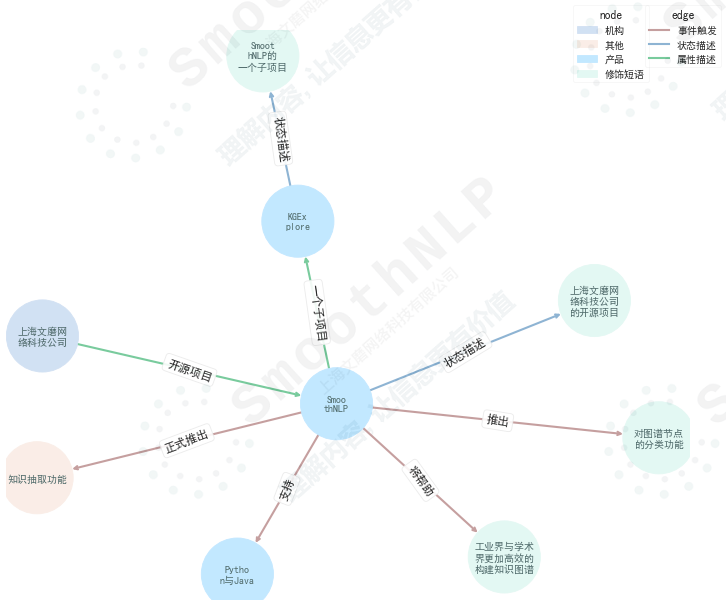
関数の説明
事件触发、状态描述、属性描述、および数值描述が含まれます。产品、地区、公司与品牌、货品、机构、人物、修饰短语其他が含まれます。 >> import smoothnlp
>> smoothnlp . segment ( '欢迎在Python中使用SmoothNLP' )
[ '欢迎' , '在' , 'Python' , '中' , '使用' , 'SmoothNLP' ]一部のスピーチラベルの説明wiki
 >> smoothnlp . postag ( '欢迎使用smoothnlp的Python接口' )
[{ 'token' : '欢迎' , 'postag' : 'VV' },
 { 'token' : '在' , 'postag' : 'P' },
 { 'token' : 'Python' , 'postag' : 'NN' },
 { 'token' : '中' , 'postag' : 'LC' },
 { 'token' : '使用' , 'postag' : 'VV' },
{ 'token' : 'SmoothNLP' , 'postag' : 'NN' }] >> smoothnlp . ner ( "中国平安2019年度长期服务计划于2019年5月7日至5月14日通过二级市场完成购股" )
[{ 'charStart' : 0 , 'charEnd' : 4 , 'text' : '中国平安' , 'nerTag' : 'COMPANY_NAME' , 'sTokenList' : { '1' : { 'token' : '中国平安' , 'postag' : None }}, 'normalizedEntityValue' : '中国平安' },
{ 'charStart' : 4 , 'charEnd' : 9 , 'text' : '2019年' , 'nerTag' : 'NUMBER' , 'sTokenList' : { '2' : { 'token' : '2019年' , 'postag' : 'CD' }}, 'normalizedEntityValue' : '2019年' },
{ 'charStart' : 17 , 'charEnd' : 26 , 'text' : '2019年5月7日' , 'nerTag' : 'DATETIME' , 'sTokenList' : { '8' : { 'token' : '2019年5月' , 'postag' : None }, '9' : { 'token' : '7日' , 'postag' : None }}, 'normalizedEntityValue' : '2019年5月7日' },
{ 'charStart' : 27 , 'charEnd' : 32 , 'text' : '5月14日' , 'nerTag' : 'DATETIME' , 'sTokenList' : { '11' : { 'token' : '5月' , 'postag' : None }, '12' : { 'token' : '14日' , 'postag' : None }}, 'normalizedEntityValue' : '5月14日' }] >> smoothnlp . company_recognize ( "旷视科技预计将在今年9月在港IPO" )
[{ 'charStart' : 0 ,
'charEnd' : 4 ,
'text' : '旷视科技' ,
'nerTag' : 'COMPANY_NAME' ,
'sTokenList' : { '1' : { 'token' : '旷视科技' , 'postag' : None }},
'normalizedEntityValue' : '旷视科技' }]
smoothnlp.dep_parsingによって返されるIndex=0は、ダミーのrootトークンであることに注意してください。
依存性構文分析タグ説明wiki
 smoothnlp . dep_parsing ( "特斯拉是全球最大的电动汽车制造商。" )
> [{ 'relationship' : 'top' , 'dependentIndex' : 2 , 'targetIndex' : 1 },
  { 'relationship' : 'root' , 'dependentIndex' : 0 , 'targetIndex' : 2 },
  { 'relationship' : 'dep' , 'dependentIndex' : 5 , 'targetIndex' : 3 },
  { 'relationship' : 'advmod' , 'dependentIndex' : 5 , 'targetIndex' : 4 },
  { 'relationship' : 'ccomp' , 'dependentIndex' : 2 , 'targetIndex' : 5 },
  { 'relationship' : 'cpm' , 'dependentIndex' : 5 , 'targetIndex' : 6 },
  { 'relationship' : 'amod' , 'dependentIndex' : 8 , 'targetIndex' : 7 },
  { 'relationship' : 'attr' , 'dependentIndex' : 2 , 'targetIndex' : 8 },
  { 'relationship' : 'attr' , 'dependentIndex' : 2 , 'targetIndex' : 9 },
{ 'relationship' : 'punct' , 'dependentIndex' : 2 , 'targetIndex' : 10 }] smoothnlp . split2sentences ( "句子1!句子2!" )
> [ '句子1!' , '句子2!' ]SmoothNLPは、サービスコールにデフォルトで2つのスレッドを使用します。
 from smoothnlp import config
config . setNumThreads ( 2 ) from smoothnlp import config
config . setLogLevel ( "DEBUG" ) ## 设定日志级别アルゴリズムの紹介|使用する手順
現在、オンラインサービスを使用して、この機能の商用ソリューションのみをサポートしています。詳細については、[email protected]にお問い合わせください
効果デモンストレーション
[
  {
    "url" : " https://36kr.com/p/5167309 " ,
    "title" : " Facebook第三次数据泄露,可能导致680万用户私人照片泄露" ,
    "pub_ts" : 1544832000
  },
  {
    "url" : " https://www.pencilnews.cn/p/24038.html " ,
    "title" : "热点 | Facebook将因为泄露700万用户个人照片 面临16亿美元罚款" ,
    "pub_ts" : 1544832000
  },
  {
    "url" : " https://finance.sina.com.cn/stock/usstock/c/2018-12-15/doc-ihmutuec9334184.shtml " ,
    "title" : " Facebook再曝新数据泄露 6800万用户或受影响" ,
    "pub_ts" : 1544844120
  }
]
コメント:SINA編集者のデータは間違っています...誇張された事実、Facebookが6800万枚の写真を漏らしなかった本当の状況
現在、オンラインサービスでは、この機能の商用ソリューションのみをサポートしています。詳細については、[email protected]にお問い合わせください。オンラインサービスはAPI出力をサポートしています。
効果
| イベント名 | auc | 精度 |
|---|---|---|
| 投資と買収 | 0.996 | 0.982 |
| 企業協力 | 0.977 | 0.885 |
| 取締役、監督者、幹部 | 0.982 | 0.940 |
| 収入報告書 | 0.994 | 0.960 |
| ビジネス署名 | 0.993 | 0.904 |
| ビジネス開発 | 0.968 | 0.869 |
| 製品レポート | 0.977 | 0.911 |
| 産業政策 | 0.990 | 0.879 |
| 貧弱な管理 | 0.981 | 0.765 |
| 違反に関する議論 | 0.951 | 0.890 |
参照
smoothnlp_mavenにあります。 mavenを通してコンパイルしてパッケージ化できますSmoothNLP Proは、安定した信頼性の高いエンタープライズレベルのユーザー、ドキュメントをサポートしています。試してみたり購入したい場合は、@smoothnlp.comに連絡してください
smoothnlp.split2sentencesを試してください。SimHeiサポートしています。ほとんどの環境でのMatplotlibは、中国のフォントをサポートしていません。フォントパッケージのダウンロードリンクを提供します。次のコードを実行して、 SimheiフォントをMatplotlibフォントライブラリにロードできます。 import matplotlib . pyplot as plt
import matplotlib . font_manager as font_manager
## 设置字体
font_dirs = [ 'simhei/' ]
font_files = font_manager . findSystemFonts ( fontpaths = font_dirs )
font_list = font_manager . createFontList ( font_files )
font_manager . fontManager . ttflist . extend ( font_list )
plt . rcParams [ 'font.family' ] = "SimHei" NLPや知识图谱、さらにはインターンシップの機会に関連する研究資料を探してください。 [email protected]へようこそ




