HP integration example
1.0.0

이 예는 서버, Raspberry Pi 등의 Valden Heat Pump 데이터에 액세스하는 방법을 보여줍니다.
필요한 것은 USB-> RS485 컨버터 및 Python2가 설치되기 만하면됩니다.
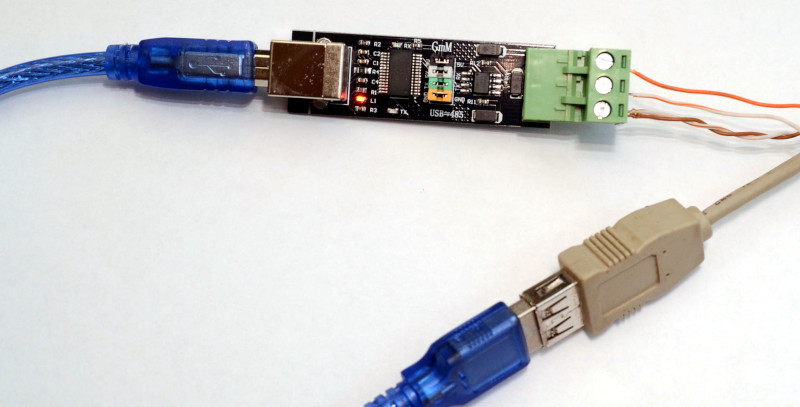
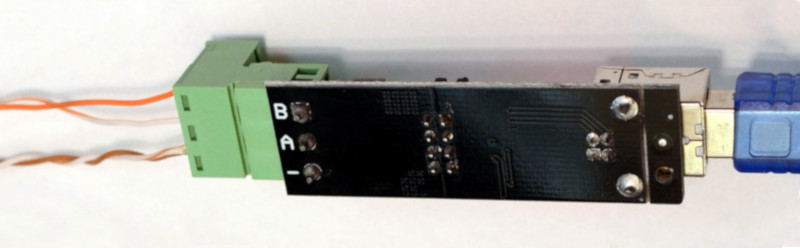
아래 그림과 같이 컴퓨터를 RS485 라인에 연결하고 Valden 디스플레이 페이지에서 설명한 것과 같이 와이어의 다른면을 연결하고 아래 예제에서 Python 스크립트를 실행하십시오.
RS485는 3 와이어 라인입니다. "신호 접지"가없는 저렴한 변환기와 A와 B 만 사용하지 마십시오. 몇 미터 거리에서 작동합니다.
 # Communication example for:
# - Valden Display  https://github.com/openhp/Display/
# - Valden Service Display https://github.com/openhp/ServiceDisplay/
#
# The source code licensed under GPLv3.
#
# This product is distributed in the hope that it will be useful, but WITHOUT ANY WARRANTY;
# without even the implied warranty of MERCHANTABILITY or FITNESS FOR A PARTICULAR PURPOSE.
# See the GNU General Public License for more details.


import serial
from time import sleep
import datetime
import string
import sys

#-------------------------------------------------------
#function to send commands and print answers
def SendCommand ( ID_to , command ):
	#send command
	towrite = str ( ID ) +  str ( ID_to ) + command
	print "> " + str ( datetime . datetime . now ())[ 0 : 19 ] + " we sent: " + towrite
	try :
		serial . write ( towrite )
	except :		#do not catch all exceptions in a real code
		print "USB>Serial converter disconnected?" , sys . exc_info ()
		line = None
		return 0

	#read result
	try :
		line = serial . readline ()   # read a 'n' terminated line
	except :		#do not catch all exceptions in a real code
		print "USB>Serial converter disconnected?" , sys . exc_info ()
		line = None
		return 0

	#print answer
	if len ( line ) > 2 :
		print "< " + str ( datetime . datetime . now ())[ 0 : 19 ] + " we got: " + line
	else :
		print "No answer from" , ID_to , " t t " , str ( datetime . datetime . now ())[ 0 : 19 ]

#-------------------------------------------------------
#open serial
print "Starting.."
try :
	serial = serial . Serial ( '/dev/ttyUSB2' , 9600 , timeout = 3 )		#Change serial name to yours!
	print "Opened: " , serial . name
except serial . serialutil . SerialException :
	print "Serial open error! Change serial name to yours! (ex: /dev/ttyUSB5, or something like COM9 at win)"
	exit ( 0 )

#-------------------------------------------------------
#some example values
eev_target = "02.50"		#new eev temperature difference
newtemp = "31.50"		#new setpoint temperature

ID 	= chr ( 0x30 )		#this script ID, 0x30 by default, default value supported by all Valden components so do not change it
remote_ID = chr ( 0x41 )		#Remote Display ID ( this display https://github.com/openhp/Display/ or that display https://github.com/openhp/ServiceDisplay/ )
				#Remote Display ID can be changed, and yes: few devices with unique IDs can work together at the same time at same line

#-------------------------------------------------------
#example cycle, interaction with Remote Display
#commands:
#(G)et all
#new (T)emperature set (setpoint)
#new (E)EV difference set


#cycle sends 10 times (G)er all command
#then sends (T)emperature set
#then sends (E)EV difference set
#then cycle


while ( 1 == 1 ):
	for i in xrange ( 10 ):
		SendCommand ( remote_ID , "G" )	#sends 0AG : from ID 0 to ID A (G)et all
		sleep ( 5 )
	SendCommand ( remote_ID , "T" + newtemp )	#sends 0AT31.50, command format TNN.NN
	sleep ( 5 )
	SendCommand ( remote_ID , "E" + eev_target )	#sends 0AE02.50, command format ENN.NN
	sleep ( 5 )
스크립트 출력 예제 (확대하려면 클릭) : 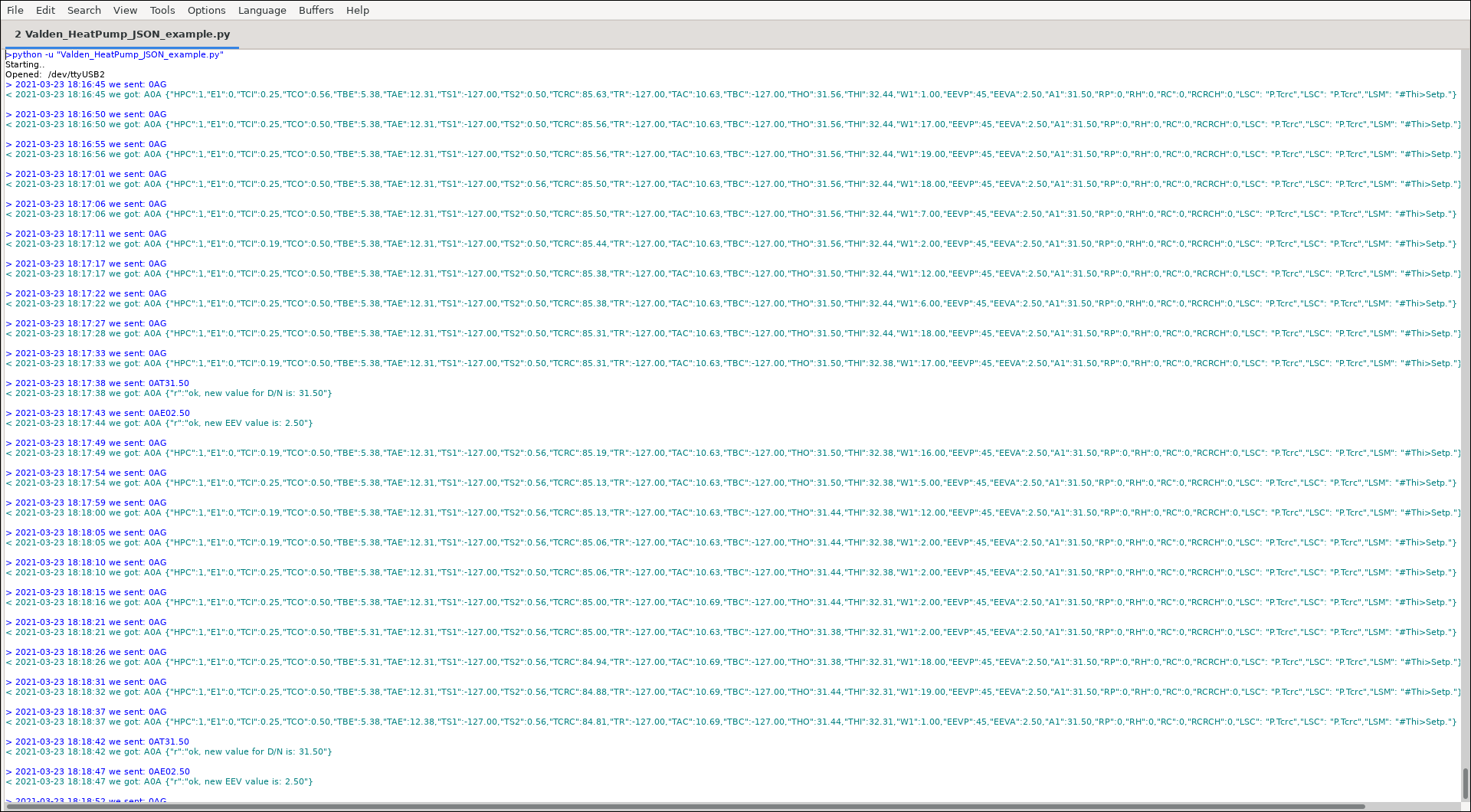
JSON 커뮤니케이션에 관한 짧은 이름 (키) :
| ABBR. | 전체 이름 |
|---|---|
| A1 | 설정 점 |
| E1 | 오류 코드 |
| HPC | 연결된 히트 펌프 (원격 디스플레이, 1 = 예, 0 = 아니오) |
| W1 | 와트 |
디스플레이에서 볼 수있는 모든 약어 및 상태 메시지는 Valden Heat Pump Controller 부록에 나열되어 있습니다. 오류 코드도 거기에 있습니다.
다음은 무엇입니까? 예를 들어, 홈 어시스턴트 또는 다른 "스마트 홈"시스템과 통합하는 데 필요한 모든 정보가 있습니다. 단지 구문 분석은 문자열을 얻었고 (파이썬에서는 매우 쉬운) 키 값 쌍을 좋아하는 시스템에 공급합니다.
나는 "스마트 홈"시스템을 사용하지 않지만 그래프를 좋아합니다. 그래프는 프로세스 역학을 분석하는 데 도움이됩니다. 따라서 서버 측에 스크립트 (훨씬 더 복잡한 스크립트)가있어 모든 장치에서 통계를 얻고 그래프를 그립니다.
예를 들어, 내 히트 펌프 중 하나의 일일 그래프 (확대하려면 클릭) : 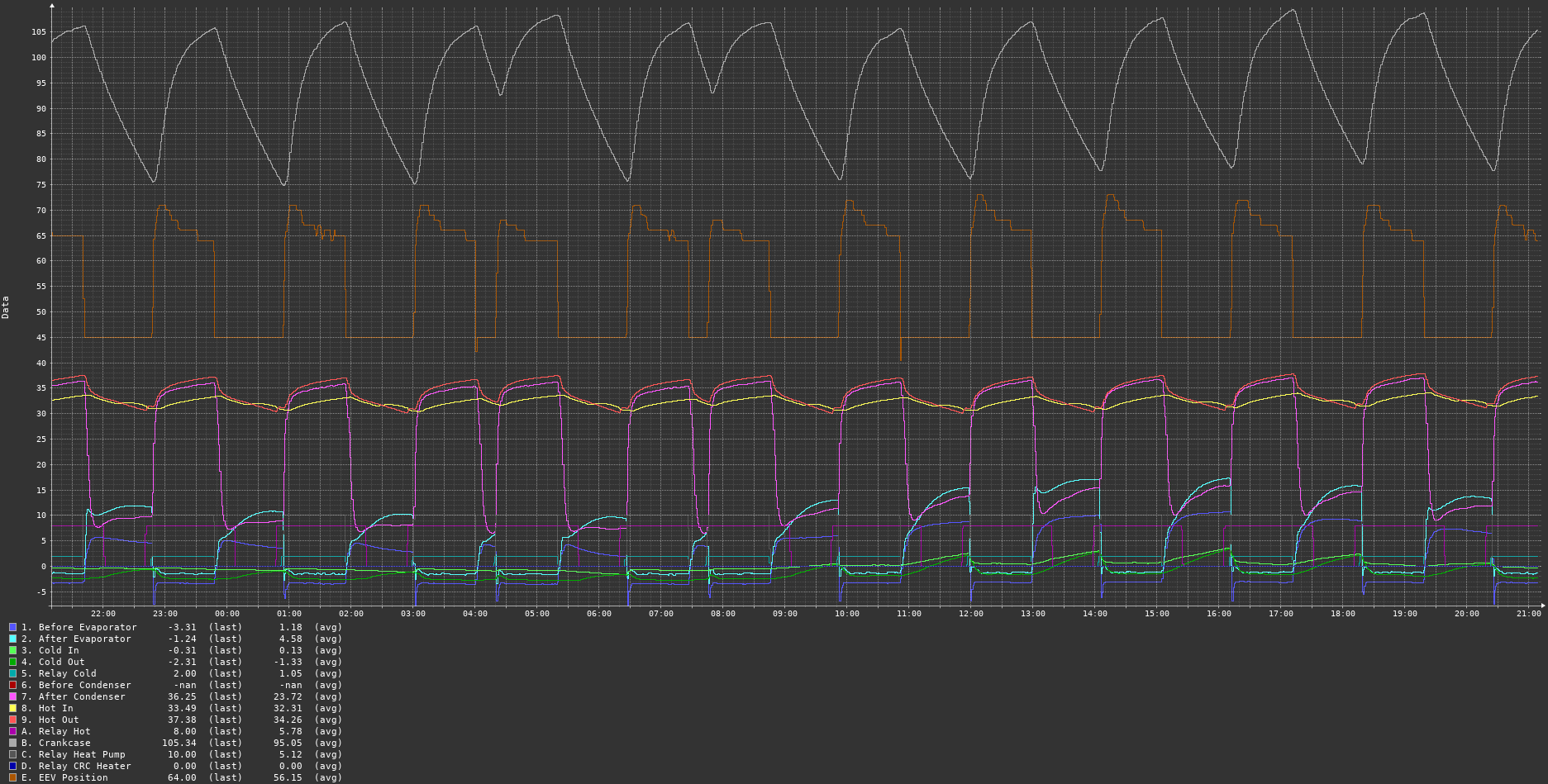
그래프를 얻으려면 CACTI 모니터링 시스템과 같은 것을 사용할 수 있습니다.
그리고 하나 더 : "설정 온도"명령을 사용하여 "설정 점"온도를 자동으로 변경하여 전력 절약과 주택 온도 사이의 편안한 균형을 만들 수 있습니다. 또는 주간 의존적, 시간 의존적 또는 무언가에 의존하는 온도 의존 시스템.
© 2015-2021 DAA 판권 소유; Web.de의 Gonzho; https://github.com/openhp/hp-integration-example/.
CC-By-SA 라이센스 v4.0에 따라 라이센스가 부여 된 텍스트, 미디어 및 기타 자료.
속성 : Valden Heat Pump Integration (https://github.com/openhp/hp-integration-example/) 원래 작업에서는 분명하게 귀속해야합니다.
공유 및 공유 모두 : 재사용 컨텐츠를 수정하거나 추가하는 경우 CC-By-SA 라이센스 v4.0 이상에 따라 라이센스를 부여해야합니다.
변경 사항 표시 : 수정 또는 추가를 수행하는 경우 원래 작업이 수정되었음을 합리적인 방식으로 표시해야합니다.
귀하는 무료입니다 : 라이센스 약관을 따르는 한 상업적으로 모든 목적으로 자료를 공유하고 조정하는 것.
소스 코드는 GPLV3에 따라 라이센스가 부여됩니다.
이 제품은 유용하지만 보증이 없기를 희망하여 배포됩니다. 상업성 또는 특정 목적에 대한 적합성에 대한 묵시적 보증조차 없습니다. 자세한 내용은 GNU 일반 공개 라이센스를 참조하십시오.
이 제품에 사용 된 타사 라이브러리 라이센스의 경우 해당 라이브러리를 참조하십시오.





