cyp
1.0.0

CYP는 MPD의 웹 기반 프론트 엔드, Music Player Daemon입니다. 기본 응용 프로그램을 설치하지 않고도 재생을 제어하는 데 사용할 수 있습니다. 데스크탑과 모바일의 최신 웹 브라우저에서 작동합니다.
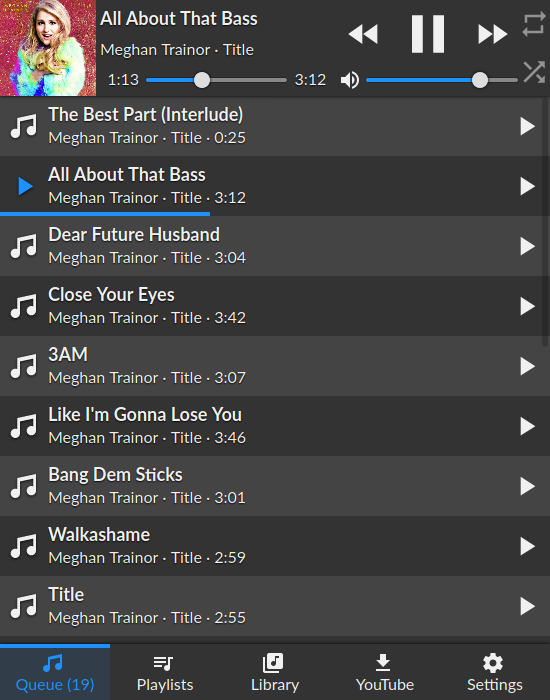
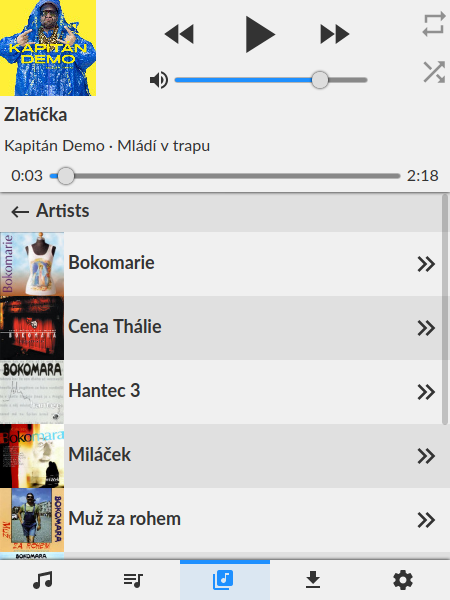
먼저 작동하는 MPD 설정과 노드 버전> = 10이 있는지 확인하십시오.
git clone https://github.com/ondras/cyp.git && cd cyp
npm i
node .
인터페이스를 열려면 브라우저를 http : // localhost : 8080으로 가리 킵니다. 사용자 정의 MPD 주소 지정을 수행 할 수 있습니다.
MPD_HOST 및 MPD_PORT 환경 변수 사용server 쿼리 스트링 인수 ( ?server=localhost:6655 )를 통해. 또는 Docker를 사용하여 CYP를 실행할 수 있습니다.
git clone https://github.com/ondras/cyp.git && cd cyp
docker build -t cyp .
docker run --network=host cypCYP를 서비스로 실행하고 APACHE2를 통해 프록시하려면 여러 모듈을 활성화해야합니다.
 # a2enmod proxy
# a2enmod proxy_http
# a2enmod proxy_wstunnel
# a2enmod proxypass
"music"(https://example.com/music/)이라는 바이러스 폴더에 CYP를 제시하려면 사이트 구성에 다음을 추가하십시오.
 # MPD daemon
RewriteEngine on						# Enable the RewriteEngine
RewriteCond %{REQUEST_FILENAME} !-f		# If the requested file isn't a file
RewriteCond %{REQUEST_FILENAME} !-d		# And if it isn't a directory
RewriteCond %{REQUEST_URI} .*/music$	# And if they only requested /music instead of /music/
RewriteRule ^(.+[^/])$ %{REQUEST_URI}/ [QSA,L,R=301] # Then append a trailing slash

ProxyPass /music/ http://localhost:3366/	# Proxy all request to /music/ to the CYP server (running on the same server as apache)
ProxyWebsocketFallbackToProxyHttp Off		# Don't fallback to http for WebSocket requests

# Rewrite WebSocket requests to CYP WebSocket requets, (also converts wss to ws)
RewriteEngine on
RewriteCond %{HTTP:Upgrade} websocket [NC]
RewriteCond %{HTTP:Connection} upgrade [NC]
RewriteRule ^/music/?(.*) "ws://localhost:3366/$1" [P,L]
 location /music/ {
  proxy_pass_header  Set-Cookie;
  proxy_set_header   Host               $host;
  proxy_set_header   X-Real-IP          $remote_addr;
  proxy_set_header   X-Forwarded-Proto  $scheme;
  proxy_set_header   X-Forwarded-For    $proxy_add_x_forwarded_for;
  proxy_http_version 1.1;
  proxy_set_header Upgrade $http_upgrade;
  proxy_set_header Connection "Upgrade";
  proxy_set_header Host $host;
  proxy_pass http://localhost:8080/;
}
작동하는 YouTube-DL 설치가 필요합니다. 오디오 파일은 _youtube 디렉토리에 다운로드되므로 MPD 라이브러리에서 사용할 수 있는지 확인하십시오 (Symlink 사용).
Docker를 사용하는 경우 _youtube 디렉토리를 이미지에 장착해야합니다.
docker run --network=host -v " $( pwd ) " /_youtube:/cyp/_youtube cyp ... PORT 환경 변수를 통해 수행됩니다. Docker를 사용하는 경우 -e 스위치가 트릭을 수행합니다.
docker run --network=host -e PORT=12345 cyp CYPS 홈 디렉토리에서 passwords.json 파일을 만듭니다. 사용 가능한 MPD 서버의 비밀번호 지정 :
{
  "localhost:6600" : " my-pass-1 " ,
  "some.other.server.or.ip:12345" : " my-pass-2 "
}
호스트 이름과 포트가 server 쿼리 스트링 인수 (기본값으로 localhost:6600 )를 통해 지정된 것과 일치하는지 확인하십시오.
Origin 검사보다 낫다)






