cyp
1.0.0

CYP adalah frontend berbasis web untuk MPD, daemon pemutar musik. Anda dapat menggunakannya untuk mengontrol pemutaran tanpa harus menginstal aplikasi asli. Ini bekerja di browser web modern, baik desktop maupun seluler.
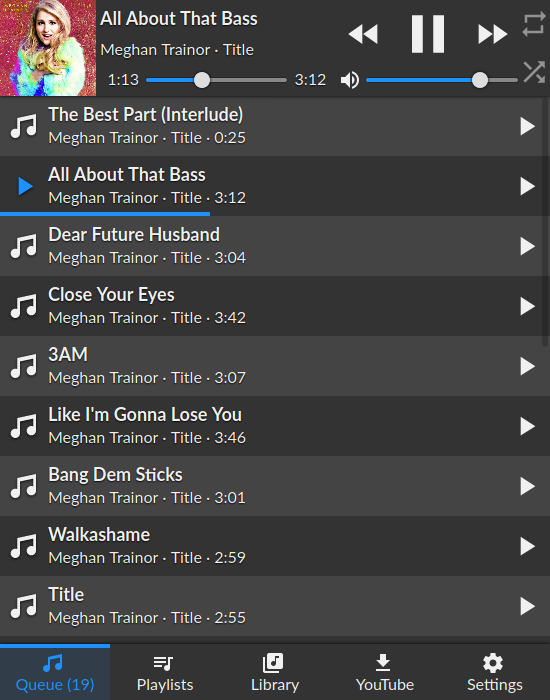
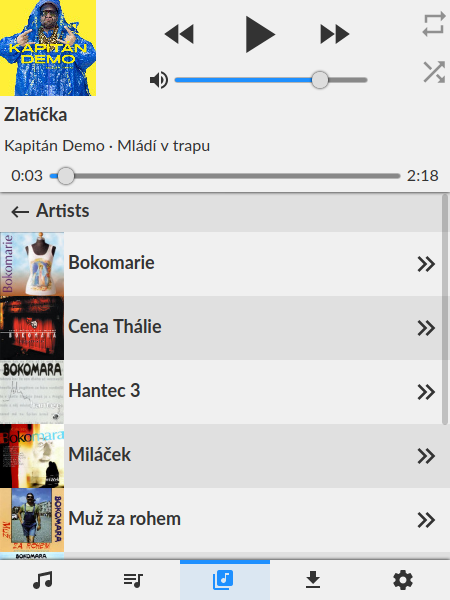
Pastikan Anda memiliki pengaturan MPD yang berfungsi terlebih dahulu dan versi node> = 10
git clone https://github.com/ondras/cyp.git && cd cyp
npm i
node .
Arahkan browser Anda ke http: // localhost: 8080 untuk membuka antarmuka. Menentukan alamat MPD khusus dapat dilakukan:
MPD_HOST dan MPD_PORT , atauserver querystring ( ?server=localhost:6655 ). Atau, Anda dapat menggunakan Docker untuk menjalankan CYP.
git clone https://github.com/ondras/cyp.git && cd cyp
docker build -t cyp .
docker run --network=host cypJika Anda ingin menjalankan CYP sebagai layanan dan proksi melalui Apache2, Anda harus mengaktifkan beberapa modul.
 # a2enmod proxy
# a2enmod proxy_http
# a2enmod proxy_wstunnel
# a2enmod proxypass
Untuk menyajikan CYP di folder virutal bernama "Music" (https://example.com/music/) Tambahkan yang berikut ke konfigurasi situs Anda.
 # MPD daemon
RewriteEngine on						# Enable the RewriteEngine
RewriteCond %{REQUEST_FILENAME} !-f		# If the requested file isn't a file
RewriteCond %{REQUEST_FILENAME} !-d		# And if it isn't a directory
RewriteCond %{REQUEST_URI} .*/music$	# And if they only requested /music instead of /music/
RewriteRule ^(.+[^/])$ %{REQUEST_URI}/ [QSA,L,R=301] # Then append a trailing slash

ProxyPass /music/ http://localhost:3366/	# Proxy all request to /music/ to the CYP server (running on the same server as apache)
ProxyWebsocketFallbackToProxyHttp Off		# Don't fallback to http for WebSocket requests

# Rewrite WebSocket requests to CYP WebSocket requets, (also converts wss to ws)
RewriteEngine on
RewriteCond %{HTTP:Upgrade} websocket [NC]
RewriteCond %{HTTP:Connection} upgrade [NC]
RewriteRule ^/music/?(.*) "ws://localhost:3366/$1" [P,L]
 location /music/ {
  proxy_pass_header  Set-Cookie;
  proxy_set_header   Host               $host;
  proxy_set_header   X-Real-IP          $remote_addr;
  proxy_set_header   X-Forwarded-Proto  $scheme;
  proxy_set_header   X-Forwarded-For    $proxy_add_x_forwarded_for;
  proxy_http_version 1.1;
  proxy_set_header Upgrade $http_upgrade;
  proxy_set_header Connection "Upgrade";
  proxy_set_header Host $host;
  proxy_pass http://localhost:8080/;
}
Anda akan memerlukan instalasi YouTube-DL yang berfungsi. File audio diunduh ke direktori _youtube , jadi pastikan itu tersedia untuk perpustakaan MPD Anda (gunakan symlink).
Jika Anda menggunakan Docker, Anda perlu memasang direktori _youtube ke dalam gambar:
docker run --network=host -v " $( pwd ) " /_youtube:/cyp/_youtube cyp ... dilakukan melalui variabel lingkungan PORT . Jika Anda menggunakan Docker, sakelar -e melakukan trik:
docker run --network=host -e PORT=12345 cyp Buat file passwords.json . Tentukan kata sandi untuk server MPD yang tersedia:
{
  "localhost:6600" : " my-pass-1 " ,
  "some.other.server.or.ip:12345" : " my-pass-2 "
}
Pastikan bahwa nama host dan port cocok dengan yang ditentukan melalui argumen querystring server (default ke localhost:6600 ).
Origin )






