cyp
1.0.0

CYP هي واجهة أمامية قائمة على الويب لـ MPD ، The Music Player Daemon. يمكنك استخدامه للتحكم في التشغيل دون الحاجة إلى تثبيت التطبيقات (التطبيقات) الأصلية. إنه يعمل في متصفحات الويب الحديثة ، سواء سطح المكتب والجوال.
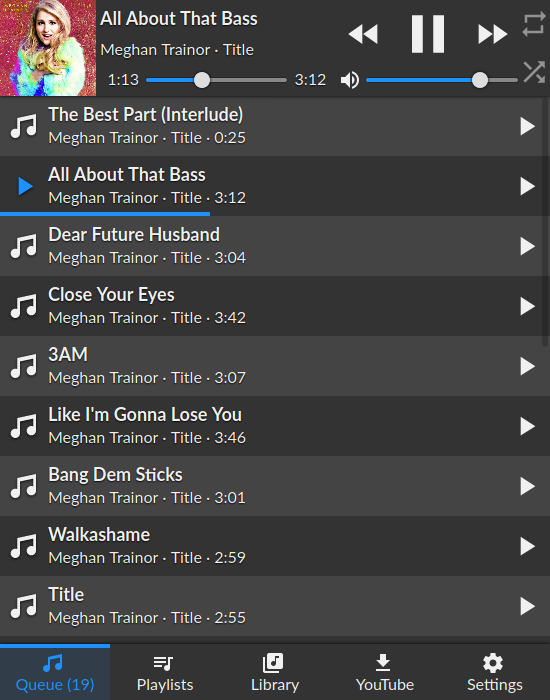
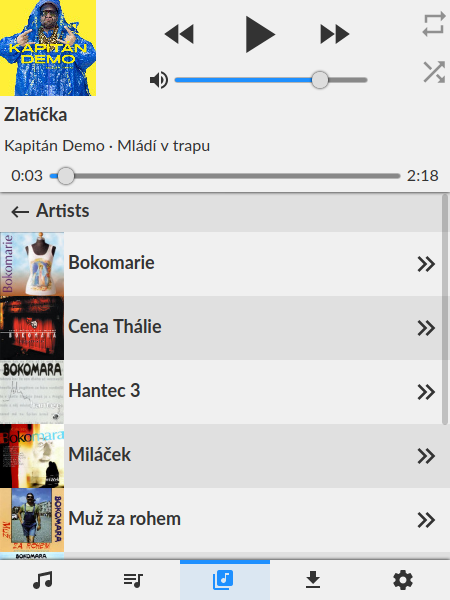
تأكد من أن لديك إعداد MPD العاملة أولاً وإصدار العقدة> = 10
git clone https://github.com/ondras/cyp.git && cd cyp
npm i
node .
أشر متصفحك إلى http: // localhost: 8080 لفتح الواجهة. يمكن تحديد عنوان MPD مخصص:
MPD_HOST و MPD_PORT ، أوserver QueryString ( ?server=localhost:6655 ). بدلاً من ذلك ، يمكنك استخدام Docker لتشغيل CYP.
git clone https://github.com/ondras/cyp.git && cd cyp
docker build -t cyp .
docker run --network=host cypإذا كنت ترغب في تشغيل CYP كخدمة ووكيل من خلال APACH2 ، فستحتاج إلى تمكين العديد من الوحدات النمطية.
 # a2enmod proxy
# a2enmod proxy_http
# a2enmod proxy_wstunnel
# a2enmod proxypass
لتقديم CYP في مجلد Virutal يسمى "Music" (https://example.com/music/) أضف ما يلي إلى تكوين موقعك.
 # MPD daemon
RewriteEngine on						# Enable the RewriteEngine
RewriteCond %{REQUEST_FILENAME} !-f		# If the requested file isn't a file
RewriteCond %{REQUEST_FILENAME} !-d		# And if it isn't a directory
RewriteCond %{REQUEST_URI} .*/music$	# And if they only requested /music instead of /music/
RewriteRule ^(.+[^/])$ %{REQUEST_URI}/ [QSA,L,R=301] # Then append a trailing slash

ProxyPass /music/ http://localhost:3366/	# Proxy all request to /music/ to the CYP server (running on the same server as apache)
ProxyWebsocketFallbackToProxyHttp Off		# Don't fallback to http for WebSocket requests

# Rewrite WebSocket requests to CYP WebSocket requets, (also converts wss to ws)
RewriteEngine on
RewriteCond %{HTTP:Upgrade} websocket [NC]
RewriteCond %{HTTP:Connection} upgrade [NC]
RewriteRule ^/music/?(.*) "ws://localhost:3366/$1" [P,L]
 location /music/ {
  proxy_pass_header  Set-Cookie;
  proxy_set_header   Host               $host;
  proxy_set_header   X-Real-IP          $remote_addr;
  proxy_set_header   X-Forwarded-Proto  $scheme;
  proxy_set_header   X-Forwarded-For    $proxy_add_x_forwarded_for;
  proxy_http_version 1.1;
  proxy_set_header Upgrade $http_upgrade;
  proxy_set_header Connection "Upgrade";
  proxy_set_header Host $host;
  proxy_pass http://localhost:8080/;
}
ستحتاج إلى تثبيت YouTube-DL يعمل. يتم تنزيل ملفات الصوت في دليل _youtube ، لذا تأكد من توفره لمكتبة MPD الخاصة بك (استخدم Symlink).
إذا كنت تستخدم Docker ، فأنت بحاجة إلى تثبيت دليل _youtube في الصورة:
docker run --network=host -v " $( pwd ) " /_youtube:/cyp/_youtube cyp ... يتم عبر متغير بيئة PORT . إذا كنت تستخدم Docker ، فإن مفتاح -e يقوم بالخدعة:
docker run --network=host -e PORT=12345 cyp قم بإنشاء ملف passwords.json في دليل CYPS Home. حدد كلمات المرور لخوادم MPD المتاحة:
{
  "localhost:6600" : " my-pass-1 " ,
  "some.other.server.or.ip:12345" : " my-pass-2 "
}
تأكد من أن أسماء المضيف والمنافذ تتطابق مع تلك المحددة عبر وسيطة QueryString server (الافتراضيات إلى localhost:6600 ).
Origin )






