goggle
1.0.0

속도로 유형을 통해 API를 검색하십시오
Goggle은 Hoogle과 같은 유형 지향 검색 엔진이지만
직접 Goggle을 사용해보십시오! 이제 여기를 방문하여 Goggle이 작동하는 것을 볼 수 있습니다.
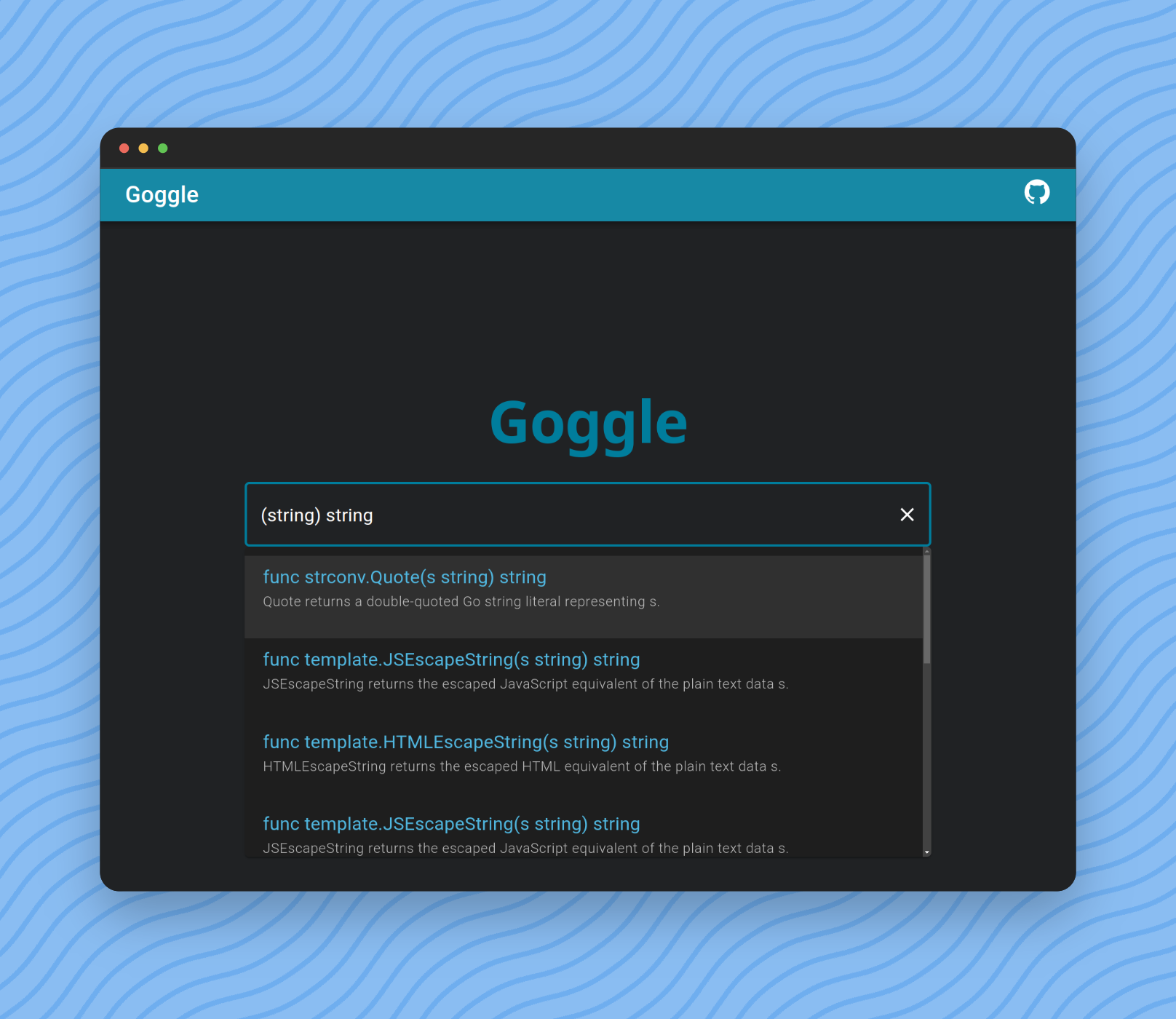
검색 및 필터 결과에 쿼리를 입력 할 수 있습니다.
가장 간단한 형태는 GO의 표준 기능 정의입니다.
func length ( s string ) int 그러나 이름이 length 와 일치하지 않는 결과를 검색하기 위해 함수 이름을 생략 할 수 있습니다.
func ( s string ) int func 키워드도 생략 할 수 있습니다.
( s string ) int마지막으로 인수 이름을 생략 할 수 있습니다.
( string ) int Type = Primitives | SliceType | PointerType | identifier .
Primitives = " bool " | Int | UInt | " float32 " | " float64 " | " complex64 " | " complex128 " .
Int = " int " | " int8 " | " int16 " | " int32 " | " int64 " .
UInt = " uint " | " uint8 " | " uint16 " | " uint32 " | " uint64 " | " uintptr " .
SliceType = " [ " " ] " Type .
Parameters = " ( " [ Type { " , " Type } ] " ) " .
Query = [ " func " ] [ identifier ] Parameters [ Type ] .$ git clone https://github.com/abiriadev/goggle && cd goggle$ go run ./cmd/indexer
# or
$ go run ./cmd/indexer < space separated list of packages to index >자세한 내용은 도움말 페이지를 참조하십시오.
Usage of indexer:
  -f string
        index format (default " gob " )
  -o string
path to save index file$ go run ./cmd/repl
# or optionally pass a path to index file to use
$ go run ./cmd/repl < index file to use > 그런 다음 λ 로 시작하는 프롬프트가 표시됩니다.
쿼리 (예 : () bool )를 입력하고 결과를 확인하려면 입력하십시오.
 λ () bool
func utf8 . FullRune () bool       // FullRune reports whether the bytes in p begin with a full UTF-8 encoding of a rune.
func nettest . TestableAddress () bool     // TestableAddress reports whether address of network is testable on the current platform configuration.
func nettest . SupportsRawSocket () bool   // SupportsRawSocket reports whether the current session is available to use raw sockets.
func nettest . SupportsIPv6 () bool        // SupportsIPv6 reports whether the platform supports IPv6 networking functionality.
func nettest . SupportsIPv4 () bool        // SupportsIPv4 reports whether the platform supports IPv4 networking functionality.
func signal . Ignored () bool      // Ignored reports whether sig is currently ignored.
func slices . Equal () bool        // Equal reports whether two slices are equal: the same length and all elements equal.
func testenv . OptimizationOff () bool     // OptimizationOff reports whether optimization is disabled.
func testenv . HasSymlink () bool  // HasSymlink reports whether the current system can use os.Symlink.
func testenv . HasSrc () bool // HasSrc reports whether the entire source tree is available under GOROOT.$ go run ./cmd/goggle 기본 포트 번호는 6099 (L33T 또는 Gogg )입니다. -port 옵션을 통과하여 변경할 수 있습니다.
Usage of goggle:
  -port int
        port number to bind (default 6099)
터미널에서 요청해보십시오.
$ http :6099/search q= ' () bool ' -v

POST /search HTTP/1.1
Accept: application/json, * / * ; q=0.5
Accept-Encoding: gzip, deflate, br
Connection: keep-alive
Content-Length: 15
Content-Type: application/json
Host: localhost:6099
User-Agent: HTTPie/3.2.1

{
    " q " : " () bool "
}

HTTP/1.1 200 OK
Access-Control-Allow-Origin: *
Content-Length: 1970
Content-Type: text/plain ; charset=utf-8
Date: Tue, 12 Dec 2023 04:12:01 GMT

{
    " items " : [
        {
            " sim " : 0,
            " sig " : " func utf8.FullRune() bool " ,
            " summary " : " FullRune reports whether the bytes in p begin with a full UTF-8 encoding of a rune. " ,
            " link " : " https://pkg.go.dev/unicode/utf8#FullRune "
        },
        {
            " sim " : 0,
            " sig " : " func nettest.TestableAddress() bool " ,
            " summary " : " TestableAddress reports whether address of network is testable on the current platform configuration. " ,
            " link " : " https://pkg.go.dev/golang.org/x/net/nettest#TestableAddress "
        },
        ...
    ]
}이동, 작업, Node.js 및 Binaryen이 설치되어 있는지 확인하십시오.
그런 다음 다음 명령을 실행하십시오.
$ task wasm-exec syntaxck
$ corepack enable
$ pnpm install --frozen-lockfile
$ cd frontend
로컬 Goggle 프록시를 원하지 않으면 VITE_EXTERN_ENDPOINT 변수를 설정하여 이미 배치 된 엔드 포인트를 지정할 수 있습니다.
$ echo ' VITE_EXTERN_ENDPOINT=<type your endpoint url here> ' > .env.production그런 다음 달리기!
$ pnpm dev
# Or, to use an external endpoint:
$ pnpm dev --mode production
배포 또는 서빙을위한 프론트 엔드 구축 :
$ pnpm buildGoggle의 지속적인 유지 보수 및 개선을 지원하고 기여하는 방법에는 여러 가지가 있습니다. 모든 지원은 대단히 감사합니다!





