goggle
1.0.0

Suchen Sie Ihre API über Typen mit Geschwindigkeit
Goggle ist eine vom Typ vom Typ gesteuerte Suchmaschine wie Hoogle, aber für Go
Versuchen Sie sich selbst! Jetzt können Sie hier besuchen, um die Brille in Aktion zu sehen.
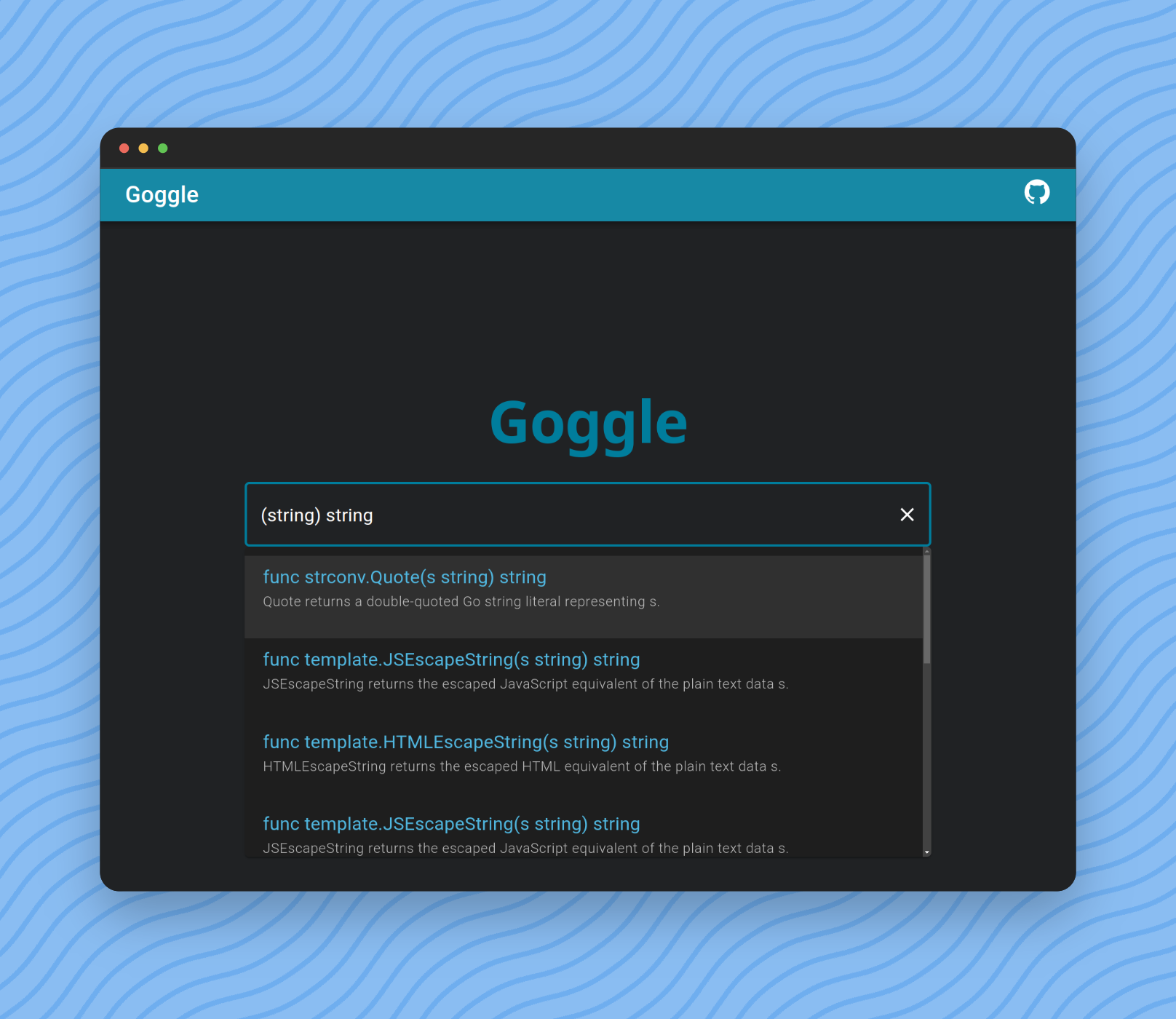
Sie können Abfragen eingeben, um Ergebnisse zu suchen und zu filtern.
Die einfachste Form ist nur die Standardfunktionsdefinition von Go GO.
func length ( s string ) int Wir können jedoch einen Funktionsnamen weglassen, um Ergebnisse abzurufen, deren Name nicht mit length übereinstimmt.
func ( s string ) int Wir können auch ein func -Schlüsselwort weglassen.
( s string ) intSchließlich können wir Argumentennamen weglassen.
( string ) int Type = Primitives | SliceType | PointerType | identifier .
Primitives = " bool " | Int | UInt | " float32 " | " float64 " | " complex64 " | " complex128 " .
Int = " int " | " int8 " | " int16 " | " int32 " | " int64 " .
UInt = " uint " | " uint8 " | " uint16 " | " uint32 " | " uint64 " | " uintptr " .
SliceType = " [ " " ] " Type .
Parameters = " ( " [ Type { " , " Type } ] " ) " .
Query = [ " func " ] [ identifier ] Parameters [ Type ] .$ git clone https://github.com/abiriadev/goggle && cd goggle$ go run ./cmd/indexer
# or
$ go run ./cmd/indexer < space separated list of packages to index >Weitere Informationen finden Sie unter Hilfe.
Usage of indexer:
  -f string
        index format (default " gob " )
  -o string
path to save index file$ go run ./cmd/repl
# or optionally pass a path to index file to use
$ go run ./cmd/repl < index file to use > Anschließend wird eine Eingabeaufforderung angezeigt, die mit λ beginnt.
Geben Sie jede Abfrage (wie () bool ) ein und geben Sie die Ergebnisse ein.
 λ () bool
func utf8 . FullRune () bool       // FullRune reports whether the bytes in p begin with a full UTF-8 encoding of a rune.
func nettest . TestableAddress () bool     // TestableAddress reports whether address of network is testable on the current platform configuration.
func nettest . SupportsRawSocket () bool   // SupportsRawSocket reports whether the current session is available to use raw sockets.
func nettest . SupportsIPv6 () bool        // SupportsIPv6 reports whether the platform supports IPv6 networking functionality.
func nettest . SupportsIPv4 () bool        // SupportsIPv4 reports whether the platform supports IPv4 networking functionality.
func signal . Ignored () bool      // Ignored reports whether sig is currently ignored.
func slices . Equal () bool        // Equal reports whether two slices are equal: the same length and all elements equal.
func testenv . OptimizationOff () bool     // OptimizationOff reports whether optimization is disabled.
func testenv . HasSymlink () bool  // HasSymlink reports whether the current system can use os.Symlink.
func testenv . HasSrc () bool // HasSrc reports whether the entire source tree is available under GOROOT.$ go run ./cmd/goggle Die Standardportnummer lautet 6099 (L33T oder Gogg ). Sie können die Option -port übergeben, um sie zu ändern.
Usage of goggle:
  -port int
        port number to bind (default 6099)
Versuchen Sie, vom Terminal anzufordern:
$ http :6099/search q= ' () bool ' -v

POST /search HTTP/1.1
Accept: application/json, * / * ; q=0.5
Accept-Encoding: gzip, deflate, br
Connection: keep-alive
Content-Length: 15
Content-Type: application/json
Host: localhost:6099
User-Agent: HTTPie/3.2.1

{
    " q " : " () bool "
}

HTTP/1.1 200 OK
Access-Control-Allow-Origin: *
Content-Length: 1970
Content-Type: text/plain ; charset=utf-8
Date: Tue, 12 Dec 2023 04:12:01 GMT

{
    " items " : [
        {
            " sim " : 0,
            " sig " : " func utf8.FullRune() bool " ,
            " summary " : " FullRune reports whether the bytes in p begin with a full UTF-8 encoding of a rune. " ,
            " link " : " https://pkg.go.dev/unicode/utf8#FullRune "
        },
        {
            " sim " : 0,
            " sig " : " func nettest.TestableAddress() bool " ,
            " summary " : " TestableAddress reports whether address of network is testable on the current platform configuration. " ,
            " link " : " https://pkg.go.dev/golang.org/x/net/nettest#TestableAddress "
        },
        ...
    ]
}Stellen Sie sicher, dass Sie Go, Task, Node.js und Binary installiert haben.
Führen Sie dann die folgenden Befehle aus:
$ task wasm-exec syntaxck
$ corepack enable
$ pnpm install --frozen-lockfile
$ cd frontend
Wenn Sie keinen lokalen Goggle-Proxy haben möchten, können Sie Ihren bereits eingelagerten Endpunkt angeben, indem Sie VITE_EXTERN_ENDPOINT Variable festlegen.
$ echo ' VITE_EXTERN_ENDPOINT=<type your endpoint url here> ' > .env.productionDann renn!
$ pnpm dev
# Or, to use an external endpoint:
$ pnpm dev --mode production
Zum Aufbau des Frontends für den Einsatz oder die Dienste:
$ pnpm buildEs gibt viele Möglichkeiten, die laufende Wartung und Verbesserung der Brille zu unterstützen und zu beitragen. Jede Unterstützung wird sehr geschätzt!





