goggle
1.0.0

速度でタイプを介してAPIを検索します
GoggleはHoogleのようなタイプ指向の検索エンジンですが、
自分でゴーグルを試してみてください!ここにアクセスして、Goggleが動作しているのを見ることができます。
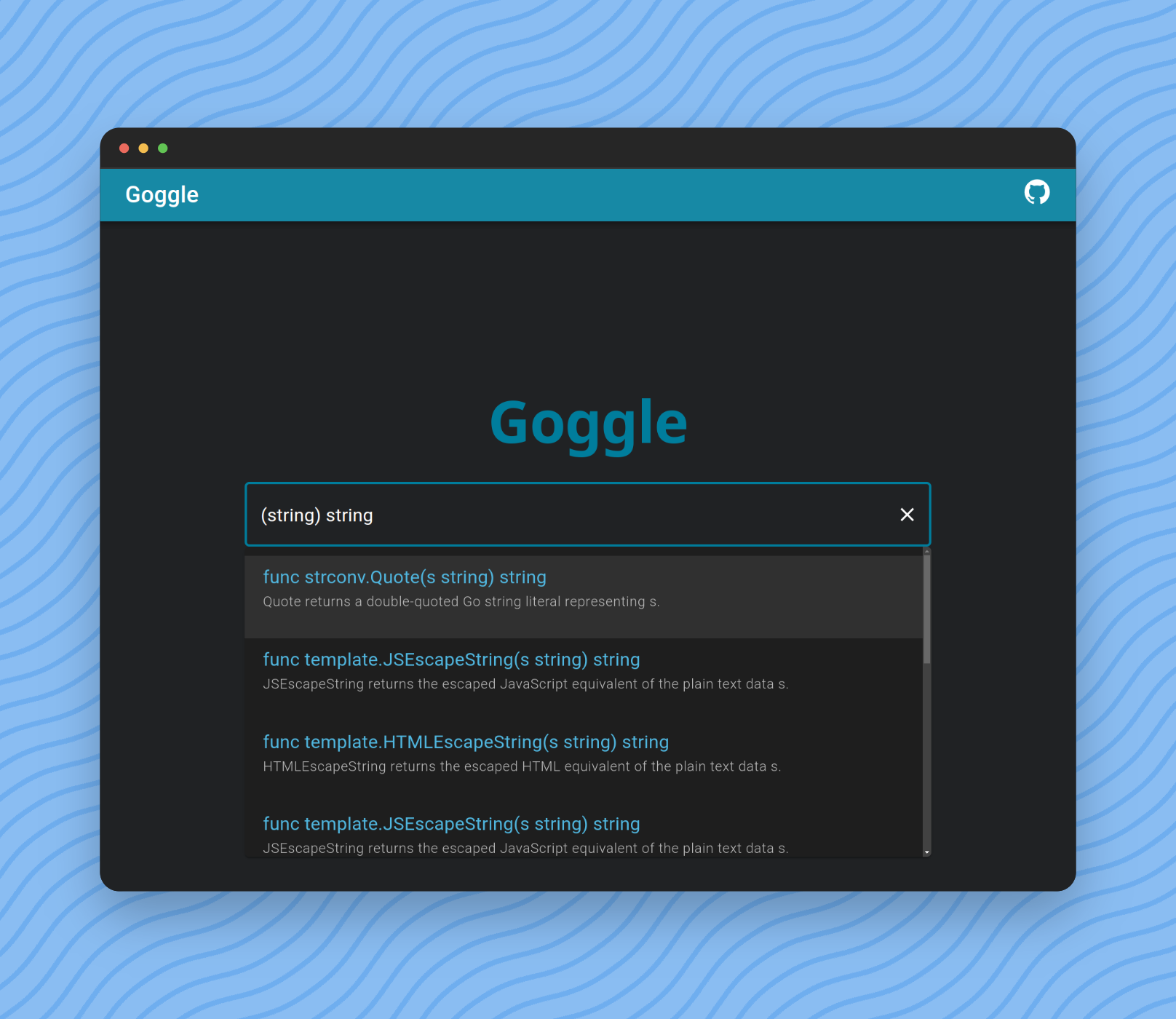
クエリを入力して結果を検索およびフィルタリングできます。
最も単純な形式は、Goの標準関数定義だけです。
func length ( s string ) intただし、機能名を省略して、名前がlengthと一致しない結果を取得することができます。
func ( s string ) int funcキーワードも省略できます。
( s string ) int最後に、引数名を省略できます。
( string ) int Type = Primitives | SliceType | PointerType | identifier .
Primitives = " bool " | Int | UInt | " float32 " | " float64 " | " complex64 " | " complex128 " .
Int = " int " | " int8 " | " int16 " | " int32 " | " int64 " .
UInt = " uint " | " uint8 " | " uint16 " | " uint32 " | " uint64 " | " uintptr " .
SliceType = " [ " " ] " Type .
Parameters = " ( " [ Type { " , " Type } ] " ) " .
Query = [ " func " ] [ identifier ] Parameters [ Type ] .$ git clone https://github.com/abiriadev/goggle && cd goggle$ go run ./cmd/indexer
# or
$ go run ./cmd/indexer < space separated list of packages to index >詳細については、ヘルプページを参照してください。
Usage of indexer:
  -f string
        index format (default " gob " )
  -o string
path to save index file$ go run ./cmd/repl
# or optionally pass a path to index file to use
$ go run ./cmd/repl < index file to use >その後、 λから始まるプロンプトが表示されます。
任意のクエリ( () boolなど)を入力し、結果を確認してください。
 λ () bool
func utf8 . FullRune () bool       // FullRune reports whether the bytes in p begin with a full UTF-8 encoding of a rune.
func nettest . TestableAddress () bool     // TestableAddress reports whether address of network is testable on the current platform configuration.
func nettest . SupportsRawSocket () bool   // SupportsRawSocket reports whether the current session is available to use raw sockets.
func nettest . SupportsIPv6 () bool        // SupportsIPv6 reports whether the platform supports IPv6 networking functionality.
func nettest . SupportsIPv4 () bool        // SupportsIPv4 reports whether the platform supports IPv4 networking functionality.
func signal . Ignored () bool      // Ignored reports whether sig is currently ignored.
func slices . Equal () bool        // Equal reports whether two slices are equal: the same length and all elements equal.
func testenv . OptimizationOff () bool     // OptimizationOff reports whether optimization is disabled.
func testenv . HasSymlink () bool  // HasSymlink reports whether the current system can use os.Symlink.
func testenv . HasSrc () bool // HasSrc reports whether the entire source tree is available under GOROOT.$ go run ./cmd/goggleデフォルトのポート番号は6099 (L33TまたはGogg )です。パス-portオプションを変更できます。
Usage of goggle:
  -port int
        port number to bind (default 6099)
ターミナルからリクエストを試してみてください:
$ http :6099/search q= ' () bool ' -v

POST /search HTTP/1.1
Accept: application/json, * / * ; q=0.5
Accept-Encoding: gzip, deflate, br
Connection: keep-alive
Content-Length: 15
Content-Type: application/json
Host: localhost:6099
User-Agent: HTTPie/3.2.1

{
    " q " : " () bool "
}

HTTP/1.1 200 OK
Access-Control-Allow-Origin: *
Content-Length: 1970
Content-Type: text/plain ; charset=utf-8
Date: Tue, 12 Dec 2023 04:12:01 GMT

{
    " items " : [
        {
            " sim " : 0,
            " sig " : " func utf8.FullRune() bool " ,
            " summary " : " FullRune reports whether the bytes in p begin with a full UTF-8 encoding of a rune. " ,
            " link " : " https://pkg.go.dev/unicode/utf8#FullRune "
        },
        {
            " sim " : 0,
            " sig " : " func nettest.TestableAddress() bool " ,
            " summary " : " TestableAddress reports whether address of network is testable on the current platform configuration. " ,
            " link " : " https://pkg.go.dev/golang.org/x/net/nettest#TestableAddress "
        },
        ...
    ]
}行って、タスク、node.js、およびbinaryenがインストールされていることを確認してください。
次に、次のコマンドを実行します。
$ task wasm-exec syntaxck
$ corepack enable
$ pnpm install --frozen-lockfile
$ cd frontend
ローカルゴーグルプロキシを持ちたくない場合は、 VITE_EXTERN_ENDPOINT変数を設定して、既に展開されたエンドポイントを指定できます。
$ echo ' VITE_EXTERN_ENDPOINT=<type your endpoint url here> ' > .env.production次に、走ってください!
$ pnpm dev
# Or, to use an external endpoint:
$ pnpm dev --mode production
展開またはサービングのためにフロントエンドを構築するため:
$ pnpm buildゴーグルの継続的なメンテナンスと改善をサポートし、貢献する方法はたくさんあります。どんなサポートも大歓迎です!





