py automl
1.0.0

Py-Automlは、Pythonのオープンソースlow-code機械学習ライブラリであり、ML実験でのサイクル時間を洞察するための仮説を減らすことを目的としています。それは主に私たちのペットのプロジェクトを迅速かつ効率的に行うのに役立ちます。他のオープンソースの機械学習ライブラリと比較して、Py-Automlは、コードが少ない複雑な機械学習タスクを実行するために使用できる代替の低コードライブラリです。 Py-automlは、基本的に、 scikit-learn 、「Tensorflow」、「Keras」など、いくつかの機械学習ライブラリとフレームワークをめぐるPythonラッパーです。
Py-automlのデザインとシンプルさは、2つの原則のKISS(シンプルで甘くしてください)と乾燥(繰り返さないでください)に触発されています。エンジニアとして、このギャップを軽減し、ビジネス環境におけるデータ関連の課題に対処するための効果的な方法を見つけなければなりません。
Py-automlは、機械学習タスクを単純化しない最小限のライブラリであり、作業を容易にします。
pip install py-automlフォルダーに移動し、要件をインストールします。
pip install -r requirements.txt
パッケージのインポート
 import pyAutoML
from pyAutoML import *
from pyAutoML . model import *
# like that...
変数xとyを目的の列に割り当て、可変サイズを目的のtest_sizeに割り当てます。
 X = < df . features >
Y = < df . target >
size = < test_size > 非数値の場合はターゲット変数をエンコードします。
 from pyAutoML import *
Y = EncodeCategorical ( Y )署名は次のとおりです:ml(x、y、size = 0.25、 *args)
 from pyAutoML . ml import ML , ml , EncodeCategorical

import pandas as pd
import numpy as np
from sklearn . ensemble import RandomForestClassifier
from sklearn . tree import DecisionTreeClassifier
from sklearn . neighbors import KNeighborsClassifier
from sklearn . linear_model import LogisticRegression
from sklearn . svm import SVC
from sklearn import datasets


##reading the Iris dataset into the code
df =  datasets . load_iris ()

##assigning the desired columns to X and Y  in preparation for running fastML
X = df . data [:, : 4 ]
Y = df . target

##running the EncodeCategorical function from fastML to handle the process of categorial encoding of data
Y = EncodeCategorical ( Y )
size = 0.33

ML ( X , Y , size , SVC (), RandomForestClassifier (), DecisionTreeClassifier (), KNeighborsClassifier (), LogisticRegression ( max_iter = 7000 )) ____________________________________________________
..................... Py - AutoML ......................
____________________________________________________
SVC ______________________________
Accuracy Score for SVC is
0.98
Confusion Matrix for SVC is
[[ 16 0 0 ]
[ 0 18 1 ]
[ 0 0 15 ]]
Classification Report for SVC is
precision recall f1 - score support
0 1.00 1.00 1.00 16
1 1.00 0.95 0.97 19
2 0.94 1.00 0.97 15
accuracy 0.98 50
macro avg 0.98 0.98 0.98 50
weighted avg 0.98 0.98 0.98 50
____________________________________________________
RandomForestClassifier ______________________________
Accuracy Score for RandomForestClassifier is
0.96
Confusion Matrix for RandomForestClassifier is
[[ 16 0 0 ]
[ 0 18 1 ]
[ 0 1 14 ]]
Classification Report for RandomForestClassifier is
precision recall f1 - score support
0 1.00 1.00 1.00 16
1 0.95 0.95 0.95 19
2 0.93 0.93 0.93 15
accuracy 0.96 50
macro avg 0.96 0.96 0.96 50
weighted avg 0.96 0.96 0.96 50
____________________________________________________
DecisionTreeClassifier ______________________________
Accuracy Score for DecisionTreeClassifier is
0.98
Confusion Matrix for DecisionTreeClassifier is
[[ 16 0 0 ]
[ 0 18 1 ]
[ 0 0 15 ]]
Classification Report for DecisionTreeClassifier is
precision recall f1 - score support
0 1.00 1.00 1.00 16
1 1.00 0.95 0.97 19
2 0.94 1.00 0.97 15
accuracy 0.98 50
macro avg 0.98 0.98 0.98 50
weighted avg 0.98 0.98 0.98 50
____________________________________________________
KNeighborsClassifier ______________________________
Accuracy Score for KNeighborsClassifier is
0.98
Confusion Matrix for KNeighborsClassifier is
[[ 16 0 0 ]
[ 0 18 1 ]
[ 0 0 15 ]]
Classification Report for KNeighborsClassifier is
precision recall f1 - score support
0 1.00 1.00 1.00 16
1 1.00 0.95 0.97 19
2 0.94 1.00 0.97 15
accuracy 0.98 50
macro avg 0.98 0.98 0.98 50
weighted avg 0.98 0.98 0.98 50
____________________________________________________
LogisticRegression ______________________________
Accuracy Score for LogisticRegression is
0.98
Confusion Matrix for LogisticRegression is
[[ 16 0 0 ]
[ 0 18 1 ]
[ 0 0 15 ]]
Classification Report for LogisticRegression is
precision recall f1 - score support
0 1.00 1.00 1.00 16
1 1.00 0.95 0.97 19
2 0.94 1.00 0.97 15
accuracy 0.98 50
macro avg 0.98 0.98 0.98 50
weighted avg 0.98 0.98 0.98 50
Model Accuracy
0 SVC 0.98
1 RandomForestClassifier 0.96
2 DecisionTreeClassifier 0.98
3 KNeighborsClassifier 0.98
4 LogisticRegression 0.98 ML ( X , Y ) ____________________________________________________
..................... Py - AutoML ......................
____________________________________________________
SVC ______________________________
Accuracy Score for SVC is
0.9736842105263158
Confusion Matrix for SVC is
[[ 13 0 0 ]
[ 0 15 1 ]
[ 0 0 9 ]]
Classification Report for SVC is
precision recall f1 - score support
0 1.00 1.00 1.00 13
1 1.00 0.94 0.97 16
2 0.90 1.00 0.95 9
accuracy 0.97 38
macro avg 0.97 0.98 0.97 38
weighted avg 0.98 0.97 0.97 38
____________________________________________________
RandomForestClassifier ______________________________
Accuracy Score for RandomForestClassifier is
0.9736842105263158
Confusion Matrix for RandomForestClassifier is
[[ 13 0 0 ]
[ 0 15 1 ]
[ 0 0 9 ]]
Classification Report for RandomForestClassifier is
precision recall f1 - score support
0 1.00 1.00 1.00 13
1 1.00 0.94 0.97 16
2 0.90 1.00 0.95 9
accuracy 0.97 38
macro avg 0.97 0.98 0.97 38
weighted avg 0.98 0.97 0.97 38
____________________________________________________
DecisionTreeClassifier ______________________________
Accuracy Score for DecisionTreeClassifier is
0.9736842105263158
Confusion Matrix for DecisionTreeClassifier is
[[ 13 0 0 ]
[ 0 15 1 ]
[ 0 0 9 ]]
Classification Report for DecisionTreeClassifier is
precision recall f1 - score support
0 1.00 1.00 1.00 13
1 1.00 0.94 0.97 16
2 0.90 1.00 0.95 9
accuracy 0.97 38
macro avg 0.97 0.98 0.97 38
weighted avg 0.98 0.97 0.97 38
____________________________________________________
KNeighborsClassifier ______________________________
Accuracy Score for KNeighborsClassifier is
0.9736842105263158
Confusion Matrix for KNeighborsClassifier is
[[ 13 0 0 ]
[ 0 15 1 ]
[ 0 0 9 ]]
Classification Report for KNeighborsClassifier is
precision recall f1 - score support
0 1.00 1.00 1.00 13
1 1.00 0.94 0.97 16
2 0.90 1.00 0.95 9
accuracy 0.97 38
macro avg 0.97 0.98 0.97 38
weighted avg 0.98 0.97 0.97 38
____________________________________________________
LogisticRegression ______________________________
Accuracy Score for LogisticRegression is
0.9736842105263158
Confusion Matrix for LogisticRegression is
[[ 13 0 0 ]
[ 0 15 1 ]
[ 0 0 9 ]]
Classification Report for LogisticRegression is
precision recall f1 - score support
0 1.00 1.00 1.00 13
1 1.00 0.94 0.97 16
2 0.90 1.00 0.95 9
accuracy 0.97 38
macro avg 0.97 0.98 0.97 38
weighted avg 0.98 0.97 0.97 38
Model Accuracy
0 SVC 0.9736842105263158
1 RandomForestClassifier 0.9736842105263158
2 DecisionTreeClassifier 0.9736842105263158
3 KNeighborsClassifier 0.9736842105263158
4 LogisticRegression 0.9736842105263158 #Instantiation
AlexNet = Sequential ()
#1st Convolutional Layer
AlexNet . add ( Conv2D ( filters = 96 , input_shape = input_shape , kernel_size = ( 11 , 11 ), strides = ( 4 , 4 ), padding = 'same' ))
AlexNet . add ( BatchNormalization ())
AlexNet . add ( Activation ( 'relu' ))
AlexNet . add ( MaxPooling2D ( pool_size = ( 2 , 2 ), strides = ( 2 , 2 ), padding = 'same' ))
#2nd Convolutional Layer
AlexNet . add ( Conv2D ( filters = 256 , kernel_size = ( 5 , 5 ), strides = ( 1 , 1 ), padding = 'same' ))
AlexNet . add ( BatchNormalization ())
AlexNet . add ( Activation ( 'relu' ))
AlexNet . add ( MaxPooling2D ( pool_size = ( 2 , 2 ), strides = ( 2 , 2 ), padding = 'same' ))
#3rd Convolutional Layer
AlexNet . add ( Conv2D ( filters = 384 , kernel_size = ( 3 , 3 ), strides = ( 1 , 1 ), padding = 'same' ))
AlexNet . add ( BatchNormalization ())
AlexNet . add ( Activation ( 'relu' ))
#4th Convolutional Layer
AlexNet . add ( Conv2D ( filters = 384 , kernel_size = ( 3 , 3 ), strides = ( 1 , 1 ), padding = 'same' ))
AlexNet . add ( BatchNormalization ())
AlexNet . add ( Activation ( 'relu' ))
#5th Convolutional Layer
AlexNet . add ( Conv2D ( filters = 256 , kernel_size = ( 3 , 3 ), strides = ( 1 , 1 ), padding = 'same' ))
AlexNet . add ( BatchNormalization ())
AlexNet . add ( Activation ( 'relu' ))
AlexNet . add ( MaxPooling2D ( pool_size = ( 2 , 2 ), strides = ( 2 , 2 ), padding = 'same' ))
#Passing it to a Fully Connected layer
AlexNet . add ( Flatten ())
# 1st Fully Connected Layer
AlexNet . add ( Dense ( 4096 , input_shape = ( 32 , 32 , 3 ,)))
AlexNet . add ( BatchNormalization ())
AlexNet . add ( Activation ( 'relu' ))
# Add Dropout to prevent overfitting
AlexNet . add ( Dropout ( 0.4 ))
#2nd Fully Connected Layer
AlexNet . add ( Dense ( 4096 ))
AlexNet . add ( BatchNormalization ())
AlexNet . add ( Activation ( 'relu' ))
#Add Dropout
AlexNet . add ( Dropout ( 0.4 ))
#3rd Fully Connected Layer
AlexNet . add ( Dense ( 1000 ))
AlexNet . add ( BatchNormalization ())
AlexNet . add ( Activation ( 'relu' ))
#Add Dropout
AlexNet . add ( Dropout ( 0.4 ))
#Output Layer
AlexNet . add ( Dense ( 10 ))
AlexNet . add ( BatchNormalization ())
AlexNet . add ( Activation ( classifier_function ))
AlexNet . compile ( 'adam' , loss_function , metrics = [ 'acc' ])
return AlexNetただし、このパッケージを使用して、以下のような単一のコードにこれを実装します。
alexNet_model = model ( input_shape = ( 30 , 30 , 4 ) , arch = "alexNet" , classify = "Mulit" )同様に、実装することもできます
 alexNet_model = model ( "alexNet" )

lenet5_model = model ( "lenet5" )

googleNet_model = model ( "googleNet" )

vgg16_model = model ( "vgg16" )

### etc...
より一般化するには、次のコードを観察しましょう。
 # Lets take all models that are defined in the py_automl and which are implemented in a signle line of code
models = [ "simple_cnn" , "basic_cnn" , "googleNet" , "inception" , "vgg16" , "lenet5" , "alexNet" , "basic_mlp" , "deep_mlp" , "basic_lstm" , "deep_lstm" ]

d = {}

for i in models :
  d [ i ] = model ( i )  # assigning all architectures to its model names using dictionary
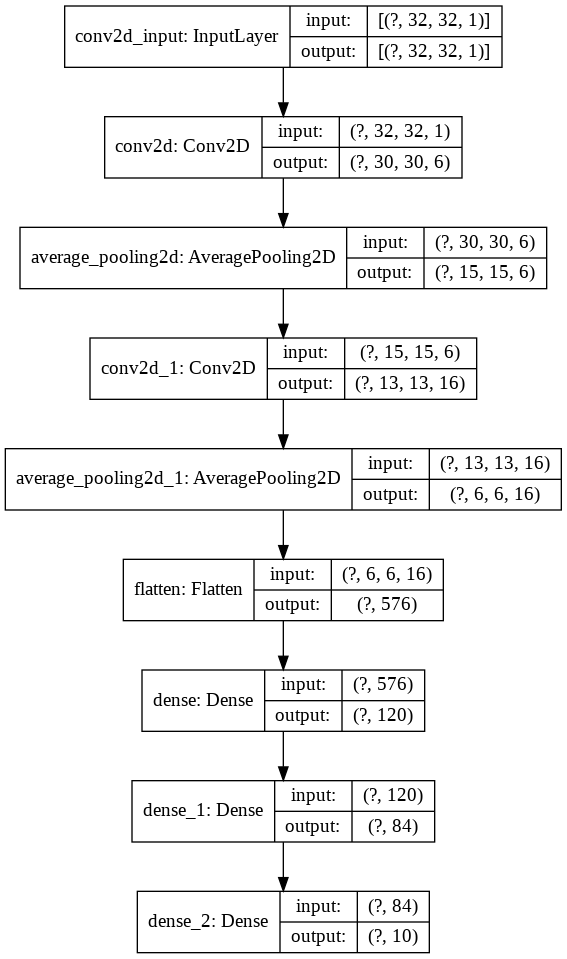
よりよく理解するために、次のコードを遵守しましょう
 import keras
from keras import layers
model = keras . Sequential ()

model . add ( layers . Conv2D ( filters = 6 , kernel_size = ( 3 , 3 ), activation = 'relu' , input_shape = ( 32 , 32 , 1 )))
model . add ( layers . AveragePooling2D ())

model . add ( layers . Conv2D ( filters = 16 , kernel_size = ( 3 , 3 ), activation = 'relu' ))
model . add ( layers . AveragePooling2D ())

model . add ( layers . Flatten ())

model . add ( layers . Dense ( units = 120 , activation = 'relu' ))

model . add ( layers . Dense ( units = 84 , activation = 'relu' ))

model . add ( layers . Dense ( units = 10 , activation = 'softmax' ))
それでは、これを視覚化しましょう
nn_visualize ( model )デフォルトでは、Keras Visualizationオブジェクトを返します
 from keras . models import Sequential
from keras . layers import Dense
import numpy
# fix random seed for reproducibility
numpy . random . seed ( 7 )
# load pima indians dataset
dataset = numpy . loadtxt ( "pima-indians-diabetes.csv" , delimiter = "," )
# split into input (X) and output (Y) variables
X = dataset [:, 0 : 8 ]
Y = dataset [:, 8 ]
# create model
model = Sequential ()
model . add ( Dense ( 12 , input_dim = 8 , activation = 'relu' ))
model . add ( Dense ( 8 , activation = 'relu' ))
model . add ( Dense ( 1 , activation = 'sigmoid' ))
# Compile model
model . compile ( loss = 'binary_crossentropy' , optimizer = 'adam' , metrics = [ 'accuracy' ])
# Fit the model
model . fit ( X , Y , epochs = 150 , batch_size = 10 )
# evaluate the model
scores = model . evaluate ( X , Y )
print ( " n %s: %.2f%%" % ( model . metrics_names [ 1 ], scores [ 1 ] * 100 ))


#Neural network visualization

nn_visualize ( model , type = "graphviz" )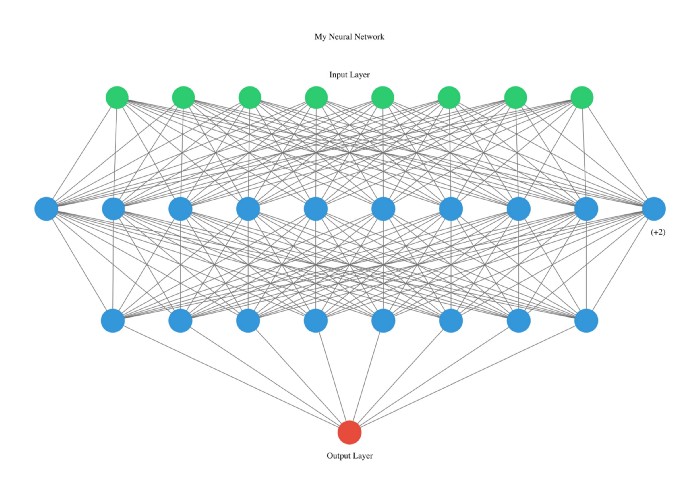
このライブラリは非常に開発者に優しいので、スタートレターでタイプを宣言します。
 from pyAutoML . model import *
model2 = model ( arch = "alexNet" )

nn_visualize ( model2 , type = "k" )
LinkedIn
github
Instagram







