py automl
1.0.0

Py-Automl adalah perpustakaan pembelajaran mesin low-code sumber terbuka di Python yang bertujuan untuk mengurangi hipotesis waktu siklus wawasan dalam percobaan ML. Terutama membantu melakukan proyek hewan peliharaan kami dengan cepat dan efisien. Dibandingkan dengan pustaka pembelajaran mesin open source lainnya, Py-Automl adalah perpustakaan kode rendah alternatif yang dapat digunakan untuk melakukan tugas pembelajaran mesin yang kompleks dengan hanya beberapa baris kode. Py-Automl pada dasarnya adalah pembungkus Python di sekitar beberapa perpustakaan dan kerangka kerja pembelajaran mesin seperti scikit-learn , 'TensorFlow', 'Keras' dan banyak lagi.
Desain dan kesederhanaan py-automl terinspirasi oleh dua prinsip ciuman (tetap sederhana dan manis) dan kering (jangan ulangi diri Anda). Kami sebagai insinyur harus menemukan cara yang efektif untuk mengurangi kesenjangan ini dan mengatasi tantangan terkait data dalam pengaturan bisnis.
Py-Automl adalah perpustakaan minimalis yang tidak menyederhanakan tugas pembelajaran mesin dan juga membuat pekerjaan kami lebih mudah.
pip install py-automlArahkan ke folder dan instal persyaratan:
pip install -r requirements.txt
Mengimpor paket
 import pyAutoML
from pyAutoML import *
from pyAutoML . model import *
# like that...
Tetapkan variabel x dan y ke kolom yang diinginkan dan tetapkan ukuran variabel ke test_size yang diinginkan.
 X = < df . features >
Y = < df . target >
size = < test_size > Encode variabel target jika non-numerik:
 from pyAutoML import *
Y = EncodeCategorical ( Y )Tanda tangan adalah sebagai berikut: Ml (x, y, ukuran = 0,25, *args)
 from pyAutoML . ml import ML , ml , EncodeCategorical

import pandas as pd
import numpy as np
from sklearn . ensemble import RandomForestClassifier
from sklearn . tree import DecisionTreeClassifier
from sklearn . neighbors import KNeighborsClassifier
from sklearn . linear_model import LogisticRegression
from sklearn . svm import SVC
from sklearn import datasets


##reading the Iris dataset into the code
df =  datasets . load_iris ()

##assigning the desired columns to X and Y  in preparation for running fastML
X = df . data [:, : 4 ]
Y = df . target

##running the EncodeCategorical function from fastML to handle the process of categorial encoding of data
Y = EncodeCategorical ( Y )
size = 0.33

ML ( X , Y , size , SVC (), RandomForestClassifier (), DecisionTreeClassifier (), KNeighborsClassifier (), LogisticRegression ( max_iter = 7000 )) ____________________________________________________
..................... Py - AutoML ......................
____________________________________________________
SVC ______________________________
Accuracy Score for SVC is
0.98
Confusion Matrix for SVC is
[[ 16 0 0 ]
[ 0 18 1 ]
[ 0 0 15 ]]
Classification Report for SVC is
precision recall f1 - score support
0 1.00 1.00 1.00 16
1 1.00 0.95 0.97 19
2 0.94 1.00 0.97 15
accuracy 0.98 50
macro avg 0.98 0.98 0.98 50
weighted avg 0.98 0.98 0.98 50
____________________________________________________
RandomForestClassifier ______________________________
Accuracy Score for RandomForestClassifier is
0.96
Confusion Matrix for RandomForestClassifier is
[[ 16 0 0 ]
[ 0 18 1 ]
[ 0 1 14 ]]
Classification Report for RandomForestClassifier is
precision recall f1 - score support
0 1.00 1.00 1.00 16
1 0.95 0.95 0.95 19
2 0.93 0.93 0.93 15
accuracy 0.96 50
macro avg 0.96 0.96 0.96 50
weighted avg 0.96 0.96 0.96 50
____________________________________________________
DecisionTreeClassifier ______________________________
Accuracy Score for DecisionTreeClassifier is
0.98
Confusion Matrix for DecisionTreeClassifier is
[[ 16 0 0 ]
[ 0 18 1 ]
[ 0 0 15 ]]
Classification Report for DecisionTreeClassifier is
precision recall f1 - score support
0 1.00 1.00 1.00 16
1 1.00 0.95 0.97 19
2 0.94 1.00 0.97 15
accuracy 0.98 50
macro avg 0.98 0.98 0.98 50
weighted avg 0.98 0.98 0.98 50
____________________________________________________
KNeighborsClassifier ______________________________
Accuracy Score for KNeighborsClassifier is
0.98
Confusion Matrix for KNeighborsClassifier is
[[ 16 0 0 ]
[ 0 18 1 ]
[ 0 0 15 ]]
Classification Report for KNeighborsClassifier is
precision recall f1 - score support
0 1.00 1.00 1.00 16
1 1.00 0.95 0.97 19
2 0.94 1.00 0.97 15
accuracy 0.98 50
macro avg 0.98 0.98 0.98 50
weighted avg 0.98 0.98 0.98 50
____________________________________________________
LogisticRegression ______________________________
Accuracy Score for LogisticRegression is
0.98
Confusion Matrix for LogisticRegression is
[[ 16 0 0 ]
[ 0 18 1 ]
[ 0 0 15 ]]
Classification Report for LogisticRegression is
precision recall f1 - score support
0 1.00 1.00 1.00 16
1 1.00 0.95 0.97 19
2 0.94 1.00 0.97 15
accuracy 0.98 50
macro avg 0.98 0.98 0.98 50
weighted avg 0.98 0.98 0.98 50
Model Accuracy
0 SVC 0.98
1 RandomForestClassifier 0.96
2 DecisionTreeClassifier 0.98
3 KNeighborsClassifier 0.98
4 LogisticRegression 0.98 ML ( X , Y ) ____________________________________________________
..................... Py - AutoML ......................
____________________________________________________
SVC ______________________________
Accuracy Score for SVC is
0.9736842105263158
Confusion Matrix for SVC is
[[ 13 0 0 ]
[ 0 15 1 ]
[ 0 0 9 ]]
Classification Report for SVC is
precision recall f1 - score support
0 1.00 1.00 1.00 13
1 1.00 0.94 0.97 16
2 0.90 1.00 0.95 9
accuracy 0.97 38
macro avg 0.97 0.98 0.97 38
weighted avg 0.98 0.97 0.97 38
____________________________________________________
RandomForestClassifier ______________________________
Accuracy Score for RandomForestClassifier is
0.9736842105263158
Confusion Matrix for RandomForestClassifier is
[[ 13 0 0 ]
[ 0 15 1 ]
[ 0 0 9 ]]
Classification Report for RandomForestClassifier is
precision recall f1 - score support
0 1.00 1.00 1.00 13
1 1.00 0.94 0.97 16
2 0.90 1.00 0.95 9
accuracy 0.97 38
macro avg 0.97 0.98 0.97 38
weighted avg 0.98 0.97 0.97 38
____________________________________________________
DecisionTreeClassifier ______________________________
Accuracy Score for DecisionTreeClassifier is
0.9736842105263158
Confusion Matrix for DecisionTreeClassifier is
[[ 13 0 0 ]
[ 0 15 1 ]
[ 0 0 9 ]]
Classification Report for DecisionTreeClassifier is
precision recall f1 - score support
0 1.00 1.00 1.00 13
1 1.00 0.94 0.97 16
2 0.90 1.00 0.95 9
accuracy 0.97 38
macro avg 0.97 0.98 0.97 38
weighted avg 0.98 0.97 0.97 38
____________________________________________________
KNeighborsClassifier ______________________________
Accuracy Score for KNeighborsClassifier is
0.9736842105263158
Confusion Matrix for KNeighborsClassifier is
[[ 13 0 0 ]
[ 0 15 1 ]
[ 0 0 9 ]]
Classification Report for KNeighborsClassifier is
precision recall f1 - score support
0 1.00 1.00 1.00 13
1 1.00 0.94 0.97 16
2 0.90 1.00 0.95 9
accuracy 0.97 38
macro avg 0.97 0.98 0.97 38
weighted avg 0.98 0.97 0.97 38
____________________________________________________
LogisticRegression ______________________________
Accuracy Score for LogisticRegression is
0.9736842105263158
Confusion Matrix for LogisticRegression is
[[ 13 0 0 ]
[ 0 15 1 ]
[ 0 0 9 ]]
Classification Report for LogisticRegression is
precision recall f1 - score support
0 1.00 1.00 1.00 13
1 1.00 0.94 0.97 16
2 0.90 1.00 0.95 9
accuracy 0.97 38
macro avg 0.97 0.98 0.97 38
weighted avg 0.98 0.97 0.97 38
Model Accuracy
0 SVC 0.9736842105263158
1 RandomForestClassifier 0.9736842105263158
2 DecisionTreeClassifier 0.9736842105263158
3 KNeighborsClassifier 0.9736842105263158
4 LogisticRegression 0.9736842105263158 #Instantiation
AlexNet = Sequential ()
#1st Convolutional Layer
AlexNet . add ( Conv2D ( filters = 96 , input_shape = input_shape , kernel_size = ( 11 , 11 ), strides = ( 4 , 4 ), padding = 'same' ))
AlexNet . add ( BatchNormalization ())
AlexNet . add ( Activation ( 'relu' ))
AlexNet . add ( MaxPooling2D ( pool_size = ( 2 , 2 ), strides = ( 2 , 2 ), padding = 'same' ))
#2nd Convolutional Layer
AlexNet . add ( Conv2D ( filters = 256 , kernel_size = ( 5 , 5 ), strides = ( 1 , 1 ), padding = 'same' ))
AlexNet . add ( BatchNormalization ())
AlexNet . add ( Activation ( 'relu' ))
AlexNet . add ( MaxPooling2D ( pool_size = ( 2 , 2 ), strides = ( 2 , 2 ), padding = 'same' ))
#3rd Convolutional Layer
AlexNet . add ( Conv2D ( filters = 384 , kernel_size = ( 3 , 3 ), strides = ( 1 , 1 ), padding = 'same' ))
AlexNet . add ( BatchNormalization ())
AlexNet . add ( Activation ( 'relu' ))
#4th Convolutional Layer
AlexNet . add ( Conv2D ( filters = 384 , kernel_size = ( 3 , 3 ), strides = ( 1 , 1 ), padding = 'same' ))
AlexNet . add ( BatchNormalization ())
AlexNet . add ( Activation ( 'relu' ))
#5th Convolutional Layer
AlexNet . add ( Conv2D ( filters = 256 , kernel_size = ( 3 , 3 ), strides = ( 1 , 1 ), padding = 'same' ))
AlexNet . add ( BatchNormalization ())
AlexNet . add ( Activation ( 'relu' ))
AlexNet . add ( MaxPooling2D ( pool_size = ( 2 , 2 ), strides = ( 2 , 2 ), padding = 'same' ))
#Passing it to a Fully Connected layer
AlexNet . add ( Flatten ())
# 1st Fully Connected Layer
AlexNet . add ( Dense ( 4096 , input_shape = ( 32 , 32 , 3 ,)))
AlexNet . add ( BatchNormalization ())
AlexNet . add ( Activation ( 'relu' ))
# Add Dropout to prevent overfitting
AlexNet . add ( Dropout ( 0.4 ))
#2nd Fully Connected Layer
AlexNet . add ( Dense ( 4096 ))
AlexNet . add ( BatchNormalization ())
AlexNet . add ( Activation ( 'relu' ))
#Add Dropout
AlexNet . add ( Dropout ( 0.4 ))
#3rd Fully Connected Layer
AlexNet . add ( Dense ( 1000 ))
AlexNet . add ( BatchNormalization ())
AlexNet . add ( Activation ( 'relu' ))
#Add Dropout
AlexNet . add ( Dropout ( 0.4 ))
#Output Layer
AlexNet . add ( Dense ( 10 ))
AlexNet . add ( BatchNormalization ())
AlexNet . add ( Activation ( classifier_function ))
AlexNet . compile ( 'adam' , loss_function , metrics = [ 'acc' ])
return AlexNetTapi kami menerapkan ini dalam satu baris kode seperti di bawah ini menggunakan paket ini.
alexNet_model = model ( input_shape = ( 30 , 30 , 4 ) , arch = "alexNet" , classify = "Mulit" )Demikian pula kami juga dapat menerapkannya
 alexNet_model = model ( "alexNet" )

lenet5_model = model ( "lenet5" )

googleNet_model = model ( "googleNet" )

vgg16_model = model ( "vgg16" )

### etc...
Untuk lebih banyak generalisasi, mari kita amati kode berikut.
 # Lets take all models that are defined in the py_automl and which are implemented in a signle line of code
models = [ "simple_cnn" , "basic_cnn" , "googleNet" , "inception" , "vgg16" , "lenet5" , "alexNet" , "basic_mlp" , "deep_mlp" , "basic_lstm" , "deep_lstm" ]

d = {}

for i in models :
  d [ i ] = model ( i )  # assigning all architectures to its model names using dictionary
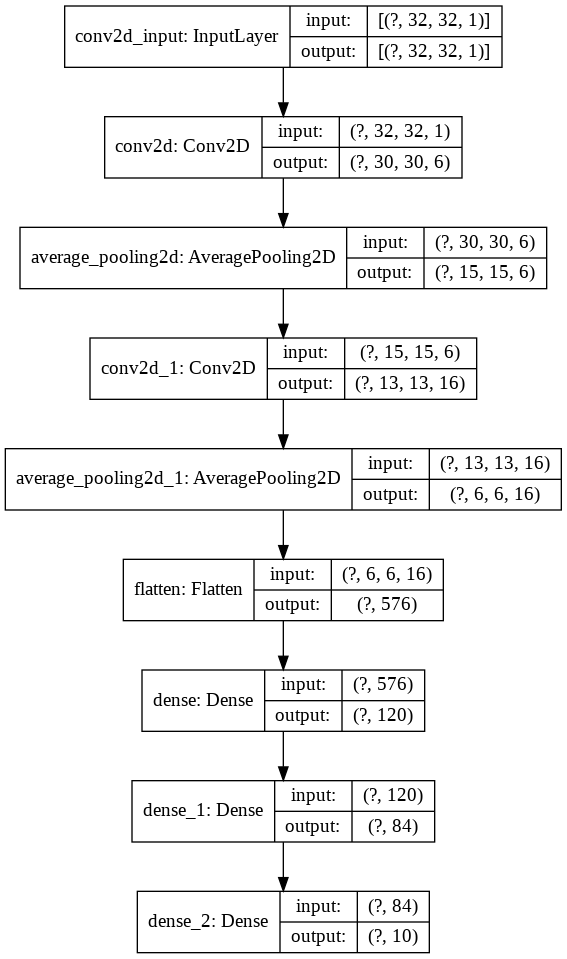
Mari kita amati kode berikut untuk pemahaman yang lebih baik
 import keras
from keras import layers
model = keras . Sequential ()

model . add ( layers . Conv2D ( filters = 6 , kernel_size = ( 3 , 3 ), activation = 'relu' , input_shape = ( 32 , 32 , 1 )))
model . add ( layers . AveragePooling2D ())

model . add ( layers . Conv2D ( filters = 16 , kernel_size = ( 3 , 3 ), activation = 'relu' ))
model . add ( layers . AveragePooling2D ())

model . add ( layers . Flatten ())

model . add ( layers . Dense ( units = 120 , activation = 'relu' ))

model . add ( layers . Dense ( units = 84 , activation = 'relu' ))

model . add ( layers . Dense ( units = 10 , activation = 'softmax' ))
Sekarang mari kita visualisasikan ini
nn_visualize ( model )Secara default, ia mengembalikan objek visualisasi keras
 from keras . models import Sequential
from keras . layers import Dense
import numpy
# fix random seed for reproducibility
numpy . random . seed ( 7 )
# load pima indians dataset
dataset = numpy . loadtxt ( "pima-indians-diabetes.csv" , delimiter = "," )
# split into input (X) and output (Y) variables
X = dataset [:, 0 : 8 ]
Y = dataset [:, 8 ]
# create model
model = Sequential ()
model . add ( Dense ( 12 , input_dim = 8 , activation = 'relu' ))
model . add ( Dense ( 8 , activation = 'relu' ))
model . add ( Dense ( 1 , activation = 'sigmoid' ))
# Compile model
model . compile ( loss = 'binary_crossentropy' , optimizer = 'adam' , metrics = [ 'accuracy' ])
# Fit the model
model . fit ( X , Y , epochs = 150 , batch_size = 10 )
# evaluate the model
scores = model . evaluate ( X , Y )
print ( " n %s: %.2f%%" % ( model . metrics_names [ 1 ], scores [ 1 ] * 100 ))


#Neural network visualization

nn_visualize ( model , type = "graphviz" )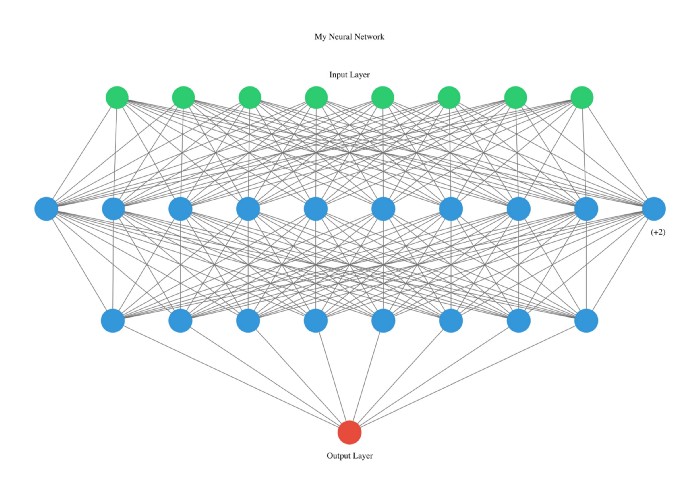
Perpustakaan ini sangat ramah pengembang sehingga bahkan kami menyatakan jenis dengan huruf awal.
 from pyAutoML . model import *
model2 = model ( arch = "alexNet" )

nn_visualize ( model2 , type = "k" )
LinkedIn
GitHub
Instagram







