py automl
1.0.0

Py-AutomL es una biblioteca de aprendizaje automático low-code abierto en Python que tiene como objetivo reducir la hipótesis al tiempo de ciclo de ideas en un experimento ML. Principalmente ayuda a hacer nuestros proyectos de mascotas de manera rápida y eficiente. En comparación con las otras bibliotecas de aprendizaje automático de código abierto, Py-AutomL es una biblioteca alternativa de bajo código que puede usarse para realizar tareas de aprendizaje automático complejos con solo unas pocas líneas de código. Py-Automl es esencialmente un envoltorio de Python alrededor de varias bibliotecas y marcos de aprendizaje automático como scikit-learn , 'TensorFlow', 'Keras' y muchos más.
El diseño y la simplicidad de Py-Automl se inspiran en los dos principios besos (manténgalo simple y dulce) y seco (no se repita). Nosotros, como ingenieros, tenemos que encontrar una forma efectiva de mitigar esta brecha y abordar los desafíos relacionados con los datos en el entorno comercial.
Py-Automl es una biblioteca minimalista que no simplifica las tareas de aprendizaje automático y también facilita nuestro trabajo.
pip install py-automlNavegue a la carpeta e instale los requisitos:
pip install -r requirements.txt
Importando el paquete
 import pyAutoML
from pyAutoML import *
from pyAutoML . model import *
# like that...
Asigne las variables x e y a las columnas deseadas y asigne el tamaño de la variable al test_size deseado.
 X = < df . features >
Y = < df . target >
size = < test_size > Codifique la variable objetivo si no es numérico:
 from pyAutoML import *
Y = EncodeCategorical ( Y )La firma es la siguiente: ml (x, y, tamaño = 0.25, *args)
 from pyAutoML . ml import ML , ml , EncodeCategorical

import pandas as pd
import numpy as np
from sklearn . ensemble import RandomForestClassifier
from sklearn . tree import DecisionTreeClassifier
from sklearn . neighbors import KNeighborsClassifier
from sklearn . linear_model import LogisticRegression
from sklearn . svm import SVC
from sklearn import datasets


##reading the Iris dataset into the code
df =  datasets . load_iris ()

##assigning the desired columns to X and Y  in preparation for running fastML
X = df . data [:, : 4 ]
Y = df . target

##running the EncodeCategorical function from fastML to handle the process of categorial encoding of data
Y = EncodeCategorical ( Y )
size = 0.33

ML ( X , Y , size , SVC (), RandomForestClassifier (), DecisionTreeClassifier (), KNeighborsClassifier (), LogisticRegression ( max_iter = 7000 )) ____________________________________________________
..................... Py - AutoML ......................
____________________________________________________
SVC ______________________________
Accuracy Score for SVC is
0.98
Confusion Matrix for SVC is
[[ 16 0 0 ]
[ 0 18 1 ]
[ 0 0 15 ]]
Classification Report for SVC is
precision recall f1 - score support
0 1.00 1.00 1.00 16
1 1.00 0.95 0.97 19
2 0.94 1.00 0.97 15
accuracy 0.98 50
macro avg 0.98 0.98 0.98 50
weighted avg 0.98 0.98 0.98 50
____________________________________________________
RandomForestClassifier ______________________________
Accuracy Score for RandomForestClassifier is
0.96
Confusion Matrix for RandomForestClassifier is
[[ 16 0 0 ]
[ 0 18 1 ]
[ 0 1 14 ]]
Classification Report for RandomForestClassifier is
precision recall f1 - score support
0 1.00 1.00 1.00 16
1 0.95 0.95 0.95 19
2 0.93 0.93 0.93 15
accuracy 0.96 50
macro avg 0.96 0.96 0.96 50
weighted avg 0.96 0.96 0.96 50
____________________________________________________
DecisionTreeClassifier ______________________________
Accuracy Score for DecisionTreeClassifier is
0.98
Confusion Matrix for DecisionTreeClassifier is
[[ 16 0 0 ]
[ 0 18 1 ]
[ 0 0 15 ]]
Classification Report for DecisionTreeClassifier is
precision recall f1 - score support
0 1.00 1.00 1.00 16
1 1.00 0.95 0.97 19
2 0.94 1.00 0.97 15
accuracy 0.98 50
macro avg 0.98 0.98 0.98 50
weighted avg 0.98 0.98 0.98 50
____________________________________________________
KNeighborsClassifier ______________________________
Accuracy Score for KNeighborsClassifier is
0.98
Confusion Matrix for KNeighborsClassifier is
[[ 16 0 0 ]
[ 0 18 1 ]
[ 0 0 15 ]]
Classification Report for KNeighborsClassifier is
precision recall f1 - score support
0 1.00 1.00 1.00 16
1 1.00 0.95 0.97 19
2 0.94 1.00 0.97 15
accuracy 0.98 50
macro avg 0.98 0.98 0.98 50
weighted avg 0.98 0.98 0.98 50
____________________________________________________
LogisticRegression ______________________________
Accuracy Score for LogisticRegression is
0.98
Confusion Matrix for LogisticRegression is
[[ 16 0 0 ]
[ 0 18 1 ]
[ 0 0 15 ]]
Classification Report for LogisticRegression is
precision recall f1 - score support
0 1.00 1.00 1.00 16
1 1.00 0.95 0.97 19
2 0.94 1.00 0.97 15
accuracy 0.98 50
macro avg 0.98 0.98 0.98 50
weighted avg 0.98 0.98 0.98 50
Model Accuracy
0 SVC 0.98
1 RandomForestClassifier 0.96
2 DecisionTreeClassifier 0.98
3 KNeighborsClassifier 0.98
4 LogisticRegression 0.98 ML ( X , Y ) ____________________________________________________
..................... Py - AutoML ......................
____________________________________________________
SVC ______________________________
Accuracy Score for SVC is
0.9736842105263158
Confusion Matrix for SVC is
[[ 13 0 0 ]
[ 0 15 1 ]
[ 0 0 9 ]]
Classification Report for SVC is
precision recall f1 - score support
0 1.00 1.00 1.00 13
1 1.00 0.94 0.97 16
2 0.90 1.00 0.95 9
accuracy 0.97 38
macro avg 0.97 0.98 0.97 38
weighted avg 0.98 0.97 0.97 38
____________________________________________________
RandomForestClassifier ______________________________
Accuracy Score for RandomForestClassifier is
0.9736842105263158
Confusion Matrix for RandomForestClassifier is
[[ 13 0 0 ]
[ 0 15 1 ]
[ 0 0 9 ]]
Classification Report for RandomForestClassifier is
precision recall f1 - score support
0 1.00 1.00 1.00 13
1 1.00 0.94 0.97 16
2 0.90 1.00 0.95 9
accuracy 0.97 38
macro avg 0.97 0.98 0.97 38
weighted avg 0.98 0.97 0.97 38
____________________________________________________
DecisionTreeClassifier ______________________________
Accuracy Score for DecisionTreeClassifier is
0.9736842105263158
Confusion Matrix for DecisionTreeClassifier is
[[ 13 0 0 ]
[ 0 15 1 ]
[ 0 0 9 ]]
Classification Report for DecisionTreeClassifier is
precision recall f1 - score support
0 1.00 1.00 1.00 13
1 1.00 0.94 0.97 16
2 0.90 1.00 0.95 9
accuracy 0.97 38
macro avg 0.97 0.98 0.97 38
weighted avg 0.98 0.97 0.97 38
____________________________________________________
KNeighborsClassifier ______________________________
Accuracy Score for KNeighborsClassifier is
0.9736842105263158
Confusion Matrix for KNeighborsClassifier is
[[ 13 0 0 ]
[ 0 15 1 ]
[ 0 0 9 ]]
Classification Report for KNeighborsClassifier is
precision recall f1 - score support
0 1.00 1.00 1.00 13
1 1.00 0.94 0.97 16
2 0.90 1.00 0.95 9
accuracy 0.97 38
macro avg 0.97 0.98 0.97 38
weighted avg 0.98 0.97 0.97 38
____________________________________________________
LogisticRegression ______________________________
Accuracy Score for LogisticRegression is
0.9736842105263158
Confusion Matrix for LogisticRegression is
[[ 13 0 0 ]
[ 0 15 1 ]
[ 0 0 9 ]]
Classification Report for LogisticRegression is
precision recall f1 - score support
0 1.00 1.00 1.00 13
1 1.00 0.94 0.97 16
2 0.90 1.00 0.95 9
accuracy 0.97 38
macro avg 0.97 0.98 0.97 38
weighted avg 0.98 0.97 0.97 38
Model Accuracy
0 SVC 0.9736842105263158
1 RandomForestClassifier 0.9736842105263158
2 DecisionTreeClassifier 0.9736842105263158
3 KNeighborsClassifier 0.9736842105263158
4 LogisticRegression 0.9736842105263158 #Instantiation
AlexNet = Sequential ()
#1st Convolutional Layer
AlexNet . add ( Conv2D ( filters = 96 , input_shape = input_shape , kernel_size = ( 11 , 11 ), strides = ( 4 , 4 ), padding = 'same' ))
AlexNet . add ( BatchNormalization ())
AlexNet . add ( Activation ( 'relu' ))
AlexNet . add ( MaxPooling2D ( pool_size = ( 2 , 2 ), strides = ( 2 , 2 ), padding = 'same' ))
#2nd Convolutional Layer
AlexNet . add ( Conv2D ( filters = 256 , kernel_size = ( 5 , 5 ), strides = ( 1 , 1 ), padding = 'same' ))
AlexNet . add ( BatchNormalization ())
AlexNet . add ( Activation ( 'relu' ))
AlexNet . add ( MaxPooling2D ( pool_size = ( 2 , 2 ), strides = ( 2 , 2 ), padding = 'same' ))
#3rd Convolutional Layer
AlexNet . add ( Conv2D ( filters = 384 , kernel_size = ( 3 , 3 ), strides = ( 1 , 1 ), padding = 'same' ))
AlexNet . add ( BatchNormalization ())
AlexNet . add ( Activation ( 'relu' ))
#4th Convolutional Layer
AlexNet . add ( Conv2D ( filters = 384 , kernel_size = ( 3 , 3 ), strides = ( 1 , 1 ), padding = 'same' ))
AlexNet . add ( BatchNormalization ())
AlexNet . add ( Activation ( 'relu' ))
#5th Convolutional Layer
AlexNet . add ( Conv2D ( filters = 256 , kernel_size = ( 3 , 3 ), strides = ( 1 , 1 ), padding = 'same' ))
AlexNet . add ( BatchNormalization ())
AlexNet . add ( Activation ( 'relu' ))
AlexNet . add ( MaxPooling2D ( pool_size = ( 2 , 2 ), strides = ( 2 , 2 ), padding = 'same' ))
#Passing it to a Fully Connected layer
AlexNet . add ( Flatten ())
# 1st Fully Connected Layer
AlexNet . add ( Dense ( 4096 , input_shape = ( 32 , 32 , 3 ,)))
AlexNet . add ( BatchNormalization ())
AlexNet . add ( Activation ( 'relu' ))
# Add Dropout to prevent overfitting
AlexNet . add ( Dropout ( 0.4 ))
#2nd Fully Connected Layer
AlexNet . add ( Dense ( 4096 ))
AlexNet . add ( BatchNormalization ())
AlexNet . add ( Activation ( 'relu' ))
#Add Dropout
AlexNet . add ( Dropout ( 0.4 ))
#3rd Fully Connected Layer
AlexNet . add ( Dense ( 1000 ))
AlexNet . add ( BatchNormalization ())
AlexNet . add ( Activation ( 'relu' ))
#Add Dropout
AlexNet . add ( Dropout ( 0.4 ))
#Output Layer
AlexNet . add ( Dense ( 10 ))
AlexNet . add ( BatchNormalization ())
AlexNet . add ( Activation ( classifier_function ))
AlexNet . compile ( 'adam' , loss_function , metrics = [ 'acc' ])
return AlexNetPero implementamos esto en una sola línea de código como a continuación usando este paquete.
alexNet_model = model ( input_shape = ( 30 , 30 , 4 ) , arch = "alexNet" , classify = "Mulit" )Del mismo modo, también podemos implementar
 alexNet_model = model ( "alexNet" )

lenet5_model = model ( "lenet5" )

googleNet_model = model ( "googleNet" )

vgg16_model = model ( "vgg16" )

### etc...
Para más generalización, observemos el siguiente código.
 # Lets take all models that are defined in the py_automl and which are implemented in a signle line of code
models = [ "simple_cnn" , "basic_cnn" , "googleNet" , "inception" , "vgg16" , "lenet5" , "alexNet" , "basic_mlp" , "deep_mlp" , "basic_lstm" , "deep_lstm" ]

d = {}

for i in models :
  d [ i ] = model ( i )  # assigning all architectures to its model names using dictionary
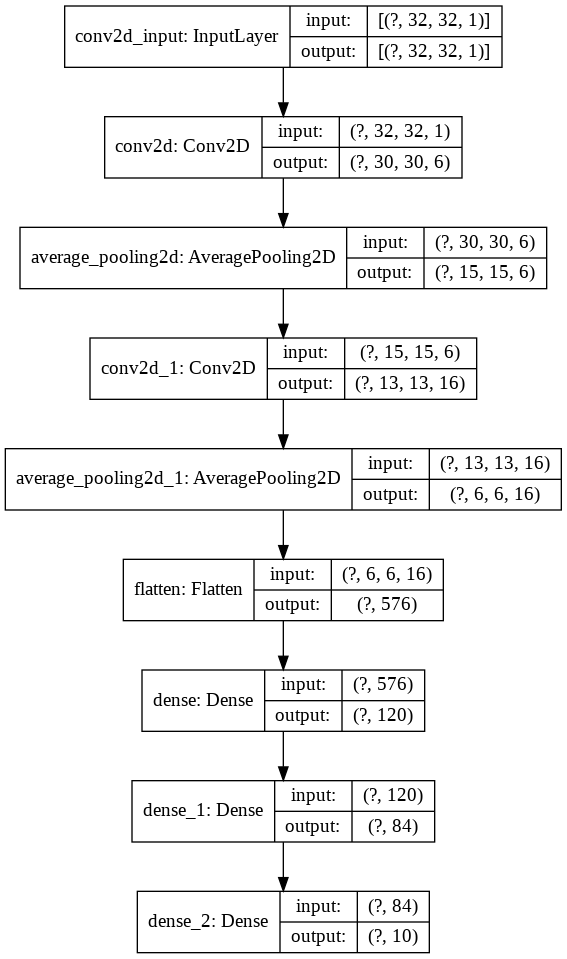
Observemos el siguiente código para una mejor comprensión
 import keras
from keras import layers
model = keras . Sequential ()

model . add ( layers . Conv2D ( filters = 6 , kernel_size = ( 3 , 3 ), activation = 'relu' , input_shape = ( 32 , 32 , 1 )))
model . add ( layers . AveragePooling2D ())

model . add ( layers . Conv2D ( filters = 16 , kernel_size = ( 3 , 3 ), activation = 'relu' ))
model . add ( layers . AveragePooling2D ())

model . add ( layers . Flatten ())

model . add ( layers . Dense ( units = 120 , activation = 'relu' ))

model . add ( layers . Dense ( units = 84 , activation = 'relu' ))

model . add ( layers . Dense ( units = 10 , activation = 'softmax' ))
Ahora visualicemos esto
nn_visualize ( model )Por defecto, devuelve el objeto de visualización de Keras
 from keras . models import Sequential
from keras . layers import Dense
import numpy
# fix random seed for reproducibility
numpy . random . seed ( 7 )
# load pima indians dataset
dataset = numpy . loadtxt ( "pima-indians-diabetes.csv" , delimiter = "," )
# split into input (X) and output (Y) variables
X = dataset [:, 0 : 8 ]
Y = dataset [:, 8 ]
# create model
model = Sequential ()
model . add ( Dense ( 12 , input_dim = 8 , activation = 'relu' ))
model . add ( Dense ( 8 , activation = 'relu' ))
model . add ( Dense ( 1 , activation = 'sigmoid' ))
# Compile model
model . compile ( loss = 'binary_crossentropy' , optimizer = 'adam' , metrics = [ 'accuracy' ])
# Fit the model
model . fit ( X , Y , epochs = 150 , batch_size = 10 )
# evaluate the model
scores = model . evaluate ( X , Y )
print ( " n %s: %.2f%%" % ( model . metrics_names [ 1 ], scores [ 1 ] * 100 ))


#Neural network visualization

nn_visualize ( model , type = "graphviz" )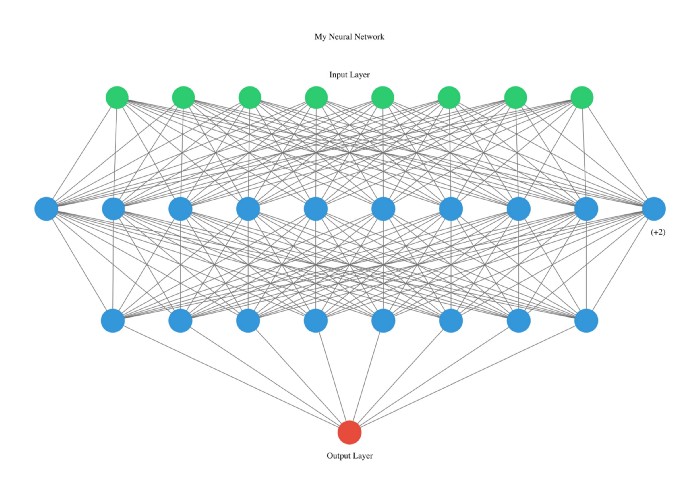
Esta biblioteca es tan amigable para el desarrollador que incluso declaramos tipo con letras iniciales.
 from pyAutoML . model import *
model2 = model ( arch = "alexNet" )

nn_visualize ( model2 , type = "k" )
LinkedIn
Github
Instagram







