RedAlert
1.0.0

公式のpikud ha-orefではありません
このスクリプトは、Pikud ha-orefによって合図されたすべての危険について警告を発するバイナリセンサーのスイートを作成します。これらの危険には、ミサイルとロケット火災の赤い警告、不正な航空機による違反、地震活動、津波警告、テロリストの侵入、化学的流出の緊急事態、非慣例的な戦争などが含まれます。アラートを受け取ると、メッセージの開始時に特定のタイプの脅威が示されます(たとえば、ロケットおよびミサイル火災のためのירי רקטות וטילים )。
このスクリプトは、履歴テキストとCSVファイルのすべてのアラートの詳細をアーカイブすること、プライマリセンサーから派生した追加のサブセンサーの作成を促進するなど、追加の機能を提供します。
注記
red_alertセットをデフォルトとして、センサー名を好みに合わせてカスタマイズできます。
binary_sensor.red_alert :pikud ha-orefデータを保持し、アラームでトリガーし、それ以外の場合はリセットします。自動化や追加のセンサーの作成に役立ちます。binary_sensor.red_alert_city :上記に似ていますが、指定された都市がアラームの対象である場合にのみトリガーします。input_text.red_alert :履歴ログとして機能する最新のアラートデータを記録します。input_boolean.red_alert_test :ダミーアラートをシミュレートして、自動化のセットアップを確認します。スクリプトは、ホームアシスタントマップに表示できるアラートのジオロケーションデータを保存する2つのGeojsonファイルを自動的に生成します。
ヒント
履歴データを保存するには、ホームアシスタントディレクトリ内のwwwというフォルダーを作成する必要があります。ホームアシスタントの再起動後にセンサーの履歴が維持されるようにするには、入力テキストとブールヘルパーを確立することをお勧めします。インストール前にこれを行うのが最善です。これがあなたが進む方法です:
configuration.yamlを開きます。 # /config/configuration.yaml
homeassistant :
allowlist_external_urls :
- http://192.168.86.20:8123 # YOUR HOME ASSISTANT IP
- http://homeassistant.local:8123
allowlist_external_dirs :
- " /config/www "
input_text :
red_alert :
name : Last Alert in Israel
min : 0
max : 255
input_boolean :
red_alert_test :
name : Test Alert
icon : mdi:alert-circleSettings > Add-ons > Ad-on-storeに移動してAppDaemonを検索して、 AppDaemon Addonをホームアシスタントにインストールします。requestsを追加します。 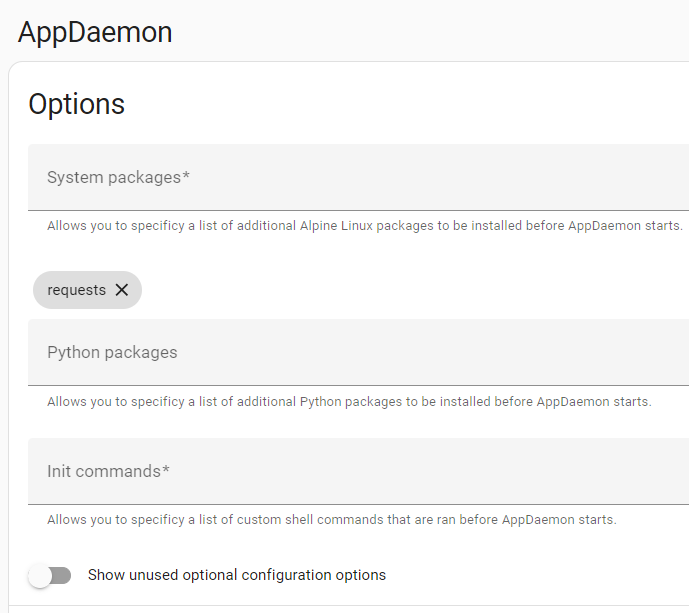
/addon_configs/a0d7b954_appdaemon/appdaemon.yaml appdaemon.yaml 。 ヒント
ファイルエディターアドオンを使用している場合、デフォルトではメインホームアシスタントディレクトリへのファイルアクセスのみを許可するように設定されています。ただし、AppDaemonアドオンファイルはルートディレクトリにあります。これらのファイルにアクセスするには、次の手順に従ってください。
Settings > Add-ons > File Editor > Configurationに移動します
Enforce Basepathオプションを切り替えます。
ファイルエディターで、ディレクトリ名の横にある矢印をクリックします(これは「Homeassistant」になります)。これにより、AppDaemonアドオンファイルが配置されているルートディレクトリにアクセスできるようになります。
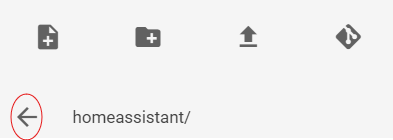
重要
ここで独自の座標(緯度と経度)を見つけることができます:https://www.latlong.net/
latitude: 31.9837528longitude: 34.7359077time_zone: Asia/Jerusalem 。app_dir: /homeassistant/appdaemon/apps/でappsディレクトリを指定します。/addon_configs/a0d7b954_appdaemon/appsからすべてのファイルを/config/appdaemon/appsに転送します。 # /addon_configs/a0d7b954_appdaemon/appdaemon.yaml
---
# secrets: /homeassistant/secrets.yaml
appdaemon :
app_dir : /homeassistant/appdaemon/apps/ # If you install this script via HACS
latitude : 31.9837528
longitude : 34.7359077
elevation : 2
time_zone : Asia/Jerusalem
plugins :
HASS :
type : hass
# token: !secret appdaemon
http :
timeout : 30
admin :
api :
hadashboard :スクリプトをダウンロードする2つの選択肢があります:手動またはHACを介して。 HACSからインストールすることで、スクリプトの新しいバージョンが利用可能になった場合、ホームアシスタントに通知を受け取ることができます。手動のダウンロードでは、将来の自動更新は提供されません。自分に最適な方法を選択してください。
appdaemon/appsディレクトリ内に配置し、最終ステップに進みますホームアシスタント: Settings > Integrations > HACS > AppDaemon apps discovery & tracking Configureおよび有効にします。有効にした後、メインHACS画面に戻ります。
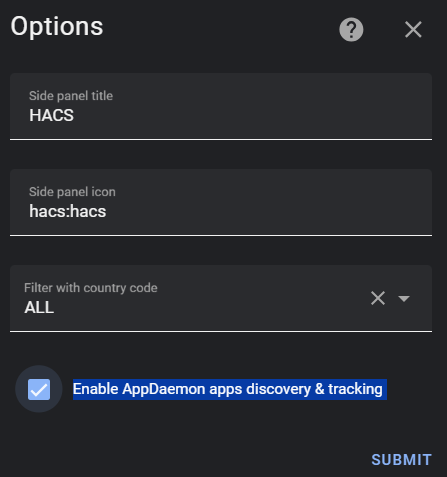
Custom Repositoriesページに移動し、次のリポジトリをAppDaemonとして追加します: https://github.com/idodov/RedAlert/
メインのHACSスクリーンに戻り、 Red Alerts Israelを検索します。 Downloadをクリックして、最終ステップに進みます
appdaemon/apps/apps.yamlファイルで、次のコードを追加します。
重要
pikud ha-orefがそれらを定義するように、 city_names値を必ず交換してください。たとえば、 תל אביבを書いてはいけません。代わりに、 תל אביב - דרום העירを書きます。
都市と地域の名前のリストについては、ここをクリックしてください
 # /appdaemon/apps/apps.yaml
red_alerts_israel :
  module : red_alerts_israel
  class : Red_Alerts_Israel
  interval : 2
  timer : 120
  sensor_name : " red_alert "
  save_2_file : True
  city_names :
    - תל אביב - מרכז העיר
    - כיסופים
    - שדרות, איבים, ניר עם
    - אשדוד - א,ב,ד,ה
- נתיב הל''ה| パラメーター | 説明 | 例 |
|---|---|---|
interval | スクリプトが実行される秒単位の間隔 | 2 |
timer | センサーがアラートの後にオンのままである秒単位の期間 | 120 |
sensor_name | ホームアシスタントのプライマリバイナリセンサーの名前( binary_sensor.#sensor_name# ) | red_alert |
save_2_file | 履歴データファイルを保存します。アラートがトリガーされるたびに、専用のTXTファイルとCSVファイルがデータを保存します。このファイルはホームアシスタントwwwディレクトリからアクセスできます/ CSVは、ExcelやGoogleシートなどのスプレッドシートアプリケーションで開くことができます | True |
city_names | binary_sensor.#sensor_name#_city必要な都市を追加できます | תל אביב - מרכז העיר |
ホームアシスタントは4つの異なるエンティティを初期化します。
binary_sensor.red_alert :これは、イスラエルの赤い警告中にアクティブになり、それ以外の場合は非アクティブに戻る主要なエンティティです。カテゴリ、ID、タイトル、データ、説明、アクティブアラートカウント、絵文字などのさまざまな属性が含まれます。binary_sensor.red_alert_city :このエンティティはpikud-ha-orefデータを保持しており、アラートに指定された都市が含まれている場合だけにアクティブ化されます。input_text.red_alert :ログブックのアラート履歴のログを目的としています。テキストエンティティのホームアシスタントの255文字の制限を考えると、広範なイベントがデータが遮断または省略されることにつながる可能性があります。したがって、自動化トリガーのためにこのエンティティに依存したり、サブセンサーを生成することはめったにありません。input_boolean.red_alert_test :このスイッチのフリップは、 timer構成に従ってセンサーを設定した期間センサーをアクティブにする架空のデータ(選択した都市用)を生成します。カードの例
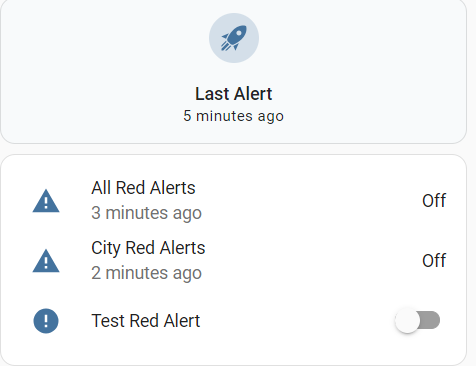
 type : vertical-stack
cards :
  - type : tile
    entity : input_text.red_alert
    vertical : true
    state_content : last-changed
  - type : entities
    entities :
      - entity : binary_sensor.red_alert
      - entity : binary_sensor.red_alert_city
      - entity : input_boolean.red_alert_test
    state_color : true
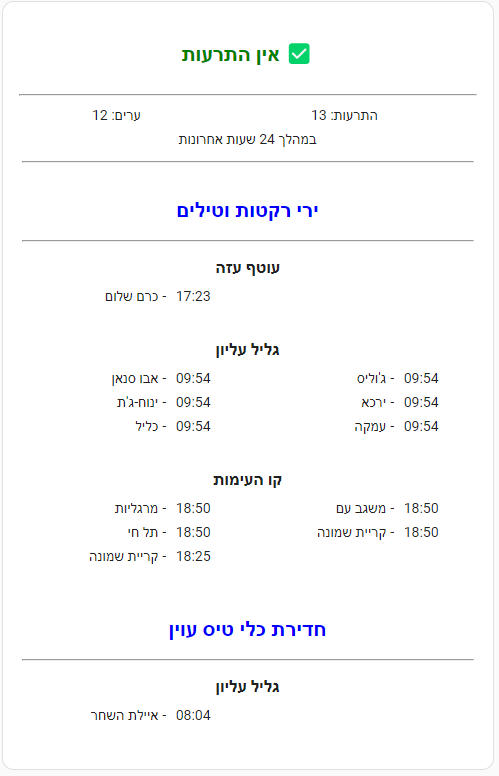
24時間の歴史
ヒント
履歴とその他の情報データを表示または表示するかどうかを選択することにより、カードを変更できます。 {% set show_history = False %} falseは24時間のアラート履歴を表示しないことです{% set show_info = False %} - falseはより多くの情報データを表示しないことです
type : markdown
content : >-
{% set show_history = True %}
{% set show_info = True %}
{% set alerts = state_attr('binary_sensor.red_alert',
'last_24h_alerts_group') %}
{% set oref = states('binary_sensor.red_alert') %}
<table width=100%><tr><td align=center>
{% if oref == 'on' %}
# <font color = red>{{ state_attr('binary_sensor.red_alert', 'prev_title')
}}</font> {{ state_attr('binary_sensor.red_alert', 'emoji') }}
</td></tr>
<tr><td align=center><big><big>
<b>{{ state_attr('binary_sensor.red_alert', 'alert_txt') }}</b></big></big>
{% else %}
## <font color=green>אין התרעות</font> ✅{% endif %}
</td></tr></table>
{% set current_date = now().date() %}
{% if state_attr('binary_sensor.red_alert', 'prev_last_changed') |
regex_match("^\d{4}-\d{2}-\d{2}T\d{2}:d{2}:d{2}.d+$") %}
{% set last_changed_timestamp = state_attr('binary_sensor.red_alert',
'prev_last_changed') | as_timestamp %}
{% if current_date == (last_changed_timestamp | timestamp_custom('%Y-%m-%d',
true) | as_datetime).date() %}
{% set current_timestamp = now().timestamp() %}
{% set time_difference = current_timestamp - last_changed_timestamp %}
<center>התרעה אחרונה נשלחה {% if time_difference < 3600 %} לפני {{
(time_difference / 60) | int }} דקות
{% elif time_difference < 86400 %}היום בשעה {{ last_changed_timestamp |
timestamp_custom('%H:%M', true) }}
{% else %}בתאריך {{ last_changed_timestamp | timestamp_custom('%d/%m/%Y',
true) }}, בשעה {{ last_changed_timestamp | timestamp_custom('%H:%M', true) }}
{% endif %}{% endif %}{% endif %}
</ha-alert>
{% if alerts and show_history %}
{% if show_info %}
<hr>
<table width=100%>
<tr><td align=center>
{{ state_attr('binary_sensor.red_alert', 'cities_past_24h') | length }}
:ערים</td>
<td align=center>
{{ state_attr('binary_sensor.red_alert', 'last_24h_alerts') | length }}
:התרעות</td></tr>
<tr>
<td colspan=2 align=center>
במהלך 24 שעות אחרונות
</td>
</tr>
<tr><td colspan=2><hr></td></tr>
</table>
{% endif %}
<table width=100% align=center>
{% for alert_type, areas in alerts.items() %}
<tr>
<td></td>
</tr>
<tr>
<td colspan=6 align=center><h2><font color=blue>{{ alert_type }}</font></h2>
<hr></td>
</tr>
{% for area, cities in areas.items() %}
<tr>
<td></td>
</tr>
<tr>
<td colspan=6 align=center><big><b>{{ area }}</b></big></td></tr>
<tr>
<td colspan=6></td>
</tr>
{% for city_pair in cities|batch(2) %}
<tr><td align=right valign=top>{{ city_pair[0].city }}</td>
<td valign=top> - </td><td valign=top>{{ city_pair[0].time[11:16] }}</td>{% if
city_pair|length > 1 %}
<td align=right valign=top>{{ city_pair[1].city }}</td>
<td valign=top> - </td><td valign=top>{{ city_pair[1].time[11:16] }}{% else
%}</td>{% endif %}</tr>
{% endfor %}
<tr>
<td colspan=6> </td>
</tr>
{% endfor %}
{% endfor %}
</table>
{% else %}
{% endif %}
ヒント
このトリガーをオートメーションで使用{{ (as_timestamp(now()) - as_timestamp(states.binary_sensor.red_alert.last_updated)) > 30 }}使用して、スクリプトがいつ実行されないかを知ります。
SpecialHis Markdownカードを作成して、センサーを追跡することもできます。

 type : markdown
content : >-
  {% set status = (as_timestamp(now()) -
  as_timestamp(states.binary_sensor.red_alert.last_updated)) < 30 %}
  {% if status %}
  <ha-alert alert-type="info">Run **{{ state_attr('binary_sensor.red_alert', 'count') }}** times since restart
  {% else %}
  <ha-alert alert-type="warning">**SCRIPT IS NOT RUNNING!!!**
  {% endif %}
</ha-alert> センサーから任意の属性を使用できます。たとえば、Lovelaceカード{{ state_attr('binary_sensor.red_alert', 'title') }}タイトルを表示するには、このコード構文を使用します。
| 属性名 | 手段 | 例 |
|---|---|---|
| `Active_now ' | ライブアラートがあるon 、ライブアラートがないoff | off |
count | ホームアシスタントの最後の再起動以来、スクリプトが実行した回数をカウントします。このデータを監視することにより、スクリプトが実行されていないかどうか、いつ実行されていないかを判断できます。 | 12345 |
cat | カテゴリ番号。 1から13にすることができます | 1 |
title | テキストの攻撃タイプ | ירי רקטות וטילים |
data | 文字列としての都市のリスト | תל אביב - מרכז העיר |
cities | 攻撃された都市のリスト | - קריית שמונה |
alerts_count | ライブアラートの数 | 4 |
my_cities | 定義されたユーザー都市 | - תל אביב - מרכז העיר |
areas | 文字列としての領域のリスト | גוש דן |
desc | 何をすべきかを説明してください | היכנסו למרחב המוגן ושהו בו 10 דקות |
duration | 安全な部屋に何秒になるか | 600 |
id | アラートのID | 133413399870000000 |
data_count | 攻撃されている都市の数 | 1 |
cities_past_24h | 過去24時間で攻撃した都市のリスト | - שלומי |
last_24h_alerts | 過去24時間のすべてのアラートのリスト | title 、 city 、 area 、 time |
last_24h_alerts_group | タイトルとエリアごとにグループ化された24時間すべてのアラートのリスト | titile 、 area 、 city 、 time |
emoji | 攻撃の種類のアイコン | |
prev_* | 各アトリブからの最後のデータ | センサーがアクティブだったときに最新の情報を保存します |
alert | 1行フルテキスト | ירי רקטות וטילים ב־קו העימות - בצת, שלומי |
alert_alt | ブレイキングラインフルテキスト | ירי רקטות וטילים/n* קו העימות: בצת, שלומי |
alert_txt | 1つの行のテキスト | קו העימות: בצת, שלומי |
alert_wa | WhatsApp経由で送信するテキストメッセージを最適化します | 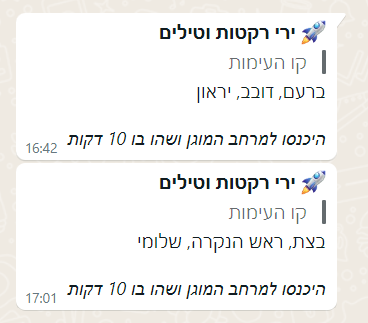 |
alert_tg | Telegram経由で送信するテキストメッセージを最適化します |
例:
 count : 237
id : 1234567890000000
cat : 1
title : ירי רקטות וטילים
desc : היכנסו למרחב המוגן ושהו בו 10 דקות
data : אבירים, פסוטה
areas : קו העימות
data_count : 2
duration : 600
last_changed : " 2024-03-29T20:18:36.354614 "
emoji : ️
icon_alert : mdi:alert
prev_last_changed : " 2024-03-29T20:18:36.354636 "
prev_cat : 1
prev_title : ירי רקטות וטילים
prev_desc : היכנסו למרחב המוגן ושהו בו 10 דקות
prev_data : שלומי
prev_data_count : 1
prev_duration : 600
prev_areas : קו העימות
alert : " ירי רקטות וטילים ב־קו העימות: שלומי "
alert_alt : |-
  ירי רקטות וטילים
   * קו העימות: שלומי
alert_txt : " קו העימות: שלומי "
alert_wa : |-
   *ירי רקטות וטילים*
  > קו העימות
  שלומי

  _היכנסו למרחב המוגן ושהו בו 10 דקות_
friendly_name : All Red Alerts
icon : mdi:alert
alert_tg : |-
   **ירי רקטות וטילים**
  **__קו העימות__** — שלומי

  __היכנסו למרחב המוגן ושהו בו 10 דקות__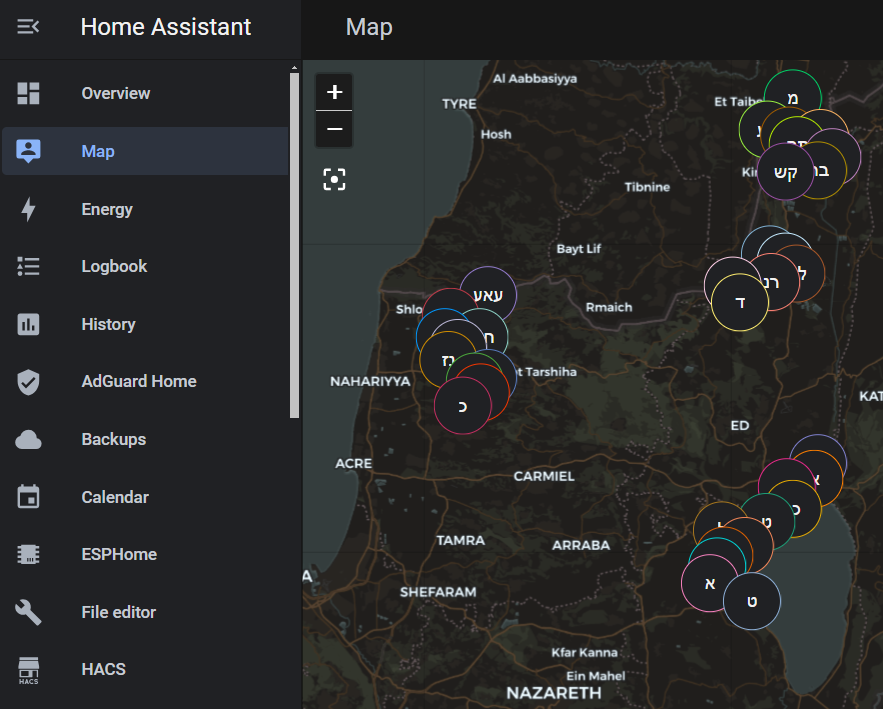
また、このスクリプトは2つのGeojsonファイルを自動的に作成し、アラートのジオロケーションデータを保存し、ホームアシスタントマップに表示できます。両方のファイルは\homeassistantconfigwwwディレクトリにあります。 red_alert_24h.geojsonファイルは、過去24時間のアラートのデータを保存し、 red_alert_latest.geojsonファイルは最新のアラートデータを保存します。
ホームアシスタントマップにデータを表示するには:
http://homeassistant.local:8123/local/red_alert_24h.geojson 。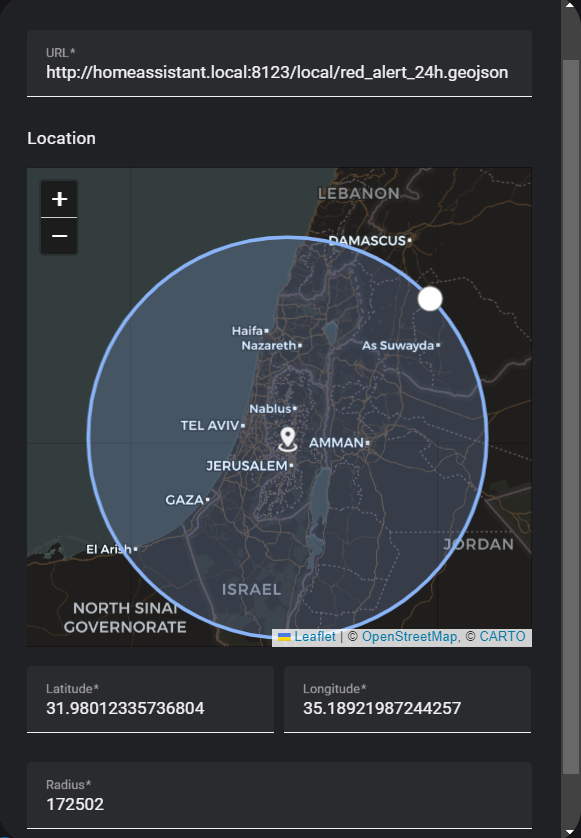
注記
Geojson統合がGeojsonファイルにアクセスできない場合は、 configuration.yamlファイルを開き、次のように必要な承認を追加します。
 homeassistant :
  allowlist_external_urls :
    - http://192.168.86.174:8123      # YOUR HA IP
    - http://homeassistant.local:8123
  allowlist_external_dirs :
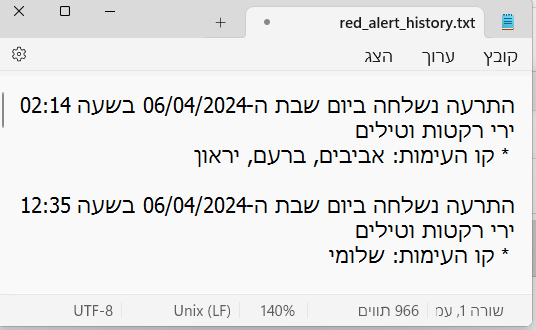
- " /config/www " スクリプトは、センサーデータ\homeassistantconfigwww red_alert_history.txtとred_alert_history.csvという名前のテキストファイルに保存します。アラート(テストアラートを含む)がトリガーされるたびに、ファイルが更新されます。専用のCSVファイルは、ExcelやGoogleシートなどのスプレッドシートアプリケーションで開くことができます。提供されたURL:http://homeassistant.local:8123/local/red_alert_history.txtを使用して、ブラウザからこれらのファイルに直接アクセスできます。
アラートがあるかどうか、アクティブアラートの数、およびそれぞれの場所があるかどうかを表示します。
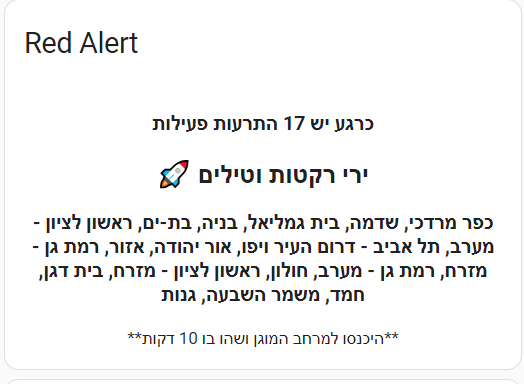
 type : markdown
content : >-
  <center><h3>{% if state_attr('binary_sensor.red_alert', 'data_count') > 0 %}
  כרגע יש {% if state_attr('binary_sensor.red_alert', 'data_count') > 1 %}{{
  state_attr('binary_sensor.red_alert', 'data_count') }} התרעות פעילות{% elif
  state_attr('binary_sensor.red_alert', 'data_count') == 1 %} התרעה פעילה אחת{%
  endif %}{% else %} אין התרעות פעילות{% endif %}</h3>

  {% if state_attr('binary_sensor.red_alert', 'data_count') > 0 %}<h2>{{
  state_attr('binary_sensor.red_alert', 'emoji') }} {{
  state_attr('binary_sensor.red_alert', 'title') }}</h2>
  <h3>{{ state_attr('binary_sensor.red_alert', 'data') }}</h3>
  **{{ state_attr('binary_sensor.red_alert', 'desc') }}** {% endif %} </center>
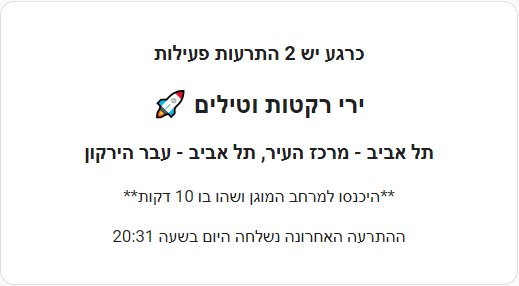
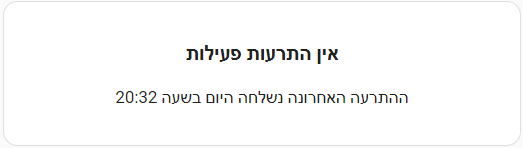
title : Red Alertこのスクリプトを使用して、アラートがトリガーされた正確な時間など、追加情報を含める柔軟性があります。
 type : markdown
content : >-
  <center><h3>{% if state_attr('binary_sensor.red_alert', 'data_count') > 0 %}
  כרגע יש {% if state_attr('binary_sensor.red_alert', 'data_count') > 1 %}{{
  state_attr('binary_sensor.red_alert', 'data_count') }} התרעות פעילות{% elif
  state_attr('binary_sensor.red_alert', 'data_count') == 1 %} התרעה פעילה אחת{%
  endif %}{% else %} אין התרעות פעילות{% endif %}</h3>

  {% if state_attr('binary_sensor.red_alert', 'data_count') > 0 %}<h2>{{
  state_attr('binary_sensor.red_alert', 'emoji') }} {{
  state_attr('binary_sensor.red_alert', 'title') }}</h2> <h3>{{
  state_attr('binary_sensor.red_alert', 'data') }}</h3> **{{
  state_attr('binary_sensor.red_alert', 'desc') }}** {% endif %}

  {% if state_attr('binary_sensor.red_alert', 'last_changed') |
  regex_match("^\d{4}-\d{2}-\d{2}T\d{2}:d{2}:d{2}.d+$") %}

  {% set last_changed_timestamp = state_attr('binary_sensor.red_alert',
  'last_changed') | as_timestamp %}

  {% set current_date = now().date() %}

  {% if current_date == (last_changed_timestamp | timestamp_custom('%Y-%m-%d',
  true)
   | as_datetime).date() %}
   ההתרעה האחרונה נשלחה היום בשעה {{ last_changed_timestamp | timestamp_custom('%H:%M', true) }}
  {% else %}התרעה אחרונה נשלחה בתאריך {{ last_changed_timestamp |
  timestamp_custom('%d/%m/%Y', true) }}, בשעה {{ last_changed_timestamp |
  timestamp_custom('%H:%M', true) }}

  {% endif %}
  {% endif %}
  </center>
別のより良い方法:
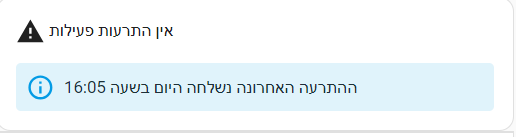
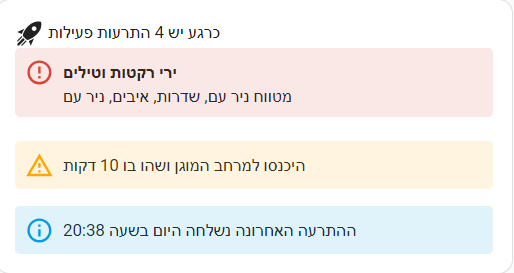
 type : markdown
content : >-
  <ha-icon icon="{{ state_attr('binary_sensor.red_alert', 'icon')
  }}"></ha-icon> {% if state_attr('binary_sensor.red_alert', 'data_count') > 0
  %}כרגע יש {% if state_attr('binary_sensor.red_alert', 'data_count') > 1 %}{{
  state_attr('binary_sensor.red_alert', 'data_count') }} התרעות פעילות{% elif
  state_attr('binary_sensor.red_alert', 'data_count') == 1 %} התרעה פעילה אחת{%
  endif %}{% else %}אין התרעות פעילות{% endif %}{% if
  state_attr('binary_sensor.red_alert', 'data_count') > 0 %}

  <ha-alert alert-type="error" title="{{ state_attr('binary_sensor.red_alert',
  'title') }}">{{ state_attr('binary_sensor.red_alert', 'data') }}</ha-alert>

  <ha-alert alert-type="warning">{{ state_attr('binary_sensor.red_alert',
  'desc') }}</ha-alert>

  {% endif %}

  {% if state_attr('binary_sensor.red_alert', 'last_changed') |
  regex_match("^\d{4}-\d{2}-\d{2}T\d{2}:d{2}:d{2}.d+$") %}

  {% set last_changed_timestamp = state_attr('binary_sensor.red_alert',
  'last_changed') | as_timestamp %}

  {% set current_date = now().date() %}{% if current_date ==
  (last_changed_timestamp | timestamp_custom('%Y-%m-%d', true)
   | as_datetime).date() %}<ha-alert alert-type="info">ההתרעה האחרונה נשלחה היום בשעה {{ last_changed_timestamp | timestamp_custom('%H:%M', true) }}
  {% else %}התרעה אחרונה נשלחה בתאריך {{ last_changed_timestamp |
  timestamp_custom('%d/%m/%Y', true) }}, בשעה {{ last_changed_timestamp |
timestamp_custom('%H:%M', true) }}{% endif %}{% endif %}</ha-alert> バイナリセンサーまたはその子会社センサーによってトリガーされるさまざまな自動アクションを生成する柔軟性があります。例として、1つの潜在的なアプリケーションは、AlertメッセージをLEDマトリックス画面にディスパッチすることです(PIC:すべてのアラートをEsphome32に基づいて画面を備えたUlanziスマートクロックにすべてのアラートを転送します)。

( #your phone#エンティティ名に変更します)
 alias : Notify attack
description : " Real-time Attack Notification "
trigger :
  - platform : state
    entity_id :
      - binary_sensor.red_alert
    from : " off "
    to : " on "
condition : []
action :
  - service : notify.mobile_app_#your phone#
    data :
      message : " {{ state_attr('binary_sensor.red_alert', 'data') }} "
      title : " {{ state_attr('binary_sensor.red_alert', 'title') }} {{ state_attr('binary_sensor.red_alert', 'areas') }} "
mode : single別の図として、アラートがアクティブになっている間に、RGBライトを繰り返し変更するようにRGBライトを構成できます。
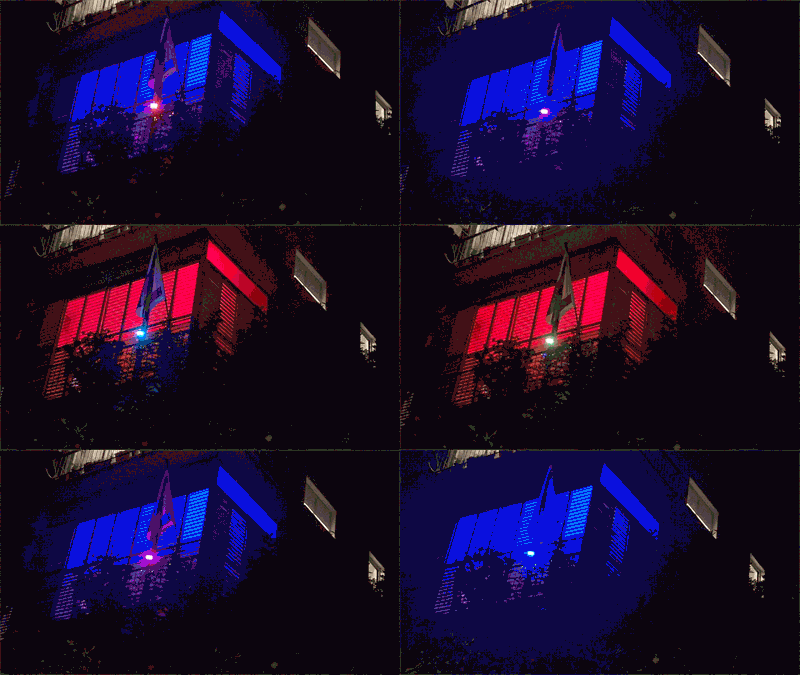
( light.#light-1#エンティティ名に)
 alias : Alert in city
description : " When an alert occurs in your define city, the lights will cyclically change to red and blue for a duration of 30 seconds, after which they will revert to their previous states "
trigger :
- platform : state
  entity_id :
    - binary_sensor.red_alert_city
  from : " off "
  to : " on "
condition : []
action :
  - service : scene.create
    data :
      scene_id : before_red_alert
      snapshot_entities :
        - light.#light-1#
        - light.#light-2#
        - light.#light-3#
  - repeat :
      count : 30
      sequence :
        - service : light.turn_on
          data :
            color_name : blue
          target :
            entity_id :
            - light.#light-1#
            - light.#light-2#
            - light.#light-3#
        - delay :
            hours : 0
            minutes : 0
            seconds : 0
            milliseconds : 500
        - service : light.turn_on
          data :
            color_name : red
          target :
            entity_id :
            - light.#light-1#
            - light.#light-2#
            - light.#light-3#
        - delay :
            hours : 0
            minutes : 0
            seconds : 0
            milliseconds : 500
  - service : scene.turn_on
    data : {}
    target :
      entity_id : scene.before_red_alert
mode : single「DESC」属性は、セーフルーム内にとどまるために数分で期間に関する情報を提供します。この自動化は、この属性のデータに基づいてタイマーを生成します。この自動化を実装する前に、タイマーヘルパーを作成することが不可欠です。
#your phone#エンティティ名に変更) Alias : Safe to go out
description : " Notify on phone that it's safe to go outside "
mode : single
trigger :
- platform : template
value_template : >-
{{ "תל אביב - מרכז העיר" in state_attr('binary_sensor.red_alert',
'data').split(', ') }}
condition : []
action :
- service : timer.start
data :
duration : >-
{{ state_attr('binary_sensor.red_alert_city', 'duration') }}
target :
entity_id : timer.red_alert
- service : notify.mobile_app_#your phone#
data :
title : ההתרעה הוסרה
message : אפשר לחזור לשגרה 二次バイナリセンサーがアクティブになる都市を指定する必要がありますが、メインセンサーに基づいて追加のサブセンサーを定義する柔軟性もあります。これを行う方法のいくつかの例を以下に示します。
注記
他の都市名で同様のキャラクターパターンを持つ特定の都市で攻撃が発生した場合にのみアクティブになるセンサーを作成するには、次のアプローチを使用する必要があります。たとえば、「גןגןגןגן」ではなく「גןגן」のみが攻撃されたときにアクティブになるセンサーを作成する場合は、次のコード構文を使用できます。特定の領域をトリガーしたい場合は、分割関数を使用して、https://www.oref.org.il/12481-he/pakar.aspxに登場するとまったく同じ都市名とエリアを入力するようにしてください。
{{ "תל אביב - מרכז העיר" in state_attr('binary_sensor.red_alert', 'data').split(', ') }}
{{ "יבנה" in state_attr('binary_sensor.red_alert', 'data').split(', ') }}
 {{ "אירוס" in state_attr('binary_sensor.red_alert', 'data').split(', ')
 or "בית חנן" in state_attr('binary_sensor.red_alert', 'data').split(', ')
 or "גן שורק" in state_attr('binary_sensor.red_alert', 'data').split(', ') }}
複数のゾーンがある都市では、都市名のみを定義した場合、分割関数のみに依存することは効果的ではありません。複数のアラートゾーンに分割された11の都市内のすべてのゾーンをトリガーするセンサーが必要な場合は、データを分割する代わりにSearch_Regex関数を利用することをお勧めします。
{{ state_attr('binary_sensor.red_alert', 'data') | regex_search("תל אביב") }}
イスラエルは30の大都市圏に分割されているため、それぞれを個別に指定する必要なく、近くの町の一般的な状況を判断できます。これを達成するために、「エリア」属性を利用できます。これは、アルファベット順に提示されたイスラエルの30の大都市圏のリストです。
א、בקעבקע、בקעתב、גג、גלגלעל対גלדר対דרדר対דרדר対דרדר、דרדר、דרם、、、 、מערבמערבנגב、 מערבלכלכ、מרכזמרכזמרכז対מרכזמרכז、עע、עעטףעז、ערבערב、צפצפ、קקק業者、קקする、ש業者、ששמר因、
{{ "גוש דן" in state_attr('binary_sensor.red_alert', 'areas').split(', ') }}
「CAT」属性は、1〜13の範囲のアラートタイプを定義します。選択した都市またはエリアの有無にかかわらず、特定のタイプのアラートに対してバイナリセンサーをセットアップするオプションがあります。
| 猫(番号) | アラートのタイプ |
|---|---|
| 1 | ミスル攻撃 |
| 6 | 許可されていない航空機の浸透 |
| 13 | テロリストの侵入 |
自動化のトリガー
{{ state_attr('binary_sensor.red_alert', 'cat') == '6' }}
Nahal-ozの不正な航空機の浸透のサンプルトリガーアラート
 {{ state_attr('binary_sensor.red_alert', 'cat') == '6'
and "נחל עוז" in state_attr('binary_sensor.red_alert', 'data').split(', ') }}




