pyqttooltip
v1.0.0

A modern and fully customizable tooltip library for PyQt and PySide
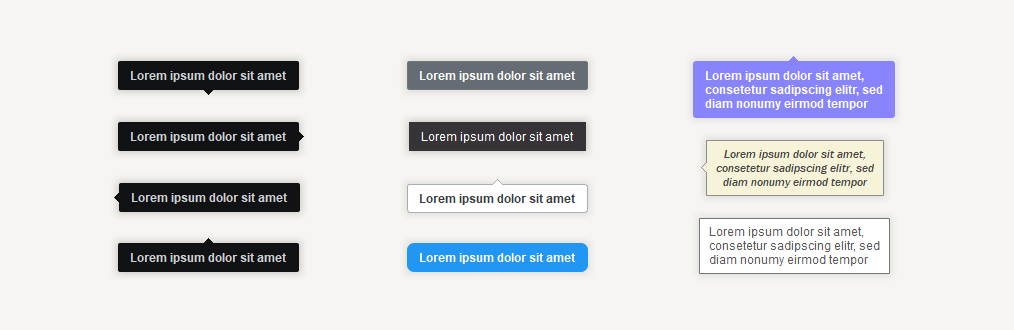
PyQt5, PyQt6, PySide2, and PySide6pip install pyqttooltip
from PyQt6.QtWidgets import QMainWindow, QPushButton
from pyqttooltip import Tooltip, TooltipPlacement


class Window(QMainWindow):
    def __init__(self):
        super().__init__(parent=None)

        # Add button
        self.button = QPushButton('Button', self)

        # Add tooltip to button
        self.tooltip = Tooltip(self.button, 'This is a tooltip')
The tooltip will automatically be shown while hovering the widget. If you want to manually
show and hide the tooltip, you can use the show() and hide() methods:
tooltip.show()
tooltip.hide()
To delete a tooltip, you can use the deleteLater() method:
tooltip.deleteLater()To get notified when a tooltip gets shown or hidden, you can subscribe to the shown and hidden signals:
tooltip.shown.connect(lambda: print('shown'))
tooltip.hidden.connect(lambda: print('hidden'))tooltip.setWidget(widget) # Default: Nonetooltip.setText('Text of the tooltip') # Default: ''tooltip.setPlacement(TooltipPlacement.RIGHT) # Default: TooltipPlacement.AUTOAVAILABLE PLACEMENTS:
AUTO,LEFT,RIGHT,TOP,BOTTOM
tooltip.setFallbackPlacements([TooltipPlacement.TOP, TooltipPlacement.BOTTOM]) # Default: []If the tooltip doesn't fit on the screen with the primary placement, one of the fallback placements will be chosen instead in the order of the provided list.
To get the current placement of the tooltip, you can use thegetActualPlacement()method.
tooltip.setTriangleEnabled(False) # Default: Truetooltip.setTriangleSize(7) # Default: 5tooltip.setDuration(1000) # Default: 0The duration is the time in milliseconds after which the tooltip will start fading out again. If the duration is set to
0, the tooltip will stay visible for as long as the widget is hovered.
# Setting the offset for a specific placement
tooltip.setOffsetByPlacement(TooltipPlacement.LEFT, QPoint(-10, 5))

# Using a dict that specifies the offset for each placement you want to set
offsets = {
    TooltipPlacement.LEFT:   QPoint(-10, 5),
    TooltipPlacement.RIGHT:  QPoint(10, 5),
    TooltipPlacement.TOP:    QPoint(5, -10),
    TooltipPlacement.BOTTOM: QPoint(5, 10)
}
tooltip.setOffsets(offsets)

# Setting the offsets for all the placements to a single value
tooltip.setOffsetsAll(QPoint(10, 5))
Each placement / side has its own offset to allow for full customizability. Each offset is a QPoint, which is made up of an x and y value.
By default, all the offsets are set toQPoint(0, 0).
tooltip.setShowDelay(500)  # Default: 50
tooltip.setHideDelay(500) # Default: 50tooltip.setFadeInDuration(250) # Default: 150
tooltip.setFadeOutDuration(250) # Default: 150tooltip.setBorderRadius(0) # Default: 2tooltip.setBorderEnabled(True) # Default: Falsetooltip.setBackgroundColor(QColor('#FCBA03')) # Default: QColor('#111214')
tooltip.setTextColor(QColor('#000000')) # Default: QColor('#CFD2D5')
tooltip.setBorderColor(QColor('#A38329')) # Default: QColor('#403E41')tooltip.setFont(QFont('Consolas', 10)) # Default: QFont('Arial', 9, QFont.Weight.Bold)tooltip.setMargins(QMargins(10, 8, 10, 8)) # Default: QMargins(12, 8, 12, 7)tooltip.setMaximumWidth(150) # Default: 16777215 (QWIDGETSIZE_MAX)tooltip.setTextCenteringEnabled(False) # Default: Truetooltip.setDropShadowEnabled(False) # Default: Truetooltip.setDropShadowStrength(3.5) # Default: 2.0tooltip.setOpacity(0.8) # Default: 1.0
Other customization options:
| Option | Description | Default |
|---|---|---|
setShowingOnDisabled() |
Whether the tooltips should also be shown on disabled widgets | False |
setFadeInEasingCurve() |
The easing curve of the fade in animation | QEasingCurve.Type.Linear |
setFadeOutEasingCurve() |
The easing curve of the fade out animation | QEasingCurve.Type.Linear |
setMarginLeft() |
Set left margin individually | 12 |
setMarginRight() |
Set right margin individually | 12 |
setMarginTop() |
Set top margin individually | 8 |
setMarginBottom() |
Set bottom margin individually | 7 |
The demos for PyQt5, PyQt6, and PySide6 can be found in the demo folder.
To keep the demo simple, only the most important features are included. To get an overview of all the customization options, check out the documentation above.
Installing the required test dependencies PyQt6, pytest, and coveragepy:
pip install PyQt6 pytest coverage
To run the tests with coverage, clone this repository, go into the main directory and run:
coverage run -m pytest
coverage report --ignore-errors -m
This software is licensed under the MIT license.







