powerpage
1.0.0

PowerPage is a lightweight web browser with DB capability and windows accessibility, for rapid development of HTML/Javascript application.
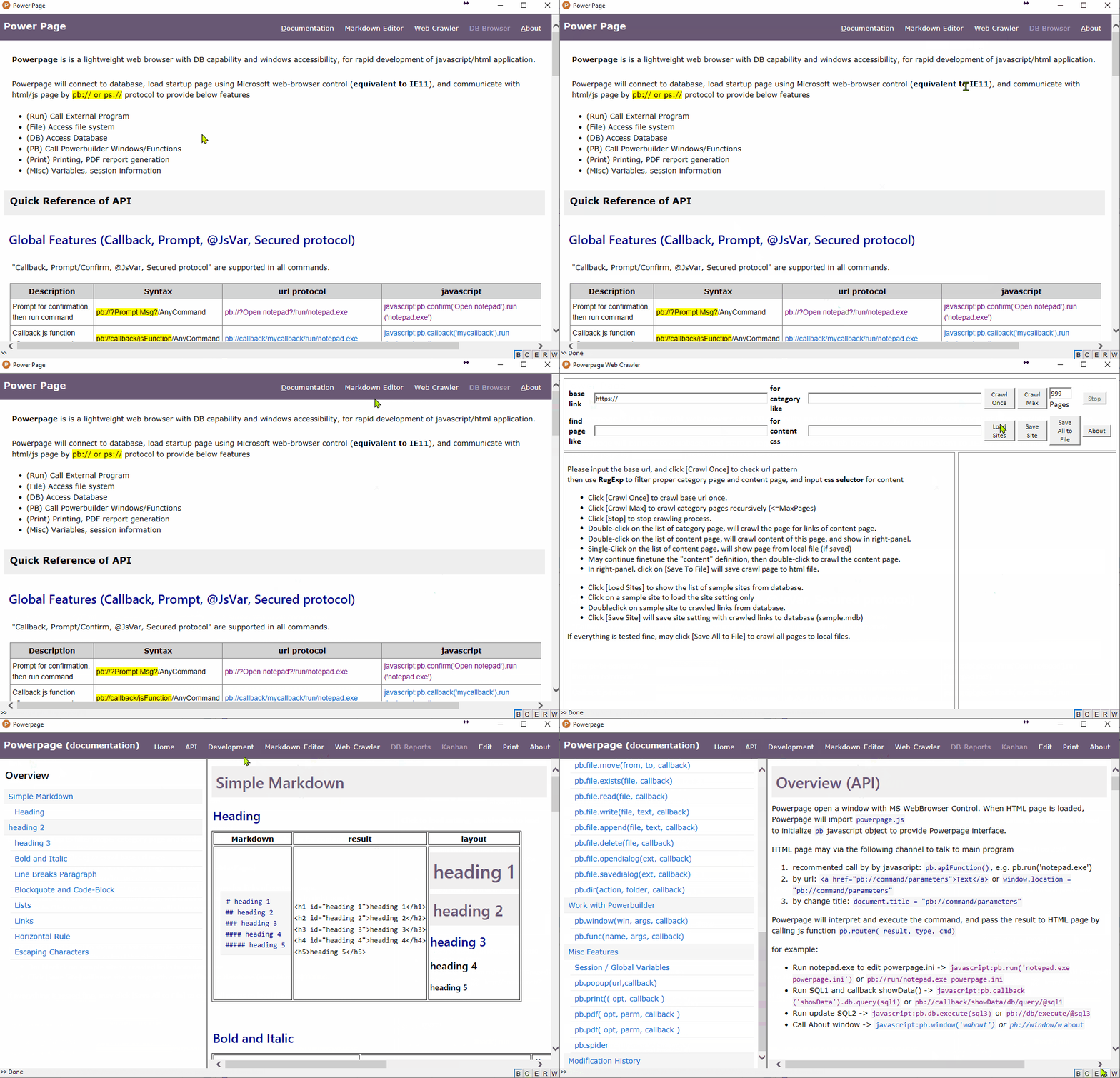
Powerpage will connect to database, load startup page using Microsoft web-browser control (equivalent to IE11),
and communicate with html/js page by pb:// or ps:// protocol to provide below features
For security reason, all browsers are working hard to prevent unauthorized access of OS resources (ie. printer, files, database etc..). In other side, developers working hard to access OS resources for application development. Development within web-browser just like a game of police-theft.
I had longed for a web browser which has DB connectivity and OS accessibility, so that can coding HTML/JavaScript application like Electron.
Somehow, quite frustrated in many "installation" works, to setup development environment and deploy application. It always goes wrong by unknown reasons and stuck into unknown situations. What I want is "copy-and-run" and "code-and-play" (i.e. no installation, no compile, no deployment).
I try to make "Powerpage" solution for this purpose.
Powerpage is a ready-make Electron-like solution. No install, no compile, no packing. Just open editor to start coding.
ps: due to the limitation of Microsoft web-browser control, Powerpage web browser is equivalent to IE11 (not chrome)!
Powerpage is a single executable program. just download and run powerpage.exe.
powerpage.exepowerpage.exe is the executable file of powerpage. (single executable file)powerpage.html is the startup html file (i.e. javascript/html application)powerpage.ini is the config file for DB connection and misc setuppowerpage.js is the initial javascript lib for interface*.dll is Powerbuilder run-time filesSource code
Powerpage is developed by Powerbuilder 10.5, source code is powerpage.pbl (only one file)
powerpage.pbl is powerbuilder source codepowerpage.pbt is powerbuilder target filepowerpage.pbt to workspace, and compile by p_powerpageApplications
pp-md-editor.html is pp-application of "Powerpage Markdown Editor"pp-web-crawler.html is pp-application of "Powerpage Web Crawler"Powerpage open a window with MS WebBrowser Control. When HTML page is loaded, Powerpage will import powerpage.js
to initialize pb javascript object to provide Powerpage interface.
HTML page may via the following channel to talk to main program
pb.apiFunction(), e.g. pb.run('notepad.exe')<a href="pb://command/parameters">Text</a> or window.location = "pb://command/parameters"document.title = "pb://command/parameters"Powerpage will interpret and execute the command, and pass the result to HTML page by calling js function pb.router(callback, result, type, cmd)
for example:
javascript:pb.run('notepad.exe powerpage.ini') or pb://run/notepad.exe powerpage.inijavascript:pb.callback('showData').db.query(sql1) or pb://callback/showData/db/query/@sql1javascript:pb.db.execute(sql3) or pb://db/execute/@sql3javascript:pb.window('w_about') or pb://window/w_aboutplease refer to latest documents in github-page: https://casualwriter.github.io/powerpage
Beside running html/javascript applications, Powerpage has wide usage by using command-line parameters.
powerpage.exe /ini={ini-file} /url={start-url}  /script={script-file} /fullscreen /print /silent
              /save={save-html} /pdf={output-pdf-file} /select={selector} /delay={1000}
/ini={ini-file} specifies ini setting file. Aplication could be changed by change the ini file./url={start-url} is used to specify startup link. Aplication could be changed by change startup link./script={script-file} will specify user-defined javascript instead of powerpage.js. useful for js injection./fullscreen or /kiosk will run in fullscreen mode, useful for kiosk, or display board./silent will run in silent mode (i.e. suppress js error message)/save={save-html} will load startup url, save to html file, and close program. Useful for web-crawler/pdf={output-pdf-file} will load startup url, generate PDF file, and close program. useful for PDF generation./delay={1000} specifies delay time (by milliseconds) for print/save/pdf options/select={css-selector} is applied for print/save to select part of html elements. Useful for web-crawlerGeneral Usage
powerpage.exe /ini=pp-md-editor.ini run "Powerpage Markdown Editor" with its config inipowerpage.exe /url=pp-md-editor.html run "Powerpage Markdown Editor"powerpage.exe /url=pp-web-crawler.html run "Powerpage Web Crawler"powerpage.exe /url=pp-kanban.html /fullscreen run Kanban display board in fullscreen modepowerpage.exe /url=pp-md-document.html open "Powerpage Documents"powerpage.exe /url=facebook.com /script=myfacebook.js`` inject js script for facebook.comprint page or save to html/pdf
powerpage.exe /url=http://haodoo.net/ /print print page of haodoo.netpowerpage.exe /url=http://haodoo.net/ /pdf=haodoo.pdf save the page of haodoo.net to PDF filepowerpage.exe /url=http://haodoo.net/ /save=haodoo.html save page "haodoo.net" to haodoo.htmlsave web content to file (whole page or select by css-selecotr)
powerpage.exe /url=https://pingshan-tech.com/powerpage/doc /save=README.html save powerpage README (whole page)powerpage.exe /url=https://pingshan-tech.com/powerpage/doc /save=README.html /select=#content save powerpage README (#content:outerHTML)powerpage.exe /url=https://pingshan-tech.com/powerpage/doc /save=README.html /select=@#content save powerpage README (#content:innerText)powerpage.exe /url=https://pingshan-tech.com/powerpage/doc /save=README.html /select=#right-panel save powerpage README (#right-panel)save github content to html/pdf (select==.markdown-body)
powerpage /url=https://github.com/casualwriter/powerpage /save=README.html /select=.markdown-body to save README from github (has error msg)powerpage /url=https://github.com/casualwriter/powerpage /save=README.html /select=.markdown-body /silent to save README from github (silent mode)powerpage /url=https://github.com/casualwriter/powerpage /pdf=README.pdf /select=.markdown-body /silent to save in PDF formatPowerpage is released with some sample applications.





