everything web scraping
1.0.0

Learn everything web scraping by David Teather find the video series on YouTube.
Please consider giving Course Feedback
Glad you're here! If it's your first time check out the the introduction, if not welcome back!
Consider sponsoring me on GitHub to make work like this possible
Video Walkthrough
If you don't want to deal with installing and configuring software, I've set up this repository so that a GitHub Codespace can do all of that for you.
Note: A free GitHub account comes with 60 hours of Codespaces free each month, and if you're a student you can get 90 hours free each month with GitHub Pro through the GitHub Student Developer Pack (source)
If you want to save your solutions, create a fork then create a Codespace from your own repo, then you'll be able to use git to save your changes as normal.
Create a Codespace using the instructions below or here
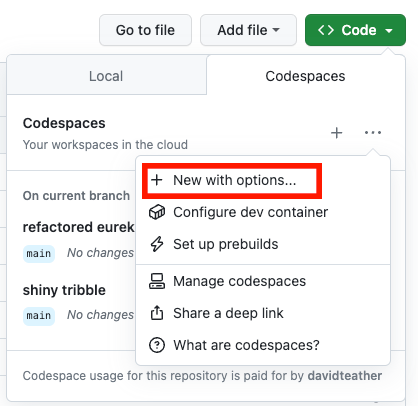
Select Code -> Codespaces Tab -> The + Icon -> New With Options
Or click here
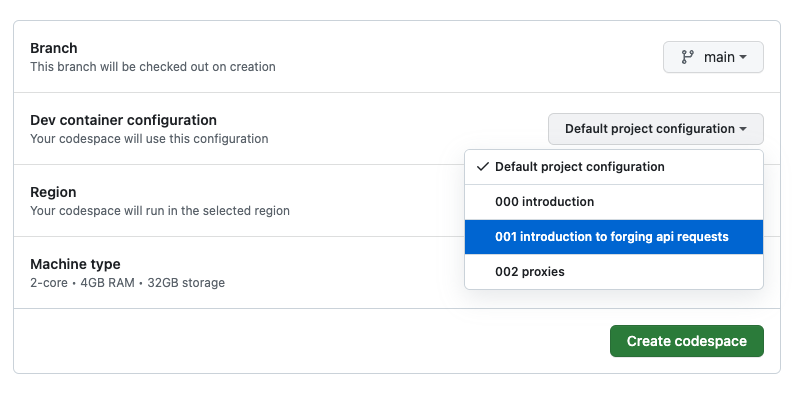
Select the configuration of the lesson you're on, and after hitting create a Codespace
VS Code editor will open in the browser and start all programs needed for the activity!
After finishing each lesson you can visit the GitHub Codespaces menu and delete the Codespace so you don't get charged while you're not using it.
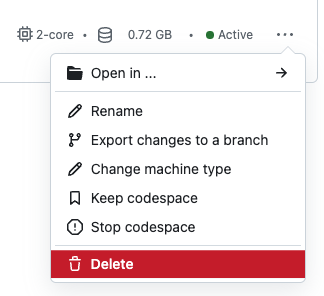
Delete a Codespace with the 3 dots -> Delete
This will delete any changes you've made
Note: If you enjoy GitHub Codespaces consider checking out my ~30 minute LinkedIn Learning Course on Codespaces, you can get free 24h access through my LinkedIn post and feel free to send a connection request while you're over there ?
Run docker-compose up while in a lesson directory, when it says development server started open localhost:3000 in your browser to check that it's working properly.
When done with this lesson you can control + c to shut down your docker containers.
docker rm $(docker ps -a -q --filter name=XXX), where XXX is the lesson number you want removed (ex: 001).docker rmi $(docker images --filter label=lesson.number=X -a -q), where X is the number you want removed (ex: 1, ex: 10)






