learn_fortran
1.0.0


So you want to learn Fortran. Well, so do I. This is Brian's sandbox for learning Fortran using VS Code.
My goal is that this learning environment will work on both Linux and Windows using software available on conda-forge.
Clone this repository and open the folder/workspace in VS Code.
Install the following recommended VS Code extensions.
Assuming you have the Conda package manager installed, the fastest way to create the provided Conda environment is to run the VS Code custom workspace task:
Ctrl+Shift+P.Tasks: Run Task? Conda: Create environment learn_fortranNote: When you want to update the environment, run the task
? Conda: Update environment learn_fortran
Add gfortran, fortls, and fprettify to your environment PATH. See platform-specific details below:
You can find the path for these programs with these commands in the Windows command prompt:
where gfortran
where fortls
where fprettify
Hit the Windows Key and search for and open Edit environment variables for your account. Click the Path line and Edit. Then click New and type the path for gfortran, fortls, findent and fprettify. You should have something like these three lines:
C:UsersblaylockMiniconda3envslearn_fortranLibrarymingw-w64bin
C:UsersblaylockMiniconda3envslearn_fortranScripts
C:UsersblaylockMiniconda3envslearn_fortranbin
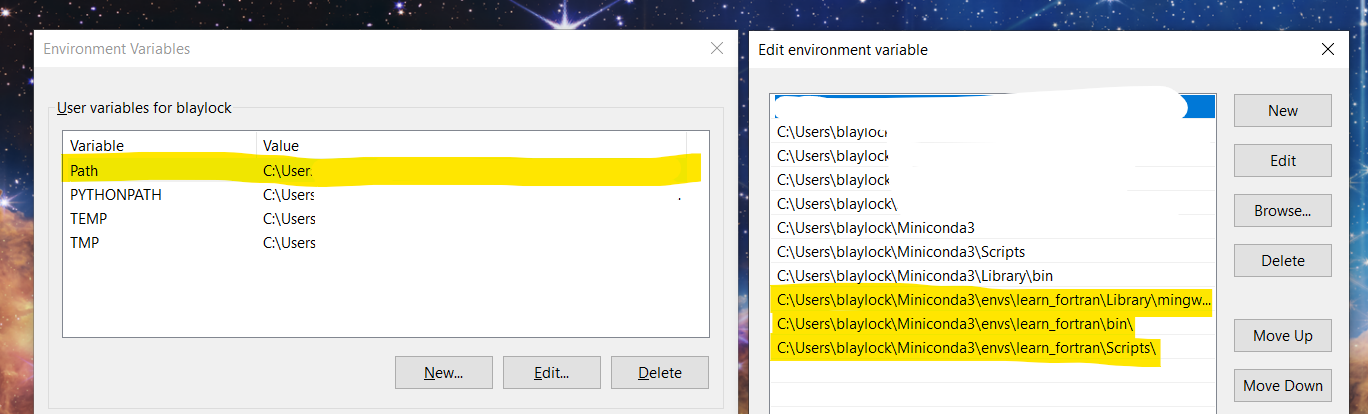
Note: Watch for an update to the m2w64-gfortran compiler ?.
which gfortran
which fortls
which fprettify
Your .bashrc file might have this line to append the PATH:
export PATH="$PATH:/Users/blaylock/anaconda3/envs/learn_fortran/bin"I'm using the Code Runner extension to do a quick compile and run of a Fortran program. When you have a program source code file open and in focus (i.e., src/hello_world/hello_world.f90), use the shortcut Ctrl+Alt+N to compile and run the Fortran program. The output will show below in the terminal window. It's that easy.





