maui chat app
1.0.0

This example uses DevExpress .NET MAUI Components to display a chat view with sender and receiver messages, suggested quick replies, and response input controls.
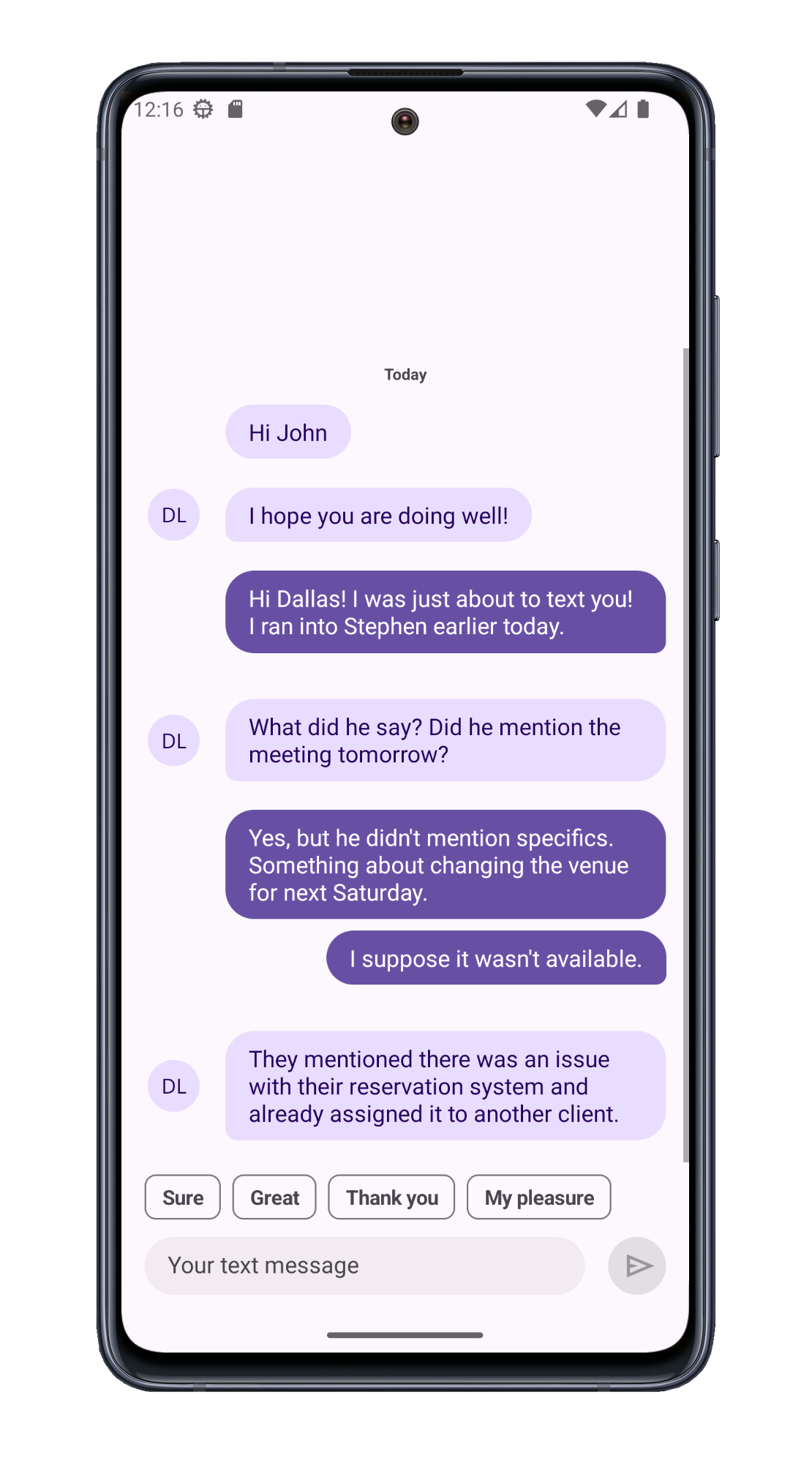
Use a SafeKeyboardAreaView as the root for the view layout. When implemented in this manner, the device keyboard will not overlap the message view when it appears on-screen.
<dx:SafeKeyboardAreaView>
    ...
</dx:SafeKeyboardAreaView>
Use the DXCollectionView control to display messages. Specify the data source and item templates (use different templates for sender and receiver). Groups items using a built-in algorithm that uses date/time ranges ("Today", "Yesterday", "Last Week", etc). Specify a template for group headers.
<dxcv:DXCollectionView
    ItemsSource="{Binding Messages}"
    ItemTemplate="{local:MessageTemplateSelector SenderTemplate=..., RecipientTemplate=...}"
    GroupHeaderTemplate="{StaticResource dayGroupTemplate}"
    ...
>
    <dxcv:DXCollectionView.GroupDescription>
        <dxcv:GroupDescription FieldName="SentAt" GroupInterval="DateRange" />
    </dxcv:DXCollectionView.GroupDescription>
</dxcv:DXCollectionView>
Use DXContentPresenter components to define templates for sender and receiver messages.
<ContentPage.Resources>
    <DataTemplate x:Key="senderMessageTemplate"  x:DataType="{x:Type local:Message}">
        <dx:DXContentPresenter ... >
        </dx:DXContentPresenter>
    </DataTemplate>
    <DataTemplate x:Key="recipientMessageTemplate" x:DataType="{x:Type local:Message}">
        <dx:DXContentPresenter ... >
        </dx:DXContentPresenter>
    </DataTemplate>
    ...
</ContentPage.Resources>
Call the DXCollectionView.ScrollTo() method to scroll the view to the last message.
public partial class MainPage : ContentPage {
    // ...
    void OnMessagesCollectionChanged(object sender, NotifyCollectionChangedEventArgs e) {
        chatSurface.ScrollTo(chatSurface.GetItemHandle(vm.Messages.Count - 1));
    }
}
Use the ChipGroup control to display short answers.
<dxe:ChipGroup ...
    DisplayMember="Text"
    ItemsSource="{Binding SuggestedActions}" />
public ChatViewModel() {
// ...
SuggestedActions = new ObservableCollection<SuggestedAction>() {
new SuggestedAction() { Message = new Message() { Sender = Me, SentAt = DateTime.Now, Text = "Sure" }, Text = "Sure" },
new SuggestedAction() { Message = new Message() { Sender = Me, SentAt = DateTime.Now, Text = "Great" }, Text = "Great" },
new SuggestedAction() { Message = new Message() { Sender = Me, SentAt = DateTime.Now, Text = "Thank you" }, Text = "Thank you" },
new SuggestedAction() { Message = new Message() { Sender = Me, SentAt = DateTime.Now, Text = "My pleasure" }, Text = "My pleasure" }
};
}Use the TextEdit control to create/display a text message input field. To send the message, specify the DXButton control.
<Grid ... >
    <dxe:TextEdit ...
        x:Name="messageEditor"
        Text="{Binding EditMessageText}"/>
    <dx:DXButton ...
        Command="{Binding SendMessageCommand}"
        CommandParameter="{Binding EditMessageText}"/>
</Grid>
(you will be redirected to DevExpress.com to submit your response)





