ai_beats
1.0.0

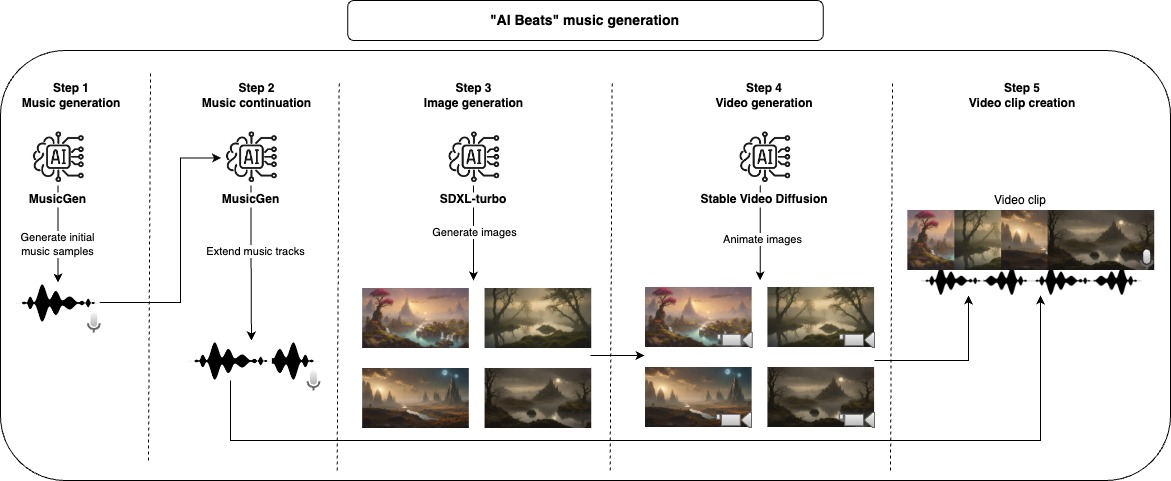
With this project, you can use AI to generate music tracks and video clips. Provide some information on how you would like the music and videos, the code will do the rest.
First, we use a generative model to create music samples, the default model used here is only able to generate a max of 30 seconds of music, for this reason, we take another step to extend the music. After finishing with the audio part we can generate the video, first, we start with a Stable Diffusion model to generate images and then we use another generative model to give it a bit of motion and animation. To compose the final video clip, we take each generated music and join together with as many animated images as necessary to match the length of the music.
All of those steps will generate intermediate files that you can inspect and manually remove what you don't like to improve the results.
The recommended approach to use this repository is with Docker, but you can also use a custom venv, just make sure to install all dependencies.
Note: make sure to update the device param to maximize performance, but notice that some models might not work for all device options (cpu, cuda, mps).
project_dir: beats
project_name: lofi
seed: 42
music:
  prompt: "lo-fi music with a relaxing slow melody"
  model_id: facebook/musicgen-small
  device: cpu
  n_music: 5
  music_duration: 60
  initial_music_tokens: 1050
  max_continuation_duration: 20
  prompt_music_duration: 10
image:
  prompt: "Mystical Landscape"
  prompt_modifiers:
    - "concept art, HQ, 4k"
    - "epic scene, cinematic, sci fi cinematic look, intense dramatic scene"
    - "digital art, hyperrealistic, fantasy, dark art"
    - "digital art, hyperrealistic, sense of comsmic wonder"
    - "mystical and ethereal atmosphere, photo taken with a wide-angle lens"
  model_id: stabilityai/sdxl-turbo
  device: mps
  n_images: 5
  inference_steps: 3
  height: 576
  width: 1024
video:
  model_id: stabilityai/stable-video-diffusion-img2vid
  device: cpu
  n_continuations: 2
  loop_video: true
  video_fps: 6
  decode_chunk_size: 8
  motion_bucket_id: 127
  noise_aug_strength: 0.1
audio_clip:
  n_music_loops: 1
Build the Docker image
make buildApply lint and formatting to the code (only needed for development)
make lintRun the whole pipeline to create the music video
make ai_beatsRun the music generation step
make musicRun the music continuation step
make music_continuationRun the image generation step
make imageRun the video generation step
make videoRun the audio clip creation step
make audio_clipFor development make sure to install requirements-dev.txt and run make lint to maintain the coding style.
I developed and tested most of this project on my MacBook Pro M2, the only step that I was not able to run was the video creation step, for that I used Google Colab (with V100 or A100 GPU). Some of the models were not runnable on MPS but they run on a reasonable time anyway.
The models used by default here have specific licenses that might not be suited for all use cases, if you want to use the same models make sure to check their licenses. For music generation MusicGen and its CC-BY-NC 4.0 license, for image generation SDXL-Turbo and its LICENSE-SDXL1.0 license, and stable video diffusion and its STABLE VIDEO DIFFUSION NC COMMUNITY LICENSE license for video generation.





