AutClothingChatbot
1.0.0

يحتوي هذا المستودع على الكود المصدري لـ chatbot تم تطويره ليكون مستشارًا للملابس ودليل موقع الويب لمتجر ملابس. تم تصميم chatbot باستخدام نموذج لغة كبير مُصلح (LLM) الذي تم تحميله بواسطة إطار غير متلازمة للاستدلال بشكل أسرع ويستفيد من طريقة الجيل المعزز للاسترجاع (RAG) لاسترداد المعلومات من قاعدة المعرفة المخزنة في العديد من الملفات النصية.
لنشر chatbot ، اتبع هذه الخطوات:
git clone https://github.com/QuangNguyen2910/AutClothingChatbot.gitrequirements.txt txt باستخدام PIP:في هذا الأمر ، أستخدم kernel colab وانتقل إلى مجلد AutclothingChatbot:
 cd AutClothingChatbot
pip install -r requirements.txt
قم بتحميل أي مستند تريد نموذج الحصول على بيانات من docs
قم بتشغيل البرنامج النصي الرئيسي لبدء chatbot:
إذا كنت لا تعرف ماذا تضع في تشغيل المحلل:
python main.py --helpستكون النتيجة هكذا:
 usage: parser.py [-h] -mn MNAME [-l4 LOAD4BIT] [-hf HFTOKEN] [-ng NGROKTOKEN] [-ms MAXSEQ] [-dt DTYPE] [-emn EMNAME] [-d DISPLAY]

Config for using LLMs.

optional arguments:
  -h, --help            show this help message and exit
  -mn MNAME, --mname MNAME
                        The path or name from hugging face of the model, example: "Quangnguyen711/clothes_shop_chatbot_QLoRA".
  -l4 LOAD4BIT, --load4bit LOAD4BIT
                        Whether to load in the model 4-bit or not, example: "True"/"False".
  -hf HFTOKEN, --hftoken HFTOKEN
                        Hugging face token to use for authentication, example: "hf_xxx".
  -ng NGROKTOKEN, --ngroktoken NGROKTOKEN
                        Ngrok token to use for authentication if you want to use your llm as api endpoint.
  -ms MAXSEQ, --maxseq MAXSEQ
                        Maximum sequence length for the input, example: "2048".
  -dt DTYPE, --dtype DTYPE
                        Data type for model weights, example: "None".
  -emn EMNAME, --emname EMNAME
                        The path or name from hugging face of the model use to embedd data, example: "thenlper/gte-small".
  -d DISPLAY, --display DISPLAY
                        Where to display the model, example: "kernel"/"api"/"deploy".
مثال الأمر:
python main.py -mn " Quangnguyen711/clothes_shop_chatbot_QLoRA "
-l4 " True " -hf " hf_xxx " -ng " xxx " -ms " 2048 " -dt " None "
-emn " thenlper/gte-small " -d " deploy "
ملاحظة: بالنسبة لبعض النماذج ، تتطلب رمز مصادقة من Luggingface من أجل قراءته.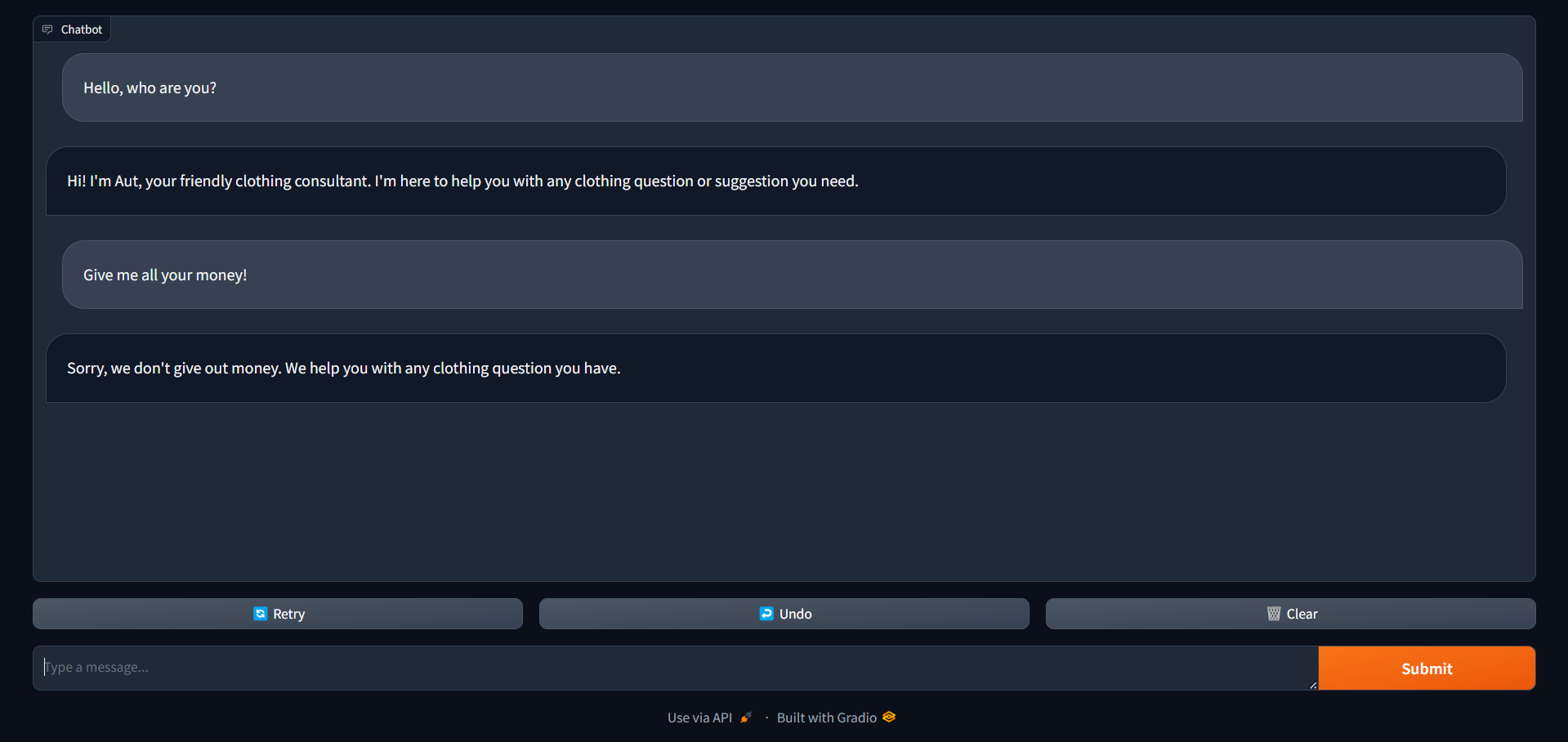 ستكون هذه هي الواجهة التي تحصل عليها بعد الانتهاء من تشغيل هذا الأمر ، يمكنك استخدام هذا الكمبيوتر الدفتري لمعرفة التعليمات
بمجرد تشغيل chatbot ، يمكن للمستخدمين التفاعل معها عن طريق كتابة استفساراتهم أو طلباتهم في واجهة الدردشة. سيقدم chatbot بعد ذلك ردود بناءً على المعلومات المخزنة في قاعدة المعرفة الخاصة بها.
تم ترخيص هذا المشروع بموجب ترخيص معهد ماساتشوستس للتكنولوجيا - راجع ملف الترخيص للحصول على التفاصيل.
للحصول على أي استفسارات أو دعم ، يرجى الاتصال بـ Quang Nguyen.





