
這篇文章帶大家了解angular中的HttpClientModule模組,介紹一下請求方法、請求參數、回應內容、攔截器、Angular Proxy等相關知識,希望對大家有幫助!
此模組用於發送Http請求,用於發送請求的方法都會傳回Observable物件。 【相關教學推薦:《angular教學》】
1)、引入HttpClientModule 模組
// app.module.ts
import { httpClientModule } 從 '@angular/common/http';
imports: [
httpClientModule
]
2)、注入HttpClient 服務實例對象,用於傳送請求
// app.component.ts
import { HttpClient } 從 '@angular/common/http';

export class AppComponent {
	constructor(private http: HttpClient) {}
}
3)、發送請求
import { HttpClient } 從 "@angular/common/http"

export class AppComponent implements OnInit {
constructor(private http: HttpClient) {}
ngOnInit() {
this.getUsers().subscribe(console.log)
}
getUsers() {
return this.http.get("https://jsonplaceholder.typicode.com/users")
}
}this.http.get(url [, options]); this.http.post(url, data [, options]); this.http.delete(url [, options]); this.http.put(url, data [, options]);
 this.http.get<Post[]>('/getAllPosts')
.subscribe(response => console.log(response))1、HttpParams 類
export declare class HttpParams {
constructor(options?: HttpParamsOptions);
has(param: string): boolean;
get(param: string): string | null;
getAll(param: string): string[] | null;
keys(): string[];
append(param: string, value: string): HttpParams;
set(param: string, value: string): HttpParams;
delete(param: string, value?: string): HttpParams;
toString(): string;
}
2、HttpParamsOptions 介面
declare interface HttpParamsOptions {
fromString?: string;
fromObject?: {
[param: string]: string | ReadonlyArray<string>;
};
encoder?: HttpParameterCodec;
}
3、使用範例
import { HttpParams } 從 '@angular/common/http';

let params = new HttpParams({ fromObject: {name: "zhangsan", age: "20"}})
params = params.append("sex", "male")
let params = new HttpParams({ fromString: "name=zhangsan&age=20"})請求頭字段的建立需要使用HttpHeaders 類,在類別實例物件下面有各種操作請求頭的方法。
 export declare class HttpHeaders {
constructor(headers?: string | {
[name: string]: string | string[];
});
has(name: string): boolean;
get(name: string): string | null;
keys(): string[];
getAll(name: string): string[] | null;
append(name: string, value: string | string[]): HttpHeaders;
set(name: string, value: string | string[]): HttpHeaders;
delete(name: string, value?: string | string[]): HttpHeaders;
}
let headers = new HttpHeaders({ test: "Hello" })declare type HttpObserve = 'body' | 'response'; // response 讀取完整回應體// body 讀取伺服器端傳回的數據
this.http.get(
"https://jsonplaceholder.typicode.com/users",
{ observe: "body" }
).subscribe(console.log)攔截器是Angular 應用中全域擷取和修改HTTP 請求和回應的方式。 (Token、Error)
攔截器將只攔截使用HttpClientModule 模組發出的請求。
ng g interceptor <name>
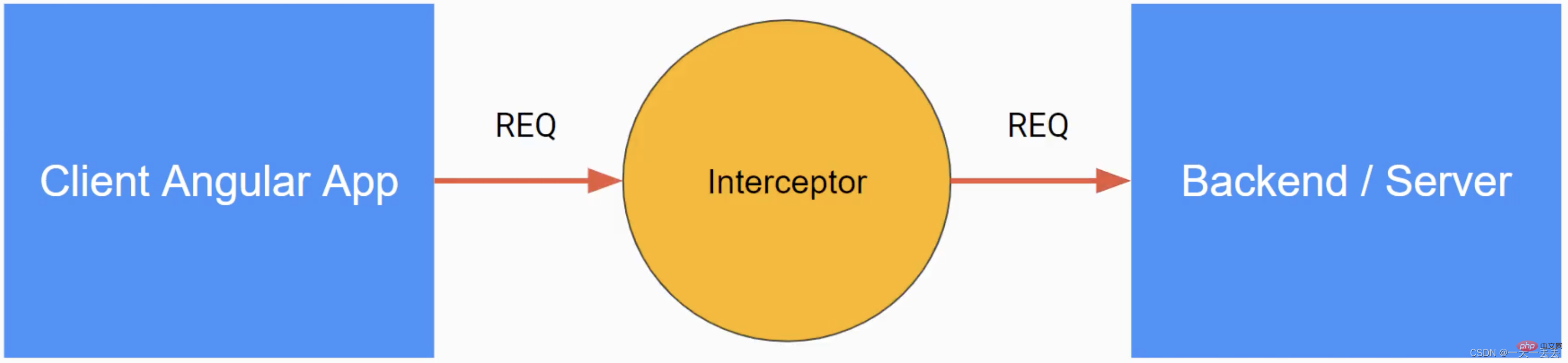
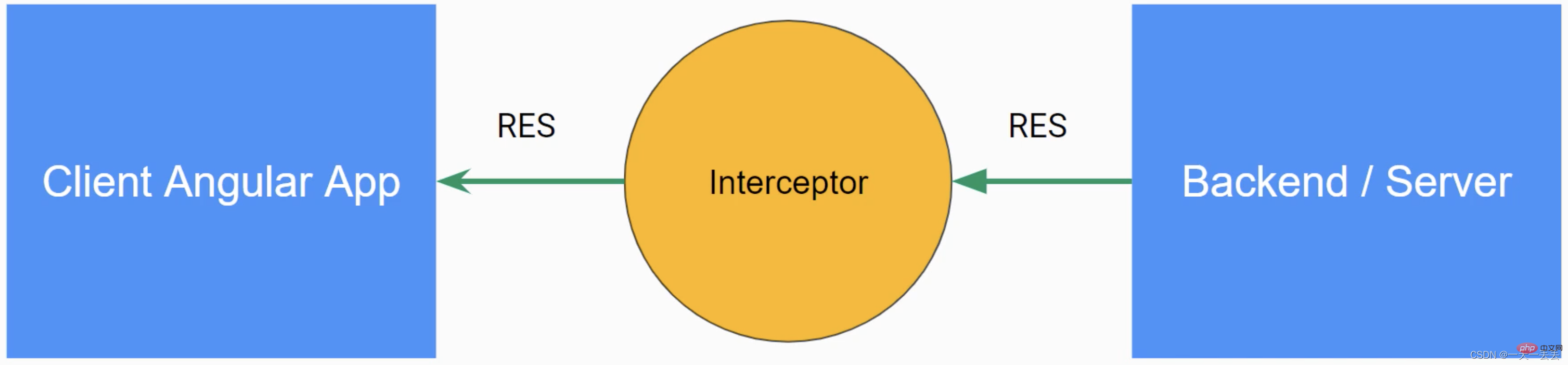
6.1 請求攔截
@Injectable()
export class AuthInterceptor implements HttpInterceptor {
constructor() {}
	// 攔截方法 intercept(
// unknown 指定請求體 (body) 的類型 request: HttpRequest<unknown>,
next: HttpHandler
// unknown 指定回應內容 (body) 的類型 ): Observable<HttpEvent<unknown>> {
// 複製並修改請求頭 const req = request.clone({
setHeaders: {
Authorization: "Bearer xxxxxxx"
}
})
// 透過回呼函數將修改後的請求頭回傳給應用程式 return next.handle(req)
}
}
6.2 響應攔截
@Injectable()
export class AuthInterceptor implements HttpInterceptor {
constructor() {}
	// 攔截方法 intercept(
request: HttpRequest<unknown>,
next: HttpHandler
): Observable<any> {
return next.handle(request).pipe(
retry(2),
catchError((error: HttpErrorResponse) => throwError(error))
)
}
}
6.3 攔截器注入
import { AuthInterceptor } from "./auth.interceptor"
import { HTTP_INTERCEPTORS } from "@angular/common/http"

@NgModule({
providers: [
{
provide: HTTP_INTERCEPTORS,
useClass: AuthInterceptor,
multi: true
}
]
})1、在專案的根目錄下建立proxy.conf.json 檔案並加入以下程式碼
{
"/api/*": {
"target": "http://localhost:3070",
"secure": false,
"changeOrigin": true
}
}
/api/*:在應用程式中發出的以/api 開頭的請求走此代理
target:伺服器端URL
secure:如果伺服器端URL 的協定是https,此項需要為true
changeOrigin:如果伺服器端不是localhost, 此項目需要為true
2、指定proxy 設定檔(方式一)
 "scripts": {
"start": "ng serve --proxy-config proxy.conf.json",
}
3.指定proxy 設定檔(方式二)
 "serve": {
"options": {
"proxyConfig": "proxy.conf.json"
}, 此模組用於發送Http請求,用於發送請求的方法都會傳回Observable物件。