
This article will take you to understand the HttpClientModule module in angular, and introduce the request method, request parameters, response content, interceptors, Angular Proxy and other related knowledge. I hope it will be helpful to you!
This module is used to send Http requests, and the methods used to send requests return Observable objects. [Recommended related tutorials: "angular tutorial"]
1), introduce the HttpClientModule module
 // app.module.ts
import { httpClientModule } from '@angular/common/http';
imports: [
httpClientModule
]
2) Inject the HttpClient service instance object for sending requests
 // app.component.ts
import { HttpClient } from '@angular/common/http';

export class AppComponent {
	constructor(private http: HttpClient) {}
}
3), send request
 import { HttpClient } from "@angular/common/http"

export class AppComponent implements OnInit {
constructor(private http: HttpClient) {}
ngOnInit() {
this.getUsers().subscribe(console.log)
}
getUsers() {
return this.http.get("https://jsonplaceholder.typicode.com/users")
}
}this.http.get(url [, options]); this.http.post(url, data [, options]); this.http.delete(url [, options]); this.http.put(url, data [, options]);
 this.http.get<Post[]>('/getAllPosts')
.subscribe(response => console.log(response))1. HttpParams class
 export declare class HttpParams {
constructor(options?: HttpParamsOptions);
has(param: string): boolean;
get(param: string): string | null;
getAll(param: string): string[] | null;
keys(): string[];
append(param: string, value: string): HttpParams;
set(param: string, value: string): HttpParams;
delete(param: string, value?: string): HttpParams;
toString(): string;
}
2. HttpParamsOptions interface
 declare interface HttpParamsOptions {
fromString?: string;
fromObject?: {
[param: string]: string | ReadonlyArray<string>;
};
encoder?: HttpParameterCodec;
}
3. Usage examples
 import { HttpParams } from '@angular/common/http';

let params = new HttpParams({ fromObject: {name: "zhangsan", age: "20"}})
params = params.append("sex", "male")
let params = new HttpParams({ fromString: "name=zhangsan&age=20"})The creation of request header fields requires the use of the HttpHeaders class. There are various methods for operating request headers under the class instance object.
 export declare class HttpHeaders {
constructor(headers?: string | {
[name: string]: string | string[];
});
has(name: string): boolean;
get(name: string): string | null;
keys(): string[];
getAll(name: string): string[] | null;
append(name: string, value: string | string[]): HttpHeaders;
set(name: string, value: string | string[]): HttpHeaders;
delete(name: string, value?: string | string[]): HttpHeaders;
}
let headers = new HttpHeaders({ test: "Hello" })declare type HttpObserve = 'body' | 'response'; // response reads the complete response body // body reads the data returned by the server
 this.http.get(
"https://jsonplaceholder.typicode.com/users",
{ observe: "body" }
).subscribe(console.log)Interceptors are a way of globally capturing and modifying HTTP requests and responses in Angular applications. (Token, Error)
The interceptor will only intercept requests made using the HttpClientModule module.
ng g interceptor <name>
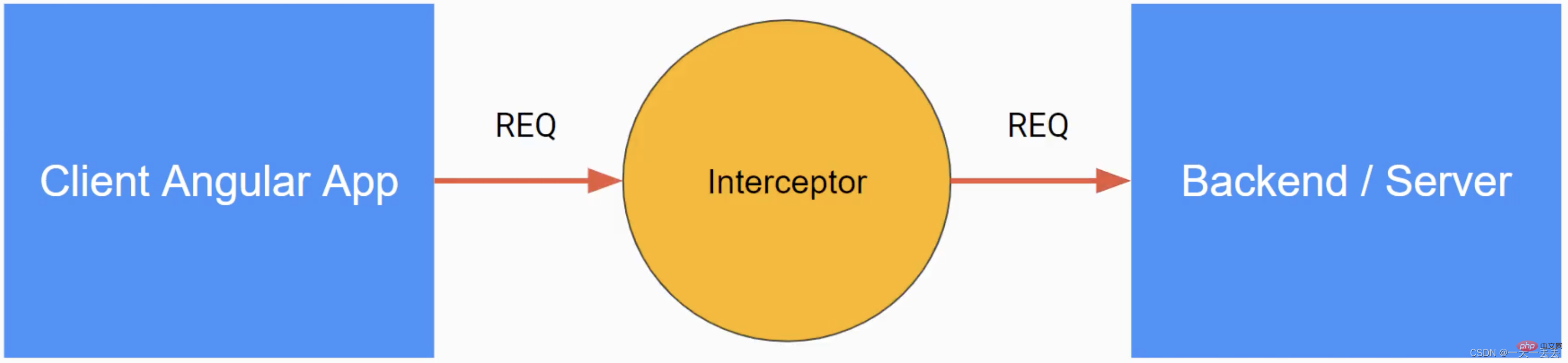
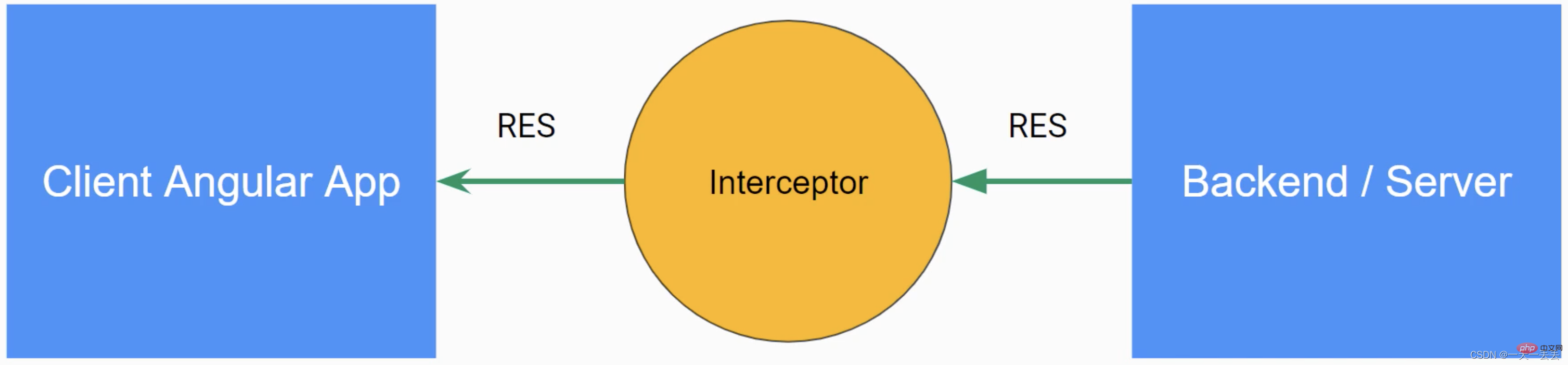
6.1 Request interception
 @Injectable()
export class AuthInterceptor implements HttpInterceptor {
constructor() {}
	//Interception method intercept(
// unknown specifies the type of request body (body) request: HttpRequest<unknown>,
next: HttpHandler
// unknown specifies the type of response content (body)): Observable<HttpEvent<unknown>> {
// Clone and modify the request header const req = request.clone({
setHeaders: {
Authorization: "Bearer xxxxxxx"
}
})
// Pass the modified request header back to the application through the callback function return next.handle(req)
}
}
6.2 Response interception
 @Injectable()
export class AuthInterceptor implements HttpInterceptor {
constructor() {}
	//Interception method intercept(
request: HttpRequest<unknown>,
next: HttpHandler
): Observable<any> {
return next.handle(request).pipe(
retry(2),
catchError((error: HttpErrorResponse) => throwError(error))
)
}
}
6.3 Interceptor injection
 import { AuthInterceptor } from "./auth.interceptor"
import { HTTP_INTERCEPTORS } from "@angular/common/http"

@NgModule({
providers: [
{
provide: HTTP_INTERCEPTORS,
useClass: AuthInterceptor,
multi: true
}
]
})1. Create the proxy.conf.json file in the root directory of the project and add the following code
 {
"/api/*": {
"target": "http://localhost:3070",
"secure": false,
"changeOrigin": true
}
}
/api/*: Requests starting with /api made in the application go through this proxy
target: server-side URL
secure: If the protocol of the server-side URL is https, this item needs to be true
changeOrigin: If the server is not localhost, this item needs to be true
2. Specify proxy configuration file (method 1)
 "scripts": {
"start": "ng serve --proxy-config proxy.conf.json",
}
3. Specify proxy configuration file (method 2)
 "serve": {
"options": {
"proxyConfig": "proxy.conf.json"
},
This module is used to send Http requests, and the methods used to send requests return Observable objects.