GRAD
1.0.0

這是用於復制Grad的關鍵結果的代碼:文本圖上的圖形感知蒸餾。
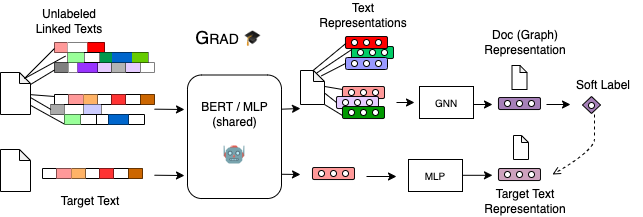
請前往GradBERT或GradMLP以獲取更多說明。
運行代碼的依賴項在requirements.txt文件中。
我們還遵循[巨人]的安裝過程。
首先讓我們設置一個環境
conda create -n " grad " python=3.8
conda activate grad
接下來,我們安裝pytorch:
conda install pytorch==1.9.0 cudatoolkit=10.2 -c pytorch
# check the pytorch version and cuda availability
python -c " import torch; print('torch={}, cuda={}'.format(torch.__version__, torch.cuda.is_available())) "
Finall,我們安裝了GNN相關軟件包
ptcu_version= " 1.9.0+cu102 "
pip install torch-scatter -f " https://pytorch-geometric.com/whl/torch- ${ptcu_version} .html "
pip install torch-sparse -f " https://pytorch-geometric.com/whl/torch- ${ptcu_version} .html "
pip install torch-cluster -f " https://pytorch-geometric.com/whl/torch- ${ptcu_version} .html "
pip install torch-spline-conv -f " https://pytorch-geometric.com/whl/torch- ${ptcu_version} .html "
pip install torch-geometric
pip install ogb==1.3.2
# our ogb version is 1.3.2
python -c " import ogb; from ogb.graphproppred import PygGraphPropPredDataset; print(ogb.__version__) " 請從此鏈接下載預訓練的Gradbert節點嵌入https://drive.google.com/drive/folders/1tol67yewyewyogusf4t2qwrds-hbhbg-icx?usp = sharing並在此文件夾中提取它們。請確保提取的文件夾具有此基結構GradBERT/embeddings/ogbn-*/ 。
然後,您可以使用ogbn-arxiv或ogbn-products文件夾,並運行相應的sh命令,以重現OGB排行榜的Gradbert結果。
在下面,您可以找到腳本來複製關鍵結果。
./GRAD
| ---- GradBERT/                     # OGB datasets
|        | ---- embeddings/
|        | ---- ogbn-arxiv/
|        |        | ---- gradbert_mlp.sh         # MLP with GradBERT feats
|        |        | ---- gradbert_sage.sh        # SAGE with GradBERT feats
|        |        | ---- RevGAT-ori
|                           | ---- gradbert_RevGAT_ogbnarxiv.sh      # RevGAT with GradBERT feats
|        | ---- ogbn-products/
|        |        | ---- gradbert_mlp.sh         # MLP with GradBERT feats
|        |        | ---- gradbert_giant_sage.sh  # SAGE with GradBERT+GIANT feats
|        |        | ---- SAGN_with_SLE
|                           | ---- Runexp_SAGN_SLE_ogbnproducts_morestages.sh     # SAGN_SLE with GradBERT+GIANT feats

| ---- GradMLP/                # CPF data from GLNN
|        | ---- experiments/
|        |        | ---- cora_gradmlp.sh
|        |        | ---- cora_gradmlp_kd.sh
|        |        | ---- etc.


Please go to ` GradBERT ` or ` GradMLP ` for more details.






