Colorprt
1.0.0

英語| 中文
這是一個簡單的軟件包,可以自定義控制台打印顏色。
PYPI:https://pypi.org/project/colorprt/
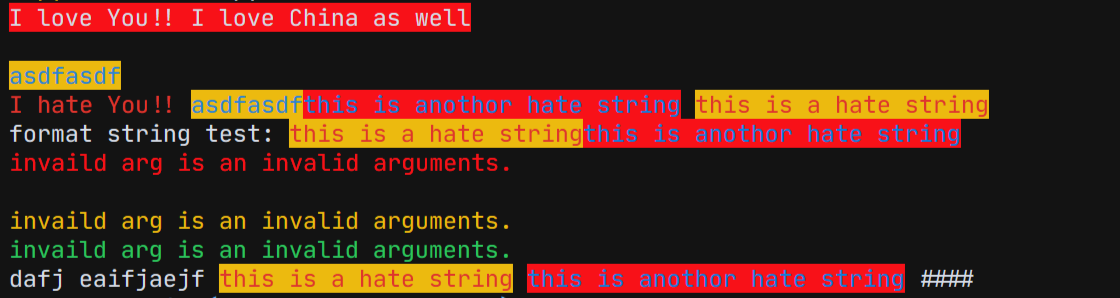
我們在軟件包中添加了一些默認的顏色配置。
 from colorprt . default import warn_color , success_color , error_color

warn_color . print ( "Print a warn message" )
success_color . print ( "Print a success message" )
error_color . print ( "Print an error message" )
我們發現有些人在Linux服務器上使用此軟件包,因此沒有自動完成。它會麻煩用戶。因此,我們添加了您不需要輸入的功能: mode= ; foreground= ; background=
只需調用函數或類似的課程:
在舊版本中:
 from colorprt import colorprt , Back , Fore

# CAUTION: Do not use this after version: 3.0.0
colorprt ( "Hello World" , backgound = Back . RED )
使用新功能:
 from colorprt import colorprt , Back , Fore

colorprt ( "Hello World" , Back . RED , Fore . YELLOW )pip install colorprt功能colorprt是print功能擴展。您可以自定義打印樣式。
 from colorprt import colorprt , Back , Fore

hello_else = "Hello Michael"
colorprt ( "Hello World" , hello_else ,  Back . RED , Fore . BLUE end = "x100 times n " )
另外,您可以使用ColorprtConfig類來設置彩色字符串。
 from colorprt import ColorprtConfig , Mode , Back , Fore

pycolor_config = ColorprtConfig ( Mode . BOLD , Back . DEFAULT , Fore . RED )

# You can use ColorprtConfig to set a color string configuration

colored_formatted_str = pycolor_config ( "I love You!!" )

print ( colored_formatted_str )

# or just use print method

pycolor_config . print ( "I love you!!" , end = "x10086 n " )如果您只想要ANSI彩色格式的字符串,則可以使用colorstr類。
 from colorprt import colorstr , Mode , Back , Fore , ColorprtConfig

hate_print_config = ColorprtConfig ( Mode . UNDER_LINE , Back . DEFAULT , Fore . YELLOW )
print ( colorstr ( "I love You!!" , Mode . BOLD , Back . DEFAULT , Fore . RED )
      + colorstr ( "I hate you" , hate_print_config ))
如果使用str()強制更改為字符串。你會得到的
 >>> str(colorstr("I love You!!", Mode.BOLD, Back.DEFAULT, Fore.RED)
      + colorstr("I hate you", hate_print_config))
>>> 'x1b[0mx1b[1;31mI love You!!x1b[0mx1b[4;33mI hate youx1b[0mx1b[0m'
 from colorprt import colorstr , Mode , Back , Fore , ColorprtConfig

hate_print_config = ColorprtConfig ( Mode . UNDER_LINE , Back . DEFAULT , Fore . YELLOW )

output = str ( colorstr ( 'I hate You' , hate_print_config ))






