Colorprt
1.0.0

Englisch | 中文
Es ist ein einfaches Paket, mit dem Sie die Konsolendruckfarbe anpassen können.
pypi: https://pypi.org/project/colorprt/
In unserem Paket fügen wir eine Standard -Farbkonfiguration hinzu.
 from colorprt . default import warn_color , success_color , error_color

warn_color . print ( "Print a warn message" )
success_color . print ( "Print a success message" )
error_color . print ( "Print an error message" )
Wir haben festgestellt, dass einige Leute dieses Paket auf Linux -Server verwenden, damit keine automatischen Abschlüsse vorhanden sind. Es wird Benutzer beunruhigen. Daher fügen wir eine Funktion hinzu, die Sie nicht eingeben müssen: mode= ; foreground= ; background=
Rufen Sie einfach Funktionen oder Klassen wie diese an:
In alten Versionen:
 from colorprt import colorprt , Back , Fore

# CAUTION: Do not use this after version: 3.0.0
colorprt ( "Hello World" , backgound = Back . RED )
Verwenden Sie neue Funktionen:
 from colorprt import colorprt , Back , Fore

colorprt ( "Hello World" , Back . RED , Fore . YELLOW )pip install colorprt Funktion colorprt ist eine print . Sie können den Druckstil anpassen.
 from colorprt import colorprt , Back , Fore

hello_else = "Hello Michael"
colorprt ( "Hello World" , hello_else ,  Back . RED , Fore . BLUE end = "x100 times n " )
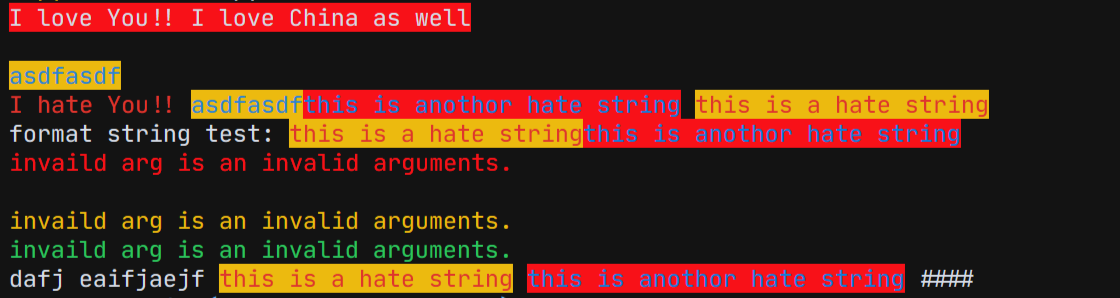
Außerdem können Sie ColorprtConfig -Klasse verwenden, um farbige Zeichenfolgen festzulegen.
 from colorprt import ColorprtConfig , Mode , Back , Fore

pycolor_config = ColorprtConfig ( Mode . BOLD , Back . DEFAULT , Fore . RED )

# You can use ColorprtConfig to set a color string configuration

colored_formatted_str = pycolor_config ( "I love You!!" )

print ( colored_formatted_str )

# or just use print method

pycolor_config . print ( "I love you!!" , end = "x10086 n " )
Wenn Sie nur die von ANSI gefärbten Zeichenfolgen möchten, können Sie colorstr -Klasse verwenden.
 from colorprt import colorstr , Mode , Back , Fore , ColorprtConfig

hate_print_config = ColorprtConfig ( Mode . UNDER_LINE , Back . DEFAULT , Fore . YELLOW )
print ( colorstr ( "I love You!!" , Mode . BOLD , Back . DEFAULT , Fore . RED )
      + colorstr ( "I hate you" , hate_print_config ))
Wenn Sie Str () verwenden, um Änderungen zur String zu erzwingen. Du wirst bekommen
 >>> str(colorstr("I love You!!", Mode.BOLD, Back.DEFAULT, Fore.RED)
      + colorstr("I hate you", hate_print_config))
>>> 'x1b[0mx1b[1;31mI love You!!x1b[0mx1b[4;33mI hate youx1b[0mx1b[0m'
 from colorprt import colorstr , Mode , Back , Fore , ColorprtConfig

hate_print_config = ColorprtConfig ( Mode . UNDER_LINE , Back . DEFAULT , Fore . YELLOW )

output = str ( colorstr ( 'I hate You' , hate_print_config ))






