Colorprt
1.0.0

Bahasa Inggris | 中文
Ini adalah paket sederhana bagi Anda untuk menyesuaikan warna pencetakan konsol.
PYPI: https://pypi.org/project/colorprt/
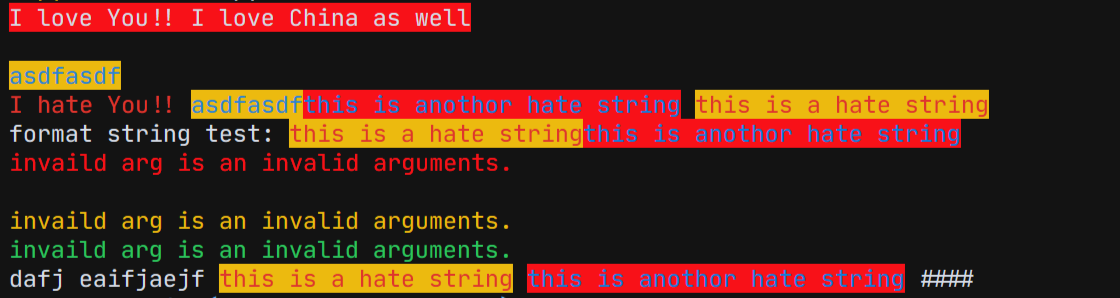
Kami menambahkan beberapa konfigurasi warna default di paket kami.
 from colorprt . default import warn_color , success_color , error_color

warn_color . print ( "Print a warn message" )
success_color . print ( "Print a success message" )
error_color . print ( "Print an error message" )
Kami menemukan bahwa beberapa orang menggunakan paket ini di Linux Server, sehingga tidak ada penyelesaian otomatis. Itu akan mengganggu pengguna. Karena itu, kami menambahkan fitur yang tidak perlu Anda ketik: mode= ; foreground= ; background=
Panggil saja fungsi atau kelas seperti ini:
Dalam versi lama:
 from colorprt import colorprt , Back , Fore

# CAUTION: Do not use this after version: 3.0.0
colorprt ( "Hello World" , backgound = Back . RED )
Gunakan fitur baru:
 from colorprt import colorprt , Back , Fore

colorprt ( "Hello World" , Back . RED , Fore . YELLOW )pip install colorprt Function colorprt adalah ekstensi print . Anda dapat menyesuaikan gaya pencetakan.
 from colorprt import colorprt , Back , Fore

hello_else = "Hello Michael"
colorprt ( "Hello World" , hello_else ,  Back . RED , Fore . BLUE end = "x100 times n " )
Anda juga dapat menggunakan kelas ColorprtConfig untuk mengatur string berwarna.
 from colorprt import ColorprtConfig , Mode , Back , Fore

pycolor_config = ColorprtConfig ( Mode . BOLD , Back . DEFAULT , Fore . RED )

# You can use ColorprtConfig to set a color string configuration

colored_formatted_str = pycolor_config ( "I love You!!" )

print ( colored_formatted_str )

# or just use print method

pycolor_config . print ( "I love you!!" , end = "x10086 n " )
Jika Anda hanya ingin string format yang diformat berwarna ANSI, Anda dapat menggunakan kelas colorstr .
 from colorprt import colorstr , Mode , Back , Fore , ColorprtConfig

hate_print_config = ColorprtConfig ( Mode . UNDER_LINE , Back . DEFAULT , Fore . YELLOW )
print ( colorstr ( "I love You!!" , Mode . BOLD , Back . DEFAULT , Fore . RED )
      + colorstr ( "I hate you" , hate_print_config ))
Jika Anda menggunakan str () untuk memaksa perubahan ke string. Anda akan mendapatkan
 >>> str(colorstr("I love You!!", Mode.BOLD, Back.DEFAULT, Fore.RED)
      + colorstr("I hate you", hate_print_config))
>>> 'x1b[0mx1b[1;31mI love You!!x1b[0mx1b[4;33mI hate youx1b[0mx1b[0m'
 from colorprt import colorstr , Mode , Back , Fore , ColorprtConfig

hate_print_config = ColorprtConfig ( Mode . UNDER_LINE , Back . DEFAULT , Fore . YELLOW )

output = str ( colorstr ( 'I hate You' , hate_print_config ))






