ansis
v3.4.0


一個小的快速節點庫,用於在終端輸出中應用ANSI顏色和样式。
ANSIS提供了您需要的所有功能,您可以與類似的庫進行比較。
ANSIS比粉筆和picocolors快(在某些用例中),請參見基準測試。
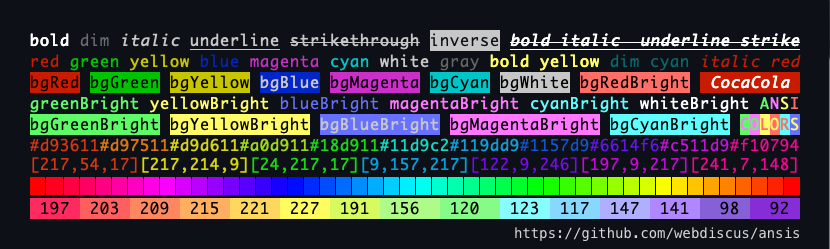
 import ansis , { red , green , cyan , black , ansi256 , hex } from 'ansis' ;

ansis . blueBright ( 'file.txt' )
green `Succeful!`
red `Error: ${ cyan ( file ) } not found!`
black . bgYellow `Warning!`
ansi256 ( 214 ) `Orange`
hex ( '#E0115F' ) . bold . underline ( 'Truecolor!' ) 最受歡迎的Node.js庫類似於Ansis:
粉筆,picocolors,色彩,kleur,ansi-colors,kolorist,cli-color,colors-cli,colors.js
✅比較功能?比較包裝尺寸基準
chalk colorette picocolors ansi-colors的倒入替代品import ansis, { red, bold, ansi256, hex } from 'ansis'red.bold.underline('text')red`Error: ${blue`file.js`} not found!`dim bold italic underline strikethroughred`Error!` redBright`Error!` bgRed`Error!` bgRedBright`Error!`fg(56)`violet` bg(208)`orange`rgb(224, 17, 95)`Ruby` hex('#96C')`Amethyst`open和close屬性`foo ${red.open}red{red.close} bar`ansis.strip()NO_COLOR FORCE_COLOR和標誌--no-color --colorn時,在end of line正確樣式斷開String.prototypeNestjs,Facebook/Stylex,續集,Salesforce,Oclif,WebPackbar
如果您發現了一個錯誤或有功能建議,請隨時在Github上創建問題。
如今,兩個最小,最快的圖書館是ansis和picocolors 。 ES工具社區推薦兩者,這是對較老的,較大的庫的最佳替代品。
picocolors :6.4 KB-一個僅具有基本功能的微庫。аnsis :7.4 kb-一個功能強大的庫,包含您需要的所有功能。chalk :44.2 KB-提供與ANSIS相似的功能,但更大。picocolors :應用單一樣式時最快(例如,僅red )。аnsis :應用兩種或多種樣式時最快(例如, red + bgWhite )。chalk :在所有用例中都比ANSIS和PICOLORS慢。與許多其他圖書館不同,只有ansis , chalk和picocolors才能積極維護:
colorette :最後一次更新2年前ansi-colors :3年前上一次更新kleur :最後一次更新2年前cli-color :上次更新〜1年前colors-cli :最後更新1年前colors.js :最後更新5年前如果您僅使用單一樣式,例如red('foo') ,則Picocolors是最好的解決方案。
但是,如果您需要更多,例如組合多種樣式(例如, red + bold + bgWhite ),
ANSI256顏色,TrueColor或對各種環境的支持,那麼ANSIS是更好的選擇。
與類似庫相比,探索功能,包裝大小和基準的列表。
提示
使用圖書館提供的鏈條語法,例如ansis和chalk 。
避免使用嵌套的呼叫,因為它們比鍊式語法要慢得多且可讀性。
保持代碼清潔可讀!
 red . bold . bgWhite `Error`                    ✅ ansis: faster , shorter , readable
pico . red ( pico . bold ( pico . bgWhite ( 'Error' ) ) )  picocolor: slower , longer , unreadable

red `Error: ${ cyan . underline ( file ) } not found!`                   ✅ ansis ?
pico . red ( `Error: ${ pico . cyan ( pico . underline ( file ) ) } not found!` ) picocolor ? chalkcolorettepicocolorsansi-colorskleurcli-color npm install ansis您可以使用ESM或CONCORJS語法導入默認模塊或命名顏色。
 // ESM default import
import ansis from 'ansis' ;
// ESM named import
import { red , green , blue } from 'ansis' ;
或者
 // CommonJS default import
const ansis = require ( 'ansis' ) ;
// CommonJS named import
const { red , green , blue } = require ( 'ansis' ) ;
請參閱ANSI顏色和样式的列表。
 console . log ( ansis . green ( 'Success!' ) ) ;
console . log ( green ( 'Success!' ) ) ;

// template string
console . log ( green `Success!` ) ;

// chained syntax
console . log ( green . bold `Success!` ) ;

// nested syntax
console . log ( red `The ${ blue . underline `file.js` } not found!` ) ;基本示例Hello World! :
 import { red , black , inverse , reset } from 'ansis' ;

console . log ( green `Hello ${ inverse `ANSI` } World!
${ black . bgYellow `Warning:` } ${ cyan `/path/to/file.js` } ${ red `not found!` } ` ) ;
輸出: 
ansis支持default import和named import 。
 // default import
import ansis from 'ansis' ;

ansis . red . bold ( 'text' ) ;您可以導入命名顏色,樣式和功能。所有導入的顏色和样式都是chainable 。
 // named import
import { red , hex , italic } from 'ansis' ;

red . bold ( 'text' ) ;
默認導入和命名導入可以組合。
 // default and named import
import ansis , { red } from 'ansis' ;

const redText = red ( 'text' ) ; // colorized ANSI string
const text = ansis . strip ( redText ) ; // pure string without ANSI codes ansis支持函數語法red('error')和模板文字red`error` 。
template literals允許您使復雜的模板更加可讀和較短。
function syntax可用於使變量著色。
 import { red } from 'ansis' ;

let message = 'error' ;

red ( message ) ;
red `text` ;
red `text ${ message } text` ; 所有顏色,樣式和功能都是可鏈的。每種顏色或樣式都可以按任何順序組合。
 import { red , bold , italic , hex } from 'ansis' ;

red . bold `text` ;
hex ( '#FF75D1' ) . bgCyan . bold `text` ;
bold . bgHex ( '#FF75D1' ) . cyan `text` ;
italic . bold . yellow . bgMagentaBright `text` ; 您可以在彼此之間嵌套功能和模板字符串。其他庫(粉筆,kleur,色彩,顏色等)都不支持嵌套模板字符串。
嵌套模板字符串:
 import { red , green } from 'ansis' ;

red `red ${ green `green` } red` ;
深嵌套的鍊式樣式:
 import { red , green , cyan , magenta , yellow , italic , underline } from 'ansis' ;

red ( `red ${ italic ( `red italic ${ underline ( `red italic underline` ) } ` ) } red` ) ;

// deep nested chained styles
green (
  `green ${ yellow (
    `yellow ${ magenta (
      `magenta ${ cyan (
        `cyan ${ red . italic . underline `red italic underline` } cyan` ,
      ) } magenta` ,
    ) } yellow` ,
  ) } green` ,
) ;
輸出: 
多行嵌套模板字符串:
 import { red , green , hex , visible , inverse } from 'ansis' ;

// defined a Truecolor as the constant
const orange = hex ( '#FFAB40' ) ;

let cpu = 33 ;
let ram = 44 ;
let disk = 55 ;

// normal colors
visible `
CPU:  ${ red ` ${ cpu } %` }
RAM:  ${ green ` ${ ram } %` }
DISK: ${ orange ` ${ disk } %` }
` ;

// inversed colors
inverse `
CPU:  ${ red ` ${ cpu } %` }
RAM:  ${ green ` ${ ram } %` }
DISK: ${ orange ` ${ disk } %` }
` ;
輸出: 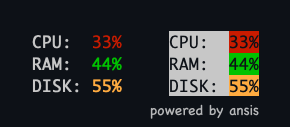
顏色和样式具有許多受歡迎的庫中使用的標準名稱,例如粉筆,色彩,picocolors,kleur。
| 前景顏色 | 背景顏色 | 樣式 |
|---|---|---|
black | bgBlack | dim |
red | bgRed | bold |
green | bgGreen | italic |
yellow | bgYellow | underline |
blue | bgBlue | strikethroughstrike ) |
magenta | bgMagenta | inverse |
cyan | bgCyan | visible |
white | bgWhite | hidden |
blackBright別名: greygray美國拼寫 | bgBlackBright別名: bgGreybgGray我們的拼寫 | reset |
redBright | bgRedBright | |
greenBright | bgGreenBright | |
yellowBright | bgYellowBright | |
blueBright | bgBlueBright | |
magentaBright | bgMagentaBright | |
cyanBright | bgCyanBright | |
whiteBright | bgWhiteBright |
默認情況下,導入的ansis實例包含基本樣式和顏色。為了擴展使用自定義顏色名稱的基本顏色,請使用ansis.extend()方法。
 import ansis from 'ansis' ;

// extend base colors
ansis . extend ( {
  pink : '#FF75D1' ,
  orange : '#FFAB40' ,
} ) ;

// the custom colors are available under namespace `ansis`
ansis . pink ( 'text' ) ;
ansis . orange ( 'text' ) ;
用打字稿的用法示例:
 import ansis , { AnsiColorsExtend } from 'ansis' ;

// extend base colors
ansis . extend ( {
  pink : '#FF75D1' ,
  orange : '#FFAB40' ,
} ) ;

const write = ( style : AnsiColorsExtend < 'pink' | 'orange' > , message : string ) => {
  console . log ( ansis [ style ] ( message ) ) ;
}

write ( 'red' , 'message' ) ; // base color OK
write ( 'pink' , 'message' ) ; // extended color OK
write ( 'orange' , 'message' ) ; // extended color OK
write ( 'unknown' , 'message' ) ; // TypeScript Error 預定義的256種顏色。
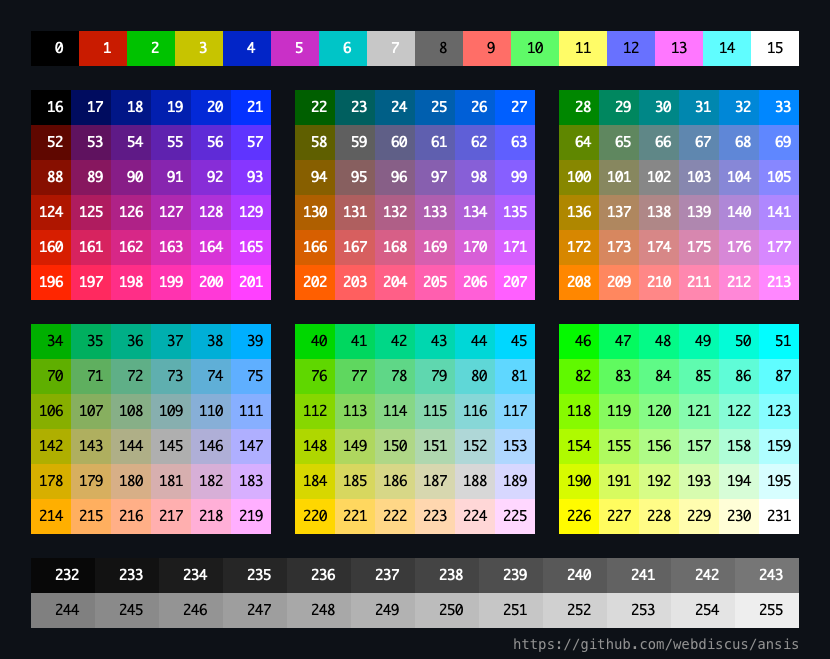
| 代碼範圍 | 描述 |
|---|---|
| 0-7 | 標準顏色 |
| 8-15 | 鮮豔的色彩 |
| 16-231 | 6×6×6立方體(216種顏色) |
| 232-255 | 灰度從黑色到白色,分別為24步 |
前景功能: ansi256(code)具有簡短的別名fg(code)
背景功能: bgAnsi256(code)具有簡短的別名bg(code)
ansi256()和bgAnsi256()方法實現了與chalkAPI的兼容性。
請參閱ANSI顏色代碼。
如果終端僅支持16種顏色,則ANSI 256顏色將被插值為16種顏色。
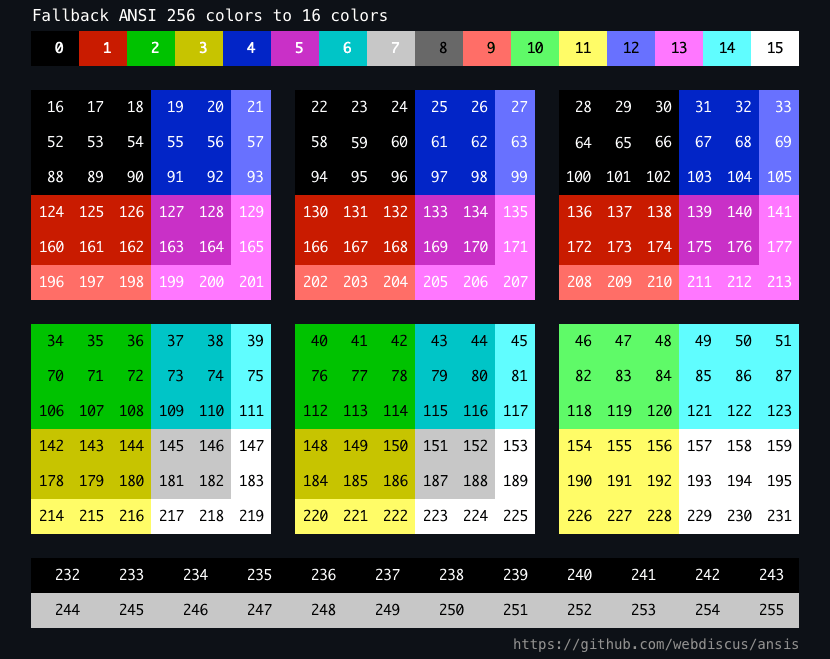
 import { bold , ansi256 , fg , bgAnsi256 , bg } from 'ansis' ;

// foreground color
ansi256 ( 96 ) `Bright Cyan` ;
fg ( 96 ) `Bright Cyan` ; // alias for ansi256

// background color
bgAnsi256 ( 105 ) `Bright Magenta` ;
bg ( 105 ) `Bright Magenta` ; // alias for bgAnsi256

// function is chainable
ansi256 ( 96 ) . bold `bold Bright Cyan` ;

// function is avaliable in each style
bold . ansi256 ( 96 ) . underline `bold underline Bright Cyan` ;

// you can combine the functions and styles in any order
bgAnsi256 ( 105 ) . ansi256 ( 96 ) `cyan text on magenta background`
bg ( 105 ) . fg ( 96 ) `cyan text on magenta background` 您可以使用hex或rgb格式。
前景功能: hex() rgb()
背景功能: bgHex() bgRgb()
 import { bold , hex , rgb , bgHex , bgRgb } from 'ansis' ;

// foreground color
hex ( '#E0115F' ) . bold `bold Ruby` ;
hex ( '#96C' ) `Amethyst` ;
rgb ( 224 , 17 , 95 ) . italic `italic Ruby` ;

// background color
bgHex ( '#E0115F' ) `Ruby` ;
bgHex ( '#96C' ) `Amethyst` ;
bgRgb ( 224 , 17 , 95 ) `Ruby` ;

// you can combine the functions and styles in any order
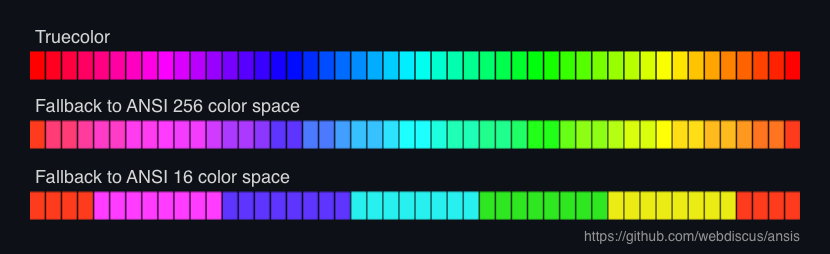
bold . hex ( '#E0115F' ) . bgHex ( '#96C' ) `ruby bold text on amethyst background` ansis支持後備為支持的顏色空間。
Truecolor —> 256 colors —> 16 colors —> no colors (black & white)
如果您在不支持的trueColor或256種顏色的端子中使用hex() , rgb()或ansis256()函數,則顏色將被插值。
您可以使用每種樣式的ANSI逃生代碼具有open和close屬性。
 import { red , bold } from 'ansis' ;

// each style has `open` and `close` properties
console . log ( `Hello ${ red . open } ANSI ${ red . close } World!` ) ;

// you can defiene own style which will have the `open` and `close` properties
const myStyle = bold . italic . black . bgHex ( '#E0115F' ) ;

console . log ( `Hello ${ myStyle . open } ANSI ${ myStyle . close } World!` ) ; ANSIS類包含方法strip()以從字符串中刪除所有ANSI代碼。
 import ansis from 'ansis' ;

const ansiString = ansis . green `Hello World!` ;
const string = ansis . strip ( ansiString ) ;變量string將包含無ANSI代碼的純字符串。
支持end of line正確樣式中斷。
 import { bgGreen } from 'ansis' ;

console . log ( bgGreen `nAnsisnNew LinenNext New Linen` ) ; 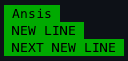
定義自己的主題:
 import ansis from 'ansis' ;

const theme = {
  info : ansis . cyan . italic ,
  warn : ansis . black . bgYellowBright ,
  error : ansis . red . bold ,
  ruby : ansis . hex ( '#E0115F' ) ,
} ;

theme . info ( 'info' ) ;
theme . warn ( 'warning' ) ;
theme . error ( 'error' ) ;
theme . ruby ( 'Ruby color' ) ; 默認情況下,終端控制台中的輸出顏色並在文件中輸出未顏色。
強制禁用或啟用彩色輸出使用環境變量NO_COLOR和FORCE_COLOR 。
NO_COLOR變量應具有任何不空值的呈現。該值並不重要,例如, NO_COLOR=1 NO_COLOR=true禁用顏色。
請參閱NO_COLOR的標準描述。
FORCE_COLOR變量應為一個值之一:
FORCE_COLOR=0力禁用顏色FORCE_COLOR=1力啟用顏色
請參閱force_color的標準描述。
例如, app.js :
 import { red } from 'ansis' ;

console . log ( red `red color` ) ;
在終端執行腳本:
 $ node app.js           # colored output in terminal
$ node app.js > log.txt # output in file without ANSI codes

$ NO_COLOR=1 node app.js              # force disable colors, non colored output in terminal
$ FORCE_COLOR=0 node app.js           # force disable colors, non colored output in terminal
$ FORCE_COLOR=1 node app.js > log.txt # force enable colors, output in file with ANSI codes
COLORTERM終端仿真器使用COLORTERM環境變量表示對顏色的支持。它的值可以根據終端模擬器和提供的顏色支持水平而有所不同。
ansis支持的常用值:
truecolor或24bit -1600萬顏色ansi256 ANSI 256顏色ansi基本ANSI 16顏色您可以在運行節點腳本之前設置CMD中的變量:
 COLORTERM=truecolor node script.js # force use truecolor
COLORTERM=ansi256 node script.js   # force use 256 colors
COLORTERM=ansi node script.js      # force use 16 olors
要在腳本中設置顏色級別,請創建一個JS文件,其中您可以使用所需值來定義COLORTERM Environment變量,然後在ansis之前導入此文件。
例如,對於測試CLI應用程序,這可能是有用的,以確保在不同環境和終端中受支持的顏色水平如何,測試結果將相同。
級別truecolor.js
process . env . COLORTERM = 'truecolor' ;您的腳本文件:
 import './level-truecolor' ; // <= force use truecolor
import { red , ansi256 , hex } from 'ansis' ;

console . log ( hex ( '#FFAB40' ) ( 'orange' ) ) ; // native ANSI RGB color value
console . log ( ansi256 ( 200 ) ( 'pink' ) ) ;     // native ANSI 256 color value
console . log ( red ( 'red' ) ) ; // native ANSI 16 color value Level-256Colors.js
process . env . COLORTERM = 'ansi256' ;您的腳本文件:
 import './level-256colors' ; // <= force use 256 colors
import { red , ansi256 , hex } from 'ansis' ;

console . log ( hex ( '#FFAB40' ) ( 'orange' ) ) ; // fallback to ANSI 256 color value
console . log ( ansi256 ( 200 ) ( 'pink' ) ) ;     // native ANSI 256 color value
console . log ( red ( 'red' ) ) ; // native ANSI 16 color value 16colors.js
process . env . COLORTERM = 'ansi' ;您的腳本文件:
 import './level-16colors' ; // <= force use 16 olors
import { red , ansi256 , hex } from 'ansis' ;

console . log ( hex ( '#FFAB40' ) ( 'orange' ) ) ; // fallback to ANSI 16 color value - `bright red`
console . log ( ansi256 ( 200 ) ( 'pink' ) ) ;     // fallback to ANSI 16 color value - `bright magenta`
console . log ( red ( 'red' ) ) ; // native ANSI 16 color value 使用cmd參數--no-color或--color=false to to to to colose --color顏色以啟用顏色。
例如,可執行腳本app.js :
#!/usr/bin/env node
import { red } from 'ansis' ;

console . log ( red `red color` ) ;
在終端執行腳本:
 $ ./app.js                        # colored output in terminal
$ ./app.js --no-color             # non colored output in terminal
$ ./app.js --color=false          # non colored output in terminal

$ ./app.js > log.txt              # output in file without ANSI codes
$ ./app.js --color > log.txt      # output in file with ANSI codes
$ ./app.js --color=true > log.txt # output in file with ANSI codes
警告
命令行參數的優先級高於環境變量。
ANSIS自動檢測支持的顏色空間:
ANSIS具有isSupported()該方法是否支持ANSI顏色和样式,它返回boolean值。
 import ansis from 'ansis' ;

console . log ( 'Color output: ' , ansis . isSupported ( ) ) ;沒有標準方法可以檢測支持哪個顏色空間。檢測顏色支持的最常見方法是檢查TERM和COLORTERM環境變量。可以通過檢查CI和其他特定環境變量的存在來檢測CI系統。結合有關該程序正在運行的操作系統的知識,我們有足夠的方法來檢測顏色。
| 終端 | ANSI 16 顏色 | ANSI 256 顏色 | 真的 顏色 | env。 學期 | env。 色情 | 特別是ENV變量 |
|---|---|---|---|---|---|---|
| Azure CI | ✅ | 啞的 | tf_build Agent_name | |||
| github ci | ✅ | ✅ | ✅ | 啞的 | CI,github_actions | |
| Gittea CI | ✅ | ✅ | ✅ | 啞的 | CI,gitea_actions | |
| gitlab ci | ✅ | 啞的 | CI,gitlab_ci | |||
| 特拉維斯CI | ✅ | 啞的 | 特拉維斯 | |||
| PM2 不是iStty | ✅1 | ✅1 | ✅1 | 啞的 | PM2_HOME PM_ID | |
| Jetbrains Teamcity > = 2020.1.1 | ✅ | ✅ | Teamcity_version | |||
| Jetbrains的想法 | ✅ | ✅ | ✅ | XTerm-256Color | terminal_emulator ='jetbrains-jediterm' | |
| VS代碼 | ✅ | ✅ | ✅ | XTerm-256Color | truecolor | |
| 視窗 終端 | ✅ | ✅ | ✅2 | |||
| 視窗 Powershell | ✅ | ✅ | ✅2 | |||
| MacOS終端 | ✅ | ✅ | XTerm-256Color | |||
| iterm | ✅ | ✅ | ✅ | XTerm-256Color | truecolor | |
| 終端模擬器小貓 | ✅ | ✅ | ✅ | xterm-kitty | ||
| 終端模擬器KDE Konsole | ✅ | ✅ | ✅ | x-term-direct |
參見:
運行命令以查看各種庫的某些功能的支持:
npm run compare
| 圖書館 ________________ - 命名導入 - 命名顏色 | ANSI 16顏色 | ANSI 256 顏色 | 真的 顏色 | 被束縛 句法 | 嵌套 模板字符串 | 新的 線 | 顏色的後備 | 支持 env vars CLI標誌 |
|---|---|---|---|---|---|---|---|---|
ansis✅ named import✅ standard | ✅ | ✅ | ✅ | ✅ | ✅ | ✅ | →256 →16 →B&W | NO_COLORFORCE_COLOR--no-color--color |
chalknamed import✅ standard | ✅ | ✅ | ✅ | ✅ | ✅ | →256 →16 →B&W | NO_COLORFORCE_COLOR--no-color--color | |
kolorist✅ named importstandard | ✅ | ✅ | ✅ | →256 →B&W | NO_COLORFORCE_COLOR | |||
cli-colornamed import✅ standard | ✅ | ✅ | ✅ | →16 →B&W | NO_COLOR | |||
colors-clinamed importstandard | ✅ | ✅ | ✅ | ✅ | →B&W | --no-color--color | ||
colors.jsnamed importstandard | ✅ | ✅ | ✅ | →B&W | FORCE_COLOR--no-color--color | |||
ansi-colorsnamed import✅ standard | ✅ | ✅ | ✅ | FORCE_COLOR | ||||
colorette✅ named import✅ standard | ✅ | →B&W | NO_COLORFORCE_COLOR--no-color--color | |||||
picocolorsnamed import✅ standard | ✅ 自v1.1.0以來 | →B&W | NO_COLORFORCE_COLOR--no-color--color | |||||
kleur✅ named import✅ standard | 8顏色 | ✅ | →B&W | NO_COLORFORCE_COLOR |
筆記
命名導入
ESM
import { red, green, blue } from 'lib';
CJS
const { red, green, blue } = require('lib');命名顏色
- 標準:顏色具有標準名稱,例如:
red,redBright,bgRed,bgRedBright- 非標準:顏色具有特定於lib的名稱,例如:
brightRed,bgBrightRed,red_b,red_bttANSI 256顏色
方法名稱:
colors-cli:x<n>cli-color:xterm(n)chalk:ansi256(n)bgAnsi256(n)ansis:ansi256(n)bgAnsi256(n)fg(n)bg(n)truecolor
方法名稱:
chalk:hex()rgb()ansis:hex()rgb()鍊式語法
lib.red.bold('text')嵌套模板字符串
lib.red`text ${lib.cyan`nested`} text`新線
end-of-line時正確的斷裂樣式。lib.bgGreen(`First Line Next Line`);
| NPM軟件包 | 下載tarball尺寸 | 打開包裝的尺寸 | 代碼大小 |
|---|---|---|---|
picocolors | 2.6 kb | 6.4 kb | 2.6 kb |
ansis | 3.8 kb | 7.4 kb | 3.4 kb |
colorette | 4.9 kb | 17.0 kb | 3.4 kb |
kleur | 6.0 kb | 20.3 kb | 2.7 kb |
ansi-colors | 8.5 kb | 26.1 kb | 5.8 kb |
kolorist | 8.7 kb | 51.0 kb | 6.8 kb |
colors.js | 11.0 kb | 39.5 kb | 18.1 kb |
chalk | 13.1 kb | 43.7 kb | 16.4 kb |
cli-color | 13.8(216 KB) | 39.6(754 KB) | 12.1 kb |
colors-cli | 361.7 kb | 511.0 kb | 8.7 kb |
下載尺寸: NPM軟件包的GZZ尺寸。
打開包裝的大小: node_modules/ DIRECTORY (incl. dependencies)中NPM軟件包的大小。
代碼大小:將通過require或import到應用程序中的分佈式代碼的大小。
參見:
git clone https://github.com/webdiscus/ansis.git
cd ./ansis
npm i
npm run demo測量性能用於基準。
警告
vitest benchmark產生虛假/虛幻的結果。
例如,簡單的基準的結果:
 chalk.red('foo') -  7.000.000 ops/sec
ansis.red('foo') - 23.000.000 ops/sec (x3 faster is WRONG result)
在此測試中,粉筆和ANSIS的實際性能非常相似。
git clone https://github.com/webdiscus/ansis.git
cd ./ansis
npm i
npm run build
npm run bench
經過測試
MacBook Pro 16“ M1 Max 64GB
MacOS紅杉15.1
Node.js v22.11.0
終端iTerm2v3.5.0
筆記
在測試中,每個庫都使用可用的最快樣式方法來比較每個庫的絕對性能。
在實際實踐中,沒有人會使用最慢的方法(例如嵌套呼叫)來設置字符串,當庫提供更快且較短的鍊式方法時。
例如:
 lib . red . bold . bgWhite ( ' ERROR ' )           // ✅ faster, shorter, readable
lib . red ( lib . bold ( lib . bgWhite ( ' ERROR ' ) ) ) // slower, longer, unreadable簡單的測試僅使用單個樣式。 Picocolors,Colorette和Kleur不支持鍊式的語法或正確的樣式中斷(在字符串中使用`n`使用),因此在此簡單用例中它們是最快的。沒有功能,沒有性能開銷。
 ansis . red ( 'foo' )
chalk . red ( 'foo' )
picocolors . red ( 'foo' )
. . .
+ [email protected] 109.212.939 ops/sec
[email protected] 108.044.800 ops/sec
[email protected] 87.800.739 ops/sec
- > [email protected] 60.606.043 ops/sec -44.5%
- [email protected] 55.702.479 ops/sec -48.9%
[email protected] 37.069.069 ops/sec
[email protected] 14.364.378 ops/sec
[email protected] 7.060.583 ops/sec
[email protected] 2.753.751 ops/sec
[email protected] 897.746 ops/sec僅使用2種樣式,Picocolors已經有點慢一些,因為使用鍊式語法比嵌套調用快。
 ansis . red . bold ( 'foo' )
chalk . red . bold ( 'foo' )
picocolors . red ( picocolors . bold ( 'foo' ) ) // chained syntax is not supported
. . .
+ [email protected] 60.468.181 ops/sec
- [email protected] 58.777.183 ops/sec -2.8%
- [email protected] 47.789.020 ops/sec -21.5%
[email protected] 33.387.988 ops/sec
[email protected] 13.420.047 ops/sec
[email protected] 5.972.681 ops/sec
[email protected] 4.086.412 ops/sec
[email protected] 3.018.244 ops/sec
[email protected] 1.817.039 ops/sec
[email protected] 695.601 ops/sec使用3種樣式,Picocolors比ANSIS慢2倍。
 ansis . red . bold . bgWhite ( 'foo' )
chalk . red . bold . bgWhite ( 'foo' )
picocolors . red ( picocolors . bold ( picocolors . bgWhite ( 'foo' ) ) ) // chained syntax is not supported
. . .
+ [email protected] 59.463.640 ops/sec
- [email protected] 42.166.783 ops/sec -29.0%
- [email protected] 32.434.017 ops/sec -45.5% (~2x slower than Ansis)
[email protected] 13.008.117 ops/sec
[email protected] 5.608.244 ops/sec
[email protected] 5.268.630 ops/sec
[email protected] 2.145.517 ops/sec
[email protected] 1.686.728 ops/sec
[email protected] 1.453.611 ops/sec
[email protected] 590.467 ops/sec在極少數情況下,當使用4種樣式時,小科羅斯(Picocolors)的速度比ANSIS慢3.4倍。
 ansis . red . bold . underline . bgWhite ( 'foo' )
chalk . red . bold . underline . bgWhite ( 'foo' )
picocolors . red ( picocolors . bold ( picocolors . underline ( picocolors . bgWhite ( 'foo' ) ) ) ) // chained syntax is not supported
. . .
+ [email protected] 59.104.535 ops/sec
- [email protected] 36.147.547 ops/sec -38.8%
- [email protected] 17.581.709 ops/sec -70.2% (~3x slower than Ansis)
[email protected] 7.981.171 ops/sec
[email protected] 4.825.665 ops/sec
[email protected] 3.729.880 ops/sec
[email protected] 1.514.053 ops/sec
[email protected] 1.229.999 ops/sec
[email protected] 1.210.931 ops/sec
[email protected] 481.073 ops/sec具有深層嵌套單樣式的複雜測試。
 c . green (
  `green ${ c . cyan (
    `cyan ${ c . red (
      `red ${ c . yellow (
        `yellow ${ c . blue (
          `blue ${ c . magenta ( `magenta ${ c . underline ( `underline ${ c . italic ( `italic` ) } underline` ) } magenta` ) } blue` ,
        ) } yellow` ,
      ) } red` ,
    ) } cyan` ,
  ) } green` ,
)
+ [email protected] 1.110.056 ops/sec
- [email protected] 1.073.299 ops/sec
- > [email protected] 847.246 ops/sec -23.7%
[email protected] 847.110 ops/sec
- [email protected] 573.942 ops/sec -48.3%
[email protected] 471.285 ops/sec
[email protected] 439.588 ops/sec
[email protected] 382.862 ops/sec
[email protected] 213.351 ops/sec
[email protected] 41.097 ops/seccolorette中用於單一樣式的基準。
c . red ( ` ${ c . bold ( ` ${ c . cyan ( ` ${ c . yellow ( 'yellow' ) } cyan` ) } ` ) } red` ) + [email protected] 3.861.384 ops/sec
[email protected] 3.815.039 ops/sec
- > [email protected] 2.918.269 ops/sec -24.4%
[email protected] 2.548.564 ops/sec
- [email protected] 2.502.850 ops/sec -35.2%
[email protected] 2.229.023 ops/sec
[email protected] 1.426.279 ops/sec
[email protected] 1.123.139 ops/sec
[email protected] 481.708 ops/sec
[email protected] 114.570 ops/secpicocolors基準測試,稍作修改。通過將兩種樣式應用於彩色單詞而不是一個樣式來增加一些複雜性。
 let index = 1e8 ;
c . red ( '.' ) +
c . yellow ( '.' ) +
c . green ( '.' ) +
c . red . bold ( ' ERROR ' ) +
c . red ( 'Add plugin ' + c . cyan . underline ( 'name' ) + ' to use time limit with ' + c . cyan ( ++ index ) ) ;
+ [email protected] 2.601.559 ops/sec
- > [email protected] 2.501.227 ops/sec -3.8%
[email protected] 2.326.491 ops/sec
- [email protected] 2.129.106 ops/sec -18.1%
[email protected] 1.780.496 ops/sec
[email protected] 1.685.703 ops/sec
[email protected] 838.542 ops/sec
[email protected] 533.362 ops/sec
[email protected] 287.558 ops/sec
[email protected] 97.463 ops/sec筆記
在更接近實際用途的測試中,每個庫都使用最快的樣式方法。
因此, chalk , ansis , ansi-colors , cli-color , colors-cli和colors使用鍊式方法,例如c.red.bold(' ERROR ') 。雖然picocolors , colorette和kolorist使用嵌套呼叫,例如c.red(c.bold(' ERROR ')) ,因為不支持鍊式語法。
Ansis是一個強大,小巧且快速的更換,不需要許多類似庫的代碼遷移。
只需import ... from ...或require(...)到ansis 。
 - import chalk from 'chalk';
+ import chalk from 'ansis';
ANSIS支持粉筆語法,並與樣式和顏色名稱兼容*,因此您無需修改原始代碼:
 chalk . red . bold ( 'Error!' ) ;

// colorize "Error: file not found!"
chalk . red ( `Error: ${ chalk . cyan . bold ( 'file' ) } not found!` ) ;

// ANSI 256 colors
chalk . ansi256 ( 93 ) ( 'Violet color' ) ;
chalk . bgAnsi256 ( 194 ) ( 'Honeydew, more or less' ) ;

// truecolor
chalk . hex ( '#FFA500' ) . bold ( 'Bold orange color' ) ;
chalk . rgb ( 123 , 45 , 67 ) . underline ( 'Underlined reddish color' ) ;
chalk . bgHex ( '#E0115F' ) ( 'Ruby' ) ;
chalk . bgHex ( '#96C' ) ( 'Amethyst' ) ;
警告
Ansis不支持overline樣式,因為它沒有得到廣泛支持,也沒有人使用它。
檢查您的代碼並刪除overline樣式:
 - chalk.red.overline('text');
+ chalk.red('text');
可選地,您可以重寫相同的代碼以使其更短,更清潔:
 import { red , cyan , ansi256 , bgAnsi256 , fg , bg , hex , rgb , bgHex , bgRgb } from 'ansis' ;

red . bold ( 'Error!' ) ; // using parentheses
red . bold `Error!` ;   // using template string

// colorize "Error: file not found!"
red `Error: ${ cyan . bold `file` } not found!` ;

// ANSI 256 colors
ansi256 ( 93 ) `Violet color` ;
bgAnsi256 ( 194 ) `Honeydew, more or less` ;
fg ( 93 ) `Violet color` ; // alias for ansi256
bg ( 194 ) `Honeydew, more or less` ;  // alias for bgAnsi256

// truecolor
hex ( '#FFA500' ) . bold `Bold orange color` ;
rgb ( 123 , 45 , 67 ) . underline `Underlined reddish color` ;
bgHex ( '#E0115F' ) `Ruby` ;
bgHex ( '#96C' ) `Amethyst` ; - import { red, bold, underline } from 'colorette';
+ import { red, bold, underline } from 'ansis'; Ansis完全兼容著colorette樣式和顏色名稱,因此您無需修改原始代碼:
 red . bold ( 'Error!' ) ;
bold ( `I'm ${ red ( `da ba ${ underline ( "dee" ) } da ba` ) } daa` ) ;
可選地,您可以重寫相同的代碼以使其更短,更清潔:
 red . bold `Error!` ;
bold `I'm ${ red `da ba ${ underline `dee` } da ba` } daa` ; - import pico from 'picocolors';
+ import pico from 'ansis'; Ansis與picocolors樣式和顏色名稱完全兼容,因此您無需修改原始代碼:
 pico . red ( pico . bold ( 'text' ) ) ;
pico . red ( pico . bold ( variable ) ) ;

// colorize "Error: file not found!"
pico . red ( 'Error: ' + pico . cyan ( pico . bold ( 'file' ) ) + ' not found!' ) ;
可選地,您可以重寫相同的代碼以使其更短,更清潔:
 import { red , cyan } from 'ansis' ;

red . bold `text` ;
red . bold ( variable ) ;

// colorize "Error: file not found!"
red `Error: ${ cyan . bold `file` } not found!` - const c = require('ansi-colors');
+ const c = require('ansis'); Ansis與ansi-color樣式和顏色名稱完全兼容,因此您無需修改原始代碼:
 c . red . bold ( 'Error!' ) ;

// colorize "Error: file not found!"
c . red ( `Error: ${ c . cyan . bold ( 'file' ) } not found!` ) ;
可選地,您可以重寫相同的代碼以使其更短,更清潔:
 import { red , cyan } from 'ansis' ;

red . bold ( 'Error!' ) ; // using parentheses
red . bold `Error!` ;   // using template string

// colorize "Error: file not found!"
red `Error: ${ cyan . bold `file` } not found!` ; - import { red, green, yellow, cyan } from 'kleur';
+ import { red, green, yellow, cyan } from 'ansis'; Ansis與kleur樣式和顏色名稱完全兼容,但是Kleur v3.0不再使用粉筆式的語法(Magical Getter):
 green ( ) . bold ( ) . underline ( 'this is a bold green underlined message' ) ;
yellow ( `foo ${ red ( ) . bold ( 'red' ) } bar ${ cyan ( 'cyan' ) } baz` ) ;如果您使用鏈接方法,則需要簡單的代碼修改。只需替換().和. :
 green . bold . underline ( 'this is a bold green underlined message' ) ;
yellow ( `foo ${ red . bold ( 'red' ) } bar ${ cyan ( 'cyan' ) } baz` ) ;
可選地,您可以重寫相同的代碼以使其更短,更清潔:
yellow `foo ${ red . bold `red` } bar ${ cyan `cyan` } baz` ; - const clc = require('cli-color');
+ const clc = require('ansis'); Ansis與cli-color樣式和顏色名稱兼容*:
 clc . red . bold ( 'Error!' ) ;

// colorize "Error: file not found!"
clc . red ( `Error: ${ c . cyan . bold ( 'file' ) } not found!` ) ;
警告
Ansis不支持blink樣式,因為它沒有得到廣泛支持,也沒有人使用它。
檢查您的代碼並刪除blink樣式:
 - clc.red.blink('text');
+ clc.red('text');
如果您使用ANSI 256顏色函數xterm或bgXterm ,則必須將其替換為ansi256 fn或bgAnsi256 bg :
 - clc.xterm(202).bgXterm(236)('Orange text on dark gray background');
+ clc.ansi256(202).bgAnsi256(236)('Orange text on dark gray background');
可選地,您可以重寫相同的代碼以使其更短,更清潔:
 import { red , cyan , fg , bg } from 'ansis' ;

red . bold `Error!` ;

// colorize "Error: file not found!"
red `Error: ${ cyan . bold `file` } not found!` ;

fg ( 202 ) . bg ( 236 ) `Orange text on dark gray background` ; npm run test將運行單元和集成測試。
npm run test:coverage將通過覆蓋範圍運行測試。
ISC
所支持的顏色取決於實際終端。 ↩↩2↩3
由於Windows 10修訂版14931(2016-09-21),Windows終端支持真實顏色。 ↩2







