ansis
v3.4.0

A small and fast Node.js library for applying ANSI colors and styles in terminal output.
Ansis provides all the features you need, you can compare with similar libraries.
Ansis is faster than Chalk and Picocolors (in some use cases), see benchmarks.
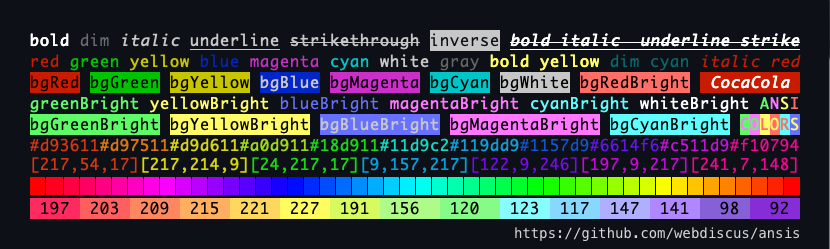
import ansis, { red, green, cyan, black, ansi256, hex } from 'ansis';

ansis.blueBright('file.txt')
green`Succeful!`
red`Error: ${cyan(file)} not found!`
black.bgYellow`Warning!`
ansi256(214)`Orange`
hex('#E0115F').bold.underline('Truecolor!')The most popular Node.js libraries similar to Ansis:
chalk, picocolors, colorette, kleur, ansi-colors, kolorist, cli-color, colors-cli, colors.js
✅ Compare features ? Compare package sizes Benchmarks
chalk colorette picocolors ansi-colorsimport ansis, { red, bold, ansi256, hex } from 'ansis'red.bold.underline('text')red`Error: ${blue`file.js`} not found!`dim bold italic underline strikethroughred`Error!` redBright`Error!` bgRed`Error!` bgRedBright`Error!`fg(56)`violet` bg(208)`orange`rgb(224, 17, 95)`Ruby` hex('#96C')`Amethyst`open and close properties `foo ${red.open}red{red.close} bar`ansis.strip()NO_COLOR FORCE_COLOR and flags --no-color --colorend of line when used n in stringString.prototypeNestJS, Facebook/StyleX, Sequelize, Salesforce, Oclif, WebpackBar
If you have discovered a bug or have a feature suggestion, feel free to create an issue on GitHub.
Today, the two smallest and fastest libraries are ansis and picocolors.
Both are recommended by the ES Tooling community as the best replacements for older, bulkier libraries.
picocolors: 6.4 kB - A micro library with only basic features.аnsis: 7.4 kB - A powerful library containing all the features you need.chalk: 44.2 kB - Provides similar functionality to Ansis but is larger.picocolors: The fastest when applying a single style (e.g., red only).аnsis: The fastest when applying two or more styles (e.g., red + bgWhite).chalk: Slower than both Ansis and Picocolors in all use cases.Only ansis, chalk, and picocolors are actively maintained, unlike many other libraries:
colorette: Last updated 2 years agoansi-colors: Last updated 3 years agokleur: Last updated 2 years agocli-color: Last updated ~1 year agocolors-cli: Last updated 1 year agocolors.js: Last updated 5 year agoIf you only use a single style, such as red('foo'), Picocolors is the best solution.
However, if you need more, like combining multiple styles (e.g., red + bold + bgWhite),
ANSI256 colors, Truecolor,
or support for a wide range of environments,
then Ansis is the better choice.
Explore the list of features, package sizes, and benchmarks compared to similar libraries.
Tip
Use the chained syntax provided by libraries like ansis and chalk.
Avoid nested calls, as they are much slower and less readable than the chained syntax.
Keep your code clean and readable!
red.bold.bgWhite`Error`                    ✅ ansis: faster, shorter, readable
pico.red(pico.bold(pico.bgWhite('Error')))  picocolor: slower, longer, unreadable

red`Error: ${cyan.underline(file)} not found!`                   ✅ ansis ?
pico.red(`Error: ${pico.cyan(pico.underline(file))} not found!`) picocolor ?chalkcolorettepicocolorsansi-colorskleurcli-colornpm install ansisYou can import default module or named colors with ESM or CommonJS syntax.
// ESM default import
import ansis from 'ansis';
// ESM named import
import { red, green, blue } from 'ansis';
or
// CommonJS default import
const ansis = require('ansis');
// CommonJS named import
const { red, green, blue } = require('ansis');
See the list of the ANSI colors and styles.
console.log(ansis.green('Success!'));
console.log(green('Success!'));

// template string
console.log(green`Success!`);

// chained syntax
console.log(green.bold`Success!`);

// nested syntax
console.log(red`The ${blue.underline`file.js`} not found!`);
Basic example Hello World!:
import { red, black, inverse, reset } from 'ansis';

console.log(green`Hello ${inverse`ANSI`} World!
${black.bgYellow`Warning:`} ${cyan`/path/to/file.js`} ${red`not found!`}`);
Output:

The ansis supports both the default import and named import.
// default import
import ansis from 'ansis';

ansis.red.bold('text');
You can import named colors, styles and functions. All imported colors and styles are chainable.
// named import
import { red, hex, italic } from 'ansis';

red.bold('text');
Default import and named import can be combined.
// default and named import
import ansis, { red } from 'ansis';

const redText = red('text'); // colorized ANSI string
const text = ansis.strip(redText); // pure string without ANSI codesThe ansis supports both the function syntax red('error') and template literals red`error`.
The template literals allow you to make a complex template more readable and shorter.
The function syntax can be used to colorize a variable.
import { red } from 'ansis';

let message = 'error';

red(message);
red`text`;
red`text ${message} text`;All colors, styles and functions are chainable. Each color or style can be combined in any order.
import { red, bold, italic, hex } from 'ansis';

red.bold`text`;
hex('#FF75D1').bgCyan.bold`text`;
bold.bgHex('#FF75D1').cyan`text`;
italic.bold.yellow.bgMagentaBright`text`;You can nest functions and template strings within each other. None of the other libraries (chalk, kleur, colorette, colors.js etc.) support nested template strings.
Nested template strings:
import { red, green } from 'ansis';

red`red ${green`green`} red`;
Deep nested chained styles:
import { red, green, cyan, magenta, yellow, italic, underline } from 'ansis';

red(`red ${italic(`red italic ${underline(`red italic underline`)}`)} red`);

// deep nested chained styles
green(
  `green ${yellow(
    `yellow ${magenta(
      `magenta ${cyan(
        `cyan ${red.italic.underline`red italic underline`} cyan`,
      )} magenta`,
    )} yellow`,
  )} green`,
);
Output:

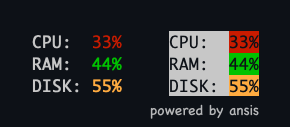
Multiline nested template strings:
import { red, green, hex, visible, inverse } from 'ansis';

// defined a Truecolor as the constant
const orange = hex('#FFAB40');

let cpu = 33;
let ram = 44;
let disk = 55;

// normal colors
visible`
CPU:  ${red`${cpu}%`}
RAM:  ${green`${ram}%`}
DISK: ${orange`${disk}%`}
`;

// inversed colors
inverse`
CPU:  ${red`${cpu}%`}
RAM:  ${green`${ram}%`}
DISK: ${orange`${disk}%`}
`;
Output:
Colors and styles have standard names used by many popular libraries, such as chalk, colorette, picocolors, kleur.
| Foreground colors | Background colors | Styles |
|---|---|---|
black |
bgBlack |
dim |
red |
bgRed |
bold |
green |
bgGreen |
italic |
yellow |
bgYellow |
underline |
blue |
bgBlue |
strikethroughstrike) |
magenta |
bgMagenta |
inverse |
cyan |
bgCyan |
visible |
white |
bgWhite |
hidden |
blackBrightaliases: greygray US spelling |
bgBlackBrightaliases: bgGreybgGray US spelling |
reset |
redBright |
bgRedBright |
|
greenBright |
bgGreenBright |
|
yellowBright |
bgYellowBright |
|
blueBright |
bgBlueBright |
|
magentaBright |
bgMagentaBright |
|
cyanBright |
bgCyanBright |
|
whiteBright |
bgWhiteBright |
Defaults, the imported ansis instance contains base styles and colors.
To extend base colors with custom color names for Truecolor use the ansis.extend() method.
import ansis from 'ansis';

// extend base colors
ansis.extend({
  pink: '#FF75D1',
  orange: '#FFAB40',
});

// the custom colors are available under namespace `ansis`
ansis.pink('text');
ansis.orange('text');
Usage example with TypeScript:
import ansis, { AnsiColorsExtend } from 'ansis';

// extend base colors
ansis.extend({
  pink: '#FF75D1',
  orange: '#FFAB40',
});

const write = (style: AnsiColorsExtend<'pink' | 'orange'>, message: string) => {
  console.log(ansis[style](message));
}

write('red', 'message'); // base color OK
write('pink', 'message'); // extended color OK
write('orange', 'message'); // extended color OK
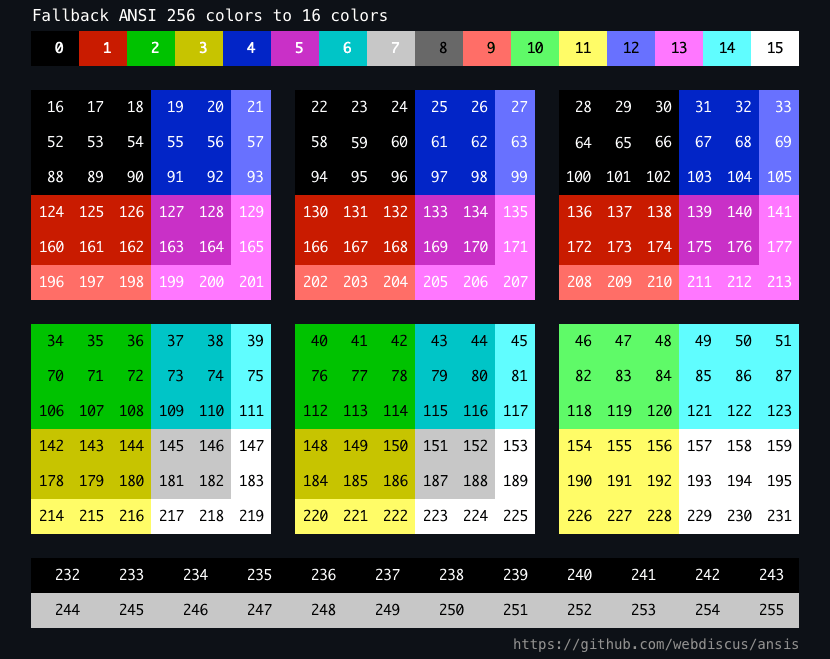
write('unknown', 'message'); // TypeScript ErrorThe pre-defined set of 256 colors.
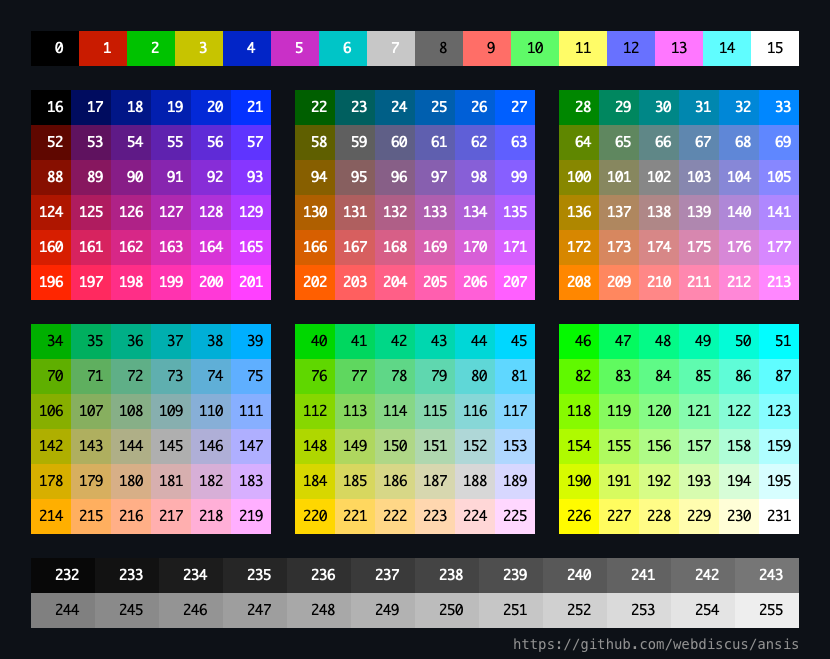
| Code range | Description |
|---|---|
| 0 - 7 | standard colors |
| 8 - 15 | bright colors |
| 16 - 231 | 6 × 6 × 6 cube (216 colors) |
| 232 - 255 | grayscale from black to white in 24 steps |
Foreground function: ansi256(code) has short alias fg(code)
Background function: bgAnsi256(code) has short alias bg(code)
The
ansi256()andbgAnsi256()methods are implemented for compatibility with thechalkAPI.
See ANSI color codes.
If a terminal supports only 16 colors then ANSI 256 colors will be interpolated into base 16 colors.
import { bold, ansi256, fg, bgAnsi256, bg } from 'ansis';

// foreground color
ansi256(96)`Bright Cyan`;
fg(96)`Bright Cyan`; // alias for ansi256

// background color
bgAnsi256(105)`Bright Magenta`;
bg(105)`Bright Magenta`; // alias for bgAnsi256

// function is chainable
ansi256(96).bold`bold Bright Cyan`;

// function is avaliable in each style
bold.ansi256(96).underline`bold underline Bright Cyan`;

// you can combine the functions and styles in any order
bgAnsi256(105).ansi256(96)`cyan text on magenta background`
bg(105).fg(96)`cyan text on magenta background`You can use the hex or rgb format.
Foreground function: hex() rgb()
Background function: bgHex() bgRgb()
import { bold, hex, rgb, bgHex, bgRgb } from 'ansis';

// foreground color
hex('#E0115F').bold`bold Ruby`;
hex('#96C')`Amethyst`;
rgb(224, 17, 95).italic`italic Ruby`;

// background color
bgHex('#E0115F')`Ruby`;
bgHex('#96C')`Amethyst`;
bgRgb(224, 17, 95)`Ruby`;

// you can combine the functions and styles in any order
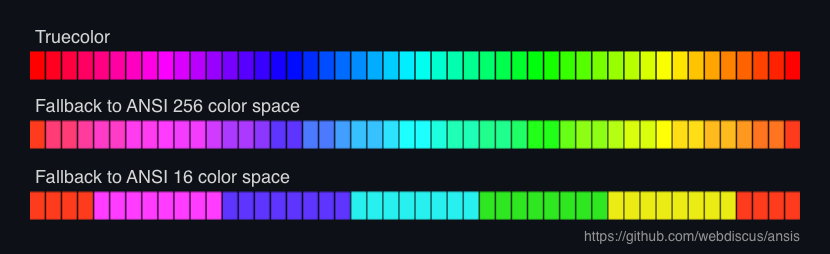
bold.hex('#E0115F').bgHex('#96C')`ruby bold text on amethyst background`The ansis supports fallback to supported color space.
Truecolor —> 256 colors —> 16 colors —> no colors (black & white)
If you use the hex(), rgb() or ansis256() functions in a terminal not supported Truecolor or 256 colors, then colors will be interpolated.
You can use the ANSI escape codes with open
and close properties for each style.
import { red, bold } from 'ansis';

// each style has `open` and `close` properties
console.log(`Hello ${red.open}ANSI${red.close} World!`);

// you can defiene own style which will have the `open` and `close` properties
const myStyle = bold.italic.black.bgHex('#E0115F');

console.log(`Hello ${myStyle.open}ANSI${myStyle.close} World!`);The Ansis class contains the method strip() to remove all ANSI codes from string.
import ansis from 'ansis';

const ansiString = ansis.green`Hello World!`;
const string = ansis.strip(ansiString);
The variable string will contain the pure string without ANSI codes.
Supports correct style break at the end of line.
import { bgGreen } from 'ansis';

console.log(bgGreen`nAnsisnNew LinenNext New Linen`);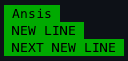
Define your own themes:
import ansis from 'ansis';

const theme = {
  info: ansis.cyan.italic,
  warn: ansis.black.bgYellowBright,
  error: ansis.red.bold,
  ruby: ansis.hex('#E0115F'),
};

theme.info('info');
theme.warn('warning');
theme.error('error');
theme.ruby('Ruby color');Defaults, the output in terminal console is colored and output in a file is uncolored.
To force disable or enable colored output use environment variables NO_COLOR and FORCE_COLOR.
The NO_COLOR variable should be presents with any not empty value.
The value is not important, e.g., NO_COLOR=1 NO_COLOR=true disable colors.
See standard description by NO_COLOR.
The FORCE_COLOR variable should be presents with one of values:
FORCE_COLOR=0 force disable colors
FORCE_COLOR=1 force enable colors
See standard description by FORCE_COLOR.
For example, app.js:
import { red } from 'ansis';

console.log(red`red color`);
Execute the script in a terminal:
$ node app.js           # colored output in terminal
$ node app.js > log.txt # output in file without ANSI codes

$ NO_COLOR=1 node app.js              # force disable colors, non colored output in terminal
$ FORCE_COLOR=0 node app.js           # force disable colors, non colored output in terminal
$ FORCE_COLOR=1 node app.js > log.txt # force enable colors, output in file with ANSI codes
COLORTERMThe COLORTERM environment variable is used by terminal emulators to indicate support for colors.
Its value can vary depending on the terminal emulator and the level of color support provided.
The commonly used values supported by ansis:
truecolor or 24bit - 16 million colorsansi256 - ANSI 256 colorsansi - basic ANSI 16 colorsYou can set the variable in cmd before running the Node script:
COLORTERM=truecolor node script.js # force use truecolor
COLORTERM=ansi256 node script.js   # force use 256 colors
COLORTERM=ansi node script.js      # force use 16 olors
To set the color level in a script, create a JS file in which you define the COLORTERM environment variable with the needed value,
and import this file before ansis.
This can be useful, for example, for testing your cli application to ensure that the test results will be the same regardless of the supported color level in different environments and terminals.
level-truecolor.js
process.env.COLORTERM = 'truecolor';your script file:
import './level-truecolor'; // <= force use truecolor
import { red, ansi256, hex } from 'ansis';

console.log(hex('#FFAB40')('orange')); // native ANSI RGB color value
console.log(ansi256(200)('pink'));     // native ANSI 256 color value
console.log(red('red')); // native ANSI 16 color valuelevel-256colors.js
process.env.COLORTERM = 'ansi256';your script file:
import './level-256colors'; // <= force use 256 colors
import { red, ansi256, hex } from 'ansis';

console.log(hex('#FFAB40')('orange')); // fallback to ANSI 256 color value
console.log(ansi256(200)('pink'));     // native ANSI 256 color value
console.log(red('red')); // native ANSI 16 color valuelevel-16colors.js
process.env.COLORTERM = 'ansi';your script file:
import './level-16colors'; // <= force use 16 olors
import { red, ansi256, hex } from 'ansis';

console.log(hex('#FFAB40')('orange')); // fallback to ANSI 16 color value - `bright red`
console.log(ansi256(200)('pink'));     // fallback to ANSI 16 color value - `bright magenta`
console.log(red('red')); // native ANSI 16 color valueUse cmd arguments --no-color or --color=false to disable colors and --color to enable ones.
For example, an executable script app.js:
#!/usr/bin/env node
import { red } from 'ansis';

console.log(red`red color`);
Execute the script in a terminal:
$ ./app.js                        # colored output in terminal
$ ./app.js --no-color             # non colored output in terminal
$ ./app.js --color=false          # non colored output in terminal

$ ./app.js > log.txt              # output in file without ANSI codes
$ ./app.js --color > log.txt      # output in file with ANSI codes
$ ./app.js --color=true > log.txt # output in file with ANSI codes
Warning
The command line arguments have a higher priority than environment variable.
Ansis automatically detects the supported color space:
Ansis has the method isSupported() that returns a boolean value whether the output supports ANSI color and styles.
import ansis from 'ansis';

console.log('Color output: ', ansis.isSupported());
There is no standard way to detect which color space is supported.
The most common way to detect color support is to check the TERM and COLORTERM environment variables.
CI systems can be detected by checking for the existence of the CI and other specifically environment variables.
Combine that with the knowledge about which operating system the program is running on, and we have a decent enough way to detect colors.
| Terminal | ANSI 16 colors |
ANSI 256 colors |
True Color |
env. TERM |
env. COLORTERM |
Specifically ENV variables |
|---|---|---|---|---|---|---|
| Azure CI | ✅ | dumb | TF_BUILD AGENT_NAME |
|||
| GitHub CI | ✅ | ✅ | ✅ | dumb | CI, GITHUB_ACTIONS | |
| GitTea CI | ✅ | ✅ | ✅ | dumb | CI, GITEA_ACTIONS | |
| GitLab CI | ✅ | dumb | CI, GITLAB_CI | |||
| Travis CI | ✅ | dumb | TRAVIS | |||
| PM2 not isTTY |
✅1 | ✅1 | ✅1 | dumb | PM2_HOME pm_id |
|
| JetBrains TeamCity >=2020.1.1 |
✅ | ✅ | TEAMCITY_VERSION | |||
| JetBrains IDEA | ✅ | ✅ | ✅ | xterm-256color | TERMINAL_EMULATOR='JetBrains-JediTerm' | |
| VS Code | ✅ | ✅ | ✅ | xterm-256color | truecolor | |
| Windows Terminal |
✅ | ✅ | ✅2 | |||
| Windows PowerShell |
✅ | ✅ | ✅2 | |||
| macOS Terminal | ✅ | ✅ | xterm-256color | |||
| iTerm | ✅ | ✅ | ✅ | xterm-256color | truecolor | |
| Terminal emulator Kitty | ✅ | ✅ | ✅ | xterm-kitty | ||
| Terminal emulator KDE Konsole | ✅ | ✅ | ✅ | xterm-direct |
See also:
Run the command to see the support of some features by various libraries:
npm run compare
| Library ________________ - named import - naming colors |
ANSI 16 colors | ANSI 256 colors |
True Color |
Chained syntax |
Nested template strings |
New Line |
Fallback to colors | Supports ENV vars CLI flags |
|---|---|---|---|---|---|---|---|---|
ansis✅ named import✅ standard |
✅ | ✅ | ✅ | ✅ | ✅ | ✅ | →256 →16 →b&w |
NO_COLORFORCE_COLOR--no-color--color |
chalk named import✅ standard |
✅ | ✅ | ✅ | ✅ | ✅ | →256 →16 →b&w |
NO_COLORFORCE_COLOR--no-color--color |
|
kolorist✅ named import standard |
✅ | ✅ | ✅ | →256 →b&w |
NO_COLORFORCE_COLOR |
|||
cli-color named import✅ standard |
✅ | ✅ | ✅ | →16 →b&w |
NO_COLOR |
|||
colors-cli named import standard |
✅ | ✅ | ✅ | ✅ | →b&w | --no-color--color |
||
colors.js named import standard |
✅ | ✅ | ✅ | →b&w | FORCE_COLOR--no-color--color |
|||
ansi-colors named import✅ standard |
✅ | ✅ | ✅ | FORCE_COLOR |
||||
colorette✅ named import✅ standard |
✅ | →b&w | NO_COLORFORCE_COLOR--no-color--color |
|||||
picocolors named import✅ standard |
✅ since v1.1.0 |
→b&w | NO_COLORFORCE_COLOR--no-color--color |
|||||
kleur✅ named import✅ standard |
8 colors |
✅ | →b&w | NO_COLORFORCE_COLOR |
Note
Named import
ESM
import { red, green, blue } from 'lib';
CJS
const { red, green, blue } = require('lib');Naming colors
- standard: colors have standard names, e.g.:
red,redBright,bgRed,bgRedBright- non-standard: colors have lib-specific names, e.g.:
brightRed,bgBrightRed,red_b,red_bttANSI 256 colors
The method names:
colors-cli:x<n>cli-color:xterm(n)chalk:ansi256(n)bgAnsi256(n)ansis:ansi256(n)bgAnsi256(n)fg(n)bg(n)Truecolor
The method names:
chalk:hex()rgb()ansis:hex()rgb()Chained syntax
lib.red.bold('text')Nested template strings
lib.red`text ${lib.cyan`nested`} text`New line
Correct break styles atend-of-line.lib.bgGreen(`First Line Next Line`);
| Npm package | Download tarball size | Unpacked Size | Code size |
|---|---|---|---|
picocolors |
2.6 kB | 6.4 kB | 2.6 kB |
ansis |
3.8 kB | 7.4 kB | 3.4 kB |
colorette |
4.9 kB | 17.0 kB | 3.4 kB |
kleur |
6.0 kB | 20.3 kB | 2.7 kB |
ansi-colors |
8.5 kB | 26.1 kB | 5.8 kB |
kolorist |
8.7 kB | 51.0 kB | 6.8 kB |
colors.js |
11.0 kB | 39.5 kB | 18.1 kB |
chalk |
13.1 kB | 43.7 kB | 16.4 kB |
cli-color |
13.8 (216 kB) | 39.6 (754 kB) | 12.1 kB |
colors-cli |
361.7 kB | 511.0 kB | 8.7 kB |
Download size: The gzipped size of the npm package.
Unpacked Size: The size of the npm package in the node_modules/ directory, (incl. dependencies).
Code size: The size of distributed code that will be loaded via require or import into your app.
See also:
git clone https://github.com/webdiscus/ansis.git
cd ./ansis
npm i
npm run demoTo measure performance is used benchmark.js.
Warning
The vitest benchmark generate FALSE/unreal results.
For example, the results of the simple bench:
chalk.red('foo') -  7.000.000 ops/sec
ansis.red('foo') - 23.000.000 ops/sec (x3 faster is WRONG result)
The actual performance results of Chalk and Ansis in this test are very similar.
git clone https://github.com/webdiscus/ansis.git
cd ./ansis
npm i
npm run build
npm run bench
Tested on
MacBook Pro 16" M1 Max 64GB
macOS Sequoia 15.1
Node.js v22.11.0
TerminaliTerm2v3.5.0
Note
In the tests, each library uses the fastest styling method available to compare the absolute performance of each library.
In real practice, no one would use the slowest method (such as nested calls) to style a string when the library provides a faster and a shorter chained method.
For example:
lib.red.bold.bgWhite(' ERROR ')           // ✅ faster, shorter, readable
lib.red(lib.bold(lib.bgWhite(' ERROR '))) // slower, longer, unreadableThe simple test uses only single style.
Picocolors, Colorette and Kleur do not support chained syntax or correct style break (wenn used `n` in a string),
so they are the fastest in this simple use case. No function, no performance overhead.
ansis.red('foo')
chalk.red('foo')
picocolors.red('foo')
...
+ [email protected] 109.212.939 ops/sec
[email protected] 108.044.800 ops/sec
[email protected] 87.800.739 ops/sec
-> [email protected] 60.606.043 ops/sec -44.5%
- [email protected] 55.702.479 ops/sec -48.9%
[email protected] 37.069.069 ops/sec
[email protected] 14.364.378 ops/sec
[email protected] 7.060.583 ops/sec
[email protected] 2.753.751 ops/sec
[email protected] 897.746 ops/secUsing only 2 styles, picocolors is already a bit slower, because using the chained syntax is faster than nested calls.
ansis.red.bold('foo')
chalk.red.bold('foo')
picocolors.red(picocolors.bold('foo')) // chained syntax is not supported
...
+ [email protected] 60.468.181 ops/sec
- [email protected] 58.777.183 ops/sec -2.8%
- [email protected] 47.789.020 ops/sec -21.5%
[email protected] 33.387.988 ops/sec
[email protected] 13.420.047 ops/sec
[email protected] 5.972.681 ops/sec
[email protected] 4.086.412 ops/sec
[email protected] 3.018.244 ops/sec
[email protected] 1.817.039 ops/sec
[email protected] 695.601 ops/secUsing 3 styles, picocolors is 2x slower than ansis.
ansis.red.bold.bgWhite('foo')
chalk.red.bold.bgWhite('foo')
picocolors.red(picocolors.bold(picocolors.bgWhite('foo'))) // chained syntax is not supported
...
+ [email protected] 59.463.640 ops/sec
- [email protected] 42.166.783 ops/sec -29.0%
- [email protected] 32.434.017 ops/sec -45.5% (~2x slower than Ansis)
[email protected] 13.008.117 ops/sec
[email protected] 5.608.244 ops/sec
[email protected] 5.268.630 ops/sec
[email protected] 2.145.517 ops/sec
[email protected] 1.686.728 ops/sec
[email protected] 1.453.611 ops/sec
[email protected] 590.467 ops/secIn rare cases, when using 4 styles, picocolors becomes 3.4x slower than ansis.
ansis.red.bold.underline.bgWhite('foo')
chalk.red.bold.underline.bgWhite('foo')
picocolors.red(picocolors.bold(picocolors.underline(picocolors.bgWhite('foo')))) // chained syntax is not supported
...
+ [email protected] 59.104.535 ops/sec
- [email protected] 36.147.547 ops/sec -38.8%
- [email protected] 17.581.709 ops/sec -70.2% (~3x slower than Ansis)
[email protected] 7.981.171 ops/sec
[email protected] 4.825.665 ops/sec
[email protected] 3.729.880 ops/sec
[email protected] 1.514.053 ops/sec
[email protected] 1.229.999 ops/sec
[email protected] 1.210.931 ops/sec
[email protected] 481.073 ops/secThe complex test with deeply nested single styles.
c.green(
  `green ${c.cyan(
    `cyan ${c.red(
      `red ${c.yellow(
        `yellow ${c.blue(
          `blue ${c.magenta(`magenta ${c.underline(`underline ${c.italic(`italic`)} underline`)} magenta`)} blue`,
        )} yellow`,
      )} red`,
    )} cyan`,
  )} green`,
)
+ [email protected] 1.110.056 ops/sec
- [email protected] 1.073.299 ops/sec
-> [email protected] 847.246 ops/sec -23.7%
[email protected] 847.110 ops/sec
- [email protected] 573.942 ops/sec -48.3%
[email protected] 471.285 ops/sec
[email protected] 439.588 ops/sec
[email protected] 382.862 ops/sec
[email protected] 213.351 ops/sec
[email protected] 41.097 ops/secThe benchmark used in colorette for single styles.
c.red(`${c.bold(`${c.cyan(`${c.yellow('yellow')}cyan`)}`)}red`)+ [email protected] 3.861.384 ops/sec
[email protected] 3.815.039 ops/sec
-> [email protected] 2.918.269 ops/sec -24.4%
[email protected] 2.548.564 ops/sec
- [email protected] 2.502.850 ops/sec -35.2%
[email protected] 2.229.023 ops/sec
[email protected] 1.426.279 ops/sec
[email protected] 1.123.139 ops/sec
[email protected] 481.708 ops/sec
[email protected] 114.570 ops/secThe picocolors benchmark, slightly modified.
Added a bit more complexity by applying two styles to the colored word instead of one.
let index = 1e8;
c.red('.') +
c.yellow('.') +
c.green('.') +
c.red.bold(' ERROR ') +
c.red('Add plugin ' + c.cyan.underline('name') + ' to use time limit with ' + c.cyan(++index));
+ [email protected] 2.601.559 ops/sec
-> [email protected] 2.501.227 ops/sec -3.8%
[email protected] 2.326.491 ops/sec
- [email protected] 2.129.106 ops/sec -18.1%
[email protected] 1.780.496 ops/sec
[email protected] 1.685.703 ops/sec
[email protected] 838.542 ops/sec
[email protected] 533.362 ops/sec
[email protected] 287.558 ops/sec
[email protected] 97.463 ops/secNote
In this test, which is closer to practical use, each library uses the fastest styling method available.
So, chalk, ansis, ansi-colors, cli-color, colors-cli and colors uses chained method, e.g. c.red.bold(' ERROR ').
While picocolors, colorette and kolorist uses nested calls, e.g. c.red(c.bold(' ERROR ')), because doesn't support the chained syntax.
Ansis is a powerful, small, and fast replacement that requires no code migration for many similar libraries.
Just replace your import ... from ... or require(...) to ansis.
- import chalk from 'chalk';
+ import chalk from 'ansis';
Ansis supports the Chalk syntax and is compatible* with styles and color names, so you don't need to modify the original code:
chalk.red.bold('Error!');

// colorize "Error: file not found!"
chalk.red(`Error: ${chalk.cyan.bold('file')} not found!`);

// ANSI 256 colors
chalk.ansi256(93)('Violet color');
chalk.bgAnsi256(194)('Honeydew, more or less');

// truecolor
chalk.hex('#FFA500').bold('Bold orange color');
chalk.rgb(123, 45, 67).underline('Underlined reddish color');
chalk.bgHex('#E0115F')('Ruby');
chalk.bgHex('#96C')('Amethyst');
Warning
Ansis doesn't not support the overline style, because it's not widely supported and no one uses it.
Check you code and remove the overline style:
- chalk.red.overline('text');
+ chalk.red('text');
Optionally, you can rewrite the same code to make it even shorter and cleaner:
import { red, cyan, ansi256, bgAnsi256, fg, bg, hex, rgb, bgHex, bgRgb } from 'ansis';

red.bold('Error!'); // using parentheses
red.bold`Error!`;   // using template string

// colorize "Error: file not found!"
red`Error: ${cyan.bold`file`} not found!`;

// ANSI 256 colors
ansi256(93)`Violet color`;
bgAnsi256(194)`Honeydew, more or less`;
fg(93)`Violet color`; // alias for ansi256
bg(194)`Honeydew, more or less`;  // alias for bgAnsi256

// truecolor
hex('#FFA500').bold`Bold orange color`;
rgb(123, 45, 67).underline`Underlined reddish color`;
bgHex('#E0115F')`Ruby`;
bgHex('#96C')`Amethyst`;- import { red, bold, underline } from 'colorette';
+ import { red, bold, underline } from 'ansis';Ansis is fully compatible with colorette styles and color names, so you don't need to modify the
original code:
red.bold('Error!');
bold(`I'm ${red(`da ba ${underline("dee")} da ba`)} daa`);
Optionally, you can rewrite the same code to make it even shorter and cleaner:
red.bold`Error!`;
bold`I'm ${red`da ba ${underline`dee`} da ba`} daa`;- import pico from 'picocolors';
+ import pico from 'ansis';Ansis is fully compatible with picocolors styles and color names, so you don't need to modify the
original code:
pico.red(pico.bold('text'));
pico.red(pico.bold(variable));

// colorize "Error: file not found!"
pico.red('Error: ' + pico.cyan(pico.bold('file')) + ' not found!');
Optionally, you can rewrite the same code to make it even shorter and cleaner:
import { red, cyan } from 'ansis';

red.bold`text`;
red.bold(variable);

// colorize "Error: file not found!"
red`Error: ${cyan.bold`file`} not found!`- const c = require('ansi-colors');
+ const c = require('ansis');Ansis is fully compatible with ansi-color styles and color names, so you don't need to modify the
original code:
c.red.bold('Error!');

// colorize "Error: file not found!"
c.red(`Error: ${c.cyan.bold('file')} not found!`);
Optionally, you can rewrite the same code to make it even shorter and cleaner:
import { red, cyan } from 'ansis';

red.bold('Error!'); // using parentheses
red.bold`Error!`;   // using template string

// colorize "Error: file not found!"
red`Error: ${cyan.bold`file`} not found!`;- import { red, green, yellow, cyan } from 'kleur';
+ import { red, green, yellow, cyan } from 'ansis';Ansis is fully compatible with kleur styles and color names,
but Kleur v3.0 no longer uses Chalk-style syntax (magical getter):
green().bold().underline('this is a bold green underlined message');
yellow(`foo ${red().bold('red')} bar ${cyan('cyan')} baz`);
If you uses chained methods then it requires a simple code modification.
Just replace (). with .:
green.bold.underline('this is a bold green underlined message');
yellow(`foo ${red.bold('red')} bar ${cyan('cyan')} baz`);
Optionally, you can rewrite the same code to make it even shorter and cleaner:
yellow`foo ${red.bold`red`} bar ${cyan`cyan`} baz`;- const clc = require('cli-color');
+ const clc = require('ansis');Ansis is compatible* with cli-color styles and color names:
clc.red.bold('Error!');

// colorize "Error: file not found!"
clc.red(`Error: ${c.cyan.bold('file')} not found!`);
Warning
Ansis doesn't not support the blink style, because it's not widely supported and no one uses it.
Check you code and remove the blink style:
- clc.red.blink('text');
+ clc.red('text');
If you use ANSI 256 color functions xterm or bgXterm, these must be replaced with ansi256 fn or bgAnsi256 bg:
- clc.xterm(202).bgXterm(236)('Orange text on dark gray background');
+ clc.ansi256(202).bgAnsi256(236)('Orange text on dark gray background');
Optionally, you can rewrite the same code to make it even shorter and cleaner:
import { red, cyan, fg, bg } from 'ansis';

red.bold`Error!`;

// colorize "Error: file not found!"
red`Error: ${cyan.bold`file`} not found!`;

fg(202).bg(236)`Orange text on dark gray background`;npm run test will run the unit and integration tests.
npm run test:coverage will run the tests with coverage.
ISC
Colors supported depends on actual terminal. ↩ ↩2 ↩3
The Windows terminal supports true color since Windows 10 revision 14931 (2016-09-21). ↩ ↩2







