ansis
v3.4.0

Perpustakaan node.js yang kecil dan cepat untuk menerapkan warna dan gaya ANSI dalam output terminal.
ANSIS menyediakan semua fitur yang Anda butuhkan, Anda dapat membandingkan dengan perpustakaan serupa.
Ansis lebih cepat daripada kapur dan picocolor (dalam beberapa kasus penggunaan), lihat tolok ukur.
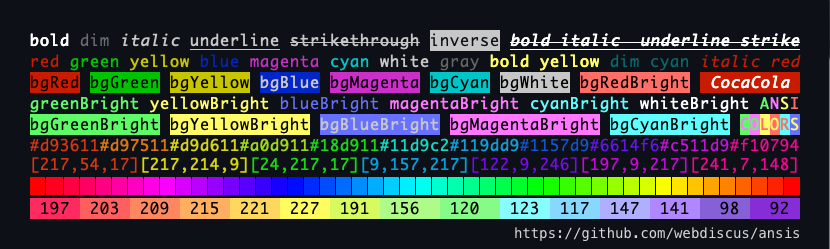
 import ansis , { red , green , cyan , black , ansi256 , hex } from 'ansis' ;

ansis . blueBright ( 'file.txt' )
green `Succeful!`
red `Error: ${ cyan ( file ) } not found!`
black . bgYellow `Warning!`
ansi256 ( 214 ) `Orange`
hex ( '#E0115F' ) . bold . underline ( 'Truecolor!' ) Perpustakaan Node.js yang paling populer mirip dengan Ansis:
Kapur, Picocolors, Colorette, Kleur, Ansi-Wolors, Kolorist, Clior Color, Colors-Cli, Colors.js
✅ Bandingkan fitur? Bandingkan tolok ukur ukuran paket
colorette chalk picocolors ansi-colorsimport ansis, { red, bold, ansi256, hex } from 'ansis'red.bold.underline('text')red`Error: ${blue`file.js`} not found!`dim bold italic underline strikethroughred`Error!` redBright`Error!` bgRed`Error!` bgRedBright`Error!`fg(56)`violet` bg(208)`orange`rgb(224, 17, 95)`Ruby` hex('#96C')`Amethyst`open dan close `foo ${red.open}red{red.close} bar`ansis.strip()NO_COLOR FORCE_COLOR dan bendera --no-color --colorend of line saat digunakan n di stringString.prototypeNestJs, Facebook/Stylex, Sequellize, Salesforce, Oclif, Webpackbar
Jika Anda telah menemukan bug atau memiliki saran fitur, jangan ragu untuk membuat masalah di GitHub.
Hari ini, dua perpustakaan terkecil dan tercepat adalah ansis dan picocolors . Keduanya direkomendasikan oleh komunitas perkakas ES sebagai pengganti terbaik untuk perpustakaan yang lebih tua dan lebih besar.
picocolors : 6.4 KB - Perpustakaan mikro dengan hanya fitur dasar.аnsis : 7.4 kb - Perpustakaan yang kuat yang berisi semua fitur yang Anda butuhkan.chalk : 44.2 kb - memberikan fungsi yang serupa dengan ANSIS tetapi lebih besar.picocolors : Tercepat saat menerapkan gaya tunggal (misalnya, hanya red ).аnsis : tercepat saat menerapkan dua atau lebih gaya (misalnya, red + bgWhite ).chalk : Lebih lambat dari Ansis dan Picocolors dalam semua kasus penggunaan. Hanya ansis , chalk , dan picocolors yang secara aktif dipertahankan, tidak seperti banyak perpustakaan lainnya:
colorette : terakhir diperbarui 2 tahun laluansi-colors : Terakhir Diperbarui 3 tahun yang lalukleur : Terakhir diperbarui 2 tahun yang lalucli-color : Terakhir diperbarui ~ 1 tahun yang lalucolors-cli : Terakhir diperbarui 1 tahun yang lalucolors.js : Terakhir diperbarui 5 tahun yang lalu Jika Anda hanya menggunakan gaya tunggal, seperti red('foo') , picocolors adalah solusi terbaik.
Namun, jika Anda membutuhkan lebih banyak, seperti menggabungkan beberapa gaya (misalnya, red + bold + bgWhite ),
Warna ANSI256, Truecolor, atau Dukungan untuk berbagai lingkungan, maka ANSIS adalah pilihan yang lebih baik.
Jelajahi daftar fitur, ukuran paket, dan tolok ukur dibandingkan dengan perpustakaan serupa.
Tip
Gunakan sintaks rantai yang disediakan oleh perpustakaan seperti ansis dan chalk .
Hindari panggilan bersarang, karena mereka jauh lebih lambat dan kurang dapat dibaca daripada sintaks yang dirantai.
Jaga kode Anda bersih dan mudah dibaca!
 red . bold . bgWhite `Error`                    ✅ ansis: faster , shorter , readable
pico . red ( pico . bold ( pico . bgWhite ( 'Error' ) ) )  picocolor: slower , longer , unreadable

red `Error: ${ cyan . underline ( file ) } not found!`                   ✅ ansis ?
pico . red ( `Error: ${ pico . cyan ( pico . underline ( file ) ) } not found!` ) picocolor ? chalkcolorettepicocolorsansi-colorskleurcli-color npm install ansisAnda dapat mengimpor modul default atau warna bernama dengan Sintaks ESM atau CommonJS.
 // ESM default import
import ansis from 'ansis' ;
// ESM named import
import { red , green , blue } from 'ansis' ;
atau
 // CommonJS default import
const ansis = require ( 'ansis' ) ;
// CommonJS named import
const { red , green , blue } = require ( 'ansis' ) ;
Lihat daftar warna dan gaya ANSI.
 console . log ( ansis . green ( 'Success!' ) ) ;
console . log ( green ( 'Success!' ) ) ;

// template string
console . log ( green `Success!` ) ;

// chained syntax
console . log ( green . bold `Success!` ) ;

// nested syntax
console . log ( red `The ${ blue . underline `file.js` } not found!` ) ;
Contoh Dasar Hello World! :
 import { red , black , inverse , reset } from 'ansis' ;

console . log ( green `Hello ${ inverse `ANSI` } World!
${ black . bgYellow `Warning:` } ${ cyan `/path/to/file.js` } ${ red `not found!` } ` ) ;
Keluaran: 
ansis mendukung default import dan named import .
 // default import
import ansis from 'ansis' ;

ansis . red . bold ( 'text' ) ;
Anda dapat mengimpor warna, gaya, dan fungsi bernama. Semua warna dan gaya impor dapat chainable .
 // named import
import { red , hex , italic } from 'ansis' ;

red . bold ( 'text' ) ;
Impor default dan impor bernama dapat digabungkan.
 // default and named import
import ansis , { red } from 'ansis' ;

const redText = red ( 'text' ) ; // colorized ANSI string
const text = ansis . strip ( redText ) ; // pure string without ANSI codes ansis mendukung sintaks fungsi red('error') dan templat literal red`error` .
template literals memungkinkan Anda untuk membuat template yang kompleks lebih mudah dibaca dan lebih pendek.
function syntax dapat digunakan untuk mewarnai variabel.
 import { red } from 'ansis' ;

let message = 'error' ;

red ( message ) ;
red `text` ;
red `text ${ message } text` ; Semua warna, gaya, dan fungsi dapat diikat. Setiap warna atau gaya dapat digabungkan dalam urutan apa pun.
 import { red , bold , italic , hex } from 'ansis' ;

red . bold `text` ;
hex ( '#FF75D1' ) . bgCyan . bold `text` ;
bold . bgHex ( '#FF75D1' ) . cyan `text` ;
italic . bold . yellow . bgMagentaBright `text` ; Anda dapat bersarang fungsi dan melakukan templat dalam satu sama lain. Tak satu pun dari perpustakaan lain (kapur, kleur, colorette, colors.js dll) mendukung string template bersarang.
String template bersarang:
 import { red , green } from 'ansis' ;

red `red ${ green `green` } red` ;
Gaya berantai bersarang dalam:
 import { red , green , cyan , magenta , yellow , italic , underline } from 'ansis' ;

red ( `red ${ italic ( `red italic ${ underline ( `red italic underline` ) } ` ) } red` ) ;

// deep nested chained styles
green (
  `green ${ yellow (
    `yellow ${ magenta (
      `magenta ${ cyan (
        `cyan ${ red . italic . underline `red italic underline` } cyan` ,
      ) } magenta` ,
    ) } yellow` ,
  ) } green` ,
) ;
Keluaran: 
String template bersarang multiline:
 import { red , green , hex , visible , inverse } from 'ansis' ;

// defined a Truecolor as the constant
const orange = hex ( '#FFAB40' ) ;

let cpu = 33 ;
let ram = 44 ;
let disk = 55 ;

// normal colors
visible `
CPU:  ${ red ` ${ cpu } %` }
RAM:  ${ green ` ${ ram } %` }
DISK: ${ orange ` ${ disk } %` }
` ;

// inversed colors
inverse `
CPU:  ${ red ` ${ cpu } %` }
RAM:  ${ green ` ${ ram } %` }
DISK: ${ orange ` ${ disk } %` }
` ;
Keluaran: 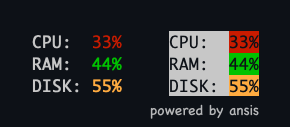
Warna dan gaya memiliki nama standar yang digunakan oleh banyak perpustakaan populer, seperti kapur, colorette, picocolors, kleur.
| Warna latar depan | Warna latar belakang | Gaya |
|---|---|---|
black | bgBlack | dim |
red | bgRed | bold |
green | bgGreen | italic |
yellow | bgYellow | underline |
blue | bgBlue | strikethroughstrike ) |
magenta | bgMagenta | inverse |
cyan | bgCyan | visible |
white | bgWhite | hidden |
blackBrightAlias: greyejaan kami gray | bgBlackBrightAlias: bgGreybgGray ejaan AS | reset |
redBright | bgRedBright | |
greenBright | bgGreenBright | |
yellowBright | bgYellowBright | |
blueBright | bgBlueBright | |
magentaBright | bgMagentaBright | |
cyanBright | bgCyanBright | |
whiteBright | bgWhiteBright |
Default, instance ansis yang diimpor berisi gaya dan warna dasar. Untuk memperluas warna dasar dengan nama warna khusus untuk TrueColor Gunakan metode ansis.extend() .
 import ansis from 'ansis' ;

// extend base colors
ansis . extend ( {
  pink : '#FF75D1' ,
  orange : '#FFAB40' ,
} ) ;

// the custom colors are available under namespace `ansis`
ansis . pink ( 'text' ) ;
ansis . orange ( 'text' ) ;
Contoh penggunaan dengan naskah:
 import ansis , { AnsiColorsExtend } from 'ansis' ;

// extend base colors
ansis . extend ( {
  pink : '#FF75D1' ,
  orange : '#FFAB40' ,
} ) ;

const write = ( style : AnsiColorsExtend < 'pink' | 'orange' > , message : string ) => {
  console . log ( ansis [ style ] ( message ) ) ;
}

write ( 'red' , 'message' ) ; // base color OK
write ( 'pink' , 'message' ) ; // extended color OK
write ( 'orange' , 'message' ) ; // extended color OK
write ( 'unknown' , 'message' ) ; // TypeScript Error Set 256 warna yang telah ditentukan sebelumnya.
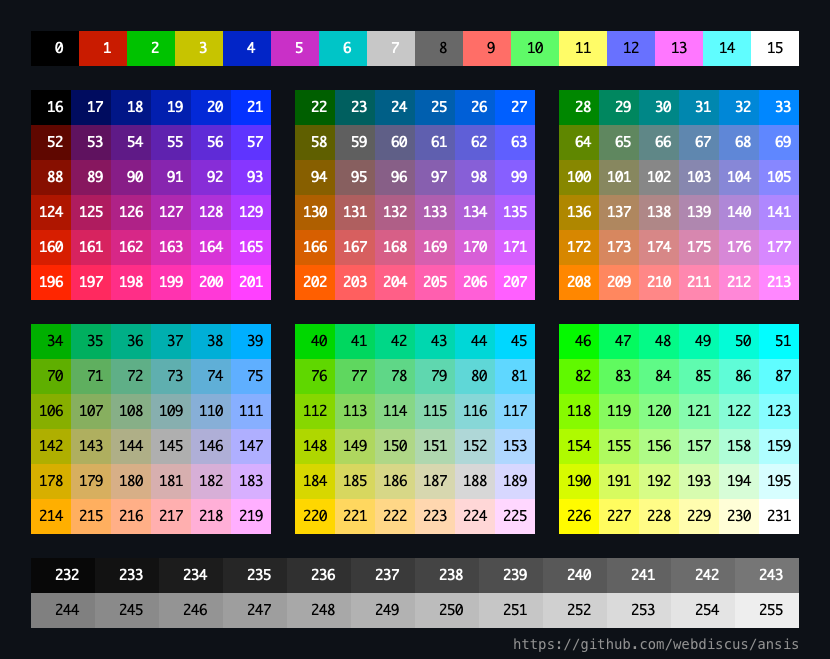
| Rentang kode | Keterangan |
|---|---|
| 0 - 7 | warna standar |
| 8 - 15 | Warna -warna cerah |
| 16 - 231 | 6 × 6 × 6 kubus (216 warna) |
| 232 - 255 | GRAYSCALE DARI Hitam ke Putih dalam 24 Langkah |
Fungsi latar depan: ansi256(code) memiliki alias pendek fg(code)
Fungsi Latar Belakang: bgAnsi256(code) memiliki alias pendek bg(code)
Metode
ansi256()danbgAnsi256()diimplementasikan untuk kompatibilitas dengan APIchalk.
Lihat Kode Warna ANSI.
Jika terminal hanya mendukung 16 warna maka ANSI 256 warna akan diinterpolasi ke dalam dasar 16 warna.
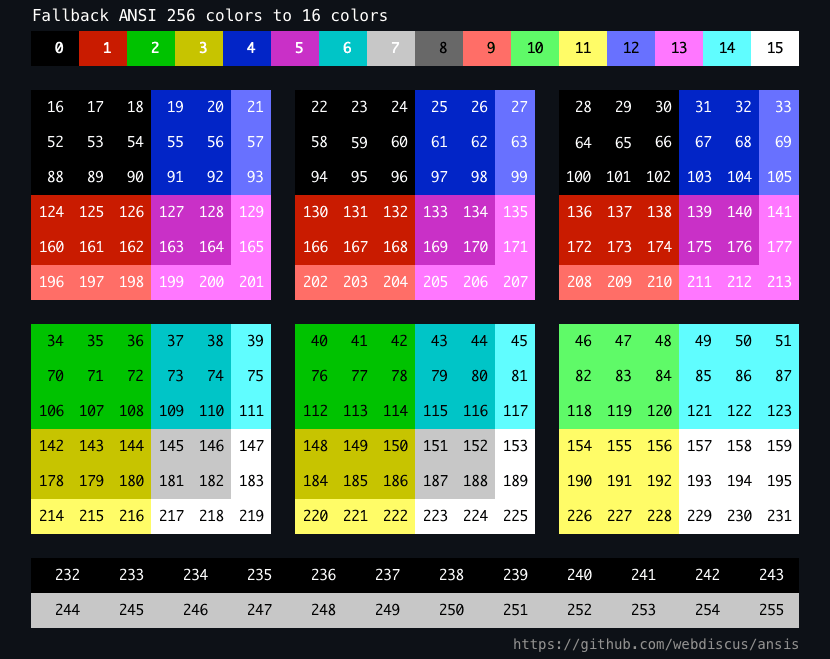
 import { bold , ansi256 , fg , bgAnsi256 , bg } from 'ansis' ;

// foreground color
ansi256 ( 96 ) `Bright Cyan` ;
fg ( 96 ) `Bright Cyan` ; // alias for ansi256

// background color
bgAnsi256 ( 105 ) `Bright Magenta` ;
bg ( 105 ) `Bright Magenta` ; // alias for bgAnsi256

// function is chainable
ansi256 ( 96 ) . bold `bold Bright Cyan` ;

// function is avaliable in each style
bold . ansi256 ( 96 ) . underline `bold underline Bright Cyan` ;

// you can combine the functions and styles in any order
bgAnsi256 ( 105 ) . ansi256 ( 96 ) `cyan text on magenta background`
bg ( 105 ) . fg ( 96 ) `cyan text on magenta background` Anda dapat menggunakan format hex atau rgb .
Fungsi latar depan: hex() rgb()
Fungsi Latar Belakang: bgHex() bgRgb()
 import { bold , hex , rgb , bgHex , bgRgb } from 'ansis' ;

// foreground color
hex ( '#E0115F' ) . bold `bold Ruby` ;
hex ( '#96C' ) `Amethyst` ;
rgb ( 224 , 17 , 95 ) . italic `italic Ruby` ;

// background color
bgHex ( '#E0115F' ) `Ruby` ;
bgHex ( '#96C' ) `Amethyst` ;
bgRgb ( 224 , 17 , 95 ) `Ruby` ;

// you can combine the functions and styles in any order
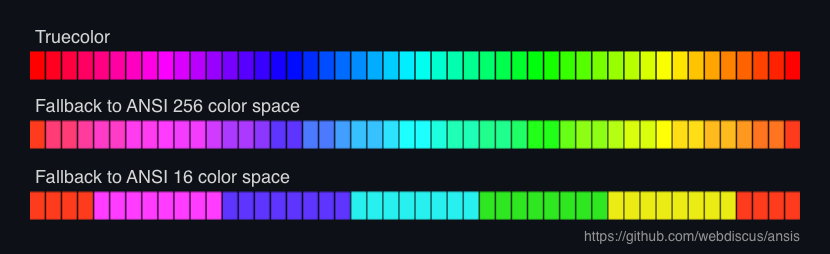
bold . hex ( '#E0115F' ) . bgHex ( '#96C' ) `ruby bold text on amethyst background` ansis mendukung fallback untuk ruang warna yang didukung.
Truecolor —> 256 colors —> 16 colors —> no colors (black & white)
Jika Anda menggunakan fungsi hex() , rgb() atau ansis256() di terminal yang tidak didukung truecolor atau 256 warna, maka warna akan diinterpolasi.
Anda dapat menggunakan kode Escape ANSI dengan properti open dan close untuk setiap gaya.
 import { red , bold } from 'ansis' ;

// each style has `open` and `close` properties
console . log ( `Hello ${ red . open } ANSI ${ red . close } World!` ) ;

// you can defiene own style which will have the `open` and `close` properties
const myStyle = bold . italic . black . bgHex ( '#E0115F' ) ;

console . log ( `Hello ${ myStyle . open } ANSI ${ myStyle . close } World!` ) ; Kelas ANSIS berisi metode strip() untuk menghapus semua kode ANSI dari string.
 import ansis from 'ansis' ;

const ansiString = ansis . green `Hello World!` ;
const string = ansis . strip ( ansiString ) ;
string variabel akan berisi string murni tanpa kode ANSI.
Mendukung istirahat gaya yang benar di end of line .
 import { bgGreen } from 'ansis' ;

console . log ( bgGreen `nAnsisnNew LinenNext New Linen` ) ; 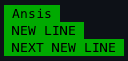
Tentukan tema Anda sendiri:
 import ansis from 'ansis' ;

const theme = {
  info : ansis . cyan . italic ,
  warn : ansis . black . bgYellowBright ,
  error : ansis . red . bold ,
  ruby : ansis . hex ( '#E0115F' ) ,
} ;

theme . info ( 'info' ) ;
theme . warn ( 'warning' ) ;
theme . error ( 'error' ) ;
theme . ruby ( 'Ruby color' ) ; Default, output di terminal konsol diwarnai dan output dalam file tidak berwarna.
Untuk memaksa menonaktifkan atau mengaktifkan output berwarna menggunakan variabel lingkungan NO_COLOR dan FORCE_COLOR .
Variabel NO_COLOR harus disajikan dengan nilai yang tidak kosong. Nilainya tidak penting, misalnya, NO_COLOR=1 NO_COLOR=true .
Lihat Deskripsi Standar oleh NO_COLOR.
Variabel FORCE_COLOR harus disajikan dengan salah satu nilai:
FORCE_COLOR=0 force menonaktifkan warna
FORCE_COLOR=1 gaya mengaktifkan warna
Lihat Deskripsi Standar oleh Force_Color.
Misalnya, app.js :
 import { red } from 'ansis' ;

console . log ( red `red color` ) ;
Jalankan skrip di terminal:
 $ node app.js           # colored output in terminal
$ node app.js > log.txt # output in file without ANSI codes

$ NO_COLOR=1 node app.js              # force disable colors, non colored output in terminal
$ FORCE_COLOR=0 node app.js           # force disable colors, non colored output in terminal
$ FORCE_COLOR=1 node app.js > log.txt # force enable colors, output in file with ANSI codes
COLORTERM Variabel Lingkungan COLORTERM digunakan oleh emulator terminal untuk menunjukkan dukungan untuk warna. Nilainya dapat bervariasi tergantung pada emulator terminal dan tingkat dukungan warna yang disediakan.
Nilai yang umum digunakan didukung oleh ansis :
truecolor atau 24bit - 16 juta warnaansi256 - ANSI 256 Warnaansi - Warna ANSI 16 DasarAnda dapat mengatur variabel dalam CMD sebelum menjalankan skrip simpul:
 COLORTERM=truecolor node script.js # force use truecolor
COLORTERM=ansi256 node script.js   # force use 256 colors
COLORTERM=ansi node script.js      # force use 16 olors
Untuk mengatur level warna dalam skrip, buat file JS di mana Anda mendefinisikan variabel lingkungan COLORTERM dengan nilai yang dibutuhkan, dan impor file ini sebelum ansis .
Ini dapat berguna, misalnya, untuk menguji aplikasi CLI Anda untuk memastikan bahwa hasil tes akan sama terlepas dari tingkat warna yang didukung di lingkungan dan terminal yang berbeda.
level-truecolor.js
process . env . COLORTERM = 'truecolor' ;File skrip Anda:
 import './level-truecolor' ; // <= force use truecolor
import { red , ansi256 , hex } from 'ansis' ;

console . log ( hex ( '#FFAB40' ) ( 'orange' ) ) ; // native ANSI RGB color value
console . log ( ansi256 ( 200 ) ( 'pink' ) ) ;     // native ANSI 256 color value
console . log ( red ( 'red' ) ) ; // native ANSI 16 color value level-256colors.js
process . env . COLORTERM = 'ansi256' ;File skrip Anda:
 import './level-256colors' ; // <= force use 256 colors
import { red , ansi256 , hex } from 'ansis' ;

console . log ( hex ( '#FFAB40' ) ( 'orange' ) ) ; // fallback to ANSI 256 color value
console . log ( ansi256 ( 200 ) ( 'pink' ) ) ;     // native ANSI 256 color value
console . log ( red ( 'red' ) ) ; // native ANSI 16 color value level-16colors.js
process . env . COLORTERM = 'ansi' ;File skrip Anda:
 import './level-16colors' ; // <= force use 16 olors
import { red , ansi256 , hex } from 'ansis' ;

console . log ( hex ( '#FFAB40' ) ( 'orange' ) ) ; // fallback to ANSI 16 color value - `bright red`
console . log ( ansi256 ( 200 ) ( 'pink' ) ) ;     // fallback to ANSI 16 color value - `bright magenta`
console . log ( red ( 'red' ) ) ; // native ANSI 16 color value Gunakan argumen CMD --no-color atau --color=false untuk menonaktifkan warna dan --color untuk mengaktifkan yang.
Misalnya, app.js skrip yang dapat dieksekusi:
#!/usr/bin/env node
import { red } from 'ansis' ;

console . log ( red `red color` ) ;
Jalankan skrip di terminal:
 $ ./app.js                        # colored output in terminal
$ ./app.js --no-color             # non colored output in terminal
$ ./app.js --color=false          # non colored output in terminal

$ ./app.js > log.txt              # output in file without ANSI codes
$ ./app.js --color > log.txt      # output in file with ANSI codes
$ ./app.js --color=true > log.txt # output in file with ANSI codes
Peringatan
Argumen baris perintah memiliki prioritas yang lebih tinggi daripada variabel lingkungan.
ANSIS secara otomatis mendeteksi ruang warna yang didukung:
ANSIS memiliki metode isSupported() yang mengembalikan nilai boolean apakah output mendukung warna dan gaya ANSI.
 import ansis from 'ansis' ;

console . log ( 'Color output: ' , ansis . isSupported ( ) ) ;
Tidak ada cara standar untuk mendeteksi ruang warna mana yang didukung. Cara paling umum untuk mendeteksi dukungan warna adalah dengan memeriksa TERM dan variabel lingkungan COLORTERM . Sistem CI dapat dideteksi dengan memeriksa keberadaan CI dan variabel lingkungan khusus lainnya. Gabungkan itu dengan pengetahuan tentang sistem operasi mana yang dijalankan program, dan kami memiliki cara yang cukup layak untuk mendeteksi warna.
| Terminal | ANSI 16 warna | ANSI 256 warna | BENAR Warna | Env. KETENTUAN | Env. ColorterM | Khususnya variabel Env |
|---|---|---|---|---|---|---|
| Azure CI | ✅ | bodoh | Tf_build Agent_name | |||
| GitHub CI | ✅ | ✅ | ✅ | bodoh | CI, github_actions | |
| Gittea CI | ✅ | ✅ | ✅ | bodoh | CI, gitea_actions | |
| Gitlab CI | ✅ | bodoh | CI, gitlab_ci | |||
| Travis CI | ✅ | bodoh | Travis | |||
| PM2 tidak terasa | ✅ 1 | ✅ 1 | ✅ 1 | bodoh | Pm2_home pm_id | |
| JetBrains TeamCity > = 2020.1.1 | ✅ | ✅ | TeamCity_Version | |||
| Ide JetBrains | ✅ | ✅ | ✅ | Xterm-256color | Terminal_emulator = 'jetbrains-jediterm' | |
| Vs kode | ✅ | ✅ | ✅ | Xterm-256color | TrueColor | |
| Windows Terminal | ✅ | ✅ | ✅ 2 | |||
| Windows PowerShell | ✅ | ✅ | ✅ 2 | |||
| Terminal MacOS | ✅ | ✅ | Xterm-256color | |||
| Iterm | ✅ | ✅ | ✅ | Xterm-256color | TrueColor | |
| Kitty Emulator Terminal | ✅ | ✅ | ✅ | xterm-kitty | ||
| Emulator Terminal KDE Konsole | ✅ | ✅ | ✅ | Xterm-Direct |
Lihat juga:
Jalankan perintah untuk melihat dukungan beberapa fitur oleh berbagai perpustakaan:
npm run compare
| Perpustakaan ________________ - Impor bernama - Warna penamaan | ANSI 16 warna | ANSI 256 warna | BENAR Warna | Dirantai sintaksis | Bersarang string template | Baru Garis | Mundur ke warna | Dukungan Env Vars Bendera CLI |
|---|---|---|---|---|---|---|---|---|
ansis✅ named import✅ standard | ✅ | ✅ | ✅ | ✅ | ✅ | ✅ | → 256 → 16 → B&W | NO_COLORFORCE_COLOR--no-color--color |
chalknamed import✅ standard | ✅ | ✅ | ✅ | ✅ | ✅ | → 256 → 16 → B&W | NO_COLORFORCE_COLOR--no-color--color | |
kolorist✅ named importstandard | ✅ | ✅ | ✅ | → 256 → B&W | NO_COLORFORCE_COLOR | |||
cli-colornamed import✅ standard | ✅ | ✅ | ✅ | → 16 → B&W | NO_COLOR | |||
colors-clinamed importstandard | ✅ | ✅ | ✅ | ✅ | → B&W | --no-color--color | ||
colors.jsnamed importstandard | ✅ | ✅ | ✅ | → B&W | FORCE_COLOR--no-color--color | |||
ansi-colorsnamed import✅ standard | ✅ | ✅ | ✅ | FORCE_COLOR | ||||
colorette✅ named import✅ standard | ✅ | → B&W | NO_COLORFORCE_COLOR--no-color--color | |||||
picocolorsnamed import✅ standard | ✅ Sejak v1.1.0 | → B&W | NO_COLORFORCE_COLOR--no-color--color | |||||
kleur✅ named import✅ standard | 8 warna | ✅ | → B&W | NO_COLORFORCE_COLOR |
Catatan
Nama Impor
Esm
import { red, green, blue } from 'lib';
CJS
const { red, green, blue } = require('lib');Warna penamaan
- Standar: Warna memiliki nama standar, misalnya:
red,redBright,bgRed,bgRedBright- Non-Standard : Warna memiliki nama khusus Lib, misalnya:
brightRed,bgBrightRed,red_b,red_bttANSI 256 Warna
Nama metode:
colors-cli:x<n>cli-color:xterm(n)chalk:ansi256(n)bgAnsi256(n)ansis:ansi256(n)bgAnsi256(n)fg(n)bg(n)TrueColor
Nama metode:
chalk:hex()rgb()ansis:hex()rgb()Sintaks Rantai
lib.red.bold('text')String template bersarang
lib.red`text ${lib.cyan`nested`} text`Baris baru
Gaya istirahat yang benar diend-of-line.lib.bgGreen(`First Line Next Line`);
| Paket NPM | Unduh ukuran tarball | Ukuran yang tidak dibongkar | Ukuran kode |
|---|---|---|---|
picocolors | 2.6 kb | 6.4 kb | 2.6 kb |
ansis | 3,8 kb | 7.4 kb | 3.4 kb |
colorette | 4,9 kb | 17.0 kb | 3.4 kb |
kleur | 6.0 kb | 20,3 kb | 2,7 kb |
ansi-colors | 8,5 kb | 26.1 kb | 5,8 kb |
kolorist | 8,7 kb | 51.0 kb | 6,8 kb |
colors.js | 11.0 kb | 39,5 kb | 18.1 kb |
chalk | 13.1 kb | 43,7 kb | 16.4 kb |
cli-color | 13.8 (216 kb) | 39.6 (754 kb) | 12.1 kb |
colors-cli | 361.7 kb | 511.0 kb | 8,7 kb |
Ukuran Unduh: Ukuran Gzipping dari Paket NPM.
Ukuran Unpacked: Ukuran paket NPM di node_modules/ Direktori, (incl. dependencies) .
Ukuran Kode : Ukuran kode terdistribusi yang akan dimuat melalui require atau import ke dalam aplikasi Anda.
Lihat juga:
git clone https://github.com/webdiscus/ansis.git
cd ./ansis
npm i
npm run demoUntuk mengukur kinerja digunakan benchmark.js.
Peringatan
vitest benchmark menghasilkan hasil yang salah/ tidak nyata .
Misalnya, hasil bangku sederhana:
 chalk.red('foo') -  7.000.000 ops/sec
ansis.red('foo') - 23.000.000 ops/sec (x3 faster is WRONG result)
Hasil kinerja aktual kapur dan ANSIS dalam tes ini sangat mirip.
git clone https://github.com/webdiscus/ansis.git
cd ./ansis
npm i
npm run build
npm run bench
Diuji pada
MacBook Pro 16 "M1 Max 64GB
MacOS Sequoia 15.1
Node.js v22.11.0
TerminaliTerm2v3.5.0
Catatan
Dalam pengujian, setiap perpustakaan menggunakan metode gaya tercepat yang tersedia untuk membandingkan kinerja absolut dari setiap perpustakaan.
Dalam praktik nyata, tidak ada yang akan menggunakan metode paling lambat (seperti panggilan bersarang) untuk menata string ketika perpustakaan menyediakan metode rantai yang lebih cepat dan lebih pendek .
Misalnya:
 lib . red . bold . bgWhite ( ' ERROR ' )           // ✅ faster, shorter, readable
lib . red ( lib . bold ( lib . bgWhite ( ' ERROR ' ) ) ) // slower, longer, unreadable Tes sederhana hanya menggunakan gaya tunggal. Picocolors, Colorette dan Kleur tidak mendukung sintaks rantai atau istirahat gaya yang benar (Wenn menggunakan `n` dalam string), jadi mereka adalah yang tercepat dalam kasing sederhana ini. Tidak ada fungsi, tidak ada overhead kinerja .
 ansis . red ( 'foo' )
chalk . red ( 'foo' )
picocolors . red ( 'foo' )
. . .
+ [email protected] 109.212.939 ops/sec
[email protected] 108.044.800 ops/sec
[email protected] 87.800.739 ops/sec
- > [email protected] 60.606.043 ops/sec -44.5%
- [email protected] 55.702.479 ops/sec -48.9%
[email protected] 37.069.069 ops/sec
[email protected] 14.364.378 ops/sec
[email protected] 7.060.583 ops/sec
[email protected] 2.753.751 ops/sec
[email protected] 897.746 ops/secMenggunakan hanya 2 gaya, picocolors sudah sedikit lebih lambat, karena menggunakan sintaks rantai lebih cepat daripada panggilan bersarang.
 ansis . red . bold ( 'foo' )
chalk . red . bold ( 'foo' )
picocolors . red ( picocolors . bold ( 'foo' ) ) // chained syntax is not supported
. . .
+ [email protected] 60.468.181 ops/sec
- [email protected] 58.777.183 ops/sec -2.8%
- [email protected] 47.789.020 ops/sec -21.5%
[email protected] 33.387.988 ops/sec
[email protected] 13.420.047 ops/sec
[email protected] 5.972.681 ops/sec
[email protected] 4.086.412 ops/sec
[email protected] 3.018.244 ops/sec
[email protected] 1.817.039 ops/sec
[email protected] 695.601 ops/secMenggunakan 3 gaya, picocolors 2x lebih lambat dari ANSIS.
 ansis . red . bold . bgWhite ( 'foo' )
chalk . red . bold . bgWhite ( 'foo' )
picocolors . red ( picocolors . bold ( picocolors . bgWhite ( 'foo' ) ) ) // chained syntax is not supported
. . .
+ [email protected] 59.463.640 ops/sec
- [email protected] 42.166.783 ops/sec -29.0%
- [email protected] 32.434.017 ops/sec -45.5% (~2x slower than Ansis)
[email protected] 13.008.117 ops/sec
[email protected] 5.608.244 ops/sec
[email protected] 5.268.630 ops/sec
[email protected] 2.145.517 ops/sec
[email protected] 1.686.728 ops/sec
[email protected] 1.453.611 ops/sec
[email protected] 590.467 ops/secDalam kasus yang jarang, saat menggunakan 4 gaya, picocolors menjadi 3,4x lebih lambat dari ANSIS.
 ansis . red . bold . underline . bgWhite ( 'foo' )
chalk . red . bold . underline . bgWhite ( 'foo' )
picocolors . red ( picocolors . bold ( picocolors . underline ( picocolors . bgWhite ( 'foo' ) ) ) ) // chained syntax is not supported
. . .
+ [email protected] 59.104.535 ops/sec
- [email protected] 36.147.547 ops/sec -38.8%
- [email protected] 17.581.709 ops/sec -70.2% (~3x slower than Ansis)
[email protected] 7.981.171 ops/sec
[email protected] 4.825.665 ops/sec
[email protected] 3.729.880 ops/sec
[email protected] 1.514.053 ops/sec
[email protected] 1.229.999 ops/sec
[email protected] 1.210.931 ops/sec
[email protected] 481.073 ops/secTes kompleks dengan gaya tunggal bersarang.
 c . green (
  `green ${ c . cyan (
    `cyan ${ c . red (
      `red ${ c . yellow (
        `yellow ${ c . blue (
          `blue ${ c . magenta ( `magenta ${ c . underline ( `underline ${ c . italic ( `italic` ) } underline` ) } magenta` ) } blue` ,
        ) } yellow` ,
      ) } red` ,
    ) } cyan` ,
  ) } green` ,
)
+ [email protected] 1.110.056 ops/sec
- [email protected] 1.073.299 ops/sec
- > [email protected] 847.246 ops/sec -23.7%
[email protected] 847.110 ops/sec
- [email protected] 573.942 ops/sec -48.3%
[email protected] 471.285 ops/sec
[email protected] 439.588 ops/sec
[email protected] 382.862 ops/sec
[email protected] 213.351 ops/sec
[email protected] 41.097 ops/sec Benchmark yang digunakan dalam colorette untuk gaya tunggal.
c . red ( ` ${ c . bold ( ` ${ c . cyan ( ` ${ c . yellow ( 'yellow' ) } cyan` ) } ` ) } red` ) + [email protected] 3.861.384 ops/sec
[email protected] 3.815.039 ops/sec
- > [email protected] 2.918.269 ops/sec -24.4%
[email protected] 2.548.564 ops/sec
- [email protected] 2.502.850 ops/sec -35.2%
[email protected] 2.229.023 ops/sec
[email protected] 1.426.279 ops/sec
[email protected] 1.123.139 ops/sec
[email protected] 481.708 ops/sec
[email protected] 114.570 ops/sec Benchmark picocolors , sedikit dimodifikasi. Menambahkan sedikit lebih kompleksitas dengan menerapkan dua gaya pada kata berwarna, bukan satu.
 let index = 1e8 ;
c . red ( '.' ) +
c . yellow ( '.' ) +
c . green ( '.' ) +
c . red . bold ( ' ERROR ' ) +
c . red ( 'Add plugin ' + c . cyan . underline ( 'name' ) + ' to use time limit with ' + c . cyan ( ++ index ) ) ;
+ [email protected] 2.601.559 ops/sec
- > [email protected] 2.501.227 ops/sec -3.8%
[email protected] 2.326.491 ops/sec
- [email protected] 2.129.106 ops/sec -18.1%
[email protected] 1.780.496 ops/sec
[email protected] 1.685.703 ops/sec
[email protected] 838.542 ops/sec
[email protected] 533.362 ops/sec
[email protected] 287.558 ops/sec
[email protected] 97.463 ops/secCatatan
Dalam tes ini, yang lebih dekat dengan penggunaan praktis, setiap perpustakaan menggunakan metode gaya tercepat yang tersedia.
Jadi, chalk , ansis , ansi-colors , cli-color , colors-cli dan colors menggunakan metode rantai, misalnya c.red.bold(' ERROR ') . Sementara picocolors , colorette dan kolorist menggunakan panggilan bersarang, misalnya c.red(c.bold(' ERROR ')) , karena tidak mendukung sintaks rantai.
Ansis adalah pengganti yang kuat, kecil, dan cepat yang tidak memerlukan migrasi kode untuk banyak perpustakaan serupa.
Cukup ganti import ... from ... atau require(...) ke ansis .
 - import chalk from 'chalk';
+ import chalk from 'ansis';
ANSIS mendukung sintaks kapur dan kompatibel* dengan gaya dan nama warna, jadi Anda tidak perlu memodifikasi kode asli:
 chalk . red . bold ( 'Error!' ) ;

// colorize "Error: file not found!"
chalk . red ( `Error: ${ chalk . cyan . bold ( 'file' ) } not found!` ) ;

// ANSI 256 colors
chalk . ansi256 ( 93 ) ( 'Violet color' ) ;
chalk . bgAnsi256 ( 194 ) ( 'Honeydew, more or less' ) ;

// truecolor
chalk . hex ( '#FFA500' ) . bold ( 'Bold orange color' ) ;
chalk . rgb ( 123 , 45 , 67 ) . underline ( 'Underlined reddish color' ) ;
chalk . bgHex ( '#E0115F' ) ( 'Ruby' ) ;
chalk . bgHex ( '#96C' ) ( 'Amethyst' ) ;
Peringatan
ANSIS tidak mendukung gaya overline , karena itu tidak didukung secara luas dan tidak ada yang menggunakannya.
Periksa kode Anda dan hapus gaya overline :
 - chalk.red.overline('text');
+ chalk.red('text');
Secara opsional, Anda dapat menulis ulang kode yang sama untuk membuatnya lebih pendek dan lebih bersih:
 import { red , cyan , ansi256 , bgAnsi256 , fg , bg , hex , rgb , bgHex , bgRgb } from 'ansis' ;

red . bold ( 'Error!' ) ; // using parentheses
red . bold `Error!` ;   // using template string

// colorize "Error: file not found!"
red `Error: ${ cyan . bold `file` } not found!` ;

// ANSI 256 colors
ansi256 ( 93 ) `Violet color` ;
bgAnsi256 ( 194 ) `Honeydew, more or less` ;
fg ( 93 ) `Violet color` ; // alias for ansi256
bg ( 194 ) `Honeydew, more or less` ;  // alias for bgAnsi256

// truecolor
hex ( '#FFA500' ) . bold `Bold orange color` ;
rgb ( 123 , 45 , 67 ) . underline `Underlined reddish color` ;
bgHex ( '#E0115F' ) `Ruby` ;
bgHex ( '#96C' ) `Amethyst` ; - import { red, bold, underline } from 'colorette';
+ import { red, bold, underline } from 'ansis'; Ansis sepenuhnya kompatibel dengan gaya colorette dan nama warna, jadi Anda tidak perlu memodifikasi kode asli:
 red . bold ( 'Error!' ) ;
bold ( `I'm ${ red ( `da ba ${ underline ( "dee" ) } da ba` ) } daa` ) ;
Secara opsional, Anda dapat menulis ulang kode yang sama untuk membuatnya lebih pendek dan lebih bersih:
 red . bold `Error!` ;
bold `I'm ${ red `da ba ${ underline `dee` } da ba` } daa` ; - import pico from 'picocolors';
+ import pico from 'ansis'; Ansis sepenuhnya kompatibel dengan gaya picocolors dan nama warna, jadi Anda tidak perlu memodifikasi kode asli:
 pico . red ( pico . bold ( 'text' ) ) ;
pico . red ( pico . bold ( variable ) ) ;

// colorize "Error: file not found!"
pico . red ( 'Error: ' + pico . cyan ( pico . bold ( 'file' ) ) + ' not found!' ) ;
Secara opsional, Anda dapat menulis ulang kode yang sama untuk membuatnya lebih pendek dan lebih bersih:
 import { red , cyan } from 'ansis' ;

red . bold `text` ;
red . bold ( variable ) ;

// colorize "Error: file not found!"
red `Error: ${ cyan . bold `file` } not found!` - const c = require('ansi-colors');
+ const c = require('ansis'); ANSIS sepenuhnya kompatibel dengan gaya ansi-color dan nama warna, jadi Anda tidak perlu memodifikasi kode asli:
 c . red . bold ( 'Error!' ) ;

// colorize "Error: file not found!"
c . red ( `Error: ${ c . cyan . bold ( 'file' ) } not found!` ) ;
Secara opsional, Anda dapat menulis ulang kode yang sama untuk membuatnya lebih pendek dan lebih bersih:
 import { red , cyan } from 'ansis' ;

red . bold ( 'Error!' ) ; // using parentheses
red . bold `Error!` ;   // using template string

// colorize "Error: file not found!"
red `Error: ${ cyan . bold `file` } not found!` ; - import { red, green, yellow, cyan } from 'kleur';
+ import { red, green, yellow, cyan } from 'ansis'; Ansis sepenuhnya kompatibel dengan gaya kleur dan nama warna, tetapi Kleur v3.0 tidak lagi menggunakan sintaks gaya kapur (pengambil magis):
 green ( ) . bold ( ) . underline ( 'this is a bold green underlined message' ) ;
yellow ( `foo ${ red ( ) . bold ( 'red' ) } bar ${ cyan ( 'cyan' ) } baz` ) ;
Jika Anda menggunakan metode rantai maka itu membutuhkan modifikasi kode sederhana. Cukup ganti (). dengan . :
 green . bold . underline ( 'this is a bold green underlined message' ) ;
yellow ( `foo ${ red . bold ( 'red' ) } bar ${ cyan ( 'cyan' ) } baz` ) ;
Secara opsional, Anda dapat menulis ulang kode yang sama untuk membuatnya lebih pendek dan lebih bersih:
yellow `foo ${ red . bold `red` } bar ${ cyan `cyan` } baz` ; - const clc = require('cli-color');
+ const clc = require('ansis'); Ansis kompatibel* dengan gaya cli-color dan nama warna:
 clc . red . bold ( 'Error!' ) ;

// colorize "Error: file not found!"
clc . red ( `Error: ${ c . cyan . bold ( 'file' ) } not found!` ) ;
Peringatan
ANSIS tidak mendukung gaya blink , karena itu tidak didukung secara luas dan tidak ada yang menggunakannya.
Periksa kode Anda dan hapus gaya blink :
 - clc.red.blink('text');
+ clc.red('text');
Jika Anda menggunakan fungsi warna ANSI 256 xterm atau bgXterm , ini harus diganti dengan ansi256 fn atau bgAnsi256 bg :
 - clc.xterm(202).bgXterm(236)('Orange text on dark gray background');
+ clc.ansi256(202).bgAnsi256(236)('Orange text on dark gray background');
Secara opsional, Anda dapat menulis ulang kode yang sama untuk membuatnya lebih pendek dan lebih bersih:
 import { red , cyan , fg , bg } from 'ansis' ;

red . bold `Error!` ;

// colorize "Error: file not found!"
red `Error: ${ cyan . bold `file` } not found!` ;

fg ( 202 ) . bg ( 236 ) `Orange text on dark gray background` ; npm run test akan menjalankan tes unit dan integrasi.
npm run test:coverage akan menjalankan tes dengan cakupan.
ISC
Warna yang didukung tergantung pada terminal aktual. ↩ ↩ 2 ↩ 3
Terminal Windows mendukung warna sejati sejak Revisi Windows 10 14931 (2016-09-21). ↩ ↩ 2







