next swagger doc
v0.4.0

從NextJS API路線產生Swagger JSON API
如果您喜歡與Next-Swagger-Doc合作,您會喜歡下一個驗證:NextJS API驗證,支持ZOD,YUP,最快錄音機,JOI等等
該軟件包在NextJS API路由上讀取了您的JSDOC註銷源代碼,並生成OpenAPI(Swagger)規範。
nextJS + Swagger-jsdoc = next-swagger-doc
yarn add next-swagger-doc要將next-swagger-doc納入您的下一個項目。 JS13項目,請按照以下步驟操作。此設置將根據您的代碼為您的API生成Swagger文檔,並提供內置的Swagger UI來查看文檔。
接下來,創建一個新的文件lib/swagger.ts 。該文件使用next-swagger-doc庫來創建基於您的下一個項目中的API路由的Swagger規範。
 import { createSwaggerSpec } from "next-swagger-doc" ;

export const getApiDocs = async ( ) => {
  const spec = createSwaggerSpec ( {
    apiFolder : "app/api" , // define api folder under app folder
    definition : {
      openapi : "3.0.0" ,
      info : {
        title : "Next Swagger API Example" ,
        version : "1.0" ,
      } ,
      components : {
        securitySchemes : {
          BearerAuth : {
            type : "http" ,
            scheme : "bearer" ,
            bearerFormat : "JWT" ,
          } ,
        } ,
      } ,
      security : [ ] ,
    } ,
  } ) ;
  return spec ;
} ;生成一個名為app/api-doc/react-swagger.tsx的新文件。在此文件中,創建和導出一個React組件,該組件利用swagger-ui-react庫根據提供的規範渲染Swagger UI。
出於演示目的,這是使用Swagger-UI-React的示例
可以隨意使用任何替代Swagger UI庫,例如Sotlightio/Elements。我在example文件夾中使用此庫添加了一個示例。
 'use client' ;

import SwaggerUI from 'swagger-ui-react' ;
import 'swagger-ui-react/swagger-ui.css' ;

type Props = {
  spec : Record < string , any > ,
} ;

function ReactSwagger ( { spec } : Props ) {
  return < SwaggerUI spec = { spec } /> ;
}

export default ReactSwagger ;創建一個新的文件app/api-doc/page.tsx 。此頁面將導入Swagger Spec和Swagger UI組件以顯示Swagger文檔。
 import { getApiDocs } from "@/lib/swagger" ;
import ReactSwagger from "./react-swagger" ;

export default async function IndexPage ( ) {
  const spec = await getApiDocs ( ) ;
  return (
    < section className = "container" >
      < ReactSwagger spec = { spec } />
    </ section >
  ) ;
}最後,在app/api/hello/route.ts中向您的API路線添加招牌評論。此評論包括有關API端點的元數據,該端點將由next-swagger-doc讀取,並包含在Swagger Spec中。
 /**
 * @swagger
 * /api/hello:
 *   get:
 *     description: Returns the hello world
 *     responses:
 *       200:
 *         description: Hello World!
 */
export async function GET ( _request : Request ) {
  // Do whatever you want
  return new Response ( 'Hello World!' , {
    status : 200 ,
  } ) ;
}現在,導航到localhost:3000/api-doc (或任何託管下一個js應用程序),您應該看到Swagger UI。
yarn add next-swagger-doc swagger-ui-reactpages/api-doc.tsx import { GetStaticProps , InferGetStaticPropsType } from 'next' ;
import { createSwaggerSpec } from 'next-swagger-doc' ;
import dynamic from 'next/dynamic' ;
import 'swagger-ui-react/swagger-ui.css' ;
const SwaggerUI = dynamic < {
spec : any ;
} > ( import ( 'swagger-ui-react' ) , { ssr : false } ) ;
function ApiDoc ( { spec } : InferGetStaticPropsType < typeof getStaticProps > ) {
return < SwaggerUI spec = { spec } / > ;
}
export const getStaticProps : GetStaticProps = async ( ) => {
const spec : Record < string , any > = createSwaggerSpec ( {
apiFolder : 'pages/api' // or 'src/pages/api',
definition : {
openapi : '3.0.0' ,
info : {
title : 'Next Swagger API Example' ,
version : '1.0' ,
} ,
} ,
} ) ;
return {
props : {
spec ,
} ,
} ;
} ;
export default ApiDoc ; pages/api/doc.ts import { withSwagger } from "next-swagger-doc" ;
const swaggerHandler = withSwagger ( {
definition : {
openapi : "3.0.0" ,
info : {
title : "NextJS Swagger" ,
version : "0.1.0" ,
} ,
} ,
apiFolder : "pages/api" ,
} ) ;
export default swaggerHandler ( ) ;pages/api/hello.ts import { NextApiRequest , NextApiResponse } from "next" ;
/**
* @swagger
* /api/hello:
* get:
* description: Returns the hello world
* responses:
* 200:
* description: hello world
*/
const handler = ( _req : NextApiRequest , res : NextApiResponse ) => {
res . status ( 200 ) . json ( {
result : "hello world" ,
} ) ;
} ;
export default handler ;next-swagger-doc.json {
"apiFolder" : " pages/api " ,
"schemaFolders" : [ " models " ],
"definition" : {
"openapi" : " 3.0.0 " ,
"info" : {
"title" : " Next Swagger API Example " ,
"version" : " 1.0 "
}
}
}yarn next-swagger-doc-cli next-swagger-doc.jsongh repo clone jellydn/next-swagger-doc
cd examples/next14-app
pnpm install
pnm run dev然後打開http:// localhost:3000/api-doc或http:// localhost:3000/在瀏覽器上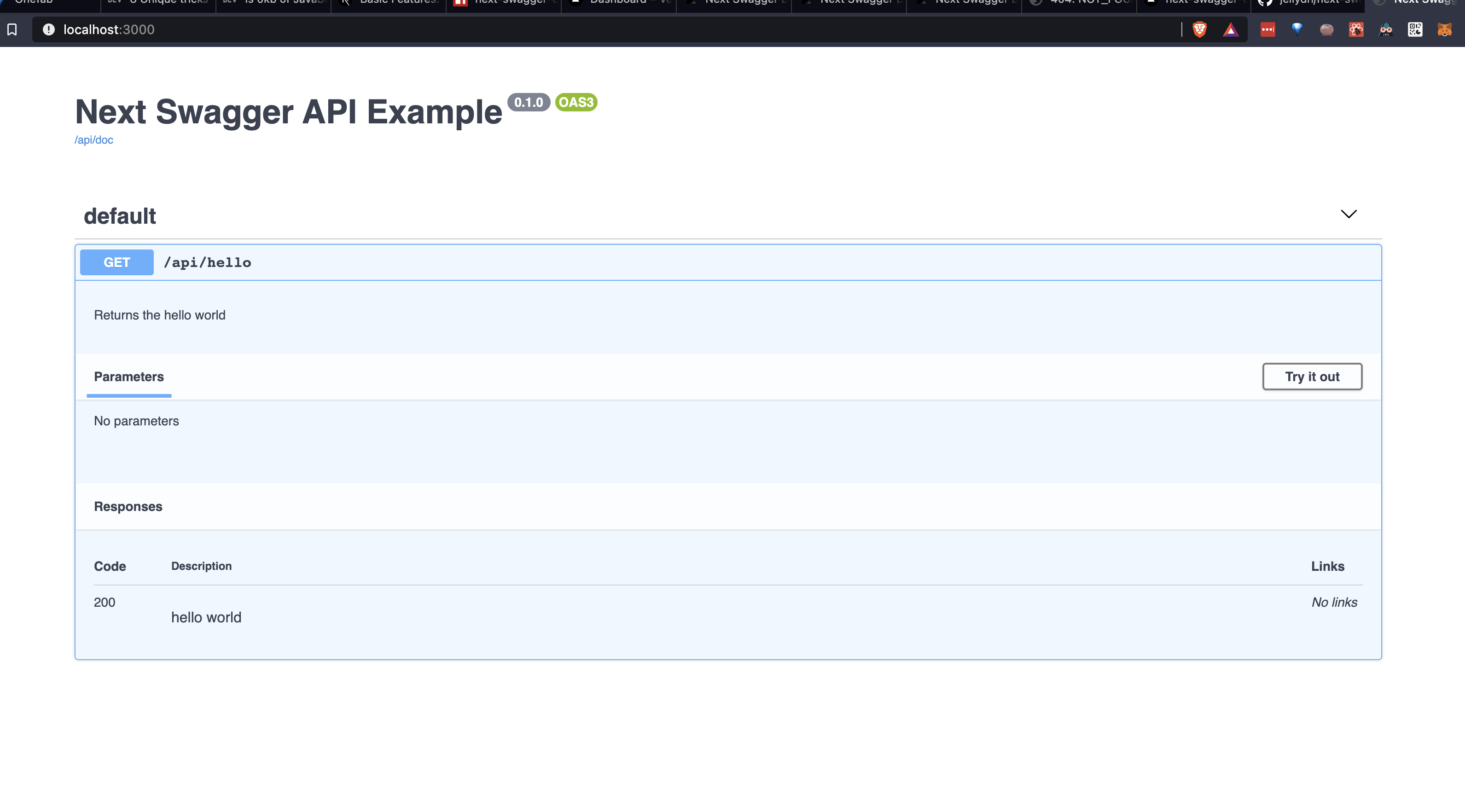
為了設置ESLINT規則,該規則檢查所有API是否實際上都有Swagger JSDOC說明,我們可以使用以下設置:
安裝JSDOC ESLINT插件:
yarn add -D eslint-plugin-jsdoc在ESLINT配置文件中創建自定義規則:
{
    //...your configuration
    "overrides" : [
        //...your overrides
        {
            // Force the setting of a swagger description on each api endpoint
            "files" : [ " pages/api/**/*.ts " ],
            "plugins" : [ " jsdoc " ],
            "rules" : {
                "jsdoc/no-missing-syntax" : [
                " error " ,
                {
                    "contexts" : [
                    {
                        "comment" : " JsdocBlock:has(JsdocTag[tag=swagger]) " ,
                        "context" : " any " ,
                        "message" : " @swagger documentation is required on each API. Check this out for syntax info: https://github.com/jellydn/next-swagger-doc "
                    }
                    ]
                }
            ]
        }
    ]
}該項目使用預先承諾來執行代碼質量。要安裝預加壓鉤,請運行:
pre-commit install? Huynh Duc Dung
如果這個項目對您有所幫助,請給!
謝謝這些好人(表情符號鑰匙):
Dung duc huynh(kaka) | tmirkovic | 馬修·霍洛威(Matthew Holloway) | Leventemihaly | Pahrizal Ma'rup | Aris | Valerio Ageno |
cachho |
該項目遵循全企業規範。歡迎任何形式的貢獻!







