cytoscape.js view utilities
v6.0.0

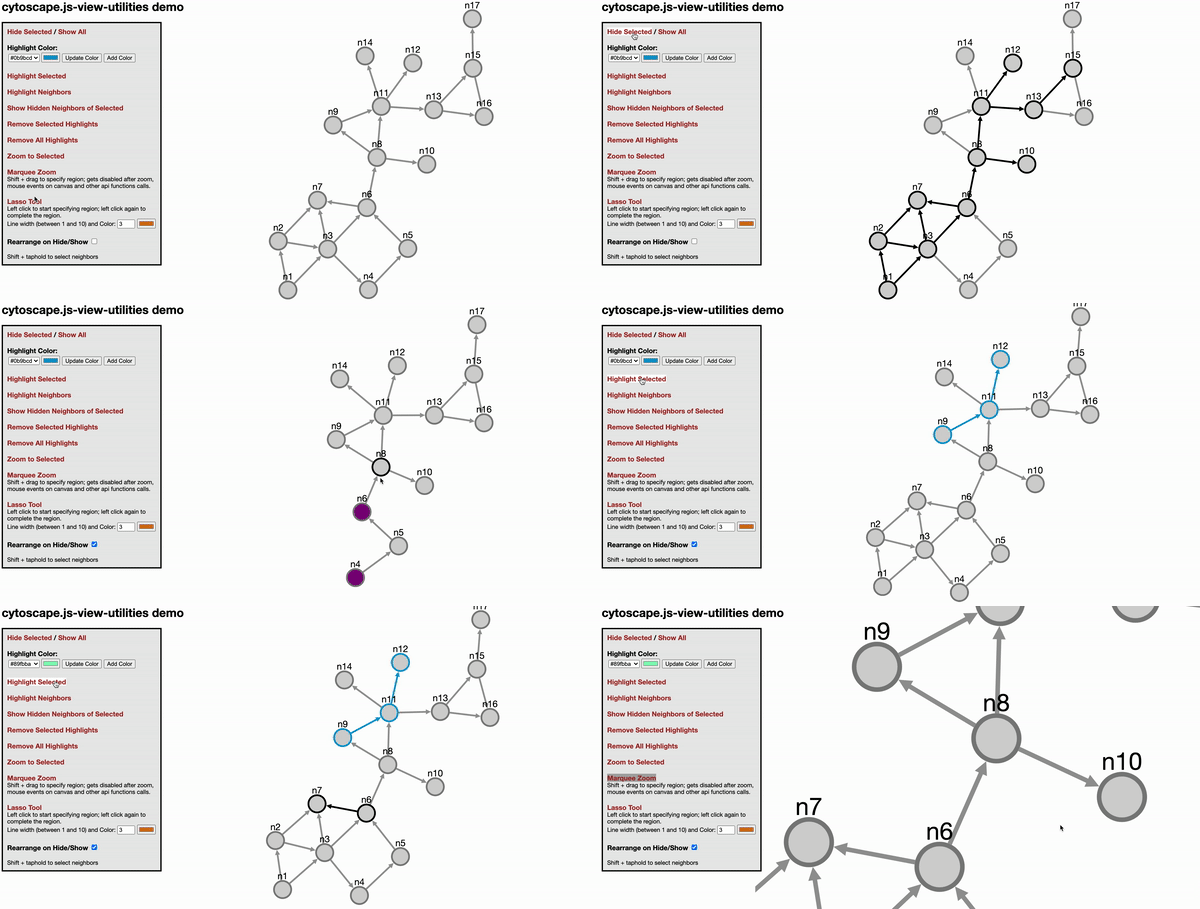
此cytoscape.js擴展名提供了雜項視圖實用程序,例如hide/show,亮點,大門縮放和免費的表單選擇,並根據麻省理工學院許可分發。
使用此擴展時,請引用以下論文:
U. Dogrusoz,A。 Karacelik,I。 Safarli,H。 Balci,L。 Dervishi和Mc Siper,“有效的方法和易於自定義的可用於管理大型網絡複雜性的可自定義庫”,PLOS One,13(5):E0197238,2018。
單擊此處(無撤消)或此演示的(不可行)
var instance = cy.viewUtilities(options)
@Param選項 - 如果未提供,將使用默認選項。有關默認選項,請參見下一節。 highlightStyles是對象的數組。對象應遵循格式{node: ..., edge: ...} 。如果您想在選擇對象時覆蓋突出顯示的樣式,則將使用selectStyles 。 lassoStyle將用於覆蓋拉索線樣式。
例如
 var options = {
  highlightStyles : [
    { node : { 'border-color' : '#0b9bcd' ,  'border-width' : 3 } , edge : { 'line-color' : '#0b9bcd' , 'source-arrow-color' : '#0b9bcd' , 'target-arrow-color' : '#0b9bcd' , 'width' : 3 } } ,
    { node : { 'border-color' : '#04f06a' ,  'border-width' : 3 } , edge : { 'line-color' : '#04f06a' , 'source-arrow-color' : '#04f06a' , 'target-arrow-color' : '#04f06a' , 'width' : 3 } } ,
  ] ,
  selectStyles : {
    node : { 'border-color' : 'black' , 'border-width' : 3 , 'background-color' : 'lightgrey' } ,
    edge : { 'line-color' : 'black' , 'source-arrow-color' : 'black' , 'target-arrow-color' : 'black' , 'width' : 3 }
  } ,
  setVisibilityOnHide : false , // whether to set visibility on hide/show
  setDisplayOnHide : true , // whether to set display on hide/show
  zoomAnimationDuration : 1500 , // default duration for zoom animation speed
  neighbor : function ( ele ) {
      return ele . closedNeighborhood ( ) ;
  } ,
  neighborSelectTime : 500 ,
  lassoStyle : { lineColor : "#d67614" , lineWidth : 3 } // default lasso line color, dark orange, and default line width
  htmlElem4marqueeZoom : '' , // should be string like `#cy` or `.cy`. `#cy` means get element with the ID 'cy'. `.cy` means the element with class 'cy'
  marqueeZoomCursor : 'se-resize' , // the cursor that should be used when marquee zoom is enabled. It can also be an image if a URL to an image is given
  isShowEdgesBetweenVisibleNodes : true // When showing elements, show edges if both source and target nodes become visible
} ;
var api = cy . viewUtilities ( options ) ;
instance.highlight(eles, idx = 0)
@param Eles - cytoscape.js集合(元素集合)要突出顯示
@Param IDX - cytoscape.js樣式的索引。如果您不指定它,則將使用第一個樣式。
將樣式類應用於指定的元素。風格類指定其索引
instance.highlightNeighbors(eles, idx = 0)
@param Eles - cytoscape.js集合(元素集合)要突出顯示
@Param IDX - cytoscape.js樣式的索引。如果您不指定它,則將使用第一個樣式。
突出顯示Elements的鄰居(基於顏色選項)。與高光函數類似,可以在參數中發送元素和突出顯示選項。如果僅發送元素,則使用默認的突出顯示顏色。
instance.removeHighlights(eles)
@Param Eles - 要刪除高光的元素
從Eles中刪除亮點。
instance.hide(eles)
@Param Eles - 隱藏的元素
生皮。
instance.show(eles)
@Param Eles-要顯示的元素
Undide給出了Eles。
instance.showHiddenNeighbors(eles)
@param Eles - 顯示隱藏鄰居的元素
UND給定的Eles隱藏的腹地。請注意,化合物節點未按預期尊重。
instance.zoomToSelected(eles)
@Param Eles-要變焦的元素
縮放選定的Eles。
instance.enableMarqueeZoom(callback)
@Param回調 - 在功能末尾被調用
啟用Marquee Zoom。當Ctrl+Shift Keys關閉時,它會自動調用。
instance.disableMarqueeZoom()
禁用Marquee Zoom。當Ctrl+Shift鍵向上時,它會自動調用。
instance.enableLassoMode(callback)
@Param回調 - 在功能末尾被調用
啟用套索工具。
instance.disableLassoMode()
禁用套索工具。
instance.getHighlightStyles()
返回當前的highlightStyles ,這是下面的一系列對象
 [
  { node: { 'border-color': '#0b9bcd',  'border-width': 3 }, edge: {'line-color': '#0b9bcd', 'source-arrow-color': '#0b9bcd', 'target-arrow-color': '#0b9bcd', 'width' : 3} },
  { node: { 'border-color': '#bf0603',  'border-width': 3 }, edge: {'line-color': '#bf0603', 'source-arrow-color': '#bf0603', 'target-arrow-color': '#bf0603', 'width' : 3} },
],
instance.getAllHighlightClasses()
返回所有當前使用的cytoscape.js樣式類
instance.changeHighlightStyle(idx, nodeStyle, edgeStyle)
@Param IDX - 將要更改的樣式索引
@param nodestyle-節點的Cytoscape風格
@Param Edgestyle - 邊緣的Cytoscape樣式
更改idx指定的樣式。
instance.addHighlightStyle(nodeStyle, edgeStyle)
@param nodestyle-節點的Cytoscape風格
@Param Edgestyle - 邊緣的Cytoscape樣式
在highlightStyles陣列中添加了新樣式。
instance.removeHighlightStyle(styleIdx): void
@param styleidx - 刪除樣式的索引(基於0)
從highlightStyles陣列中刪除樣式。
instance.changeLassoStyle(styleObj)
@param styleobj - 帶有LineColor和/或LineWidth屬性的拉索線樣式對象
 var options = {
  highlightStyles : [ ] ,
  selectStyles : { } ,
  setVisibilityOnHide : false , // whether to set visibility on hide/show
  setDisplayOnHide : true , // whether to set display on hide/show
  zoomAnimationDuration : 1500 , // default duration for zoom animation speed
  neighbor : function ( ele ) { // return desired neighbors of tapheld element
    return false ;
  } ,
  neighborSelectTime : 500 , // ms, time to taphold to select desired neighbors in addition to the taphold event detect time by cytoscape
  lassoStyle : { lineColor : "#d67614" , lineWidth : 3 } // default lasso line color, dark orange, and default line width
} ; ur.do("highlight", args)
ur.do("highlightNeighbors", args) ur.do("highlightNeighbours", args)
ur.do("removeHighlights")
ur.do("hide", eles)
ur.do("show", eles)
下載圖書館:
npm install cytoscape-view-utilities ,bower install cytoscape-view-utilities或 require()庫適合您的項目:
commonjs:
 var cytoscape = require ( 'cytoscape' ) ;
var viewUtilities = require ( 'cytoscape-view-utilities' ) ;

viewUtilities ( cytoscape ) ; // register extension
AMD:
 require ( [ 'cytoscape' , 'cytoscape-view-utilities' ] , function ( cytoscape , view - utilities ) {
    view - utilities ( cytoscape ) ; // register extension
} ) ;普通的html/js自動為您註冊了擴展名,因為不需要require() 。
npm run build :build ./src/**在生產環境中進入cytoscape-view-utilities.js並最大程度地減少文件。npm run build:dev :build ./src/** in開發環境中的cytoscape-view-utilities.js而無需最小化文件。 該項目將自動發佈到NPM和Bower。發布:
npm run buildgit commit -am "Build for release"npm version major|minor|patchgit push && git push --tagsnpm publish .bower register cytoscape-view-utilities https://github.com/iVis-at-Bilkent/view-utilities.git 





