cytoscape.js view utilities
v6.0.0

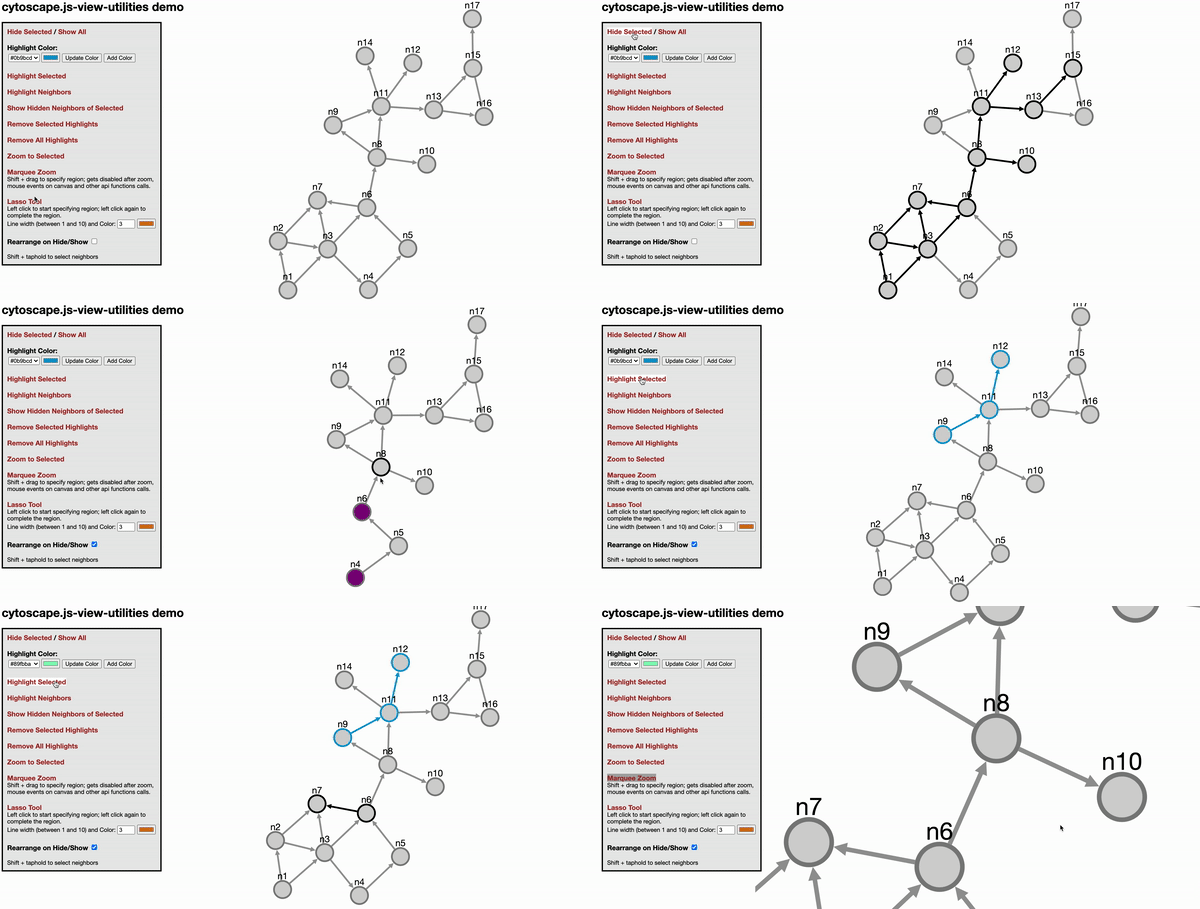
此cytoscape.js扩展名提供了杂项视图实用程序,例如hide/show,亮点,大门缩放和免费的表单选择,并根据麻省理工学院许可分发。
使用此扩展时,请引用以下论文:
U. Dogrusoz,A。Karacelik,I。Safarli,H。Balci,L。Dervishi和Mc Siper,“有效的方法和易于自定义的可用于管理大型网络复杂性的可自定义库”,PLOS One,13(5):E0197238,2018。
单击此处(无撤消)或此演示的(不可行)
var instance = cy.viewUtilities(options)
@Param选项 - 如果未提供,将使用默认选项。有关默认选项,请参见下一节。 highlightStyles是对象的数组。对象应遵循格式{node: ..., edge: ...} 。如果您想在选择对象时覆盖突出显示的样式,则将使用selectStyles 。 lassoStyle将用于覆盖拉索线样式。
例如
 var options = {
  highlightStyles : [
    { node : { 'border-color' : '#0b9bcd' ,  'border-width' : 3 } , edge : { 'line-color' : '#0b9bcd' , 'source-arrow-color' : '#0b9bcd' , 'target-arrow-color' : '#0b9bcd' , 'width' : 3 } } ,
    { node : { 'border-color' : '#04f06a' ,  'border-width' : 3 } , edge : { 'line-color' : '#04f06a' , 'source-arrow-color' : '#04f06a' , 'target-arrow-color' : '#04f06a' , 'width' : 3 } } ,
  ] ,
  selectStyles : {
    node : { 'border-color' : 'black' , 'border-width' : 3 , 'background-color' : 'lightgrey' } ,
    edge : { 'line-color' : 'black' , 'source-arrow-color' : 'black' , 'target-arrow-color' : 'black' , 'width' : 3 }
  } ,
  setVisibilityOnHide : false , // whether to set visibility on hide/show
  setDisplayOnHide : true , // whether to set display on hide/show
  zoomAnimationDuration : 1500 , // default duration for zoom animation speed
  neighbor : function ( ele ) {
      return ele . closedNeighborhood ( ) ;
  } ,
  neighborSelectTime : 500 ,
  lassoStyle : { lineColor : "#d67614" , lineWidth : 3 } // default lasso line color, dark orange, and default line width
  htmlElem4marqueeZoom : '' , // should be string like `#cy` or `.cy`. `#cy` means get element with the ID 'cy'. `.cy` means the element with class 'cy'
  marqueeZoomCursor : 'se-resize' , // the cursor that should be used when marquee zoom is enabled. It can also be an image if a URL to an image is given
  isShowEdgesBetweenVisibleNodes : true // When showing elements, show edges if both source and target nodes become visible
} ;
var api = cy . viewUtilities ( options ) ;
instance.highlight(eles, idx = 0)
@param Eles - cytoscape.js集合(元素集合)要突出显示
@Param IDX - cytoscape.js样式的索引。如果您不指定它,则将使用第一个样式。
将样式类应用于指定的元素。风格类指定其索引
instance.highlightNeighbors(eles, idx = 0)
@param Eles - cytoscape.js集合(元素集合)要突出显示
@Param IDX - cytoscape.js样式的索引。如果您不指定它,则将使用第一个样式。
突出显示Elements的邻居(基于颜色选项)。与高光函数类似,可以在参数中发送元素和突出显示选项。如果仅发送元素,则使用默认的突出显示颜色。
instance.removeHighlights(eles)
@Param Eles - 要删除高光的元素
从Eles中删除亮点。
instance.hide(eles)
@Param Eles - 隐藏的元素
生皮。
instance.show(eles)
@Param Eles-要显示的元素
Undide给出了Eles。
instance.showHiddenNeighbors(eles)
@param Eles - 显示隐藏邻居的元素
UND给定的Eles隐藏的腹地。请注意,化合物节点未按预期尊重。
instance.zoomToSelected(eles)
@Param Eles-要变焦的元素
缩放选定的Eles。
instance.enableMarqueeZoom(callback)
@Param回调 - 在功能末尾被调用
启用Marquee Zoom。当Ctrl+Shift Keys关闭时,它会自动调用。
instance.disableMarqueeZoom()
禁用Marquee Zoom。当Ctrl+Shift键向上时,它会自动调用。
instance.enableLassoMode(callback)
@Param回调 - 在功能末尾被调用
启用套索工具。
instance.disableLassoMode()
禁用套索工具。
instance.getHighlightStyles()
返回当前的highlightStyles ,这是下面的一系列对象
 [
  { node: { 'border-color': '#0b9bcd',  'border-width': 3 }, edge: {'line-color': '#0b9bcd', 'source-arrow-color': '#0b9bcd', 'target-arrow-color': '#0b9bcd', 'width' : 3} },
  { node: { 'border-color': '#bf0603',  'border-width': 3 }, edge: {'line-color': '#bf0603', 'source-arrow-color': '#bf0603', 'target-arrow-color': '#bf0603', 'width' : 3} },
],
instance.getAllHighlightClasses()
返回所有当前使用的cytoscape.js样式类
instance.changeHighlightStyle(idx, nodeStyle, edgeStyle)
@Param IDX - 将要更改的样式索引
@param nodestyle-节点的Cytoscape风格
@Param Edgestyle - 边缘的Cytoscape样式
更改idx指定的样式。
instance.addHighlightStyle(nodeStyle, edgeStyle)
@param nodestyle-节点的Cytoscape风格
@Param Edgestyle - 边缘的Cytoscape样式
在highlightStyles阵列中添加了新样式。
instance.removeHighlightStyle(styleIdx): void
@param styleidx - 删除样式的索引(基于0)
从highlightStyles阵列中删除样式。
instance.changeLassoStyle(styleObj)
@param styleobj - 带有LineColor和/或LineWidth属性的拉索线样式对象
 var options = {
  highlightStyles : [ ] ,
  selectStyles : { } ,
  setVisibilityOnHide : false , // whether to set visibility on hide/show
  setDisplayOnHide : true , // whether to set display on hide/show
  zoomAnimationDuration : 1500 , // default duration for zoom animation speed
  neighbor : function ( ele ) { // return desired neighbors of tapheld element
    return false ;
  } ,
  neighborSelectTime : 500 , // ms, time to taphold to select desired neighbors in addition to the taphold event detect time by cytoscape
  lassoStyle : { lineColor : "#d67614" , lineWidth : 3 } // default lasso line color, dark orange, and default line width
} ; ur.do("highlight", args)
ur.do("highlightNeighbors", args) ur.do("highlightNeighbours", args)
ur.do("removeHighlights")
ur.do("hide", eles)
ur.do("show", eles)
下载图书馆:
npm install cytoscape-view-utilities ,bower install cytoscape-view-utilities或 require()库适合您的项目:
commonjs:
 var cytoscape = require ( 'cytoscape' ) ;
var viewUtilities = require ( 'cytoscape-view-utilities' ) ;

viewUtilities ( cytoscape ) ; // register extension
AMD:
 require ( [ 'cytoscape' , 'cytoscape-view-utilities' ] , function ( cytoscape , view - utilities ) {
    view - utilities ( cytoscape ) ; // register extension
} ) ;普通的html/js自动为您注册了扩展名,因为不需要require() 。
npm run build :build ./src/**在生产环境中进入cytoscape-view-utilities.js并最大程度地减少文件。npm run build:dev :build ./src/** in开发环境中的cytoscape-view-utilities.js而无需最小化文件。 该项目将自动发布到NPM和Bower。发布:
npm run buildgit commit -am "Build for release"npm version major|minor|patchgit push && git push --tagsnpm publish .bower register cytoscape-view-utilities https://github.com/iVis-at-Bilkent/view-utilities.git 





