cytoscape.js view utilities
v6.0.0

يوفر امتداد Cytoscape.js مرافق عرض متنوعة مثل Hide/Show و Allight و Marquee Zoom واختيار النماذج المجانية ، الموزعة بموجب ترخيص MIT.
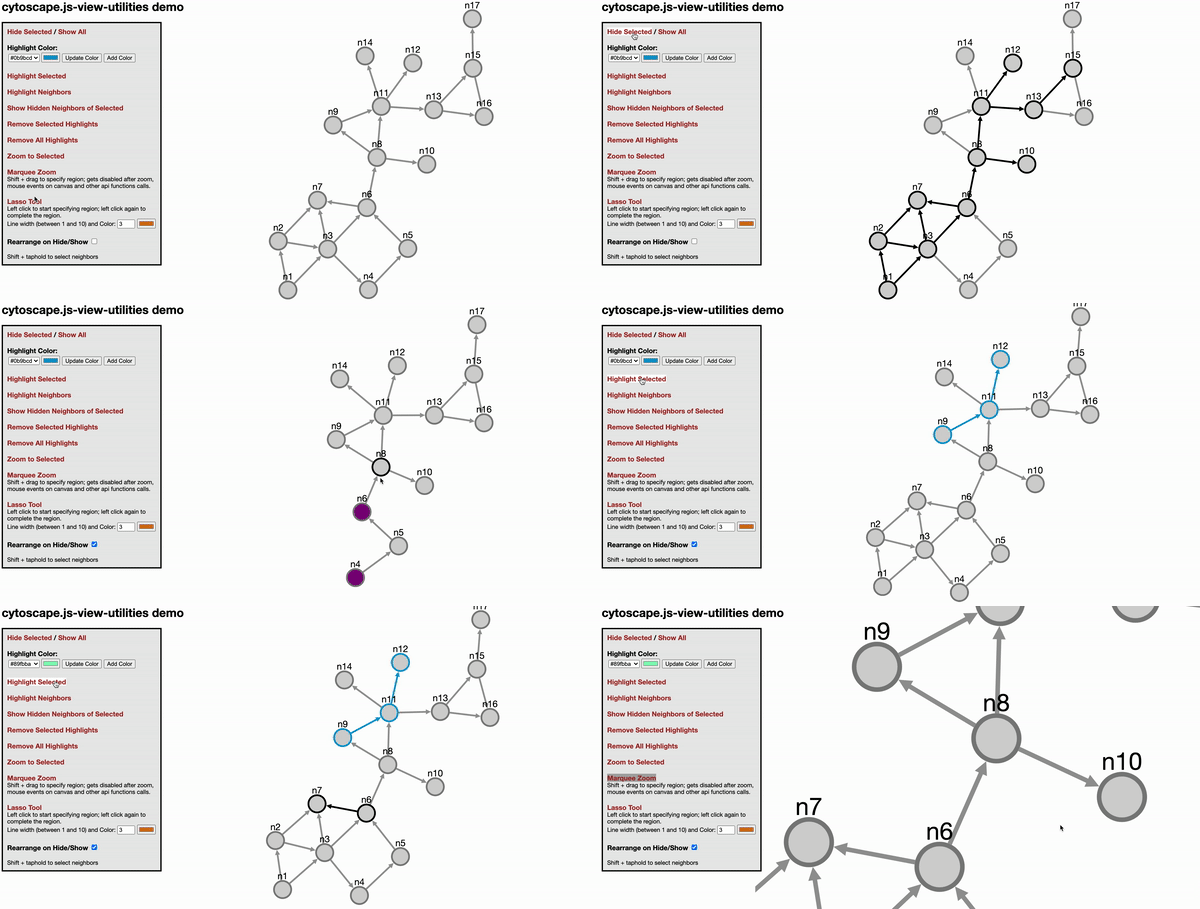
يرجى الاستشهاد بالورقة التالية عند استخدام هذا الامتداد:
U. Dogrusoz ، A. Karacelik ، I. Safarli ، H. Balci ، L. Dervishi ، و Mc Siper ، "طرق فعالة ومكتبات قابلة للتخصيص بسهولة لإدارة التعقيد للشبكات الكبيرة" ، PLOS One ، 13 (5): E0197238 ، 2018.
انقر هنا (لا تراجع) أو هنا (غير قابل للتراجع) للعروض التوضيحية
var instance = cy.viewUtilities(options)
خيارات param - إذا لم يتم توفيرها ، سيتم استخدام الخيارات الافتراضية. راجع القسم أدناه للحصول على الخيارات الافتراضية. highlightStyles على هيكل مجموعة من الأشياء. يجب أن تتبع الكائنات التنسيق {node: ..., edge: ...} . سيتم استخدام selectStyles إذا كنت ترغب في تجاوز الأنماط المميزة عند تحديد الكائنات. سيتم استخدام lassoStyle لتجاوز نمط Lasso Line.
على سبيل المثال
 var options = {
  highlightStyles : [
    { node : { 'border-color' : '#0b9bcd' ,  'border-width' : 3 } , edge : { 'line-color' : '#0b9bcd' , 'source-arrow-color' : '#0b9bcd' , 'target-arrow-color' : '#0b9bcd' , 'width' : 3 } } ,
    { node : { 'border-color' : '#04f06a' ,  'border-width' : 3 } , edge : { 'line-color' : '#04f06a' , 'source-arrow-color' : '#04f06a' , 'target-arrow-color' : '#04f06a' , 'width' : 3 } } ,
  ] ,
  selectStyles : {
    node : { 'border-color' : 'black' , 'border-width' : 3 , 'background-color' : 'lightgrey' } ,
    edge : { 'line-color' : 'black' , 'source-arrow-color' : 'black' , 'target-arrow-color' : 'black' , 'width' : 3 }
  } ,
  setVisibilityOnHide : false , // whether to set visibility on hide/show
  setDisplayOnHide : true , // whether to set display on hide/show
  zoomAnimationDuration : 1500 , // default duration for zoom animation speed
  neighbor : function ( ele ) {
      return ele . closedNeighborhood ( ) ;
  } ,
  neighborSelectTime : 500 ,
  lassoStyle : { lineColor : "#d67614" , lineWidth : 3 } // default lasso line color, dark orange, and default line width
  htmlElem4marqueeZoom : '' , // should be string like `#cy` or `.cy`. `#cy` means get element with the ID 'cy'. `.cy` means the element with class 'cy'
  marqueeZoomCursor : 'se-resize' , // the cursor that should be used when marquee zoom is enabled. It can also be an image if a URL to an image is given
  isShowEdgesBetweenVisibleNodes : true // When showing elements, show edges if both source and target nodes become visible
} ;
var api = cy . viewUtilities ( options ) ;
instance.highlight(eles, idx = 0)
param eles - مجموعة cytoscape.js (مجموعة من العناصر) ليتم تسليط الضوء عليها
param idx - فهرس نمط cytoscape.js. إذا لم تحدد ذلك ، فسيتم استخدام النمط الأول.
تطبيق فئة النمط على العناصر المحددة. تم تحديد فئة النمط مع فهرسها
instance.highlightNeighbors(eles, idx = 0)
param eles - مجموعة cytoscape.js (مجموعة من العناصر) ليتم تسليط الضوء عليها
param idx - فهرس نمط cytoscape.js. إذا لم تحدد ذلك ، فسيتم استخدام النمط الأول.
يبرز حي العناصر (بناءً على خيار اللون). على غرار وظيفة تسليط الضوء ، يمكن إرسال كل من العناصر وخيار تسليط الضوء في الوسيطات. إذا تم إرسال العناصر فقط ، فسيتم استخدام لون التمييز الافتراضي.
instance.removeHighlights(eles)
Param Eles - عناصر لإزالة النقاط البارزة
قم بإزالة النقاط البارزة من ELES.
instance.hide(eles)
Param Eles - عناصر للاختباء
يختبئ إعطاء إليز.
instance.show(eles)
Param Eles - عناصر لإظهارها
يضعون إيليز.
instance.showHiddenNeighbors(eles)
Param Eles - عناصر لإظهار الجيران المخفيين
خفية neigbors المخبأة من ELES. لاحظ أن العقد المركبة لا تحترم كما هو متوقع.
instance.zoomToSelected(eles)
Param Eles - عناصر للتكبير
تكبير إلى ELES المختارة.
instance.enableMarqueeZoom(callback)
Param Callback - يتم استدعاؤه في نهاية الوظيفة
يتيح تكبير سرادق. يتم استدعاؤه تلقائيًا عند انخفاض مفاتيح CTRL+Shift.
instance.disableMarqueeZoom()
تعطيل تكبير السرادق. يتم استدعاؤه تلقائيًا عند ارتفاع مفاتيح التحول CTRL+.
instance.enableLassoMode(callback)
Param Callback - يتم استدعاؤه في نهاية الوظيفة
يتيح أداة Lasso.
instance.disableLassoMode()
يعطل أداة لاسو.
instance.getHighlightStyles()
إرجاع highlightStyles الحالي ، وهي مجموعة من الكائنات مثل أدناه
 [
  { node: { 'border-color': '#0b9bcd',  'border-width': 3 }, edge: {'line-color': '#0b9bcd', 'source-arrow-color': '#0b9bcd', 'target-arrow-color': '#0b9bcd', 'width' : 3} },
  { node: { 'border-color': '#bf0603',  'border-width': 3 }, edge: {'line-color': '#bf0603', 'source-arrow-color': '#bf0603', 'target-arrow-color': '#bf0603', 'width' : 3} },
],
instance.getAllHighlightClasses()
إرجاع جميع فصول نمط cytoscape.js المستخدمة حاليا
instance.changeHighlightStyle(idx, nodeStyle, edgeStyle)
Param IDX - فهرس النمط الذي سيتم تغييره
param nodestyle - نمط cytoscape للعقد
param edgestyle - نمط cytoscape للحواف
يغير النمط المحدد مع idx .
instance.addHighlightStyle(nodeStyle, edgeStyle)
param nodestyle - نمط cytoscape للعقد
param edgestyle - نمط cytoscape للحواف
يضيف نمطًا جديدًا إلى مجموعة highlightStyles .
instance.removeHighlightStyle(styleIdx): void
param styleidx - فهرس النمط لحذف (0 على أساس)
يزيل النمط من صفيف highlightStyles .
instance.changeLassoStyle(styleObj)
param styleObj - كائن نمط خط Lasso مع خصائص Linecolor و/أو خطوط العرض
 var options = {
  highlightStyles : [ ] ,
  selectStyles : { } ,
  setVisibilityOnHide : false , // whether to set visibility on hide/show
  setDisplayOnHide : true , // whether to set display on hide/show
  zoomAnimationDuration : 1500 , // default duration for zoom animation speed
  neighbor : function ( ele ) { // return desired neighbors of tapheld element
    return false ;
  } ,
  neighborSelectTime : 500 , // ms, time to taphold to select desired neighbors in addition to the taphold event detect time by cytoscape
  lassoStyle : { lineColor : "#d67614" , lineWidth : 3 } // default lasso line color, dark orange, and default line width
} ; ur.do("highlight", args)
ur.do("highlightNeighbors", args) ur.do("highlightNeighbours", args)
ur.do("removeHighlights")
ur.do("hide", eles)
ur.do("show", eles)
قم بتنزيل المكتبة:
npm install cytoscape-view-utilities ،bower install cytoscape-view-utilities ، أو require() المكتبة حسب الاقتضاء لمشروعك:
CommonJS:
 var cytoscape = require ( 'cytoscape' ) ;
var viewUtilities = require ( 'cytoscape-view-utilities' ) ;

viewUtilities ( cytoscape ) ; // register extension
AMD:
 require ( [ 'cytoscape' , 'cytoscape-view-utilities' ] , function ( cytoscape , view - utilities ) {
    view - utilities ( cytoscape ) ; // register extension
} ) ;
لدى HTML/JS العادي التمديد المسجل لك تلقائيًا ، لأنه لا require() .
npm run build : Build ./src/** in to cytoscape-view-utilities.js في بيئة الإنتاج وتقليل الملف.npm run build:dev : build ./src/** in to cytoscape-view-utilities.js في بيئة التطوير دون تقليل الملف. تم إعداد هذا المشروع ليتم نشره تلقائيًا إلى NPM و Bower. للنشر:
npm run buildgit commit -am "Build for release"npm version major|minor|patchgit push && git push --tagsnpm publish .bower register cytoscape-view-utilities https://github.com/iVis-at-Bilkent/view-utilities.git 





