KodeEditor
v4.0.1

一個簡單的代碼編輯器,帶有語法突出顯示和夾緊以縮放
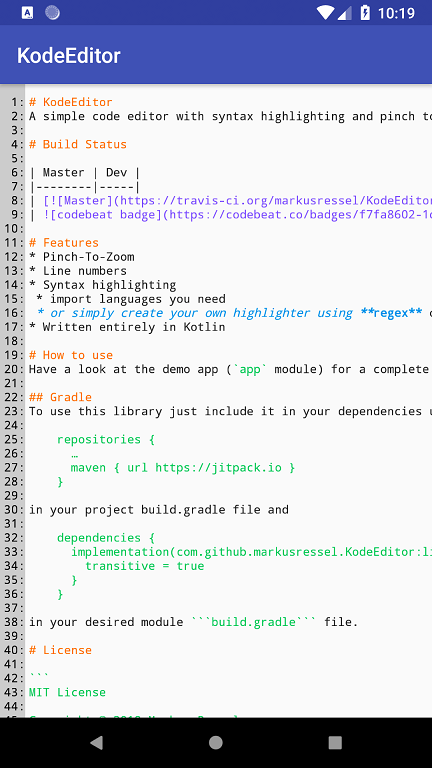
| 掌握 |
|---|
查看完整示例的演示應用程序( app模塊)。
要使用此庫,只需將其包含在您的依賴項中
 repositories {
    ...
    maven { url "https://jitpack.io" }
}
在您的項目build.gradle文件中
 dependencies {
    ...

    def codeEditorVersion = "v4.0.1"
    implementation("com.github.markusressel:KodeEditor:${codeEditorVersion}")
}
在您所需的模塊build.gradle文件中。
要使用此編輯器,只需將與此類似的內容添加到您所需的佈局XML文件:
 <de.markusressel.kodeeditor.library.view.CodeEditorLayout
        android:id="@+id/codeEditorView"
        android:layout_width="match_parent"
        android:layout_height="match_parent"
        app:ke_divider_color="?android:attr/textColorPrimary"
        app:ke_divider_enabled="true"
        app:ke_editor_backgroundColor="?android:attr/windowBackground"
        app:ke_editor_maxZoom="10.0"
        app:ke_lineNumbers_backgroundColor="#ccc"
        app:ke_lineNumbers_textColor="#000"
        app:ke_minimap_enabled="true"
        app:ke_minimap_maxDimension="200dp"
        app:ke_minimap_borderColor="#000"
        app:ke_minimap_indicatorColor="#f00"
        />
目前尚無文檔中使用的語言的自動檢測。您必須自己管理語法熒光筆,並在適當時致電setSyntaxHighlighter方法。
請看一下Kodehighlighter部分。
請看一下Kodehighlighter部分。
Kodeeditor可以通過多種方式進行樣式:
| 姓名 | 描述 | 類型 | 預設 |
|---|---|---|---|
| ke_lineNumbers_textColor | 指定行號的文本顏色 | 顏色 | android.R.attr.textColorPrimary |
| ke_lineNumbers_backgroundColor | 指定行號視圖的背景顏色 | 顏色 | android.R.attr.windowBackground |
| ke_divider_enabled | 指定是否應在行號和實際代碼編輯器內容之間繪製分隔線 | 布爾 | true |
| ke_divider_color | 指定分隔線的顏色(如果ke_divider_enabled設置為false ,則無效) | 顏色 | android.R.attr.textColorPrimary |
| ke_editor_backgroundColor | 指定代碼編輯器視圖的背景顏色 | 顏色 | android.R.attr.windowBackground |
| ke_editor_maxzoom | 指定編輯器的最大縮放級別 | 漂浮 | 10 |
| ke_minimap_enabled | 啟用最小值 | 布爾 | true |
| ke_minimap_maxdimension | 指定兩個軸的最小值的最大尺寸 | 方面 | 150dp |
| ke_minimap_bordercolor | 指定最小值的邊框顏色 | 顏色 | Color.BLACK |
| ke_minimap_indicatorColor | 指定最小值指示器的顏色 | 顏色 | Color.RED |
您可以直接在佈局中的視圖上使用這些屬性:
 <de.markusressel.kodeeditor.library.view.CodeEditorView
    android:id="@+id/codeEditorView"
    android:layout_width="match_parent"
    android:layout_height="match_parent"
    [...]
    app:ke_divider_color="?android:attr/textColorPrimary"
    app:ke_divider_enabled="true"
    app:ke_editor_backgroundColor="?android:attr/windowBackground"
    app:ke_editor_maxZoom="10.0"
    app:ke_lineNumbers_backgroundColor="#ccc"
    app:ke_lineNumbers_textColor="#000"
    app:ke_minimap_enabled="true"
    app:ke_minimap_maxDimension="200dp"
    app:ke_divider="true"
    [...] />
或在您的應用程序主題(DEM應用中的styles.xml )中指定它們,以在全球應用樣式:
 <resources>

    <!-- Base application theme. -->
    <style name="AppTheme" parent="Theme.AppCompat.Light.DarkActionBar">
        <!-- Other theme attributes of your application -->
        <item name="colorPrimary">@color/colorPrimary</item>
        <item name="colorPrimaryDark">@color/colorPrimaryDark</item>
        <item name="colorAccent">@color/colorAccent</item>

        <!-- CodeEditorView -->
        <item name="ke_lineNumbers_backgroundColor">#ccc</item>
        <item name="ke_lineNumbers_textColor">#000</item>
        <item name="ke_divider_enabled">false</item>
        <item name="ke_divider_color">#000</item>
        <item name="ke_editor_backgroundColor">#fff</item>
        <item name="ke_editor_maxZoom">10.0</item>
        <item name="ke_editor_followCursor">true</item>
        <item name="ke_minimap_enabled">true</item>
        <item name="ke_minimap_maxDimension">200dp</item>
        [...]

    </style>

</resources>
也可以使用代碼指定所有樣式屬性。由於KodeEditorLayout只是一個包裝器,可以擴展使用行號的CodeEditorView和最小值來使用其中一些方法,因此首先訪問KodeEditorLayout的匹配屬性。
| 姓名 | 描述 | 類型 |
|---|---|---|
| 文字 | 在編輯器中設置給定文本。 | 細繩 |
| setText(@StringRes) | 將給定的字符串資源設置為編輯器中的文本。 | int |
| 語言書 | 獲取/設置用於突出顯示的活動語言規則簿。使用null完全禁用突出顯示。 | 語言書? |
| 可編輯 | 如果編輯器內容是可編輯的,則獲取/設置。 | 布爾 |
| 姓名 | 描述 | 類型 |
|---|---|---|
| Showdivider | 如果顯示行號和代碼編輯器之間的分隔線,則獲取/設置。 | 布爾 |
| 亞麻生生物 | 設置基於行總數顯示的文本以顯示行號 | (長) - >列表 |
| 姓名 | 描述 | 類型 |
|---|---|---|
| Showminimap | 如果顯示了最小值,請獲取/設置。 | 布爾 |
| 最小值 | 獲取/設置像素中最小化的最大尺寸。 | 漂浮 |
| minimapborderWidth | 獲取/設置MiniMap邊框大小以像素為單位。 | 數字 |
| 最小值 | 獲取/設置Minimap邊框顏色。 | @ColorInt |
| MinimapIndicatorColor | 獲取/設置MiniMAP指示器顏色。 | @ColorInt |
| 最小值 | 獲取/設置MiniMAP定位重力。 | int |
要使用這些API方法,請使用codeEditorLayout.codeEditorView屬性。
| 姓名 | 描述 | 類型 |
|---|---|---|
| 文字 | 在編輯器中設置給定文本。 | 細繩 |
| setText(@StringRes) | 將給定的字符串資源設置為編輯器中的文本。 | int |
| getlinecount() | 返回當前的線計數。 | 長的 |
| 語言書 | 獲取/設置用於突出顯示的活動語言規則簿。使用null完全禁用突出顯示。 | 語言書? |
| 可編輯 | 如果編輯器內容是可編輯的,則獲取/設置。 | 布爾 |
| 哈塞爾 | 當選擇範圍時,是真的。 | 布爾 |
| SELECTIONSTART | 當前選擇的開始索引。 | int |
| SelectionEnd | 當前選擇的最終索引。 | int |
| SelectionChangedListener | 獲取/設置偵聽器以進行選擇更改。 | SelectionChangedListener? |
GitHub用於社交編碼:如果您想編寫代碼,我會通過此存儲庫的分叉請求來鼓勵貢獻。為錯誤和新功能創建GitHub門票,並評論您感興趣的票。
 MIT License

Copyright (c) 2018 Markus Ressel

Permission is hereby granted, free of charge, to any person obtaining a copy
of this software and associated documentation files (the "Software"), to deal
in the Software without restriction, including without limitation the rights
to use, copy, modify, merge, publish, distribute, sublicense, and/or sell
copies of the Software, and to permit persons to whom the Software is
furnished to do so, subject to the following conditions:

The above copyright notice and this permission notice shall be included in all
copies or substantial portions of the Software.

THE SOFTWARE IS PROVIDED "AS IS", WITHOUT WARRANTY OF ANY KIND, EXPRESS OR
IMPLIED, INCLUDING BUT NOT LIMITED TO THE WARRANTIES OF MERCHANTABILITY,
FITNESS FOR A PARTICULAR PURPOSE AND NONINFRINGEMENT. IN NO EVENT SHALL THE
AUTHORS OR COPYRIGHT HOLDERS BE LIABLE FOR ANY CLAIM, DAMAGES OR OTHER
LIABILITY, WHETHER IN AN ACTION OF CONTRACT, TORT OR OTHERWISE, ARISING FROM,
OUT OF OR IN CONNECTION WITH THE SOFTWARE OR THE USE OR OTHER DEALINGS IN THE
SOFTWARE.






