KodeEditor
v4.0.1

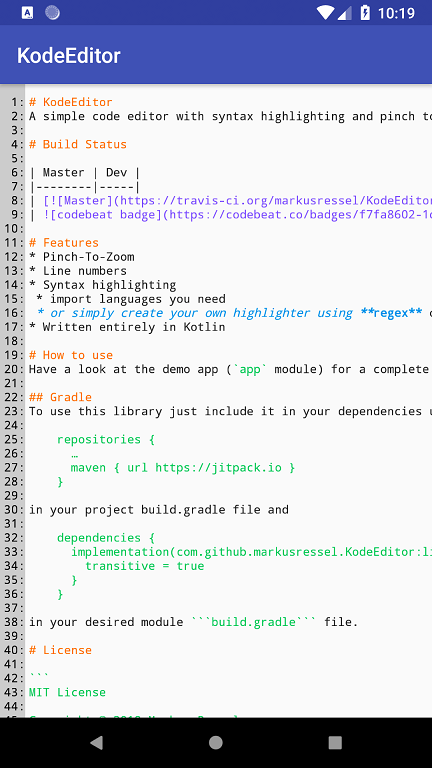
ตัวแก้ไขรหัสอย่างง่ายพร้อมการไฮไลต์ไวยากรณ์และหยิกเพื่อซูม
| ผู้เชี่ยวชาญ |
|---|
ดูแอพสาธิต (โมดูล app ) สำหรับตัวอย่างที่สมบูรณ์
ในการใช้ห้องสมุดนี้รวมไว้ในการพึ่งพาของคุณโดยใช้
 repositories {
    ...
    maven { url "https://jitpack.io" }
}
ในไฟล์ Project Build.gradle และ
 dependencies {
    ...

    def codeEditorVersion = "v4.0.1"
    implementation("com.github.markusressel:KodeEditor:${codeEditorVersion}")
}
ในโมดูลที่คุณต้องการไฟล์ build.gradle
หากต้องการใช้ตัวแก้ไขนี้เพียงเพิ่มสิ่งที่คล้ายกับสิ่งนี้ในไฟล์เลย์เอาต์ XML ที่คุณต้องการ:
 <de.markusressel.kodeeditor.library.view.CodeEditorLayout
        android:id="@+id/codeEditorView"
        android:layout_width="match_parent"
        android:layout_height="match_parent"
        app:ke_divider_color="?android:attr/textColorPrimary"
        app:ke_divider_enabled="true"
        app:ke_editor_backgroundColor="?android:attr/windowBackground"
        app:ke_editor_maxZoom="10.0"
        app:ke_lineNumbers_backgroundColor="#ccc"
        app:ke_lineNumbers_textColor="#000"
        app:ke_minimap_enabled="true"
        app:ke_minimap_maxDimension="200dp"
        app:ke_minimap_borderColor="#000"
        app:ke_minimap_indicatorColor="#f00"
        />
ขณะนี้ไม่มีการตรวจจับอัตโนมัติสำหรับภาษาที่ใช้ในเอกสาร คุณต้องจัดการปากกาเน้นข้อความไวยากรณ์ด้วยตัวเองและเรียกใช้วิธี setSyntaxHighlighter เมื่อเหมาะสม
ดูส่วน Kodehighlighter เกี่ยวกับเรื่องนี้
ดูส่วน Kodehighlighter เกี่ยวกับเรื่องนี้
Kodeeditor สามารถจัดสไตล์ได้หลายวิธี:
| ชื่อ | คำอธิบาย | พิมพ์ | ค่าเริ่มต้น |
|---|---|---|---|
| ke_linenumbers_textcolor | ระบุสีข้อความของหมายเลขบรรทัด | สี | android.R.attr.textColorPrimary |
| ke_linenumbers_backgroundcolor | ระบุสีพื้นหลังของมุมมองหมายเลขบรรทัด | สี | android.R.attr.windowBackground |
| ke_divider_enabled | ระบุว่าควรวาดตัวแบ่งระหว่างหมายเลขบรรทัดและเนื้อหาตัวแก้ไขรหัสจริง | บูลีน | true |
| ke_divider_color | ระบุสีของตัวแบ่ง (ไม่มีผลถ้า ke_divider_enabled ถูกตั้งค่าเป็น false ) | สี | android.R.attr.textColorPrimary |
| ke_editor_backgroundcolor | ระบุสีพื้นหลังของมุมมองตัวแก้ไขรหัส | สี | android.R.attr.windowBackground |
| ke_editor_maxzoom | ระบุระดับการซูมสูงสุดของตัวแก้ไข | ลอย | 10 |
| ke_minimap_enabled | เปิดใช้งาน minimap | บูลีน | true |
| ke_minimap_maxdimension | ระบุมิติสูงสุดของ minimap สำหรับทั้งสองแกน | มิติ | 150dp |
| ke_minimap_bordercolor | ระบุสีขอบของ minimap | สี | Color.BLACK |
| ke_minimap_indicatorcolor | ระบุสีของตัวบ่งชี้ minimap | สี | Color.RED |
คุณสามารถใช้แอตทริบิวต์เหล่านั้นได้โดยตรงบนมุมมองในรูปแบบของคุณเช่นนี้:
 <de.markusressel.kodeeditor.library.view.CodeEditorView
    android:id="@+id/codeEditorView"
    android:layout_width="match_parent"
    android:layout_height="match_parent"
    [...]
    app:ke_divider_color="?android:attr/textColorPrimary"
    app:ke_divider_enabled="true"
    app:ke_editor_backgroundColor="?android:attr/windowBackground"
    app:ke_editor_maxZoom="10.0"
    app:ke_lineNumbers_backgroundColor="#ccc"
    app:ke_lineNumbers_textColor="#000"
    app:ke_minimap_enabled="true"
    app:ke_minimap_maxDimension="200dp"
    app:ke_divider="true"
    [...] />
หรือระบุไว้ในธีมแอปพลิเคชันของคุณ ( styles.xml ในแอพ Dem) เพื่อใช้สไตล์ทั่วโลก:
 <resources>

    <!-- Base application theme. -->
    <style name="AppTheme" parent="Theme.AppCompat.Light.DarkActionBar">
        <!-- Other theme attributes of your application -->
        <item name="colorPrimary">@color/colorPrimary</item>
        <item name="colorPrimaryDark">@color/colorPrimaryDark</item>
        <item name="colorAccent">@color/colorAccent</item>

        <!-- CodeEditorView -->
        <item name="ke_lineNumbers_backgroundColor">#ccc</item>
        <item name="ke_lineNumbers_textColor">#000</item>
        <item name="ke_divider_enabled">false</item>
        <item name="ke_divider_color">#000</item>
        <item name="ke_editor_backgroundColor">#fff</item>
        <item name="ke_editor_maxZoom">10.0</item>
        <item name="ke_editor_followCursor">true</item>
        <item name="ke_minimap_enabled">true</item>
        <item name="ke_minimap_maxDimension">200dp</item>
        [...]

    </style>

</resources>
คุณลักษณะการจัดแต่งทรงผมทั้งหมดยังสามารถระบุได้โดยใช้รหัส เนื่องจาก KodeEditorLayout เป็นเพียง wrapper เพื่อขยาย CodeEditorView ด้วยหมายเลขบรรทัดและ minimap เพื่อใช้วิธีการบางอย่างที่คุณต้องใช้ในการเข้าถึงคุณสมบัติการจับคู่ของ KodeEditorLayout ก่อน
| ชื่อ | คำอธิบาย | พิมพ์ |
|---|---|---|
| ข้อความ | ตั้งค่าข้อความที่กำหนดในตัวแก้ไข | สาย |
| SetText (@StringRes) | ตั้งค่าทรัพยากรสตริงที่กำหนดเป็นข้อความในตัวแก้ไข | int |
| Languagerulebook | รับ/ตั้งค่าหนังสือกฎภาษาที่ใช้งานที่ใช้สำหรับการไฮไลต์ ใช้ null เพื่อปิดการใช้งานที่เน้นไปพร้อมกัน | Languagerulebook? |
| สามารถแก้ไขได้ | รับ/ตั้งค่าหากเนื้อหาของตัวแก้ไขสามารถแก้ไขได้ | บูลีน |
| ชื่อ | คำอธิบาย | พิมพ์ |
|---|---|---|
| ผู้จัดแสดง | รับ/ตั้งค่าถ้าตัวแบ่งระหว่างหมายเลขบรรทัดและตัวแก้ไขรหัสจะปรากฏขึ้น | บูลีน |
| LinenumberGenerator | ตั้งค่าข้อความเพื่อแสดงสำหรับหมายเลขบรรทัดตามจำนวนบรรทัดทั้งหมด | (ยาว) -> รายการ |
| ชื่อ | คำอธิบาย | พิมพ์ |
|---|---|---|
| การแสดง | รับ/ตั้งค่าหากมีการแสดง minimap | บูลีน |
| minimapmaxdimension | รับ/ตั้งค่ามิติสูงสุดของ minimap เป็นพิกเซล | ลอย |
| minimapBorderWidth | รับ/ตั้งค่าขนาดเส้นขอบน้อยที่สุดในพิกเซล | ตัวเลข |
| minimapBorderColor | รับ/ตั้งค่าสีขอบน้อยที่สุด | @colorint |
| MinimapIndicatorColor | รับ/ตั้งค่าสีตัวบ่งชี้ minimap | @colorint |
| minimapgravity | รับ/ตั้งค่าแรงโน้มถ่วงการวางตำแหน่งขั้นต่ำ | int |
หากต้องการใช้วิธี API เหล่านี้ให้ใช้คุณสมบัติ codeEditorLayout.codeEditorView
| ชื่อ | คำอธิบาย | พิมพ์ |
|---|---|---|
| ข้อความ | ตั้งค่าข้อความที่กำหนดในตัวแก้ไข | สาย |
| SetText (@StringRes) | ตั้งค่าทรัพยากรสตริงที่กำหนดเป็นข้อความในตัวแก้ไข | int |
| getLinecount () | ส่งคืนจำนวนบรรทัดปัจจุบัน | ยาว |
| Languagerulebook | รับ/ตั้งค่าหนังสือกฎภาษาที่ใช้งานที่ใช้สำหรับการไฮไลต์ ใช้ null เพื่อปิดการใช้งานที่เน้นไปพร้อมกัน | Languagerulebook? |
| สามารถแก้ไขได้ | รับ/ตั้งค่าหากเนื้อหาของตัวแก้ไขสามารถแก้ไขได้ | บูลีน |
| การเลือกอย่างฮัส | จริงเมื่อเลือกช่วง | บูลีน |
| ตัวเลือก | ดัชนีเริ่มต้นของการเลือกปัจจุบัน | int |
| การเลือก | ดัชนีสิ้นสุดของการเลือกปัจจุบัน | int |
| SelectionChangedListener | รับ/ตั้งค่าผู้ฟังสำหรับการเปลี่ยนแปลงการเลือก | SelectionChangedListener? |
GitHub มีไว้สำหรับการเข้ารหัสโซเชียล: หากคุณต้องการเขียนโค้ดฉันขอแนะนำให้มีส่วนร่วมผ่านคำขอดึงจากส้อมของที่เก็บนี้ สร้างตั๋ว GitHub สำหรับข้อบกพร่องและคุณสมบัติใหม่และแสดงความคิดเห็นเกี่ยวกับตั๋วที่คุณสนใจ
 MIT License

Copyright (c) 2018 Markus Ressel

Permission is hereby granted, free of charge, to any person obtaining a copy
of this software and associated documentation files (the "Software"), to deal
in the Software without restriction, including without limitation the rights
to use, copy, modify, merge, publish, distribute, sublicense, and/or sell
copies of the Software, and to permit persons to whom the Software is
furnished to do so, subject to the following conditions:

The above copyright notice and this permission notice shall be included in all
copies or substantial portions of the Software.

THE SOFTWARE IS PROVIDED "AS IS", WITHOUT WARRANTY OF ANY KIND, EXPRESS OR
IMPLIED, INCLUDING BUT NOT LIMITED TO THE WARRANTIES OF MERCHANTABILITY,
FITNESS FOR A PARTICULAR PURPOSE AND NONINFRINGEMENT. IN NO EVENT SHALL THE
AUTHORS OR COPYRIGHT HOLDERS BE LIABLE FOR ANY CLAIM, DAMAGES OR OTHER
LIABILITY, WHETHER IN AN ACTION OF CONTRACT, TORT OR OTHERWISE, ARISING FROM,
OUT OF OR IN CONNECTION WITH THE SOFTWARE OR THE USE OR OTHER DEALINGS IN THE
SOFTWARE.






