KodeEditor
v4.0.1

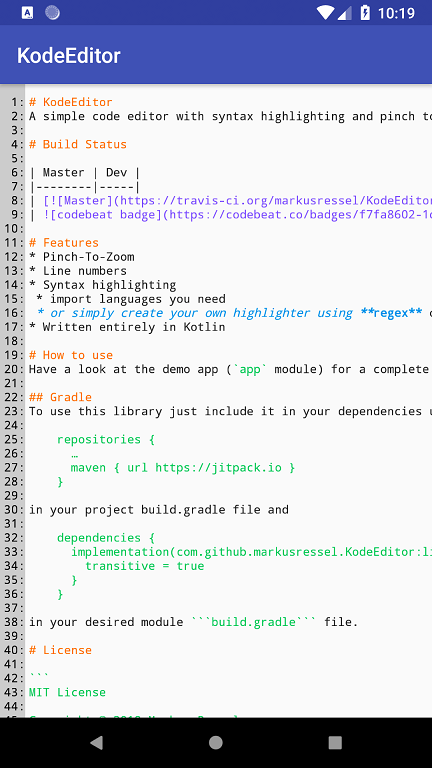
構文の強調表示とズームへのピンチを備えたシンプルなコードエディター
| マスター |
|---|
完全なサンプルについては、デモアプリ( appモジュール)をご覧ください。
このライブラリを使用するには、使用して依存関係に含めるだけです
 repositories {
    ...
    maven { url "https://jitpack.io" }
}
プロジェクトでbuild.gradleファイルと
 dependencies {
    ...

    def codeEditorVersion = "v4.0.1"
    implementation("com.github.markusressel:KodeEditor:${codeEditorVersion}")
}
目的のモジュールbuild.gradleファイルで。
このエディターを使用するには、これに似たものを目的のレイアウトXMLファイルに追加するだけです。
 <de.markusressel.kodeeditor.library.view.CodeEditorLayout
        android:id="@+id/codeEditorView"
        android:layout_width="match_parent"
        android:layout_height="match_parent"
        app:ke_divider_color="?android:attr/textColorPrimary"
        app:ke_divider_enabled="true"
        app:ke_editor_backgroundColor="?android:attr/windowBackground"
        app:ke_editor_maxZoom="10.0"
        app:ke_lineNumbers_backgroundColor="#ccc"
        app:ke_lineNumbers_textColor="#000"
        app:ke_minimap_enabled="true"
        app:ke_minimap_maxDimension="200dp"
        app:ke_minimap_borderColor="#000"
        app:ke_minimap_indicatorColor="#f00"
        />
現在、ドキュメントで使用されている言語の自動検出はありません。 Syntax Highlighterを自分で管理し、必要に応じてsetSyntaxHighlighterメソッドに電話する必要があります。
これについてのKodehighlighterセクションをご覧ください。
これについてのKodehighlighterセクションをご覧ください。
Kodeeditorは複数の方法でスタイルを整えることができます:
| 名前 | 説明 | タイプ | デフォルト |
|---|---|---|---|
| ke_linenumbers_textcolor | 行番号のテキスト色を指定します | 色 | android.R.attr.textColorPrimary |
| ke_linenumbers_backgroundcolor | 行番号ビューの背景色を指定します | 色 | android.R.attr.windowBackground |
| ke_divider_enabled | ライン番号と実際のコードエディターコンテンツの間に仕切りを描画する必要があるかどうかを指定します | ブール | true |
| ke_divider_color | 仕切りの色を指定します( ke_divider_enabledがfalseに設定されている場合、効果はありません) | 色 | android.R.attr.textColorPrimary |
| ke_editor_backgroundcolor | コードエディタービューの背景色を指定します | 色 | android.R.attr.windowBackground |
| ke_editor_maxzoom | エディターの最大ズームレベルを指定します | フロート | 10 |
| ke_minimap_enabled | ミニマップを有効にします | ブール | true |
| ke_minimap_maxdimension | 両方の軸のミニマップの最大寸法を指定します | 寸法 | 150dp |
| ke_minimap_bordercolor | ミニマップの境界色の色を指定します | 色 | Color.BLACK |
| ke_minimap_indicatorcolor | ミニマップインジケーターの色を指定します | 色 | Color.RED |
このようなレイアウトのビューでこれらの属性を直接使用できます。
 <de.markusressel.kodeeditor.library.view.CodeEditorView
    android:id="@+id/codeEditorView"
    android:layout_width="match_parent"
    android:layout_height="match_parent"
    [...]
    app:ke_divider_color="?android:attr/textColorPrimary"
    app:ke_divider_enabled="true"
    app:ke_editor_backgroundColor="?android:attr/windowBackground"
    app:ke_editor_maxZoom="10.0"
    app:ke_lineNumbers_backgroundColor="#ccc"
    app:ke_lineNumbers_textColor="#000"
    app:ke_minimap_enabled="true"
    app:ke_minimap_maxDimension="200dp"
    app:ke_divider="true"
    [...] />
または、グローバルにスタイルを適用するために、アプリケーションテーマ(DEMアプリのstyles.xml )でそれらを指定します。
 <resources>

    <!-- Base application theme. -->
    <style name="AppTheme" parent="Theme.AppCompat.Light.DarkActionBar">
        <!-- Other theme attributes of your application -->
        <item name="colorPrimary">@color/colorPrimary</item>
        <item name="colorPrimaryDark">@color/colorPrimaryDark</item>
        <item name="colorAccent">@color/colorAccent</item>

        <!-- CodeEditorView -->
        <item name="ke_lineNumbers_backgroundColor">#ccc</item>
        <item name="ke_lineNumbers_textColor">#000</item>
        <item name="ke_divider_enabled">false</item>
        <item name="ke_divider_color">#000</item>
        <item name="ke_editor_backgroundColor">#fff</item>
        <item name="ke_editor_maxZoom">10.0</item>
        <item name="ke_editor_followCursor">true</item>
        <item name="ke_minimap_enabled">true</item>
        <item name="ke_minimap_maxDimension">200dp</item>
        [...]

    </style>

</resources>
すべてのスタイリング属性は、コードを使用して指定することもできます。 KodeEditorLayout 、 KodeEditorLayoutの一致するプロパティに最初にアクセスするために必要な方法のいくつかを使用するために、ライン番号とミニマップを使用してCodeEditorView拡張するためのラッパーであるためです。
| 名前 | 説明 | タイプ |
|---|---|---|
| 文章 | 指定されたテキストを編集者に設定します。 | 弦 |
| settext(@stringres) | 指定された文字列リソースをエディターのテキストとして設定します。 | int |
| Languagerulebook | ハイライトに使用されるアクティブな言語ルールブックを取得/設定します。 nullを使用して、強調表示を完全に無効にします。 | langagerulebook? |
| 編集可能 | エディターのコンテンツが編集可能な場合は、取得/セットを取得します。 | ブール |
| 名前 | 説明 | タイプ |
|---|---|---|
| showdivider | 行番号とコードエディターの間の仕切りが表示されている場合は、取得/セットを取得します。 | ブール |
| LinEnumbergenerator | 行の総数に基づいて行数を表示するテキストを設定します | (long) - >リスト |
| 名前 | 説明 | タイプ |
|---|---|---|
| showminimap | ミニマップが表示されている場合は取得/セット。 | ブール |
| minimapmaxdimension | ピクセルでミニマップの最大寸法を取得/設定します。 | フロート |
| minimapborderwidth | ピクセル単位でミニマップの境界サイズを取得/設定します。 | 番号 |
| minimapbordercolor | ミニマップボーダーカラーを取得/設定します。 | @colorint |
| minimapindicatorcolor | ミニマップインジケーターの色を取得/設定します。 | @colorint |
| 最小限 | ミニマップポジショニング重力を取得/設定します。 | int |
ACCESには、これらのAPIメソッドがcodeEditorLayout.codeEditorViewプロパティを使用します。
| 名前 | 説明 | タイプ |
|---|---|---|
| 文章 | 指定されたテキストを編集者に設定します。 | 弦 |
| settext(@stringres) | 指定された文字列リソースをエディターのテキストとして設定します。 | int |
| getlinecount() | 現在の行数を返します。 | 長さ |
| Languagerulebook | ハイライトに使用されるアクティブな言語ルールブックを取得/設定します。 nullを使用して、強調表示を完全に無効にします。 | langagerulebook? |
| 編集可能 | エディターのコンテンツが編集可能な場合は、取得/セットを取得します。 | ブール |
| ハーズセレクション | 範囲が選択されている場合はtrue。 | ブール |
| SelectionStart | 現在の選択の開始インデックス。 | int |
| SelectionEnd | 現在の選択の最終インデックス。 | int |
| SelectionChangedListener | 選択変更のためにリスナーを取得/設定します。 | SelectionChangedListener? |
GitHubはソーシャルコーディング用です。コードを書きたい場合は、このリポジトリのフォークからのプルリクエストを通じて寄付をお勧めします。バグや新機能のGitHubチケットを作成し、興味のあるものについてコメントしてください。
 MIT License

Copyright (c) 2018 Markus Ressel

Permission is hereby granted, free of charge, to any person obtaining a copy
of this software and associated documentation files (the "Software"), to deal
in the Software without restriction, including without limitation the rights
to use, copy, modify, merge, publish, distribute, sublicense, and/or sell
copies of the Software, and to permit persons to whom the Software is
furnished to do so, subject to the following conditions:

The above copyright notice and this permission notice shall be included in all
copies or substantial portions of the Software.

THE SOFTWARE IS PROVIDED "AS IS", WITHOUT WARRANTY OF ANY KIND, EXPRESS OR
IMPLIED, INCLUDING BUT NOT LIMITED TO THE WARRANTIES OF MERCHANTABILITY,
FITNESS FOR A PARTICULAR PURPOSE AND NONINFRINGEMENT. IN NO EVENT SHALL THE
AUTHORS OR COPYRIGHT HOLDERS BE LIABLE FOR ANY CLAIM, DAMAGES OR OTHER
LIABILITY, WHETHER IN AN ACTION OF CONTRACT, TORT OR OTHERWISE, ARISING FROM,
OUT OF OR IN CONNECTION WITH THE SOFTWARE OR THE USE OR OTHER DEALINGS IN THE
SOFTWARE.






